Email Testing in 2026: A Complete Pre-Send QA Guide
Most teams test their subject line and call it QA. Here's the full pre-send email testing stack — rendering, spam scoring, authentication, link checks, and list quality — plus which tools actually earn their price.
TL;DR
- Email testing is not one check — it's five: rendering, spam/content scoring, authentication, link and tracking integrity, and recipient-list quality. Skipping any one of them produces a different failure mode.
- Rendering tools (Litmus, Email on Acid) catch visual breaks. They do not catch bounces, and bounces do more damage to your sender reputation than a misaligned button.
- The cheapest test with the highest payoff is list-level: verifying addresses before send. A 5% invalid rate is enough to trip inbox provider filters on a cold domain.
- Seed testing (sending to your own Gmail, Outlook, and Yahoo accounts) is still the only way to see actual inbox-vs-promotions-vs-spam placement. Spam-score tools predict; seeds observe.
- Build a repeatable 12-point checklist and run it every send. Ad-hoc testing means you catch the errors you happen to remember.
What is email testing, exactly?#
Email testing is the pre-send QA process that answers one question: will this message arrive, render, and work as intended for every recipient on the list?
Think of it like a pre-flight checklist. A pilot doesn't inspect only the engine because the engine is the exciting part — they run every item, because a failure in the least glamorous system grounds the plane just as hard. Email is the same. A perfect subject line means nothing if 18% of your addresses bounce, and beautiful HTML means nothing if it lands in spam.
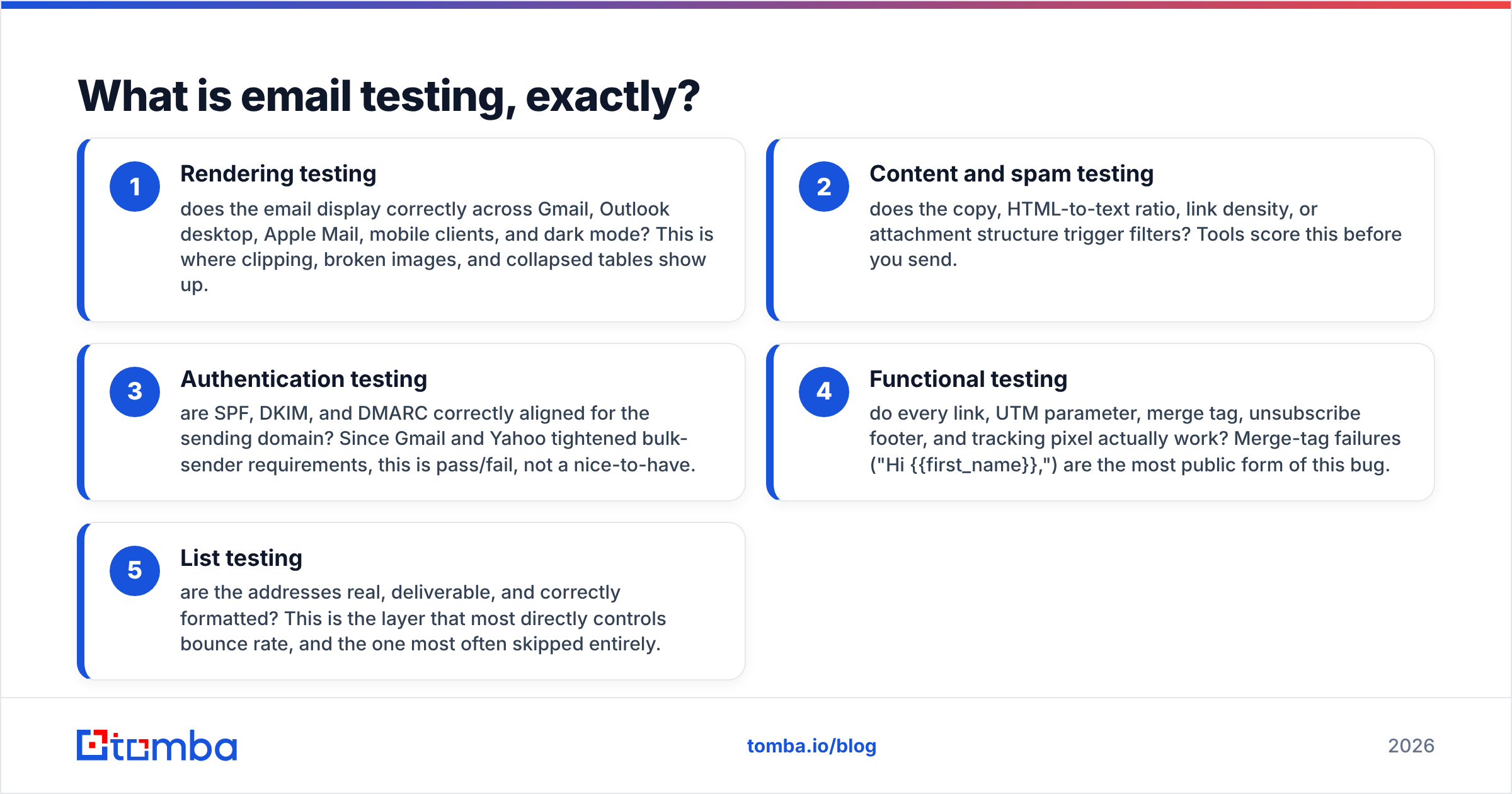
In practice, email testing splits into five distinct layers, and most teams only run one or two of them:
- Rendering testing — does the email display correctly across Gmail, Outlook desktop, Apple Mail, mobile clients, and dark mode? This is where clipping, broken images, and collapsed tables show up.
- Content and spam testing — does the copy, HTML-to-text ratio, link density, or attachment structure trigger filters? Tools score this before you send.
- Authentication testing — are SPF, DKIM, and DMARC correctly aligned for the sending domain? Since Gmail and Yahoo tightened bulk-sender requirements, this is pass/fail, not a nice-to-have.
- Functional testing — do every link, UTM parameter, merge tag, unsubscribe footer, and tracking pixel actually work? Merge-tag failures ("Hi {{first_name}},") are the most public form of this bug.
- List testing — are the addresses real, deliverable, and correctly formatted? This is the layer that most directly controls bounce rate, and the one most often skipped entirely.
The layers are not interchangeable. Passing a spam-score test tells you nothing about whether 400 of your 3,000 addresses are dead. Verifying your list tells you nothing about whether Outlook 2019 will eat your padding.

Why does email testing matter more in 2026 than it did in 2022?#
Because the inbox providers stopped grading on a curve.
Google and Yahoo's bulk-sender requirements — rolled out in 2024 and tightened since — made three things mandatory for anyone sending meaningful volume: authenticated sending domains (SPF and DKIM, with DMARC at minimum p=none), one-click unsubscribe honored within two days, and a spam complaint rate held below 0.3%. Miss those and mail gets rejected or filtered at scale, not throttled politely. Microsoft has moved in the same direction for Outlook.com traffic.
The practical consequence: reputational damage now compounds faster. A single untested campaign with a 12% hard-bounce rate can measurably suppress inbox placement on your next three sends. In 2022 you could absorb that. In 2026, on a new or lightly warmed domain, you often cannot.
There's a second driver. AI-assisted prospecting made it trivially easy to generate large lists of guessed addresses. Volume went up; accuracy did not. That has made list hygiene the single biggest variable in email deliverability for outbound teams — bigger than copy, bigger than send time, bigger than template design.
What should a complete email testing checklist include?#
Run these in order. Later checks are wasted if earlier ones fail.
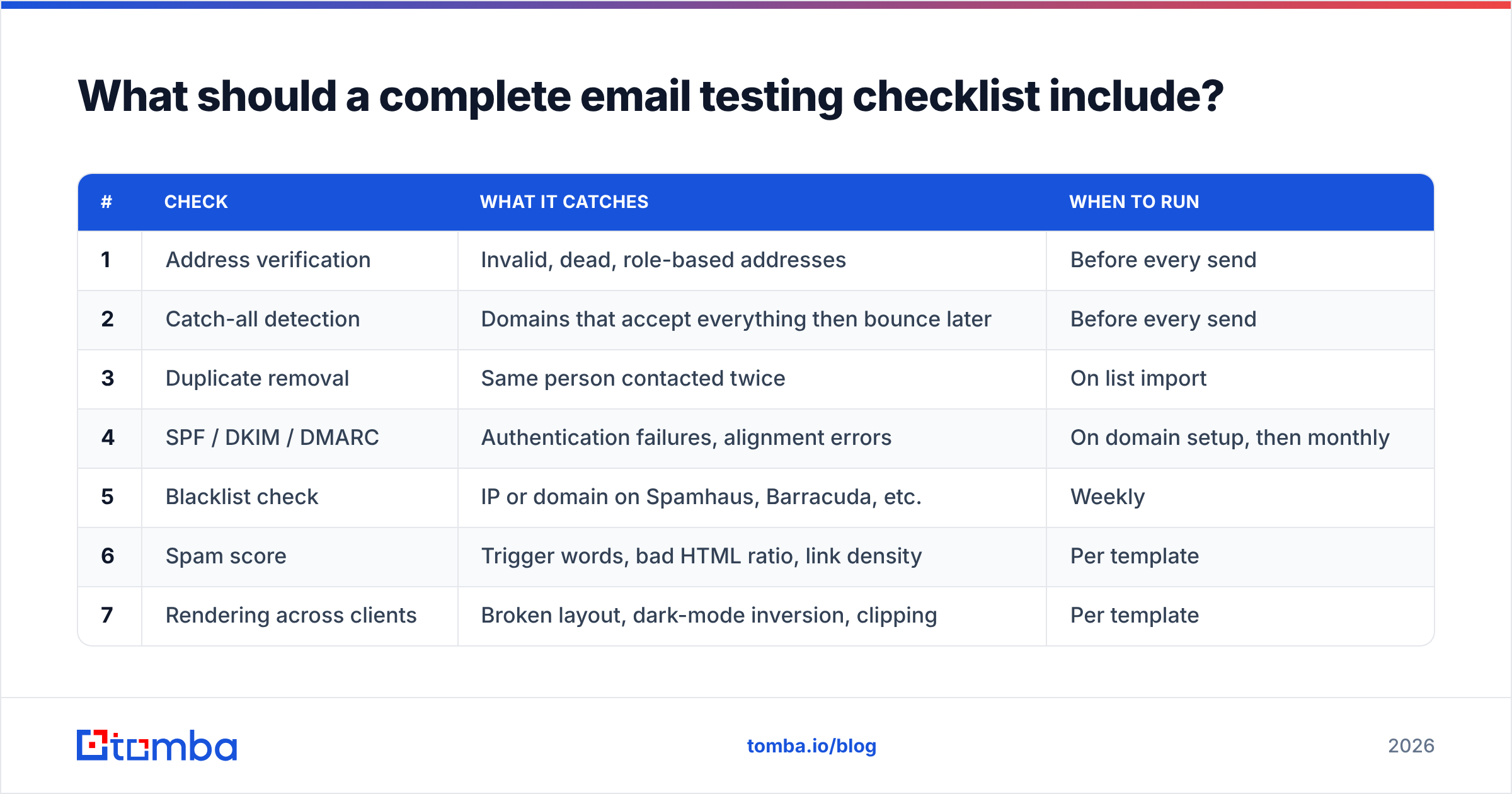
| # | Check | What it catches | When to run |
|---|---|---|---|
| 1 | Address verification | Invalid, dead, role-based addresses | Before every send |
| 2 | Catch-all detection | Domains that accept everything then bounce later | Before every send |
| 3 | Duplicate removal | Same person contacted twice | On list import |
| 4 | SPF / DKIM / DMARC | Authentication failures, alignment errors | On domain setup, then monthly |
| 5 | Blacklist check | IP or domain on Spamhaus, Barracuda, etc. | Weekly |
| 6 | Spam score | Trigger words, bad HTML ratio, link density | Per template |
| 7 | Rendering across clients | Broken layout, dark-mode inversion, clipping | Per template |
| 8 | Merge-tag population | Empty or literal {{first_name}} tokens |
Per campaign |
| 9 | Link and UTM validation | 404s, wrong destinations, missing tracking | Per campaign |
| 10 | Unsubscribe / list-unsubscribe header | Compliance failures, complaint spikes | Per campaign |
| 11 | Plain-text fallback | Unreadable message in text-only clients | Per template |
| 12 | Seed inbox placement | Actual inbox vs promotions vs spam | Per campaign |
Items 1–3 are list-layer. Items 4–5 are infrastructure. Items 6–11 are content and function. Item 12 is the real-world confirmation that the other eleven worked.
How do you test email rendering across clients?#
You either sample manually or you screenshot programmatically. Both are legitimate; the choice is about volume.
Manual seed testing means maintaining a small set of real accounts — Gmail web, Gmail Android, Outlook desktop (the Word rendering engine, which behaves nothing like the others), Outlook web, Apple Mail on macOS, Apple Mail on iOS, and Yahoo. Send the campaign to those seven, open each, and look. It costs nothing but ten minutes, and it is the only method that shows you real placement, not just rendering.
Automated rendering tools — Litmus and Email on Acid are the two established players — capture screenshots across 90+ client/OS/device combinations in a couple of minutes. If you ship templates weekly to a large list, this pays for itself the first time it catches an Outlook table collapse.
Three rendering failures worth checking specifically in 2026:
- Dark mode inversion. Gmail and Apple Mail invert colors differently. A logo with a white background that looked fine in light mode becomes a glaring white box on a dark card.
- Gmail clipping at ~102 KB. Exceed it and Gmail truncates the message with a "View entire message" link, which hides your CTA and breaks open tracking on the clipped portion.
- Image blocking. Roughly a third of recipients see images off by default on first open. If your value proposition lives inside an image, it doesn't exist. Test with images disabled.
For cold outreach specifically, the answer to most rendering questions is simpler: send plain text or near-plain text. Fewer elements, fewer failure modes, and it looks like a message from a person rather than a newsletter.
Which email testing tools are actually worth paying for?#
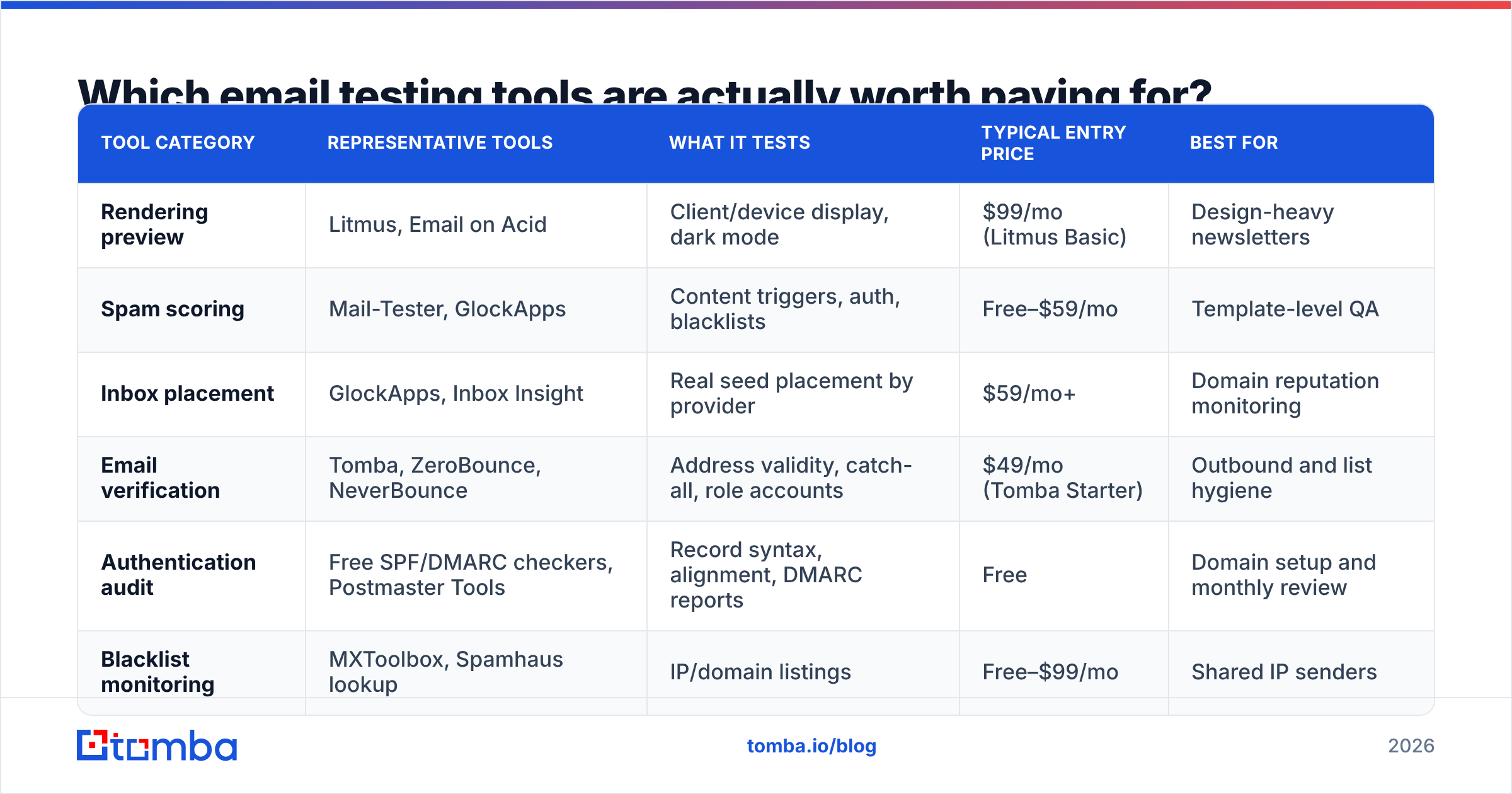
Depends entirely on which layer you're failing at. Here's how the main categories compare on what they do and what they cost.
| Tool category | Representative tools | What it tests | Typical entry price | Best for |
|---|---|---|---|---|
| Rendering preview | Litmus, Email on Acid | Client/device display, dark mode | $99/mo (Litmus Basic) | Design-heavy newsletters |
| Spam scoring | Mail-Tester, GlockApps | Content triggers, auth, blacklists | Free–$59/mo | Template-level QA |
| Inbox placement | GlockApps, Inbox Insight | Real seed placement by provider | $59/mo+ | Domain reputation monitoring |
| Email verification | Tomba, ZeroBounce, NeverBounce | Address validity, catch-all, role accounts | $49/mo (Tomba Starter) | Outbound and list hygiene |
| Authentication audit | Free SPF/DMARC checkers, Postmaster Tools | Record syntax, alignment, DMARC reports | Free | Domain setup and monthly review |
| Blacklist monitoring | MXToolbox, Spamhaus lookup | IP/domain listings | Free–$99/mo | Shared IP senders |
A few honest notes on this table:
- Rendering tools are the most expensive per unit of risk reduced if you send plain-text outbound. If your sequences are three-paragraph text emails, you do not need a $99/mo screenshot service.
- Free spam scorers are genuinely good. Mail-Tester's free tier gives you a 10-point score with a line-item breakdown of every SPF, DKIM, DMARC, and content issue. Running it before every new template costs nothing. Tomba's spam checker and SPF checker cover the same ground for quick pre-send passes.
- Verification is where the ROI concentrates for outbound teams. Bounces are the fastest way to burn a domain, and they're also the easiest failure to eliminate before send.
Tomba's pricing sits at Free (25 searches/mo), Starter $49/mo, Growth $99/mo, Pro $249/mo, and Enterprise custom — with the email verifier bundled alongside finding rather than sold as a separate product. If your primary risk is "we don't know whether these 4,000 addresses are real," that's the layer to fund first.
How do you test the list itself before sending?#
This is the layer that quietly determines your bounce rate, and it has four steps.
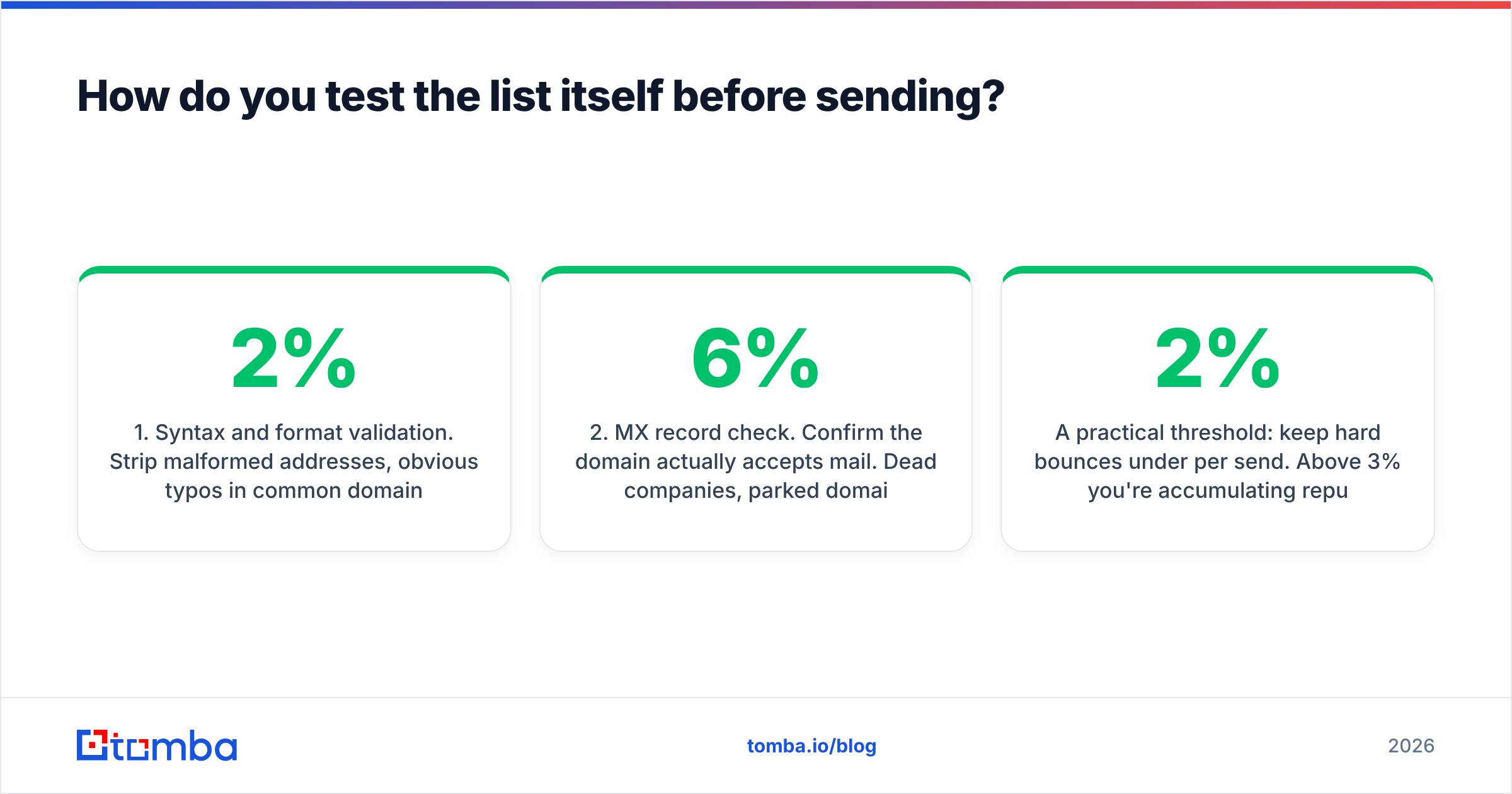
- Syntax and format validation. Strip malformed addresses, obvious typos in common domains (
gmial.com,outlok.com), and anything with spaces or invalid characters. Cheap, instant, catches maybe 1–2% of a scraped list. - MX record check. Confirm the domain actually accepts mail. Dead companies, parked domains, and abandoned subsidiaries fail here. On lists older than nine months this routinely removes 3–6%.
- SMTP-level verification. Open a connection to the receiving server and check whether the specific mailbox exists, without delivering a message. This is the core of any email verification service and where most invalid addresses are caught.
- Catch-all handling. Some domains accept mail for every address, valid or not, so SMTP verification returns "accepted" for
asdfgh@company.com. A catch-all verifier applies pattern analysis and secondary signals to estimate whether the mailbox is genuinely in use. Treat catch-all results as a separate risk bucket — send to them in smaller batches, on a secondary domain if you have one.
A practical threshold: keep hard bounces under 2% per send. Above 3% you're accumulating reputation damage; above 5% on a young domain you're in real trouble. If a freshly built list tests above 5% invalid, the problem isn't your testing — it's your sourcing.
What does a seed test actually tell you that a spam score doesn't?#
A spam score is a prediction. A seed test is an observation.
Spam-scoring tools evaluate your message against a static rule set — SpamAssassin-style heuristics, authentication checks, content patterns. They're useful and they're fast, but they don't know what Gmail's live classifier thinks about your specific domain, on this specific day, given your last thirty days of engagement history.
Seed testing sends the actual campaign to real accounts across providers and records where it landed. That's the ground truth. A message can score 9.5/10 on a content scanner and still hit Promotions on Gmail because your domain has weak engagement signals.
Run seeds this way:
- Use aged, active accounts. A Gmail account created last week and never used has no engagement history; placement results from it are meaningless.
- Cover at least four providers. Gmail, Outlook.com, Yahoo, and one corporate Microsoft 365 tenant. Corporate M365 behaves differently from consumer Outlook and is where most B2B mail actually lands.
- Record the tab, not just inbox/spam. Primary vs Promotions vs Updates matters enormously for reply rates on outbound.
- Test the same template twice, days apart. Placement varies. One data point is noise.
Pair this with Google Postmaster Tools for the domain-level view: spam complaint rate, domain reputation, authentication pass rates, and delivery errors, straight from Gmail. It's free, and if you send more than a trickle of volume to Gmail addresses, not using it is negligence.
How often should you re-run each test?#
Testing cadence should match how fast each variable decays.
- Every send: list verification (on any addresses added since the last run), merge-tag population, link validation, unsubscribe footer.
- Every new template: rendering across clients, spam score, plain-text fallback, image-off preview.
- Weekly: blacklist monitoring, bounce-rate trend, complaint-rate trend.
- Monthly: full authentication audit (SPF lookup count, DKIM key rotation, DMARC report review), seed placement test on your main sending domains.
- Quarterly: re-verify your entire retained database. B2B contact data decays roughly 2–3% per month as people change jobs — a list verified in January is materially wrong by June.
That last point is the one most teams underestimate. Verification is not a one-time import step. If you're re-engaging a CRM list you built eighteen months ago, assume a third of it is stale and run it through bulk verify before the first send, not after the bounce report comes back.
What are the most common email testing mistakes?#
- Testing the template, not the campaign. The template renders fine. The campaign has an empty merge field for 200 contacts because their company name never got enriched.
- Testing with your own address only. Your inbox is the least representative one you have — you've whitelisted your own domain, engaged with your own sends, and trained the filter to trust you.
- Treating a good spam score as inbox placement. See above. Score is necessary, not sufficient.
- Verifying once and never again. Data decay is continuous.
- Ignoring catch-all domains. They pass verification, then bounce at send time — or worse, accept silently and never deliver.
- Skipping the plain-text version. Some clients, some corporate gateways, and some accessibility tools render text only. If your text version is an unstyled dump of HTML, it reads as spam.
Where should you start if you're only going to fix one thing?#
Fix the list. It is the highest-leverage, lowest-effort layer, and it's the one that protects everything downstream — because reputation damage from bounces degrades the deliverability of every future campaign, including the well-tested ones.
Start by verifying the addresses you already have, then make verification a standing step in how you acquire new ones. Tomba's Email Finder returns addresses with a confidence score and runs verification on the way out, so contacts enter your sequences pre-checked rather than getting cleaned up after the damage is done. The Free tier gives you 25 searches a month to test the workflow against your own target accounts; Starter is $49/mo when you're ready to run it at list scale. Full Tomba pricing is on the site.
Test the message, absolutely. But test the recipients first — that's the part no rendering screenshot will ever show you.
Related guides#
Ready to find emails that actually work?
Join 150,000+ professionals who stopped guessing and started sending. Free credits on signup — no credit card required.
Get the Tomba newsletter
Practical outbound tactics and product updates — once every two weeks.
About the author