Email Titles: How to Write Subject Lines That Get Opened in 2026
Most email titles fail before anyone reads a word of your pitch. Here is what actually moves open rates in 2026 — with formulas, character limits, real test data, and a comparison of the tactics that still work.
TL;DR
- Your email title is doing one job: earning a two-second decision in a crowded preview pane. It is not a summary, and it is not a pitch.
- Length matters less than the first 3-4 words. Mobile clients cut at roughly 35-40 characters, so front-load the specific detail.
- Lowercase, 3-6 word, question-shaped titles consistently beat title-case marketing headlines in cold outbound — but they underperform in newsletters and lifecycle email.
- The single biggest cause of a bad "open rate" is not the title at all. It is an invalid or catch-all address inflating your denominator and tanking deliverability.
- Test one variable at a time, on samples of 500+, and judge on replies or clicks — not opens, which Apple Mail Privacy Protection has been inflating since 2021.
What Are Email Titles, Exactly?#
An email title is the subject line: the short string a recipient sees in their inbox list, next to the sender name and before the preview text. People use "email title," "subject line," and "email headline" interchangeably, and for practical purposes they are the same field — the Subject: header in the message.
The distinction that actually matters is between the three text elements competing for attention in that inbox row:
- Sender name — carries the most weight. A recognized sender name beats a clever title every time. This is why domain reputation and prior contact history dominate open rates.
- Email title (subject line) — the hook. Typically 30-60 characters visible on desktop, 35-40 on mobile.
- Preview text (preheader) — the first ~90 characters of the body, or an explicitly set preheader. Most senders waste this on "View in browser."
Treat these three as one unit. A title that reads well in isolation but collides with your preheader ("Quick question" / "Hi {{first_name}}, I wanted to reach out...") burns both slots.
Why Do Most Email Titles Fail?#
Because they are written for the sender, not the reader. Four failure modes account for most of it:
- They summarize instead of hooking. "Q3 Product Update and Feature Roadmap Announcement" tells the reader everything, which removes any reason to open.
- They front-load filler. "Following up on my previous email regarding..." — the first six words carry zero information. On mobile, that is the entire visible title.
- They over-index on curiosity. "You won't believe this" gets opened once, then trains the recipient to ignore you. Curiosity without a payoff is a one-shot loan against your reputation.
- They land in a mailbox that was never real. If 18% of your list is invalid or catch-all, your reported open rate is measuring the wrong denominator and your bounce rate is quietly wrecking sender reputation.
That last one is the uncomfortable part. Teams spend weeks A/B testing titles while sending to lists that have never been verified. Clean the list first — an email verifier pass takes minutes and removes the biggest confounding variable in every test you are about to run.
What Length Should an Email Title Be?#
Short, but not because short is magic. Short works because inbox clients truncate, and because a short title implies a short email.
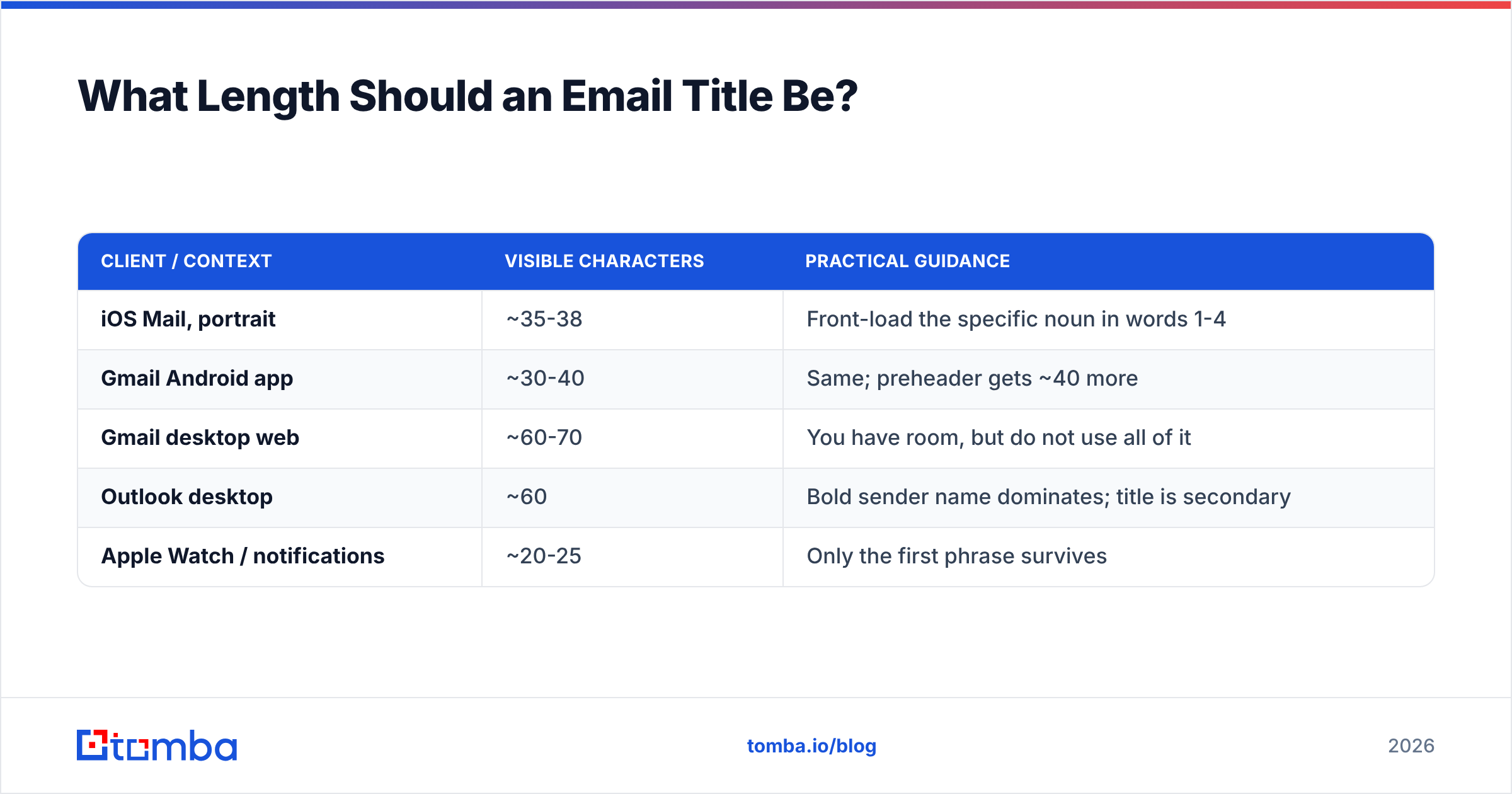
Here is what the visible window actually looks like across common clients (approximate, measured on default settings at standard zoom):
| Client / context | Visible characters | Practical guidance |
|---|---|---|
| iOS Mail, portrait | ~35-38 | Front-load the specific noun in words 1-4 |
| Gmail Android app | ~30-40 | Same; preheader gets ~40 more |
| Gmail desktop web | ~60-70 | You have room, but do not use all of it |
| Outlook desktop | ~60 | Bold sender name dominates; title is secondary |
| Apple Watch / notifications | ~20-25 | Only the first phrase survives |
The takeaway: write for 35 characters, allow up to 60. Anything past 60 is decoration that only desktop users will see, and only if they are scanning slowly.
There is one legitimate exception. Newsletters with an established audience can run longer, editorial-style titles (60-80 characters) because the sender name has already done the persuasion work. The title is then a table of contents, not a hook.
Which Email Title Formulas Still Work in 2026?#
These are the patterns that have survived the last few years of inbox-filter tightening and recipient fatigue. Each is paired with the context where it performs.
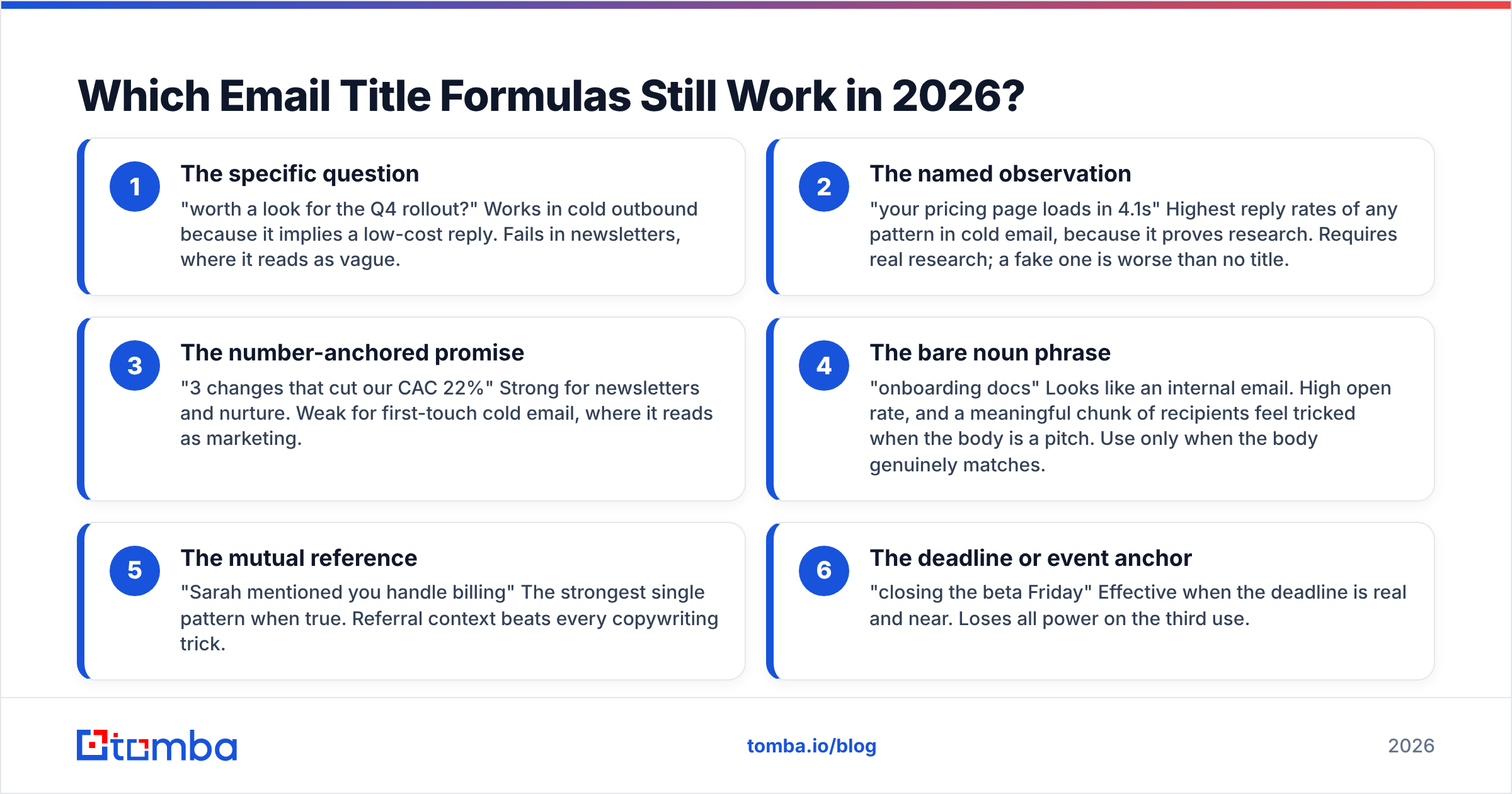
- The specific question — "worth a look for the Q4 rollout?" Works in cold outbound because it implies a low-cost reply. Fails in newsletters, where it reads as vague.
- The named observation — "your pricing page loads in 4.1s" Highest reply rates of any pattern in cold email, because it proves research. Requires real research; a fake one is worse than no title.
- The number-anchored promise — "3 changes that cut our CAC 22%" Strong for newsletters and nurture. Weak for first-touch cold email, where it reads as marketing.
- The bare noun phrase — "onboarding docs" Looks like an internal email. High open rate, and a meaningful chunk of recipients feel tricked when the body is a pitch. Use only when the body genuinely matches.
- The mutual reference — "Sarah mentioned you handle billing" The strongest single pattern when true. Referral context beats every copywriting trick.
- The deadline or event anchor — "closing the beta Friday" Effective when the deadline is real and near. Loses all power on the third use.
Notice what is absent: "Quick question," "Touching base," "Checking in," and anything with "Re:" prepended to fake a thread. These are pattern-matched by recipients and increasingly by filters. The fake-reply trick in particular now correlates with spam complaints, which is a much more expensive outcome than a low open rate.
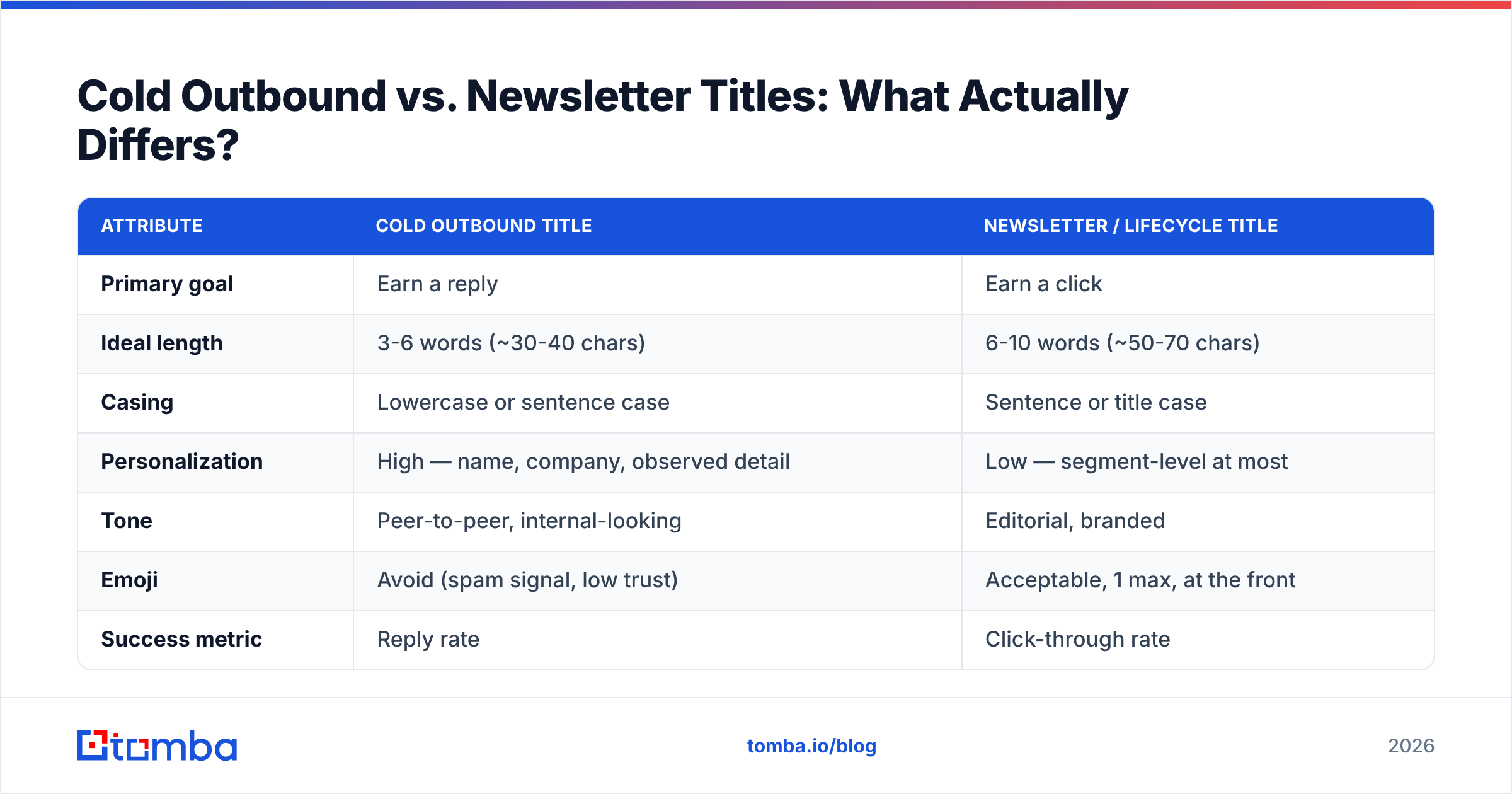
Cold Outbound vs. Newsletter Titles: What Actually Differs?#
Treating these as the same discipline is the most common strategic mistake. They optimize for different things.
| Attribute | Cold outbound title | Newsletter / lifecycle title |
|---|---|---|
| Primary goal | Earn a reply | Earn a click |
| Ideal length | 3-6 words (~30-40 chars) | 6-10 words (~50-70 chars) |
| Casing | Lowercase or sentence case | Sentence or title case |
| Personalization | High — name, company, observed detail | Low — segment-level at most |
| Tone | Peer-to-peer, internal-looking | Editorial, branded |
| Emoji | Avoid (spam signal, low trust) | Acceptable, 1 max, at the front |
| Success metric | Reply rate | Click-through rate |
| Test sample needed | 500+ per variant | 2,000+ per variant |
| Reuse across sends | Rarely — burns fast | Often — templates hold up |
The practical consequence: do not copy newsletter title conventions into your outbound sequences. A title-case, benefit-driven headline ("Unlock 3x Pipeline With Automated Prospecting") reads as an advertisement in a one-to-one context. It signals that the email was sent to thousands of people, which it was.
If you want a starting library rather than a blank page, the cold email templates collection pairs body copy with title patterns that match, so you are not bolting a casual title onto a formal email.
How Do You Test Email Titles Properly?#
Most title "testing" is not testing. It is two variants sent to 80 people, one gets 4 more opens, and a conclusion gets written into the playbook forever.
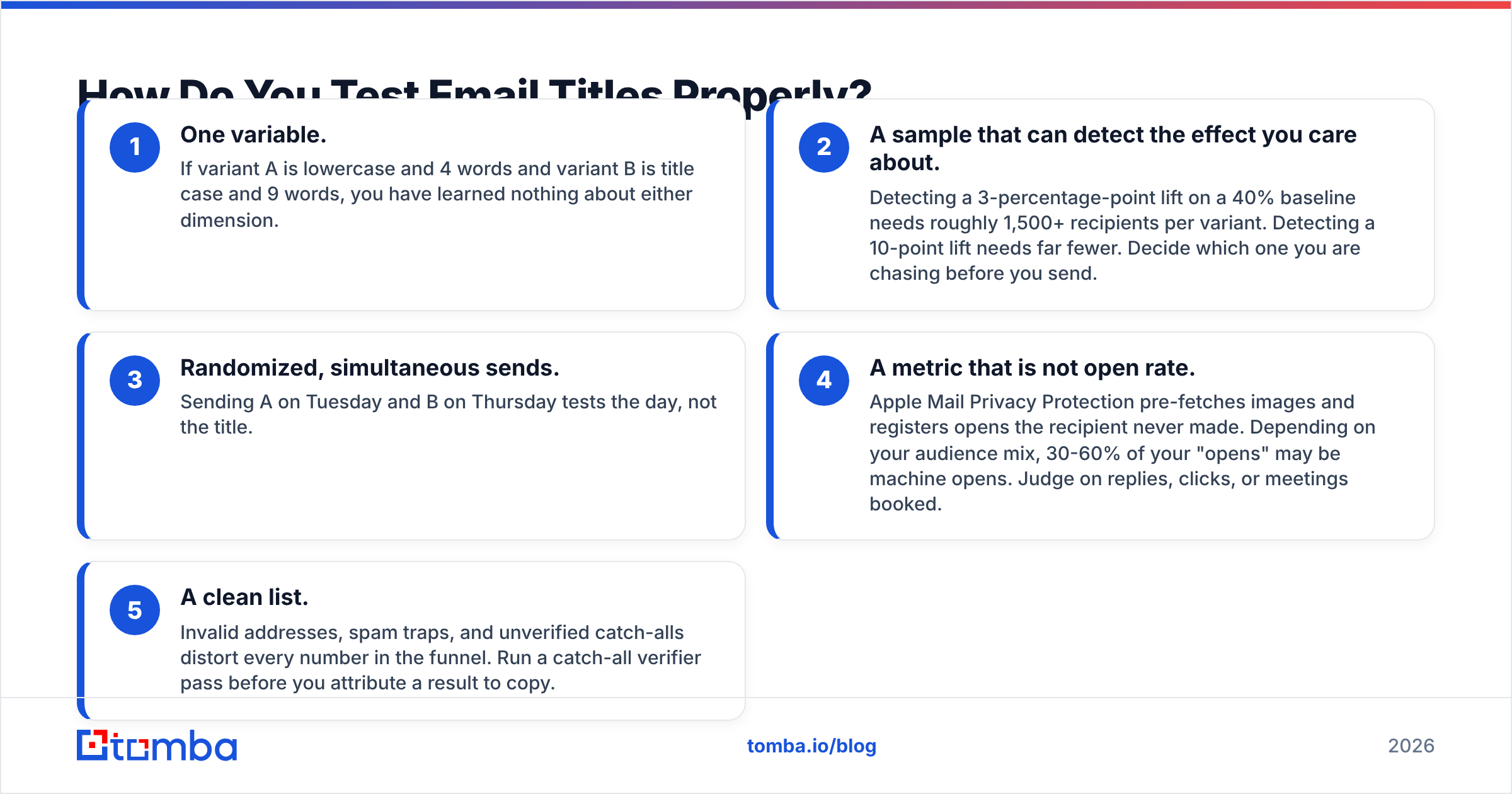
A defensible test needs five things:
- One variable. If variant A is lowercase and 4 words and variant B is title case and 9 words, you have learned nothing about either dimension.
- A sample that can detect the effect you care about. Detecting a 3-percentage-point lift on a 40% baseline needs roughly 1,500+ recipients per variant. Detecting a 10-point lift needs far fewer. Decide which one you are chasing before you send.
- Randomized, simultaneous sends. Sending A on Tuesday and B on Thursday tests the day, not the title.
- A metric that is not open rate. Apple Mail Privacy Protection pre-fetches images and registers opens the recipient never made. Depending on your audience mix, 30-60% of your "opens" may be machine opens. Judge on replies, clicks, or meetings booked.
- A clean list. Invalid addresses, spam traps, and unverified catch-alls distort every number in the funnel. Run a catch-all verifier pass before you attribute a result to copy.
Point 4 deserves emphasis. Litmus and other deliverability researchers have documented how MPP broke open-rate reliability, and the industry has largely shifted to click and reply as primary metrics. If your title strategy is still being scored on opens, you are optimizing a number that partly reflects Apple's servers rather than human interest.
Do Email Titles Affect Deliverability?#
Yes, but less directly than most people assume — and the mechanism is not a keyword blocklist.
Modern filters at Gmail and Microsoft do not maintain a static list of banned words. "Free," "guarantee," and "act now" will not, on their own, route you to spam if your domain has good history and low complaint rates. What actually happens is second-order:
- Spammy titles produce spam complaints. Complaints are a direct, heavily weighted reputation signal. A title that overpromises generates complaints when the body underdelivers.
- Deceptive titles produce deletes-without-reading. Rapid delete-without-open is a negative engagement signal at Gmail.
- ALL CAPS and excessive punctuation correlate with content-filter scores at the margins. On a strong domain, irrelevant. On a new or shaky domain, it can be the deciding factor.
If deliverability is the actual problem, fix the plumbing before the copy. Confirm your authentication records with an SPF checker, check whether your sending IP or domain appears on any blacklist, and run a message through a spam checker to see the actual content score rather than guessing. Google's own sender guidelines are the authoritative reference for bulk-sender requirements and are worth reading in full rather than through third-party summaries.
What Personalization Actually Lifts Open Rates?#
Not first names. Merge-tagged first names in titles have been common for so long that they signal automation rather than attention — and a broken merge tag ("Hi {FIRST_NAME},") is a credibility disaster.
What still works, ranked by observed lift in cold outbound:
- A specific, verifiable observation about the recipient's company, product, or recent activity. Highest lift, highest effort.
- A mutual connection's name, when genuine.
- The company name — moderate lift, low effort, still reads as researched when paired with something specific.
- Role-relevant vocabulary — using the language of their function ("SOC 2 evidence collection" to a compliance lead) rather than your product's language.
- First name alone — near-zero lift in 2026. Neutral at best.
The constraint on all of this is data quality. Personalization that references the wrong company, an outdated job title, or a person who left 14 months ago is worse than a generic title. That is a data problem, not a copy problem — which is why data enrichment and verification sit upstream of any serious title strategy. You cannot personalize your way out of a stale list.
For teams building lists from scratch, domain search surfaces the actual people and email patterns at a target company, so your title can reference a real role rather than a guessed one.
What Is the Practical Checklist Before You Send?#
Run every title through this before it ships:
- Does the first 35 characters carry the hook, or is it filler?
- Would this title make sense if a colleague forwarded it internally?
- Does it promise something the body actually delivers?
- Is it doing a different job than the preheader, or repeating it?
- Have you used this exact pattern on this contact before? (Pattern fatigue is real; the third "quick question" gets nothing.)
- Is the list verified, and is the domain authenticated?
- Are you measuring replies or clicks, not opens?
If a title fails the third question — promise versus delivery — rewrite the body, not the title. A weaker title on an honest email outperforms a strong title on a bait-and-switch over any horizon longer than one campaign.
Where Should You Start?#
Start with the list, not the copy. Every hour spent on title variants is wasted if a third of your addresses bounce, if the contacts have moved roles, or if your domain is being throttled before the title is ever rendered.
The sequence that works: verify and enrich the list, confirm authentication, then test titles one variable at a time on a sample large enough to mean something. In that order.
Tomba's Email Finder handles the first step — finding and validating professional addresses by name, domain, or company, so the people receiving your carefully written titles actually exist and actually still work there. The free tier covers 25 searches a month to test the workflow, and paid plans start at $49/mo; full Tomba pricing is on the site. Get the list right, and your titles finally get a fair test.
Related guides#
Ready to find emails that actually work?
Join 150,000+ professionals who stopped guessing and started sending. Free credits on signup — no credit card required.
Get the Tomba newsletter
Practical outbound tactics and product updates — once every two weeks.
About the author