Email Tracker Guide 2026: What Open Tracking Really Shows
Open rates have been inflated by privacy proxies since 2021. Here is how an email tracker actually works in 2026, which tools are still worth paying for, and the signals that survived.
TL;DR
- An email tracker is a 1x1 transparent pixel plus rewritten links. The pixel fires when images load; the link redirect fires when someone clicks. That is the entire technology.
- Apple Mail Privacy Protection, Gmail image proxying, and corporate security scanners now pre-load images for a large share of B2B recipients, so raw open rate in 2026 is a soft signal, not a metric you can forecast against.
- Click tracking is more reliable than open tracking, but link rewriting is also the single most common cause of self-inflicted spam-folder problems in cold outbound.
- The tracker that matters most is not a tracker at all: clean, verified contact data. A 12% "open rate" on a list where 30% of addresses bounce tells you nothing.
- Use tracking for per-thread timing signals (this one person clicked pricing twice this morning), not for aggregate reporting. Judge campaigns on replies, meetings, and pipeline.
What is an email tracker, and how does it actually work?#
An email tracker is a piece of software that tells you what happened to a message after you hit send: whether it was opened, when, how many times, from what device, and whether any links inside were clicked.
Think of it like a delivery driver leaving a doorbell camera on your porch. The camera does not read the recipient's mind. It only tells you that something triggered motion at 9:14 a.m. Sometimes that is the recipient. Sometimes it is a cat. In 2026, a lot of it is cats.
Mechanically there are only two techniques, and every tool on the market uses one or both:
- The tracking pixel. The tool injects a 1x1 transparent image hosted on its own server. When the recipient's mail client loads remote images, the server logs a request — timestamp, IP-derived location, user agent. That log becomes an "open."
- Link rewriting. Every URL in the body is replaced with a redirect through the tracking domain. The recipient clicks, the tracker records the hit, then bounces them to the real destination in milliseconds.
- Reply detection. Sequencing tools watch the inbox via IMAP or the Gmail/Outlook API and mark a thread as replied. This is the only signal in the list with essentially zero false positives.
- Device and client fingerprinting. The user agent string suggests iPhone Mail vs. Outlook desktop vs. a Barracuda scanner. Useful for debugging rendering, mostly noise otherwise.
Wikipedia's overview of email tracking is a reasonable neutral primer on the mechanics if you want the long version.
The important thing to internalize: none of these are read receipts. A true read receipt requires the recipient to consent and their client to send a confirmation. Almost nobody does that. Everything else is inference from an image request.
Why did open rates stop being trustworthy after Apple MPP?#
Because Apple broke the pixel on purpose, and everyone else followed.
Apple Mail Privacy Protection, shipped in iOS 15 back in 2021, routes images through Apple's proxy and pre-loads them whether or not the human opens the message. The tracker sees a hit. The recipient may never have seen the subject line. Gmail has proxied images through googleusercontent.com since 2013, which strips accurate IP geolocation and can cache the fetch. Corporate security gateways — Proofpoint, Mimecast, Microsoft Defender for Office 365 — actively fetch and detonate every link and image in a message before delivery, which produces both phantom opens and phantom clicks.
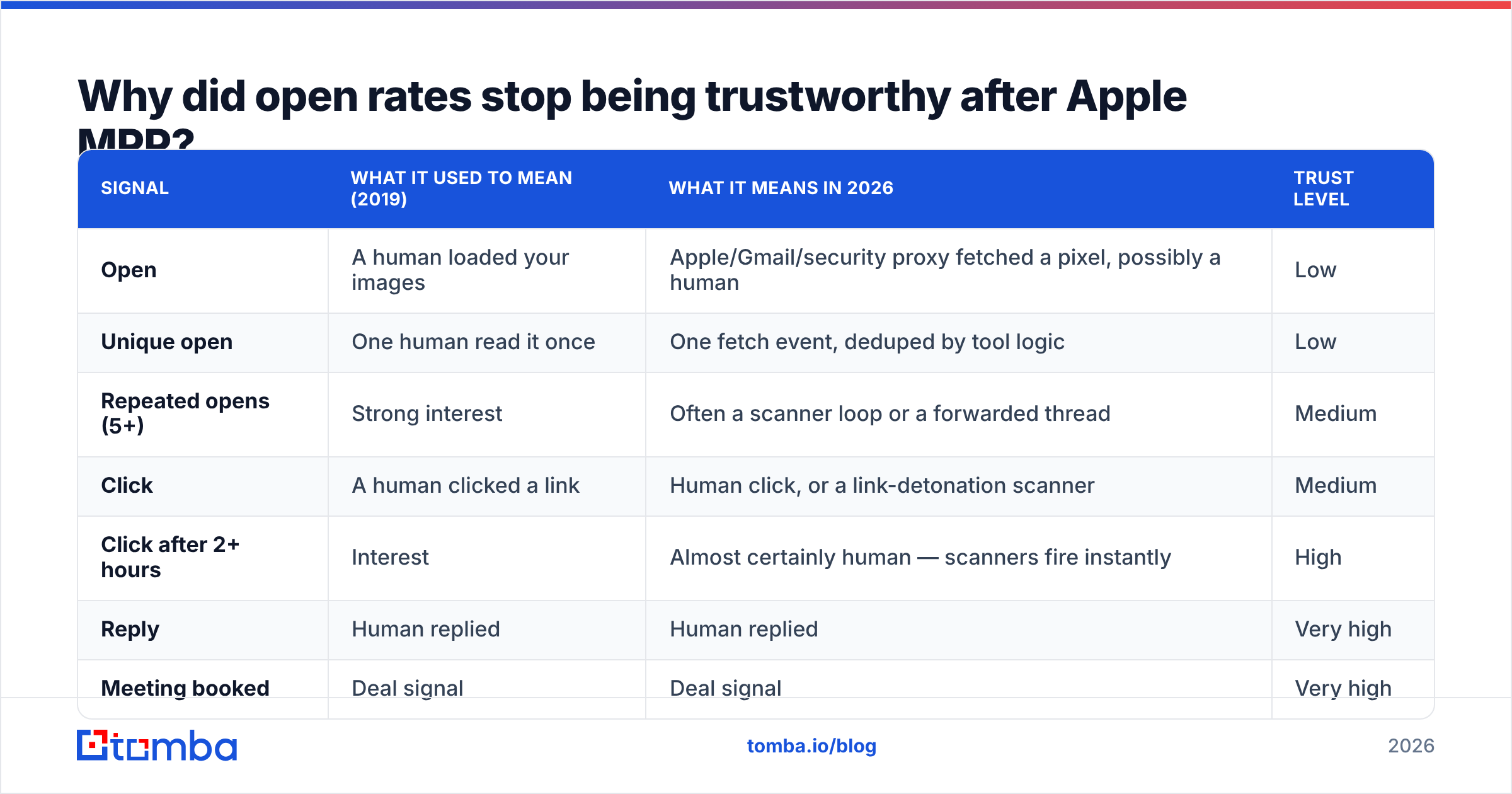
Concretely, this is what a modern B2B campaign report is made of:
| Signal | What it used to mean (2019) | What it means in 2026 | Trust level |
|---|---|---|---|
| Open | A human loaded your images | Apple/Gmail/security proxy fetched a pixel, possibly a human | Low |
| Unique open | One human read it once | One fetch event, deduped by tool logic | Low |
| Repeated opens (5+) | Strong interest | Often a scanner loop or a forwarded thread | Medium |
| Click | A human clicked a link | Human click, or a link-detonation scanner | Medium |
| Click after 2+ hours | Interest | Almost certainly human — scanners fire instantly | High |
| Reply | Human replied | Human replied | Very high |
| Meeting booked | Deal signal | Deal signal | Very high |
The practical rule: anything that fires within a few seconds of delivery is machine noise. Anything that fires hours later, from a plausible device, is a person. Good tools now filter this automatically; cheap ones still report the raw number because a 78% open rate looks great in a screenshot.
If you want to sanity check the fundamentals underneath any of this, start with email deliverability — inbox placement dictates whether tracking data exists at all.
Which email tracker should you use in 2026?#
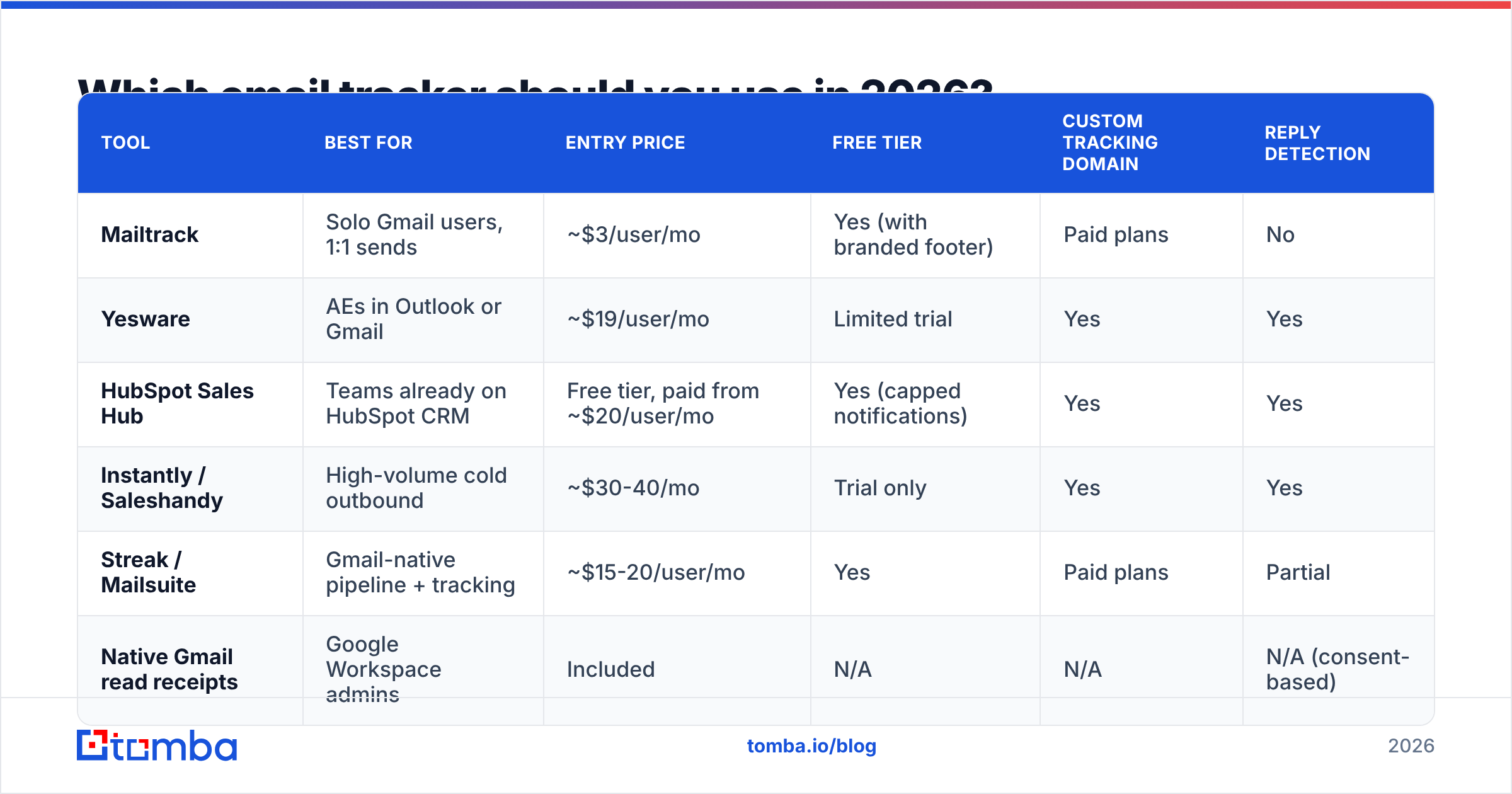
Depends on whether you send one-to-one or one-to-many. A rep sending 30 personalized emails a day needs a Gmail overlay. A team running 3,000 sends a week needs a sequencer with tracking baked in. Prices below are list prices at time of writing — check the vendor before you buy, because outbound tooling repricing is basically a seasonal sport.
| Tool | Best for | Entry price | Free tier | Custom tracking domain | Reply detection |
|---|---|---|---|---|---|
| Mailtrack | Solo Gmail users, 1:1 sends | ~$3/user/mo | Yes (with branded footer) | Paid plans | No |
| Yesware | AEs in Outlook or Gmail | ~$19/user/mo | Limited trial | Yes | Yes |
| HubSpot Sales Hub | Teams already on HubSpot CRM | Free tier, paid from ~$20/user/mo | Yes (capped notifications) | Yes | Yes |
| Instantly / Saleshandy | High-volume cold outbound | ~$30-40/mo | Trial only | Yes | Yes |
| Streak / Mailsuite | Gmail-native pipeline + tracking | ~$15-20/user/mo | Yes | Paid plans | Partial |
| Native Gmail read receipts | Google Workspace admins | Included | N/A | N/A | N/A (consent-based) |
Three buying notes that vendors do not put on the pricing page:
- A custom tracking domain is not optional. If your links redirect through a shared domain used by ten thousand other senders, you inherit their reputation. Every serious tool supports CNAME-based custom domains; if the plan you are considering does not, it is a toy.
- Per-seat vs. per-send pricing changes the math fast. Ten reps on a $19 tool is $190/mo. One sequencer at $40/mo covering the whole team may cover the same need — or may lack the per-thread notifications your reps actually use.
- CRM logging matters more than the tracking itself. A tracked open that never reaches your CRM is a notification, not data. Check the Salesforce or HubSpot integration depth before the tracking feature list. Independent review volume on G2 is a decent tiebreaker when two tools look identical on paper.
Does email tracking hurt deliverability?#
Yes, measurably, if you do it carelessly. This is the part most guides skip.
Every tracked email carries two liabilities. The pixel adds a remote image to a message that may otherwise be plain text — and plain-text-looking cold emails perform better precisely because they look like normal human mail. The rewritten link points to a domain that is not your domain, which is a classic phishing pattern that spam filters are explicitly trained on.
Damage control, in order of impact:
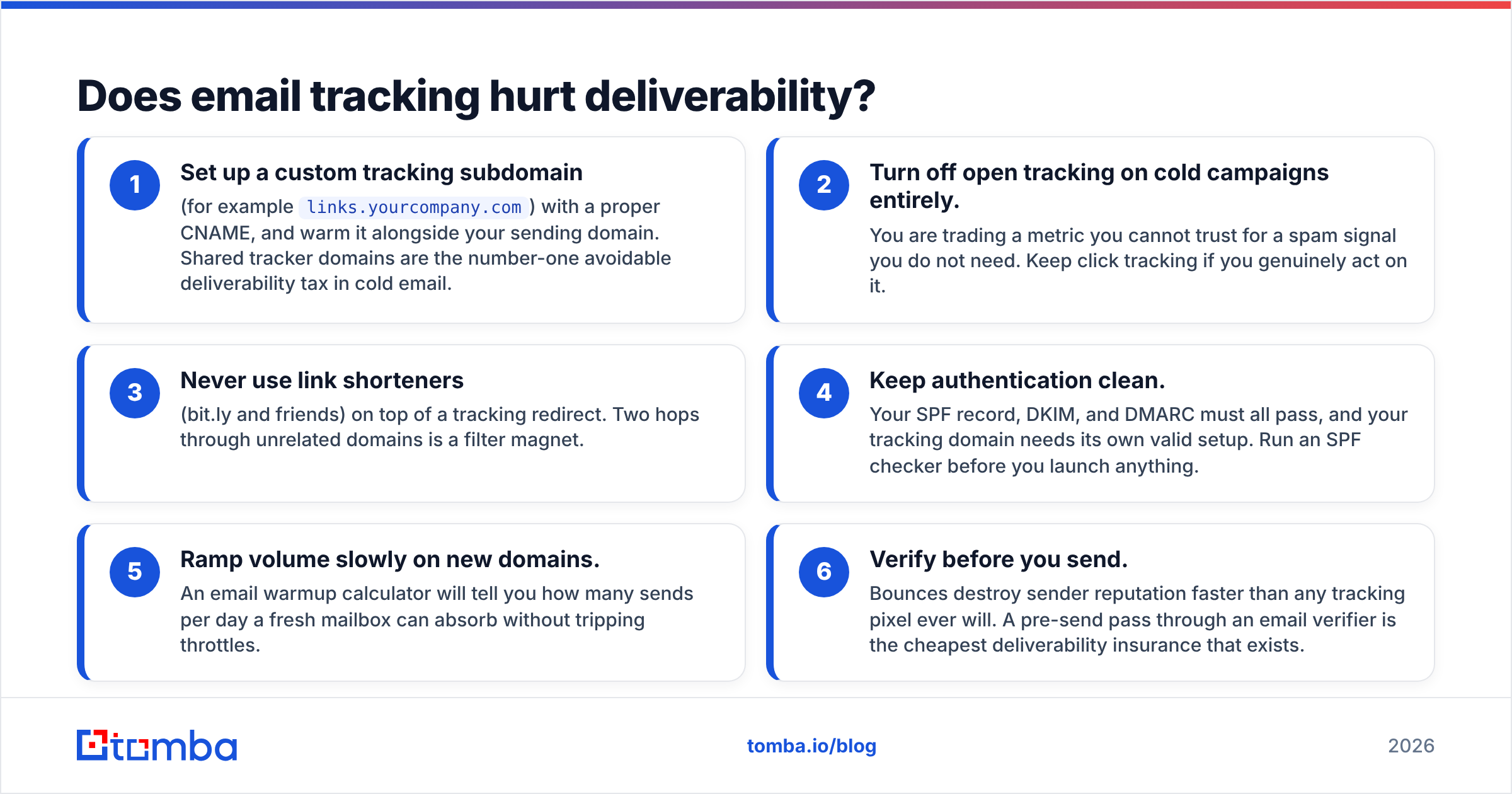
- Set up a custom tracking subdomain (for example
links.yourcompany.com) with a proper CNAME, and warm it alongside your sending domain. Shared tracker domains are the number-one avoidable deliverability tax in cold email. - Turn off open tracking on cold campaigns entirely. You are trading a metric you cannot trust for a spam signal you do not need. Keep click tracking if you genuinely act on it.
- Never use link shorteners (bit.ly and friends) on top of a tracking redirect. Two hops through unrelated domains is a filter magnet.
- Keep authentication clean. Your SPF record, DKIM, and DMARC must all pass, and your tracking domain needs its own valid setup. Run an SPF checker before you launch anything.
- Ramp volume slowly on new domains. An email warmup calculator will tell you how many sends per day a fresh mailbox can absorb without tripping throttles.
- Verify before you send. Bounces destroy sender reputation faster than any tracking pixel ever will. A pre-send pass through an email verifier is the cheapest deliverability insurance that exists.
That last point deserves emphasis. Teams obsess over a 2-point difference in open rate while sending to lists with 18% invalid addresses. You are optimizing the dashboard while the engine is on fire.
Is email tracking legal under GDPR and CAN-SPAM?#
Short answer: tracking is legal in most B2B contexts, but it is not automatically compliant, and the rules differ by jurisdiction.
Under GDPR, a tracking pixel processes personal data (IP address, behavioral data tied to an identifiable person). The usual lawful basis for B2B outbound is legitimate interest, which requires a balancing test you should actually document — not a checkbox. Several EU data protection authorities have taken the position that pixel tracking for marketing purposes needs consent under the ePrivacy Directive, which is stricter than GDPR alone. Germany and France are the ones to watch.
CAN-SPAM in the US does not regulate tracking directly. It regulates deception, headers, opt-out mechanics, and physical address disclosure. Tracking pixels are fine; a misleading "From" line is not. CASL in Canada is consent-first for commercial electronic messages, tracking or no tracking.
Practical posture for a B2B team:
- Disclose tracking in your privacy policy and link it in the footer of marketing sends.
- Honor opt-outs immediately and globally, not per-campaign.
- Do not track one-to-one emails to individuals who have asked you not to.
- Never claim in a message that you "see" someone reading it. Beyond being creepy, it is often factually wrong now.
Nothing here is legal advice. If you send at volume into the EU, get an actual review.
What should you measure instead of opens?#
Replace the vanity metric with a decision metric. A metric earns its place only if a change in it changes what you do next.
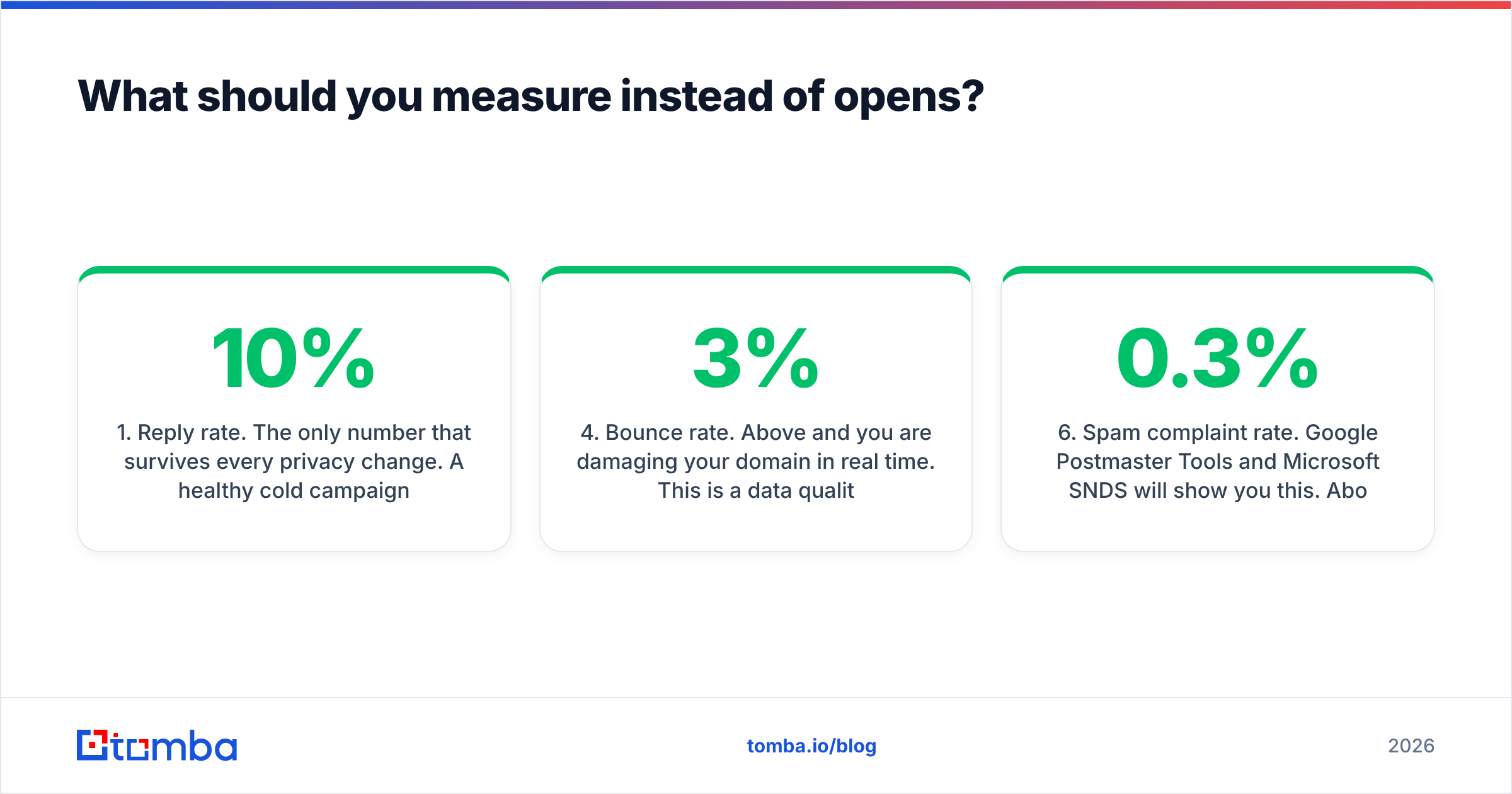
- Reply rate. The only number that survives every privacy change. A healthy cold campaign in 2026 lands somewhere in the low single digits; anything above 8-10% on a cold list means your targeting is unusually tight. Benchmark yourself against your own last quarter, not against a vendor's marketing page. Background on how this is calculated: response rate.
- Positive reply rate. Split replies into interested, not-now, and hard no. Total replies can rise while positive replies fall — usually a sign your copy got more aggressive rather than more relevant.
- Meetings booked per 100 sends. The number your revenue leader actually cares about. It collapses deliverability, targeting, and copy into one figure.
- Bounce rate. Above 3% and you are damaging your domain in real time. This is a data quality metric masquerading as a sending metric.
- Delayed click rate. Clicks that fire 2+ hours after delivery, deduped per contact. This is the one tracking signal I would still build alerts on — it correlates with genuine intent far better than any open.
- Spam complaint rate. Google Postmaster Tools and Microsoft SNDS will show you this. Above 0.3% and the algorithm has already made its decision about you.
Set up per-thread alerts on delayed clicks for named accounts. Ignore aggregate open rate in every report you build. That is the whole reform.
How do you build a tracking setup that does not lie to you?#
Work backwards from the decision, then fix the inputs.
Step one: fix the data layer. Before any tracker matters, your list has to be real. Pull contacts with a proper email finder rather than guessing patterns, then run the full list through verification. Guessed addresses inflate bounce rates, and bounces poison the exact signal you are trying to read. If you are building lists from company domains, domain search gets you every discoverable address at a company along with the confidence score for each.
Step two: separate cold from warm. Cold prospecting sequences: click tracking on a custom domain, open tracking off. Warm nurture and post-demo follow-up to people who know you: both on, because deliverability risk is low and the intent signal is genuinely useful.
Step three: set thresholds, not dashboards. Configure exactly one alert — "named account clicked a pricing or case-study link more than an hour after delivery." Everything else goes into the CRM silently for later analysis.
Step four: review monthly against pipeline. Take last month's tracked events and check which ones preceded a booked meeting. You will find that opens have almost no predictive value, delayed clicks have some, and replies have all of it. Reallocate attention accordingly.
Step five: re-verify quarterly. B2B contact data decays roughly 2-3% per month through job changes. Last quarter's clean list is this quarter's bounce problem. Bulk re-verification on a schedule keeps the whole measurement stack honest.
What is the honest verdict on email trackers in 2026?#
Keep one, use it narrowly, and stop reporting on it.
An email tracker is still worth the $15-30 a seat for one specific job: telling a rep that a particular human, at a particular account, just spent time on the pricing link at 4:47 p.m. on a Tuesday. That is a reason to pick up the phone. It is a timing signal, and timing signals are valuable.
What it is no longer worth is a single line in a board deck. Aggregate open rate is now a composite of Apple's proxy, Google's cache, three security scanners, and — somewhere in there — some actual humans. You cannot separate them reliably, so do not pretend the number means something.
The teams that outperform in 2026 are not the ones with the best tracking dashboard. They are the ones sending fewer, better-targeted emails to verified addresses from a properly authenticated domain. Data quality beats measurement sophistication every single time, because you cannot measure your way out of a bad list.
Start where the leverage is. Tracking tells you what happened after you sent. Tomba's Email Finder determines whether the send was worth making in the first place — verified professional addresses by domain, name, or company, with confidence scoring and sources on every result. The free tier gives you 25 searches a month to test accuracy against your own known-good contacts before you commit; paid plans start at $49/mo. Full Tomba pricing is public, no demo call required. Fix the list, then worry about the pixel.
Related guides#
Ready to find emails that actually work?
Join 150,000+ professionals who stopped guessing and started sending. Free credits on signup — no credit card required.
Get the Tomba newsletter
Practical outbound tactics and product updates — once every two weeks.
About the author