Email Tracking Tools in 2026: What Actually Works Now
Open-rate tracking broke in 2021 and never fully recovered. Here's what email tracking tools still measure reliably in 2026, what they fake, and how to pick one without poisoning your deliverability.
TL;DR
- Open tracking has been unreliable since Apple Mail Privacy Protection (MPP) launched in 2021. In 2026, a meaningful share of your "opens" are proxy prefetches, not humans.
- Click tracking still works, but link-rewriting is now one of the most common causes of spam-folder placement in cold outbound.
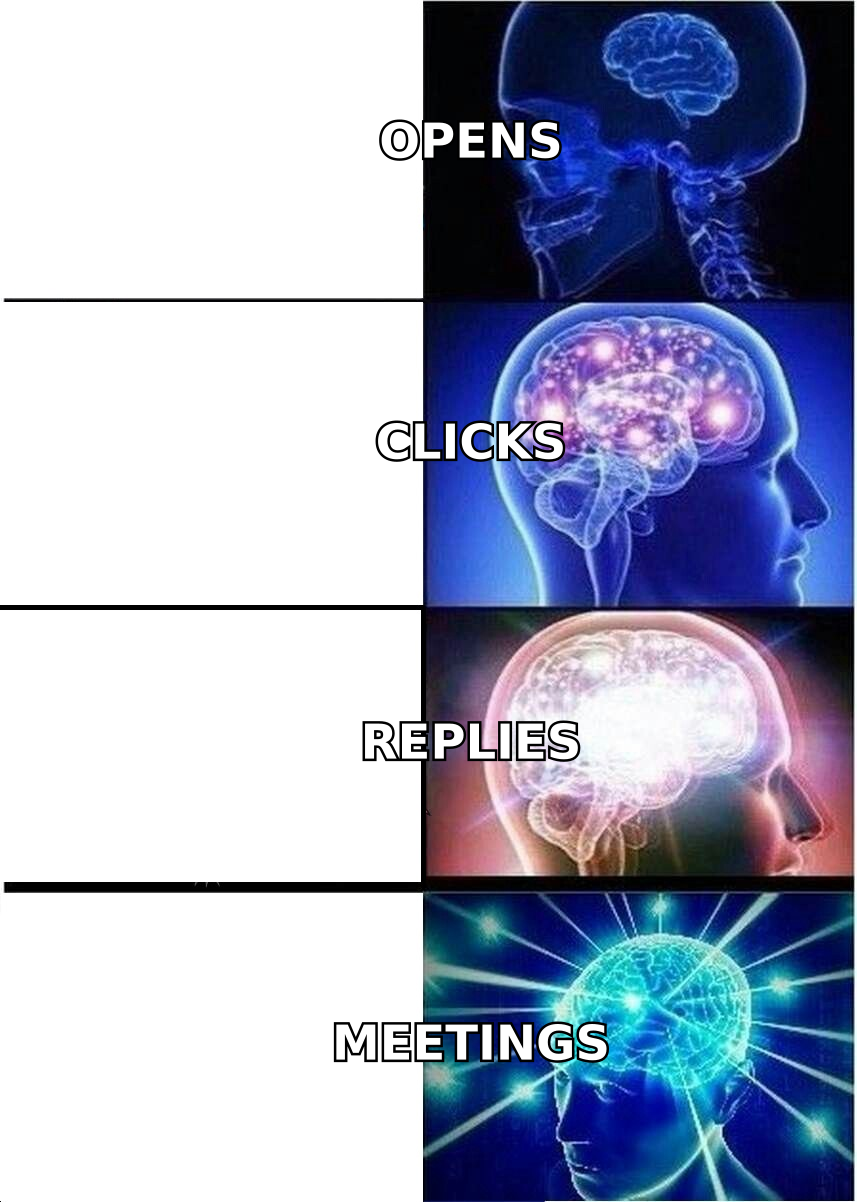
- The signals worth building a process on are replies, click-to-reply ratio, meeting-booked rate, and website revisits — not opens.
- Most "email tracking tools" are really three different product categories wearing the same name: Gmail sidebars, sequencer analytics, and marketing-automation suites. Pick by category first, vendor second.
- Tracking a bad address tracks nothing. Verified, deduplicated contact data does more for pipeline math than any pixel.
You probably opened this because a dashboard told you 68% of your last campaign was opened and only 0.4% replied. That gap isn't a copywriting problem. It's a measurement problem, and it has a specific technical cause.
What are email tracking tools, exactly?#
Email tracking tools are software that instruments an outbound email so the sender can see what happened after "send." Three mechanisms do almost all the work:
- The tracking pixel — a 1x1 transparent image hosted on the vendor's server. When the recipient's client loads images, the server logs a request and calls it an "open." This is the mechanism that broke.
- Link rewriting — every URL in your email is replaced with a redirect through the vendor's domain (
track.vendor.com/xyz). Click the link, hit the vendor's server, get bounced to the real destination. Clicks are logged with timestamp and, sometimes, user agent. - Reply and bounce detection — the tool reads your mailbox via API (Gmail/Microsoft Graph) or IMAP and matches inbound messages to threads. This is the most accurate signal of the three because there's no proxy in between and no image to load.
A fourth mechanism sits alongside these: identity resolution, where a visitor arrives on your site from a tracked link and the tool ties the session back to the contact record. Some platforms extend this to anonymous traffic — see how website visitor reveal works if that's the layer you're missing.
Everything else a vendor sells you — "engagement scores," "intent heat," "AI send-time optimization" — is derived from those four inputs. If the inputs are noisy, the derivations are noise with a nicer chart.
Why did open rates stop being trustworthy?#
Because Apple started opening your emails for you.
Apple Mail Privacy Protection, introduced with iOS 15 in September 2021 and now the default on hundreds of millions of devices, routes email content through Apple's proxy servers and prefetches all remote images before the user ever sees the message. Your pixel fires. Your dashboard records an open. The human may never look at it. Apple's own Mail Privacy Protection documentation describes the behavior plainly: it hides IP address and prevents senders from knowing when the mail was opened.
The knock-on effects compound:
- Inflated opens. Apple Mail holds a large share of consumer and BYOD-heavy B2B inboxes. Every one of those contacts registers as an opener on delivery.
- Broken geolocation. The IP logged is Apple's relay, not the recipient's. "Opened in Cupertino" is a proxy artifact.
- Useless send-time optimization. If opens are logged at prefetch time, "best time to send" models train on machine timestamps.
- Corporate scanners. Microsoft Defender for Office 365, Proofpoint, and Mimecast follow links and load images in sandboxes. In enterprise segments, you can see clicks that no human made — sometimes within seconds of delivery.
The practical rule for 2026: treat open rate as a deliverability smoke alarm, not an engagement metric. If opens crater from 45% to 8% overnight across all segments, something broke in your sending infrastructure. That's the only question opens still answer well.
Which email tracking signals still mean something?#
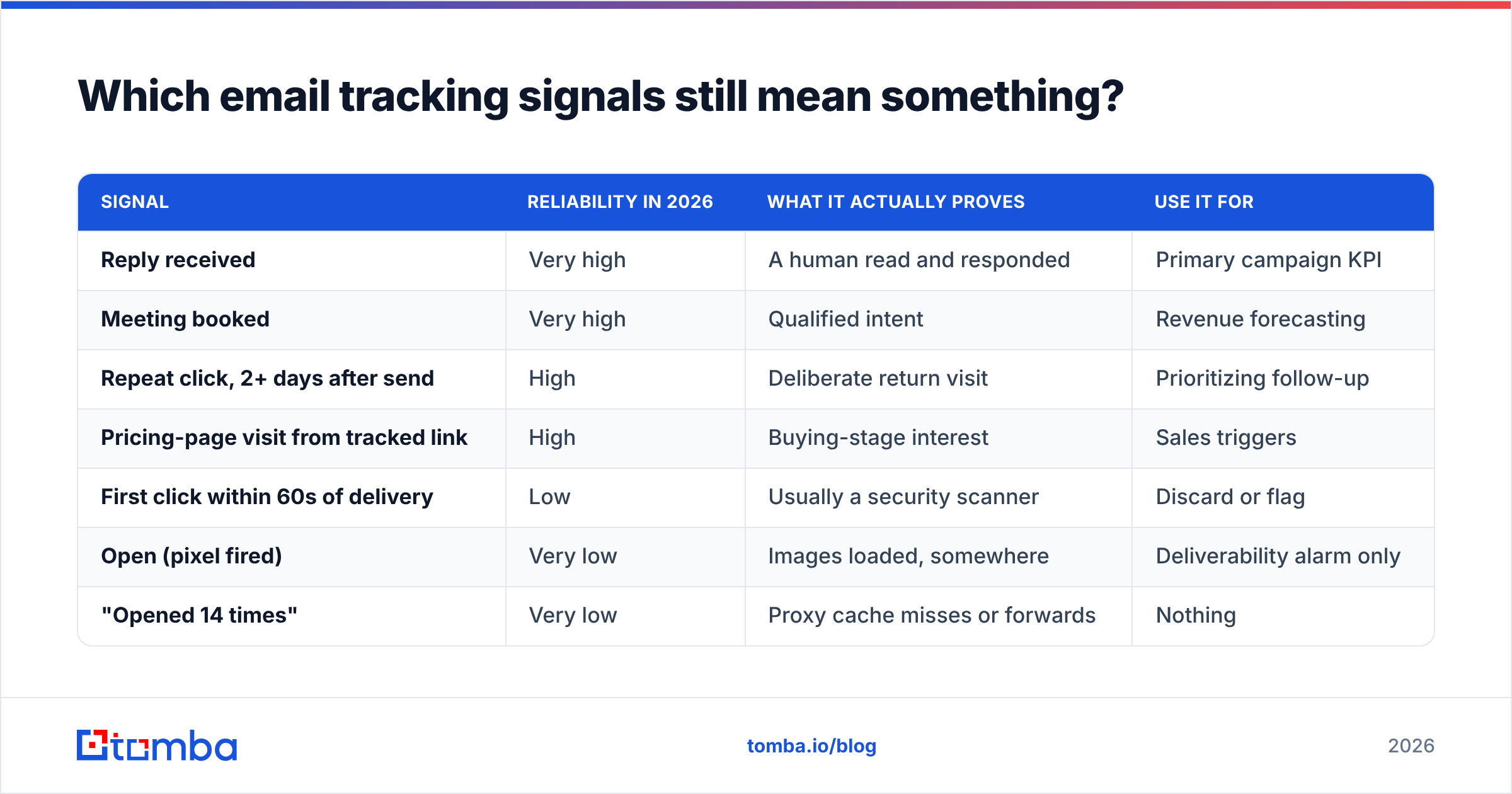
Rank your metrics by how many machines sit between the recipient's intent and your log line. Fewer machines, more truth.
| Signal | Reliability in 2026 | What it actually proves | Use it for |
|---|---|---|---|
| Reply received | Very high | A human read and responded | Primary campaign KPI |
| Meeting booked | Very high | Qualified intent | Revenue forecasting |
| Repeat click, 2+ days after send | High | Deliberate return visit | Prioritizing follow-up |
| Pricing-page visit from tracked link | High | Buying-stage interest | Sales triggers |
| First click within 60s of delivery | Low | Usually a security scanner | Discard or flag |
| Open (pixel fired) | Very low | Images loaded, somewhere | Deliverability alarm only |
| "Opened 14 times" | Very low | Proxy cache misses or forwards | Nothing |
Two derived metrics deserve their own line, because they cancel out much of the proxy noise:
- Click-to-reply ratio. If 40 people click and one replies, your landing experience or offer is the failure point, not your subject line. Real humans clicked.
- Reply rate by segment, not by campaign. Aggregate reply rate hides the fact that one ICP slice is at 9% and three others are at 0.3%. Segment-level response rate is the number that changes what you do tomorrow.
What are the main categories of email tracking tools?#
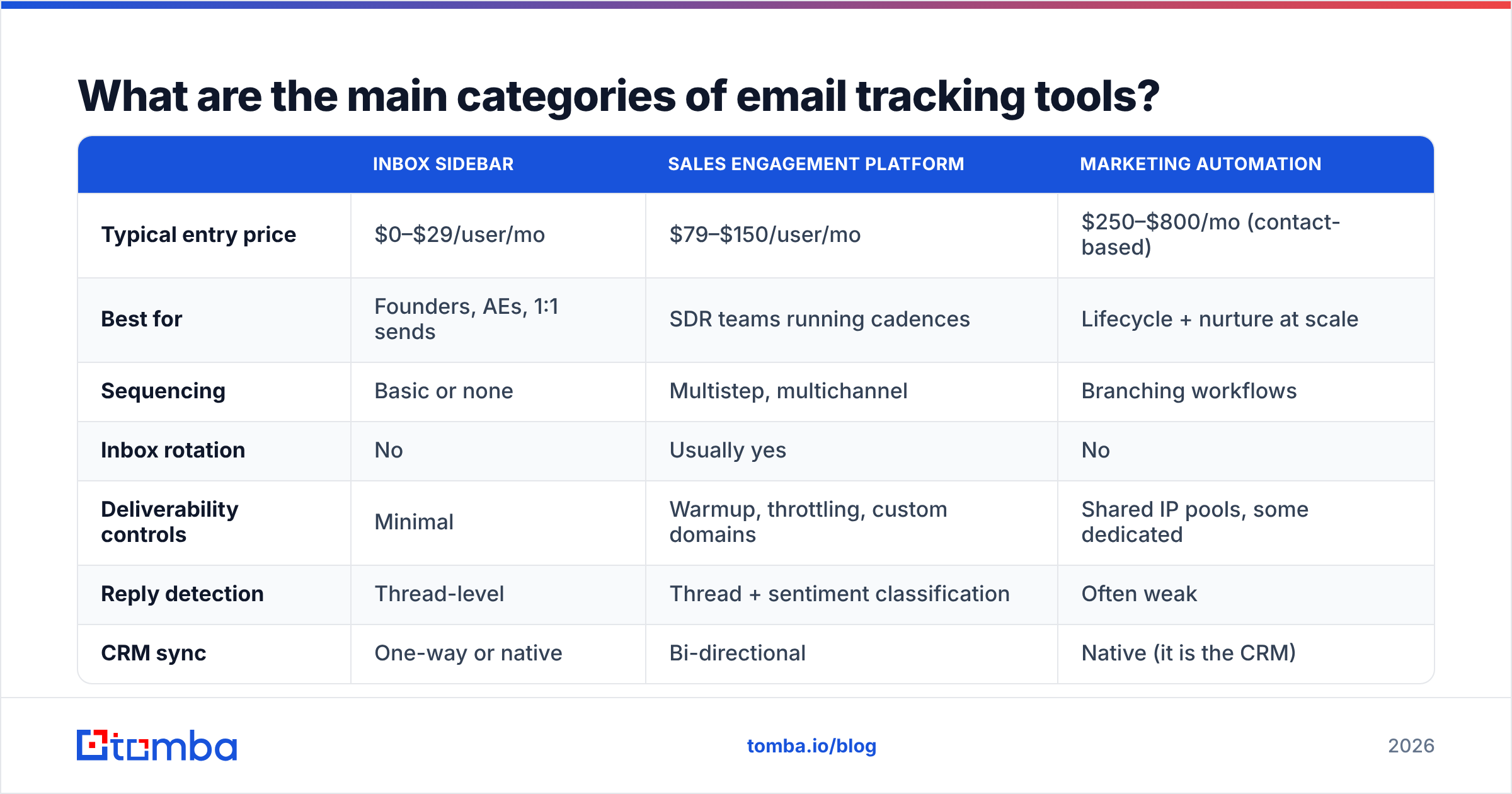
Vendors blur this deliberately, but there are three distinct products competing for the same search term, and they solve different problems.
1. Inbox sidebars (Gmail/Outlook extensions). Streak, Mailtrack, HubSpot Sales, Mixmax. You send one-to-one from your normal inbox; a panel shows opens and clicks. Cheap, fast to adopt, individually useful. Weakness: no sequencing depth, and per-seat pricing gets ugly past ten reps.
2. Sales engagement platforms (sequencers). Outreach, Salesloft, Instantly, Smartlead, Reply.io. Tracking is a feature inside a multistep, multichannel cadence engine with inbox rotation and warmup. This is what an outbound team actually needs. Weakness: cost, onboarding time, and the fact that their analytics still headline open rate.
3. Marketing automation suites. HubSpot Marketing, Marketo, Customer.io, ActiveCampaign. Built for one-to-many nurture with lifecycle scoring and form attribution. Weakness: overkill and over-priced for a five-person SDR team doing cold outbound.
If you're evaluating replacements, the alternatives pages are a faster read than any vendor's own comparison chart — for example Instantly alternative or Outreach alternative breakdowns.
| Inbox sidebar | Sales engagement platform | Marketing automation | |
|---|---|---|---|
| Typical entry price | $0–$29/user/mo | $79–$150/user/mo | $250–$800/mo (contact-based) |
| Best for | Founders, AEs, 1:1 sends | SDR teams running cadences | Lifecycle + nurture at scale |
| Sequencing | Basic or none | Multistep, multichannel | Branching workflows |
| Inbox rotation | No | Usually yes | No |
| Deliverability controls | Minimal | Warmup, throttling, custom domains | Shared IP pools, some dedicated |
| Reply detection | Thread-level | Thread + sentiment classification | Often weak |
| CRM sync | One-way or native | Bi-directional | Native (it is the CRM) |
| Setup time | Minutes | 2–4 weeks | 4–12 weeks |
The mistake I see most often: a four-person team buys a sales engagement platform at $120/seat because they want "real tracking," then uses 8% of it. The tracking in a $20 sidebar is mechanically identical — same pixel, same redirect. What you pay extra for is orchestration, not measurement.
Does link tracking hurt deliverability?#
Yes, more than most vendors admit — and it's the single most fixable problem in this whole stack.
Here's the mechanism. When a tool rewrites your links, the visible destination becomes the vendor's tracking domain. If that domain is shared across thousands of customers, you inherit the reputation of every spammer using the same redirect. Spam filters evaluate the domains in a message body, not just the sending domain. Google's bulk sender guidelines are explicit that link and domain reputation feed placement decisions.
Symptoms of tracking-domain damage:
- Sudden placement drop with no content change. Same template, same list quality, inbox rate falls off a cliff.
- Clean SPF/DKIM/DMARC but poor placement. Your auth is fine; the body is the problem. Check with an SPF checker first to rule out the simple case.
- Higher spam complaints on link-heavy templates than on plain-text sends.
- The redirect domain appears on a blocklist even though your sending domain is clean.
What to do about it, in priority order:
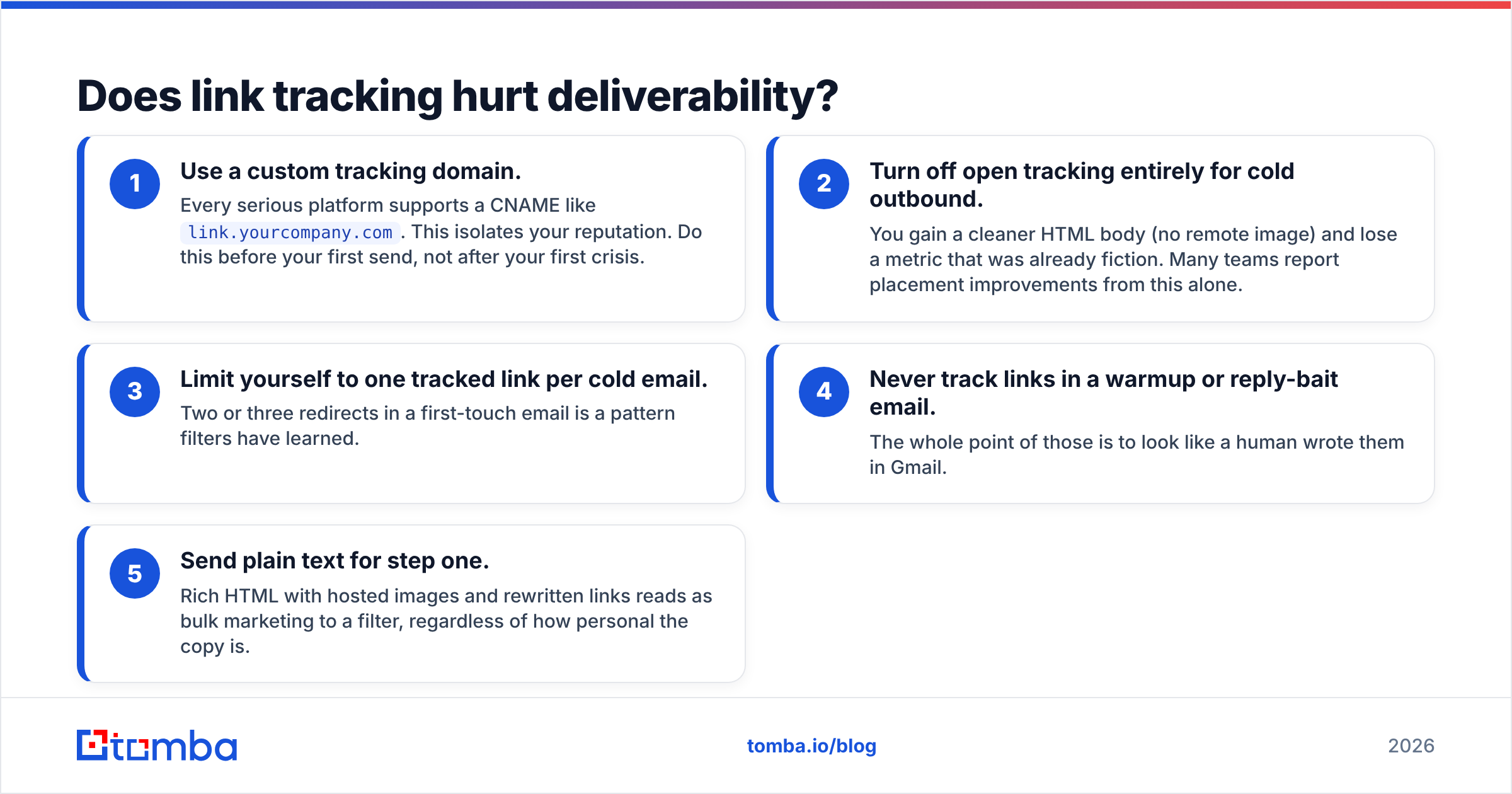
- Use a custom tracking domain. Every serious platform supports a CNAME like
link.yourcompany.com. This isolates your reputation. Do this before your first send, not after your first crisis. - Turn off open tracking entirely for cold outbound. You gain a cleaner HTML body (no remote image) and lose a metric that was already fiction. Many teams report placement improvements from this alone.
- Limit yourself to one tracked link per cold email. Two or three redirects in a first-touch email is a pattern filters have learned.
- Never track links in a warmup or reply-bait email. The whole point of those is to look like a human wrote them in Gmail.
- Send plain text for step one. Rich HTML with hosted images and rewritten links reads as bulk marketing to a filter, regardless of how personal the copy is.
Sender reputation compounds across all of this — the sender reputation primer covers how mailbox providers weight these inputs over time.
How do you build a tracking stack that reflects reality?#
Work backwards from the decision you want the data to drive. Four decisions cover almost every outbound team.
- "Should I keep sending to this segment?" → Needs reply rate and positive-reply rate by ICP slice, not by campaign. Requires clean firmographic fields on every contact, which means your enrichment layer matters more than your tracking layer. Contact enrichment at import time is what makes segment-level analysis possible at all.
- "Which prospect do I call today?" → Needs a click-recency feed, filtered to exclude sub-60-second scanner clicks, ideally cross-referenced with website revisits.
- "Is my infrastructure healthy?" → Needs bounce rate, spam-complaint rate, and yes, aggregate open trend as an alarm. Track per sending mailbox, not per campaign, so you can spot one poisoned inbox before it drags the domain down.
- "Is the copy working?" → Needs A/B at the reply level with enough volume for significance. Most teams don't have the volume; be honest about that instead of declaring winners on 200 sends.
Then apply three hygiene rules that make every number above less of a lie:
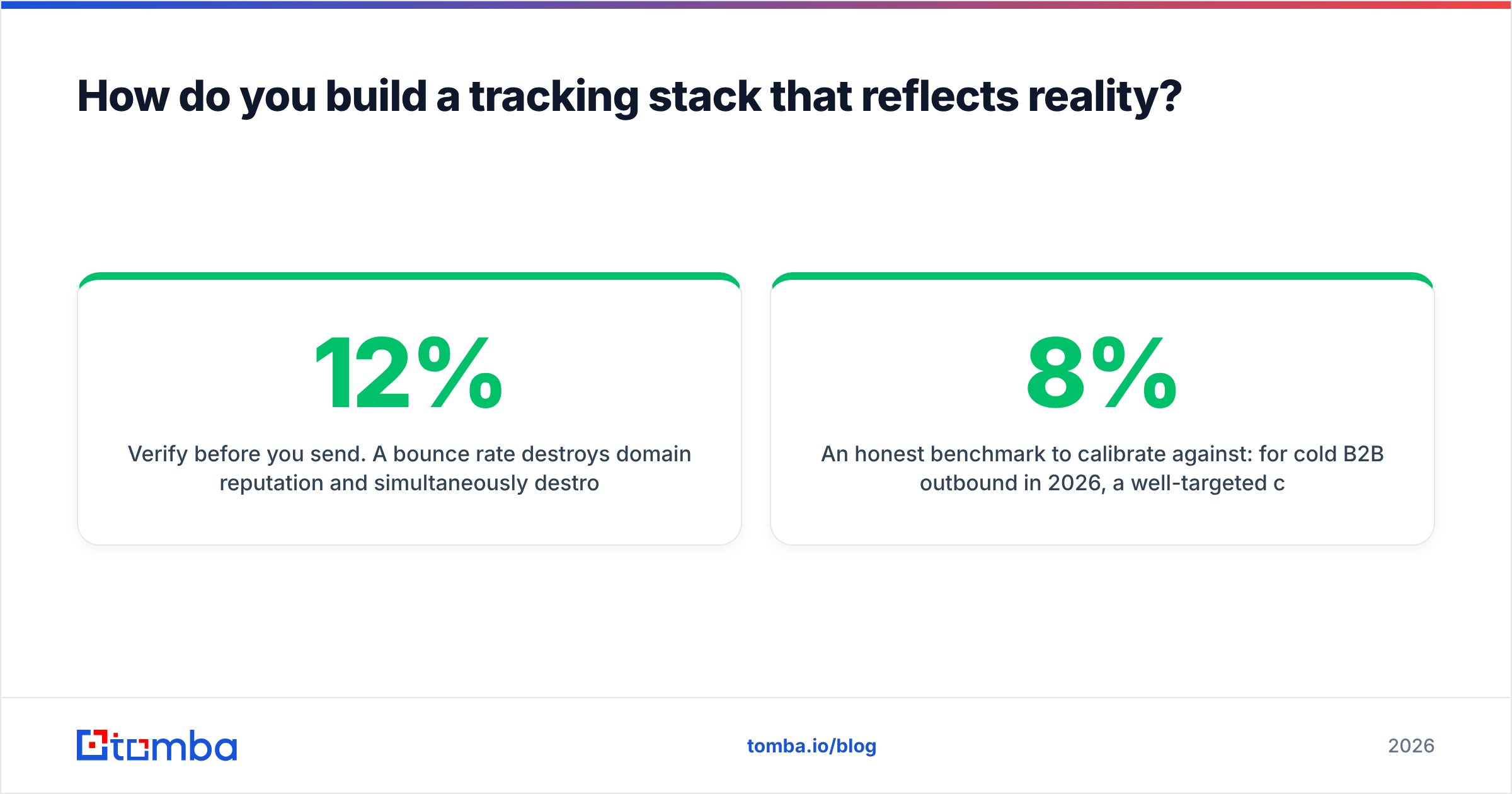
- Verify before you send. A 12% bounce rate destroys domain reputation and simultaneously destroys your denominator. Reply rate on an unverified list isn't comparable to reply rate on a verified one. Run lists through an email verifier and treat catch-all domains as a separate cohort with their own baseline.
- Deduplicate across sequences. The fastest way to look like a spammer is to have two reps sequence the same person in the same week. Your tracking tool won't catch this; your data layer has to.
- Suppress on reply, click-through-to-booking, and unsubscribe — automatically. Manual suppression fails at scale, and nothing tanks a reply rate faster than following up with someone who already said yes.
An honest benchmark to calibrate against: for cold B2B outbound in 2026, a well-targeted campaign to a verified list lands somewhere in the 3–8% reply rate range, with 20–35% of those replies being positive. Anyone quoting you 30% reply rates is either counting auto-responders or selling a course. G2's sales engagement category reviews are a more grounded source for what buyers actually report than vendor case studies.
What should you check before buying?#
Run every shortlisted vendor through this list. It takes twenty minutes and saves a year of bad data.
- Custom tracking domain support — is it on every plan, or gated behind the tier above yours?
- Can you disable open tracking per-campaign? Some tools make it all-or-nothing at the account level.
- Reply detection method — API-based thread matching or IMAP polling? API is faster and cleaner.
- Does it classify auto-replies? Out-of-office counted as a reply inflates your only trustworthy metric.
- Bot-click filtering — does the vendor filter known security-scanner user agents, or hand you raw click logs?
- Data export — can you get raw event data out via API, or are you locked into their dashboard forever?
- CRM field mapping — bi-directional, or a one-way dump that creates duplicate contacts?
- Where does contact data come from? If a tool bundles a database, ask about refresh cadence and sourcing. Transparent vendors publish this; see data sources for the shape of a straight answer.
One more thing worth saying out loud: tracking is not consent. GDPR and ePrivacy treat pixel tracking as processing personal data, and several EU regulators have taken positions on open-tracking pixels specifically. If you sell into the EU, document your legitimate-interest basis, honor opt-outs immediately, and don't retain individual-level open logs longer than you need them.
Where does contact data fit into all of this?#
At the front, and it's the part teams underinvest in.
Every metric in this post has a denominator, and that denominator is your list. Track a campaign to 1,000 addresses where 180 are dead, 90 are role accounts, and 40 are duplicates, and your reply rate is understated by roughly a third — while your bounce rate is quietly training mailbox providers to distrust you. No tracking tool corrects for that. It just charts it more attractively.
The sequence that works: find verified contacts, enrich for segmentation, verify immediately before send, then track only the signals humans actually generate.
If your list-building is the weak link, start there. Tomba's Email Finder resolves professional addresses by name and domain with a confidence score attached, verification runs in the same workflow, and Tomba pricing starts free at 25 searches a month — enough to test whether your reply-rate problem was ever a copy problem. Paid plans open at $49/mo for Starter and $99/mo for Growth, with the Tomba API available on every tier if you'd rather wire verification directly into your sequencer's pre-send step. Fix the denominator, and the dashboard finally starts telling you something true.
Related guides#
Ready to find emails that actually work?
Join 150,000+ professionals who stopped guessing and started sending. Free credits on signup — no credit card required.
Get the Tomba newsletter
Practical outbound tactics and product updates — once every two weeks.
About the author