Email Undeliverable But Address Is Correct: Causes and Fixes
A verified, spelled-correctly address still bounced. Here is what the bounce codes actually mean, why valid mailboxes reject good mail, and the 10-minute diagnostic that finds the real cause.

TL;DR
- A bounce almost never means "you spelled it wrong." Most
550rejections on a valid mailbox are about you — your IP, your domain, your authentication — not the recipient. - Read the enhanced status code (the
5.x.xor4.x.xtriplet), not the human-readable text.5.7.1is a policy block.5.1.1is a missing mailbox. They need opposite fixes. - The five causes that account for most "correct address still bounced" cases: greylisting, recipient-side spam policy, blocklisted sending IP, SPF/DKIM/DMARC failure, and full or disabled mailboxes.
- Catch-all domains lie in both directions — they accept mail for addresses that do not exist, then silently discard it, or reject it hours later with an async bounce.
- Fix order matters: authentication first, reputation second, list hygiene third. Verifying the address again does nothing if your domain is failing DMARC.
What does "email undeliverable but address is correct" actually mean?#
It means the receiving server refused the message — and the refusal had nothing to do with whether the mailbox exists.
Think of it like a courier delivering a parcel to a real apartment in a real building. The address on the label is perfect. But the building has a doorman, and the doorman does not like your delivery company, does not recognise your uniform, or has been told to reject anything from your van today. The parcel comes back stamped "undeliverable." The address was never the problem.
SMTP works the same way. When your mail server hands a message to the recipient's server, the recipient's server gets to say no for any reason it likes: reputation, content, volume, authentication, time of day. It then returns a numeric code. Most senders read the first three digits (550), assume "bad address," and delete the contact. That is usually the wrong call — and it quietly shrinks a perfectly good list.
The signal you actually need is the enhanced status code, standardised as a three-part triplet like 5.7.1 or 4.2.2. The first digit tells you permanence. The second and third tell you the category and the specific reason. Bounce messages carry this triplet in the diagnostic section of the DSN, usually a few lines below the friendly "Delivery Status Notification (Failure)" header nobody reads.

Which bounce codes mean the address is fine?#
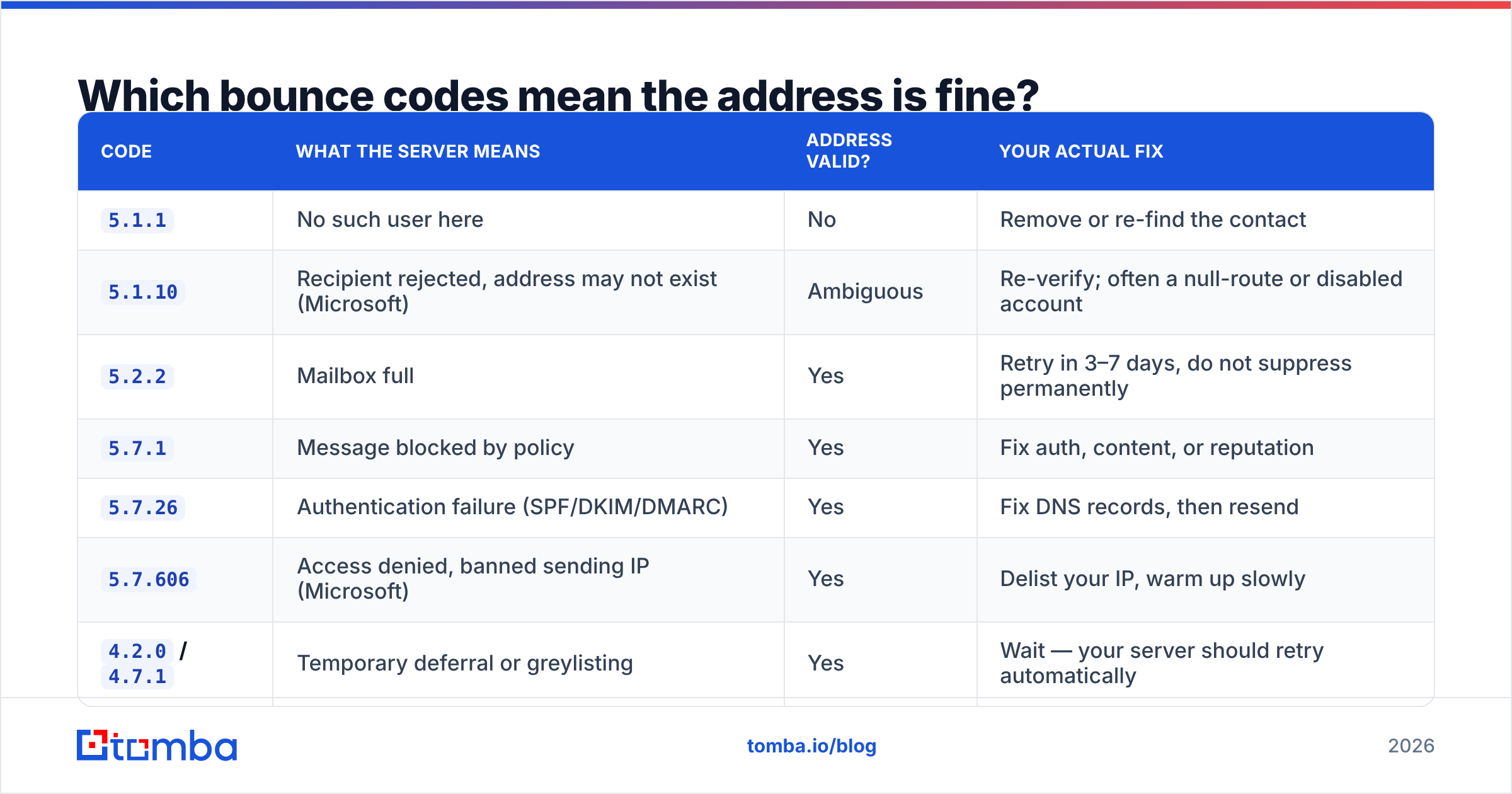
Here is the decoder ring. Match the triplet from your bounce, not the prose.
| Code | What the server means | Address valid? | Your actual fix |
|---|---|---|---|
5.1.1 |
No such user here | No | Remove or re-find the contact |
5.1.10 |
Recipient rejected, address may not exist (Microsoft) | Ambiguous | Re-verify; often a null-route or disabled account |
5.2.2 |
Mailbox full | Yes | Retry in 3–7 days, do not suppress permanently |
5.7.1 |
Message blocked by policy | Yes | Fix auth, content, or reputation |
5.7.26 |
Authentication failure (SPF/DKIM/DMARC) | Yes | Fix DNS records, then resend |
5.7.606 |
Access denied, banned sending IP (Microsoft) | Yes | Delist your IP, warm up slowly |
4.2.0 / 4.7.1 |
Temporary deferral or greylisting | Yes | Wait — your server should retry automatically |
4.4.2 |
Connection dropped mid-transfer | Yes | Transient; retries usually clear it |
5.4.1 |
Recipient address rejected: access denied | Yes (often) | Domain-level block on your sender |
Two rules fall out of this table. First, anything starting with 4 is temporary — your MTA should retry for 24–72 hours before giving up, and suppressing those contacts is a self-inflicted wound. Second, 5.7.x is the policy family. Every 5.7.x code is the receiving server saying "I know who this mailbox is, and I still don't want your mail."
Google publishes its own Gmail SMTP error code reference, which is worth bookmarking because Gmail's wording changes more often than the codes do.
Why do valid addresses still bounce?#
Six causes cover the overwhelming majority of cases. Work them in this order — each one is cheaper to check than the one after it.
Greylisting. The recipient's server rejects the first attempt from an unknown sender with a
4.x.x, expecting a legitimate MTA to retry. Spam cannon software often does not retry. If your first send bounces and a manual resend 20 minutes later lands, you have found it. Fix: use a sending platform that honours retry schedules, and stop treating soft bounces as failures.Authentication failure. Missing or misaligned SPF, DKIM, or DMARC records get you a
5.7.26from Google and Yahoo, both of which tightened bulk-sender enforcement and have not loosened it since. A single third-party sending tool added without updating your SPF record can break every campaign. Check yours with an SPF checker before you touch anything else.Sending IP or domain on a blocklist. Spamhaus, SORBS, Barracuda, and a dozen smaller lists feed the filters at most corporate gateways. One shared-IP neighbour behaving badly is enough. Run a blacklist checker against both your IP and your sending domain — the domain half gets skipped constantly and it is where URI blocklists like DBL bite.
Recipient-side security appliances. Mimecast, Proofpoint, Barracuda, and Cisco ESA sit in front of thousands of enterprise domains. They reject unknown senders on first contact, block entire TLDs, quarantine mail with tracking pixels, and often return generic
5.7.1text that reveals nothing. The mailbox is real; you simply never got past the guard.Mailbox state. Full mailboxes (
5.2.2), accounts disabled during offboarding but not deleted, and mailboxes converted to shared or archive state all reject mail while the address remains structurally valid. These are worth retrying in a week, not suppressing forever.Content and volume triggers. Attachments, link shorteners, mismatched From/Reply-To, or a sudden jump from 40 sends a day to 4,000 will earn a policy block on its own. Reputation is a rolling average, and receivers punish acceleration harder than absolute volume.
Is it a hard bounce or a soft bounce — and does the distinction still work?#
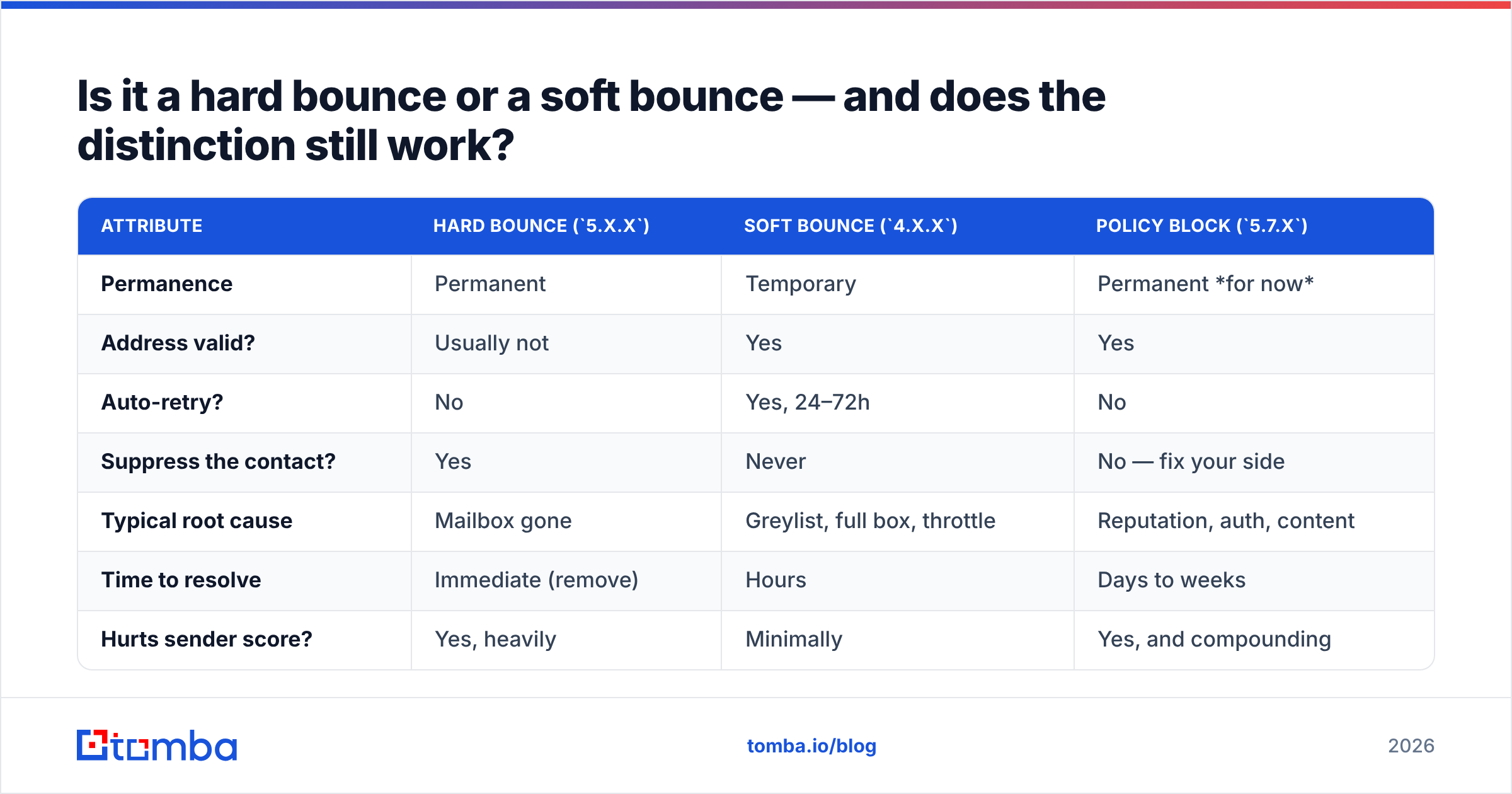
Partly. The classic hard/soft split maps to the first digit, but modern filtering has blurred it badly.
| Attribute | Hard bounce (5.x.x) |
Soft bounce (4.x.x) |
Policy block (5.7.x) |
|---|---|---|---|
| Permanence | Permanent | Temporary | Permanent for now |
| Address valid? | Usually not | Yes | Yes |
| Auto-retry? | No | Yes, 24–72h | No |
| Suppress the contact? | Yes | Never | No — fix your side |
| Typical root cause | Mailbox gone | Greylist, full box, throttle | Reputation, auth, content |
| Time to resolve | Immediate (remove) | Hours | Days to weeks |
| Hurts sender score? | Yes, heavily | Minimally | Yes, and compounding |
The trap is the third column. Most email platforms classify every 5.x.x as a hard bounce and suppress the contact automatically. That means a policy block against your domain gets recorded as their address being dead — and you lose the contact permanently for a problem that was entirely yours. If your bounce rate spiked and the addresses all came from the same verified source, check whether your platform is mislabelling 5.7.x before you blame the data.
How do you diagnose it in under 10 minutes?#
A short, ordered triage. Stop at the first step that explains the pattern.
Step 1 — Read the raw DSN. Open the bounce message, view the original source, and find the Diagnostic-Code: line. Copy the full triplet and the vendor string (it often names the appliance: mimecast.com, pphosted.com). That string alone frequently solves the case.
Step 2 — Ask whether it is one address or many. One bounce is a mailbox problem. Twenty bounces across twenty unrelated domains in the same hour is a sender problem. This single question splits your diagnostic path in half.
Step 3 — Test the address independently. Run it through an email verifier from a neutral IP. If verification returns valid but your send bounces, the mailbox exists and the rejection is about your sending identity — jump straight to authentication and reputation.
Step 4 — Check auth and blocklists. SPF record within the 10-lookup limit, DKIM signing on the actual sending subdomain, DMARC policy published and aligned. Then blocklists for IP and domain. Google Postmaster Tools gives you domain reputation, spam rate, and authentication pass rates for Gmail traffic specifically, and it is free.
Step 5 — Send a controlled test. Same copy, one recipient, from a different domain and IP. Lands? Your infrastructure is the problem. Bounces again? The recipient gateway has a policy against your content or your industry.
Step 6 — Check the domain type. If the target domain is a catch-all, none of the above may apply and you need the next section.

What about catch-all domains?#
Catch-all domains are the single biggest source of "the address was correct and it still failed" confusion — because on a catch-all domain, every address is correct at the SMTP layer.
A catch-all mail server accepts mail addressed to anything@domain.com. jsmith@, ceo@, asdfgh@ — all accepted at the door. What happens next is invisible to you: the message might route to a real inbox, drop into an unmonitored bucket, or trigger a delayed rejection hours later that arrives as an asynchronous bounce long after your campaign report says "delivered."
This breaks two things at once. Verification tools that rely on SMTP handshakes cannot distinguish a real mailbox from a fake one, so they return "accept-all" or "unknown" rather than valid. And your delivery metrics inflate, because acceptance is not delivery.
The workaround is pattern intelligence rather than handshakes: infer the organisation's email format from confirmed contacts, then score candidates against it. A catch-all verifier does exactly this — combining known-good format data with secondary signals instead of trusting a server that says yes to everything. Roughly a fifth of business domains run catch-all in some form, so if you are prospecting mid-market and enterprise, this is not an edge case.
How do sender reputation and authentication cause this?#
Because receivers evaluate the sender before they evaluate the recipient.
By the time your message reaches the mailbox-existence check, it has already passed through connection-level IP reputation, SPF and DKIM validation, DMARC alignment, domain reputation lookup, and content scoring. A failure at any of those stages returns a rejection that looks like a delivery failure but is a trust failure.
The compounding part is what catches teams out. Sender reputation is a rolling score. High bounce rates lower it. A lower score means more rejections. More rejections mean more bounces. A single bad list import can start a spiral that takes three to six weeks of disciplined sending to unwind — and during that window, perfectly valid addresses will keep bouncing.
Practical guardrails:
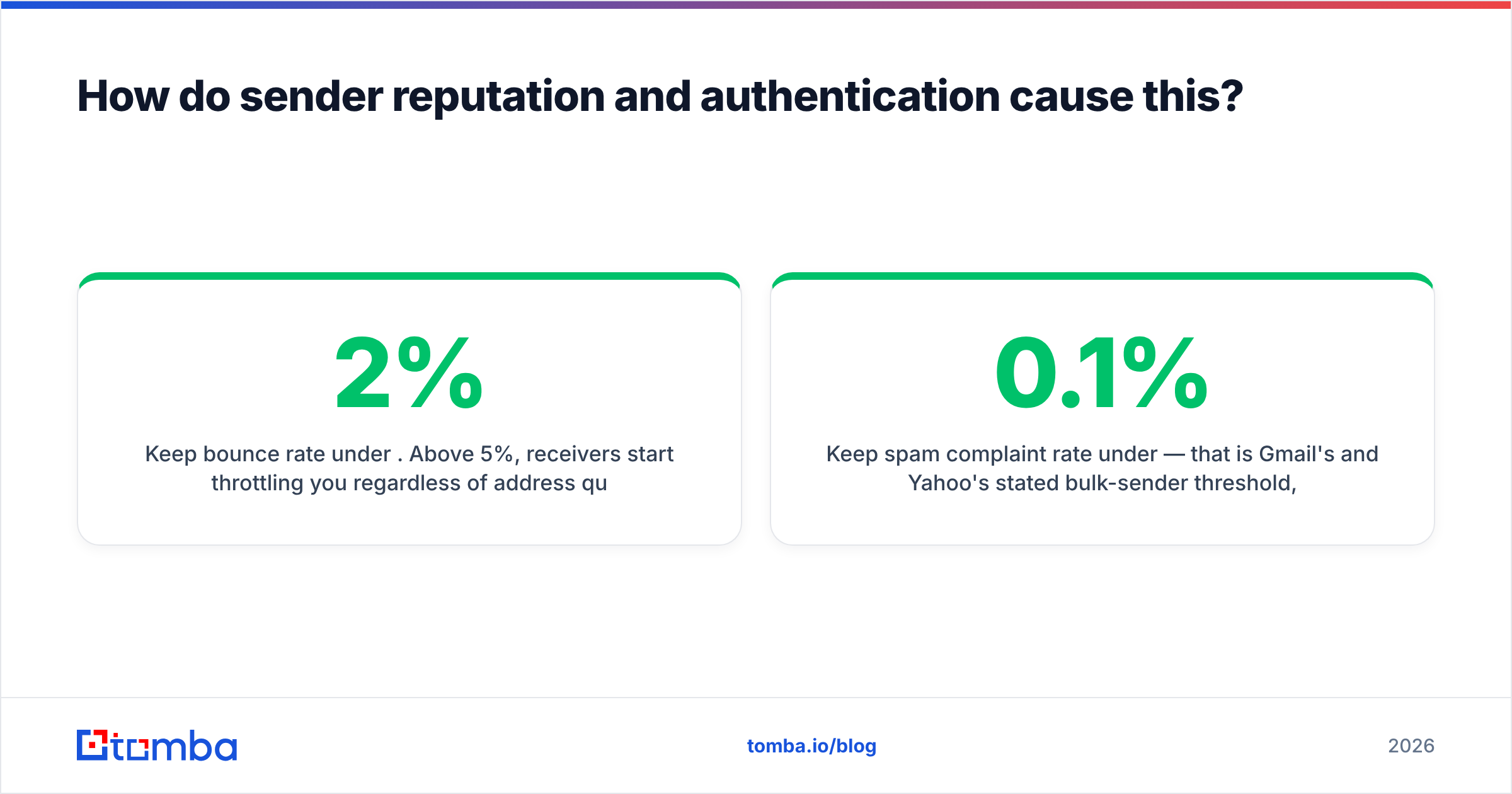
- Keep bounce rate under 2%. Above 5%, receivers start throttling you regardless of address quality.
- Keep spam complaint rate under 0.1% — that is Gmail's and Yahoo's stated bulk-sender threshold, and it is enforced.
- Authenticate every sending source. If a tool sends on your behalf and is not in your SPF and not DKIM-signing, it is a liability.
- Warm new domains and IPs over 4–6 weeks. Volume spikes read as compromise.
- Suppress role addresses (
info@,support@,noreply@) from cold outreach — they attract complaints and rarely convert.
For the broader mechanics, our email deliverability glossary entry breaks down how each signal is weighted. G2's deliverability category is also a reasonable place to compare monitoring tools if you want continuous reputation tracking rather than spot checks.
How do you prevent this from recurring?#
Fix the pipeline, not the individual bounce.
Verify before every send, not once at import. B2B data decays at roughly 2–2.5% per month through job changes alone. A list verified in January is materially different by June. Re-verify anything older than 90 days.
Separate your sending domains. Cold outreach on a subdomain, transactional mail on the root, marketing on a third. A reputation hit on one does not take down your invoices or password resets.
Classify bounces properly. Build or configure suppression logic that reads the enhanced status code. Hard-suppress 5.1.1. Retry 5.2.2 after a week. Never suppress 4.x.x. Route 5.7.x to an alert, not to the suppression list — that is a sender problem needing a human.
Monitor the leading indicators. Bounce rate by domain, authentication pass rate, and blocklist status checked weekly beat discovering a problem from a campaign report a month later.
Source data with verification built in. The cheapest bounce is the one that never enters your CRM. Pulling contacts through a domain search that returns confidence scores and format patterns alongside the address means you filter at acquisition instead of at send time.
Where should you start?#
Start with the bounce you already have. Open it, find the triplet, and match it against the first table in this post. If it is 5.7.x, spend your next hour on SPF, DKIM, DMARC, and blocklists — the address is fine and re-verifying it will teach you nothing. If it is 5.1.1, the contact is genuinely gone and you need a fresh one.
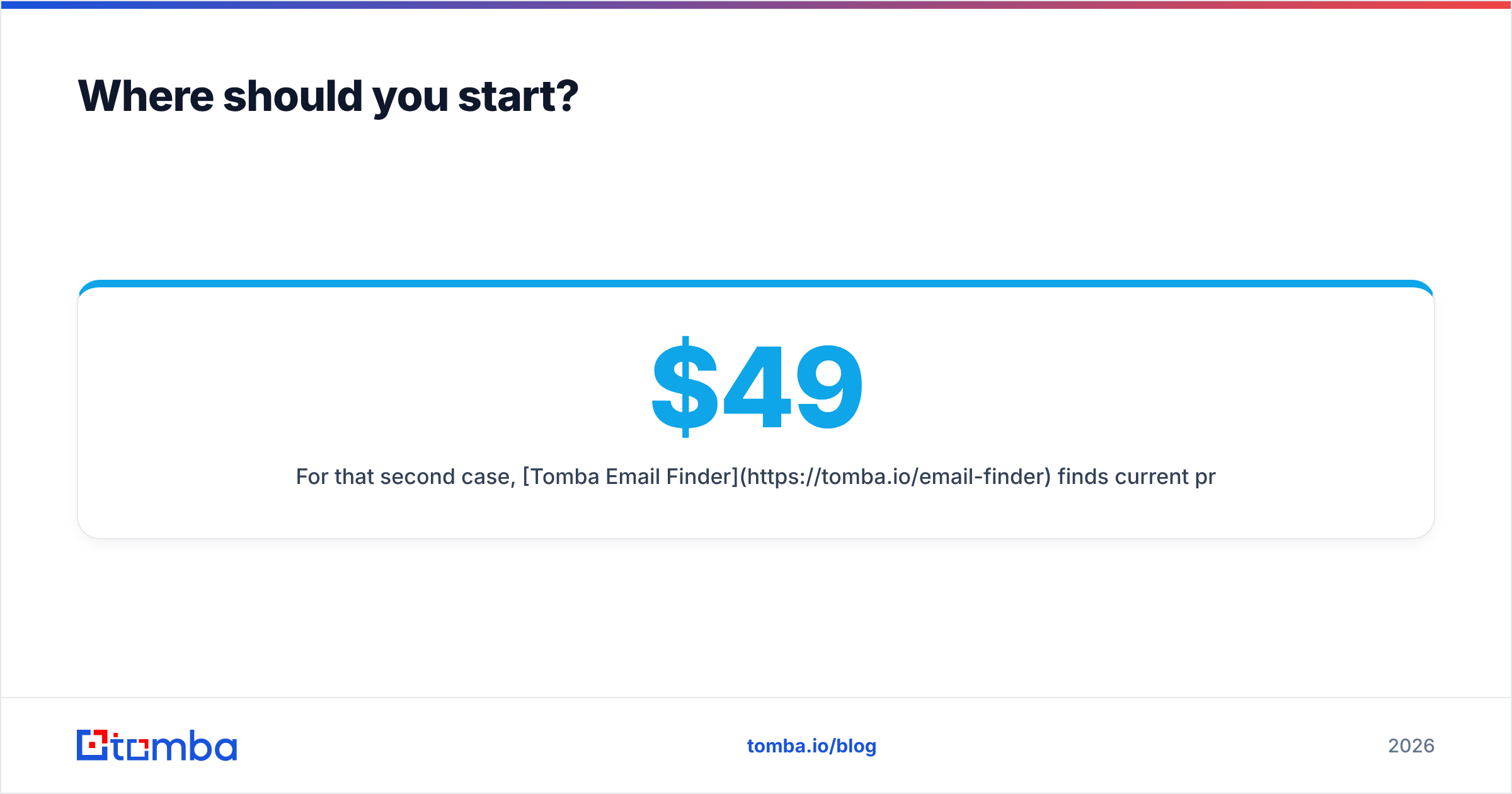
For that second case, Tomba Email Finder finds current professional addresses by name and domain, returns a confidence score with the source signals behind it, and runs verification in the same call so you are not stacking two tools to answer one question. The free tier covers 25 searches a month if you want to test it against the contacts that just bounced; paid plans start at $49/mo on Starter, with Growth at $99/mo and Pro at $249/mo — full Tomba pricing is public. Re-find the dead ones, fix your authentication for the rest, and the bounce column stops being a mystery.
Related guides#
Ready to find emails that actually work?
Join 150,000+ professionals who stopped guessing and started sending. Free credits on signup — no credit card required.
Get the Tomba newsletter
Practical outbound tactics and product updates — once every two weeks.
About the author