Email Validation in 2026: How It Works and Which Tools Win
Email validation is the difference between a 1% bounce rate and a burned domain. Here's how each check works, what accuracy claims really mean, and how the major tools compare on price and coverage in 2026.
TL;DR
- Email validation is a stack of five checks — syntax, domain, MX, mailbox (SMTP), and risk scoring — not a single yes/no lookup. Most cheap tools only run the first three.
- A 2-4% bounce rate is the practical ceiling before Google and Microsoft start throttling you. Anything above 5% and you are actively damaging your sending domain.
- "99% accuracy" claims are almost always measured on clean, mainstream domains. On catch-all domains — roughly 20-25% of B2B addresses — no provider can be certain by SMTP alone.
- Validating at capture time (forms, signups) is cheaper and more effective than validating a rotting list every quarter. Do both.
- Price per verification ranges from about $0.0004 to $0.008 depending on volume and vendor. The cheapest tool is rarely the cheapest outcome once you count bounced sends and burned domains.
What is email validation?#
Email validation is the process of confirming that an address can actually receive mail before you send to it. That is a narrower promise than it sounds. Validation tells you the mailbox exists and the domain is configured to accept mail. It does not tell you the person still works there, reads that inbox, or wants to hear from you.
Think of it like checking a street address before mailing a package. You can confirm the street exists, the building number is real, and the mail slot isn't bricked over. You cannot confirm anyone is home.
The confusion in this market comes from vendors using "validation," "verification," and "cleaning" interchangeably. Functionally they describe the same pipeline. What differs is how many layers a given tool runs and how honestly it reports uncertainty.
Here is what a complete validation pass actually checks:
- Syntax — Does the string conform to RFC 5322? This catches typos like
john@@acme.comand trailing spaces, but it is the weakest signal.notarealperson@microsoft.compasses syntax perfectly. - Domain and DNS — Does
acme.comresolve? Is it a parked domain, a typo of a real domain (gmial.com), or expired? - MX records — Does the domain publish mail exchanger records? No MX means no mailbox, full stop. This kills a surprising share of scraped lists.
- Mailbox existence via SMTP — The verifier opens a connection to the receiving mail server and asks whether the specific recipient exists, without delivering anything. This is the layer that separates real verification from pattern matching.
- Risk and reputation scoring — Is it a role account (
info@,sales@), a disposable domain, a known spam trap, or a hard-bounce record from a shared suppression pool?
A tool that stops at step 3 will happily hand you a list of syntactically perfect addresses that bounce 30% of the time. That is the single most common reason teams think "verification doesn't work."
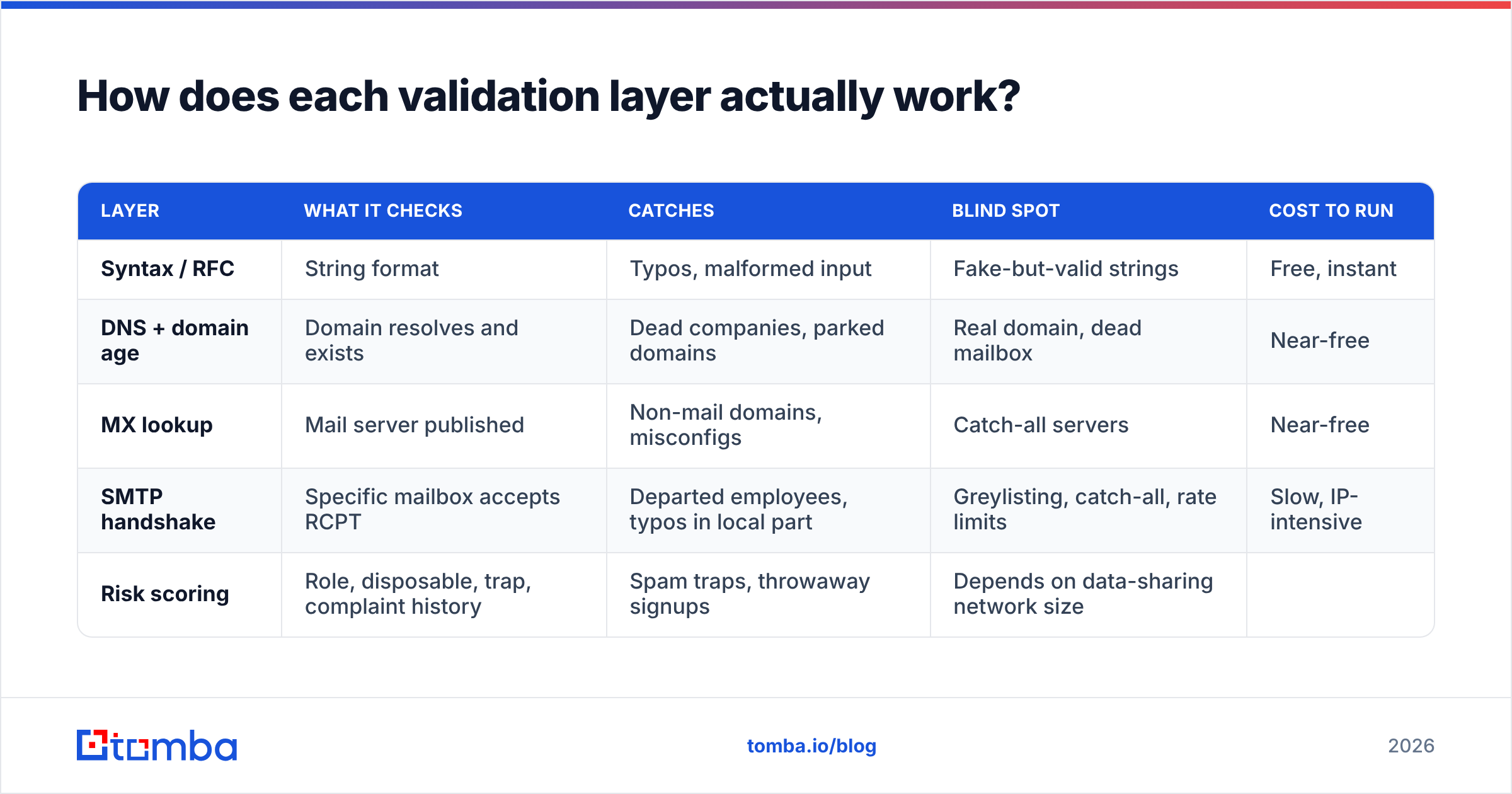
How does each validation layer actually work?#
| Layer | What it checks | Catches | Blind spot | Cost to run |
|---|---|---|---|---|
| Syntax / RFC | String format | Typos, malformed input | Fake-but-valid strings | Free, instant |
| DNS + domain age | Domain resolves and exists | Dead companies, parked domains | Real domain, dead mailbox | Near-free |
| MX lookup | Mail server published | Non-mail domains, misconfigs | Catch-all servers | Near-free |
| SMTP handshake | Specific mailbox accepts RCPT | Departed employees, typos in local part | Greylisting, catch-all, rate limits | Slow, IP-intensive |
| Risk scoring | Role, disposable, trap, complaint history | Spam traps, throwaway signups | Depends on data-sharing network size |
The SMTP handshake is where the real engineering lives. The verifier connects to the recipient's mail server, issues HELO, MAIL FROM, and RCPT TO, reads the response code, and disconnects before DATA — so no message is ever delivered. A 250 response means the mailbox is accepted. A 550 means it does not exist. You can read the underlying protocol on the SMTP specification page if you want the raw mechanics.
The trouble is that major providers have made this deliberately unreliable. Microsoft 365 tenants frequently return a positive response for every recipient. Google greylists aggressive verifiers. Some servers ban the verifying IP outright after a few hundred probes. That is why serious providers maintain large rotating IP pools and blend SMTP results with historical engagement data instead of trusting a single handshake.
Why do valid-looking addresses still bounce?#
Because "valid at scan time" and "deliverable at send time" are different claims separated by days or weeks.
Four things break the chain:
- Employee churn. B2B contact data decays at roughly 22-30% per year. Validate in January, send in June, and a fifth of your list has moved on. That decay is why quarterly re-validation beats annual cleaning.
- Catch-all domains. The server accepts every address at the domain, then silently discards the ones that do not exist. SMTP tells you nothing. More on this below.
- Greylisting and temporary failures. A
4xxresponse means "try later," not "invalid." Tools that treat soft failures as invalid will over-delete good contacts; tools that treat them as valid will under-report bounces. - Reputation-based rejection. Your address was fine. Your sending domain wasn't. If your SPF record is broken or your domain has no warmup history, mailbox providers reject at the gateway regardless of recipient validity. Check yours with an SPF checker before you blame the list.
That last one matters more than most teams realize. Validation improves email deliverability, but it cannot rescue a domain with no authentication and no warmup.
What accuracy rate should you actually expect?#
Treat every "99.x% accurate" number on a vendor homepage as a ceiling measured under favorable conditions, not a floor you will hit on your list.

Three questions expose whether a claim is meaningful:
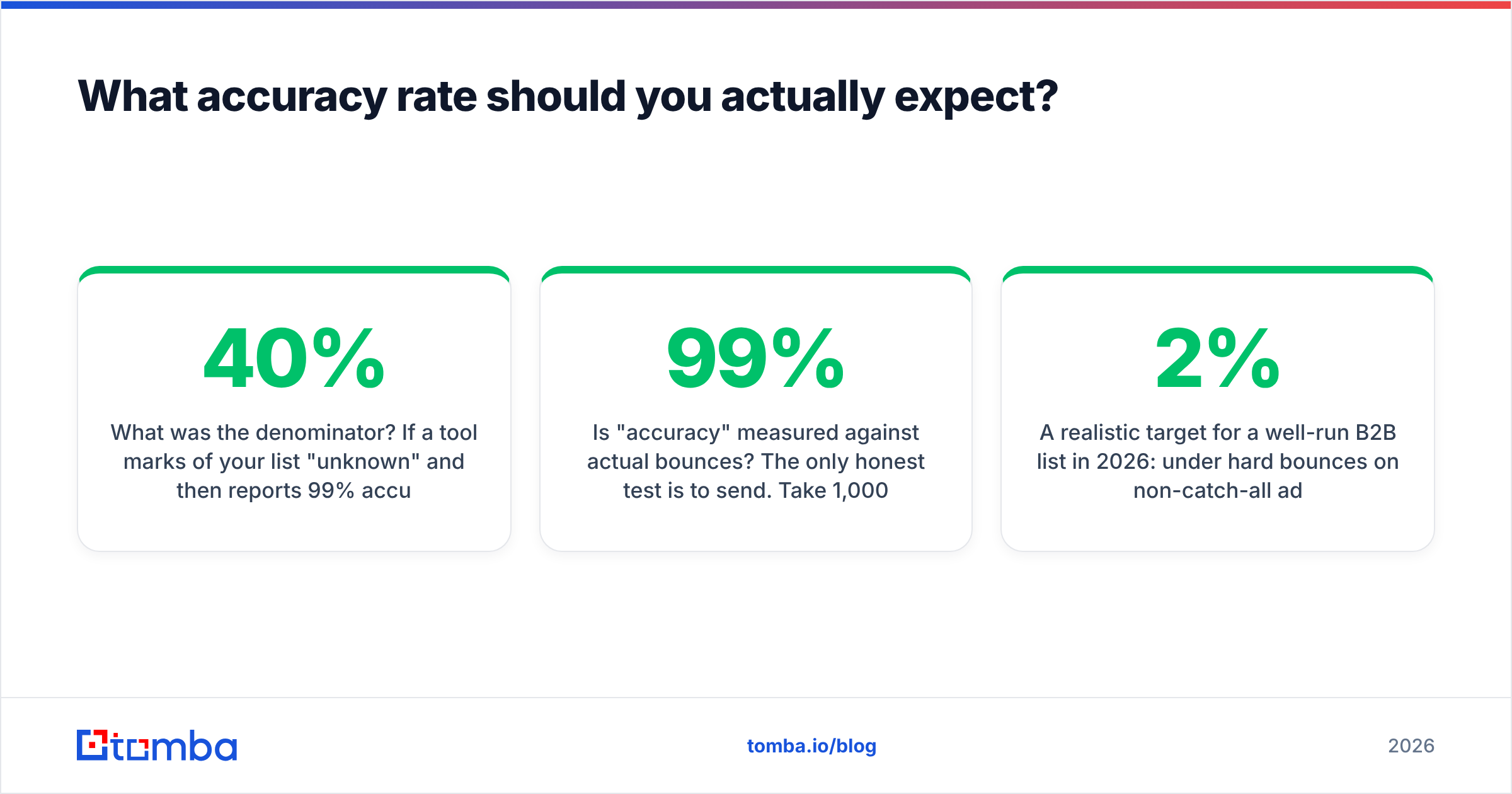
What was the denominator? If a tool marks 40% of your list "unknown" and then reports 99% accuracy on the remaining 60%, that is arithmetic, not accuracy. Ask for the unknown rate alongside the accuracy rate. A tool with 96% accuracy and a 6% unknown rate is more useful than one with 99% accuracy and a 35% unknown rate.
Was the test set catch-all heavy? Enterprise domains skew heavily toward catch-all configurations. A benchmark run on Gmail and Outlook consumer addresses tells you almost nothing about how a tool performs on your enterprise ICP.
Is "accuracy" measured against actual bounces? The only honest test is to send. Take 1,000 verified addresses, send a real campaign, and count hard bounces. If a vendor claims 99% and you see a 6% hard bounce rate, the claim was marketing.
A realistic target for a well-run B2B list in 2026: under 2% hard bounces on non-catch-all addresses, and 3-5% on a mixed list that includes accepted catch-all guesses. Independent review sites like G2 surface user-reported bounce numbers that are usually more sober than vendor pages.
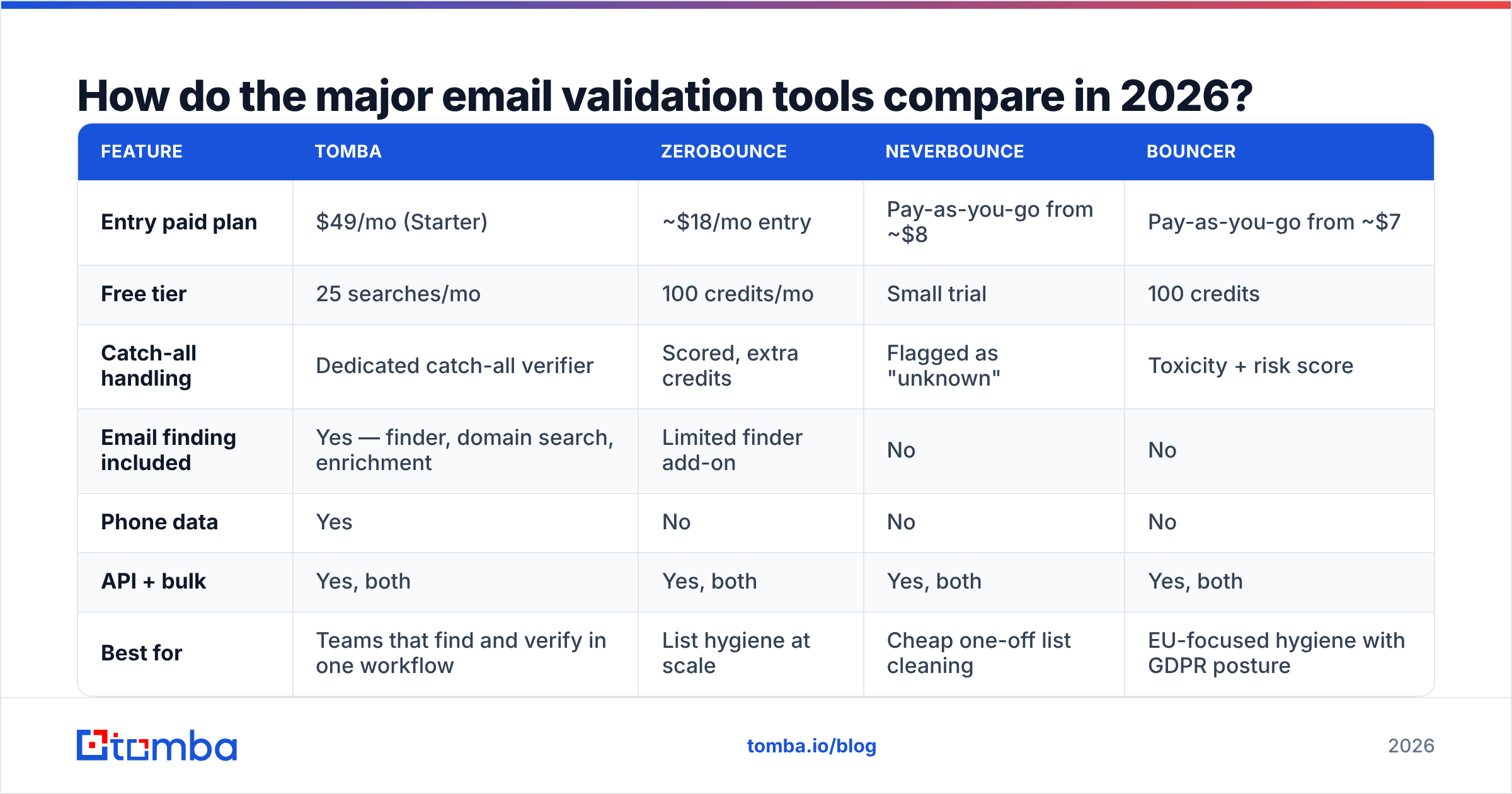
How do the major email validation tools compare in 2026?#

| Feature | Tomba | ZeroBounce | NeverBounce | Bouncer |
|---|---|---|---|---|
| Entry paid plan | $49/mo (Starter) | ~$18/mo entry | Pay-as-you-go from ~$8 | Pay-as-you-go from ~$7 |
| Free tier | 25 searches/mo | 100 credits/mo | Small trial | 100 credits |
| Catch-all handling | Dedicated catch-all verifier | Scored, extra credits | Flagged as "unknown" | Toxicity + risk score |
| Email finding included | Yes — finder, domain search, enrichment | Limited finder add-on | No | No |
| Phone data | Yes | No | No | No |
| API + bulk | Yes, both | Yes, both | Yes, both | Yes, both |
| Best for | Teams that find and verify in one workflow | List hygiene at scale | Cheap one-off list cleaning | EU-focused hygiene with GDPR posture |
The strategic split is worth naming: pure verifiers (NeverBounce, Bouncer, ZeroBounce) clean a list you already own. Find-and-verify platforms like Tomba build the list and validate it in the same pass, which removes an export/import cycle and a second vendor bill. If you already have a 500,000-record CRM and just want it scrubbed, a pure verifier is often cheaper per record. If you are generating net-new pipeline weekly, the combined workflow usually wins on total cost.
Database vendors sit in a third bucket. Providers like BookYourData sell pre-verified contact lists with validation baked into the purchase, which suits teams that would rather buy coverage than build it — a reasonable trade when you need a specific vertical fast.

How should you handle catch-all domains?#
Catch-all is where most validation projects quietly fail, so treat it as its own decision rather than a rounding error.
A catch-all (or "accept-all") server returns 250 OK for ceo@acme.com and asdkjhq@acme.com alike. SMTP cannot distinguish them. Roughly one in four B2B domains is configured this way, and the share rises with company size.
You have three options:
- Delete them. Safest for deliverability, worst for pipeline. You will throw away a meaningful chunk of your enterprise TAM.
- Send anyway, isolated. Route catch-all addresses through a separate sending domain so bounces don't contaminate your primary reputation. Cap volume and watch the bounce rate for the first week.
- Score them with secondary signals. This is what a good catch-all verifier does: cross-reference the pattern against known-good addresses at the same domain, check whether the person appears in public sources with that exact address, and weigh historical engagement. It returns a confidence score, not a binary.
The third option is the only one that scales. If a tool marks every catch-all as "unknown" and stops, you are doing the work yourself in a spreadsheet.
Where should validation sit in your workflow?#
Validation is cheapest at the point of capture and most expensive after a list has aged. Build both.
At capture. Run an inline check on every signup, demo request, and form submission. A real-time API call costs a fraction of a cent and prevents a fake address from entering your CRM at all. This also blocks disposable-domain signups from polluting your product analytics. The email verification API handles this in a single request; most teams wire it into the form handler, not the CRM.
At enrichment. When you find a new contact, verify in the same operation. Finding an address and validating it are two halves of one job — the email finder and verifier should return one combined confidence score, not two disconnected results you have to reconcile.
On a schedule. Re-validate your active outbound segment every 60-90 days and your full database every 6 months. Use bulk verify for this rather than looping single API calls; batch pricing is meaningfully better and you avoid rate limits.
Before every large send. Any campaign over roughly 5,000 recipients justifies a fresh pass. The cost of verification is measured in dollars. The cost of a 12% bounce rate on a new sending domain is measured in months of recovery.
What does email validation cost, really?#
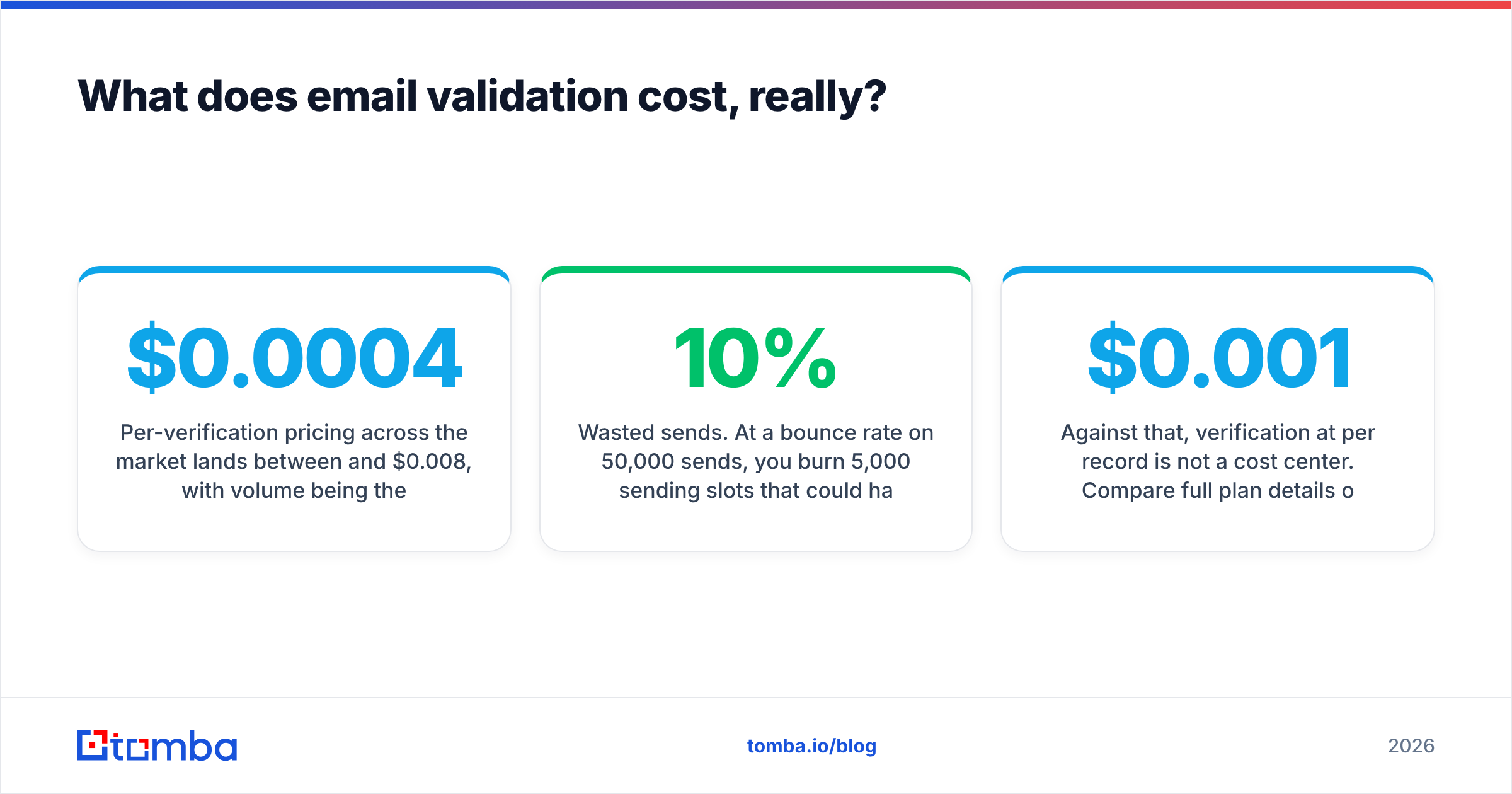
Per-verification pricing across the market lands between $0.0004 and $0.008, with volume being the main lever. That range means a 100,000-record clean might cost $40 or $800 depending on vendor and tier.
But the sticker price is the smaller number. Model the real cost:
- Wasted sends. At a 10% bounce rate on 50,000 sends, you burn 5,000 sending slots that could have carried real messages.
- Reputation damage. Mailbox providers weigh bounce rate heavily in sender reputation. Recovering a throttled domain typically takes 4-8 weeks of reduced volume and careful warmup.
- Rep time. Every bounced address that a rep manually chases is 3-5 minutes gone. Multiply by list size.
- CRM pollution. Bad records inflate your database, distort funnel metrics, and get re-worked by the next rep who inherits the account.
Against that, verification at $0.001 per record is not a cost center. Compare full plan details on the Tomba pricing page — the Free tier covers 25 searches a month, Starter is $49/mo, Growth $99/mo, and Pro $249/mo, with Enterprise custom. HubSpot's own email deliverability guidance makes the same point from the marketing side: list hygiene is the highest-leverage deliverability lever available.
What are the most common validation mistakes?#
Treating "unknown" as "invalid." You will delete good contacts. Segment unknowns and test them separately.
Validating once and never again. Data decays continuously. A one-time clean is a snapshot, not a state.
Ignoring role accounts. info@ and support@ addresses are technically valid and usually terrible outbound targets. They route to shared inboxes and generate complaints. Suppress them for cold outreach; keep them for support workflows.
Using regex as validation. A regex confirms formatting. It confirms nothing about deliverability. If your "validation" is a single pattern match in your form handler, you have a typo filter, not a verifier.
Blaming the list for a domain problem. Before you re-verify for the third time, confirm SPF, DKIM, and DMARC are correct and your domain has genuine warmup history. Run a quick free email checker on a handful of addresses to sanity-check whether the list or the sender is the problem.
Where to start#
If you are cleaning an existing list, run a bulk pass, segment the catch-alls, and send to the confirmed-valid group first while you isolate the rest. If you are building lists from scratch, stop treating finding and verifying as separate steps.
The Tomba Email Finder returns addresses with a confidence score attached from the same request, backed by domain search, catch-all verification, and enrichment on the same credits. Start on the free tier with 25 searches, run your own bounce test against a real send, and judge the accuracy claim by the result rather than the marketing page. That is the only benchmark that matters.
Related guides#
Ready to find emails that actually work?
Join 150,000+ professionals who stopped guessing and started sending. Free credits on signup — no credit card required.
Get the Tomba newsletter
Practical outbound tactics and product updates — once every two weeks.
About the author