Email Validation vs Verification: What Actually Differs
Validation checks whether an address is shaped correctly. Verification checks whether it exists and accepts mail. Confusing the two is why bounce rates blow past 5% on lists that looked clean.
TL;DR
- Validation answers "is this string shaped like an email address?" It's a syntax, format, and DNS-level check. It costs almost nothing and runs in milliseconds.
- Verification answers "does this mailbox actually exist and accept mail?" It requires an SMTP conversation with the receiving server, plus reputation and catch-all logic.
- Validation alone catches typos and junk. It will happily pass
john.smith@acme.comfor a John Smith who left Acme 14 months ago. - Most bounce problems come from teams running validation, calling it verification, and shipping the list.
- The correct order is validate → verify → segment by risk → send. Skipping the middle step is what pushes bounce rates past the 2% mark where inbox providers start throttling you.
What is email validation?#
Email validation is a structural check. It looks at the address as a piece of text and asks whether it could possibly be a real address — no network conversation with the recipient's mail server required.
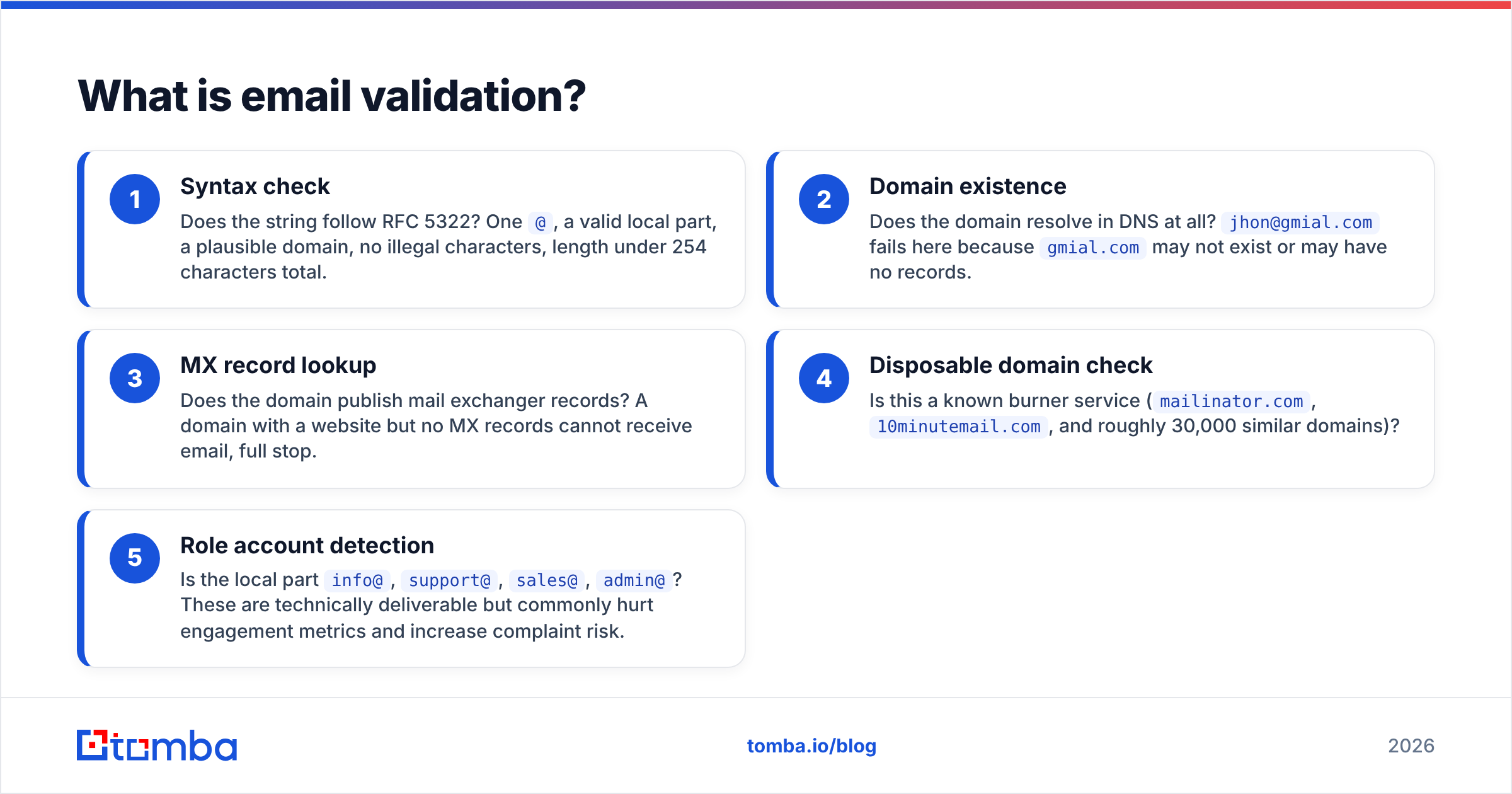
A validation pass typically runs these layers:
- Syntax check — Does the string follow RFC 5322? One
@, a valid local part, a plausible domain, no illegal characters, length under 254 characters total. - Domain existence — Does the domain resolve in DNS at all?
jhon@gmial.comfails here becausegmial.commay not exist or may have no records. - MX record lookup — Does the domain publish mail exchanger records? A domain with a website but no MX records cannot receive email, full stop.
- Disposable domain check — Is this a known burner service (
mailinator.com,10minutemail.com, and roughly 30,000 similar domains)? - Role account detection — Is the local part
info@,support@,sales@,admin@? These are technically deliverable but commonly hurt engagement metrics and increase complaint risk.
That's it. Validation never contacts the mailbox. It is fast, cheap, and essentially free at scale — you can validate a million rows locally in under a minute with no external API cost.
The catch: everything validation approves is still hypothetical. ceo@microsoft.com passes every one of the five layers above with a perfect score. It is also almost certainly not a real mailbox.
What is email verification?#
Verification is an existence check. It opens a connection to the receiving mail server and probes whether a specific mailbox is real and willing to accept mail.
The core mechanism is an SMTP handshake. The verifier connects to the MX host on port 25, issues HELO, then MAIL FROM, then RCPT TO: <target@domain.com>, and reads the response code before sending QUIT. It never actually delivers a message.
- 250 — the server accepts the recipient. Strong signal the mailbox exists.
- 550 / 551 / 553 — no such user. The address is dead.
- 450 / 451 / 452 — temporary failure or greylisting. Retry later; a single attempt is not conclusive.
- 252 — "cannot verify, but will attempt delivery." This is the catch-all response and it's the hard part.
Serious verification stacks add several layers on top of the raw handshake:
- Catch-all resolution. Roughly 15–20% of B2B domains accept every address at the domain, so
RCPT TOreturns 250 forasdlkfj@company.comtoo. A catch-all verifier probes with a known-invalid control address, compares responses, and falls back to pattern confidence and historical engagement data instead of trusting the 250. - Greylisting handling. Many servers deliberately soft-fail first contact. One-shot verifiers report these as "unknown" and you lose usable contacts.
- Spam-trap and blocklist screening. Some addresses are deliverable and still poisonous — recycled traps that were once real, or addresses sitting on known complaint lists.
- Accept-all-then-bounce detection. Microsoft 365 tenants in particular accept at the gateway and bounce internally minutes later. Only providers tracking post-accept bounce feedback catch this.
- Freshness scoring. Even a confirmed-live mailbox degrades. B2B email data decays at roughly 22–30% per year as people change jobs.
Email validation vs verification: what's the actual difference?#
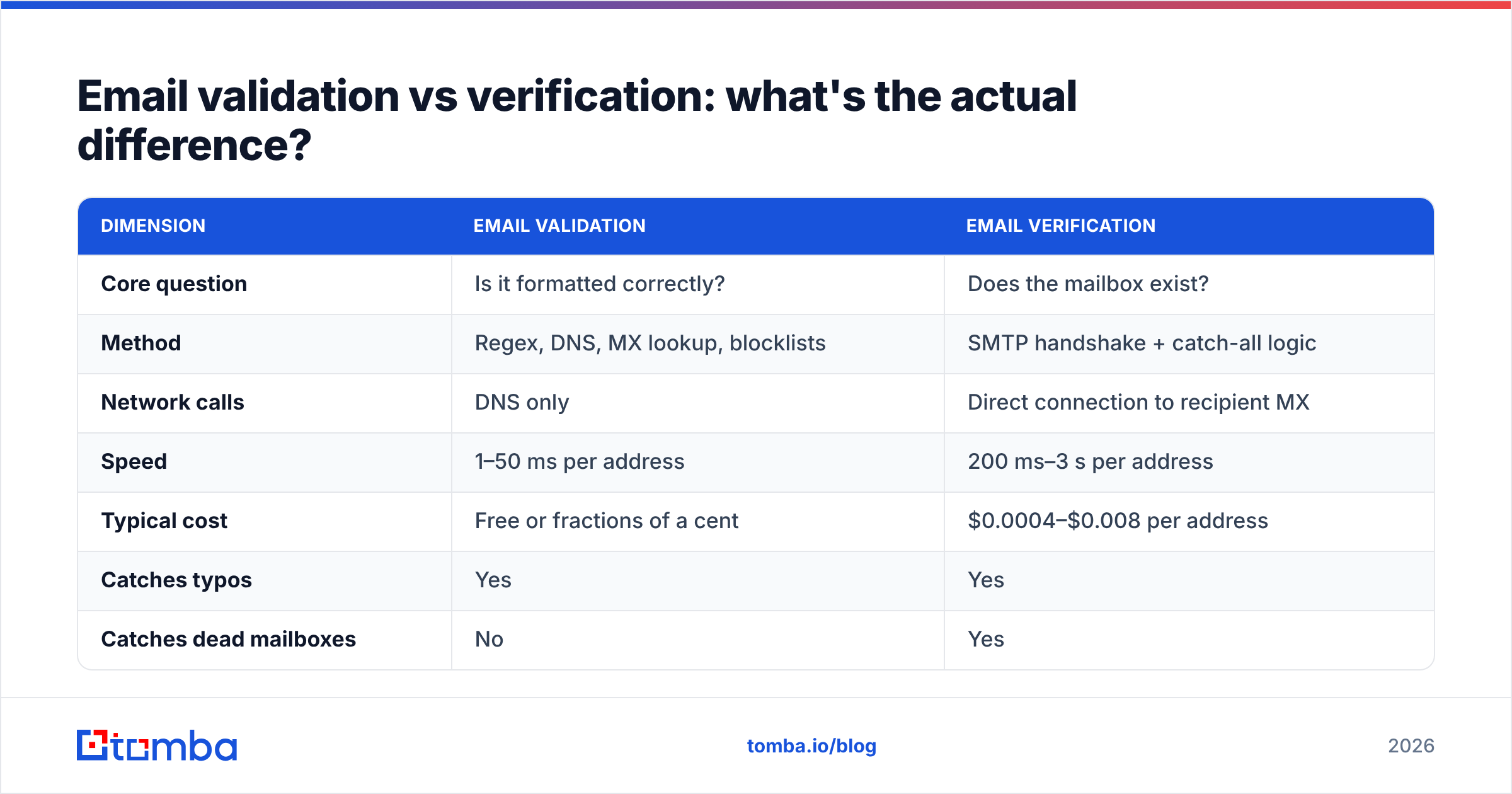
Here's the side-by-side that matters when you're deciding what your pipeline needs.
| Dimension | Email validation | Email verification |
|---|---|---|
| Core question | Is it formatted correctly? | Does the mailbox exist? |
| Method | Regex, DNS, MX lookup, blocklists | SMTP handshake + catch-all logic |
| Network calls | DNS only | Direct connection to recipient MX |
| Speed | 1–50 ms per address | 200 ms–3 s per address |
| Typical cost | Free or fractions of a cent | $0.0004–$0.008 per address |
| Catches typos | Yes | Yes |
| Catches dead mailboxes | No | Yes |
| Catches departed employees | No | Yes |
| Handles catch-all domains | No | Only with a dedicated catch-all engine |
| Detects spam traps | Partially (known lists) | Yes, with reputation data |
| Bounce rate after | 8–20% typical | 0.5–2% typical |
| Best used | At form entry, in real time | Before every send, in batch |
The bounce-rate row is the one to internalize. A validated-only list from a scraped source routinely bounces in the double digits. Gmail and Yahoo's bulk sender requirements — enforced since February 2024 — put the practical ceiling around 2%, with spam complaint rates capped at 0.3%. Validation alone cannot get you there.
When should you use validation instead of verification?#
Validation wins whenever latency and cost matter more than certainty.
- Signup and lead forms. You have 100 ms before the user notices lag. Run syntax + MX + disposable checks inline, reject obvious garbage, and queue the address for full verification asynchronously.
- CRM data hygiene at write time. Block malformed rows from entering the database at all. Cheaper than cleaning them later.
- Pre-filtering a large purchased list. Strip the 10–15% that's structurally dead before paying per-address verification fees. This alone can cut a verification bill by a sixth.
- Free-tier or high-volume consumer products. If you're processing millions of low-value signups, per-address SMTP checks may not pencil out.
Verification wins whenever a bounce has a real cost:
- Any cold outbound campaign. Non-negotiable. Your sending domain reputation is the asset; bounces are what destroy it.
- Re-engaging a list older than six months. Data decay makes a previously clean list dangerous.
- Before importing into a sequencer. Tools like Instantly, Smartlead, and Outreach charge per contact and will happily burn your domain on dead data.
- After enrichment or scraping. Guessed-pattern addresses need existence confirmation, not format confirmation.
If you're pulling addresses from a company domain, an email finder that verifies at discovery time collapses these into one step — you get the address and its deliverability status in the same call, instead of finding first and cleaning later.
Does the order of operations matter?#
Yes, and getting it wrong is expensive. The correct sequence:
- Deduplicate first. Remove exact and normalized duplicates (
John.Smith@acme.comandjohn.smith@acme.comare the same mailbox on most servers). Use a remove duplicates pass before you pay for anything. On a typical scraped list this cuts 8–12% of volume. - Validate. Syntax, MX, disposable, role. Drop hard failures. Costs nothing, removes 10–20% of a raw list.
- Verify. SMTP-level existence check on what survives. This is the paid step and it should be the smallest possible input set by now.
- Segment by risk. Split into deliverable / catch-all / risky / undeliverable. Send freely to deliverable; send catch-all only from a secondary or warmed domain; never send to undeliverable.
- Re-verify on a cadence. Every 60–90 days for active lists, or immediately before any campaign to a list that's been sitting.
Teams who verify before deduplicating pay two to three times for the same mailbox. Teams who skip step 4 blend catch-all addresses into their main sends and watch sender reputation sag for reasons they can't trace, because catch-all domains don't bounce — they silently discard.
How do the tools compare on this split?#
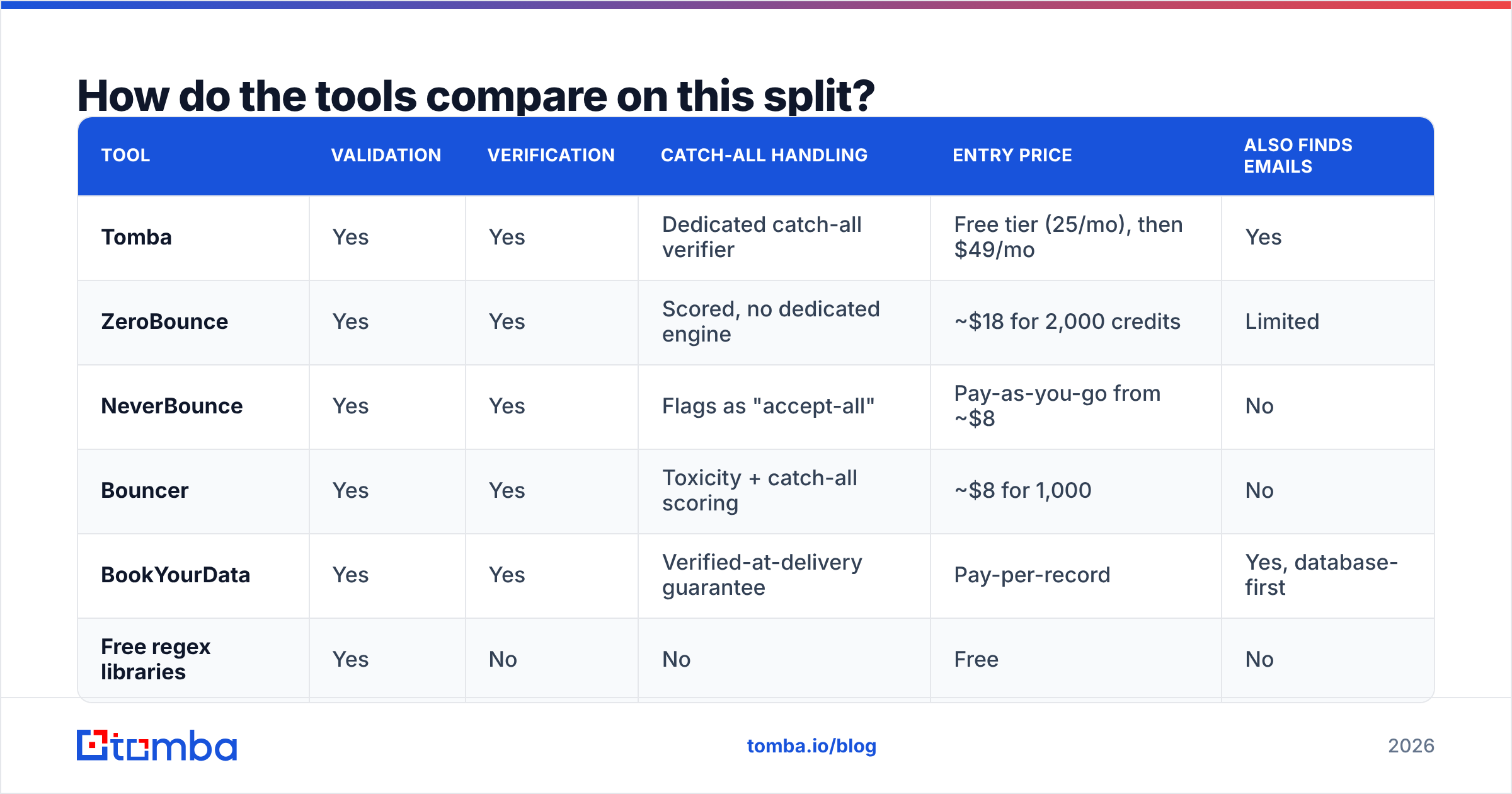
Most vendors do one side well and treat the other as a checkbox. Here's how the categories break down.
| Tool | Validation | Verification | Catch-all handling | Entry price | Also finds emails |
|---|---|---|---|---|---|
| Tomba | Yes | Yes | Dedicated catch-all verifier | Free tier (25/mo), then $49/mo | Yes |
| ZeroBounce | Yes | Yes | Scored, no dedicated engine | ~$18 for 2,000 credits | Limited |
| NeverBounce | Yes | Yes | Flags as "accept-all" | Pay-as-you-go from ~$8 | No |
| Bouncer | Yes | Yes | Toxicity + catch-all scoring | ~$8 for 1,000 | No |
| BookYourData | Yes | Yes | Verified-at-delivery guarantee | Pay-per-record | Yes, database-first |
| Free regex libraries | Yes | No | No | Free | No |
Two notes on reading this table. First, "validation" is table stakes — every paid vendor does it, and so does a 40-line open-source library. Pay for the verification column, not the validation column. Second, if your workflow starts from a company domain rather than an existing list, a combined finder-plus-verifier is structurally cheaper than buying discovery and cleaning separately. BookYourData approaches the same problem from the database side with pay-per-record pricing and a delivery guarantee, which suits teams who want a pre-built list rather than a discovery workflow.
Tomba's email verifier runs the full SMTP path plus catch-all resolution, and Tomba pricing starts at $49/mo on the Starter plan with a free tier at 25 searches per month for testing the accuracy claim before committing.
What does each check actually miss?#
Being precise about the failure modes helps you set expectations.
Validation misses:
- Dead mailboxes at live domains — the single largest bounce source in B2B
- Employees who left (22–30% annual decay)
- Suspended and over-quota accounts
- Recycled spam traps
- Anything behind a catch-all
Verification misses:
- Mailboxes at servers that block port 25 probing entirely (some enterprise firewalls)
- Whether the person still works there — a shared or forwarded mailbox can stay live for years
- Whether the address is monitored by a human
- Whether sending is legally permitted under GDPR, CAN-SPAM, or CASL
- Content-based filtering — a verified address still lands in spam if your copy, SPF, DKIM, or DMARC setup is broken
That last point matters. Verification gets you to the mail server. It doesn't get you to the inbox. If your SPF record is misconfigured or your domain is cold, a 100%-verified list still underperforms. Google's bulk sender guidelines and Microsoft's equivalent both require authentication alongside list hygiene — one without the other doesn't clear the bar.
How much does bad hygiene actually cost?#
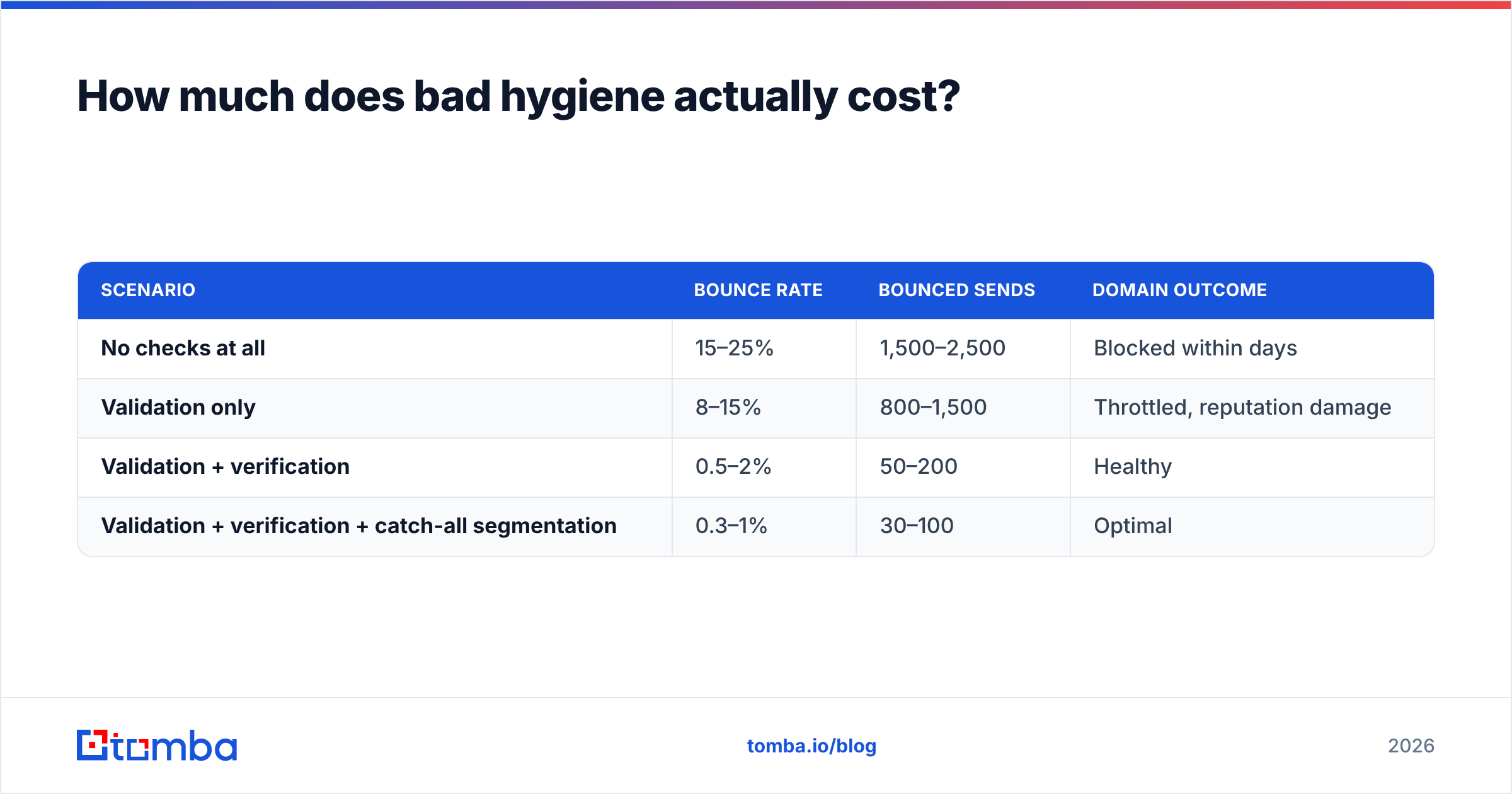
Run the numbers on a 10,000-contact list.
| Scenario | Bounce rate | Bounced sends | Domain outcome |
|---|---|---|---|
| No checks at all | 15–25% | 1,500–2,500 | Blocked within days |
| Validation only | 8–15% | 800–1,500 | Throttled, reputation damage |
| Validation + verification | 0.5–2% | 50–200 | Healthy |
| Validation + verification + catch-all segmentation | 0.3–1% | 30–100 | Optimal |
The direct cost of verifying 10,000 addresses at industry rates is roughly $40–80. The cost of burning a sending domain is a 4–8 week warmup on a replacement domain, plus every deal in the pipeline that goes cold during it. G2's email verification category reviews repeat this pattern: the teams who complain about verification cost are usually comparing it against zero, not against the recovery cost.
There's a second-order effect too. Inbox providers weigh bounce rate as a signal of list acquisition quality. A high-bounce sender gets more aggressive spam filtering on the mail that does deliver, so your open rate on valid contacts drops even though those addresses were fine.
Which one do you actually need?#
Both — but at different points in the workflow, and with different budgets.
Use validation as a free, always-on filter: at form entry, on CRM writes, and as a pre-pass before paid verification. Never treat its output as send-ready.
Use verification as a gate before any send: after enrichment, after import, before every campaign, and on a 60–90 day refresh cycle. Segment the output rather than treating it as pass/fail, because catch-all addresses are neither.
The teams with sub-1% bounce rates aren't using a secret vendor. They run both steps in the right order, they re-verify on a schedule, and they route catch-all traffic to a separate domain. That's the whole method.
If you're building a list from company domains rather than cleaning one you already have, start at the source: the Tomba Email Finder returns addresses with verification status attached, so discovery and hygiene happen in one pass instead of two invoices. The free tier gives you 25 searches a month to check the confidence scores against contacts you already know are real — do that before you trust any vendor's accuracy claim, including this one.
Related guides#
Ready to find emails that actually work?
Join 150,000+ professionals who stopped guessing and started sending. Free credits on signup — no credit card required.
Get the Tomba newsletter
Practical outbound tactics and product updates — once every two weeks.
About the author