Email Verification for Outreach: The 2026 Playbook
Bounce rates above 3% quietly kill cold campaigns. Here's how email verification for outreach actually works, what each status code means, and when verifying is a waste of credits.
TL;DR
- Anything above a 3% bounce rate puts your sending domain at risk with Google and Microsoft. Verification is the cheapest insurance you can buy.
- Syntax checks, MX lookups, and SMTP handshakes are three different things. Most "verifiers" only do the first two well.
- Catch-all domains are where verification tools quietly fail — roughly 15-25% of B2B domains accept everything, so a plain "valid" result there means nothing.
- Verify at the point of send, not at the point of scrape. A list verified 90 days ago is already 5-8% rotten.
- You do not need to verify every address. Freshly sourced emails from a finder with SMTP confidence scores are often already clean enough.
Why does email verification for outreach matter more in 2026 than it did in 2022?#
Because the mailbox providers changed the rules and never changed them back.
Since Google and Yahoo rolled out their bulk-sender requirements, spam-complaint rates above 0.3% and sustained hard bounces are treated as direct reputation signals. Microsoft followed with tighter throttling on high-bounce senders into Outlook and Office 365 tenants — which is where most of your B2B prospects actually live. The practical result: a campaign that bounced 8% in 2022 and still landed replies will, in 2026, get your domain quietly throttled after the second send.
Think of your sending domain like a credit score. Every hard bounce is a missed payment. Nobody tells you your score dropped — you just start getting declined. And unlike a credit score, there is no dispute process. You warm up a new domain and start over.
Email verification for outreach is the process of checking, before you send, whether each address on your list can actually receive mail. Done well, it pulls a raw list from a 6-10% bounce rate down to under 2%. Done badly — or done with a tool that guesses on catch-alls — it gives you false confidence and the same bounces.
What actually happens during an email verification check?#
Verification is a chain of increasingly expensive checks. Cheap ones run first and kill obvious garbage; expensive ones run last on survivors.
- Syntax validation — Does the string conform to RFC 5322? Catches
john@@company, trailing spaces, and the surprisingly commonfirstname.lastname@companywith no TLD. Free, instant, catches maybe 1-2% of a scraped list. - Domain and MX record lookup — Does the domain resolve, and does it publish mail exchange records? A domain with no MX record cannot receive mail, full stop. This catches parked domains, dead startups, and typo'd domains like
gmial.com. - Disposable and role-account detection — Flags
mailinator.comthrowaways and role addresses (info@,sales@,support@). Role accounts are technically deliverable but convert terribly and generate complaints, so most teams suppress them. - SMTP handshake (the real test) — The verifier opens a connection to the receiving mail server, issues
RCPT TOfor the specific address, and reads the response code without ever sending a message. A250means the mailbox exists. A550means it does not. - Catch-all detection — Before trusting the SMTP result, the verifier tests a deliberately fake address at the same domain. If
k7x9qq2z@company.comalso returns250, the server accepts everything and the individual result is meaningless. - Greylisting and rate-limit handling — Some servers return a temporary
4xxdeferral on first contact. A serious verifier retries later instead of marking the address "unknown" and moving on.
The gap between a good and a mediocre verifier is entirely in steps 4 through 6. Anyone can run a regex and a DNS query.
What do verification status codes actually mean?#
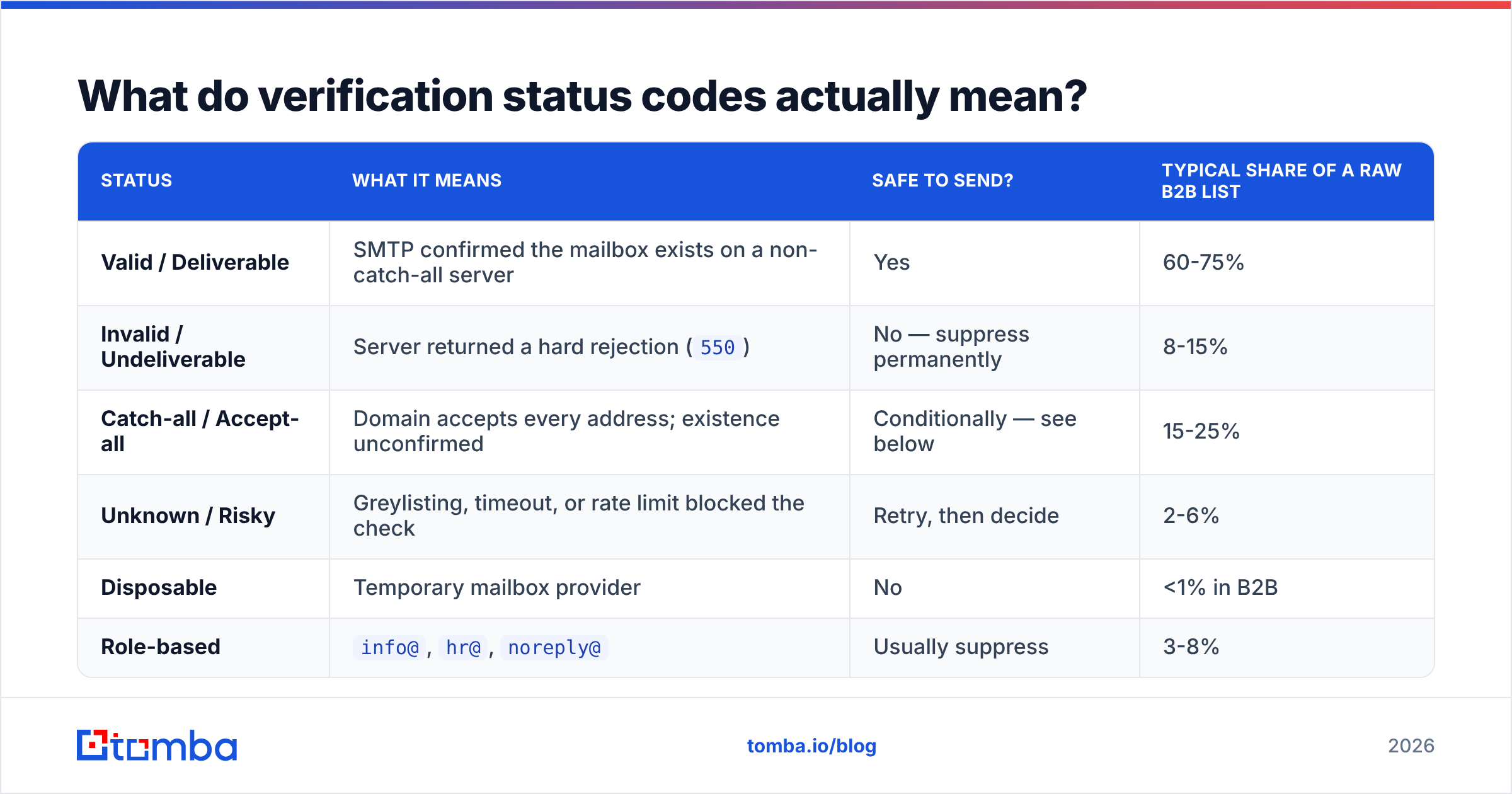
Every vendor uses slightly different labels for the same underlying reality. Here is the translation layer.
| Status | What it means | Safe to send? | Typical share of a raw B2B list |
|---|---|---|---|
| Valid / Deliverable | SMTP confirmed the mailbox exists on a non-catch-all server | Yes | 60-75% |
| Invalid / Undeliverable | Server returned a hard rejection (550) |
No — suppress permanently | 8-15% |
| Catch-all / Accept-all | Domain accepts every address; existence unconfirmed | Conditionally — see below | 15-25% |
| Unknown / Risky | Greylisting, timeout, or rate limit blocked the check | Retry, then decide | 2-6% |
| Disposable | Temporary mailbox provider | No | <1% in B2B |
| Role-based | info@, hr@, noreply@ |
Usually suppress | 3-8% |
The "unknown" bucket is where vendors differentiate most. Some tools park 12% of your list there and charge you full price for a shrug. Look for a verifier that keeps unknowns under 5% and tells you why it gave up.
How should you handle catch-all domains without torching your reputation?#
Catch-alls are the single biggest unsolved problem in this category, and any vendor claiming 99% accuracy across all domains is quietly excluding them.
A catch-all server says "yes" to every address, so SMTP verification tells you nothing. You have four options, ranked by how much they cost you:
- Suppress them entirely. Safest, and you throw away a quarter of your addressable market. Fine if you are volume-rich and reputation-poor.
- Send them on a separate domain. Isolate the risk. Your primary domain stays clean; a secondary domain absorbs whatever bounces come back. This is what most disciplined outbound teams do.
- Use pattern confidence instead of SMTP. If a provider knows that
company.comusesfirst.last@across 400 confirmed contacts, thenjane.doe@company.comis very likely real even when SMTP won't confirm it. This is where a dedicated catch-all verifier earns its keep — it scores based on observed patterns and historical engagement signals rather than a handshake that always returns yes. - Warm them through a first-touch signal. Send a low-risk plain-text message first, watch for a bounce, then escalate the sequence only for addresses that survive.
Option three plus option two, combined, is what actually works at scale. Pattern-scored catch-alls sent from a secondary domain will typically bounce at 4-6% rather than the 15-20% you get sending them blind.
Which email verification tools are worth paying for?#
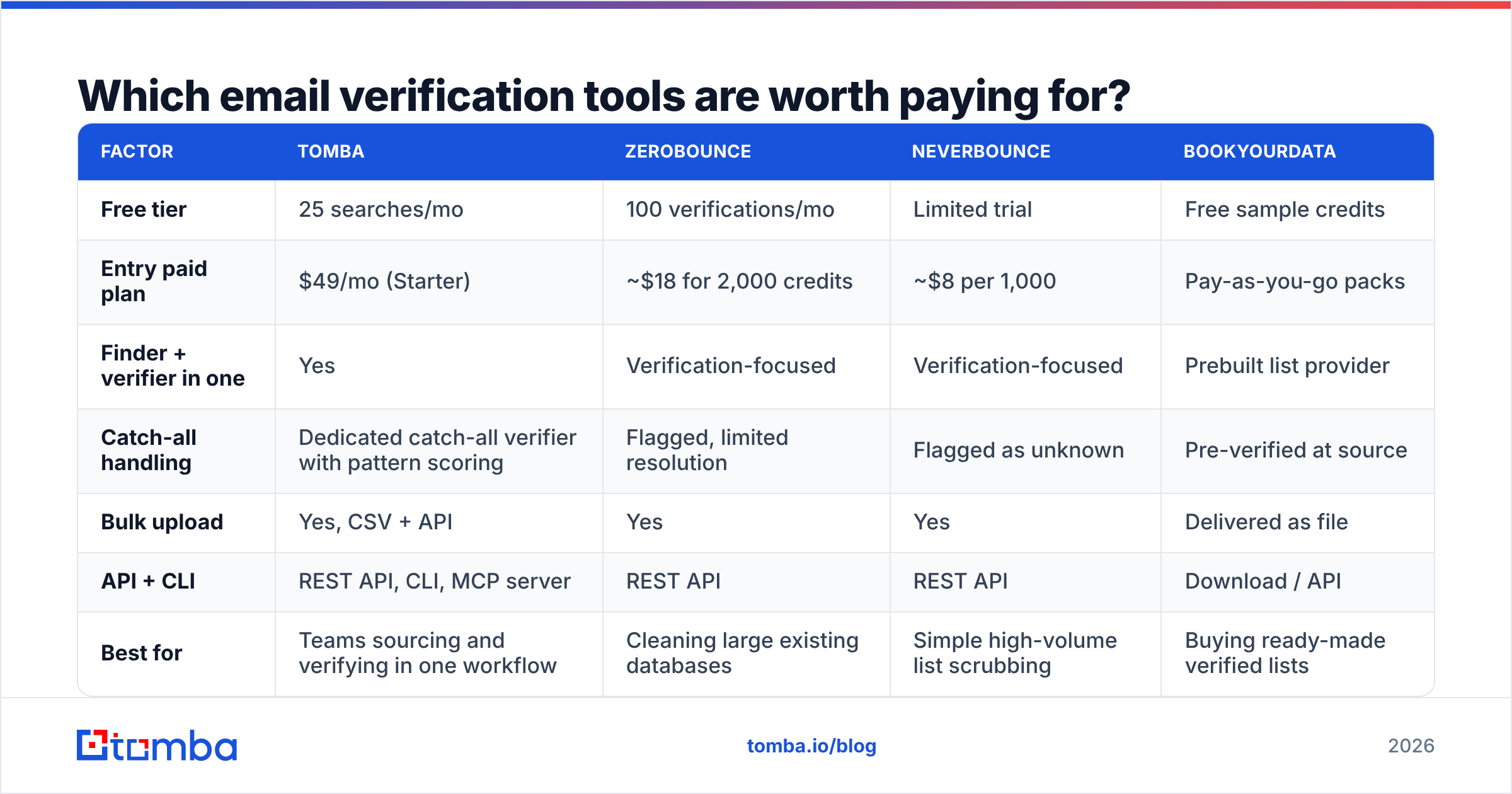
Pricing in this category is deliberately confusing — some vendors charge per verification, some bundle credits with finding, some charge monthly regardless of use. Here is an honest comparison of what you actually get.
| Factor | Tomba | ZeroBounce | NeverBounce | BookYourData |
|---|---|---|---|---|
| Free tier | 25 searches/mo | 100 verifications/mo | Limited trial | Free sample credits |
| Entry paid plan | $49/mo (Starter) | ~$18 for 2,000 credits | ~$8 per 1,000 | Pay-as-you-go packs |
| Finder + verifier in one | Yes | Verification-focused | Verification-focused | Prebuilt list provider |
| Catch-all handling | Dedicated catch-all verifier with pattern scoring | Flagged, limited resolution | Flagged as unknown | Pre-verified at source |
| Bulk upload | Yes, CSV + API | Yes | Yes | Delivered as file |
| API + CLI | REST API, CLI, MCP server | REST API | REST API | Download / API |
| Best for | Teams sourcing and verifying in one workflow | Cleaning large existing databases | Simple high-volume list scrubbing | Buying ready-made verified lists |
The honest read: if you already have a 200,000-record database sitting in your CRM and you just need it scrubbed, a pure-play verifier priced per credit is cheaper. ZeroBounce and NeverBounce are both mature and do that job well. If you are building lists from scratch every week, paying twice — once to find, once to verify — is waste, and a combined platform wins on both cost and workflow. BookYourData takes a different route entirely: pre-verified lists you buy by the record, which suits teams that would rather skip the sourcing step and accept a fixed cost per contact.
Check the current Tomba pricing against your monthly volume before assuming any of these is cheapest — the crossover point moves fast depending on whether you're finding or just cleaning.
When is verifying a waste of credits?#
More often than vendors want to admit.
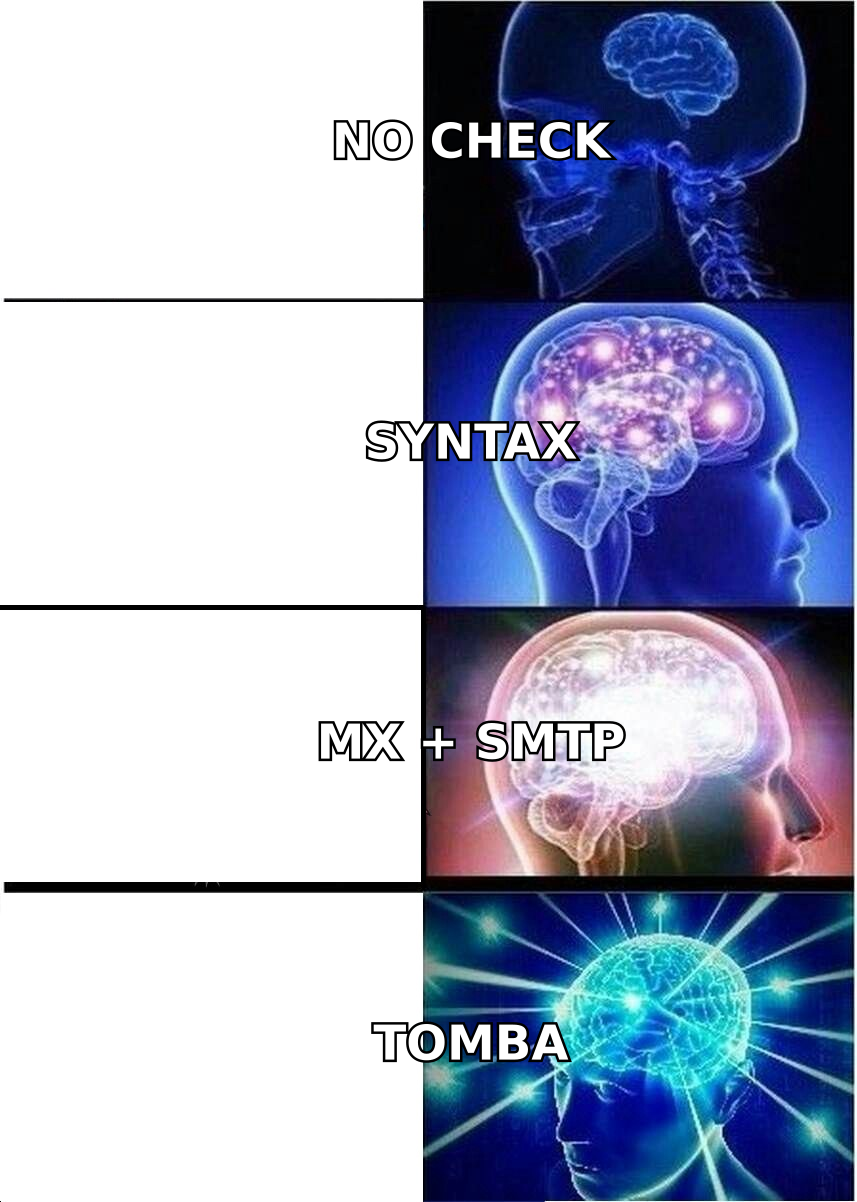
Skip verification when the address came from a finder that already ran SMTP. If your email finder returns a confidence score above 95% with an SMTP-confirmed flag attached, re-verifying is paying twice for the same handshake. Spot-check 5% of the batch instead.
Skip it for addresses under 30 days old from a confirmed source. A contact who filled in a form last week and got a confirmation email is verified by definition.
Do verify anything older than 60 days. B2B email decays at roughly 2-2.5% per month — job changes, layoffs, domain migrations. A list you verified in Q1 is meaningfully rotten by Q2. Validity's research on data decay and similar industry studies have put annual B2B database decay in the 22-30% range for years, and nothing about the 2024-2026 job market made that better.
Always verify before a high-volume send on a new domain. Warming domains have zero reputation buffer. One bad batch during week three of warmup and you restart.
How do you build a verification step into an actual outreach workflow?#
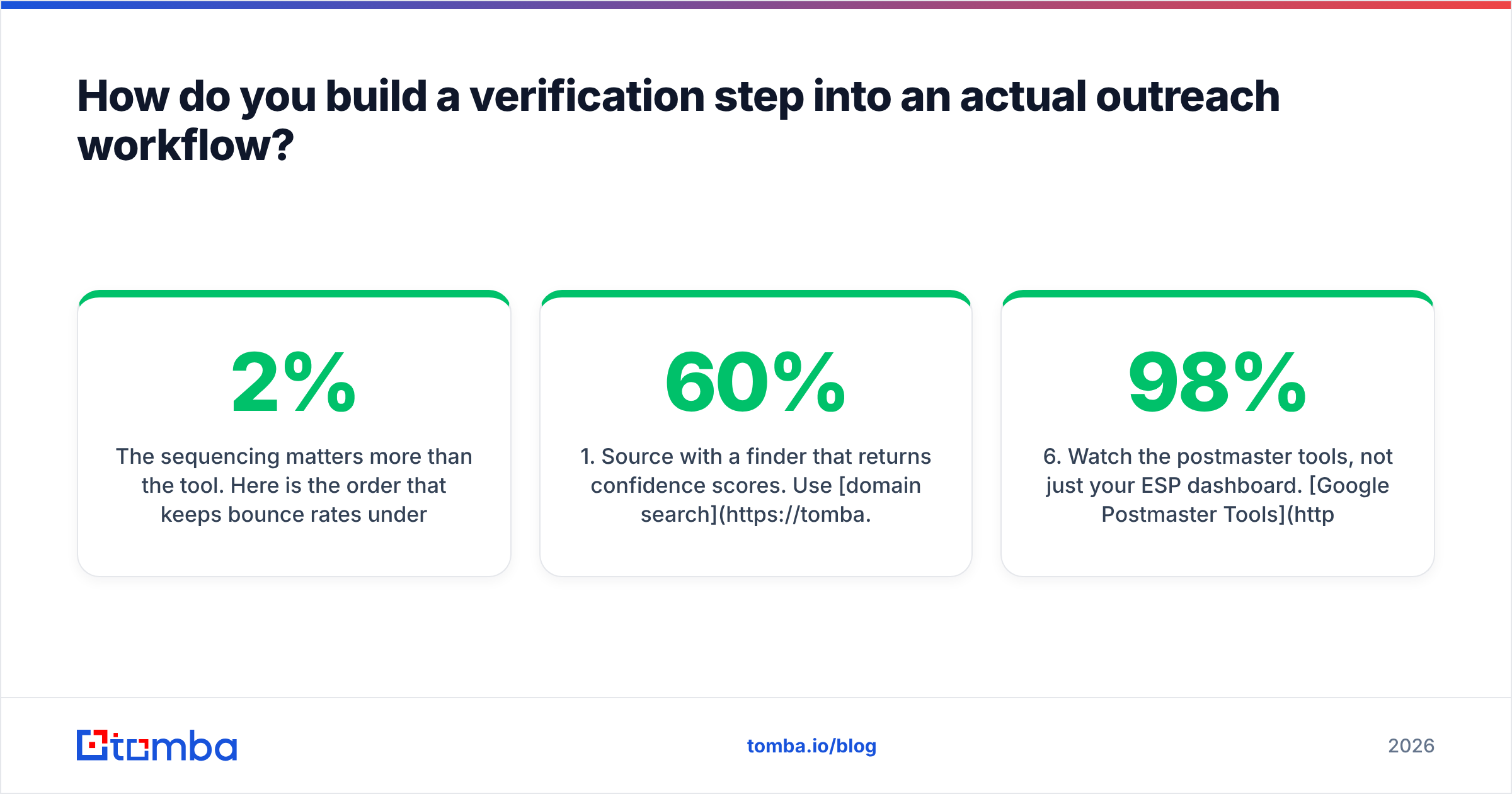
The sequencing matters more than the tool. Here is the order that keeps bounce rates under 2% without doubling your data spend:
- Source with a finder that returns confidence scores. Use domain search to pull every known address at a target company, then filter by role and seniority before you spend a single verification credit. Filtering first can cut your verification volume by 60%.
- Deduplicate before verifying. Duplicates across campaigns are the most common source of wasted credits. A quick dedupe pass on the merged CSV pays for itself instantly.
- Run the bulk verification. Push the filtered, deduped list through bulk verify or the API. For lists over 10,000, API is significantly faster than the UI and lets you write results straight back to your CRM.
- Split by status into three sends. Valid addresses go to your primary domain. Catch-alls go to a secondary domain with a softer first touch. Invalid and disposable go to a permanent suppression list — not the trash, the suppression list, so they never get re-imported.
- Re-verify on a rolling 45-day cycle. Not the whole database — just the segment you're about to touch. Rolling verification costs a fraction of full-database scrubs and catches decay before it bounces.
- Watch the postmaster tools, not just your ESP dashboard. Google Postmaster Tools shows your actual domain reputation as Google sees it. Your sending platform's "delivered" metric does not. If Postmaster shows reputation slipping while your ESP reports 98% delivered, trust Postmaster.
That last point catches teams out constantly. "Delivered" in most sending tools means "the receiving server accepted it" — which includes acceptance straight into spam, and includes every catch-all domain that accepts everything.
What bounce rate should you actually be targeting?#
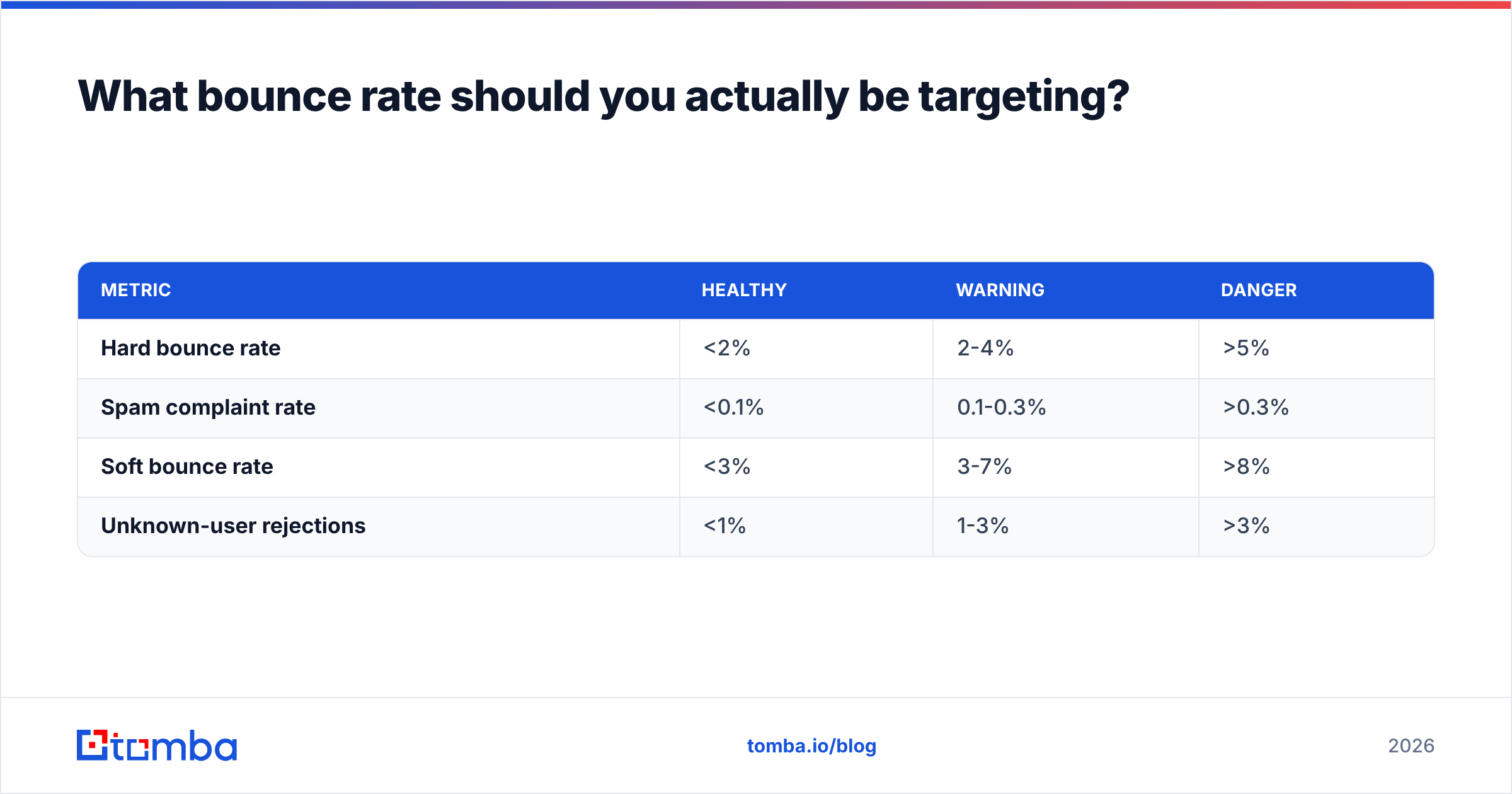
Under 2% hard bounces on any given send. Under 1% if you're on a domain younger than 90 days.
For context on the thresholds that matter:
| Metric | Healthy | Warning | Danger |
|---|---|---|---|
| Hard bounce rate | <2% | 2-4% | >5% |
| Spam complaint rate | <0.1% | 0.1-0.3% | >0.3% |
| Soft bounce rate | <3% | 3-7% | >8% |
| Unknown-user rejections | <1% | 1-3% | >3% |
Soft bounces get ignored too often. A soft bounce is usually "mailbox full" or "server busy," which sounds harmless — but a persistent soft bounce pattern on the same domain often means a throttle, not a full inbox. If one prospect domain soft-bounces 40 of your 50 sends, that domain's gateway has decided you're spam. Stop sending there and fix the underlying signal.
Also worth checking: your authentication is doing what you think it's doing. A missing or malformed SPF record will sink deliverability no matter how clean your list is. Run your domain through an SPF checker before blaming the data. Verification and authentication solve different problems, and teams routinely spend money on the first while ignoring the second.
What does verification cost when you model it properly?#
Run the math on your own numbers rather than the vendor's example.
Take a team sending 10,000 cold emails a month. Raw scraped list, no verification: expect 700-900 hard bounces, a reputation hit within two months, and a domain replacement cycle that costs you three weeks of warmup plus the domain itself. Call it $400 in direct cost and roughly 15% of a quarter's pipeline in lost sending time.
Same team with verification in the loop: roughly 10,000 verification credits a month plus finder credits. On a plan like Tomba's Growth tier at $99/mo, that's covered in a single subscription that also handles the finding. On a pure-play verifier at $0.004-0.008 per credit, you're looking at $40-80 for verification alone, plus whatever you pay to source the addresses in the first place.
The verification line item is almost never the expensive part. The expensive part is the domain you burn when you skip it.
One more thing worth budgeting for: data enrichment on the addresses that survive verification. A verified address with no job title, no company size, and no recent signal is deliverable but unusable for personalisation. Verification tells you the message will arrive. Enrichment tells you what to put in it.
Ready to stop guessing at your list quality?#
Bounce rates are a solved problem — they just require doing three things in the right order: source with confidence scores, verify before every send, and isolate catch-alls on a separate domain.
Start with the sourcing step, because clean data at the front end shrinks everything downstream. The Tomba Email Finder returns SMTP-confirmed addresses with confidence scoring built in, so a large share of what you pull is already send-ready before it ever hits a verification queue. The free tier gives you 25 searches a month to test the accuracy against a domain you already know well — pick a company where you know three real addresses, and see how many the tool gets right before you spend anything.
Related guides#
Ready to find emails that actually work?
Join 150,000+ professionals who stopped guessing and started sending. Free credits on signup — no credit card required.
Get the Tomba newsletter
Practical outbound tactics and product updates — once every two weeks.
About the author