Email Verification Service: How to Pick One in 2026
Most email verification services return the same 92% of results. The differences hide in catch-all handling, bounce guarantees, and per-credit pricing. Here is how to test one before you commit budget.
TL;DR
- An email verification service checks whether an address will accept mail before you send to it. The good ones cut hard bounces to under 2%; the weak ones just re-check syntax and MX records and call it a day.
- Every vendor scores well on easy addresses. The real differentiator is what happens with catch-all domains, role accounts, and freshly-departed employees — roughly 15-25% of a typical B2B list.
- Per-credit price is the wrong number to compare. Compare cost per usable contact after unknowns and duplicates are stripped out.
- Verification is a decay problem, not a one-time cleanup. B2B data rots at roughly 22-30% per year, so re-verify anything older than 90 days before it enters a sequence.
- Run a 500-address bake-off with known-good and known-dead controls before you buy anything. Two hours of testing beats six months on the wrong contract.
What is an email verification service?#
An email verification service tells you whether an address is deliverable before you send anything to it. Think of it as a doorman who knocks on the door and listens, rather than a mail carrier who shoves the letter through and hopes.
Technically, verification runs a chain of checks, each cheaper and faster than the one after it:
- Syntax validation — does the address conform to RFC 5322? Catches typos like
john@@acme.comand trailing spaces. Free, instant, and roughly 3% of a scraped list. - Domain and MX record lookup — does the domain exist, and does it publish mail exchange records? A domain with no MX can't receive mail at all. This kills expired and parked domains.
- Disposable and role detection — flags
mailinator.comthrowaways and generic inboxes likeinfo@,sales@,support@. Role accounts aren't invalid, but they behave differently: lower reply rates, higher spam-complaint risk. - SMTP handshake — the verifier opens a connection to the receiving mail server, issues
RCPT TO, and reads the response code without ever sending a message. A 250 means the mailbox exists. A 550 means it doesn't. - Catch-all detection — some domains accept mail for every address, real or not. The SMTP handshake returns 250 for
asdfghjkl@company.com. This is where verifiers separate themselves. - Risk scoring — combining greylisting behavior, historical bounce data, and mailbox provider heuristics into a confidence score rather than a naive yes/no.
Steps one through four are commodity. Any vendor can do them, and any vendor will show you a 98% accuracy figure based on them. Steps five and six are where you actually pay for expertise.

Why does an email verification service matter more in 2026?#
Because mailbox providers stopped being polite about it. Google and Yahoo's bulk sender requirements — rolled out in 2024 and tightened since — put a hard ceiling on spam complaint rates and expect authenticated, low-bounce sending. Microsoft followed with similar enforcement for high-volume senders into Outlook and Office 365 domains. You can read the current thresholds directly in Google's sender guidelines.
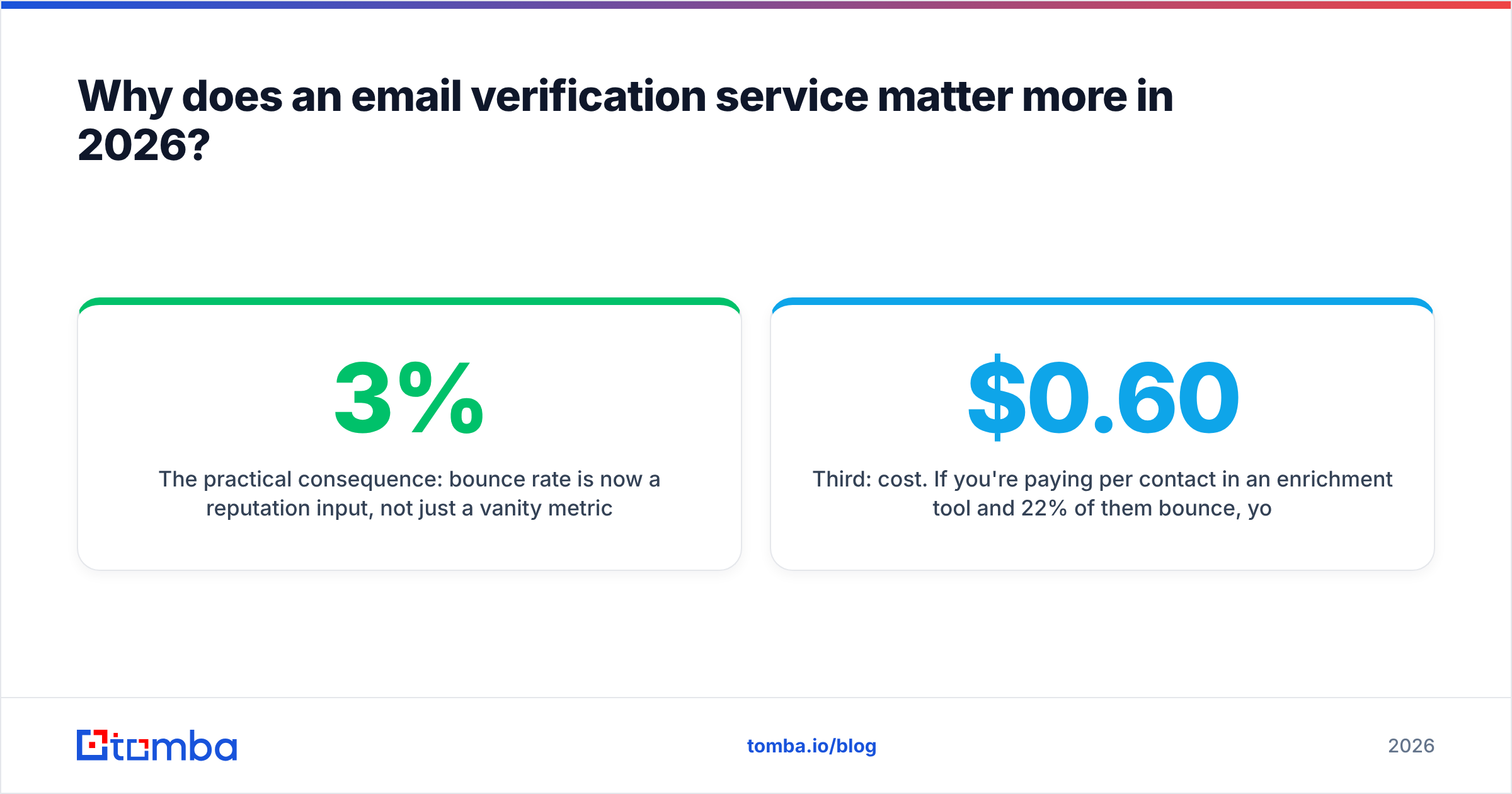
The practical consequence: bounce rate is now a reputation input, not just a vanity metric. Sustained hard bounces above roughly 2-3% and your sending domain starts getting throttled, foldered, or blocked outright. That damage isn't isolated to one campaign — it follows the domain.
There's a second reason verification got more valuable: AI-generated prospecting exploded volume. More teams are sending more sequences to more scraped lists. The mailbox providers responded by tightening filters, which means the cost of a dirty list is higher than it was three years ago. Your sender reputation is now the scarcest asset in outbound, and verification is the cheapest way to protect it.
Third: cost. If you're paying $0.60 per contact in an enrichment tool and 22% of them bounce, you're burning real budget on undeliverable rows. Verification at a fraction of a cent per address is the highest-ROI line item in most outbound stacks.
How do email verification services actually compare?#
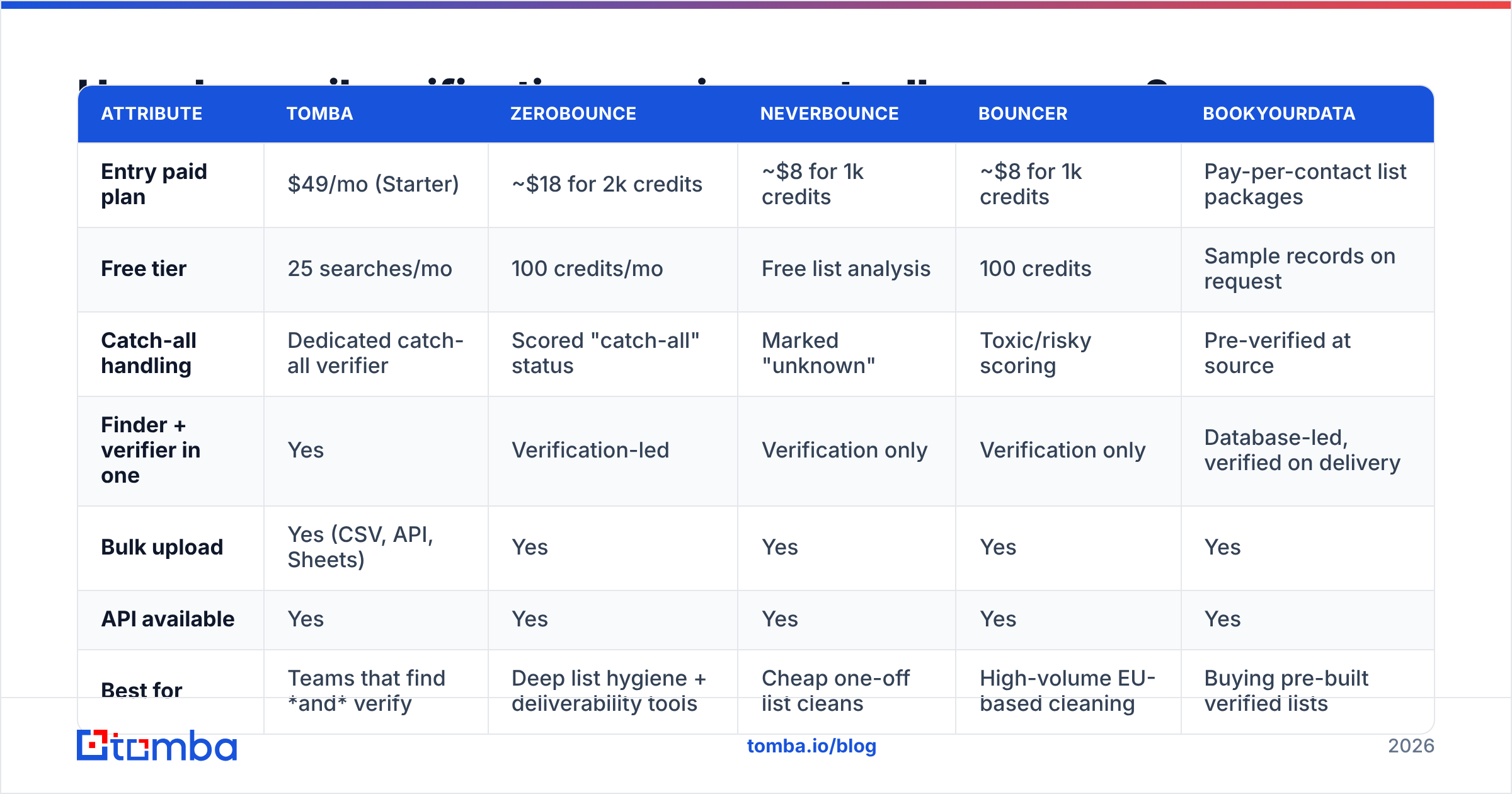
Here's where the market sits. Prices are entry-tier list published by each vendor and change often — confirm before you buy.
| Attribute | Tomba | ZeroBounce | NeverBounce | Bouncer | BookYourData |
|---|---|---|---|---|---|
| Entry paid plan | $49/mo (Starter) | ~$18 for 2k credits | ~$8 for 1k credits | ~$8 for 1k credits | Pay-per-contact list packages |
| Free tier | 25 searches/mo | 100 credits/mo | Free list analysis | 100 credits | Sample records on request |
| Catch-all handling | Dedicated catch-all verifier | Scored "catch-all" status | Marked "unknown" | Toxic/risky scoring | Pre-verified at source |
| Finder + verifier in one | Yes | Verification-led | Verification only | Verification only | Database-led, verified on delivery |
| Bulk upload | Yes (CSV, API, Sheets) | Yes | Yes | Yes | Yes |
| API available | Yes | Yes | Yes | Yes | Yes |
| Best for | Teams that find and verify | Deep list hygiene + deliverability tools | Cheap one-off list cleans | High-volume EU-based cleaning | Buying pre-built verified lists |
Two structural notes on that table.
Verification-only vendors vs. combined platforms. ZeroBounce, NeverBounce, and Bouncer are specialists — you bring a list, they clean it. That's ideal if your list comes from a webform, a CRM export, or a trade-show badge scan. It's less ideal if you're building lists from scratch, because you end up paying twice: once to a finder, once to a verifier. A combined platform like Tomba runs the email verifier against addresses its email finder produced, so verification happens inside the same credit pool.
Database vendors are a different category. BookYourData sells pre-verified contact records rather than a cleaning service — you're buying the data and the verification together, with a bounce guarantee attached. That's genuinely useful when you need coverage in a segment you can't source yourself, and it removes a step. It's a purchase decision, not a hygiene decision, and it belongs in a different budget line than a verification tool.

What accuracy claims should you actually believe?#
Treat every published accuracy number as marketing until you've reproduced it. Not because vendors lie outright, but because the denominator is never disclosed.
A vendor claiming "99% accuracy" is usually reporting: of the addresses we returned a definitive verdict on, 99% were correct. That excludes everything they marked "unknown," "risky," or "catch-all." If a service punts on 30% of your list and nails the remaining 70%, its headline accuracy looks superb while its practical usefulness is mediocre.
Ask for three numbers instead:
- Coverage rate — what percentage of submitted addresses got a definitive valid/invalid verdict, not "unknown"?
- False-valid rate — of addresses marked valid, what percentage actually bounced? This is the number that hurts you. A false invalid costs you one prospect; a false valid costs you reputation.
- False-invalid rate — of addresses marked invalid, how many were actually fine? Over-aggressive verifiers quietly delete working leads and you never find out.
The false-valid rate is the one to optimize for. Most buyers optimize for coverage, then wonder why their bounce rate didn't move.

How do you handle catch-all domains?#
Catch-all is the hardest problem in verification and the fastest way to judge a vendor.
A catch-all domain accepts mail addressed to anything. Send to zzz@company.com and the server replies 250 — accepted — then silently discards it, or routes it to an admin inbox where it dies. SMTP verification is blind here by design. Roughly 15-20% of B2B domains run catch-all, and the rate skews higher in enterprise and among companies using certain security gateways.
Vendors take three approaches:
- Mark it unknown and charge nothing. Honest, and it dumps the decision on you.
- Mark it risky and charge full price. Common. You get a label, not an answer.
- Apply secondary signals. Cross-reference the address against known-good historical sends, pattern confidence for that domain (does
first.last@match 400 other verified contacts there?), and web-sourced confirmation. This is what a dedicated catch-all verifier attempts, and it converts a meaningful slice of "unknown" into actionable.
Practical policy: don't discard catch-alls, and don't blast them either. Segment them into a separate, lower-volume send from a secondary domain. Watch the bounce rate on that segment specifically. If it stays under 4%, you can fold those addresses back into your main sending. If it spikes, you've learned something for free instead of at the cost of your primary domain.
What does an email verification service actually cost?#
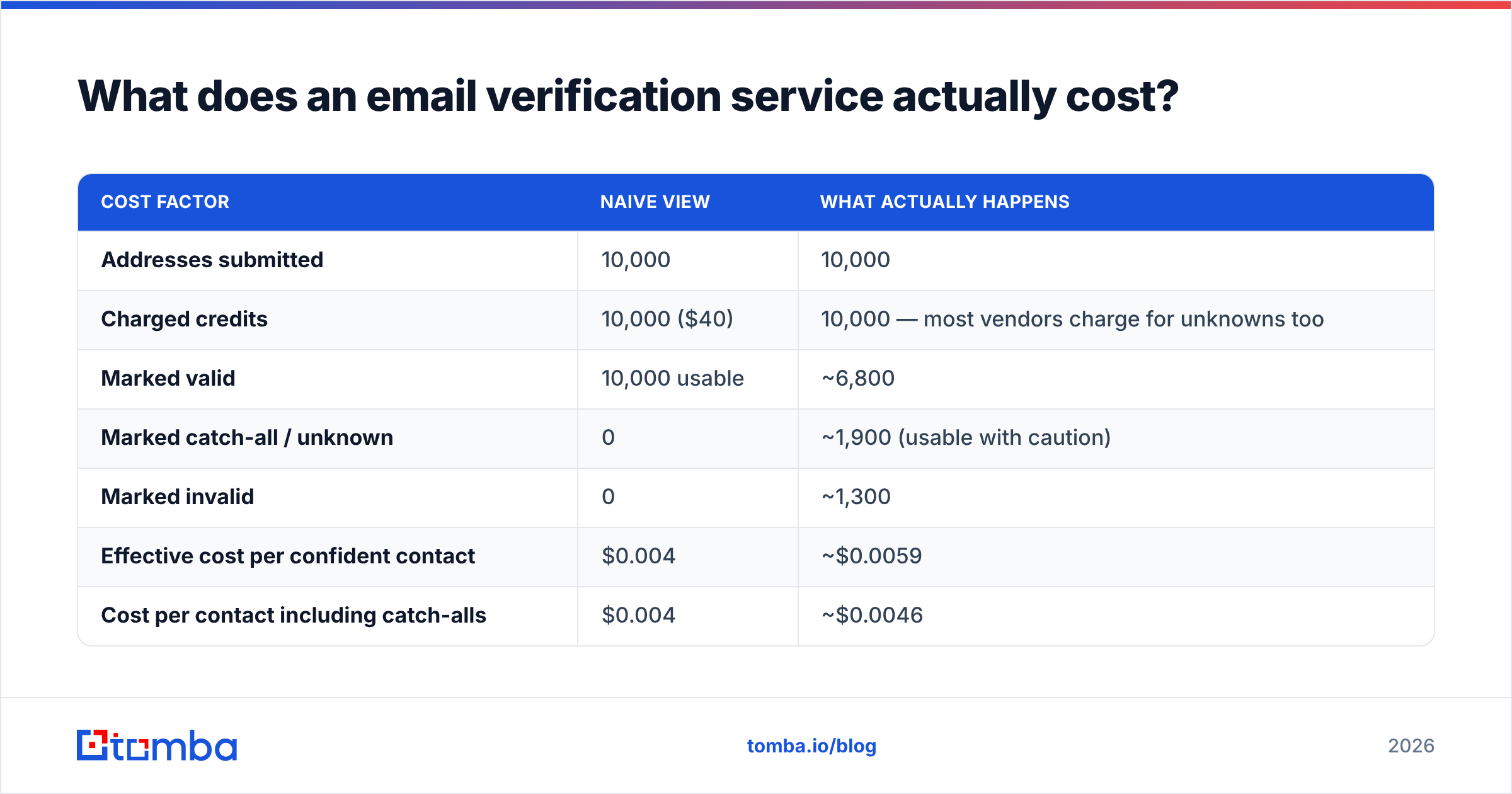
Sticker price per credit is misleading. Here's the arithmetic that matters, using a 10,000-address list at a hypothetical $0.004 per credit — $40 total.
| Cost factor | Naive view | What actually happens |
|---|---|---|
| Addresses submitted | 10,000 | 10,000 |
| Charged credits | 10,000 ($40) | 10,000 — most vendors charge for unknowns too |
| Marked valid | 10,000 usable | ~6,800 |
| Marked catch-all / unknown | 0 | ~1,900 (usable with caution) |
| Marked invalid | 0 | ~1,300 |
| Effective cost per confident contact | $0.004 | ~$0.0059 |
| Cost per contact including catch-alls | $0.004 | ~$0.0046 |
Nearly a 50% swing on effective cost, and nothing in the pricing page told you that. Three things to check in any contract:
- Do credits expire? Monthly-expiring credits punish spiky usage. If you clean lists quarterly, a rollover or pay-as-you-go plan is materially cheaper.
- Are unknowns billed? Some vendors refund or don't charge for indeterminate results. That's a real discount when 20% of your list is catch-all.
- Is there a bounce guarantee, and what does it actually cover? Most cover hard bounces only, exclude catch-alls, and reimburse in credits rather than cash.
For teams that need both discovery and cleaning, look at whether one credit pool covers both. Tomba pricing runs Free (25 searches/mo), Starter at $49/mo, Growth at $99/mo, and Pro at $249/mo, with finding, verification, and enrichment drawing from the same allowance — which removes the double-spend problem entirely.

How do you test an email verification service before buying?#
Two hours, 500 addresses, one spreadsheet. This is the single highest-value thing in this article.
Build a control set of 500 addresses with four buckets:
- 150 known-good — your own team, current customers, people you've exchanged mail with in the last 30 days. Every vendor must return valid. Any invalid here is a false-invalid, and it's disqualifying.
- 100 known-dead — addresses from employees who've left, domains you've watched expire, hard bounces from your last campaign. Every vendor must return invalid. A "valid" here is a false-valid, which is the expensive error.
- 150 catch-all domains — pull these from your existing data. You're measuring how much signal each vendor extracts, not correctness.
- 100 unknowns — fresh addresses you genuinely can't classify. This measures coverage.
Run the same file through each vendor on the same day. Data changes; a two-week gap between tests invalidates the comparison.
Score on four axes: false-valid rate (weight this heaviest), false-invalid rate, coverage on the unknown bucket, and processing speed on the full file. Note the API response format too — if you're wiring this into a workflow, a clean JSON schema and a documented email verification API saves days of integration work.
Then send. Take the 150 known-good results, add 200 addresses each vendor marked valid from the unknown bucket, and run a real campaign. Actual bounce rate over 48 hours is the only accuracy metric that isn't a claim.
One more check worth doing before any of this: confirm your own sending setup is clean. Run your domain through an SPF checker and a blacklist checker. A perfect verification service won't rescue a misconfigured sending domain, and you'll misattribute the failure to the vendor.
When should you re-verify, and how often?#
Set a 90-day expiry on verification status and enforce it in your CRM.
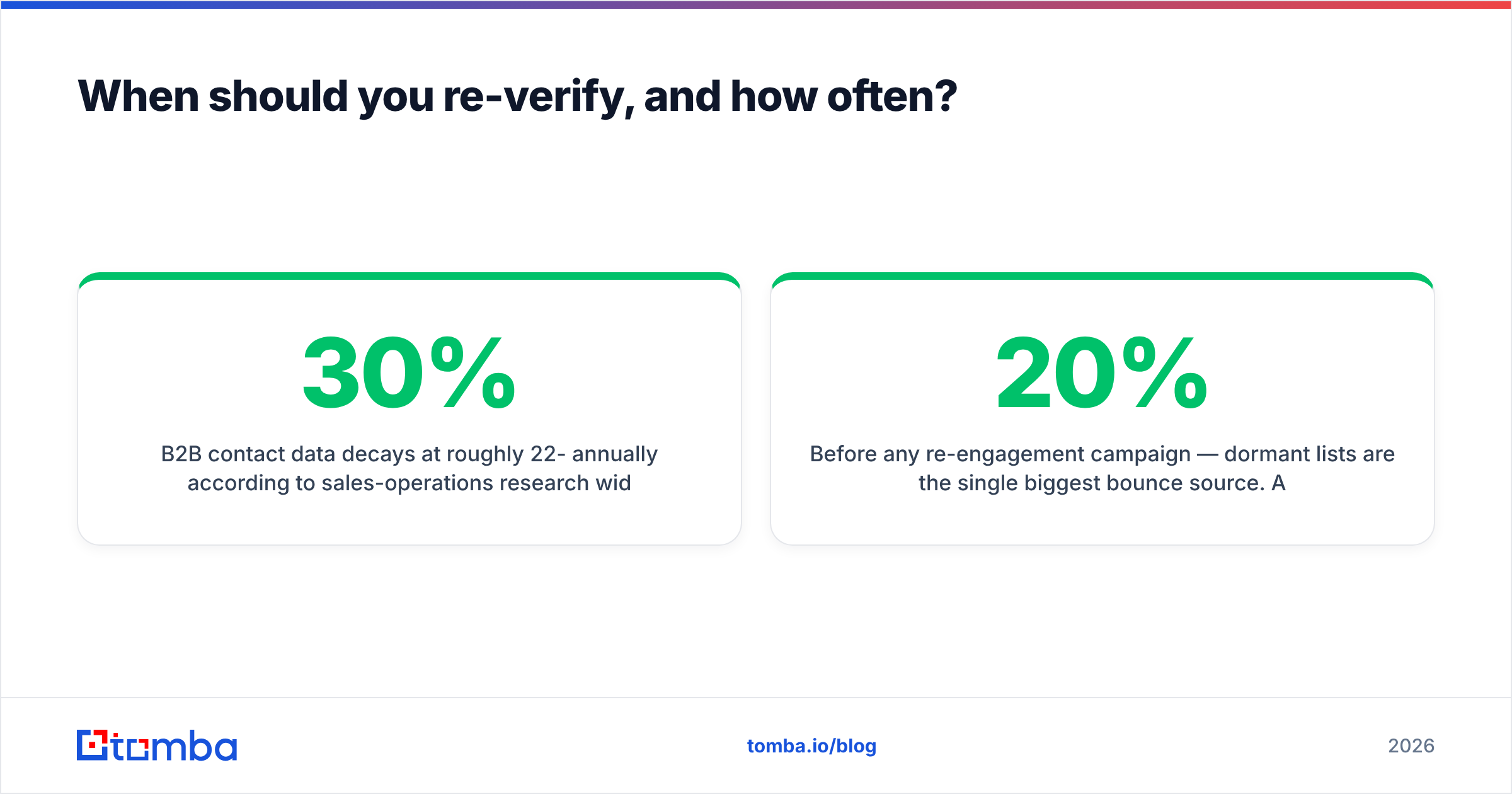
B2B contact data decays at roughly 22-30% annually according to sales-operations research widely cited by vendors including HubSpot, driven by job changes, restructures, and domain migrations. That's about 2% per month compounding. An address verified in January is meaningfully less reliable by April and materially worse by July.
Practical schedule:
- At import — verify everything before it touches a sequence. No exceptions.
- Every 90 days — re-verify anything sitting dormant in your database. Use bulk verify so it's one job, not 4,000 API calls.
- Before any re-engagement campaign — dormant lists are the single biggest bounce source. A list you last mailed 14 months ago will bounce at 20%+ if you send cold.
- After any trigger event — funding round, acquisition, layoff announcement. These correlate with mass email changes at the affected company.
- On every hard bounce — suppress immediately and permanently. Re-sending to a confirmed hard bounce is the fastest way to a blocklist. G2's email verification category is a reasonable place to sanity-check which vendors handle suppression list management natively versus expecting you to build it.
Automate the 90-day cycle rather than doing it manually. If your data lives in HubSpot or Salesforce, a scheduled re-verification job through the API is a half-day build that pays for itself in the first quarter.
What are the limits of email verification?#
Verification tells you an address exists. It tells you nothing about whether the person wants your email, whether your content will clear spam filters, or whether the contact is still in the role you think they're in.
Things verification will not fix:
- Bad targeting. A perfectly deliverable address at a company that will never buy is still a wasted send.
- Spam-triggering copy. Run drafts through a spam checker — verification and content filtering are separate gates.
- Missing authentication. SPF, DKIM, and DMARC are prerequisites, not optimizations.
- Cold domain reputation. A brand-new sending domain will land in spam regardless of list quality until it's warmed.
- Role-account complaints.
info@addresses verify fine and complain at several times the rate of individual mailboxes.
Verification is one gate in a chain. It's the cheapest and most measurable gate, which is why it's worth getting right first — but treat a 0% bounce rate as a floor, not a finish line.
Getting started#
If your problem is a dirty existing list, a verification specialist will solve it fine and cheaply. If your problem is that you need to build lists and keep them clean — which is most B2B teams — paying two vendors for two halves of the same job is avoidable overhead.
Start with the Tomba Email Finder: find addresses by domain, name, or company, and verification runs against them in the same credit pool, on the same plan, through the same API. The free tier gives you 25 searches a month to build your 500-address control set before you commit a dollar. Run the bake-off described above, and let the bounce data decide.
Related guides#
Ready to find emails that actually work?
Join 150,000+ professionals who stopped guessing and started sending. Free credits on signup — no credit card required.
Get the Tomba newsletter
Practical outbound tactics and product updates — once every two weeks.
About the author