Email Verification Tool Guide 2026: How to Pick the Right One
Most email verification tools quote 99% accuracy. Almost none define what they mean. Here's how verification actually works, what the pricing really costs you, and how to test a vendor before you commit.
TL;DR
- An email verification tool checks whether an address can receive mail before you send to it. It does not tell you whether the person still works there — that's enrichment's job, and conflating the two is the most common buying mistake.
- The "99% accuracy" claim every vendor prints is unfalsifiable unless they define how they score catch-all domains. Ask that question first; it sorts serious vendors from resellers within one email.
- Real cost is not the per-credit price. It's credits burned on unknowns, minimum-commit waste, and the bounce rate you still eat after verification.
- Verification is worth roughly 1-3% of your sending volume in credits, and it protects a sender reputation that takes months to rebuild.
- Test any vendor with a 500-address control list containing known-good, known-dead, role, and catch-all addresses before you sign anything.
What is an email verification tool, exactly?#
An email verification tool is a deliverability checkpoint. Think of it like a bouncer checking IDs at the door: it doesn't know whether the person will enjoy the party, only whether the ID is real and the name is on the list.
Concretely, a verifier runs an address through a chain of checks and returns a status. Most tools run the same core sequence:
- Syntax validation — does the address conform to RFC 5322? Catches typos like
john@gmail..comand stray whitespace. Free, instant, and the least valuable check. - Domain and MX record lookup — does the domain resolve, and does it publish mail exchange records? A domain with no MX record cannot receive email, period. This kills a surprising share of scraped lists.
- Disposable and role detection — flags
mailinator.comthrowaways and role accounts likeinfo@,sales@,support@. Role addresses are technically valid but tank engagement metrics and attract complaints. - SMTP handshake — the verifier opens a connection to the receiving mail server and asks, without sending anything, whether the mailbox exists. This is where real accuracy lives.
- Catch-all detection — determines whether the domain accepts mail for every possible address, which makes step 4 meaningless for that domain.
- Risk scoring — combines the above plus historical bounce data into a single verdict: valid, invalid, risky, or unknown.
Steps 1-3 are commodity. Any vendor can do them, and free tools do them well enough. Steps 4-6 are where vendors actually differ, and where you should spend your evaluation time.

Why does an email verification tool matter more in 2026 than it did in 2022?#
Because the mailbox providers changed the rules and never changed them back.
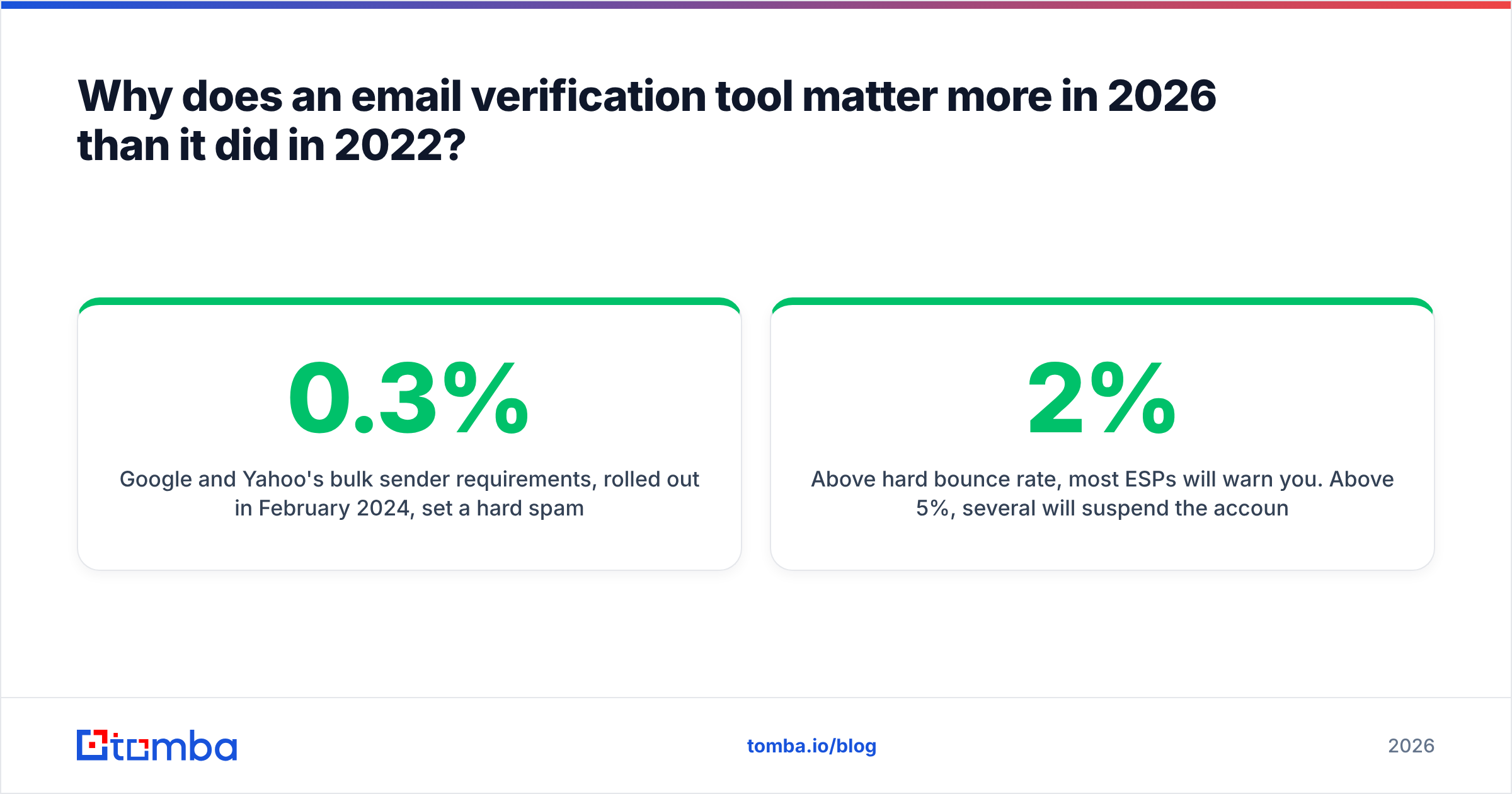
Google and Yahoo's bulk sender requirements, rolled out in February 2024, set a hard spam complaint threshold of 0.3% and made authentication non-negotiable for anyone sending over 5,000 messages a day to their users. Microsoft followed with similar enforcement for Outlook.com in 2025. The practical effect: bounce rates and complaint rates that were merely embarrassing in 2022 now trigger throttling or outright rejection.
The numbers that matter:
- Above 2% hard bounce rate, most ESPs will warn you. Above 5%, several will suspend the account.
- Sender reputation is scored on a rolling window — typically 30 days — so one bad send poisons the next month of legitimate mail.
- Recovery from a damaged domain reputation takes 4-8 weeks of low-volume, high-engagement sending. That's a quarter of your outbound year.
You can read the mechanics in more depth in Google's sender guidelines, which is the canonical source rather than any vendor's blog summary of it. The short version: verification stopped being an optimization and became table stakes.
Worth separating two things people blur together. Verification protects deliverability. It does not improve targeting. A perfectly verified list of the wrong people still fails — it just fails quietly instead of loudly. If your reply rate is the problem, look at your email deliverability fundamentals and your targeting, not your verifier.
How do email verification tools compare on the things that matter?#
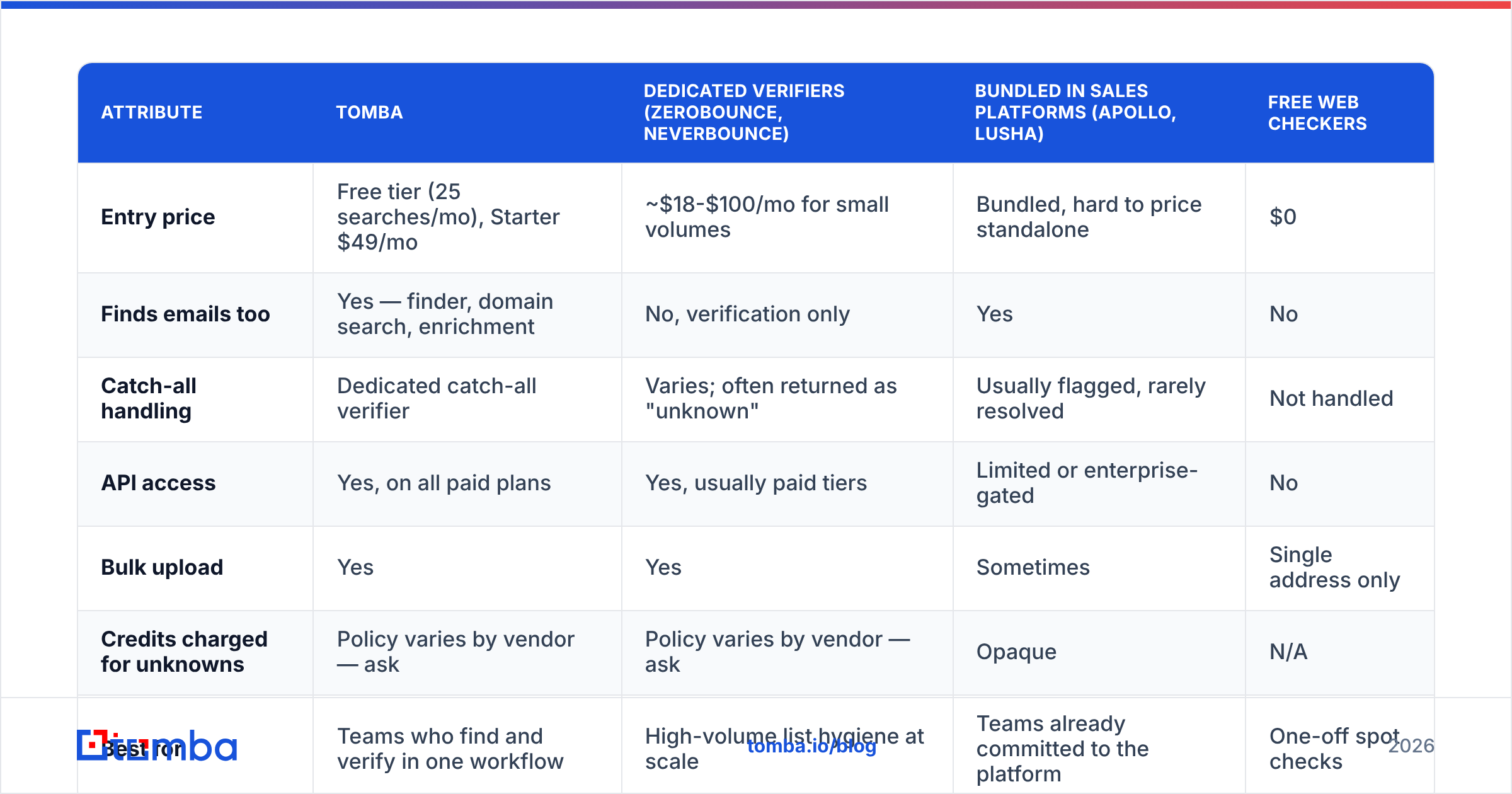
Here's the honest comparison across the categories of tool you'll encounter. Prices are entry-tier list rates as published; all vendors discount at volume.
| Attribute | Tomba | Dedicated verifiers (ZeroBounce, NeverBounce) | Bundled in sales platforms (Apollo, Lusha) | Free web checkers |
|---|---|---|---|---|
| Entry price | Free tier (25 searches/mo), Starter $49/mo | ~$18-$100/mo for small volumes | Bundled, hard to price standalone | $0 |
| Finds emails too | Yes — finder, domain search, enrichment | No, verification only | Yes | No |
| Catch-all handling | Dedicated catch-all verifier | Varies; often returned as "unknown" | Usually flagged, rarely resolved | Not handled |
| API access | Yes, on all paid plans | Yes, usually paid tiers | Limited or enterprise-gated | No |
| Bulk upload | Yes | Yes | Sometimes | Single address only |
| Credits charged for unknowns | Policy varies by vendor — ask | Policy varies by vendor — ask | Opaque | N/A |
| Best for | Teams who find and verify in one workflow | High-volume list hygiene at scale | Teams already committed to the platform | One-off spot checks |
The pattern in that table is the actual buying decision. If your workflow is find contacts, then send, a combined tool removes an export-import step and one vendor relationship. If your workflow is clean a 400,000-row list inherited from marketing, a dedicated high-volume verifier is probably cheaper per address. If you send fifty emails a week, a free email checker covers you and you should stop reading here.
There's a third category worth naming honestly: database vendors like BookYourData that sell pre-verified contact lists rather than a verification service. Different purchase entirely — you're buying the data and the verification together, with a bounce guarantee attached. That's a reasonable model if you'd rather buy a list than build one, and it competes with the finding half of the workflow more than the verification half.

What does "99% accuracy" actually mean, and how do you test it?#
It means whatever the vendor wants it to mean, which is why you test it yourself.
The trick hiding in most accuracy claims: vendors exclude catch-all and unknown results from the denominator. If a tool returns "valid" or "invalid" on 60% of your list and "unknown" on the other 40%, and it's right 99% of the time on that 60%, the marketing page says 99% accurate. Your actual bounce rate says something else.
Here's the test that costs you an afternoon and saves you a year of vendor regret.
Build a 500-address control list with four known segments:
- 150 known-good addresses — colleagues, your own aliases, contacts who replied to you last week. You know these deliver.
- 150 known-dead addresses — bounced addresses from your last campaign, or addresses at companies you know shut down. You know these fail.
- 100 role addresses —
info@,hr@,contact@at real companies. These are valid but low-value; you want to see if the tool flags them separately. - 100 catch-all domain addresses — pick a domain you know accepts everything (test with a nonsense address like
zzqx9@domain.com), then include real and fabricated addresses at it.
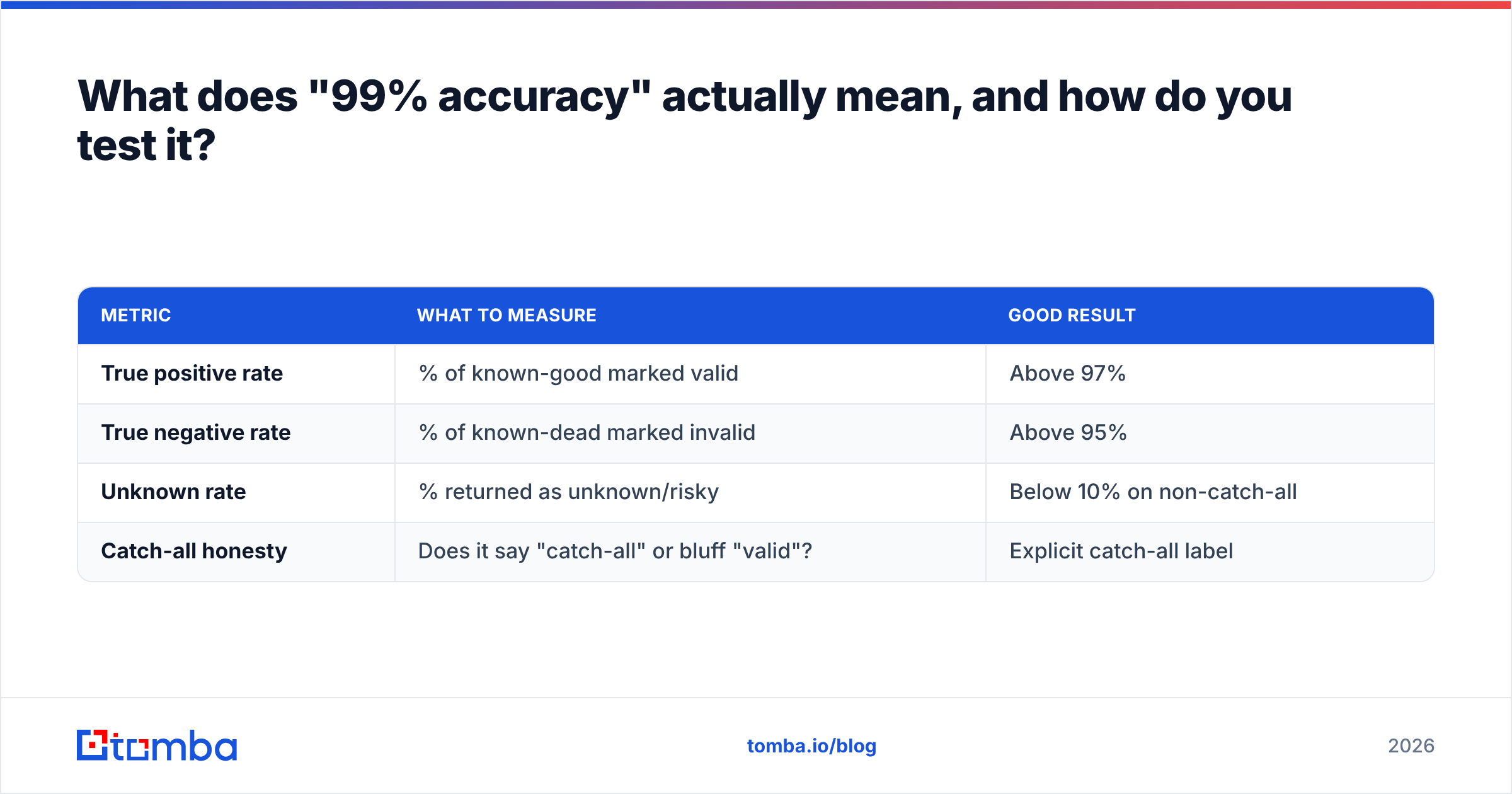
Run it through each shortlisted tool and score four things:
| Metric | What to measure | Good result |
|---|---|---|
| True positive rate | % of known-good marked valid | Above 97% |
| True negative rate | % of known-dead marked invalid | Above 95% |
| Unknown rate | % returned as unknown/risky | Below 10% on non-catch-all |
| Catch-all honesty | Does it say "catch-all" or bluff "valid"? | Explicit catch-all label |
That last row separates the field more than any other. A verifier that returns "valid" for every address on a catch-all domain is not verifying — it's guessing, and it's guessing in the direction that makes its accuracy stats look good. A tool that returns an explicit catch-all status is telling you the truth: this domain won't answer, decide for yourself.
Tools that go further use pattern confidence — if the domain's format is first.last@ and 40 verified contacts confirm it, an address matching that pattern is defensible even without SMTP confirmation. That's what a catch-all verifier is doing under the hood, and it's a meaningfully different technique from a plain SMTP ping.
How much should you actually pay for email verification?#
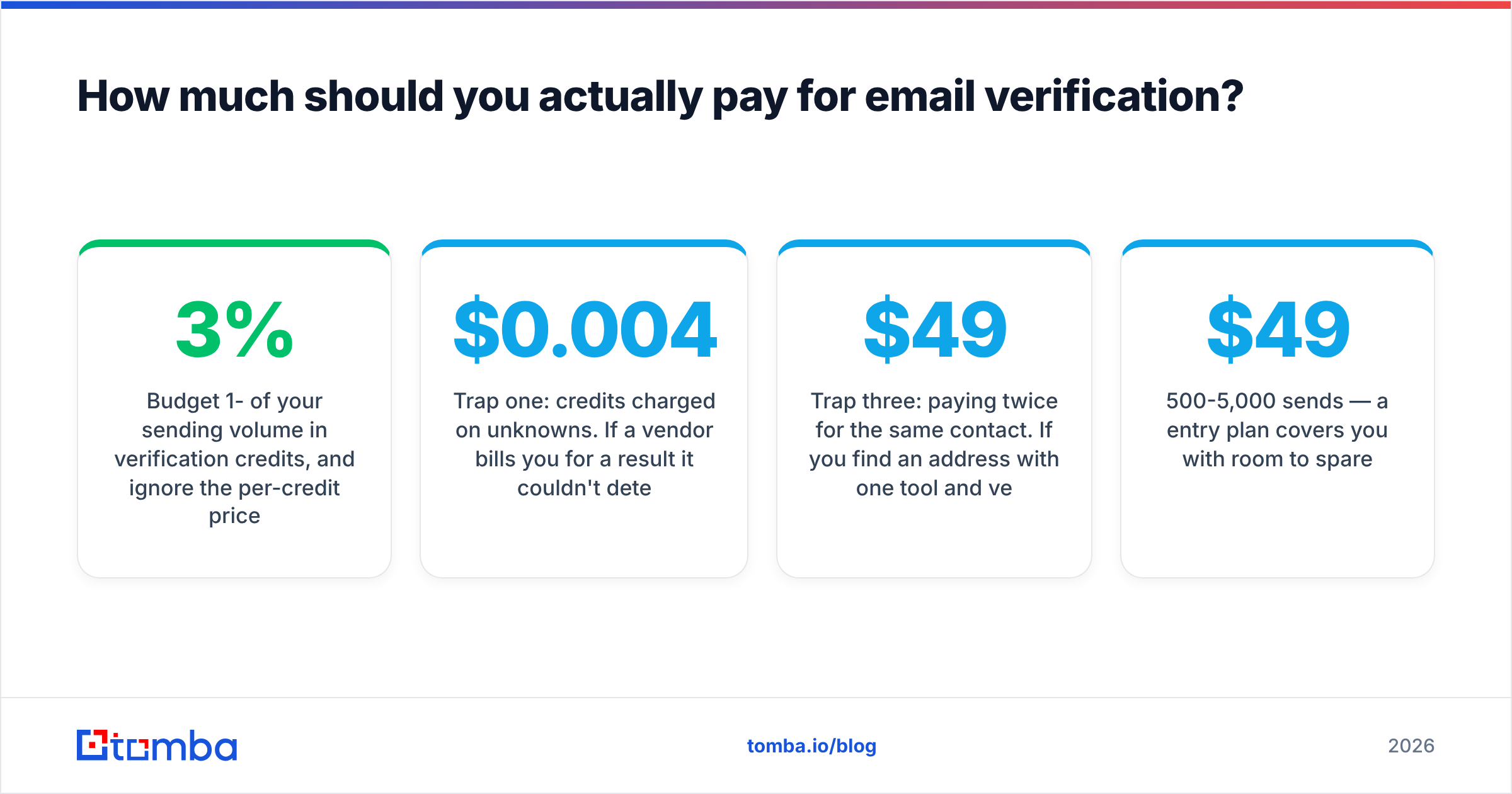
Budget 1-3% of your sending volume in verification credits, and ignore the per-credit price until you've checked three cost traps.
Trap one: credits charged on unknowns. If a vendor bills you for a result it couldn't determine, your effective cost per usable answer is higher than the sticker price by exactly the unknown rate. A tool at $0.004/credit with a 25% unknown rate costs more per resolved address than one at $0.005 with a 5% unknown rate. Ask the vendor directly and get the answer in writing.
Trap two: minimum commits and expiry. Monthly credits that don't roll over punish lumpy usage, and B2B verification is almost always lumpy — you clean a big list quarterly, not evenly across twelve months. Check whether credits expire before you buy the bigger tier.
Trap three: paying twice for the same contact. If you find an address with one tool and verify it with another, you're paying two vendors for one usable contact. Tools that verify at the point of discovery avoid this entirely. The Tomba pricing structure — Free (25 searches/mo), Starter $49/mo, Growth $99/mo, Pro $249/mo, Enterprise custom — bundles finding and verification into one credit pool, which is the main reason combined tools tend to win on total cost for prospecting teams even when their headline per-credit rate is higher than a pure verifier's.
Rough sizing, so you can pick a tier without a spreadsheet:
- Under 500 sends/month — free tiers and spot checks are genuinely enough.
- 500-5,000 sends/month — a $49/mo entry plan covers you with room to spare.
- 5,000-25,000 sends/month — mid-tier, around $99-$249/mo, plus API access so verification runs automatically on list import.
- Above 25,000/month — negotiate. At that volume list price is a starting position, not a price.
When should verification run in your workflow?#
At three points, not one. Most teams only do the middle one and wonder why bounces persist.
- At capture — verify the address the moment it enters your system, via email verification API call on form submit or CRM create. Catching a typo at capture is roughly free; catching it after a campaign costs you a bounce and a data-hygiene ticket.
- Before every send — verify the segment you're about to mail, not the whole database. Addresses decay at roughly 22-25% per year as people change jobs, so a list verified six months ago is already meaningfully stale.
- After every bounce — feed bounce results back and suppress permanently. This is the step teams skip, and it's why the same dead address bounces in three consecutive campaigns.
The decay rate is the part that surprises people. B2B email lists rot faster than consumer ones because job changes break work addresses instantly, and B2B tenure keeps shortening. Gartner and most CRM vendors put annual B2B contact decay somewhere in the 20-30% band. Whatever the exact figure, the implication is the same: verification is a recurring process, not a one-time cleanup.
If your addresses come from job-change-prone sources, pair verification with re-discovery. Verifying a dead address just confirms it's dead — you still need the new one, which is where a domain search against the person's new employer beats another verification pass.
What are the limits of any email verification tool?#
Four, and vendors are quiet about all of them.
Catch-all domains cannot be verified by SMTP. Roughly 15-20% of B2B domains accept all mail. No verifier can confirm a specific mailbox there via handshake. Pattern confidence and historical data help; certainty doesn't exist. Any vendor claiming otherwise is describing a guess with better marketing.
Greylisting and rate limiting cause false unknowns. Some mail servers deliberately defer unknown senders on first contact. A verifier that doesn't retry reads that deferral as an unknown, or worse, as an invalid. Ask about retry logic.
Verification says nothing about whether the person is still there. An address can be perfectly deliverable and route straight to a shared inbox nobody reads because the owner left in March. That's a data enrichment problem, not a verification problem, and buying a verifier expecting it to solve job-change churn will disappoint you.
Aggressive SMTP verification can hurt you. Some receiving servers log and penalize repeated verification probes from the same IP range. Reputable vendors distribute and throttle their checks; cheap ones don't, and you inherit the consequences. This is the single strongest argument against building verification in-house with a weekend script.
None of this makes verification optional. It makes verification one control among several — alongside proper authentication, gradual warmup, and honest list acquisition. A verified list sent from a domain with a broken SPF record will still land in spam. Check yours with a free SPF checker before blaming the verifier.
How do you choose between the shortlisted tools?#
Answer these five questions in order. The first "no" ends the evaluation.
- Does it label catch-all explicitly? If it returns "valid" for everything on a catch-all domain, it's not a verifier. Disqualify.
- What's the unknown rate on your control list? Above 15% on non-catch-all domains, the tool is guessing more than checking.
- Does it charge for unknowns? If yes, recalculate the effective price and re-rank.
- Does it fit the workflow you actually have? If you're finding contacts anyway, a combined finder-verifier removes a step. If you're cleaning inherited databases, a bulk-first vendor is cheaper.
- Can you test it without a credit card? Vendors confident in their accuracy let you run a sample. The ones that require a demo call before showing you results are optimizing for something other than your bounce rate.
Run those five against two or three vendors, not seven. Evaluation fatigue produces worse decisions than a fast test on a short list — and the control-list method gives you a real answer in an afternoon regardless of which tools you picked.
Where should you start?#
Start with your worst list, not your best one.
Take the segment with the highest historical bounce rate, run it through a verifier, and compare the predicted invalid count against what actually bounced last time. That single comparison tells you more than any vendor comparison page, including this one — because it measures the tool against your data, your sources, and your domains.
If your workflow is find prospects, then reach them, the Tomba Email Finder handles discovery and verification in one credit pool, with a free tier of 25 searches per month to run your control-list test before you spend anything. Build your test list, run it, and let the numbers pick your vendor.
Related guides#
Ready to find emails that actually work?
Join 150,000+ professionals who stopped guessing and started sending. Free credits on signup — no credit card required.
Get the Tomba newsletter
Practical outbound tactics and product updates — once every two weeks.
About the author