Email Verifier Free: What You Actually Get in 2026
Free email verifiers are real, useful, and quietly limited. Here's what the free tiers actually check, where they break on catch-all domains, and when paying beats stitching together credits.
TL;DR
- A free email verifier checks syntax, DNS/MX records, disposable-domain lists, role accounts, and — on the better ones — an SMTP handshake. That covers most of the value for small lists.
- Free tiers are real but capped: expect 25–100 checks per month on most tools, with bulk upload, API access, and catch-all resolution paywalled.
- Catch-all domains are where free tools quietly fail. They return "unknown" or "accept-all" and hand the risk back to you.
- If you send under ~200 cold emails a month, free verification is genuinely enough. Past that, one burned domain costs more than a year of paid credits.
- Verify at the point of collection, not the night before a campaign. Stale lists decay roughly 2–3% per month.
What Does an Email Verifier Actually Check?#
An email verifier is a bouncer at the door of your inbox reputation. It doesn't read the guest's mind — it checks the ID, confirms the name is on the list, and turns away the obvious fakes before they cause a scene.
Technically, verification runs a stack of checks in sequence, and each one is cheaper than the one after it:
- Syntax validation — Does the address conform to RFC 5322? Catches typos like
john@@company.comand trailing spaces. Costs nothing, runs instantly. - Domain and MX record lookup — Does
company.comresolve, and does it have mail exchange records? A domain with no MX record cannot receive mail, full stop. This kills a surprising share of scraped lists. - Disposable and free-provider detection — Flags Mailinator, 10minutemail, Guerrilla Mail, and thousands of throwaway domains. Also tags consumer providers (gmail.com, outlook.com) so you can decide whether they belong in a B2B campaign.
- Role-account detection —
info@,support@,sales@,noreply@. These deliver fine but convert badly and generate complaints. Most verifiers flag rather than reject them. - SMTP handshake (ping) — The verifier opens a connection to the receiving mail server and asks, without sending anything, whether the mailbox exists. This is the check that separates a real verifier from a regex script.
- Catch-all detection — Determines whether the domain accepts mail for every address, which makes the SMTP answer meaningless.
Everything up to step four is cheap enough that any tool can offer it free. Steps five and six are where infrastructure costs money — you need clean IPs, rotation, and rate limiting to run SMTP probes at scale without getting blocked.
Is a Free Email Verifier Good Enough?#
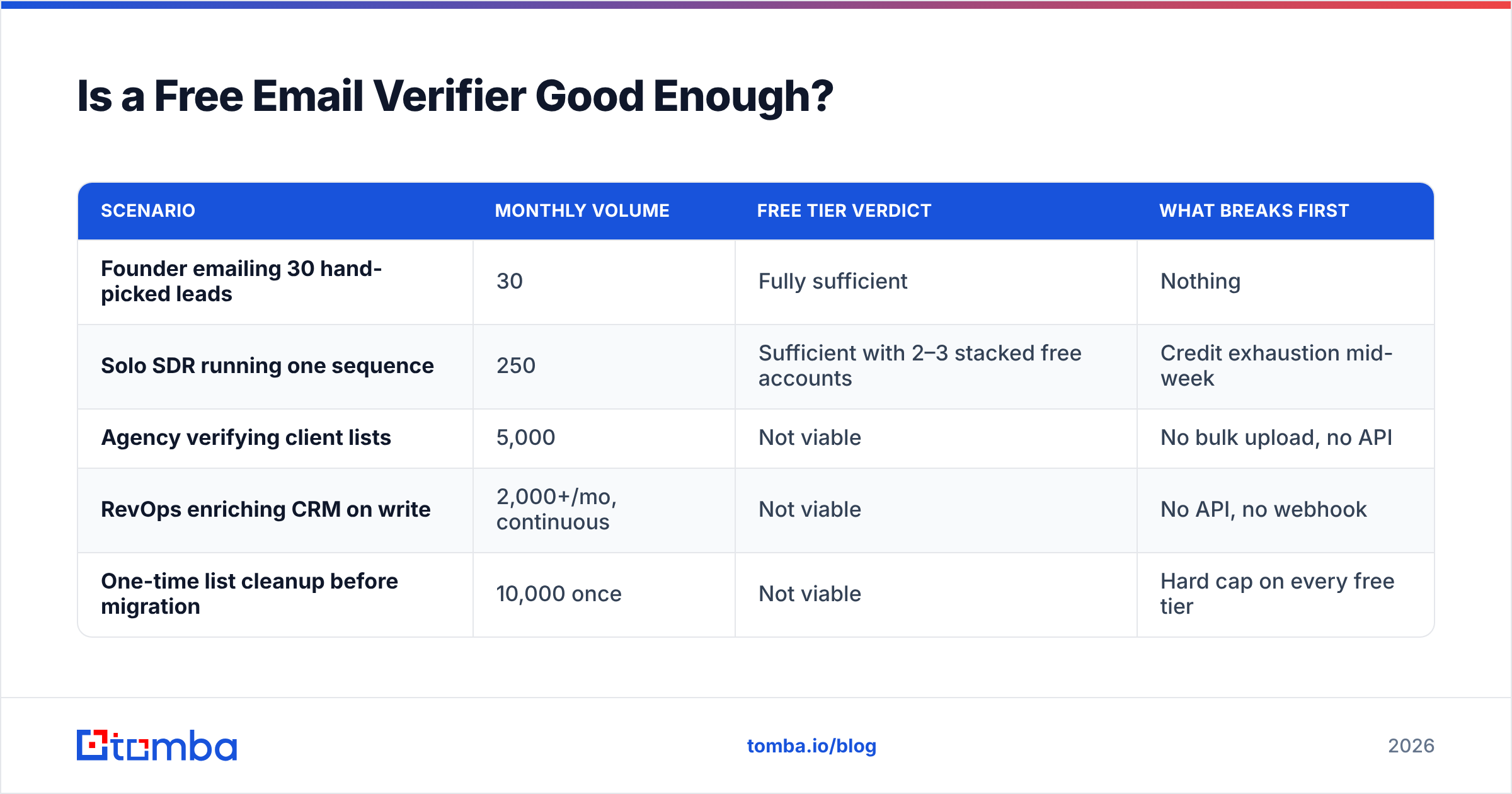
Yes — under about 200 addresses a month, and if your list is mostly non-catch-all domains.
Here's the honest math. Bounce rate is the metric that matters, and mailbox providers are unforgiving about it. Google's bulk sender guidelines and Microsoft's equivalent both treat repeated hard bounces as a spam signal. The working threshold most deliverability teams use is 2% — below that you're fine, above 4% you're actively damaging sender reputation.
A raw scraped list typically bounces at 12–25%. Free syntax + MX + disposable checks knock that down to roughly 5–8%. Adding SMTP verification gets you to 1–3%. That last leg is the expensive one, and it's the one free tiers ration.
So the decision is not "free vs. paid," it's "how many addresses do I need verified, and how many of them sit on catch-all domains?"
| Scenario | Monthly volume | Free tier verdict | What breaks first |
|---|---|---|---|
| Founder emailing 30 hand-picked leads | 30 | Fully sufficient | Nothing |
| Solo SDR running one sequence | 250 | Sufficient with 2–3 stacked free accounts | Credit exhaustion mid-week |
| Agency verifying client lists | 5,000 | Not viable | No bulk upload, no API |
| RevOps enriching CRM on write | 2,000+/mo, continuous | Not viable | No API, no webhook |
| One-time list cleanup before migration | 10,000 once | Not viable | Hard cap on every free tier |
How Do Free Email Verifier Tiers Compare in 2026?#
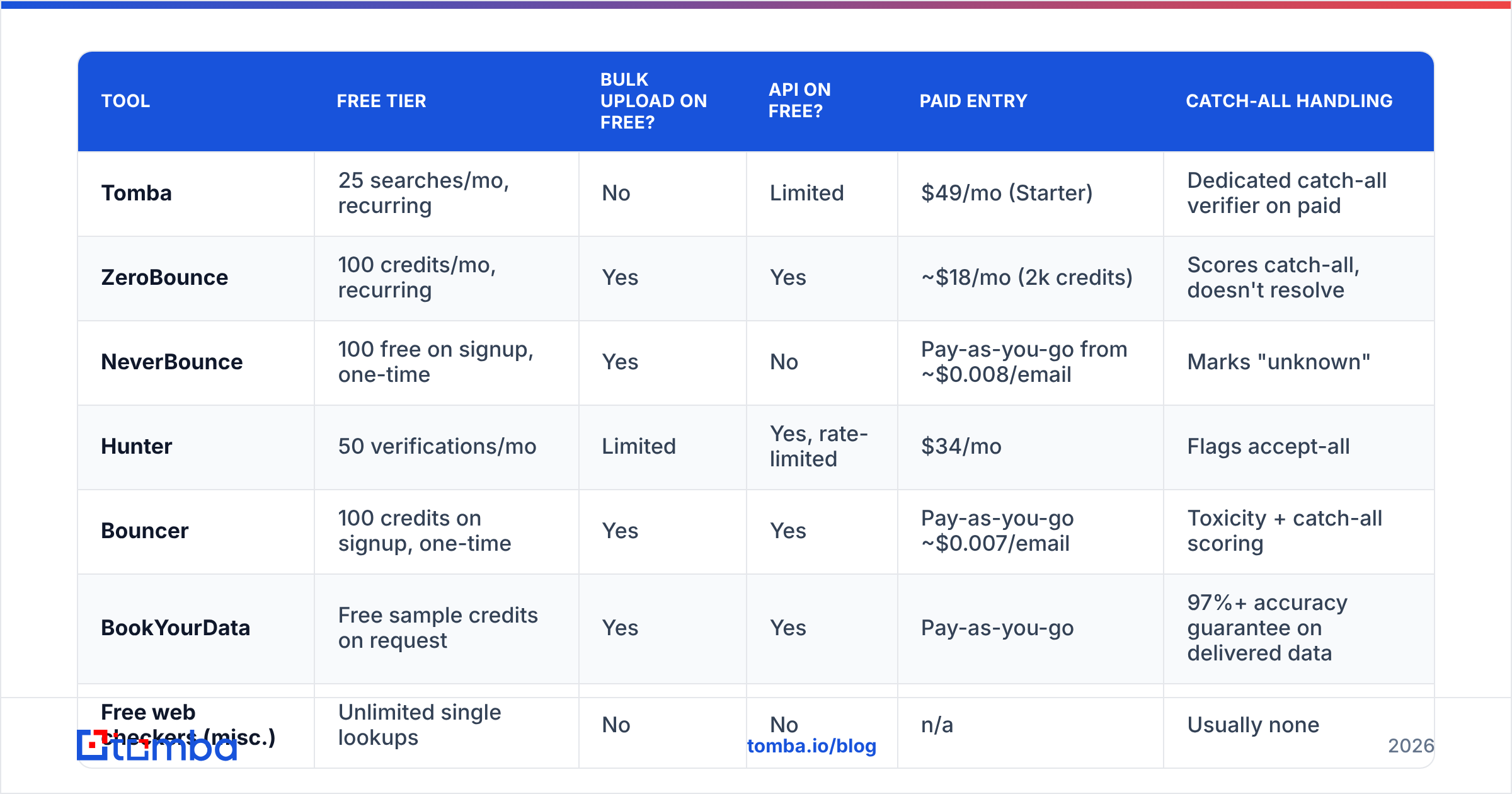
Free tiers cluster into three shapes: a small monthly credit allowance, a one-time signup bonus, or an unlimited single-address web tool with no bulk or API.
Prices and limits below reflect publicly listed plans as of early 2026. Vendors change these often — check the pricing page before you commit.
| Tool | Free tier | Bulk upload on free? | API on free? | Paid entry | Catch-all handling |
|---|---|---|---|---|---|
| Tomba | 25 searches/mo, recurring | No | Limited | $49/mo (Starter) | Dedicated catch-all verifier on paid |
| ZeroBounce | 100 credits/mo, recurring | Yes | Yes | ~$18/mo (2k credits) | Scores catch-all, doesn't resolve |
| NeverBounce | 100 free on signup, one-time | Yes | No | Pay-as-you-go from ~$0.008/email | Marks "unknown" |
| Hunter | 50 verifications/mo | Limited | Yes, rate-limited | $34/mo | Flags accept-all |
| Bouncer | 100 credits on signup, one-time | Yes | Yes | Pay-as-you-go ~$0.007/email | Toxicity + catch-all scoring |
| BookYourData | Free sample credits on request | Yes | Yes | Pay-as-you-go | 97%+ accuracy guarantee on delivered data |
| Free web checkers (misc.) | Unlimited single lookups | No | No | n/a | Usually none |
Two patterns to notice. First, recurring beats one-time if you verify continuously — a 100-credit signup bonus is worth less than 25 credits every month over a year. Second, the free tiers that include an API are the ones worth building a workflow around, because you can verify at capture time instead of batching.
If you want to test the mechanics without signing up for anything, run a single address through a free email checker and watch which signals come back. That tells you more about a vendor's depth than its marketing page does.
Why Do Catch-All Domains Break Free Verification?#
Because a catch-all server says "yes" to everything, so the SMTP handshake stops carrying information.
Think of it like a mailroom that accepts every envelope addressed to the building, then sorts — or shreds — internally. Knock on the door and ask "does Sarah work here?" and the answer is always yes. You learn nothing.
Catch-all configurations are common in enterprise and in companies running heavy inbound marketing, and they've been getting more common as organizations consolidate on Microsoft 365 tenants with wildcard routing. Depending on your target segment, 15–30% of B2B domains will be catch-all.
Free verifiers handle this in one of three ways, none of them great:
- Return "unknown" and burn a credit anyway. Most common.
- Return "accept-all" as a status and let you decide. Honest, but unhelpful.
- Silently mark it valid. The worst outcome — you send, it bounces, and your verifier's reported accuracy looked great.
Resolving catch-alls properly requires cross-referencing pattern data, historical send outcomes, and secondary sources — which is infrastructure, not a regex. That's why it lands on paid tiers universally. Tomba splits this into a dedicated catch-all verifier rather than folding it into the standard verification result, so you can see explicitly which addresses were resolved by inference versus confirmed by handshake.
Practical rule: if a segment is more than a quarter catch-all, don't try to verify your way out of it. Reduce daily volume to that segment, warm the domain properly, and treat those sends as higher-risk regardless of what any tool tells you.

What Does Free Verification Cost You in Hidden Ways?#
Three costs that don't appear on the pricing page: your data, your time, and your throughput ceiling.
Data handling. Some free verification tools reserve the right to retain or reuse uploaded lists. Read the terms. If you're processing EU contact data, uploading a customer list to a service with vague retention language is a GDPR problem, not just an etiquette one. Paid tiers usually come with a DPA; free tiers often don't.
Manual stitching. Running 250 addresses through five free accounts takes real minutes — export, split, upload, wait, download, merge, dedupe. At 30 minutes a week that's 26 hours a year to save roughly $200. If your time is worth anything, the arithmetic collapses fast. A remove duplicates pass helps, but it's still hand-work.
Throughput ceiling. Free tiers cap concurrency, not just volume. A 10,000-row list on a rate-limited free API can take days. If you're on a campaign deadline, that's not a savings, it's a blocker.
The honest framing: free verification is a sampling tool. Use it to test a vendor's accuracy on 25 addresses you already know the answers for, then decide whether to pay. Using it as your production pipeline is where the costs hide.
How Should You Build a Verification Workflow That Scales?#
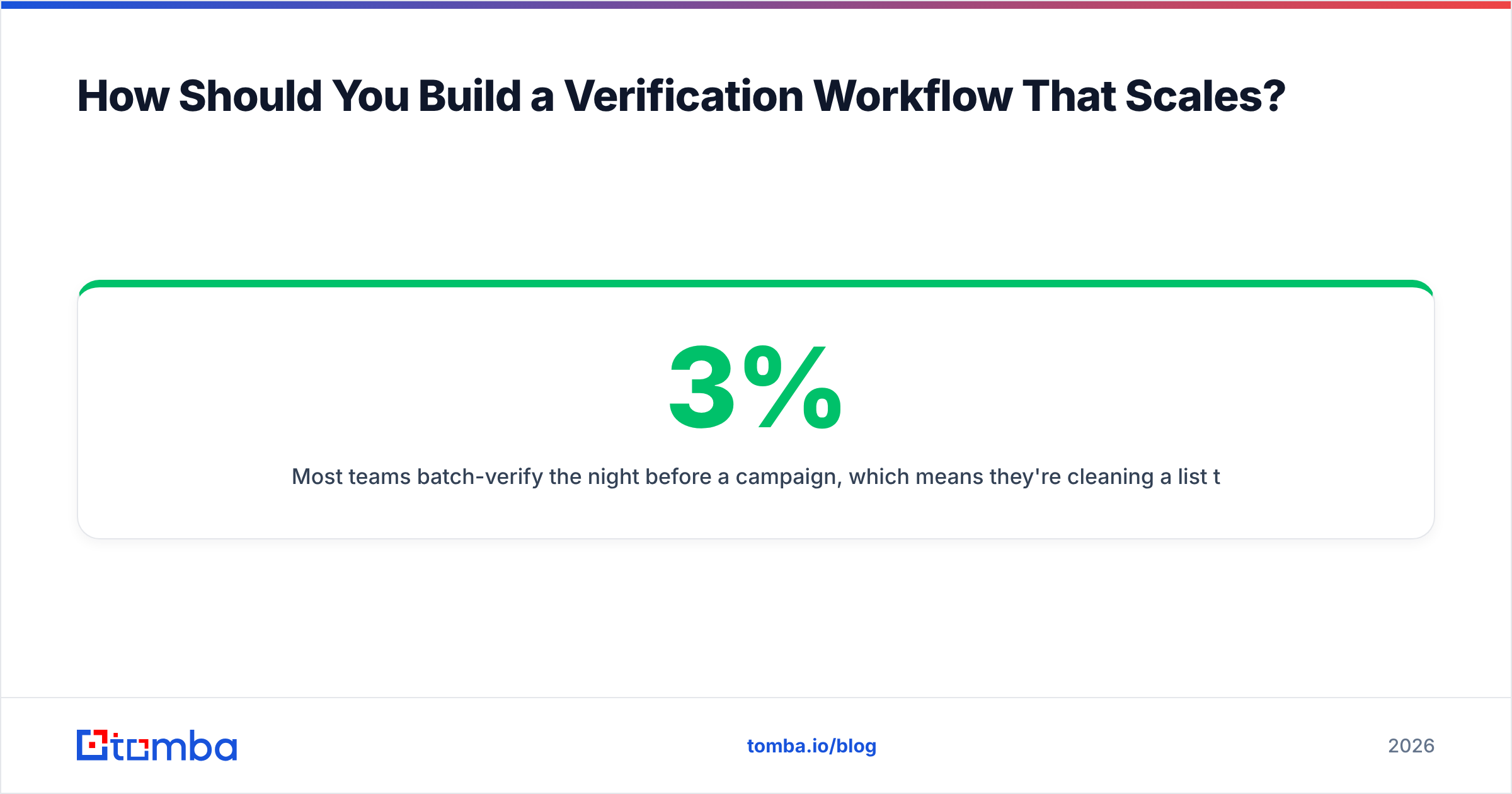
Verify at capture, not at send. That single change does more for deliverability than any tool choice.
Most teams batch-verify the night before a campaign, which means they're cleaning a list that's already three months stale. B2B contact data decays at roughly 2–3% per month from job changes alone — Gartner and most data-quality vendors put annual decay between 22% and 30%. Verifying at the moment of capture means the address is fresh when it enters your system.
A workflow that holds up at volume looks like this:
- Find with a source that verifies inline. Using an email finder that returns a confidence score at discovery time means fewer addresses enter your CRM unvalidated in the first place.
- Verify on write via API. Hook verification into your form handler, enrichment job, or CRM automation with an email verification API so nothing lands unchecked.
- Segment by result, don't just delete. Valid → main sequence. Catch-all → low-volume, warmed-domain sequence. Unknown/invalid → suppression list, not the trash (you don't want to re-import them next quarter).
- Re-verify quarterly. Anything older than 90 days that hasn't engaged gets a fresh check before it goes back into rotation.
- Watch bounces as your real accuracy metric. No vendor's claimed accuracy matters. Your observed hard-bounce rate over 1,000 sends does.
For teams already living in spreadsheets, wiring verification into Google Sheets is usually the lowest-friction version of step two — it keeps the check next to where the data actually lives.
When Should You Stop Using Free and Pay?#
When the cost of one deliverability incident exceeds a year of credits — which happens sooner than most people expect.
Concrete trigger points:
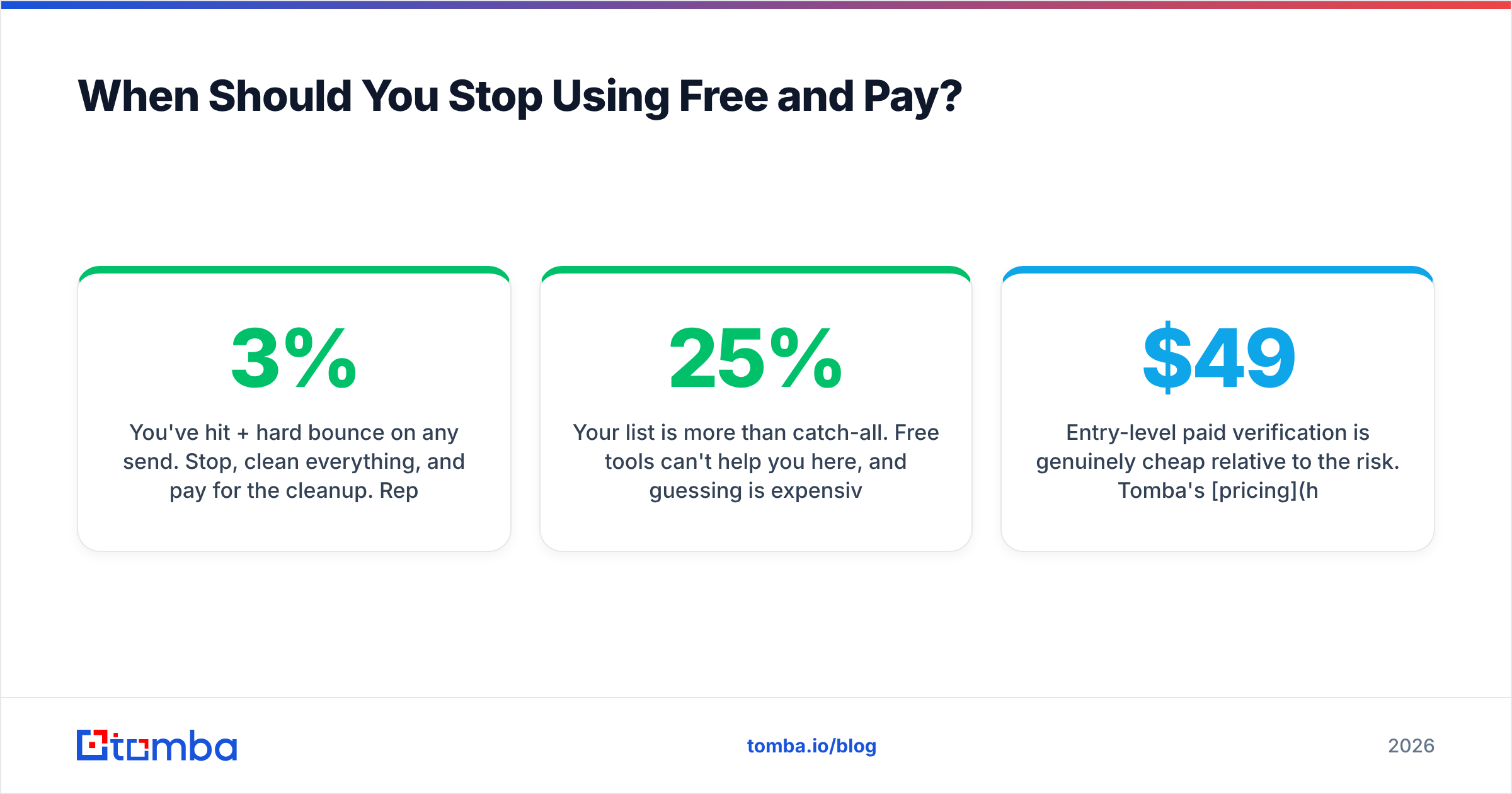
- You've hit 3%+ hard bounce on any send. Stop, clean everything, and pay for the cleanup. Reputation damage compounds.
- You're verifying more than ~300 addresses a month. Stacking free accounts stops being a hack and starts being a job.
- You need an audit trail. Compliance, client reporting, or agency SLAs all require verification logs that free tiers don't retain.
- Your list is more than 25% catch-all. Free tools can't help you here, and guessing is expensive.
- You're sending from a domain you can't afford to replace. Your main company domain is not a testbed.
Entry-level paid verification is genuinely cheap relative to the risk. Tomba's pricing starts at $49/mo for Starter, with Growth at $99/mo and Pro at $249/mo; pay-as-you-go verification vendors sit around $0.007–0.010 per address. Against the cost of rebuilding a burned sending domain — new domain, 4–6 weeks of warmup, lost pipeline in the interim — that's not a close call.
The counter-argument is real though: if you send low-volume, highly-researched outbound to 20–40 people a month, paying for verification infrastructure is overkill. Use the free tier, check each address individually, and spend the money on research instead.
What Should You Look For in Any Verifier, Free or Paid?#
Judge verifiers on what they tell you when they're not sure.
- Granular statuses, not binary. "Valid / Invalid" is a red flag. You want valid, invalid, catch-all, role, disposable, unknown — six or more states.
- Confidence scores. A number beats a label when you're deciding send volume per segment.
- Transparent methodology. Vendors who publish where their data comes from and how they handle SMTP probing are easier to trust than ones citing a 99% accuracy stat with no definition.
- No-charge for unknowns. Some vendors refund credits on unresolvable addresses. Ask.
- Third-party validation. G2 reviews on volume-heavy accounts tell you more about real accuracy than a vendor benchmark does.
- Bounce-rate guarantee. The strongest signal a vendor believes its own numbers.
Run the same 50-address control list — with known-good, known-bad, and known-catch-all addresses — through every tool you're evaluating. Twenty minutes of testing beats any comparison table, including this one.
Ready to Clean Your List Properly?#
Start free, measure honestly, upgrade when the numbers say to. Tomba's free tier gives you 25 searches a month with no card, which is enough to run a control test against your own known-good addresses and see whether the results hold up. When you're ready to move past sampling, the email verifier handles SMTP-level checks, catch-all resolution, and bulk lists — and the Tomba Email Finder returns verified addresses at discovery so fewer bad records enter your pipeline in the first place. Test it on the segment you're least confident about; that's where verification actually earns its keep.
Related guides#
Ready to find emails that actually work?
Join 150,000+ professionals who stopped guessing and started sending. Free credits on signup — no credit card required.
Get the Tomba newsletter
Practical outbound tactics and product updates — once every two weeks.
About the author