Email Verifier Free Online: The 2026 No-Fluff Guide
Free online email verifiers all promise clean lists. Here's what the free tiers actually check, where they quietly fail on catch-all domains, and when paying is cheaper than bouncing.
TL;DR
- A free online email verifier is fine for spot-checking single addresses and for lists under a few hundred rows. Past that, the free tiers run out before your list does.
- Every serious verifier runs the same four layers: syntax, domain/MX, mailbox (SMTP), and risk classification. The difference between tools is almost entirely in that last layer — catch-all, role, and disposable handling.
- "Free" usually means 25–100 credits per month, no bulk upload, or results with the risky verdicts stripped out. Read the fine print before you build a workflow on it.
- A 3% bounce rate is the practical ceiling before mailbox providers start throttling you. One bad 5,000-contact send costs more in domain reputation than a year of a paid verifier.
- Best free-first path: verify inside the same tool that found the address, so you're not paying twice for the same contact.
What is a free online email verifier?#
A free online email verifier is a browser-based tool that tells you whether an email address will accept mail — without you sending anything to it. You paste an address (or upload a list), the tool interrogates the receiving mail server, and it returns a verdict: valid, invalid, risky, or unknown.
Think of it like calling a hotel to confirm a room exists before mailing a package there. You're not checking in. You're just confirming the door is real, the building is standing, and someone is at the front desk. Email verification does the same thing over SMTP: it opens a conversation with the recipient's mail server, asks about the mailbox, and hangs up before delivering anything.
The "free online" part is where expectations and reality separate. Free tools fall into three buckets:
- Single-address checkers — one address at a time, no login, unlimited or near-unlimited. Good for verifying a prospect you just found on LinkedIn.
- Free tiers of paid platforms — 25 to 100 credits a month, full feature access, bulk upload usually included. Good for a small list or a trial run.
- Free trials with a card on file — larger credit grants, but they convert to paid unless you cancel. Not really free; just deferred.
Most people searching for an email verifier free online want bucket one or two. Bucket three is where you end up if you skip the pricing page.
How does email verification actually work?#
Every credible verifier — free or paid — runs the same sequence. Understanding it tells you exactly where a cheap tool cuts corners.
- Syntax check. Does the string conform to the email address spec? This catches typos like
john@@acme.comandjane@acmewith no TLD. It costs nothing to run and catches maybe 2% of a typical scraped list. - Domain and MX record lookup. Does
acme.comresolve, and does it publish mail exchange records? A domain with no MX records cannot receive email, full stop. This kills dead companies, parked domains, and typo'd domains likeacme.cowhen you meantacme.com. - Disposable and role detection. Is this a burner address from a temp-mail service? Is it
info@,sales@, orsupport@— a shared inbox rather than a person? Both are technically deliverable and both wreck reply rates in cold outreach. - SMTP mailbox probe. The verifier connects to the mail server and issues an
RCPT TOcommand for the specific mailbox. A 250 response means the mailbox exists. A 550 means it doesn't. This is the expensive step, because it requires clean sending IPs that haven't been blocked by Google and Microsoft. - Catch-all classification. Some domains accept mail for every address, valid or not. The SMTP probe returns 250 for
ceo@acme.comand also forasdfgh@acme.com. Any tool that reports both as "valid" is lying to you by omission.

Steps one through three are cheap and every free tool does them. Step four is where infrastructure costs money. Step five is where the tools genuinely differ — and where "free" most often means "we'll just call it valid and let you find out."
Why do free email verifiers still miss bad addresses?#
Because the two hardest categories — catch-all domains and greylisted servers — cost real money to handle, and free tiers don't fund that.
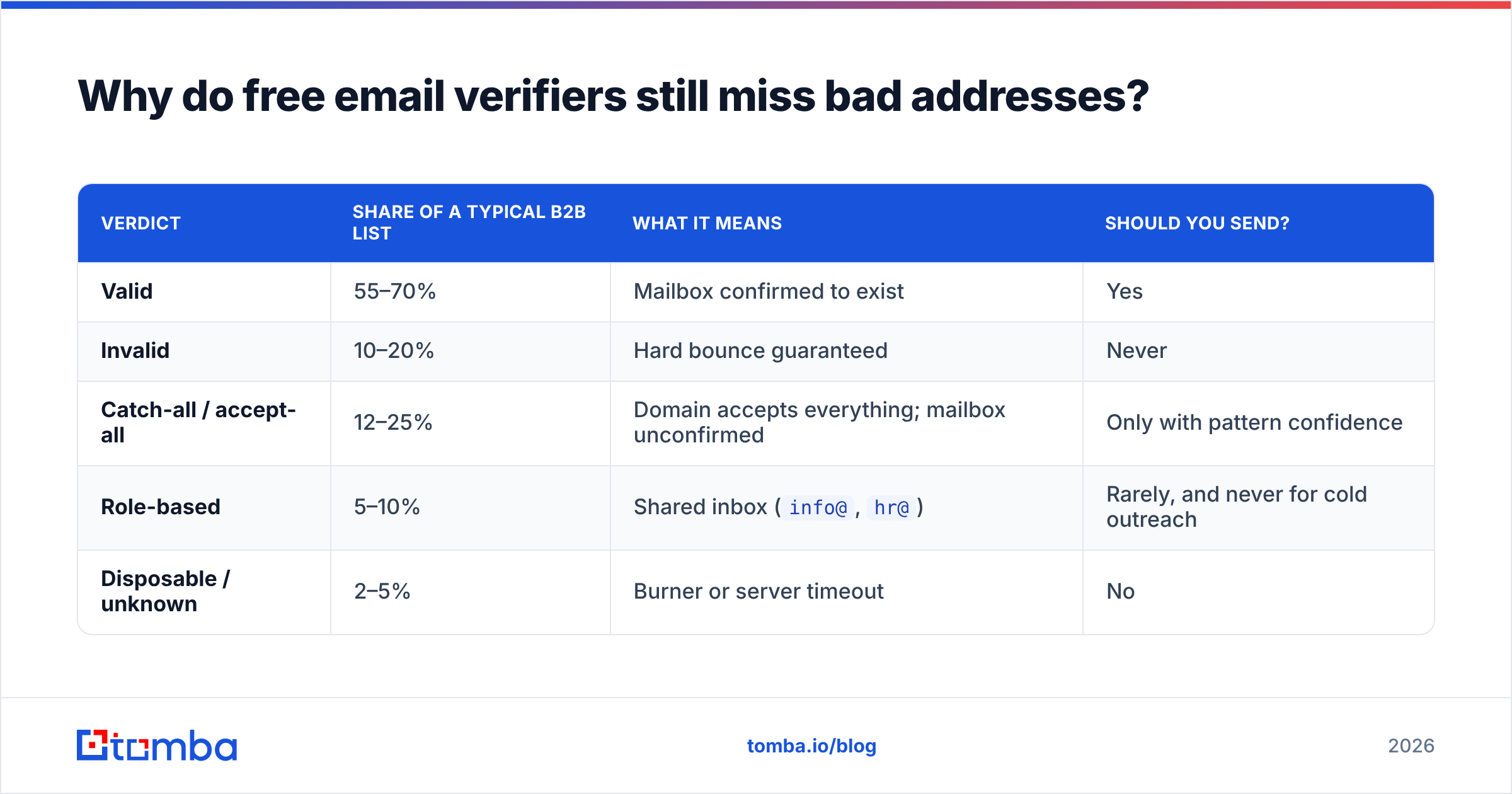
Here's the breakdown of a typical B2B list after verification:
| Verdict | Share of a typical B2B list | What it means | Should you send? |
|---|---|---|---|
| Valid | 55–70% | Mailbox confirmed to exist | Yes |
| Invalid | 10–20% | Hard bounce guaranteed | Never |
| Catch-all / accept-all | 12–25% | Domain accepts everything; mailbox unconfirmed | Only with pattern confidence |
| Role-based | 5–10% | Shared inbox (info@, hr@) |
Rarely, and never for cold outreach |
| Disposable / unknown | 2–5% | Burner or server timeout | No |
That catch-all row is the whole ballgame. On a 5,000-row list, a quarter of your contacts can land there. A tool that marks them "valid" inflates your usable count and hands you the bounce bill three days after you press send. A tool that marks them all "risky" and stops is technically honest but leaves 1,200 real prospects on the table.
The better approach is pattern inference: if you know firstname.lastname@acme.com is the confirmed format at that company — because five other confirmed contacts use it — then a catch-all address matching that pattern is far more likely real than a guess. That's what a dedicated catch-all verifier does, and it's the single feature most free tools omit.

The second reason free tools miss: sending-IP reputation. An SMTP probe from a blacklisted IP gets a generic rejection that looks identical to "mailbox doesn't exist." Tools running probes from cheap shared infrastructure return more false invalids — meaning you delete good prospects and never know. You can sanity-check your own infrastructure with a blacklist checker before blaming the verifier.
Which email verifier free online option should you actually use?#
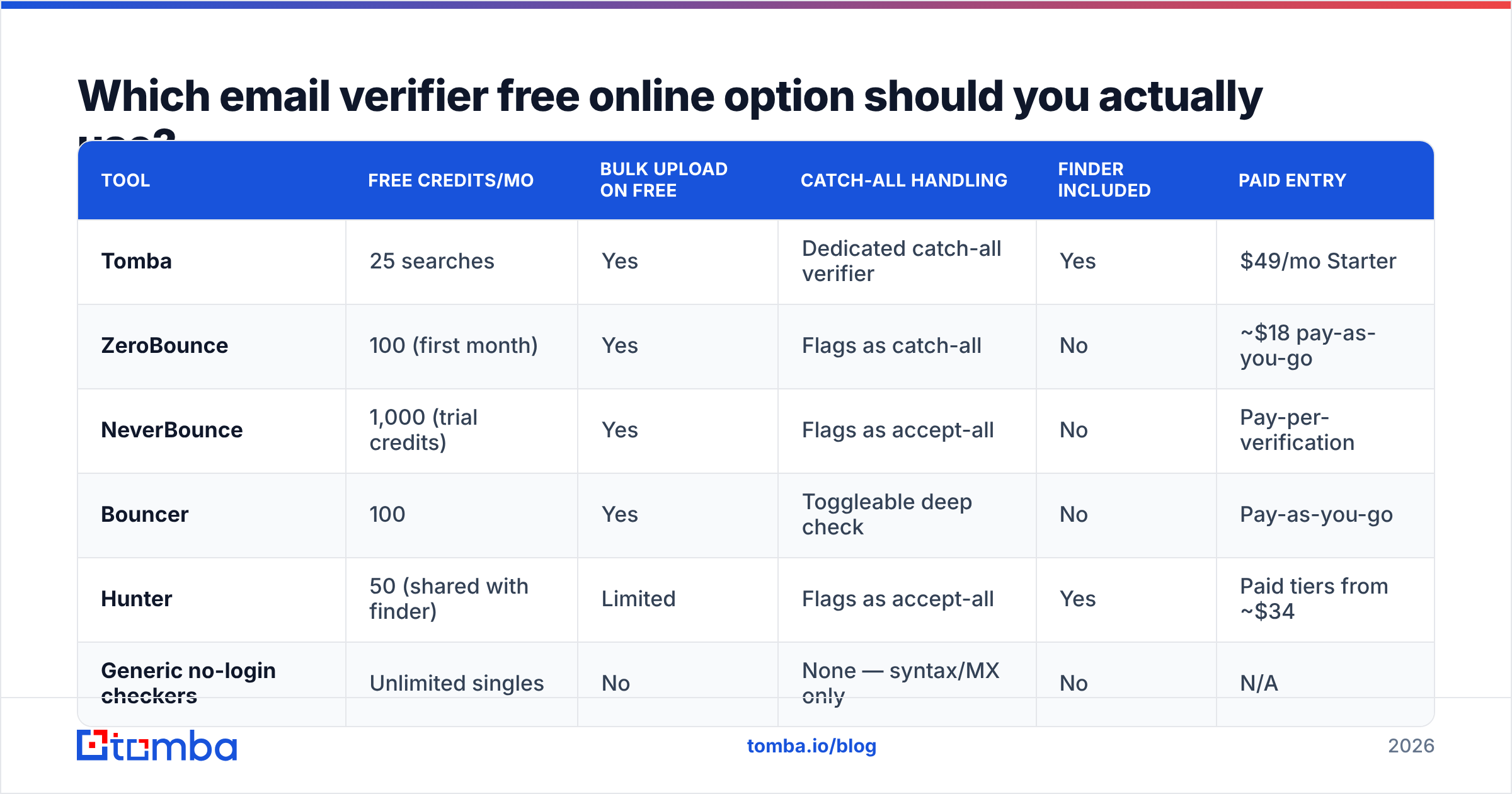
Depends entirely on volume. Below is how the main free offerings compare. Credit grants and prices change constantly — check each vendor's pricing page before committing.

| Tool | Free credits/mo | Bulk upload on free | Catch-all handling | Finder included | Paid entry |
|---|---|---|---|---|---|
| Tomba | 25 searches | Yes | Dedicated catch-all verifier | Yes | $49/mo Starter |
| ZeroBounce | 100 (first month) | Yes | Flags as catch-all | No | ~$18 pay-as-you-go |
| NeverBounce | 1,000 (trial credits) | Yes | Flags as accept-all | No | Pay-per-verification |
| Bouncer | 100 | Yes | Toggleable deep check | No | Pay-as-you-go |
| Hunter | 50 (shared with finder) | Limited | Flags as accept-all | Yes | Paid tiers from ~$34 |
| Generic no-login checkers | Unlimited singles | No | None — syntax/MX only | No | N/A |
Two honest observations from that table.
First, "unlimited free" almost always means syntax and MX only. If a tool asks for no email address, no login, and no rate limit, it is not running SMTP probes — those cost money per check. It's doing a DNS lookup and a regex. That's genuinely useful for catching typos, and worthless for predicting bounces.
Second, the free tiers that include SMTP are small on purpose. 25 to 100 credits is a demo, not a workflow. Vendors like ZeroBounce and NeverBounce price on volume because their cost is per-check. Nobody gives away 10,000 SMTP probes.
If you want an unbiased read on which vendors people actually renew, the email verification category on G2 is more useful than any vendor comparison page, this one included — filter reviews by company size, since enterprise complaints and solo-founder complaints are completely different animals.
How do you verify a list without paying anything?#
You can get real work done on free tiers if you sequence it correctly. The trick is to shrink the list before spending a credit.
- Deduplicate first. Most exported lists carry 5–15% duplicates across name variants and casing. A remove duplicates pass costs nothing and directly reduces credit spend.
- Strip roles and freemail manually. Filter out
info@,admin@,noreply@,support@in a spreadsheet. Also decide upfront whether you're keeping@gmail.comaddresses — for most B2B outreach, you're not. - Kill dead domains with a DNS pass. Any free MX-lookup tool does this without consuming verification credits. Domains with no MX records get deleted before the expensive step.
- Run the survivors through your free SMTP credits. By now you might have cut a 1,000-row list to 600. That's still more than a free tier covers, so verify the highest-value segment first — the accounts you'd actually be upset to lose.
- Handle catch-alls with pattern logic. For the remaining accept-all domains, confirm the company's email format using a company email pattern check, then keep only addresses that match the dominant pattern.
That sequence routinely gets a list from "unusable" to "safe to send" using 100 credits instead of 1,000. It also takes about an hour of manual work, which is the actual price of free.

When is a free verifier the wrong tool?#
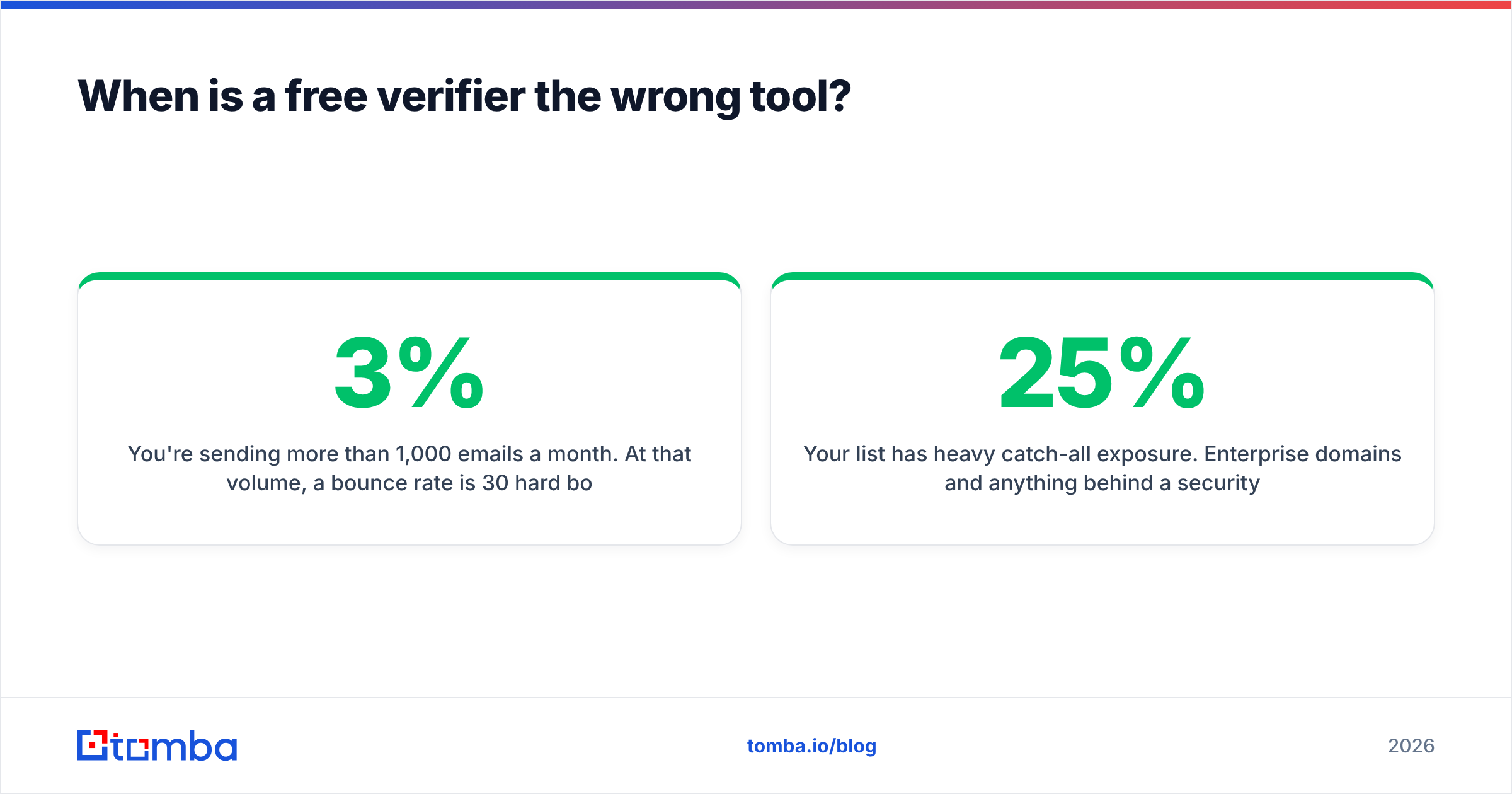
Four situations where the free route costs more than it saves.
You're sending more than 1,000 emails a month. At that volume, a 3% bounce rate is 30 hard bounces per send. Gmail and Microsoft both treat sustained bounce rates above 2–3% as a spam signal. Google's published sender guidelines are explicit about keeping invalid recipients low. Losing your domain's sender reputation costs weeks of recovery, and no free tier compensates you for it.
You need an API. Free tiers rarely include programmatic access, which means every verification is a manual paste-and-wait. If you're enriching form submissions, cleaning CRM records on write, or verifying inside a sequence tool, you need an email verification API, and that's a paid feature everywhere.
You're verifying at the point of capture. Real-time verification on a signup form has to answer in under 500ms and never rate-limit you. Free tiers rate-limit by design.
Your list has heavy catch-all exposure. Enterprise domains and anything behind a security gateway skew catch-all. If more than 25% of your list lands in that bucket, free tools will hand you a coin flip and call it an answer.
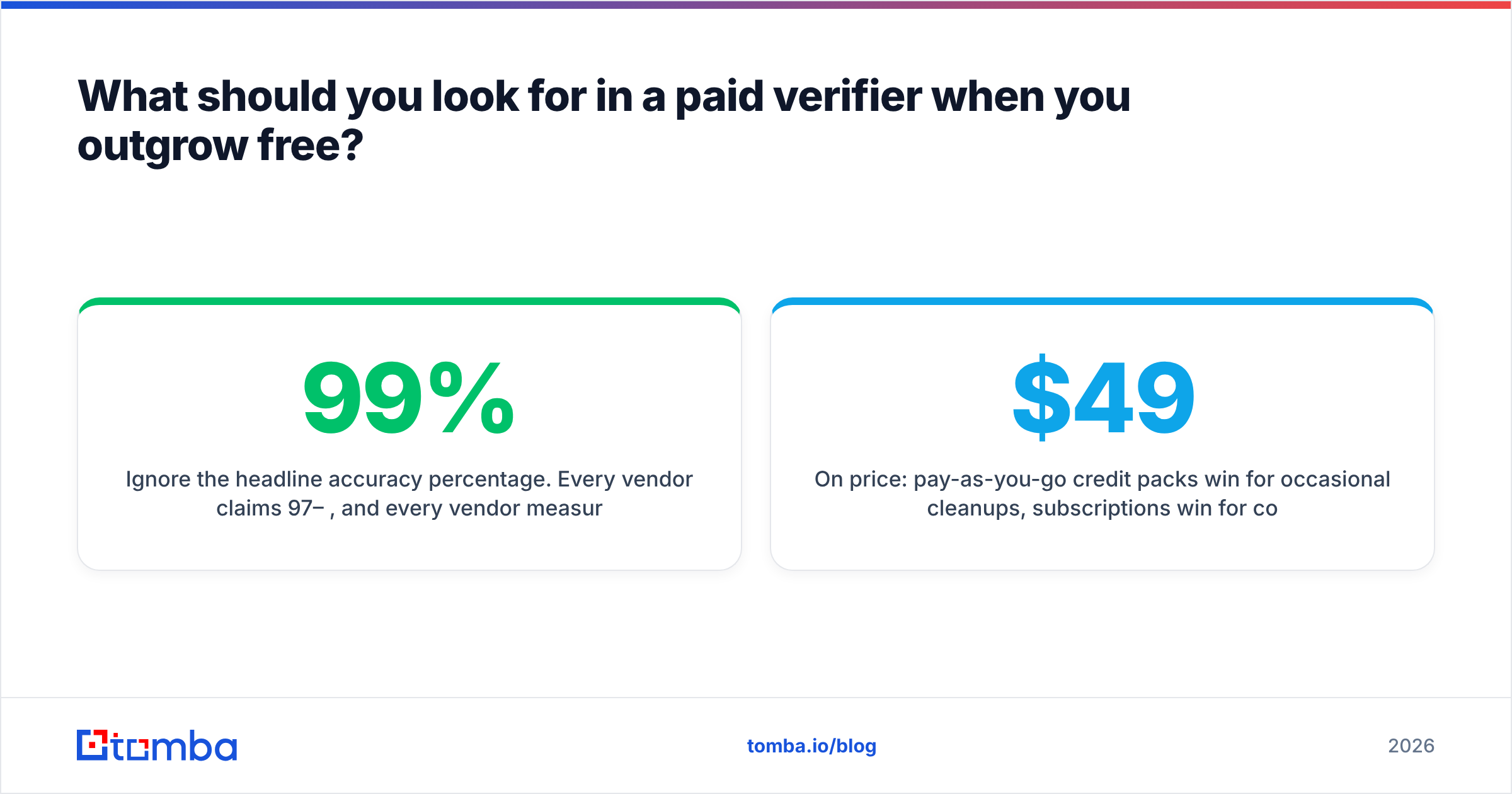
What should you look for in a paid verifier when you outgrow free?#
Ignore the headline accuracy percentage. Every vendor claims 97–99%, and every vendor measures it on a different list. Compare these instead:
- Catch-all methodology, stated openly. Ask how they classify accept-all domains. "We flag them" is honest. "We resolve them" without explanation is marketing.
- Credit rollover and expiry. Monthly credits that vanish on the 1st are a hidden price increase for lumpy workloads.
- Whether finding and verifying share a credit pool. If you're already using an email finder to source addresses, paying a second vendor to verify the same contact is a double charge on one record. Tools that bundle both — where a found address arrives pre-verified — cut your effective cost per usable contact roughly in half.
- Bulk throughput and format tolerance. A 50,000-row CSV should process in minutes, and the tool should not choke on a column order it didn't expect.
- Refunds for unknowns. The good vendors don't charge for
unknownverdicts. The rest quietly do.
On price: pay-as-you-go credit packs win for occasional cleanups, subscriptions win for continuous outbound. Tomba's pricing starts free at 25 searches a month and moves to $49/mo Starter, $99/mo Growth, and $249/mo Pro — with finding, verification, domain search, and enrichment drawing from the same pool rather than separate line items.
Frequently asked questions#
Is email verification legal? Yes. Verification is a technical handshake with a mail server; it doesn't send mail or store message content. Your obligations under GDPR and CAN-SPAM attach to how you obtained and use the address, not to whether you checked it.
Can a verifier detect if someone will actually read my email? No. It confirms the mailbox exists and accepts mail. Engagement is a copy and targeting problem, not a data problem.
Why did a verified address still bounce? Three usual causes: the person left between verification and send, the receiving server greylisted your IP on first contact, or the address was catch-all and got reported optimistically. Re-verify any list older than 90 days — B2B data decays at roughly 2–3% per month as people change jobs.
Do free verifiers sell my uploaded list? Read the privacy policy. Reputable vendors delete uploads on a stated schedule and never merge them into their own database. Tools with no stated retention policy deserve suspicion, especially free ones with no visible business model.
Is a 100% valid list realistic? No, and any tool promising it is overselling. A well-cleaned B2B list lands around 95–97% deliverable. Chasing the last few points costs more than it returns.
Where to start#
If you just need to check one address right now, use a free single-address checker and move on — that's exactly what free tiers are for. If you're building a repeatable outbound motion, the useful question isn't "which email verifier is free online," it's "where do verified addresses come from in the first place." Sourcing and verifying in one pass beats stitching a free finder to a free verifier and reconciling the mismatches by hand.
The Tomba Email Finder returns addresses with a confidence score and verification status attached, so contacts arrive ready to send rather than ready to check. The free tier gives you 25 searches a month with no card required — enough to test it against a list you already know the answers to, which is the only benchmark that matters.
Related guides#
Ready to find emails that actually work?
Join 150,000+ professionals who stopped guessing and started sending. Free credits on signup — no credit card required.
Get the Tomba newsletter
Practical outbound tactics and product updates — once every two weeks.
About the author