Email vs InMail B2B Outreach: Which Wins More in 2026?
InMail gets read more often. Cold email costs almost nothing per touch. Here is the honest math on reply rates, cost per conversation, and which channel to lead with in 2026.
The email vs InMail B2B question is really a math problem. One channel buys attention. The other buys volume. This guide runs the numbers on both — reply rates, cost per reply, and the ceiling each one hits — so you can pick a lead channel and stop guessing.
TL;DR
- InMail wins on attention. It lands inside LinkedIn, tied to a real profile, with no spam folder to fall into. Reply rates run roughly 2–3x cold email.
- Cold email wins on economics. One InMail credit costs dollars. One verified email costs cents, and you can send thousands a month without buying more seats.
- InMail's real limit is credits — about 50 a month on a Sales Navigator seat. Email's real limit is deliverability.
- Cost per booked conversation settles the argument. At list prices, InMail runs $40–$120 per reply. A clean, verified email list runs $3–$25.
- The 2026 winner is not either/or: email for volume, InMail for the 5–10% of accounts worth a paid touch.
Email vs InMail B2B: what is the actual difference?#
Think of it like knocking on a door versus mailing a letter. InMail is the knock — you're standing there, they can see who you are, and ignoring you feels slightly rude. Cold email is the letter. Cheap to send, easy to send a thousand of, and easy to throw in the bin unopened.
Technically, five things separate them.
- Delivery path — Cold email travels over SMTP to a mailbox you don't control. Google, Microsoft, and any security gateway in between all get a vote. InMail is delivered inside LinkedIn's own product. There is no spam filter to beat, only the recipient's message tab.
- Identity — An InMail carries your headline, photo, mutual connections, and shared groups. A cold email carries a from-name and a signature. Social proof is baked into one channel and bolted on in the other.
- Cost model — InMail is metered. You buy a seat, the seat comes with a fixed credit allotment, and each message to a non-connection spends one. Email is effectively unmetered. Your cost is finding and verifying the address, plus the sending tool.
Two more differences shape how a campaign actually runs.
- Length and format — InMail caps out around 1,900 characters in the body, with a 200-character subject. Email has no practical limit, though anything over 120 words underperforms in cold sequences.
- Follow-up mechanics — Email sequences send 4–7 touches over three weeks automatically. InMail follow-up is manual, and it costs another credit unless the prospect replies.
That last difference is the one most teams underestimate. Cold email's advantage isn't the first message. It's touch three.
What does each channel really cost per conversation?#
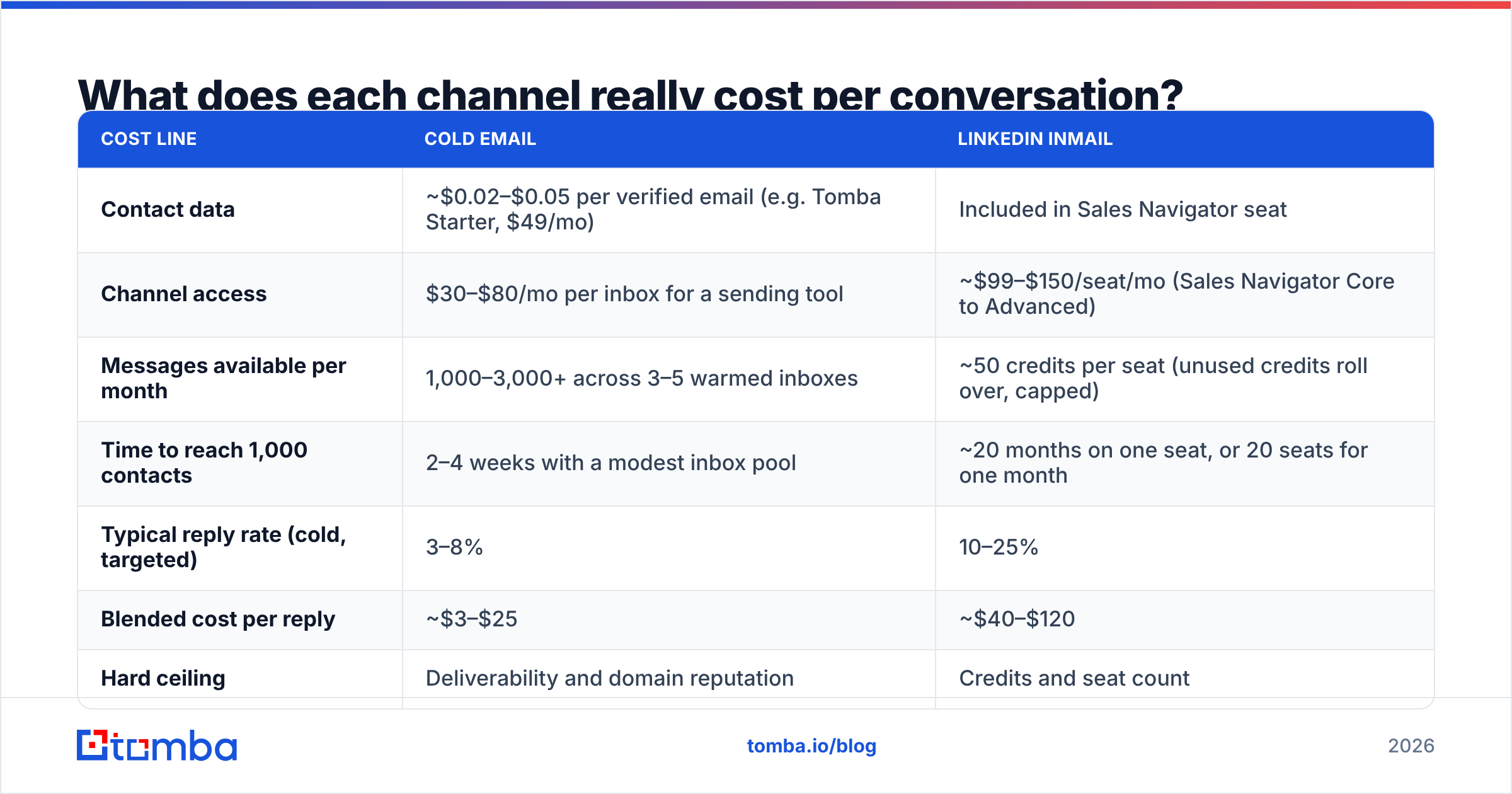
Run the math on 1,000 target contacts. Assume you already know who you want to reach.
| Cost line | Cold email | LinkedIn InMail |
|---|---|---|
| Contact data | ~$0.02–$0.05 per verified email (e.g. Tomba Starter, $49/mo) | Included in Sales Navigator seat |
| Channel access | $30–$80/mo per inbox for a sending tool | ~$99–$150/seat/mo (Sales Navigator Core to Advanced) |
| Messages available per month | 1,000–3,000+ across 3–5 warmed inboxes | ~50 credits per seat (unused credits roll over, capped) |
| Time to reach 1,000 contacts | 2–4 weeks with a modest inbox pool | ~20 months on one seat, or 20 seats for one month |
| Typical reply rate (cold, targeted) | 3–8% | 10–25% |
| Blended cost per reply | ~$3–$25 | ~$40–$120 |
| Hard ceiling | Deliverability and domain reputation | Credits and seat count |
The pattern holds across every team I've seen model it. InMail converts better per message and worse per dollar. It is a premium channel, priced like one, and it should be spent like one.
The table also exposes a throughput problem. Fifty credits a month is not an outbound motion — it's a target-account list. If your ICP is 4,000 companies, InMail alone cannot cover it without a seat budget that would embarrass your CFO.
Which channel gets more replies in 2026?#
InMail, per message, still leads. But the gap has narrowed on both ends.
InMail's advantage eroded because everyone found it. The inbox that felt exclusive in 2019 now carries recruiter spam, AI-written "loved your post" openers, and templates with a merge-field slip in the first line. Prospects swipe the message tab clean the way they learned to swipe email. Sponsored InMail (now Message Ads) sits in the same tab and trains the same reflex.
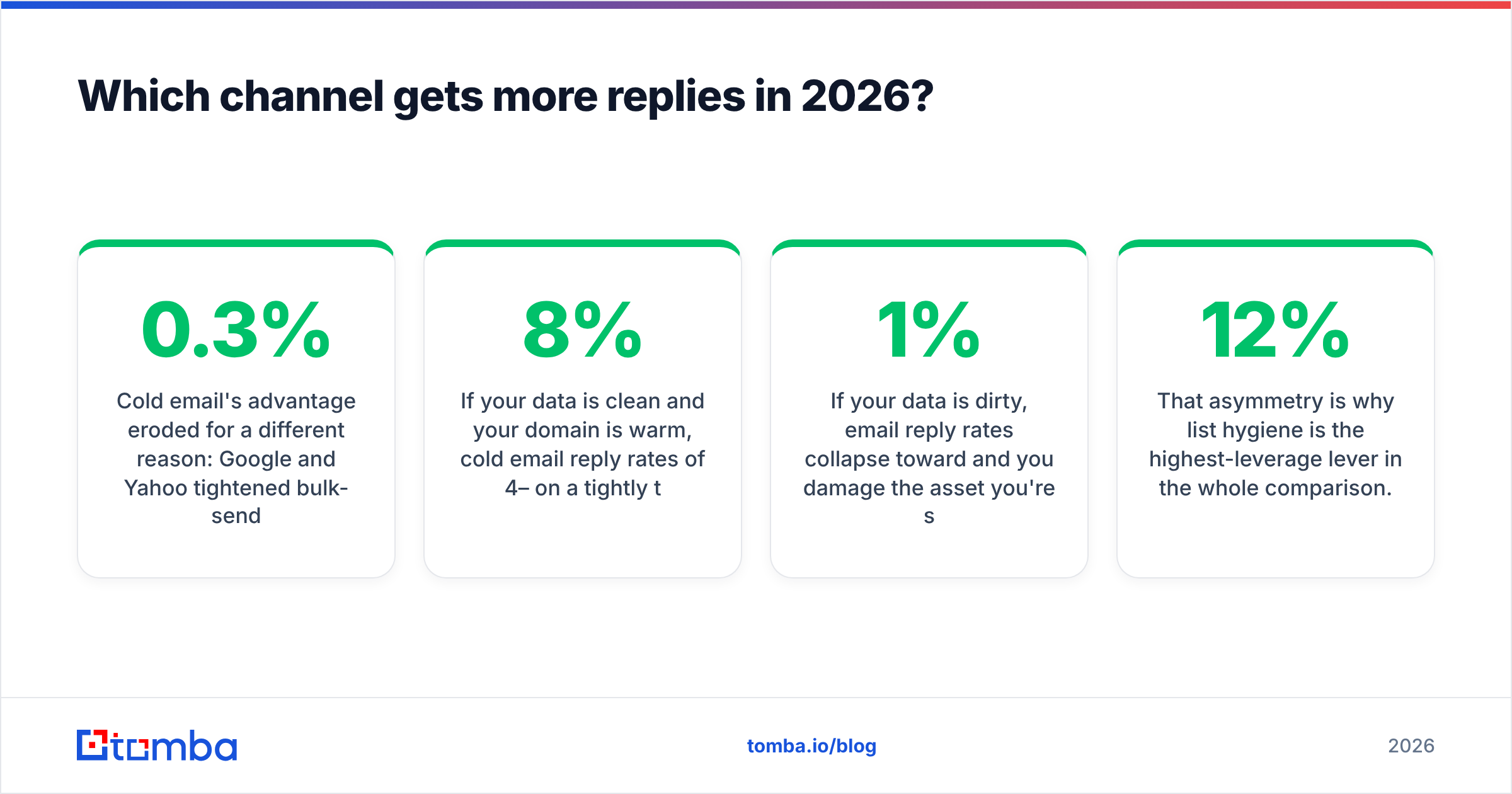
Cold email's advantage eroded for a different reason. Google and Yahoo tightened their bulk-sender rules. SPF, DKIM, and DMARC are table stakes now, and complaint rates above 0.3% get you throttled. Google publishes the rules in its bulk sender guidelines, and they are not optional. If your list is scraped and unverified, bounces will torch your domain reputation before your copy gets a chance.
So the honest 2026 answer is conditional:
- If your data is clean and your domain is warm, reply rates of 4–8% on a tight list are achievable. The volume advantage makes email the better primary channel.
- If your data is dirty, email reply rates collapse toward 1% and you damage the asset you send from. InMail looks better by default — not because it's stronger, but because it doesn't punish sloppiness the same way.
That asymmetry is why list hygiene is the highest-leverage lever here. A run through an email verifier before a campaign routinely moves bounce rates from 12% to under 2%. Reply rate follows. Verification is not a nice-to-have. It is the difference between the two rows above.
When does InMail beat cold email?#
Reserve credits for situations where the premium is justified.
- No findable email address. Some roles — certain enterprise security, legal, and government-adjacent contacts — genuinely don't have discoverable work emails. If a domain search returns no pattern and no verified hits, InMail is your only direct path.
- Named-account selling. Twenty logos, six personas each, $200k ACV. At that deal size the cost per touch is irrelevant and the attention premium is worth every dollar.
- Executive and C-level outreach. Assistants filter executive email. They rarely filter LinkedIn. A VP of Engineering who ignores 200 emails a day may still read a message tied to a profile with two mutual connections.
The last three are about timing and context.
- Recruiting and partnership conversations. These are relationship-first by nature, and the profile context does work no email signature can replicate.
- After a warm signal. Profile view, post engagement, event attendance, comment on your content. A credit spent within 48 hours of a signal is the highest-converting InMail there is.
- Regulated or privacy-sensitive markets. In some EU contexts, LinkedIn messaging carries a lower compliance burden than unsolicited email to a corporate address. Check with counsel, not with a blog post — but it's a real factor.
Notice what all six have in common: low volume, high value, or no alternative. That's the InMail profile.
When does cold email beat InMail?#
Everything else. Start with the three that decide most budgets.
- Volume plays. SMB, mid-market, product-led, any motion where you need 500+ conversations a quarter. The credit math simply doesn't work.
- Multi-touch sequencing. A 5-touch email sequence beats a single perfect InMail on aggregate reply rate almost every time. Most replies land on touch 2–4, not touch 1.
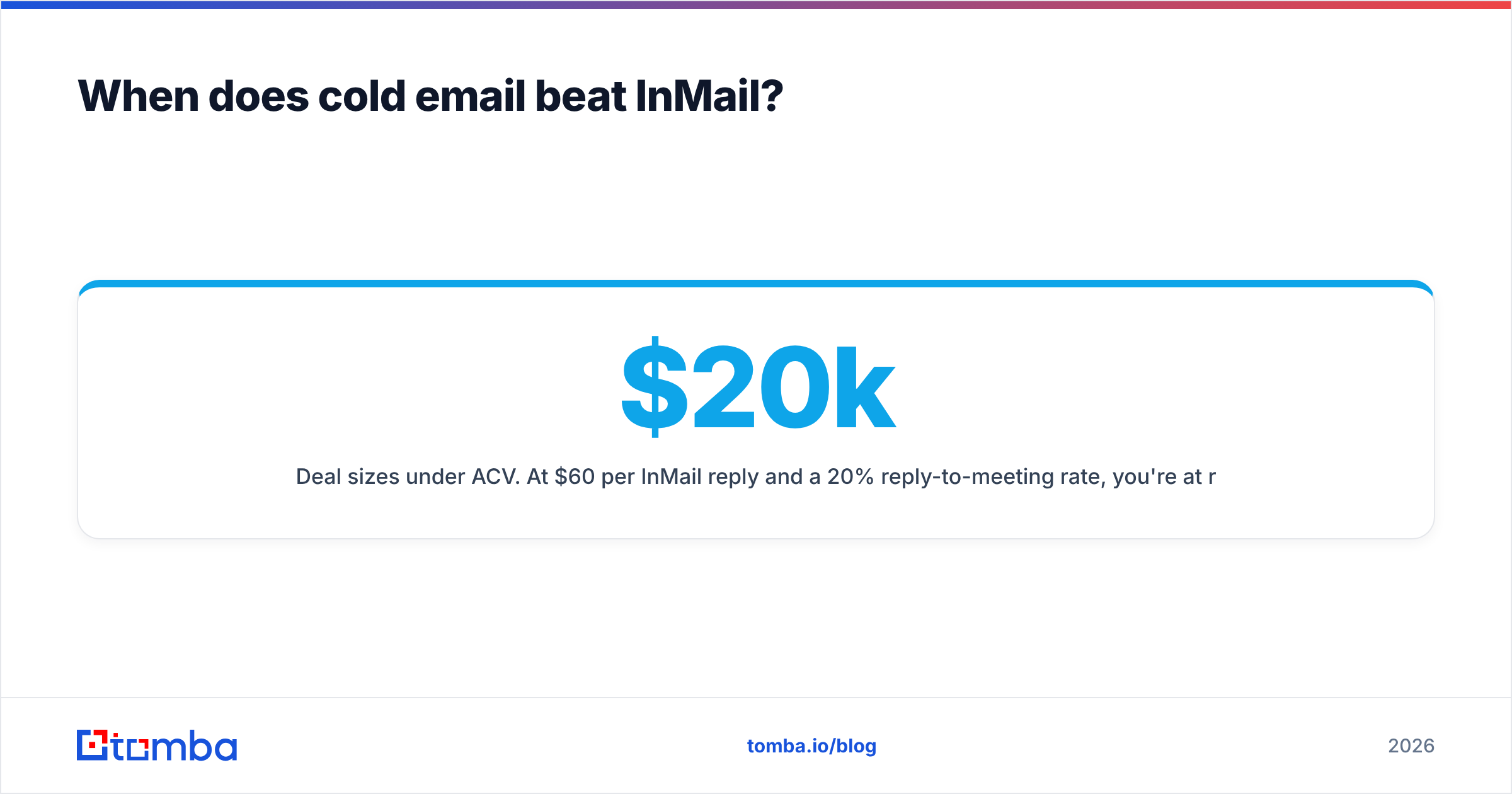
- Deal sizes under $20k ACV. At $60 per InMail reply and a 20% reply-to-meeting rate, you're at roughly $300 per meeting before a rep opens their mouth. That breaks small-ticket unit economics.
Three more that teams tend to notice later:
- A/B testing. You cannot learn anything statistically useful from 50 messages a month. Email gives you sample size, and sample size gives you a repeatable playbook.
- Automation and CRM hygiene. Email plugs into everything. Push contacts into HubSpot or Salesforce, trigger on reply, log activity automatically. The HubSpot integration route keeps enrichment and sequencing in the same record. InMail activity mostly stays trapped inside LinkedIn unless you pay for CRM sync.
- Anywhere you want to own the channel. LinkedIn can change credit allotments, pricing, or terms whenever it likes. Your domain and your list are assets you control. That's the difference between renting your pipeline and owning it.
What does the full comparison look like side by side?#
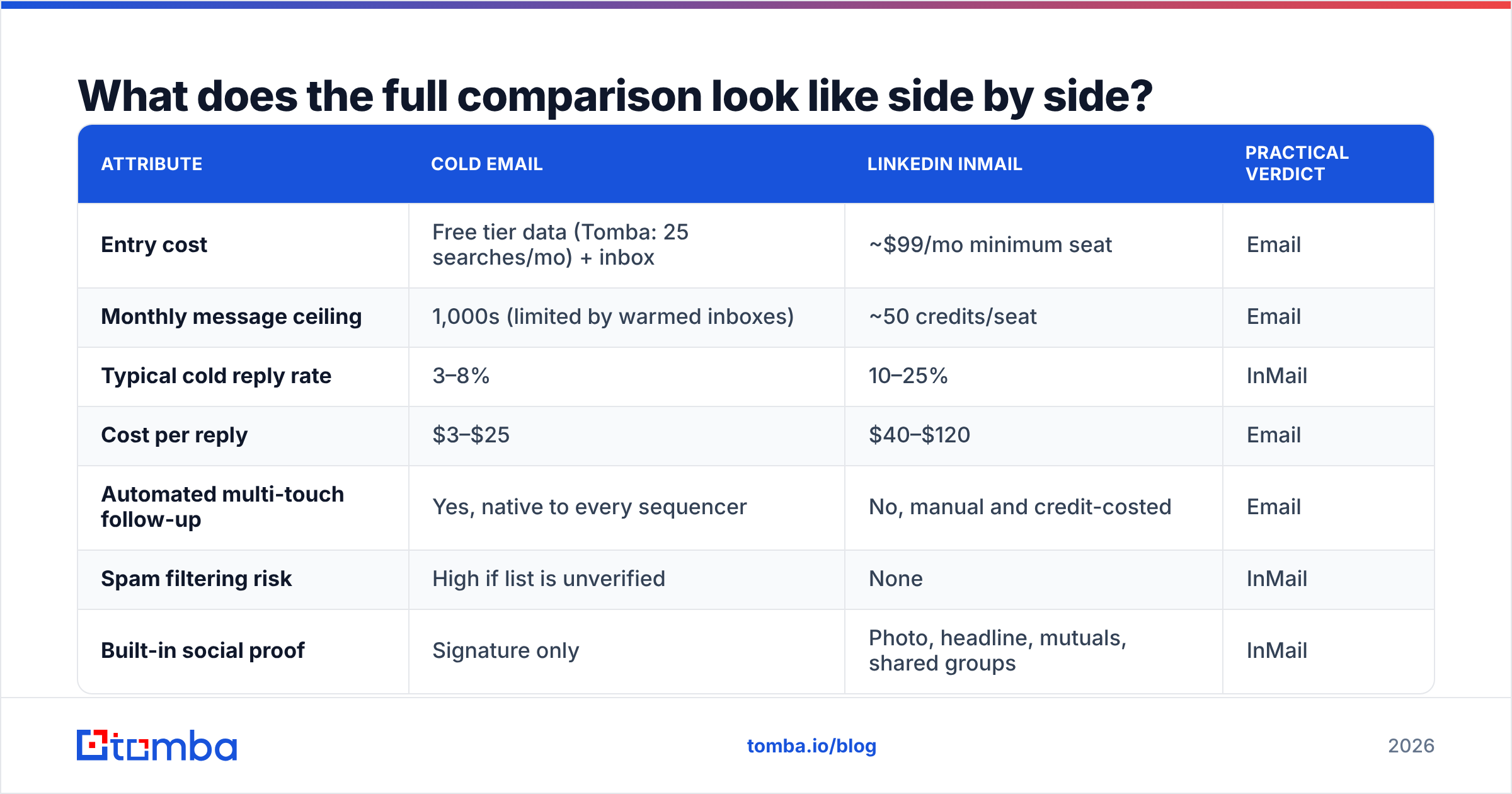
| Attribute | Cold email | LinkedIn InMail | Practical verdict |
|---|---|---|---|
| Entry cost | Free tier data (Tomba: 25 searches/mo) + inbox | ~$99/mo minimum seat | |
| Monthly message ceiling | 1,000s (limited by warmed inboxes) | ~50 credits/seat | |
| Typical cold reply rate | 3–8% | 10–25% | InMail |
| Cost per reply | $3–$25 | $40–$120 | |
| Automated multi-touch follow-up | Yes, native to every sequencer | No, manual and credit-costed | |
| Spam filtering risk | High if list is unverified | None | InMail |
| Built-in social proof | Signature only | Photo, headline, mutuals, shared groups | InMail |
| Character limit | Unlimited (120 words recommended) | ~1,900 body / 200 subject | |
| Attachment support | Yes | Limited | |
| CRM logging | Native across all major CRMs | Requires paid sync | |
| Channel ownership | You own domain + list | Platform-dependent, terms can change | |
| Best-fit use case | Volume outbound, SMB to mid-market, testing | Named accounts, C-suite, no-email contacts | Split |
Eight rows to email, three to InMail, one split. That ranking flips the moment your deal size clears about $50k. Which is exactly why enterprise teams love InMail and PLG teams find it baffling.
How do you run both channels together without wasting credits?#
Sequence them. The mistake is treating email and InMail as competing channels rather than different stages of the same play.
A structure that works:
Day 0 — Build the list. Start from your ICP filters in Sales Navigator, then resolve those profiles to work emails. A LinkedIn finder turns a profile list into verified addresses, so you're not paying for reach you could have gotten for free. Verify everything before it enters a sequence.
Days 1–14 — Email first. Run your 4–5 touch sequence. This costs almost nothing per contact and will resolve 60–80% of the replies you're going to get.
Days 3–16 — Light LinkedIn touches in parallel. Profile view, connection request with no pitch, engage with a recent post. These are free, they raise recognition before the later touches, and they sometimes produce inbound replies on their own. This is where LinkedIn outreach earns its keep without spending a credit.
Day 17 — Spend the credit, selectively. Only on accounts that meet two of: on your named-account list, showed any engagement signal, opened email 3+ times without replying, or have no other reachable channel. In practice that's 5–10% of the original list. Your 50 credits now cover a list of 500–1,000 rather than 50.
Ongoing — Recycle. Non-repliers go back into nurture. Bounced addresses get re-resolved and re-verified, not deleted. People change jobs, so a bounce is often a signal to re-enrich rather than a dead end. Vendor-neutral reviews of both channel types are worth skimming on G2's sales intelligence category before you renew anything, and HubSpot's sales blog publishes benchmark data worth checking your own numbers against.
The point of the sequence is that InMail becomes your escalation tier, not your discovery tier. Escalation tiers should be expensive. Discovery tiers should not.
What are the most common mistakes in each channel?#
Cold email: sending to unverified lists (the single biggest killer), skipping domain warmup, using one inbox for everything, writing 300-word first touches, and neglecting SPF/DKIM/DMARC. Check your setup with a spam checker and an SPF checker before you scale volume, not after your reply rate craters.
InMail: using the default LinkedIn template, writing a 1,900-character wall because the limit allows it, spending credits on cold prospects you could have emailed for two cents, and burning the month's allotment in week one with no signal-based prioritization. Also: not checking whether a prospect has an Open Profile, which lets you message them without spending a credit at all.
Both: measuring opens instead of replies. Open tracking is unreliable on email (Apple Mail Privacy Protection distorts it) and unavailable on InMail. Replies and meetings are the only metrics that survive contact with reality.
The verdict#
The email vs InMail B2B verdict: lead with email, escalate with InMail. Email gives you the volume, the sequencing, the testing surface, and the cost structure to build a repeatable outbound motion. InMail gives you a premium door-knock for the accounts where a premium door-knock changes the outcome. Treating it as your primary channel means paying $60 for conversations you could have had for $6.
But that whole argument collapses if your email data is bad. A cold-email channel running on a scraped, unverified list isn't cheaper than InMail. It's a slow-motion domain fire that also happens to be cheap.
Start by getting the addresses right. The Tomba Email Finder resolves names, domains, and LinkedIn profiles into verified work emails, with a free tier at 25 searches a month and Starter at $49/mo when you're ready to run real volume — see Tomba pricing for the full breakdown. Verify the list, warm the domain, sequence the email, and save your credits for the accounts that deserve them.
Related guides#
Ready to find emails that actually work?
Join 150,000+ professionals who stopped guessing and started sending. Free credits on signup — no credit card required.
Get the Tomba newsletter
Practical outbound tactics and product updates — once every two weeks.
About the author