Email Warming Services in 2026: What Actually Works
Email warming services promise inbox placement, but half of them just trade fake opens between fake mailboxes. Here's how the major tools compare, what warmup can and can't fix, and when to skip it entirely.
TL;DR
- Email warming services build sending reputation by exchanging low-volume mail between real inboxes and forcing positive engagement signals (opens, replies, moves out of spam).
- They work — but only as one layer. Warmup cannot rescue a domain with broken authentication, a scraped list, or copy that reads like a phishing attempt.
- Pricing clusters at $20–$50 per inbox per month for dedicated warmup tools, and warmup is bundled free-ish inside sending platforms like Instantly and Smartlead.
- The biggest 2026 shift: Google and Microsoft now weight recipient-side behavior far more heavily, so peer-network warmup that inflates opens in empty mailboxes has diminishing returns.
- Best sequence: authenticate → warm 3–4 weeks → verify every address before send. Skipping step three undoes the first two.
What are email warming services?#
An email warming service gradually increases the volume of mail leaving a new mailbox or domain while manufacturing positive engagement signals, so mailbox providers learn to trust you before you start real outreach.
Think of it like a credit score. A brand-new domain has no credit history. Blasting 500 cold emails on day one is the equivalent of applying for a $50,000 loan with zero record — the underwriter (Gmail's filter) declines by default. Warmup is the small-limit starter card you pay off on time for a few weeks until you're approved for bigger numbers.
Technically, most warmup tools operate a peer network: thousands of participating mailboxes send each other short, human-looking messages. The receiving side automatically opens them, marks them important, replies sometimes, and drags anything that landed in spam back to the primary tab. Those actions are the signals Gmail and Outlook use to build a per-sender trust profile alongside your sender reputation.
Here's what a warmup tool actually manipulates, ranked by how much it still matters in 2026:
- Spam-folder rescue — the strongest remaining signal. A message pulled out of spam by a human-behaving account tells the filter it misclassified you.
- Replies — a two-way conversation is expensive to fake at scale, so providers still weight it heavily.
- Volume ramp curve — going 10 → 20 → 40 → 80 per day looks organic; going 0 → 300 looks like a compromised account.
- Opens and read time — heavily discounted now that Apple Mail Privacy Protection and Gmail image proxying made opens unreliable.
- Folder placement and stars — minor, but free to include.
- Domain age and consistency — not something a tool controls, but warmup enforces the consistency half.

Do email warming services actually improve deliverability?#
Yes, measurably — but the effect size is smaller than vendor case studies claim, and it decays fast if the fundamentals are wrong.
What warmup reliably fixes:
- New-domain cold start. A domain registered last week has no history. Three to four weeks of ramped sending gives filters something to score.
- Dormancy resets. A mailbox that sent nothing for six months and then fires 200 emails looks hijacked. Re-warming avoids that.
- Volume ceilings. Warmup lets you discover your practical daily ceiling per inbox (usually 30–50 cold sends on Google Workspace) instead of finding it via a spam-trap incident.
What warmup cannot fix, no matter how long you run it:
- Missing or misconfigured authentication. No SPF alignment, no DKIM signature, no DMARC policy — you're rejected before reputation is even consulted. Run your record through an SPF checker before you spend a dollar on warmup.
- A dirty list. Bounce rate above roughly 3% torches reputation faster than any warmup network can rebuild it. This is the single most common reason "warmed" accounts still land in spam.
- Spam-triggering copy. Nine links, three exclamation points, and a "GUARANTEED ROI" subject line will get filtered on a pristine domain.
- Complaint rate. Google's published threshold is 0.30% spam complaints; sustained numbers above it override everything else. Their Email sender guidelines are the authoritative source here and worth reading in full.
- Blacklisting. If your sending IP is on a major DNSBL, warmup traffic just keeps hitting the wall. Check with a blacklist checker first.
The honest framing: warmup is permission to send, not permission to send badly. Teams that treat it as a magic bullet burn domains at roughly the same rate as teams that skip it — they just burn them in week five instead of week one.
How do the major email warming services compare?#
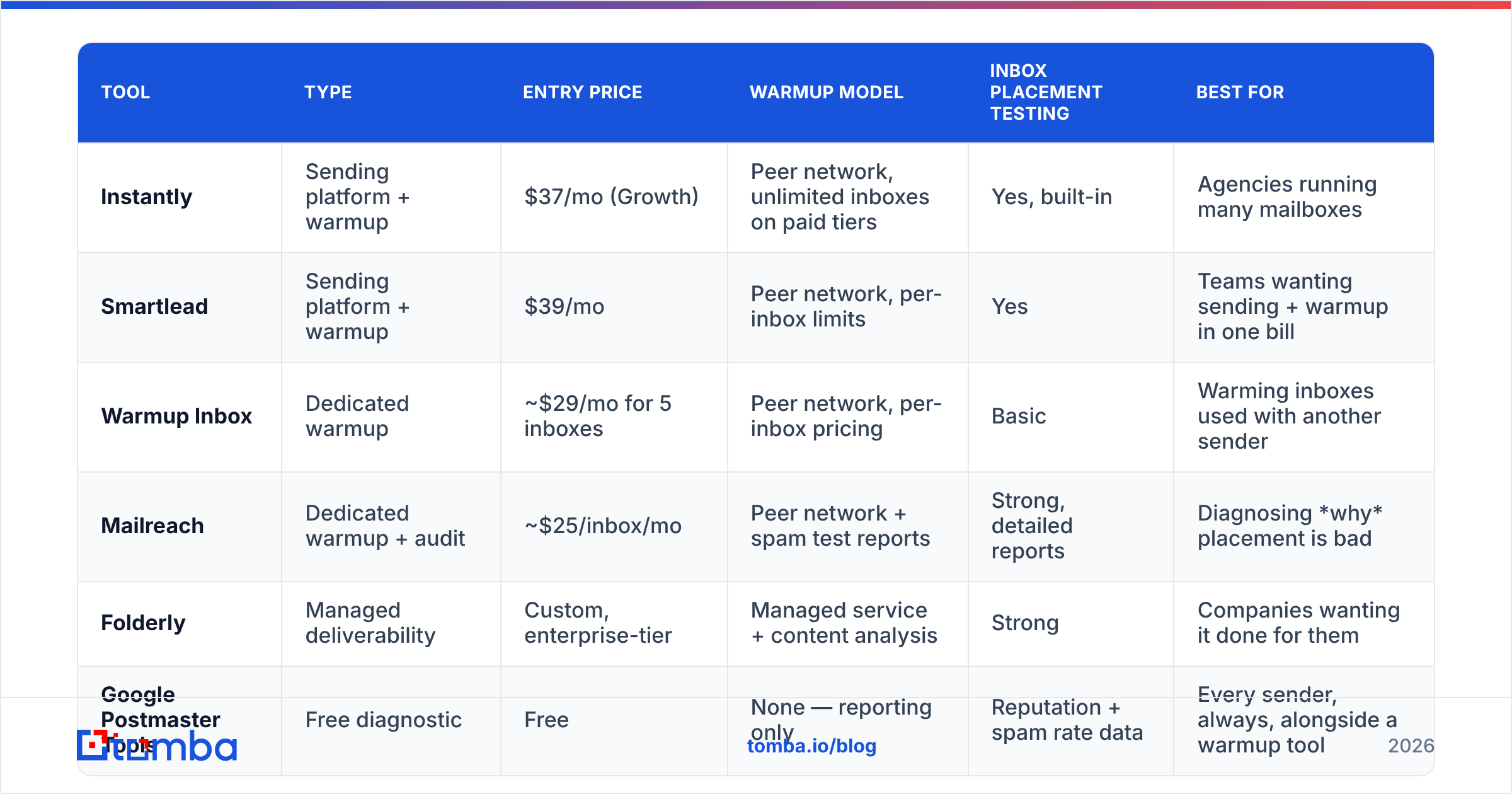
The market splits into three shapes: dedicated warmup tools, sending platforms with warmup bundled in, and inbox-placement testing tools that diagnose rather than warm. Pricing below reflects publicly listed 2026 entry tiers; all of them shift, so verify on the vendor page.
| Tool | Type | Entry price | Warmup model | Inbox placement testing | Best for |
|---|---|---|---|---|---|
| Instantly | Sending platform + warmup | $37/mo (Growth) | Peer network, unlimited inboxes on paid tiers | Yes, built-in | Agencies running many mailboxes |
| Smartlead | Sending platform + warmup | $39/mo | Peer network, per-inbox limits | Yes | Teams wanting sending + warmup in one bill |
| Warmup Inbox | Dedicated warmup | ~$29/mo for 5 inboxes | Peer network, per-inbox pricing | Basic | Warming inboxes used with another sender |
| Mailreach | Dedicated warmup + audit | ~$25/inbox/mo | Peer network + spam test reports | Strong, detailed reports | Diagnosing why placement is bad |
| Folderly | Managed deliverability | Custom, enterprise-tier | Managed service + content analysis | Strong | Companies wanting it done for them |
| Google Postmaster Tools | Free diagnostic | Free | None — reporting only | Reputation + spam rate data | Every sender, always, alongside a warmup tool |
A note on the free option in that last row: Google Postmaster Tools is not a warming service, but it's the only place you see your actual Gmail-side domain reputation and complaint rate. Running warmup without it is running blind. Set it up on day one.
The pattern worth noticing: if you already pay for a sending platform, its bundled warmup is usually good enough. Paying $25/inbox for a dedicated tool on top of Instantly is duplicated spend unless you specifically need Mailreach-grade diagnostics.
What does a realistic 30-day warmup schedule look like?#
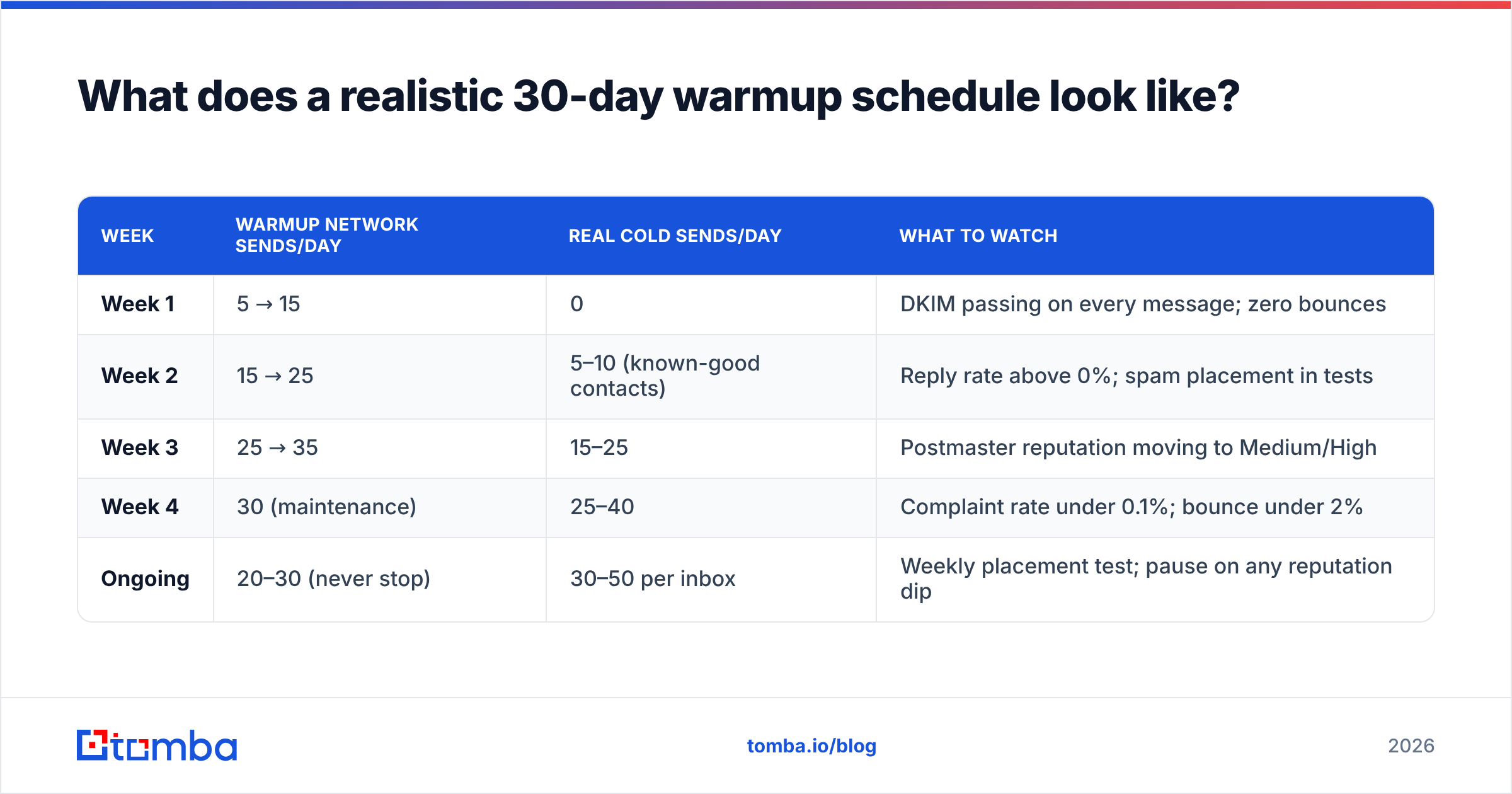
Volume ramps should roughly double weekly, split between warmup traffic and real sends, with real sends starting only in week two.
| Week | Warmup network sends/day | Real cold sends/day | What to watch |
|---|---|---|---|
| Week 1 | 5 → 15 | 0 | DKIM passing on every message; zero bounces |
| Week 2 | 15 → 25 | 5–10 (known-good contacts) | Reply rate above 0%; spam placement in tests |
| Week 3 | 25 → 35 | 15–25 | Postmaster reputation moving to Medium/High |
| Week 4 | 30 (maintenance) | 25–40 | Complaint rate under 0.1%; bounce under 2% |
| Ongoing | 20–30 (never stop) | 30–50 per inbox | Weekly placement test; pause on any reputation dip |
Two rules people get wrong:
Don't stop warmup after the ramp. Reputation is a rolling window, not a permanent badge. Most teams that see placement collapse in month three turned warmup off in month two.
Don't put your main domain in the blast radius. Send cold outreach from a lookalike domain (get-acme.com, acme-hq.com) and keep acme.com for transactional and human mail. If the cold domain burns, your invoices still deliver.
Is list quality more important than warmup?#
Yes — and this is the part most warmup vendors won't emphasize, because it's not what they sell.
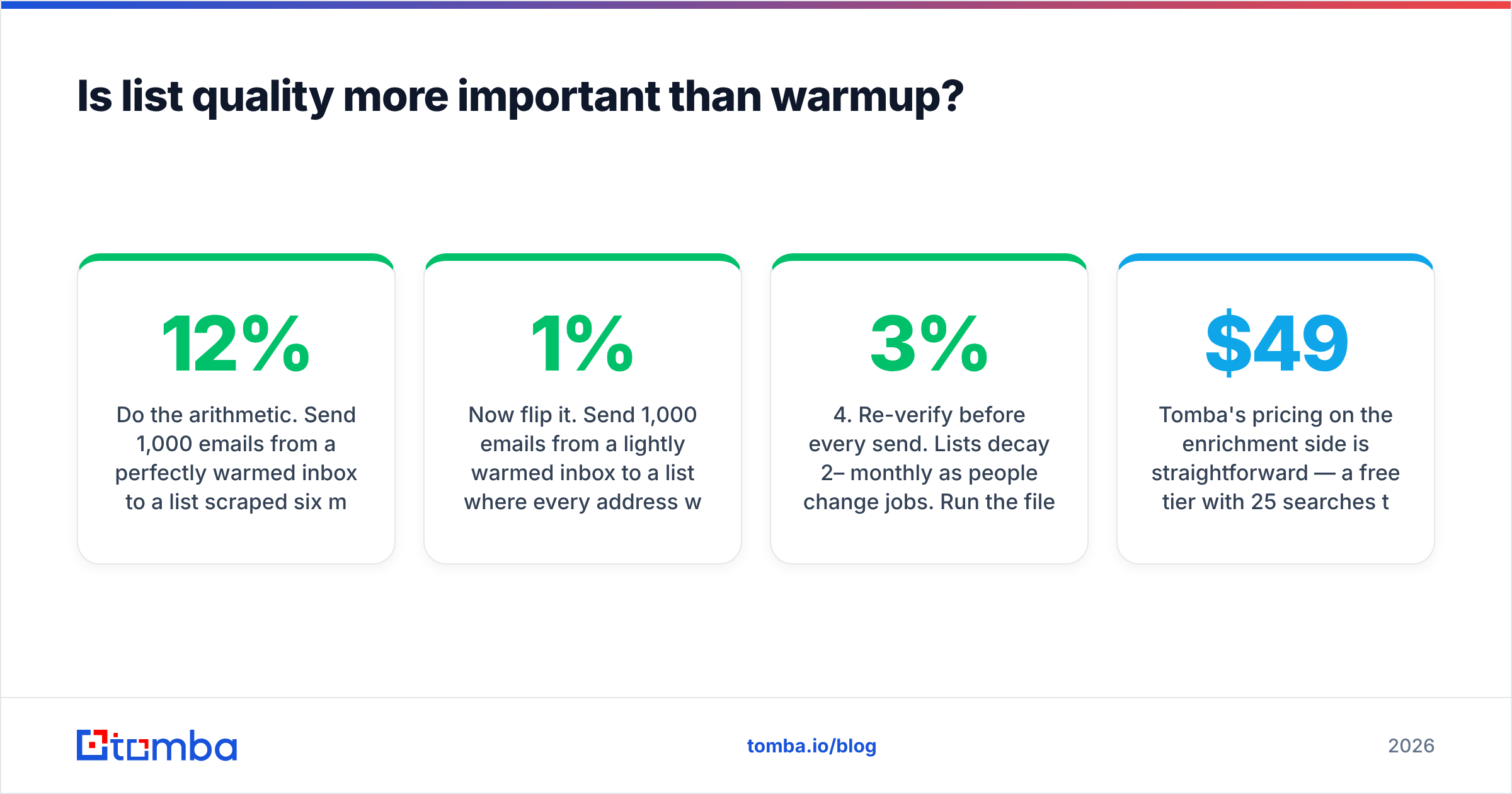
Do the arithmetic. Send 1,000 emails from a perfectly warmed inbox to a list scraped six months ago with a 12% invalid rate. That's 120 hard bounces. Gmail and Outlook read a double-digit bounce rate as a strong signal that you bought a list, and reputation drops within a single campaign. Four weeks of careful warmup, gone in one afternoon.
Now flip it. Send 1,000 emails from a lightly warmed inbox to a list where every address was verified within the last 30 days. Bounce rate under 1%, no hard signals, filters have nothing to punish. Placement will be imperfect, but it won't collapse.
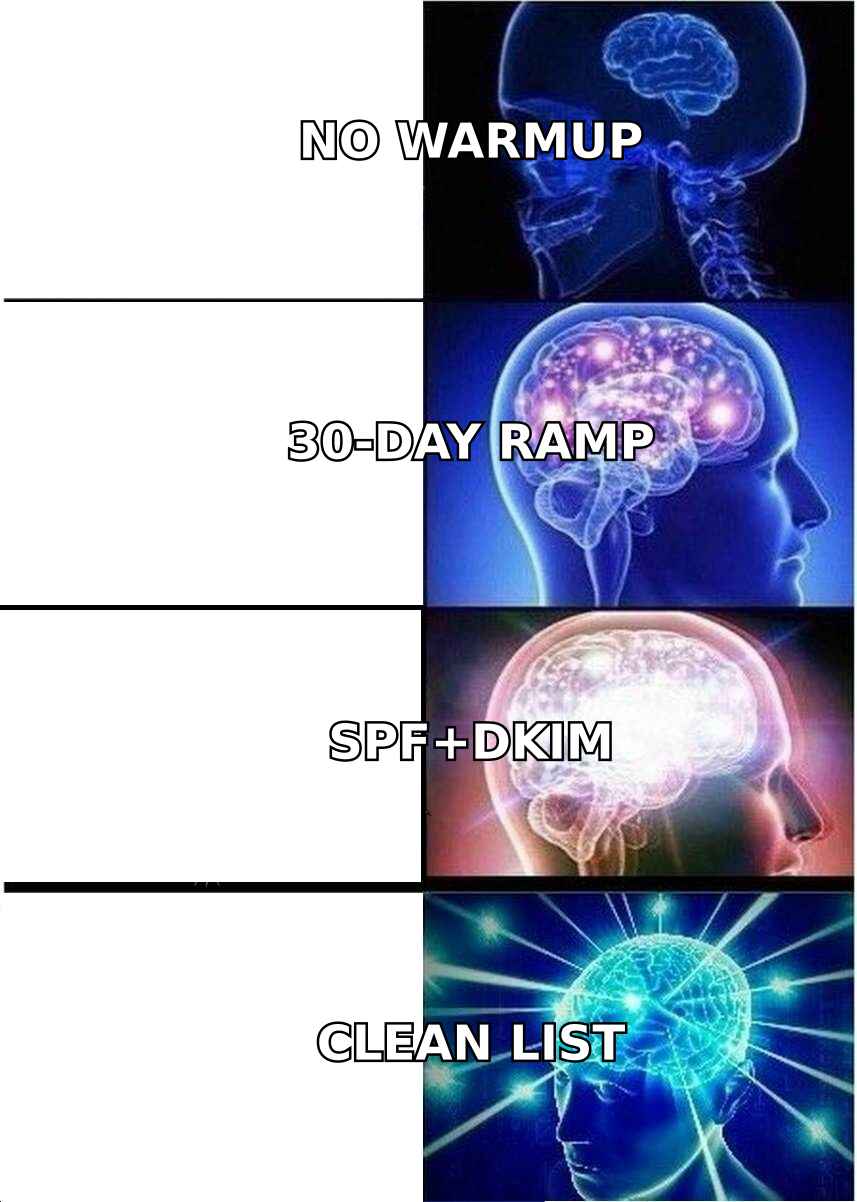
Warmup and verification aren't competing line items — they're sequential. The practical order:
- Authenticate. SPF, DKIM, DMARC (start at
p=none, tighten later). Non-negotiable. - Warm. Three to four weeks on the schedule above, using whichever tool your sending platform already includes.
- Verify at source. Find addresses with a tool that returns a confidence score rather than a guess. A good email finder gives you the address and the pattern confidence in one call.
- Re-verify before every send. Lists decay 2–3% monthly as people change jobs. Run the file through an email verifier the week you send, not the quarter you built it.
- Handle catch-alls separately. Catch-all domains accept everything at SMTP, so a standard verifier can't confirm them. Segment them and run a catch-all verifier instead of gambling on the whole batch.
- Segment by risk. Send to your highest-confidence tier first while reputation is still fragile; save uncertain addresses for month two.
If you're sourcing lists rather than building them, providers like BookYourData sell pre-verified B2B contacts with bounce guarantees, which shortcuts a lot of the cleanup work — reasonable if your ICP maps cleanly to their coverage. Either way, verification stays in the loop: bought data ages exactly as fast as scraped data.
Tomba's pricing on the enrichment side is straightforward — a free tier with 25 searches/month to test accuracy on your own domains, then Starter at $49/mo, Growth at $99/mo, and Pro at $249/mo. Full details are on the Tomba pricing page, and the email verification API lets you gate sends programmatically so an unverified address can't reach a warmed inbox by accident.
When should you skip email warming services entirely?#
Skip warmup if any of these describe you:
- You send fewer than 20 emails a day, manually, to people expecting them. Warmup solves a volume-pattern problem you don't have.
- Your domain has years of consistent, low-complaint sending. An established domain with strong Postmaster reputation doesn't need a peer network. Adding one to a healthy 10-year-old domain is noise.
- You're on a shared marketing ESP. Mailchimp, Klaviyo, and similar platforms manage IP reputation for you and often prohibit peer-network warmup in their terms. Read the terms before connecting a warmup tool.
- You haven't fixed authentication yet. Not "skip," exactly — sequence. Fix SPF/DKIM/DMARC first; warmup on a misauthenticated domain is money set on fire.
- You're warming to send to a list you haven't verified. Same logic. You're paying to build reputation you're about to spend on bounces.
There's also a legitimacy question worth naming. Peer-network warmup manufactures engagement that didn't organically happen. Gmail's filters increasingly detect the pattern — mailboxes that only ever exchange mail with other warmup network members, at suspiciously uniform intervals, with no real human variance. The networks that survive are the ones mixing in genuine mailbox activity. Ask any vendor directly how they avoid a closed-loop signature, and be skeptical of vague answers. Independent review data on G2 is more useful than vendor case studies here, because complaints about detection surface in reviews long before they surface in marketing.
What metrics prove your warmup is working?#
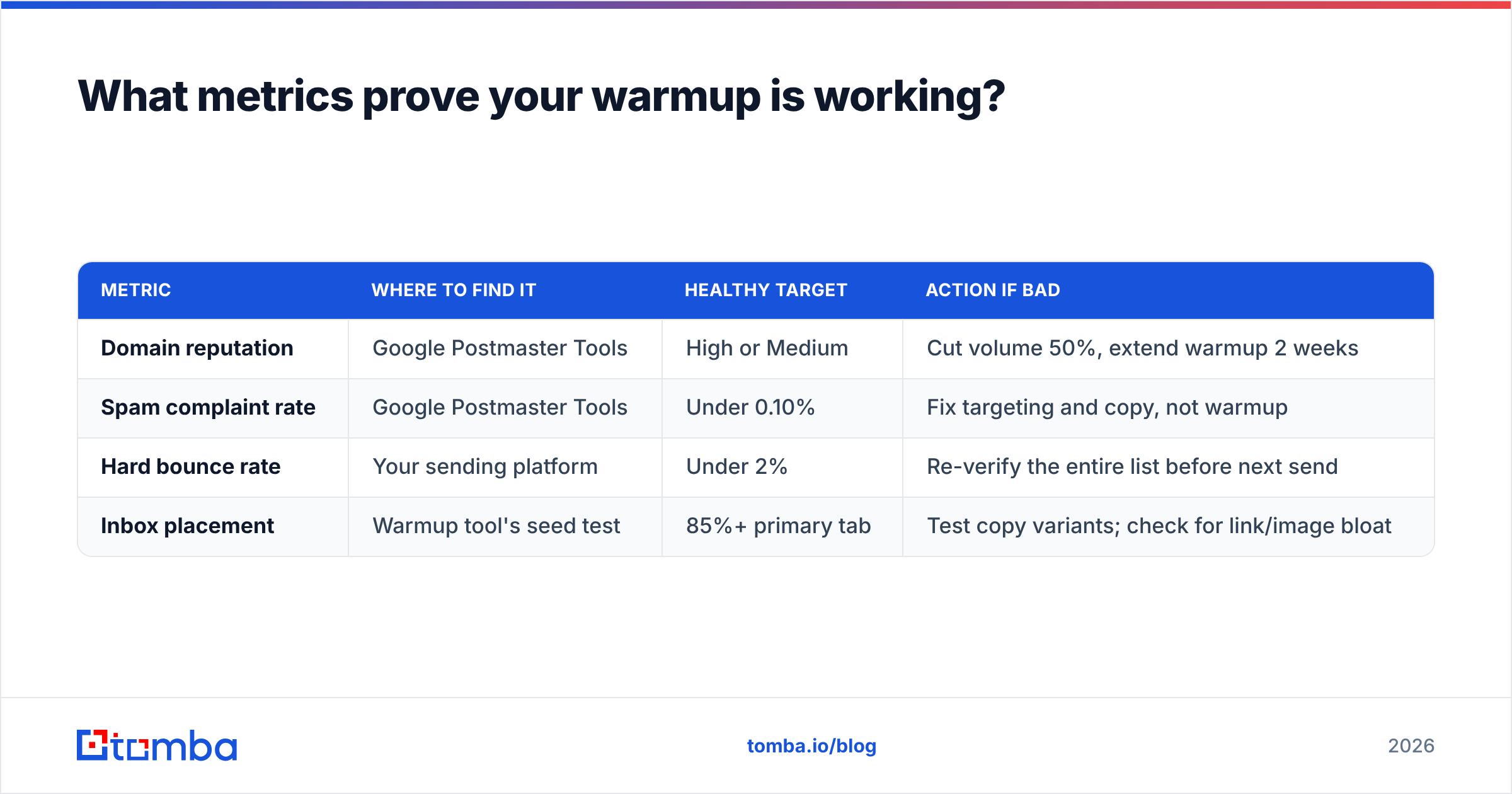
Track four numbers weekly. If all four are green, stop worrying about warmup and go work on your copy.
| Metric | Where to find it | Healthy target | Action if bad |
|---|---|---|---|
| Domain reputation | Google Postmaster Tools | High or Medium | Cut volume 50%, extend warmup 2 weeks |
| Spam complaint rate | Google Postmaster Tools | Under 0.10% | Fix targeting and copy, not warmup |
| Hard bounce rate | Your sending platform | Under 2% | Re-verify the entire list before next send |
| Inbox placement | Warmup tool's seed test | 85%+ primary tab | Test copy variants; check for link/image bloat |
Reply rate is the fifth number, but it measures your offer, not your deliverability. Don't confuse a 0.5% reply rate on a well-delivered campaign with a placement problem — those need very different fixes. If placement is fine and replies are flat, the issue is your response rate drivers: targeting, timing, and the first line.
The bottom line#
Email warming services are worth the $25–$50/month if you're launching new domains or scaling multiple inboxes — and close to worthless if your authentication is broken or your list is stale. The tool matters less than the sequence. Authenticate, ramp for a month, verify before every send, and keep a maintenance trickle running forever.
The verification step is the one most teams under-invest in, and it's the one that undoes everything else. If you want to stop losing warmed domains to bounce rates, start by fixing the data going into them: use the Tomba Email Finder to source addresses with confidence scoring built in, test it free with 25 searches a month, and only send to what you can actually confirm exists.
Related guides#
Ready to find emails that actually work?
Join 150,000+ professionals who stopped guessing and started sending. Free credits on signup — no credit card required.
Get the Tomba newsletter
Practical outbound tactics and product updates — once every two weeks.
About the author