Email Warmup Best Practices in 2026: The Complete Playbook
Warmup is not a magic switch that makes cold email land. Here is the ramp schedule, DNS checklist, tooling comparison, and the signals that tell you when warmup has stopped helping you.

TL;DR
- Email warmup builds a sending history that mailbox providers can score. It does not repair bad targeting, a bad list, or a bad offer.
- Authentication (SPF, DKIM, DMARC) must be correct before you send the first warmup email. Warming an unauthenticated domain just teaches Gmail to distrust you faster.
- A realistic ramp for a fresh Google Workspace or Microsoft 365 mailbox is 3–5 emails on day one, roughly +5 per day, capped at 30–50 cold sends per mailbox per day. Anything faster is a gamble.
- Automated warmup networks help a new mailbox cross the cold-start line. They stop helping — and can actively mislead you — once you are sending real volume.
- The single biggest deliverability lever is not warmup. It is list quality. A 3% bounce rate on real sends undoes six weeks of careful warming.
What is email warmup, and does it still work in 2026?#
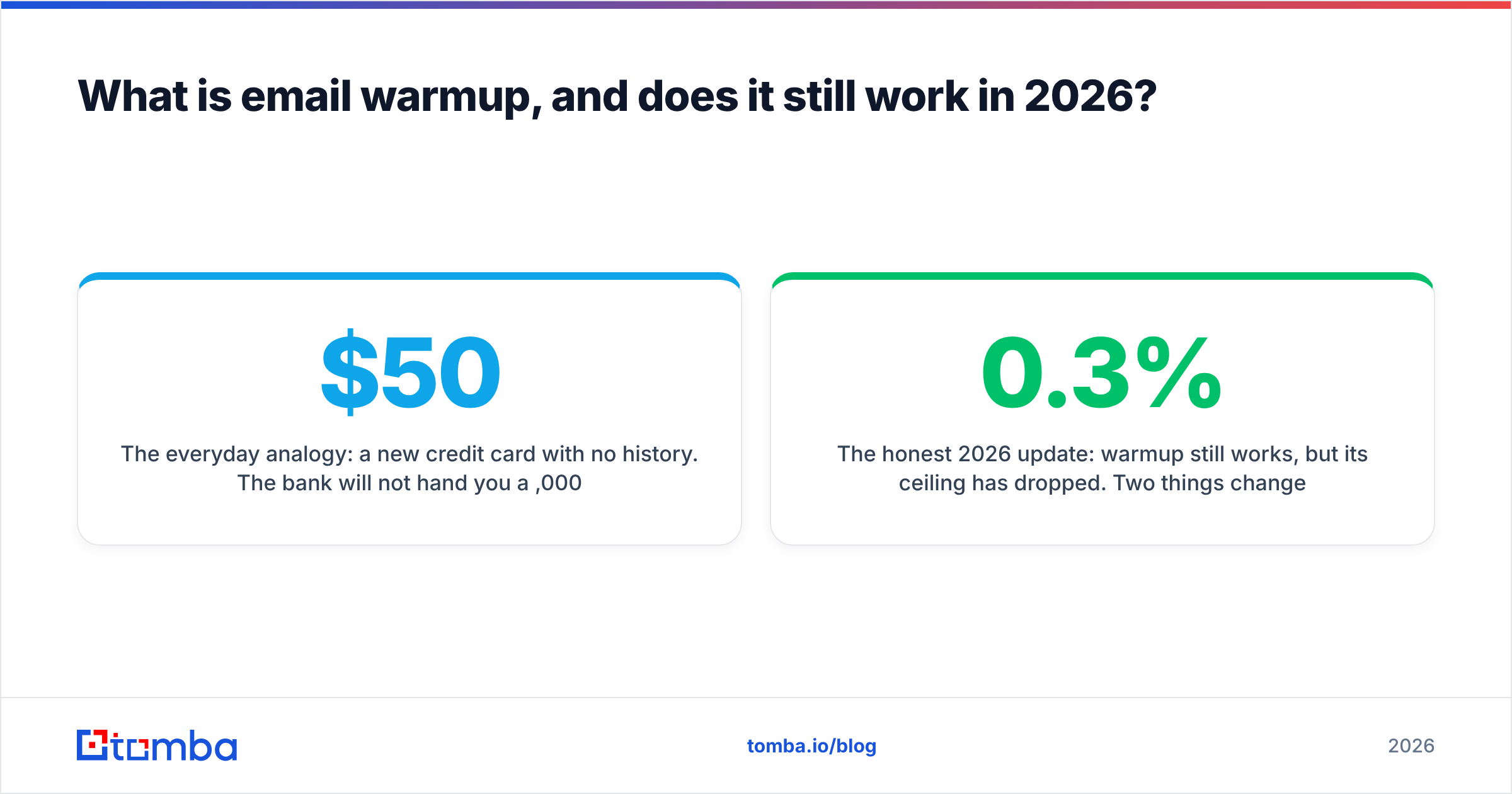
Email warmup is the practice of gradually increasing the volume of mail from a new mailbox or domain, while generating positive engagement signals (opens, replies, "move to inbox"), so that mailbox providers build a reputation profile for you before you send anything at scale.
The everyday analogy: a new credit card with no history. The bank will not hand you a $50,000 limit on day one. You spend small, pay on time, and the limit rises. Send 2,000 cold emails from a domain registered last Tuesday and you are asking for the $50,000 limit on day one — the answer is a spam folder.
Technically, providers like Google and Microsoft score a sending identity across domain reputation, IP reputation, authentication results, and recipient engagement. A brand-new identity has no score. Warmup exists to create one.
The honest 2026 update: warmup still works, but its ceiling has dropped. Two things changed. First, Google and Yahoo's bulk-sender requirements made authentication and a sub-0.3% spam-complaint rate table stakes rather than nice-to-have — see Google's bulk sender guidelines for the current thresholds. Second, filtering models got much better at distinguishing warmup-network traffic from real human correspondence. Reciprocal open-and-reply loops between thousands of seeded accounts are a recognizable pattern.
So warmup is necessary but no longer sufficient. It gets you to the starting line. It does not win the race.
What has to be true before you press start?#
Do not start warming until every item below is done. Warming a misconfigured domain is worse than not warming at all, because you are accumulating negative signal instead of neutral silence.
- Buy a separate sending domain. Never cold-email from your primary corporate domain. Use a lookalike (
get-acme.com,acme-hq.com) so a reputation hit never touches your billing, support, or transactional mail. - Let the domain age. Register it and let it sit for two to four weeks before the first send. Domain age is a weak signal on its own, but a domain registered yesterday and sending today is a strong negative one.
- Publish SPF, DKIM, and DMARC. All three, not two. Start DMARC at
p=nonewith anruareporting address, then tighten top=quarantineonce reports are clean. Run a SPF checker against the live record — a single syntax error or an exceeded 10-lookup limit silently fails every message. - Set up custom tracking domains and MX correctly. A shared tracking domain used by 4,000 other senders is a shortcut to a blocklist.
- Fill in the human details. Profile photo, real signature, a live website on the sending domain, and a working reply-to inbox that someone actually monitors. Filters weigh this more than most people expect.
- Check you are not already blocked. New domains sometimes inherit a burnt history from a previous owner. Run the domain and IP through a blacklist checker before you invest six weeks in warming it.
What does a realistic warmup ramp schedule look like?#
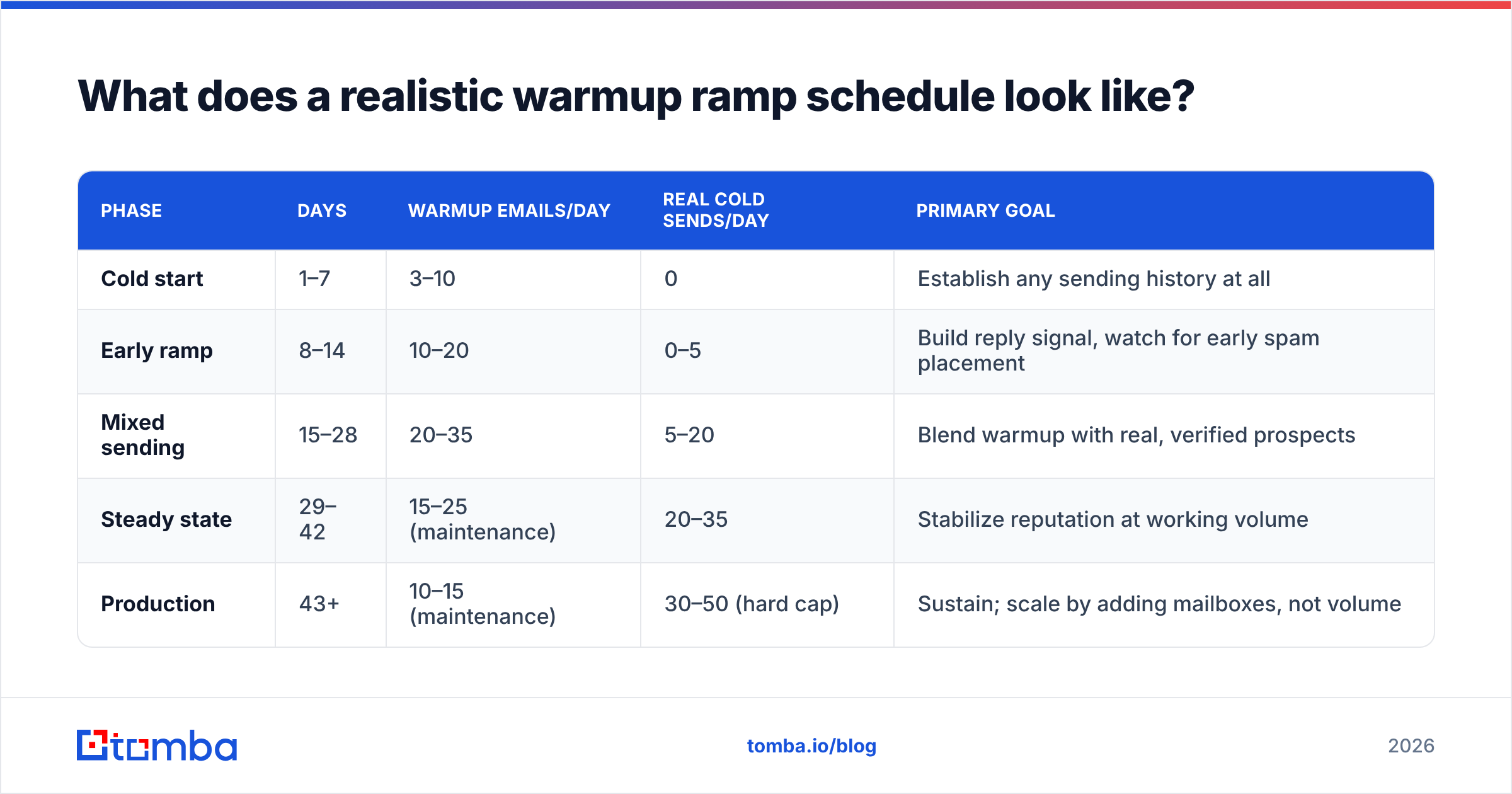
There is no universal schedule, because ramp speed depends on mailbox provider, domain age, and whether you're warming a fresh identity or rehabilitating a damaged one. But the shape below reflects what works for a new Google Workspace or Microsoft 365 mailbox on a fresh domain.
| Phase | Days | Warmup emails/day | Real cold sends/day | Primary goal |
|---|---|---|---|---|
| Cold start | 1–7 | 3–10 | 0 | Establish any sending history at all |
| Early ramp | 8–14 | 10–20 | 0–5 | Build reply signal, watch for early spam placement |
| Mixed sending | 15–28 | 20–35 | 5–20 | Blend warmup with real, verified prospects |
| Steady state | 29–42 | 15–25 (maintenance) | 20–35 | Stabilize reputation at working volume |
| Production | 43+ | 10–15 (maintenance) | 30–50 (hard cap) | Sustain; scale by adding mailboxes, not volume |
Three notes on reading that table:
The cap is per mailbox, not per domain. If you need 300 cold sends a day, you need eight to ten warmed mailboxes across two or three sending domains — not one mailbox pushed to 300. Scaling horizontally is the only safe way up.
Microsoft 365 is slower than Google. Outlook and Hotmail filtering is less forgiving of new senders. If you're targeting a Microsoft-heavy audience, add roughly two weeks to every phase and keep the daily cap nearer 25.
Warmup never fully stops. Maintenance warmup at 10–15 emails a day keeps a floor under your reputation during weeks when campaign volume dips. Turning it off entirely and then spiking back to 40 sends a day looks like exactly the pattern filters are built to catch. If you want to model your own curve, the email warmup calculator will generate a day-by-day ramp from your target volume.
Which email warmup tool should you use?#
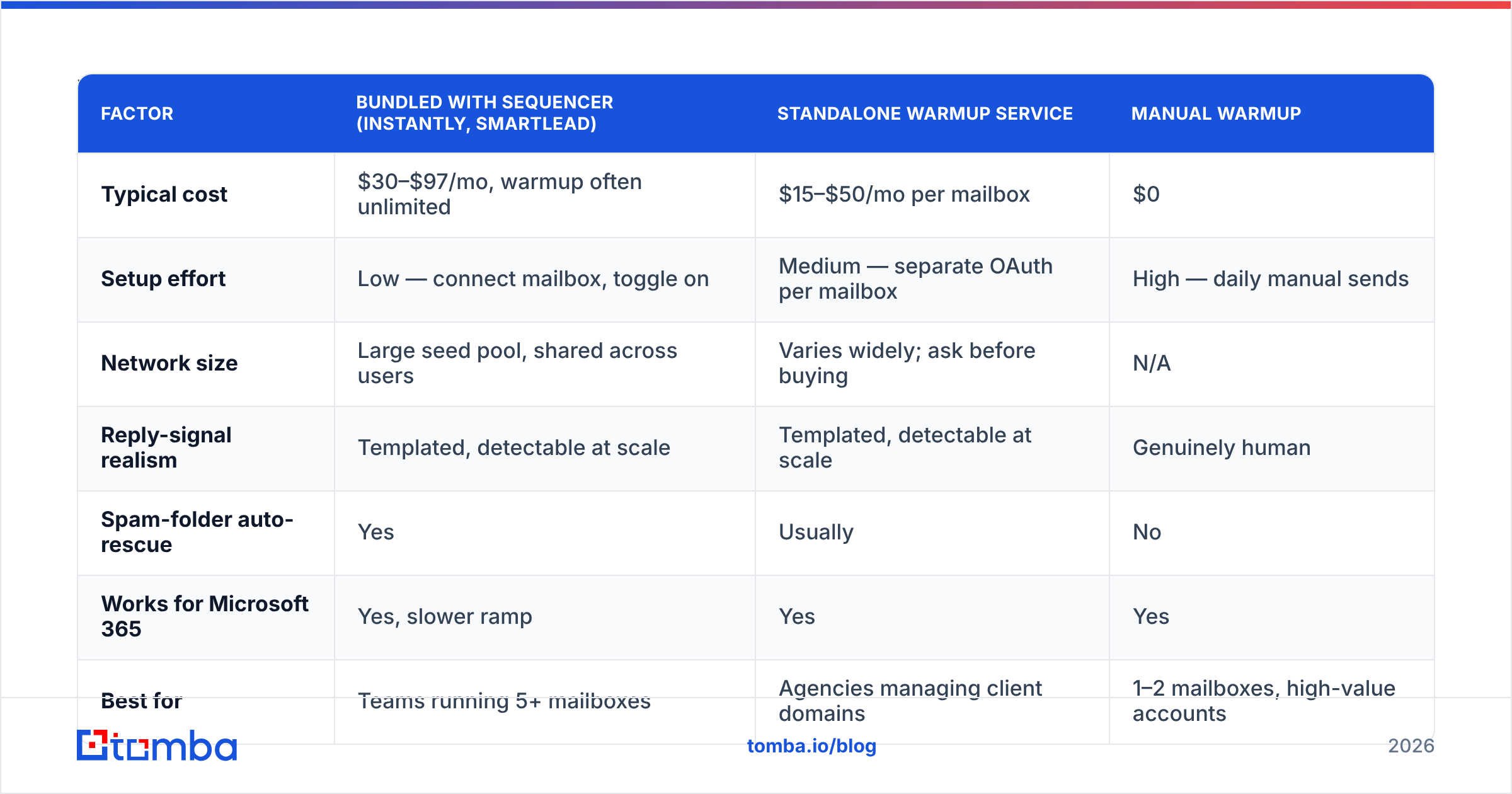
Warmup tooling has consolidated into three categories: standalone warmup networks, warmup bundled into a sending platform, and manual warmup (you and a spreadsheet). Here is how the common options actually compare.
| Factor | Bundled with sequencer (Instantly, Smartlead) | Standalone warmup service | Manual warmup |
|---|---|---|---|
| Typical cost | $30–$97/mo, warmup often unlimited | $15–$50/mo per mailbox | $0 |
| Setup effort | Low — connect mailbox, toggle on | Medium — separate OAuth per mailbox | High — daily manual sends |
| Network size | Large seed pool, shared across users | Varies widely; ask before buying | N/A |
| Reply-signal realism | Templated, detectable at scale | Templated, detectable at scale | Genuinely human |
| Spam-folder auto-rescue | Yes | Usually | No |
| Works for Microsoft 365 | Yes, slower ramp | Yes | Yes |
| Best for | Teams running 5+ mailboxes | Agencies managing client domains | 1–2 mailboxes, high-value accounts |
| Main risk | Network pollution from bad actors | Same, less visibility | Doesn't scale past ~2 mailboxes |
If you run more than a handful of mailboxes, bundled warmup inside your sequencer is the pragmatic default — Instantly and its peers include it, and the cost of a separate subscription per mailbox adds up fast. If you're a founder with two mailboxes and a list of 200 dream accounts, manual warmup is genuinely better: you'll send real emails to real people in your network, get real replies, and produce signal no network can fake.
The category that deserves scrutiny is the cheap standalone service with an undisclosed network. If you cannot find out how many accounts are in the pool or how they're vetted, you are potentially entangling your domain reputation with spammers.
How do you know warmup is actually working?#
Most people watch the wrong number. Warmup dashboards report an internal "warmup score" or inbox rate measured against their own seed network — that number is close to meaningless, because seed accounts are configured to whitelist each other.
Watch these instead:
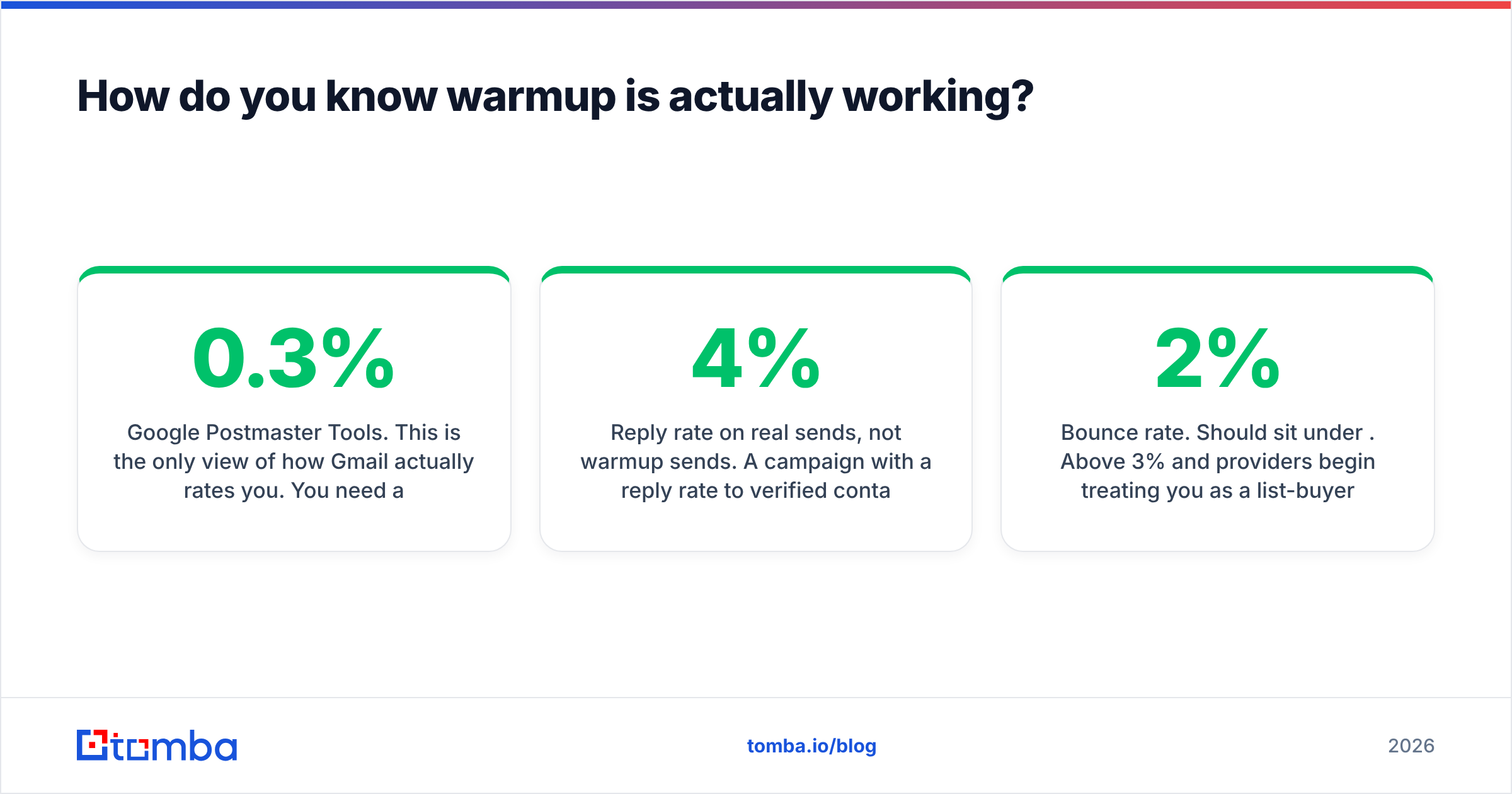
Google Postmaster Tools. This is the only view of how Gmail actually rates you. You need a minimum daily volume before data appears, so it typically goes live somewhere in phase three. Domain reputation should reach "Medium" and hold; spam rate must stay below 0.3%, and ideally below 0.1%. Anything at or above 0.3% means stop and diagnose.
Microsoft SNDS. The equivalent for Outlook and Hotmail, available at sendersupport.olc.protection.outlook.com/snds. Less granular than Postmaster, but it will tell you if you've hit a filtering trap.
Reply rate on real sends, not warmup sends. A campaign with a 4% reply rate to verified contacts is producing better reputation signal than 10,000 synthetic warmup exchanges. If real reply rate is collapsing while warmup score stays green, you're in the spam folder and your tool is lying to you.
Manual seed testing. Every two weeks, send a real campaign email to five personal mailboxes you own across Gmail, Outlook, Yahoo, and a corporate Google Workspace tenant. Note the folder. This takes ten minutes and beats any dashboard.
Bounce rate. Should sit under 2%. Above 3% and providers begin treating you as a list-buyer regardless of how carefully you warmed.

Does warmup fix a bad list?#
No — and this is where most warmup programs fail.
Warmup manufactures positive signal. Sending to a stale, scraped, or unverified list manufactures negative signal faster than warmup can offset it. Every hard bounce, every spam trap, every complaint from someone who never heard of you subtracts more than a synthetic reply adds.
Run the arithmetic. A mailbox at 40 sends a day with a 6% bounce rate produces roughly 2–3 hard bounces daily. Sustained over a week that is 15–20 bad addresses hitting Gmail's infrastructure from your domain. Your warmup network generated maybe 150 fake replies in the same window. The bounces win. They always win, because bounce and complaint data is first-party evidence of list quality, while engagement inside a warmup pool is trivially discountable.
The fix is upstream of warmup entirely:
- Verify every address before it enters a sequence. An email verifier run costs a fraction of a cent per record and removes the bounces before they can cost you a domain.
- Handle catch-all domains deliberately. They accept everything at the SMTP layer and then bounce or route to a black hole. Segment them, send them last, and cap the volume.
- Re-verify anything older than 90 days. B2B contact data decays at roughly 2–2.5% per month through job changes alone. A list you verified in January is measurably worse in April.
- Stop buying static databases. A file of 50,000 addresses sold to 400 other buyers is a spam-trap minefield and a sender reputation liability.
Two teams can follow identical warmup schedules and land in completely different places purely on list hygiene. The one that verified wins.
What are the mistakes that quietly burn a domain?#
These are the failures that don't announce themselves — reputation degrades over weeks and you notice when reply rates halve.
Spiking volume after a pause. Holidays, a paused campaign, a quarter-end lull. You come back and resume at previous volume. Providers see a dormant sender suddenly at full throttle. Ramp back up over five to seven days.
Identical copy across every mailbox. Ten mailboxes sending byte-identical templates is a fingerprint. Vary opening lines, signatures, and structure per mailbox.
Link-heavy first touches. Multiple tracked links, an image, and a calendar embed in a first cold email from a six-week-old domain is a filtering magnet. Plain text, one link at most, no images until a reply.
Ignoring unsubscribes. One-click unsubscribe is required for bulk senders, and honoring it within two days is not optional. Complaints from people who tried to leave and couldn't are the most expensive complaints you can earn.
Warming a domain you're about to abandon. Six weeks of warmup is an asset. Burning a domain every quarter and starting over means you are permanently in the low-reputation phase. Protect the domains you have.
Treating warmup score as a KPI. It is a vendor-controlled number measured against a vendor-controlled network. Postmaster domain reputation and real-campaign reply rate are the KPIs.
How should you sequence the whole thing?#
Put together, a working program looks like this:
- Register sending domains, wait two weeks, configure SPF/DKIM/DMARC and custom tracking.
- Create mailboxes, complete profiles, set up a real reply-monitoring workflow.
- Start warmup at 3–5 sends/day. Add ~5/day. Do not send a single real prospect for at least seven days.
- In parallel, build and verify your target list. Warmup time is list-building time — the two run concurrently, not sequentially.
- From day 15, blend real verified sends in at low volume. Watch bounce rate obsessively.
- From day 29, scale toward the 30–50/mailbox cap. Keep maintenance warmup running.
- Scale beyond that by adding mailboxes and domains, never by raising per-mailbox volume.
- Re-verify the list quarterly and re-check DNS whenever you change ESP or tracking setup.
The unglamorous truth is that steps 4 and 8 determine more of your outcome than steps 3 and 6. Warmup is the cheap part. Accurate, current contact data is the part that actually decides whether your email lands and whether the person on the other end is still in the role you're writing to.
Where should you start?#
If your warmup is already running and your inbox rate still disappoints, the problem is almost certainly your list, not your ramp schedule.
Tomba's Email Finder returns verified professional addresses with a confidence score attached, so bounce-prone records never make it into a sequence in the first place — which is the one deliverability lever that outperforms every warmup tactic on this page. Start free with 25 searches a month, or check Tomba pricing for bulk and API access when you're ready to feed a multi-mailbox program at scale.
Related guides#
Ready to find emails that actually work?
Join 150,000+ professionals who stopped guessing and started sending. Free credits on signup — no credit card required.
Get the Tomba newsletter
Practical outbound tactics and product updates — once every two weeks.
About the author