Email Whitelisting in 2026: How It Works and When It Fails
Email whitelisting is the most misunderstood deliverability tactic in B2B. Here is what an allowlist actually controls, what it cannot fix, and the three places it still moves the needle in 2026.
TL;DR
- Email whitelisting means a recipient, an admin, or a security gateway has explicitly marked your address, domain, or IP as trusted — it is a recipient-side setting, not something you can buy or configure on your own domain.
- Whitelisting overrides spam filtering in most cases, but it does not override a hard bounce, a blocklisted IP, or a rejected authentication check. Fix those first.
- Asking a cold prospect to "add me to your whitelist" before you have any relationship is close to useless. Asking a warm subscriber to do it after a confirmed opt-in works well.
- Corporate gateways (Mimecast, Proofpoint, Barracuda, Microsoft Defender) have their own allowlists that individual employees cannot edit. That is why your email reached one person at a company and vanished for another.
- The highest-leverage moves are upstream: clean, verified recipient data, correct SPF/DKIM/DMARC, consistent volume, and low complaint rates. Whitelisting is the last 5%, not the first 50%.
What is email whitelisting?#
Email whitelisting is the practice of adding a sender — an address, a domain, or an IP range — to a list of trusted sources so their mail bypasses spam filtering and lands in the inbox.
Think of it like a doorman with a guest list. Filtering is the doorman's judgment: he sizes up everyone who shows up and turns away the ones who look wrong. A whitelist is the printed guest list the building manager handed him that morning. If your name is on the paper, he waves you through without the once-over. But if the building itself is locked because the fire alarm went off, the guest list does not help you — you are still not getting in.
That last part is the piece most senders miss. A whitelist entry sits downstream of connection-level and authentication-level rejections. It only takes effect once the mail has been accepted and is being scored for placement.
Terminology note: the industry has largely moved from "whitelist/blacklist" to "allowlist/blocklist." Most mailbox providers and gateway vendors use the newer terms in their UIs now, though the older words still dominate search volume and internal docs. They mean the same thing, and this guide uses them interchangeably.
Who actually controls the allowlist?#
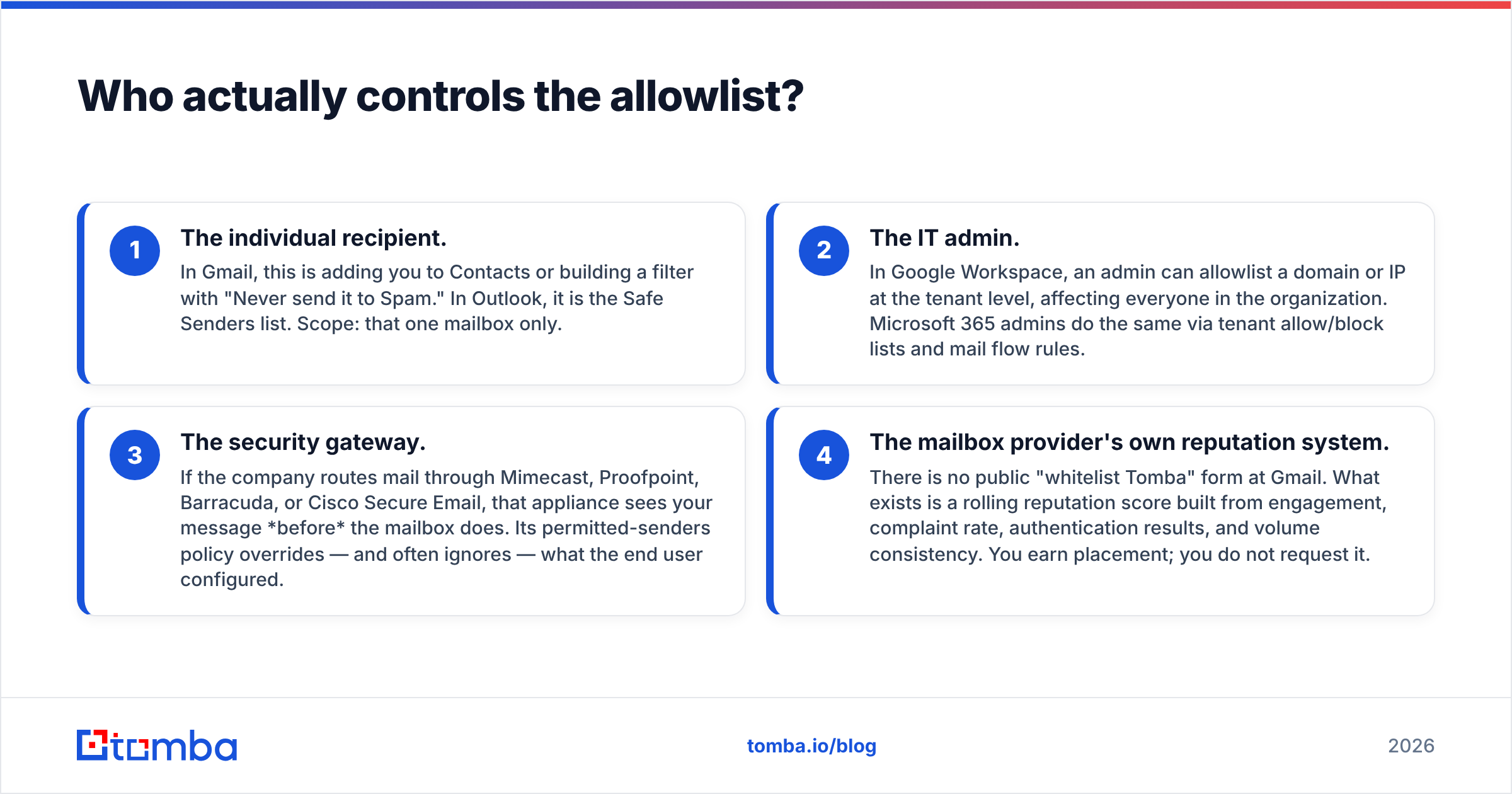
Four different parties can whitelist you, and they operate independently. Knowing which one you need is half the battle.
- The individual recipient. In Gmail, this is adding you to Contacts or building a filter with "Never send it to Spam." In Outlook, it is the Safe Senders list. Scope: that one mailbox only.
- The IT admin. In Google Workspace, an admin can allowlist a domain or IP at the tenant level, affecting everyone in the organization. Microsoft 365 admins do the same via tenant allow/block lists and mail flow rules.
- The security gateway. If the company routes mail through Mimecast, Proofpoint, Barracuda, or Cisco Secure Email, that appliance sees your message before the mailbox does. Its permitted-senders policy overrides — and often ignores — what the end user configured.
- The mailbox provider's own reputation system. There is no public "whitelist Tomba" form at Gmail. What exists is a rolling reputation score built from engagement, complaint rate, authentication results, and volume consistency. You earn placement; you do not request it.
Most failed whitelisting attempts happen because someone asked party #1 for something only party #3 could grant.

How is whitelisting different from authentication, blocklists, and greylisting?#
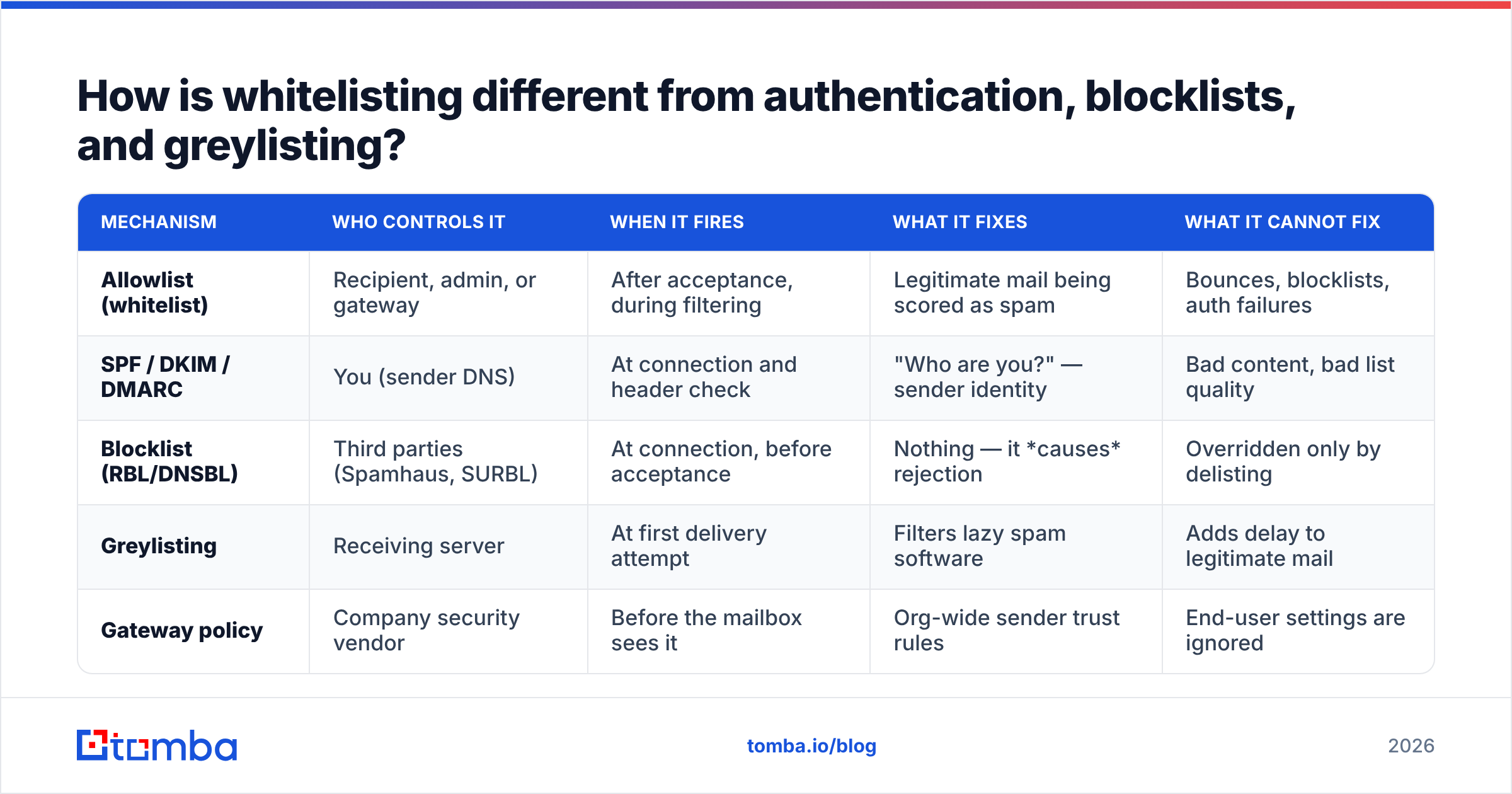
These four mechanisms get conflated constantly. They fire at different stages of delivery and fix different problems.
| Mechanism | Who controls it | When it fires | What it fixes | What it cannot fix |
|---|---|---|---|---|
| Allowlist (whitelist) | Recipient, admin, or gateway | After acceptance, during filtering | Legitimate mail being scored as spam | Bounces, blocklists, auth failures |
| SPF / DKIM / DMARC | You (sender DNS) | At connection and header check | "Who are you?" — sender identity | Bad content, bad list quality |
| Blocklist (RBL/DNSBL) | Third parties (Spamhaus, SURBL) | At connection, before acceptance | Nothing — it causes rejection | Overridden only by delisting |
| Greylisting | Receiving server | At first delivery attempt | Filters lazy spam software | Adds delay to legitimate mail |
| Gateway policy | Company security vendor | Before the mailbox sees it | Org-wide sender trust rules | End-user settings are ignored |
Read that table row by row and the sequencing becomes obvious. Authentication is your passport. Blocklists are the no-fly list. Greylisting is the security queue. The allowlist is the priority lane — useful, but only if you already cleared everything before it.
If you have never checked your own DNS records, run your domain through a SPF checker before you spend a single minute on whitelisting requests. A broken SPF record will quietly nullify every allowlist entry that depends on domain matching.
Does asking prospects to whitelist you actually work?#
Short answer: it depends entirely on whether the person already wanted to hear from you.
Where it works:
- Post-signup confirmation flows. Someone just entered their email for a report or a trial. The confirmation page and first email are the single best moment to say "add us to your contacts so you don't miss the download link." Conversion on that ask is meaningfully higher than at any later point.
- Newsletter welcome sequences. A subscriber who opened your welcome email has already demonstrated intent. A one-line, low-friction ask ("hit reply with anything and Gmail will start trusting us") works because replying is itself a strong positive engagement signal.
- Post-demo and post-contract handoffs. When a deal closes and your emails need to reach procurement, legal, and finance, asking your champion to loop in IT for a domain-level allowlist is a normal, reasonable request. It gets granted regularly.
Where it does not work:
- Cold outreach, first touch. "Please add me to your safe senders list" in email one to a stranger reads as an admission that your mail is likely to be filtered. It is also asking someone for a favor before you have given them anything.
- Any request that requires admin access. Your prospect in marketing cannot edit the Mimecast permitted-senders policy. Asking them to try burns goodwill.
- As a substitute for list hygiene. If 12% of your recipients do not exist, no amount of whitelisting saves the campaign. The bounces are already telling the provider what it needs to know about you.
The honest framing: whitelisting is a retention tactic for people who already opted in, not an acquisition tactic for people who have not.
How do recipients whitelist you on each platform?#
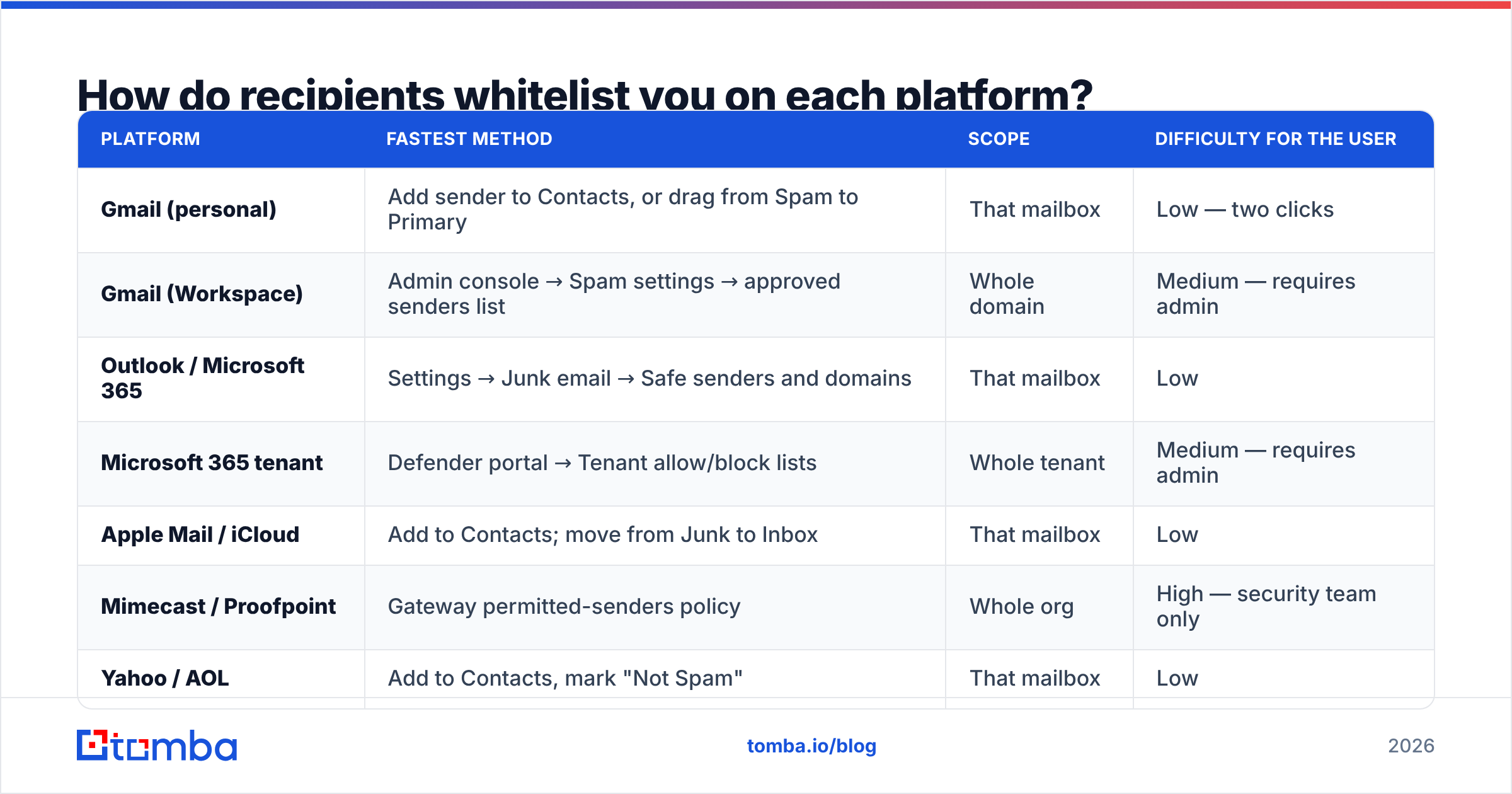
If you are writing the ask, write platform-specific instructions. Vague requests get ignored; three concrete steps get followed.
| Platform | Fastest method | Scope | Difficulty for the user |
|---|---|---|---|
| Gmail (personal) | Add sender to Contacts, or drag from Spam to Primary | That mailbox | Low — two clicks |
| Gmail (Workspace) | Admin console → Spam settings → approved senders list | Whole domain | Medium — requires admin |
| Outlook / Microsoft 365 | Settings → Junk email → Safe senders and domains | That mailbox | Low |
| Microsoft 365 tenant | Defender portal → Tenant allow/block lists | Whole tenant | Medium — requires admin |
| Apple Mail / iCloud | Add to Contacts; move from Junk to Inbox | That mailbox | Low |
| Mimecast / Proofpoint | Gateway permitted-senders policy | Whole org | High — security team only |
| Yahoo / AOL | Add to Contacts, mark "Not Spam" | That mailbox | Low |
Two practical notes. First, moving a message out of the spam folder is usually a stronger signal than adding a contact, because it is an explicit correction the provider logs against your sender reputation. Second, a reply beats both. Providers weight two-way conversation heavily, which is why "just reply with a single word" outperforms "add us to your contacts" in most welcome sequences.
Why did your email reach one person at a company but not another?#
Because you hit two different filters. This is the most common confusing symptom in B2B outbound, and the explanation is almost always one of these:
- Different mailbox settings. Person A had you in Contacts from a prior conversation; person B did not.
- Gateway policy on one route only. Larger orgs sometimes route executive mail through stricter policies than general staff.
- Address quality. One address was verified and active; the other was a guess from a pattern generator that happens to sit on a catch-all domain, so it "accepted" your mail and then quietly discarded it. Catch-all domains are the single biggest source of phantom deliveries in B2B. A catch-all verifier is the only way to distinguish a real mailbox from an accept-everything black hole.
- Role account filtering.
info@,sales@, andsupport@are filtered far more aggressively than named addresses, and many gateways drop cold mail to them by policy.
The fix is upstream of whitelisting in every one of those cases. Verify the address, avoid role accounts in cold sequences, and understand email deliverability as a chain where the weakest link decides the outcome.
What should you fix before you worry about whitelisting?#
Run this list in order. Each item below has a bigger effect on inbox placement than any allowlist entry, and several of them are prerequisites for whitelisting to function at all.
- Authenticate properly. SPF, DKIM, and a DMARC policy at minimum
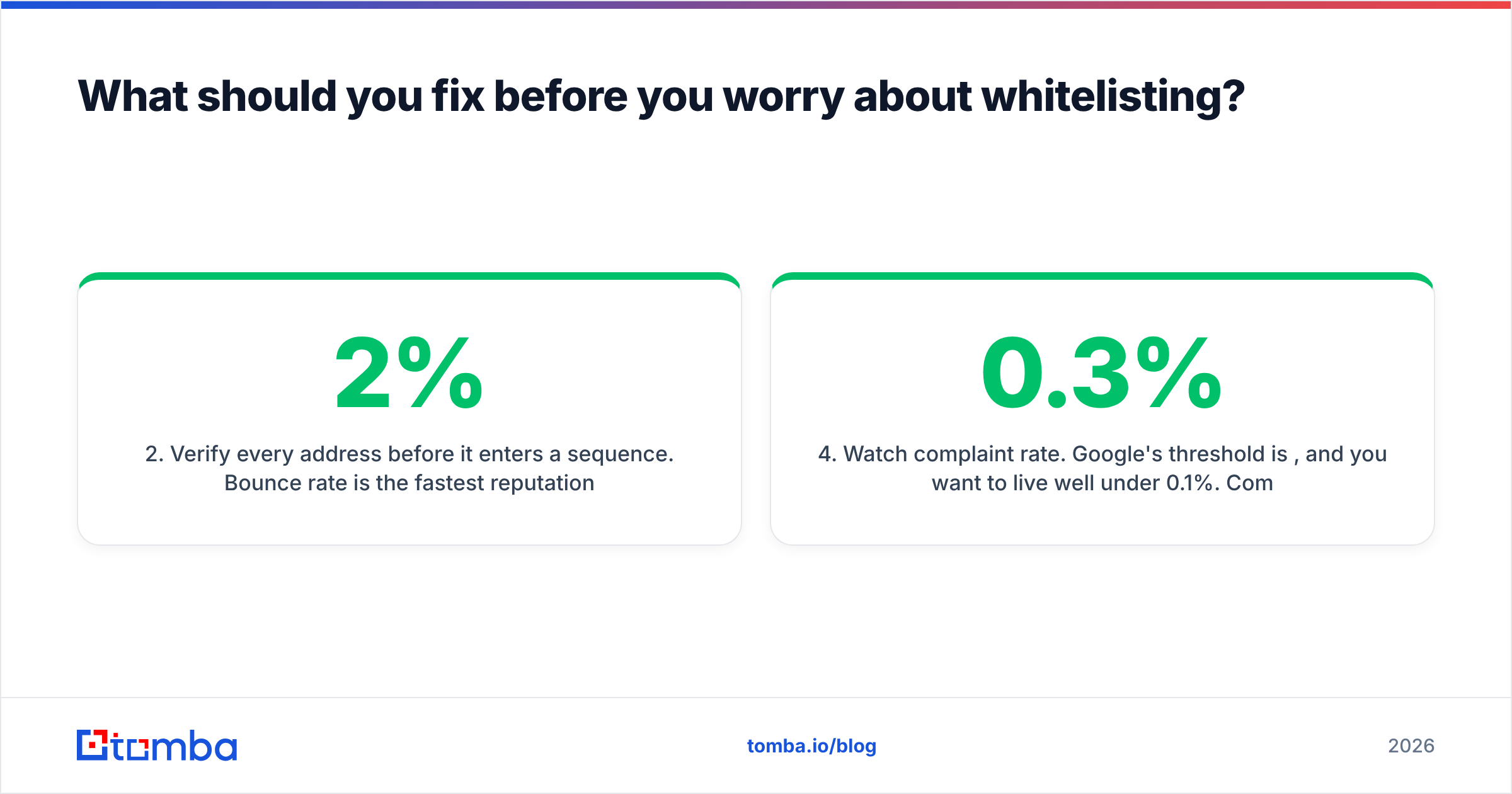
p=nonewith reporting enabled. Google's bulk sender guidelines made authentication non-negotiable for anyone sending meaningful volume, and enforcement has only tightened since. - Verify every address before it enters a sequence. Bounce rate is the fastest reputation killer there is. Keep it under 2%, and under 1% if you are sending from a young domain. An email verifier pass on the list costs a fraction of what a burned domain costs.
- Check that you are not on a blocklist. If a shared IP got listed, nothing else you do matters until you delist. Run a blacklist checker monthly, not once.
- Watch complaint rate. Google's threshold is 0.3%, and you want to live well under 0.1%. Complaints are the one signal that a whitelist genuinely cannot outrun at scale.
- Keep volume consistent. Jumping from 50 to 5,000 sends in a day looks exactly like a compromised account. Ramp gradually.
- Monitor with the provider's own tools. Google Postmaster Tools gives you domain reputation, spam rate, and authentication pass rates straight from the source. Microsoft's SNDS does the same for Outlook traffic. Neither costs anything.
Only after those six are green does whitelisting become the marginal improvement it is meant to be.
Is domain-level or IP-level whitelisting better?#
Domain-level, in almost every case.
IP-based allowlists were designed for a world of static, dedicated sending IPs. If you send through a modern ESP with rotating or shared infrastructure, the IP you send from tomorrow may not be the one an admin added today, and the entry silently stops matching. Worse, IP allowlists on shared infrastructure can inherit someone else's bad behaviour — the allowlist tells the gateway to trust an IP that a hundred other senders also use.
Domain-based entries tied to authenticated DKIM signatures are far more durable. The admin allowlists yourcompany.com, DKIM proves the message really came from you, and the entry keeps working through infrastructure changes. When you write allowlisting instructions for an IT team, ask for the domain with an authentication requirement attached, not a bare IP range.
One exception: if you send transactional mail from a dedicated IP that never changes and the receiving org has a strict default-deny gateway, the IP entry is the belt-and-braces addition. Ask for both.
What does a good whitelisting request look like?#
Keep it short, specific, and tied to something the recipient already wants. Compare:
Weak: "Please whitelist us so our emails don't go to spam."
Strong: "Your report is on its way from reports@example.com. If it hasn't landed in 5 minutes, check Promotions or Spam — and add that address to your contacts so the next one comes straight through."
The second version does three things the first does not: it names the exact sending address, it tells the reader where to look, and it frames the action as protecting their access to something they asked for. That is the whole trick. Whitelisting requests convert when they are framed as the recipient's convenience, not the sender's problem.
For enterprise deals where you need IT involvement, give your champion a forwardable paragraph containing your sending domain, your DKIM selector, your typical sending IP range if you have one, and the business reason. Do not make them write it.
What is the realistic ceiling on whitelisting?#
Whitelisting is a placement tool, not a volume tool. It protects mail to people who already know you. It will not make cold outbound work, it will not repair a domain with a 0.5% complaint rate, and it will not create engagement where none exists.
Where teams actually win is boring: accurate contact data, verified addresses, correct DNS, disciplined volume, and messages people want to open. Get those right and the allowlist becomes an optimization. Get them wrong and the allowlist is a bandage on a broken leg. If you are still sourcing prospects from stale exports, start there — Tomba pricing starts free at 25 searches a month, which is enough to test whether your data quality or your reputation is the actual bottleneck.
Where should you start?#
Start with the list, because everything downstream inherits its quality. Sequences sent to verified, real, named mailboxes bounce less, get opened more, and generate the engagement signals that make whitelisting unnecessary in the first place.
Tomba Email Finder gives you verified professional addresses by name, company, or domain — with confidence scoring on every result, so you know before you send whether an address is a real mailbox or a pattern guess. Pair it with the email verifier to keep bounce rate under 1%, and let your sender reputation earn the placement that no allowlist entry can guarantee. Start on the free tier and check your next 25 prospects before your next campaign goes out.
Related guides#
Ready to find emails that actually work?
Join 150,000+ professionals who stopped guessing and started sending. Free credits on signup — no credit card required.
Get the Tomba newsletter
Practical outbound tactics and product updates — once every two weeks.
About the author