EmailBison vs Saleshandy: Which Cold Email Tool Wins in 2026
EmailBison and Saleshandy both promise unlimited sending and better inbox placement, but they charge, scale, and verify leads very differently. Here's the honest breakdown.
TL;DR
- EmailBison is a sending-and-deliverability engine built for agencies and high-volume senders: unlimited mailboxes on most tiers, aggressive warmup controls, and a white-label option. It expects you to bring your own lead data.
- Saleshandy is a more complete sequencer: multichannel steps, a built-in B2B lead database, unified inbox, and reporting that a sales manager can actually read. Its lead credits are metered separately from sending.
- Price: Saleshandy starts around $36/mo billed annually for a single-user outreach plan; EmailBison starts near $79/mo and scales by workspace/sending volume rather than per seat.
- Neither tool fixes bad data. Both bounce identically on a stale list — verification and finding accurate addresses happen upstream, with a tool like Tomba Email Finder.
- Pick EmailBison if you run many domains for many clients. Pick Saleshandy if you're one team that wants prospecting, sending, and reporting in a single seat.
Cold email tooling split into two camps around 2024, and 2026 has only made the split sharper. One camp sells infrastructure — mailbox rotation, warmup, IP hygiene, sending throttles. The other sells workflow — sequences, lead sourcing, CRM sync, reply management. EmailBison sits firmly in the first camp. Saleshandy straddles both but leans workflow.
This comparison walks through pricing, sending architecture, data quality, deliverability features, and the honest scenarios where each one loses.
What is EmailBison and who is it built for?#
EmailBison is a cold email sending platform that markets itself on volume economics. Instead of charging per mailbox — the model that made older tools painful once you passed 20 inboxes — it bundles unlimited or very high mailbox counts into a workspace price and meters you on sending volume and active leads.
The core pieces:
- Unlimited mailbox connection — connect as many Google Workspace, Microsoft 365, or custom SMTP accounts as you can provision, without a per-inbox surcharge on most tiers.
- Built-in warmup with power levels — a warmup network plus a "sending power" concept that ramps volume gradually per mailbox instead of dumping a fixed daily cap on day one.
- White-label and agency workspaces — resell the platform under your own domain and brand, with separate client workspaces and permissioning.
- Deliverability instrumentation — bounce classification, spam-signal flags, per-mailbox health scoring, and rotation logic that pulls burned inboxes out of the pool.
- API and webhook layer — push leads in, pull reply events out, wire it into your own dashboards.
What it does not do well: it's not a prospecting tool. There's no meaningful native lead database, no LinkedIn enrichment layer, and no "find me 500 CFOs in fintech" button. You bring the list.
What is Saleshandy and who is it built for?#
Saleshandy started life as an email tracking tool and grew into a full cold outreach suite. In 2026 it covers sequence building, unlimited email accounts on paid tiers, a unified inbox, sub-sequences based on reply sentiment, and a bundled B2B lead database with contact credits.
The practical difference: a Saleshandy seat can take you from "I need contacts at Series B SaaS companies in Berlin" to "the sequence is live and three people replied" without leaving the app. EmailBison assumes steps one through three already happened somewhere else.
Saleshandy's own product site leads with lead-finding and sequencing together, and its G2 profile reflects a userbase skewed toward small sales teams and solo founders rather than agencies running fifty client accounts.
EmailBison vs Saleshandy: how do they actually compare?#
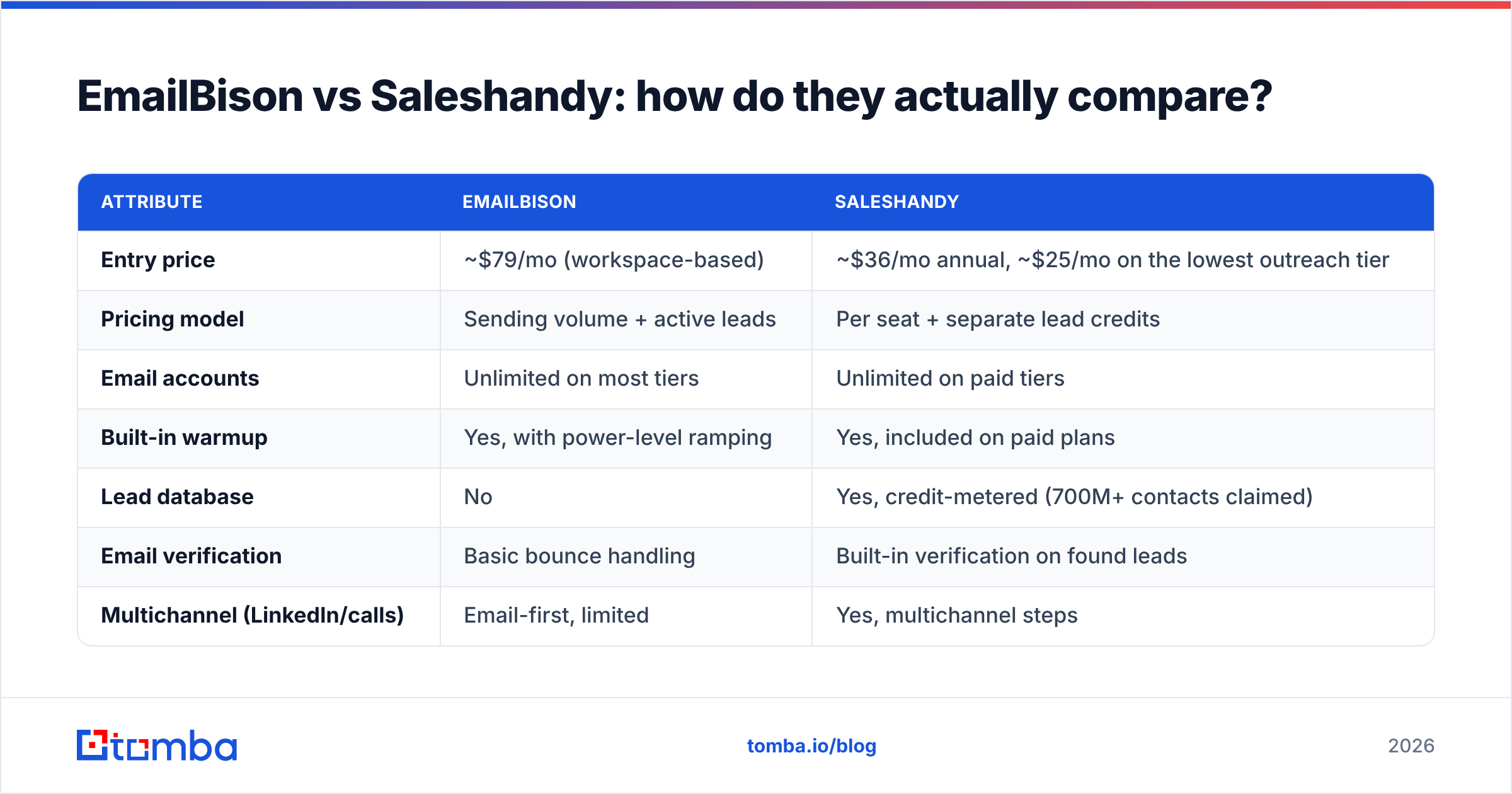
| Attribute | EmailBison | Saleshandy |
|---|---|---|
| Entry price | ~$79/mo (workspace-based) | ~$36/mo annual, ~$25/mo on the lowest outreach tier |
| Pricing model | Sending volume + active leads | Per seat + separate lead credits |
| Email accounts | Unlimited on most tiers | Unlimited on paid tiers |
| Built-in warmup | Yes, with power-level ramping | Yes, included on paid plans |
| Lead database | No | Yes, credit-metered (700M+ contacts claimed) |
| Email verification | Basic bounce handling | Built-in verification on found leads |
| Multichannel (LinkedIn/calls) | Email-first, limited | Yes, multichannel steps |
| White label / agency | Yes, core selling point | Agency plan available, less central |
| Unified inbox | Yes | Yes, with sentiment tagging |
| CRM integrations | Via API/webhooks + Zapier | Native HubSpot, Pipedrive, Salesforce, Zapier |
| Learning curve | Moderate to steep | Gentle |
| Best fit | Agencies, high-volume operators | SMB sales teams, founders |
The table hides one thing worth saying plainly: these tools are not really substitutes for most buyers. If you're running outbound for eight clients across 200 domains, Saleshandy's per-seat math and lead credits become awkward fast. If you're a five-person sales team that needs contacts and sending, EmailBison leaves you shopping for a data vendor on day one.
Which one is cheaper at real volume?#
Depends entirely on what you're scaling.
Scaling mailboxes and domains? EmailBison wins. Its whole pitch is that adding the 60th inbox costs you nothing extra. Tools that charge $3–$5 per mailbox per month turn a 200-inbox agency setup into a four-figure monthly line item before a single email sends.
Scaling seats and lead volume? Saleshandy is usually cheaper at the bottom and mid tiers, especially since the lead database is bundled rather than bought separately. But watch the credit meter — lead credits and email-verification credits are consumed independently, and teams routinely blow through the monthly allowance in week two, then buy top-ups at a worse rate than a dedicated data provider charges.
That's the cost trap in both tools: data pricing is where the real spend hides. A sending platform's list price tells you almost nothing about your true cost per booked meeting if 18% of your addresses bounce.
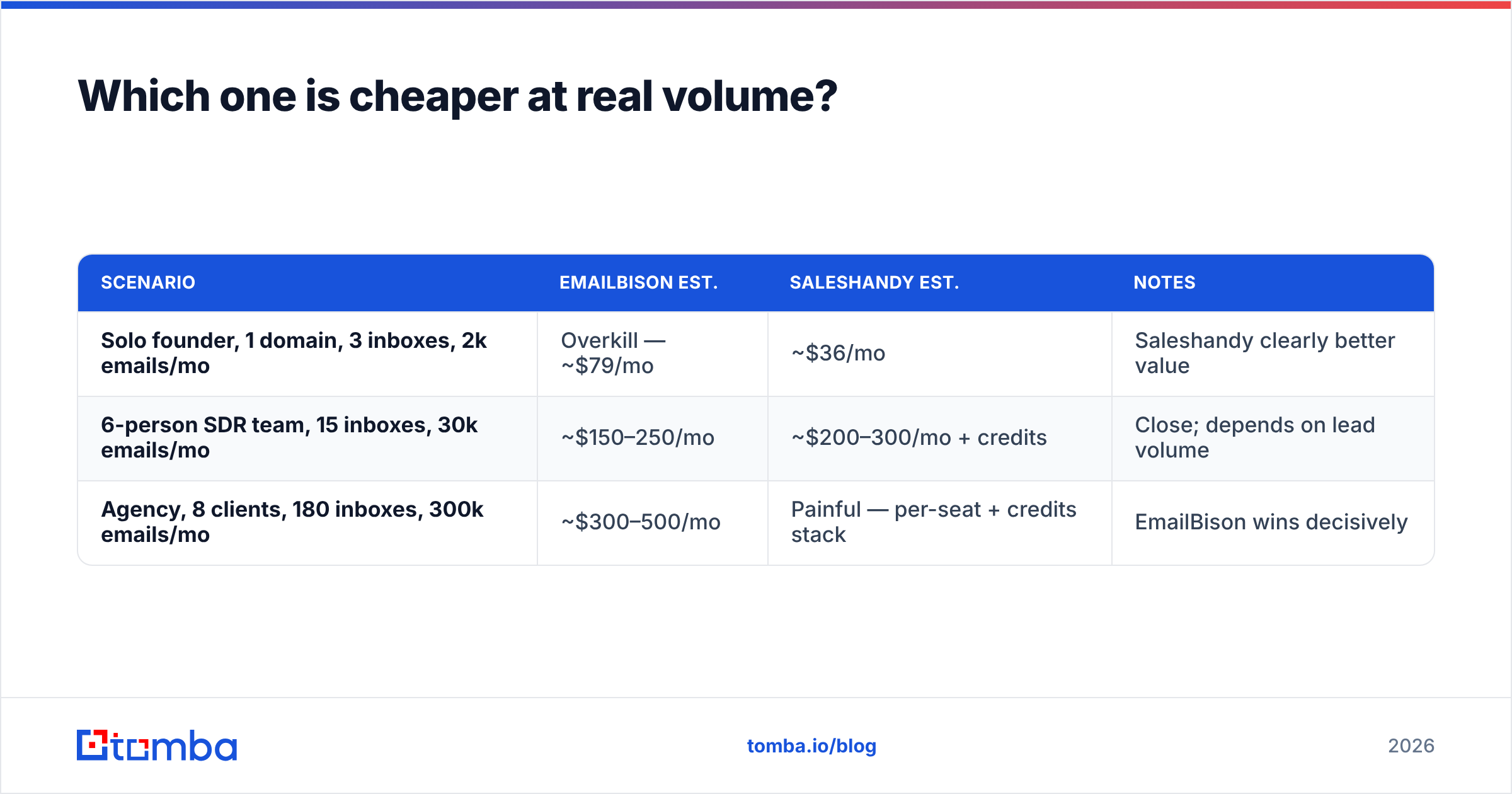
Here's a rough three-scenario model:
| Scenario | EmailBison est. | Saleshandy est. | Notes |
|---|---|---|---|
| Solo founder, 1 domain, 3 inboxes, 2k emails/mo | Overkill — ~$79/mo | ~$36/mo | Saleshandy clearly better value |
| 6-person SDR team, 15 inboxes, 30k emails/mo | ~$150–250/mo | ~$200–300/mo + credits | Close; depends on lead volume |
| Agency, 8 clients, 180 inboxes, 300k emails/mo | ~$300–500/mo | Painful — per-seat + credits stack | EmailBison wins decisively |
Treat those as directional. Both vendors change tiering often; check current pages before you commit annually.
Does either tool solve deliverability on its own?#
No, and this is where most comparison posts oversell.
Both platforms give you warmup, mailbox rotation, and sending throttles. Both let you set custom tracking domains and stagger send times. Neither can compensate for the three things that actually sink campaigns:
- A domain with no authentication. If your SPF, DKIM, and DMARC records aren't right, no warmup network saves you. Run your domain through an SPF checker before you connect a single mailbox — it takes ninety seconds and prevents a month of mystery.
- A list full of dead addresses. Google and Microsoft both treat bounce rate as a primary reputation input. Above roughly 3%, placement degrades; above 5% you're in real trouble. Google's own sender guidelines are explicit that spam complaints and invalid recipients drive filtering decisions.
- Copy that reads like a template. Warmup can't fix a message that ten thousand other people also sent this quarter.
The first two are solvable before you touch either platform. Verify the list, check the records, then send. If you want the concept explained end to end, the email deliverability glossary entry covers the reputation mechanics without the vendor spin.
What about lead data quality?#
This is the axis where the two platforms diverge most, and it's the one that actually decides campaign ROI.
Saleshandy bundles a lead database. Convenient — but bundled databases across the whole category share a structural problem: they're refreshed on the vendor's schedule, not yours, and coverage skews heavily toward US mid-market tech. Ask for European mid-size manufacturers or APAC healthcare and hit rates drop noticeably.
EmailBison doesn't pretend to solve this. You bring data from a dedicated source, which is arguably the more honest architecture — separate the finding layer from the sending layer, and swap either independently.
Either way, the workflow that holds up:
- Source by domain, not by scrape. Pull the actual people at target companies with a domain search rather than buying a static CSV that was assembled eighteen months ago.
- Verify before import. Run every address through an email verifier so bounces are caught outside the sending platform, where they cost nothing.
- Handle catch-all domains explicitly. A huge share of enterprise domains accept everything at the SMTP layer, which makes standard verification useless. A catch-all verifier resolves the ambiguity instead of leaving those rows as coin flips.
- Enrich, then segment. Titles, headcount, and tech stack turn one generic sequence into four relevant ones. That's a bigger reply-rate lever than any subject-line trick.
- Re-verify quarterly. B2B contact data decays at roughly 2–2.5% per month. A list that was clean in January is measurably worse by June.
Do that upstream and both EmailBison and Saleshandy perform better than their marketing pages claim. Skip it and both underperform identically.

Where does each tool fall short?#
EmailBison weak spots:
- No native prospecting — budget for a separate data vendor
- Smaller community and thinner third-party integration ecosystem than category leaders
- Interface density assumes you already understand mailbox rotation and warmup theory
- Reporting is operator-focused; less useful for a VP who wants pipeline attribution
Saleshandy weak spots:
- Credit-based lead access gets expensive at volume, and top-up pricing isn't generous
- Agency multi-client management is possible but not the design center
- Bundled data coverage is uneven outside core US tech segments
- Deliverability controls are good but less granular than a dedicated sending engine
Worth naming honestly: neither of these is the biggest name in the space. If your evaluation is really "which cold email platform should we standardize on," you should also price Instantly, Saleshandy alternatives, and — if your priority is verified contact data with an export-anywhere model — providers like BookYourData, which sells accuracy-guaranteed B2B lists rather than a sending seat. Different layer of the stack, and often a smarter first purchase than a fancier sequencer.
How should you decide?#
Answer four questions:
1. Do you already have a data source you trust? Yes → EmailBison is viable. No → Saleshandy's bundle removes a purchase decision, or pair EmailBison with a dedicated finder.
2. How many domains and mailboxes will you run in twelve months? Under 20 → per-seat pricing is fine. Over 80 → volume-based pricing wins on math alone.
3. Do you need multichannel? If LinkedIn touches and call tasks belong in the same sequence, Saleshandy handles it natively. EmailBison is email-first.
4. Who reads the reports? An operator optimizing inbox health wants EmailBison's telemetry. A sales manager tracking response rate by rep wants Saleshandy's dashboards.
If you're still split after those four, the tiebreaker is usually organizational: agencies pick EmailBison, in-house teams pick Saleshandy.
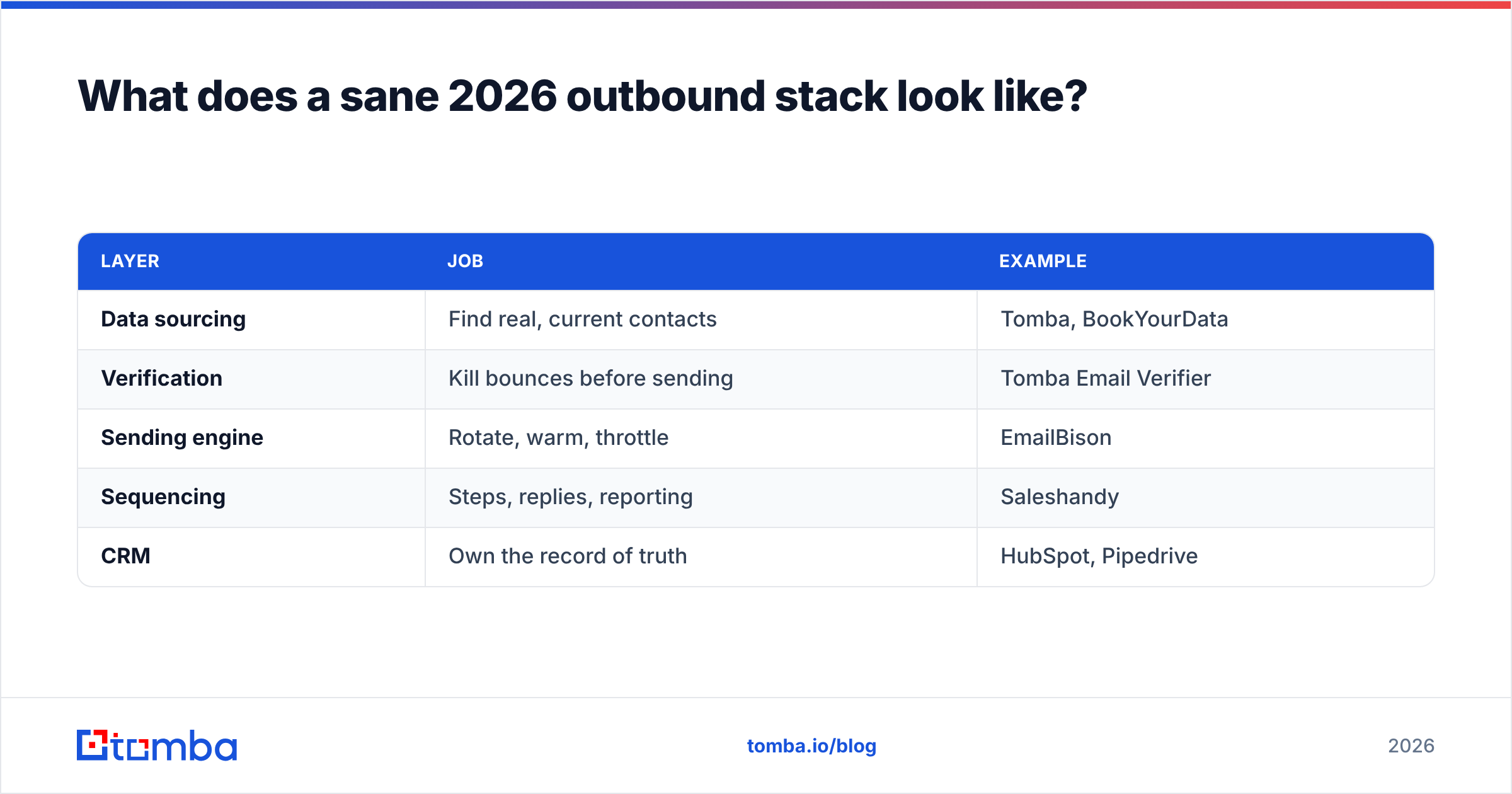
What does a sane 2026 outbound stack look like?#
| Layer | Job | Example |
|---|---|---|
| Data sourcing | Find real, current contacts | Tomba, BookYourData |
| Verification | Kill bounces before sending | Tomba Email Verifier |
| Sending engine | Rotate, warm, throttle | EmailBison |
| Sequencing | Steps, replies, reporting | Saleshandy |
| CRM | Own the record of truth | HubSpot, Pipedrive |
Most teams try to collapse this into one tool and end up paying premium prices for a mediocre version of three layers. Buying the data layer separately is usually the highest-ROI unbundling, because it's the layer where quality differences are measurable in a single week of sending.
For reference on how buyers actually rate these categories, G2's sales engagement grid is a reasonable sanity check against vendor claims — though read the review dates, since a lot of "best of" content in this space is quietly two years stale.
Final verdict#
EmailBison is the better buy if you're an agency or high-volume operator who already solved data and needs sending infrastructure that doesn't punish you for scaling mailboxes.
Saleshandy is the better buy if you're a single team that wants prospecting, sequencing, and reporting in one seat with a gentle learning curve and a lower entry price.
Both are defensible. Neither is a data company, and that's the gap most buyers underestimate.
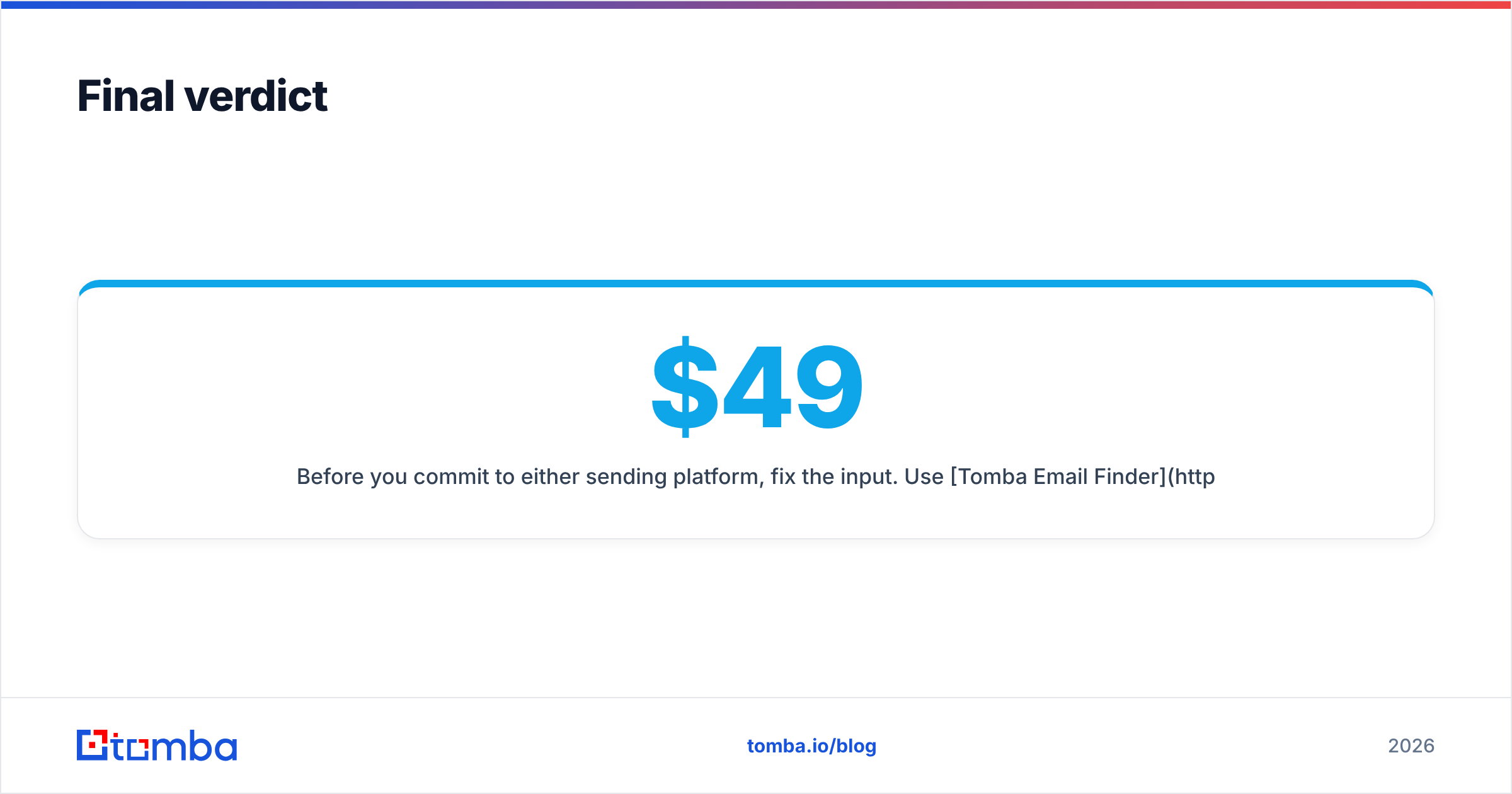
Before you commit to either sending platform, fix the input. Use Tomba Email Finder to source verified professional addresses by domain, name, or company — with real-time verification so bad rows never reach your sequencer. Start free with 25 searches a month, or check Tomba pricing for Starter at $49/mo, Growth at $99/mo, and Pro at $249/mo. Clean data first, sending platform second — that order is what separates a 2% reply rate from a 12% one.
Related guides#
Ready to find emails that actually work?
Join 150,000+ professionals who stopped guessing and started sending. Free credits on signup — no credit card required.
Get the Tomba newsletter
Practical outbound tactics and product updates — once every two weeks.
About the author