Emailchaser Reviews 2026: Features, Pricing, and Honest Verdict
Most Emailchaser reviews stop at the price tag. This one digs into deliverability limits, the built-in email finder, and the three cases where a cheaper sender actually costs you more pipeline.
TL;DR
- Emailchaser is a lightweight cold email sending platform built around unlimited sending accounts, simple sequences, and a deliberately small feature surface. It is not a data platform, and it does not pretend to be one.
- The pricing model is its strongest argument: flat, per-workspace, and unmetered on inboxes — which matters enormously if you run 10+ sending domains.
- The weakest link in almost every negative review is data quality. A built-in finder that "guesses" patterns will quietly torch your sender reputation before you notice.
- Best fit: solo founders, agencies, and small outbound teams sending 5k–50k emails a month who already have a verified list.
- Worst fit: teams that need enrichment, intent data, CRM-grade reporting, or a genuinely accurate email finder inside the same tool.
What is Emailchaser?#
Emailchaser is cold email outreach software. You connect sending mailboxes (Google Workspace, Microsoft 365, or generic SMTP), upload a list, build a multi-step sequence, and it sends on a schedule with reply detection that pulls contacts out of the campaign automatically. That's the whole product, and the official site doesn't oversell beyond it.
That narrowness is a design choice, not an oversight. The cold email category has spent five years bolting on features — dialers, LinkedIn automation, AI SDR agents, intent signals — until entry pricing crept past $200/month for teams sending a few thousand emails. Emailchaser went the other direction: strip it back to sending, rotation, and inbox management, then charge a flat rate.
Here is what you're actually buying, in the order it matters:
- Unlimited sending accounts. Most competitors charge per connected mailbox or per "sending slot." Emailchaser does not. If your outbound motion depends on 15 warmed domains with 3 mailboxes each, this single line item can cut your bill by 60–80% versus a per-inbox vendor.
- Sequence + reply detection. Multi-step follow-ups, automatic stop-on-reply, and basic conditional branching. Competent, not clever. It handles the 90% case.
- Inbox rotation and sending limits. Per-mailbox daily caps with randomized delays, which is table stakes for surviving Google and Microsoft filtering in 2026.
- A unified inbox. All replies from all connected mailboxes in one view, so your SDR isn't tabbing between 12 Gmail windows.
- A built-in email finder. This is the piece that needs the most scrutiny — see the dedicated section below.
- Basic reporting. Opens, clicks, replies, bounces per campaign and per step. No revenue attribution, no pipeline influence, no CRM-grade dashboards.
Notice what isn't there: no enrichment, no firmographic filters, no dialer, no LinkedIn automation, no A/B significance testing, no deliverability monitoring beyond bounce counts. If you need those, you need a second tool — and that's the honest trade at the center of every Emailchaser review.

How much does Emailchaser cost in 2026?#
Emailchaser publishes flat monthly pricing with an annual discount, and the entry tier sits in the same band as most self-serve sending tools. Because vendors change list pricing without notice, treat the figures below as directional and confirm on each vendor's own pricing page before you budget. Tomba's numbers are exact because they're ours.
| Tool | Entry price (approx.) | Sending accounts | Contacts/credits included | Data included? |
|---|---|---|---|---|
| Emailchaser | ~$49/mo | Unlimited | Sending-focused; finder credits limited | Basic pattern finder |
| Instantly | ~$37–97/mo | Unlimited on higher tiers | Tiered by active leads | Separate Lead Finder add-on |
| Saleshandy | ~$36–99/mo | Tiered by plan | Tiered by prospects | B2B lead database add-on |
| Smartlead | ~$39–94/mo | Unlimited | Tiered by active leads | No native finder |
| Tomba | Free (25 searches), then $49/mo Starter | N/A — data layer, not a sender | Search + verification credits by tier | Yes — finder, verifier, enrichment |
The pattern is obvious once you lay it out: sending tools converge on roughly $40–100/month for a small team, and every one of them treats data as either an add-on, a thin bundled feature, or somebody else's problem. That is the real decision, not the $12 difference in list price.
If you want the exact tier breakdown on the data side, Tomba pricing runs Free (25 searches/mo), Starter $49/mo, Growth $99/mo, Pro $249/mo, and custom Enterprise. Budget for a sender and a data source. Teams that budget for only one always end up paying twice — once in subscription, once in burned domains.
What do Emailchaser reviews say users actually like?#
Reading through public feedback on G2 and vendor-neutral roundups, four themes repeat.
Setup time is genuinely short. Users consistently report going from signup to first campaign in under an hour. There is no onboarding call, no implementation fee, no six-week rollout. For a two-person team, that's worth real money.
The unlimited-mailbox model is the headline. Agencies running client campaigns across separate domains describe it as the single reason they switched. When you're managing 40 mailboxes for eight clients, per-seat pricing becomes absurd fast.
Support is human and responsive. Small vendor, small queue. Reviewers mention getting a real answer in hours rather than a ticket-bot loop. This flips as a company scales, so weigh it as a snapshot rather than a guarantee.
It doesn't try to be an AI SDR. A recurring sentiment in 2026 reviews: buyers are tired of tools that auto-generate personalization that reads like a hostage note. Emailchaser leaves the writing to you. Whether that's a feature depends on whether your team can write.
Where does Emailchaser fall short?#
Now the part vendor-sponsored roundups skip.
Deliverability tooling is thin. You get bounce counts and sending caps. You do not get seed-list inbox placement testing, per-domain reputation trends, spam-folder detection, or blacklist alerts. When a domain starts sliding, you'll find out from your reply rate, which is roughly two weeks too late. Plug that gap with an external blacklist checker and Google Postmaster Tools, and check your SPF record before you send anything.
Reporting stops at the campaign boundary. There's no native path from "step 3 got a 4% reply rate" to "step 3 sourced $40k in pipeline." If your CRO wants attribution, you're exporting CSVs into a spreadsheet or a warehouse.
The integration surface is small. Native connectors cover the obvious CRMs and webhooks, but if your stack is opinionated you'll be routing through Zapier or Make. Compare that to running a data layer with a documented email finder API that you can call from anywhere in your pipeline.
No warmup included in the base experience. Some plans and integrations address this; many teams still end up paying for a separate warmup service. Model that cost in advance — run your ramp through an email warmup calculator so you know how many weeks of low-volume sending you need before the real campaign starts.
The finder is a pattern engine, not a verified database. Which deserves its own section.
Is Emailchaser's built-in email finder good enough?#
Short answer: for a first-pass guess on well-known domains, sometimes. For a campaign you're staking a quarter on, no.
Here's the mechanical difference. A pattern-based finder observes that jane.doe@acme.com exists, infers that Acme uses first.last@, and generates john.smith@acme.com for every other Acme contact you feed it. That inference is right often enough to feel like it works and wrong often enough to destroy a domain. Companies run mixed patterns after acquisitions. They use jsmith@ for pre-2019 hires and john.smith@ after. They run catch-all servers that accept everything and deliver nothing.
A verification-first stack does something different: it generates candidates, then confirms each one against live MX and SMTP signals, flags catch-all domains explicitly instead of returning a false "valid," and scores confidence per address. That's the job of a dedicated email verifier, and it's why the catch-all case gets its own tooling — a catch-all verifier exists precisely because the naive answer is unreliable.
The math is unforgiving. Send 5,000 emails at a 4% bounce rate and you're at 200 bounces — survivable. Run the same list through a pattern guesser with a 15% miss rate and you're at 750 bounces, which is well past the threshold where Google and Microsoft start routing your entire domain to spam. The recovery cycle is four to eight weeks of warmup on a new domain. That is not a $12/month problem.
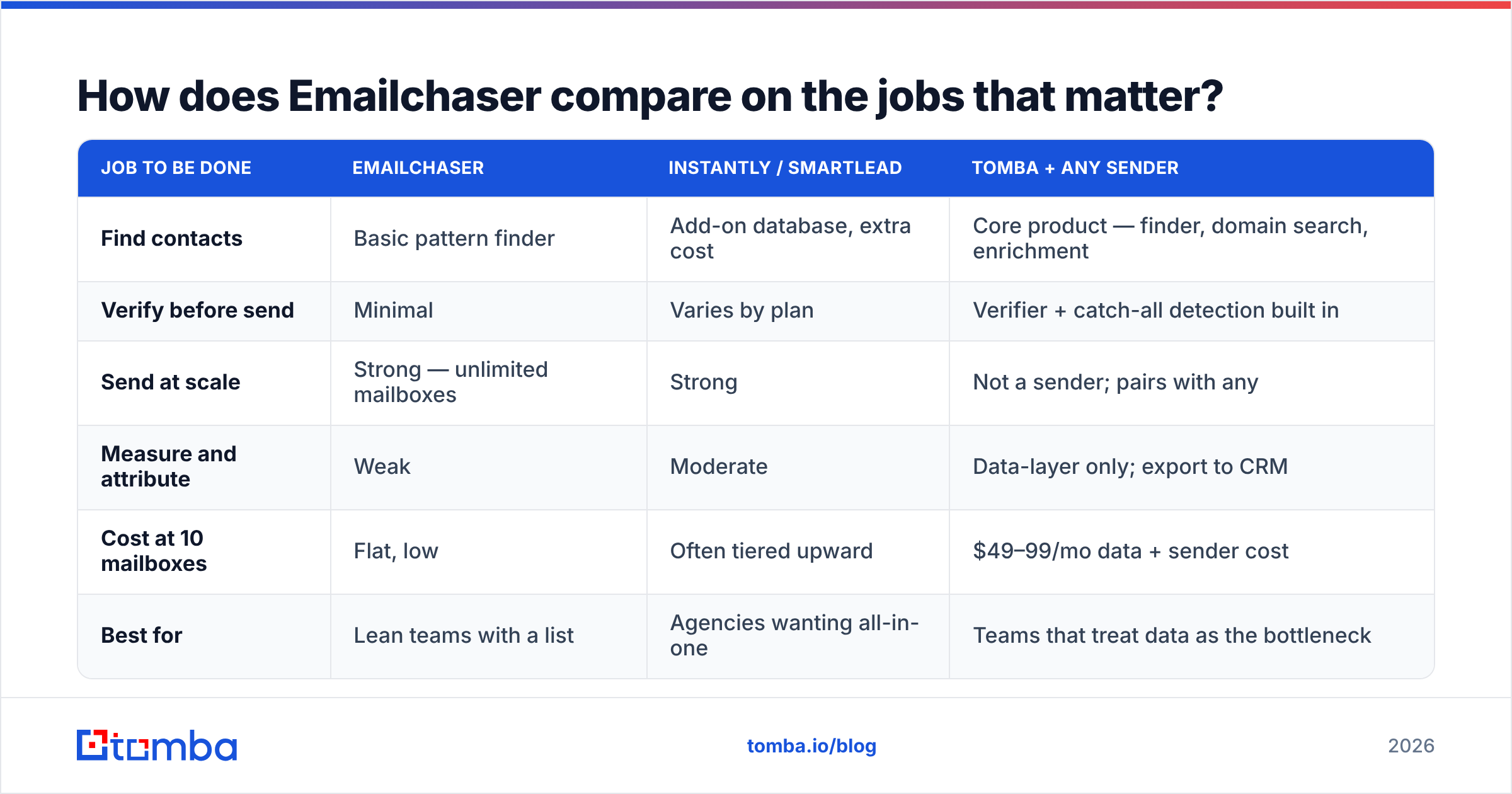
How does Emailchaser compare on the jobs that matter?#
Rather than a feature checklist, score the tools against the four jobs an outbound stack has to do.
| Job to be done | Emailchaser | Instantly / Smartlead | Tomba + any sender |
|---|---|---|---|
| Find contacts | Basic pattern finder | Add-on database, extra cost | Core product — finder, domain search, enrichment |
| Verify before send | Minimal | Varies by plan | Verifier + catch-all detection built in |
| Send at scale | Strong — unlimited mailboxes | Strong | Not a sender; pairs with any |
| Measure and attribute | Weak | Moderate | Data-layer only; export to CRM |
| Cost at 10 mailboxes | Flat, low | Often tiered upward | $49–99/mo data + sender cost |
| Best for | Lean teams with a list | Agencies wanting all-in-one | Teams that treat data as the bottleneck |
The honest read: Emailchaser wins the sending-cost job outright and loses the data job outright. Nothing in that sentence is a criticism — it's a product built to do one thing at a low price. The mistake buyers make is assuming the bundled finder means they've solved sourcing.
Who should buy Emailchaser, and who should skip it?#
Buy it if:
- You run many sending domains. Ten or more mailboxes and the flat pricing pays for itself in month one.
- You already own a verified list. You're buying a delivery mechanism, not a prospecting engine.
- You're an agency billing per client. Separate workspaces, separate domains, predictable cost.
- You write your own copy. No AI generation layer means no crutch — fine if your messaging is already tight. Start from proven cold email templates rather than improvising.
Skip it if:
- Your list comes from scraping or guessing. The sender isn't your problem; your data is. Fix that first.
- You need pipeline attribution. Sales leadership will ask for it, and you won't have it.
- You run enterprise ABM. Account-level orchestration, intent, and multi-threading are out of scope entirely.
- You need phone as a channel. No dialer, no numbers. That's a separate stack — a phone finder plus a dialer.
What does a working setup look like in practice?#
The teams that get results from a lean sender follow roughly the same sequence.
Start with domains. Buy secondary domains — never send cold from your primary — and give each one three weeks of warmup at low volume before it touches a real campaign. Authenticate SPF, DKIM, and DMARC on day one, not day thirty.
Then build the list properly. Pull contacts by company domain, enrich the ones that matter, and verify every address before it enters the sender. For a list of any size, that means a bulk email finder run rather than one-off lookups, with a verification pass gating the export. Anything flagged risky or catch-all goes into a separate, lower-volume segment — not the main campaign.
Then send conservatively. Thirty to fifty emails per mailbox per day, randomized intervals, three to four steps spaced four to seven days apart. Resist the urge to blast; the tool will happily let you, and Google will happily punish you for it.
Finally, measure the right thing. Open rates in 2026 are close to noise thanks to privacy proxies. Track reply rate, positive reply rate, and bounce rate. If bounces exceed 3%, stop the campaign and re-verify — that number is your early warning system, and it's almost always a data problem, not a sending problem.
Is Emailchaser worth it in 2026? The verdict#
Yes, conditionally. As a sending layer for a lean team with a clean list, Emailchaser is a reasonable, honestly-priced choice, and the unlimited-mailbox model is a real cost advantage that bigger vendors haven't matched. It does the narrow thing it claims to do.
But no cold email tool fails because its sequencer was inadequate. They fail because the list was garbage. If you're evaluating Emailchaser reviews to decide where the next $50/month goes, the higher-leverage spend is almost always on data — verified addresses, catch-all detection, and enrichment — not on a marginally cheaper sender.
Pair whichever sender you pick with a data layer that actually verifies. Start free with the Tomba Email Finder — 25 searches a month at no cost, no card — and run your next campaign list through verification before a single email leaves your domain. Your bounce rate, and your sending reputation, will tell you within a week whether it was worth it.
Related guides#
Ready to find emails that actually work?
Join 150,000+ professionals who stopped guessing and started sending. Free credits on signup — no credit card required.
Get the Tomba newsletter
Practical outbound tactics and product updates — once every two weeks.
About the author