Emailchaser vs Exact Data: Which B2B Data Source Wins?
One finds emails on demand and sends them. The other sells you a list by the record. Here's how Emailchaser and Exact Data actually compare on accuracy, cost, and compliance risk in 2026.
TL;DR
- Emailchaser is a cold email sending platform with a built-in email finder. You bring targets, it finds addresses and runs the sequence. Exact Data is a list broker — you buy a static file of records, then send it somewhere else.
- They are not really the same category. Comparing them is comparing "find contacts as I need them" against "buy a large file up front."
- Cost per usable contact is the only fair metric. A $0.10 purchased record that bounces costs more than a $0.40 verified one that lands.
- Purchased lists carry the heavier compliance and deliverability risk: unknown collection consent, aged records, and spam-trap exposure that can burn a sending domain in a week.
- If you want on-demand discovery plus verification without buying a haystack, a dedicated finder-and-verifier stack is the third option most teams end up on.
What is Emailchaser and what is Exact Data?#
They solve different halves of the same problem, which is exactly why people search for the comparison.
Emailchaser is an outbound email tool built around a simple loop: find the address, warm the inbox, send the sequence, track the reply. Its email finder is a feature inside the sending product rather than a standalone data business. You point it at a person or a company, it returns a likely address, and it moves that address straight into a campaign. The pitch is consolidation — one subscription instead of a finder plus a sender plus a verifier.
Exact Data is a data compiler and list broker. It sells B2B and consumer marketing files, filtered by whatever selects you specify: SIC code, employee count, job function, geography, revenue band, sometimes consumer attributes that have no place in B2B outbound at all. You describe an audience, they quote a count and a price, you pay per record and receive a file. The transaction ends there. Nothing refreshes, nothing verifies itself next month.
That structural difference drives every other difference in this comparison. One is a subscription to a workflow. The other is a one-time purchase of a snapshot.
How does each one actually source its data?#
Sourcing determines accuracy, and accuracy determines whether your outbound works at all. Here is the honest breakdown:
- Pattern inference plus validation (Emailchaser's model). Take a name and a domain, infer the company's email pattern (first.last@, flast@, first@), then test the candidate against the mail server. Cheap, fast, and reasonably accurate for standard corporate domains. It degrades badly on catch-all domains, where the server accepts everything and tells you nothing.
- Compiled and licensed files (Exact Data's model). Aggregate from public filings, trade registrations, subscription forms, event registrations, survey opt-ins, and partner data swaps. Broad coverage, deep firmographic selects, but the freshness of any individual record is opaque. You cannot tell whether a row was collected last quarter or in 2019.
- Crawled web signals. Public pages, press releases, team pages, published articles, GitHub commits, conference speaker bios. This is where role-based addresses and author contacts come from. Coverage is uneven but the records that exist are usually current.
- Real-time verification at query time. MX lookup, SMTP handshake, disposable-domain checks, role-account flags, and catch-all detection performed the moment you ask — not months ago when a file was compiled. This is the difference between "this address existed once" and "this address accepts mail right now."
- Enrichment joins. Matching a known email or domain back to job title, seniority, company size, and tech stack. Both approaches offer some version of this; the depth varies enormously.
Most stacks that work in 2026 combine 1, 3, and 4. Buying a static file from category 2 without running category 4 over it afterward is the single most common way teams destroy a sending domain in their first month.
Emailchaser vs Exact Data: how do they compare head to head?#
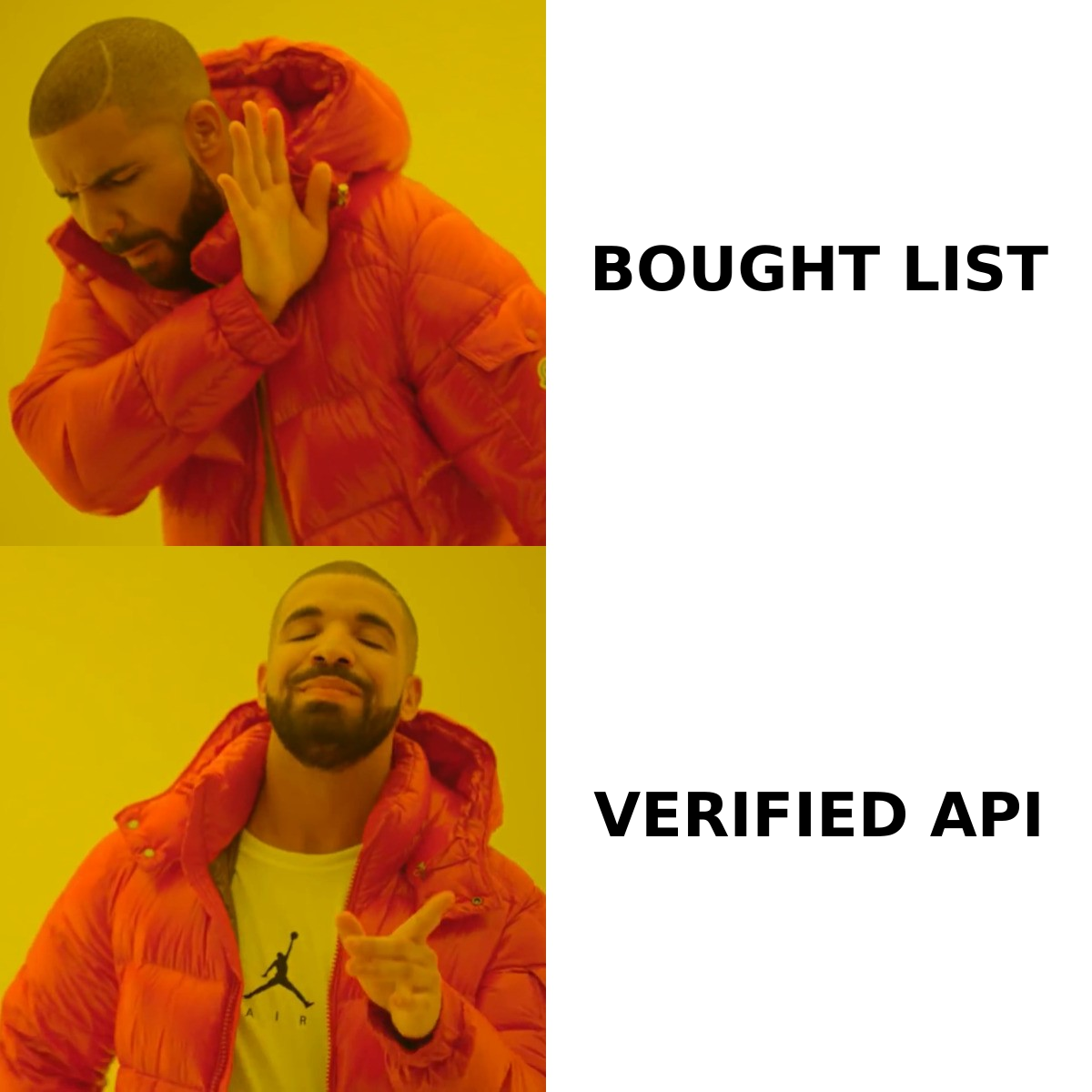
| Dimension | Emailchaser | Exact Data | Tomba |
|---|---|---|---|
| Product category | Cold email sender + built-in finder | List broker / data compiler | Email finder + verifier + enrichment API |
| Buying model | Monthly subscription | Per-record, one-time file purchase | Free tier, then $49–$249/mo subscription |
| Entry price | Around $49/mo for the entry sending plan (confirm on their pricing page) | Quote-based; commonly $0.10–$0.50+ per record with order minimums | Free 25 searches/mo; Starter $49/mo; Growth $99/mo; Pro $249/mo |
| Data freshness | Resolved at search time | Snapshot at purchase; ages from day one | Resolved at search time, re-verifiable on demand |
| Sends the email for you | Yes — sequences, warmup, inbox rotation | No — export only | No — integrates with your sender |
| Verification depth | Basic validation bundled with finding | Varies by file; often billed as an add-on | Dedicated verifier, catch-all handling, confidence scoring |
| Catch-all domains | Weak spot — SMTP tests return accept-all | Not addressed; you inherit whatever is in the file | Separate catch-all verifier and finder |
| Bulk workflow | Campaign-oriented | Native — the whole product is bulk | Bulk finder plus CSV, Sheets, Excel, API |
| API access | Limited | Typically a file delivery, not a live API | Full REST API, CLI, MCP server |
| Best for | Solo founders and small teams who want one tool | Direct mail, telemarketing, wide-net list buys | Teams that want accurate contacts inside their own workflow |
The table makes the real choice visible. Emailchaser competes on convenience — everything in one login. Exact Data competes on volume and selects — nobody beats a compiler on "give me 40,000 records matching this industry filter." Neither competes primarily on per-record accuracy, and that is the gap most outbound teams feel three weeks into a campaign.
Which one gives you more accurate contacts?#
Neither wins outright, and anyone who tells you otherwise is selling something. But the failure modes are different, and one is far more expensive to recover from.
Emailchaser's failure mode is silent uncertainty. Pattern inference gets you a plausible address. On a domain with a strict mail server, the SMTP check confirms it and you are fine. On a catch-all domain — and a large share of mid-market and enterprise domains are catch-all now — every guess returns "valid." You send to five addresses for one person, four bounce or land in a trap, and you never see the problem until your reputation dips. Running a proper catch-all verifier over that segment before sending is the fix, and it is not something a bundled sender does well.
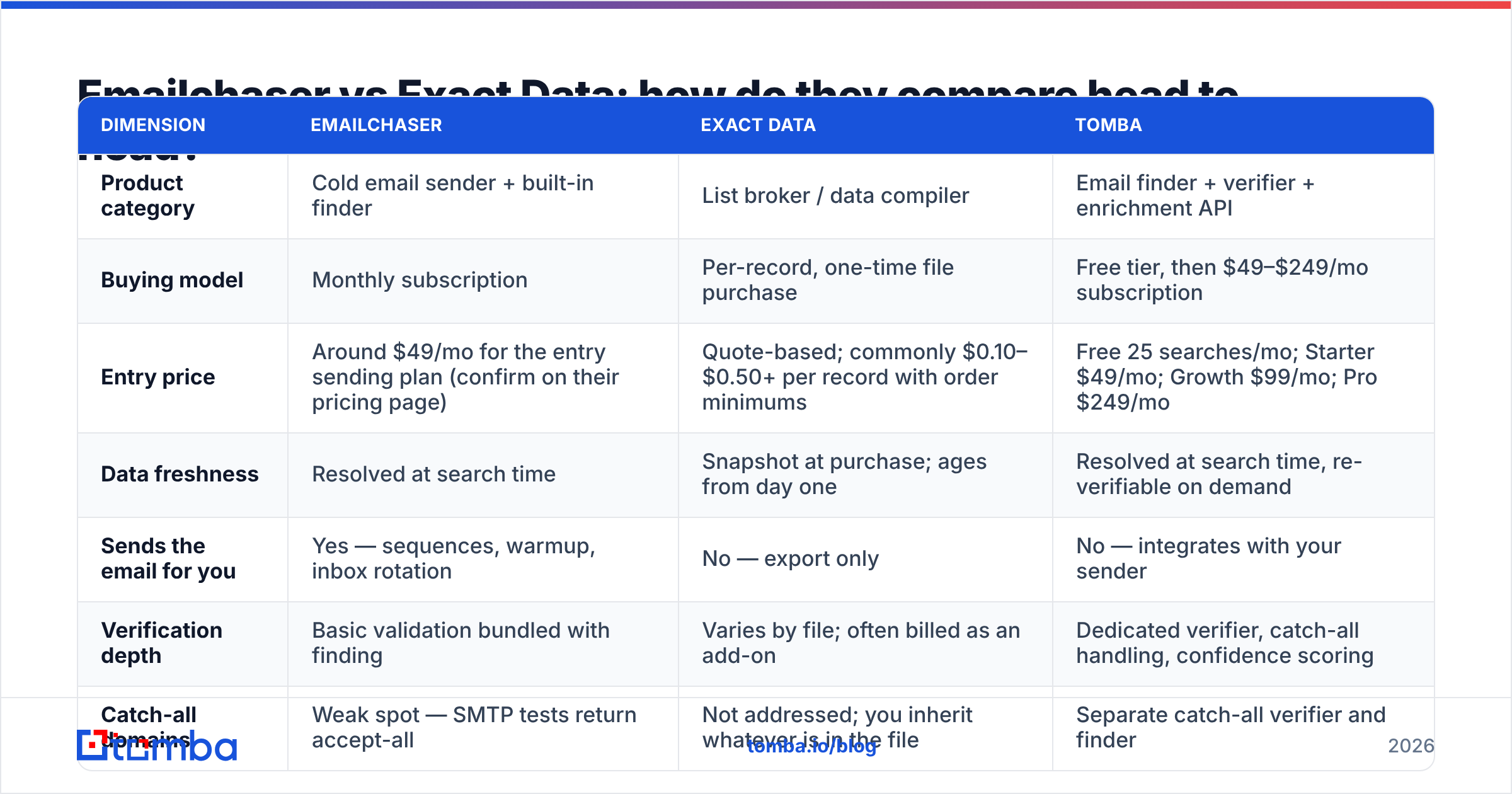
Exact Data's failure mode is decay. A compiled B2B file is accurate the day it was compiled. B2B contact data decays at roughly 2–3% per month through job changes, restructures, and domain migrations, which compounds fast. A file assembled 18 months ago can be 30–40% dead on arrival. You paid for every one of those rows. Worse, recycled spam traps live in aged files, and hitting a handful of those does more damage than 500 ordinary bounces.
The practical rule: whatever you buy or find, verify it immediately before it enters a sequence. Run the whole file through an email verifier and delete anything that comes back risky or unknown. If a purchased list loses 35% of its rows to verification, that is not a wasted spend — that is the spend that saved your domain.

What does each actually cost per usable contact?#
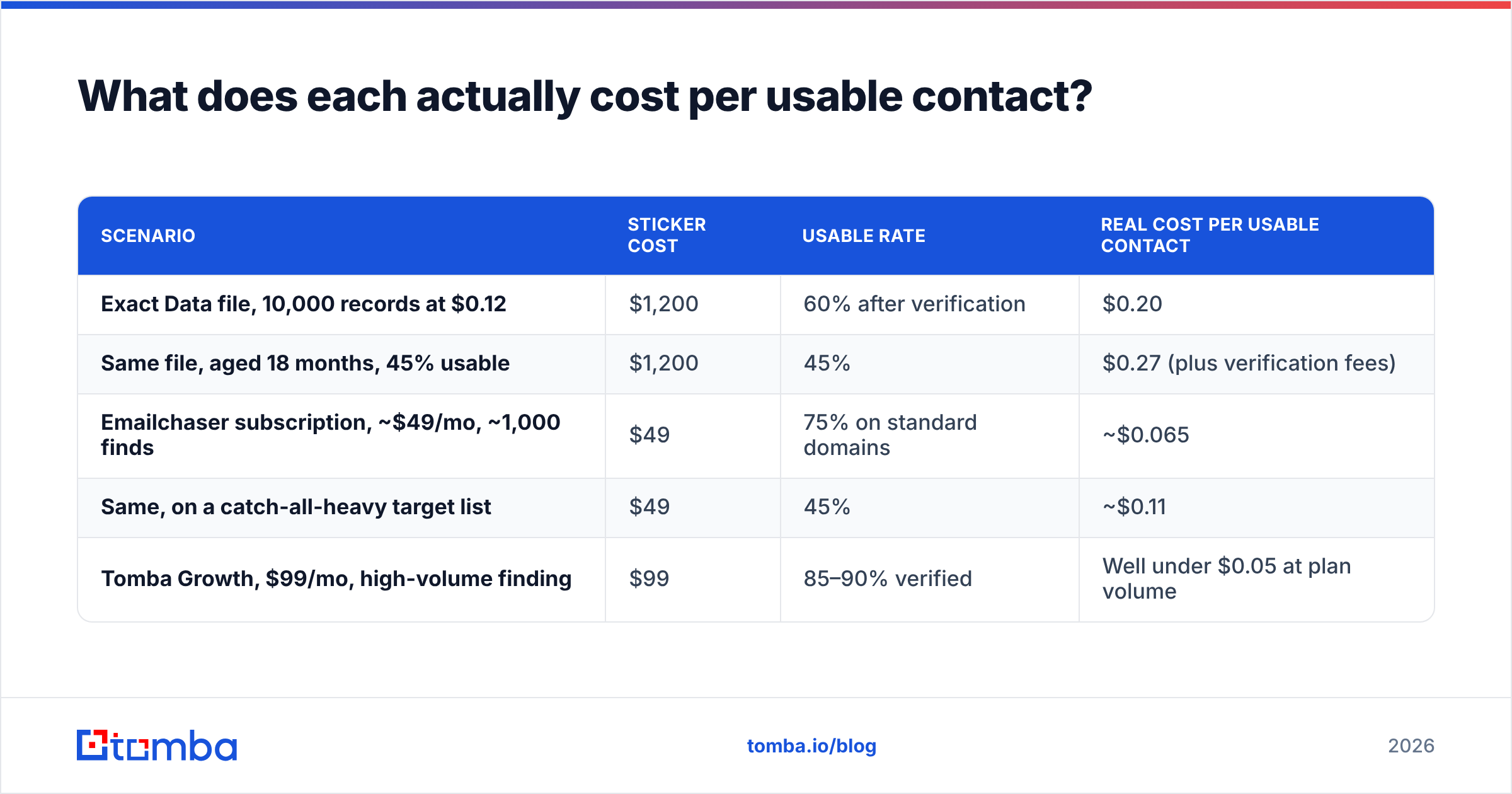
Sticker price lies. Here is the arithmetic that matters, using conservative assumptions.
| Scenario | Sticker cost | Usable rate | Real cost per usable contact |
|---|---|---|---|
| Exact Data file, 10,000 records at $0.12 | $1,200 | 60% after verification | $0.20 |
| Same file, aged 18 months, 45% usable | $1,200 | 45% | $0.27 (plus verification fees) |
| Emailchaser subscription, ~$49/mo, ~1,000 finds | $49 | 75% on standard domains | ~$0.065 |
| Same, on a catch-all-heavy target list | $49 | 45% | ~$0.11 |
| Tomba Growth, $99/mo, high-volume finding | $99 | 85–90% verified | Well under $0.05 at plan volume |
Two things fall out of this. First, subscription finders beat per-record list buys on unit economics for almost any B2B use case under six figures of volume. Second, the usable rate swings the number more than the sticker price does — a 20-point accuracy difference outweighs a 2x price difference every time.
Exact Data still wins one scenario decisively: when you genuinely need scale and postal or phone data that a finder does not touch. If you are running direct mail to 50,000 addresses, a compiler is the right vendor and a per-search email finder is not. Check current per-record quotes and pricing details side by side before committing to a large file — brokers negotiate, and the first quote is rarely the last.
Is buying a list from Exact Data a compliance risk?#
It depends on jurisdiction, and you should treat this section as a prompt to talk to counsel rather than legal advice.
Under CAN-SPAM in the US, purchased B2B lists are legal to email provided you identify yourself, include a physical address, honor opt-outs promptly, and do not use deceptive headers. Exact Data operates within that framework and is transparent about what it sells.
Under GDPR in the EU and UK, the calculus changes. You need a lawful basis for processing, and legitimate interest for B2B outreach requires that you can document the source of the data and the reasoning behind the contact. That is workable when you found a publicly listed work address for a role-relevant reason. It is much harder to defend when the record came from a compiled file whose original collection consent you cannot inspect. Some compiled consumer attributes should never touch a B2B campaign at all.
Deliverability enforcement is stricter than legal enforcement anyway. Google and Microsoft's bulk sender rules require authenticated sending, low complaint rates, and one-click unsubscribe. A purchased list that produces a 0.4% complaint rate will get you filtered long before any regulator notices you exist. Check your setup with an SPF checker before you send a single record from any new file.
The safest posture, regardless of vendor: source narrowly, verify everything, document where each contact came from, and keep list volumes small enough that a bad segment cannot take down the domain.
Which should you choose for your use case?#
- You are a solo founder sending 50–200 emails a week. Emailchaser's bundling is genuinely useful. One tool, one bill, sequences included. Add a standalone verifier for catch-all domains and you have a working stack.
- You need 25,000+ records with postal and phone data for a multichannel campaign. Exact Data is built for this and a finder is not. Budget for verification on top of the file cost, and expect to discard a meaningful percentage.
- You have a sending tool you like and just need better contacts feeding it. Neither is ideal. You want a dedicated finder with an API that drops verified contacts into whatever you already run.
- Your ICP is mid-market or enterprise with catch-all domains. Pattern-guessing tools struggle here. Prioritize catch-all handling over price.
- You are enriching an existing CRM, not building a new list. Skip both. What you need is data enrichment keyed on domains and names you already own.
- Your volume is spiky — 5,000 contacts one month, 200 the next. A subscription with a bulk email finder beats both a fixed sending plan and a one-time file purchase.
Where does Tomba fit in this comparison?#
Tomba sits in the gap the other two leave open: accurate, verified contact discovery that plugs into whatever you already use to send.
Against Emailchaser, the trade is explicit — Tomba does not send your emails. If bundling matters more than data quality, Emailchaser is the simpler purchase. If you already run Instantly, Smartlead, HubSpot, or your own SMTP, you do not need another sender; you need the finding and verification layer to be genuinely good. Tomba's domain search, catch-all verifier, LinkedIn finder, and phone finder cover cases a bundled finder does not attempt.
Against Exact Data, the trade is snapshot versus live. You are not buying 40,000 rows and hoping. You resolve contacts when you need them, verified at that moment, and re-verify before any send. For the same money as a mid-sized list purchase you get a year of on-demand finding — and none of it arrives pre-aged.
The honest limitation: if your campaign genuinely requires compiled consumer attributes, postal addresses at scale, or exotic firmographic selects, a broker is the right vendor and Tomba is not a substitute. Buy the file, then run it through verification before it touches your sender. Vendor claims move fast in this category, so cross-check current ratings on G2 before you sign anything annual.
What is the fastest way to test both?#
Run the same 100 contacts through each and measure. Pick a target account list you know well — companies where you can eyeball whether an address looks right. Pull those contacts from each source. Verify all of them with the same third-party verifier so the scoring is neutral. Then compare four numbers: match rate, verified-valid rate, cost per verified contact, and time to produce the list.
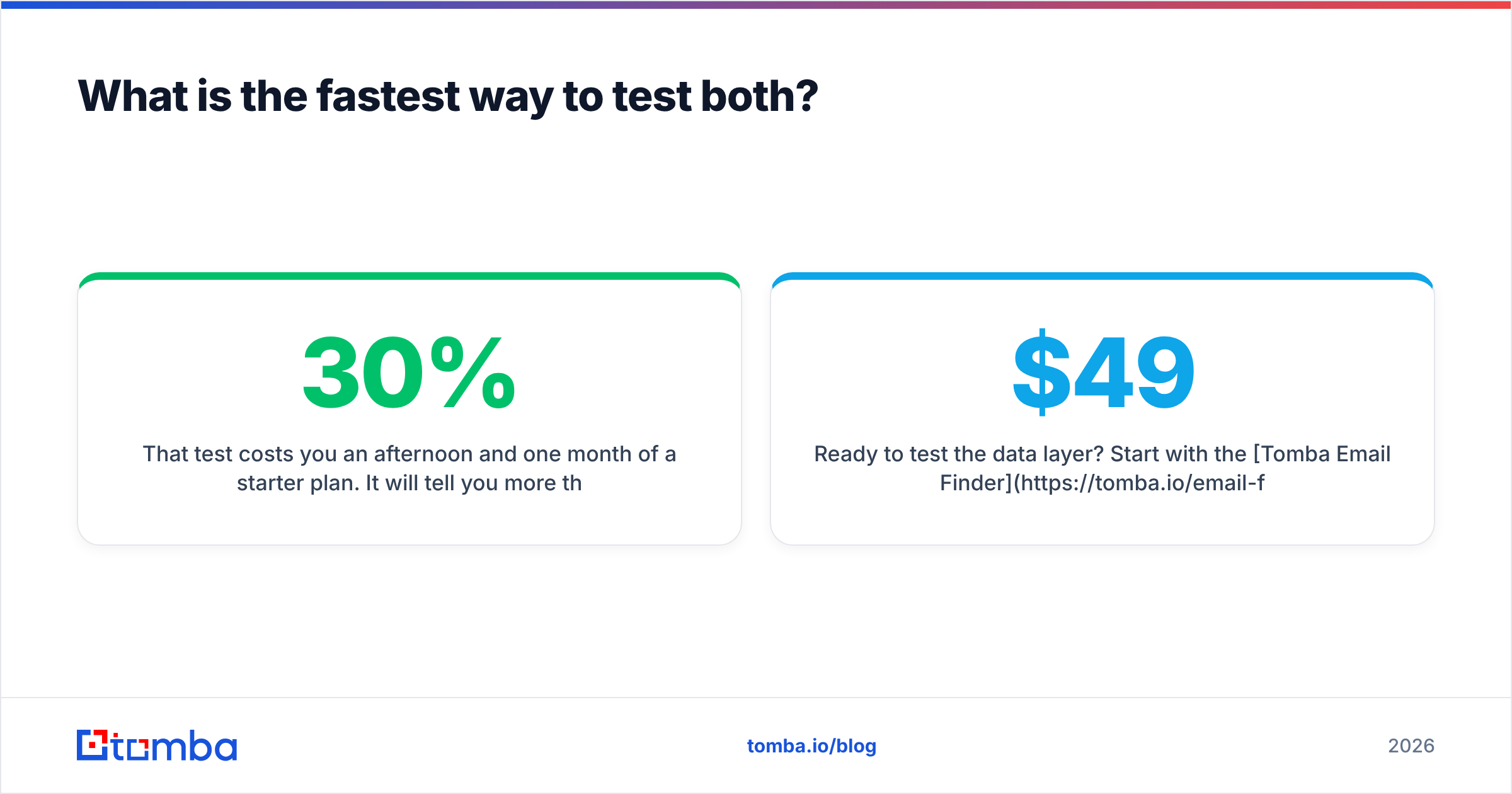
That test costs you an afternoon and one month of a starter plan. It will tell you more than any comparison article, including this one. Most teams who run it discover their real bottleneck was never the sending tool — it was the 30% of their list that was never going to land.
Ready to test the data layer? Start with the Tomba Email Finder on the free tier — 25 searches a month, no card — and run it head to head against whatever list you are considering buying. If the verified match rate wins, Starter is $49/mo and Growth is $99/mo, both with full API access so the contacts land wherever your outbound already lives.
Related guides#
Ready to find emails that actually work?
Join 150,000+ professionals who stopped guessing and started sending. Free credits on signup — no credit card required.
Get the Tomba newsletter
Practical outbound tactics and product updates — once every two weeks.
About the author