Emailchaser vs Lusha 2026: Which Email Finder Wins?
Emailchaser sells cheap unlimited-ish email finding bundled with sending. Lusha sells premium contact data with phone numbers. They solve different problems — here's which one your pipeline actually needs.
TL;DR
- Emailchaser is a budget cold-email platform with an email finder attached. You get sending, sequences, and lookups in one subscription — but the data depth is thin outside common B2B domains.
- Lusha is a contact-data company first. Its strength is direct dials and mobile numbers pulled through a Chrome extension over LinkedIn, priced per seat with credit caps.
- They are not really competitors. Emailchaser competes with Instantly and Saleshandy; Lusha competes with ZoomInfo, Apollo, and Cognism.
- If you only need verified work emails at volume, a dedicated finder plus your own sending stack beats both on cost per usable contact.
- Decision rule: need phones + intent → Lusha. Need cheap sending + basic emails → Emailchaser. Need accurate email data at scale → neither; use a finder API.
What are Emailchaser and Lusha, exactly?#
Most "X vs Y" posts pretend both products do the same job. These two don't.
Emailchaser is a cold email sending platform. Sequences, inbox rotation, reply detection, unsubscribe handling — the standard outbound stack — with an email-finding feature bolted on so you don't have to buy a separate data tool for small lists. It is priced flat, aimed at solo founders and small agencies, and its pitch is "everything in one place, cheap."
Lusha is the opposite shape. It is a B2B contact database with a browser extension. You land on a LinkedIn profile or a company page, click the extension, and Lusha returns a work email plus — this is the part people actually pay for — a direct dial or mobile number. It sells per seat, meters everything in credits, and pushes teams toward annual contracts. On G2 it consistently reviews well on ease of use and less well on credit economics.
So the honest framing: Emailchaser is a sending tool that finds emails. Lusha is a data provider that happens to export. Choosing between them is really choosing which half of your outbound stack you want to outsource.
Which tool finds more valid emails?#
Lusha, on work emails, for most mid-market and enterprise targets. That is not a controversial claim — Lusha's entire business is data acquisition, licensing, and refresh cycles, and it maintains a compliance program specifically because it operates as a data controller in the EU.
But "more valid" hides two failure modes that cost you deliverability:
Where Lusha struggles. Coverage collapses outside its core geographies and outside tech/SaaS/finance verticals. Ask it for the operations manager at a 40-person industrial supplier in Portugal and you will burn credits on misses. Credits are consumed on reveal, not on accuracy, which is the complaint that shows up over and over in review sites.
Where Emailchaser struggles. Pattern-guessing is a large part of how cheap finders work: take firstname.lastname@domain, run an SMTP check, return "valid." That is fine on domains with clean MX responses and catastrophic on catch-all domains, which now cover a large share of B2B mail. A catch-all accepts everything, so a naive checker marks a guessed address as deliverable when it isn't. You find out three weeks later when your bounce rate crosses 4% and your domain reputation tanks.
This is why any serious workflow runs found addresses through a separate email verifier with explicit catch-all handling before a single send. Finding and verifying are different problems, and bundling both into a $29 plan usually means one of them is doing the bare minimum.


How do Emailchaser and Lusha compare on features and pricing?#
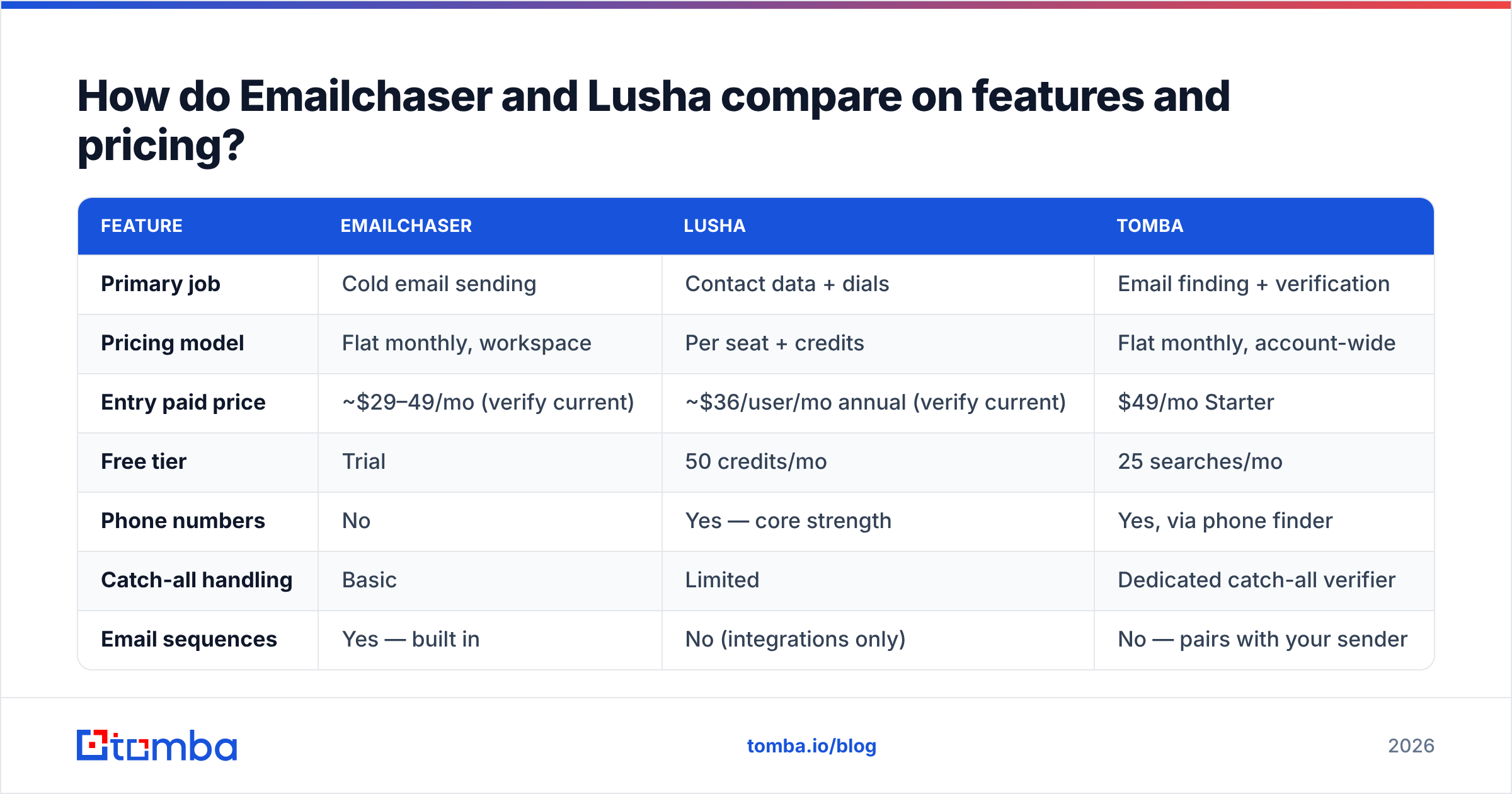
Pricing on both moves, and both run promotional annual rates, so treat these as directional and confirm on the vendor page before you buy. What matters more than the sticker is the unit — Lusha meters per seat and per credit; Emailchaser meters per sending workspace.
| Feature | Emailchaser | Lusha | Tomba |
|---|---|---|---|
| Primary job | Cold email sending | Contact data + dials | Email finding + verification |
| Pricing model | Flat monthly, workspace | Per seat + credits | Flat monthly, account-wide |
| Entry paid price | ~$29–49/mo (verify current) | ~$36/user/mo annual (verify current) | $49/mo Starter |
| Free tier | Trial | 50 credits/mo | 25 searches/mo |
| Phone numbers | No | Yes — core strength | Yes, via phone finder |
| Catch-all handling | Basic | Limited | Dedicated catch-all verifier |
| Email sequences | Yes — built in | No (integrations only) | No — pairs with your sender |
| Chrome extension | Limited | Yes — LinkedIn-first | Yes |
| API access | Minimal | Yes, higher tiers | Yes, all paid plans |
| Bulk CSV enrichment | Small volumes | Yes, credit-metered | Yes, bulk finder |
| Best for | Solo founders sending | SDR teams cold calling | Data layer for any stack |

Read the "pricing model" row twice. It is the single biggest cost driver over a year.
Lusha's per-seat model means a five-person SDR team pays five times, and each seat carries its own credit pool that does not always pool cleanly across the team. Emailchaser's workspace model means one price regardless of headcount, but you are capped on sending volume and connected inboxes instead. Tomba's pricing sits in a third bucket — account-wide credits at $49/mo Starter, $99/mo Growth, $249/mo Pro — because the data layer is separated from seats entirely.
What does each option actually cost at 5,000 contacts a month?#
Run the arithmetic before the demo, not after.
Scenario: three SDRs, 5,000 new contacts enriched per month, emails required, phone numbers required for 20% of them.
- Emailchaser path. One workspace subscription covers sending. But 5,000 lookups per month is above what a bundled finder comfortably handles, so you add a dedicated data source anyway. Real cost: sending subscription + data subscription. Phones: unavailable, so you add a third tool.
- Lusha path. Three seats at roughly $36–59 each, plus credit top-ups once 5,000 reveals exceed the plan allowance — credit overages are where Lusha bills get surprising. Then you still need a sending platform, because Lusha does not send. Real cost: seats + overage + sequencer.
- Split-stack path. A dedicated finder at a flat account price for the 5,000 emails, a phone finder for the 1,000 that need dials, and whatever sender you already trust. Real cost: one data line item + one sending line item, neither scaling with headcount.
The third path wins on cost per usable contact in almost every team above two people, and the reason is structural, not clever: seats and sends are the wrong meters for data. You don't need more data because you hired another rep. You need more data because you're prospecting more accounts.
Who should actually pick Emailchaser?#
Pick Emailchaser if you match most of this profile:
- You are one to three people. The flat workspace price is genuinely cheap when it isn't multiplied by seats.
- Your ICP lives on common domains. Tech companies, agencies, SaaS — places where pattern-based finding works and MX records behave.
- Your list sizes are small. A few hundred prospects a month, not tens of thousands.
- You want one login. Consolidation has real value when nobody on the team owns tooling.
- You do not cold call. No phone data means no phone workflow, full stop.
Where it breaks down: enterprise targets, non-English geographies, catch-all-heavy industries (legal, healthcare, government-adjacent), and any workflow that needs an API to push contacts into a CRM automatically.
Who should actually pick Lusha?#
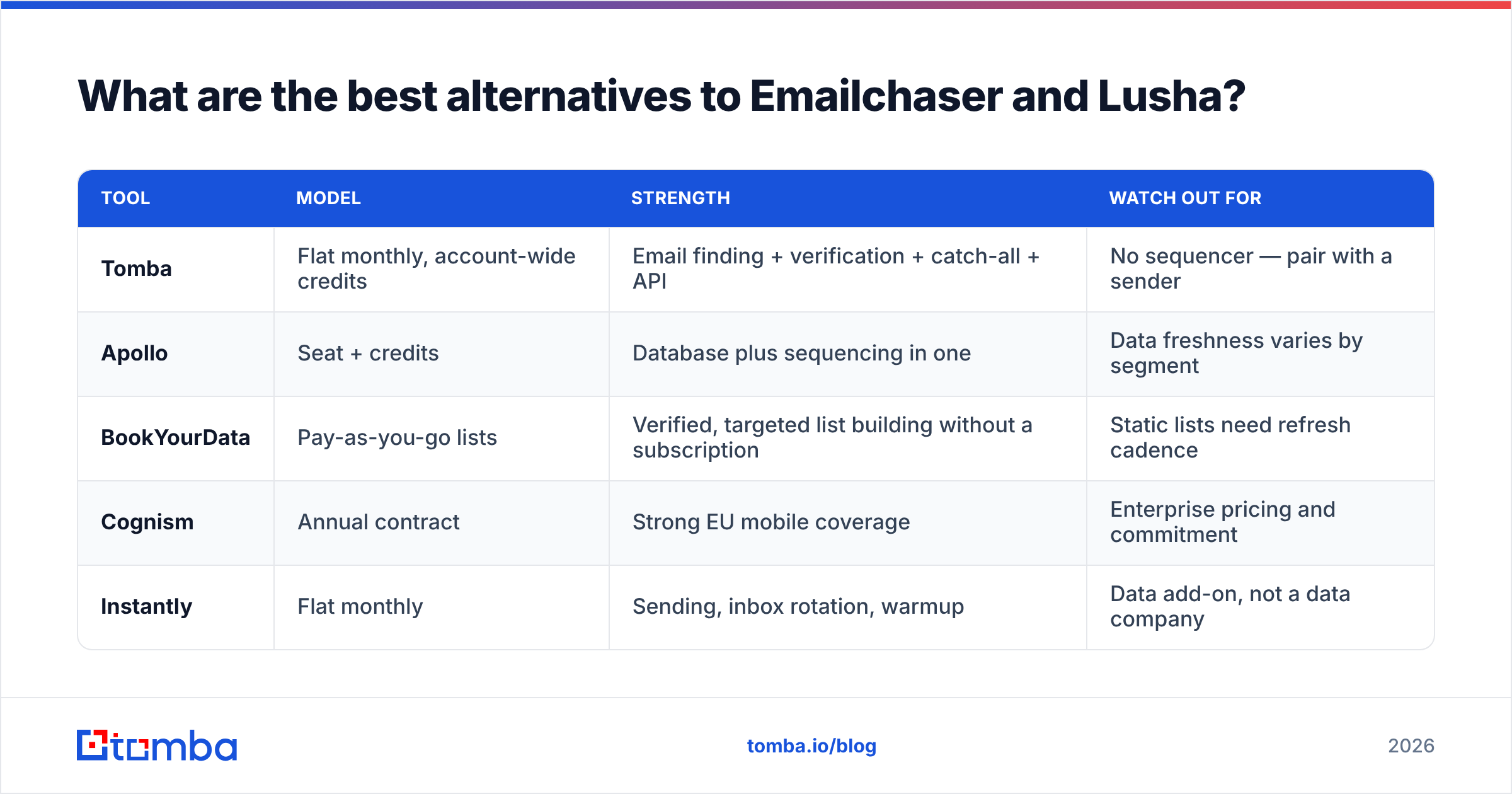
Pick Lusha if this is you:
- Phone is a primary channel. If your reps dial, Lusha's mobile coverage is the entire argument, and it is a strong one.
- Your reps prospect inside LinkedIn. The extension workflow is fast and reps adopt it without training.
- You are targeting mid-market and enterprise in the US, UK, or Western Europe. Coverage is densest there.
- Compliance matters to your legal team. Lusha invests visibly in GDPR/CCPA process, which shortens procurement.
- Your team is small enough that per-seat math still works. Under about eight seats, it stays reasonable.
Where it breaks down: credit anxiety. When reps ration reveals because credits are scarce, prospecting quality drops in ways no dashboard shows you. And Lusha won't send your email — budget for a sequencer on top.
What are the best alternatives to Emailchaser and Lusha?#
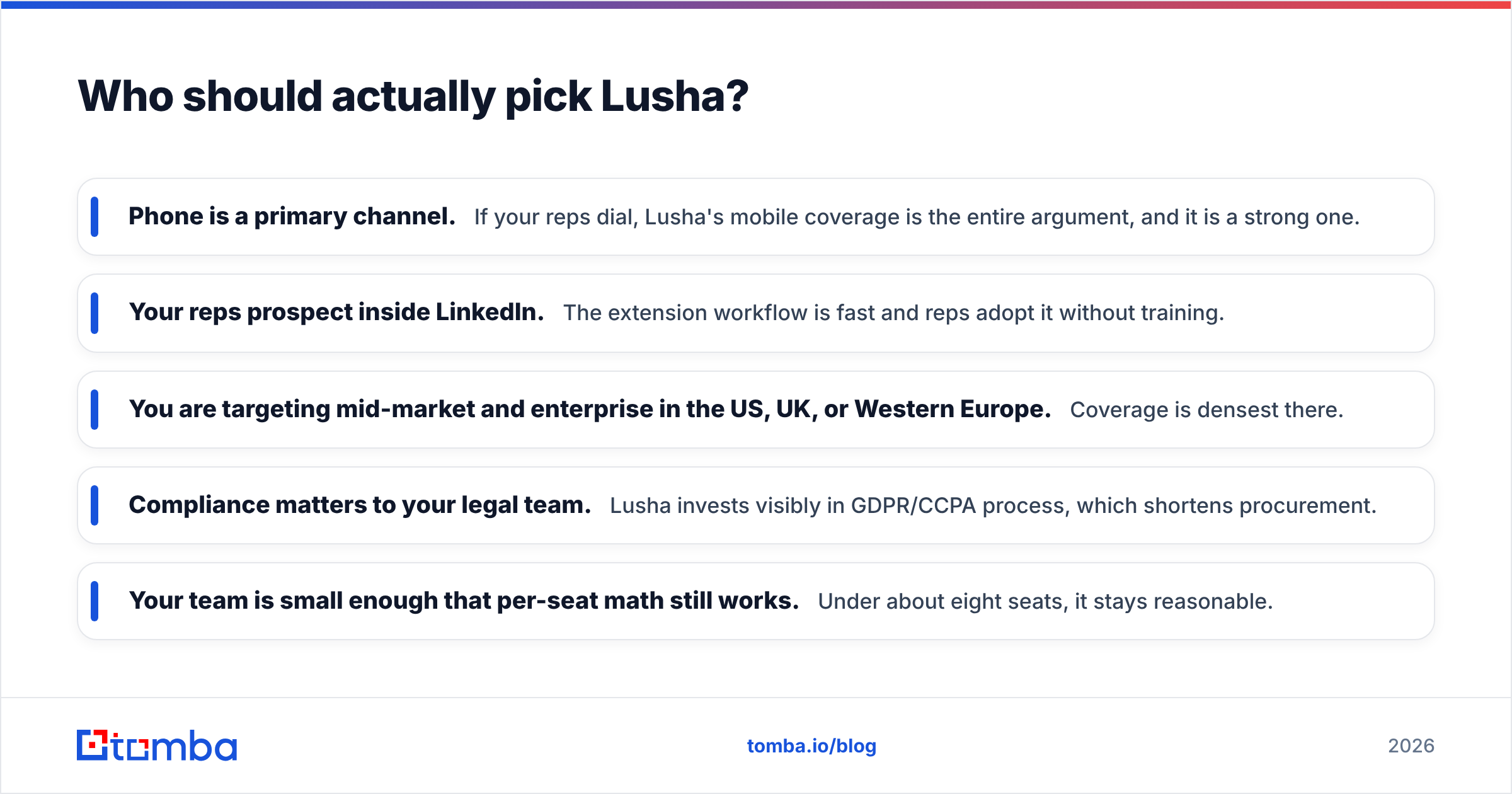
Neither tool is the only shape available. If your real requirement is "verified B2B contacts at predictable cost," these are the serious options:
| Tool | Model | Strength | Watch out for |
|---|---|---|---|
| Tomba | Flat monthly, account-wide credits | Email finding + verification + catch-all + API | No sequencer — pair with a sender |
| Apollo | Seat + credits | Database plus sequencing in one | Data freshness varies by segment |
| BookYourData | Pay-as-you-go lists | Verified, targeted list building without a subscription | Static lists need refresh cadence |
| Cognism | Annual contract | Strong EU mobile coverage | Enterprise pricing and commitment |
| Instantly | Flat monthly | Sending, inbox rotation, warmup | Data add-on, not a data company |
The pattern worth noticing: the market has split into data companies and sending companies, and the tools trying to be both usually do one well. If you want an Apollo alternative that is purely a data layer, that's a different search than looking for an all-in-one.

For teams that already own a sender they like, the cleanest architecture is a finder with a real API feeding your existing sequencer. The email finder does discovery, verification runs before every send, and your sending tool stays whatever your team already knows.
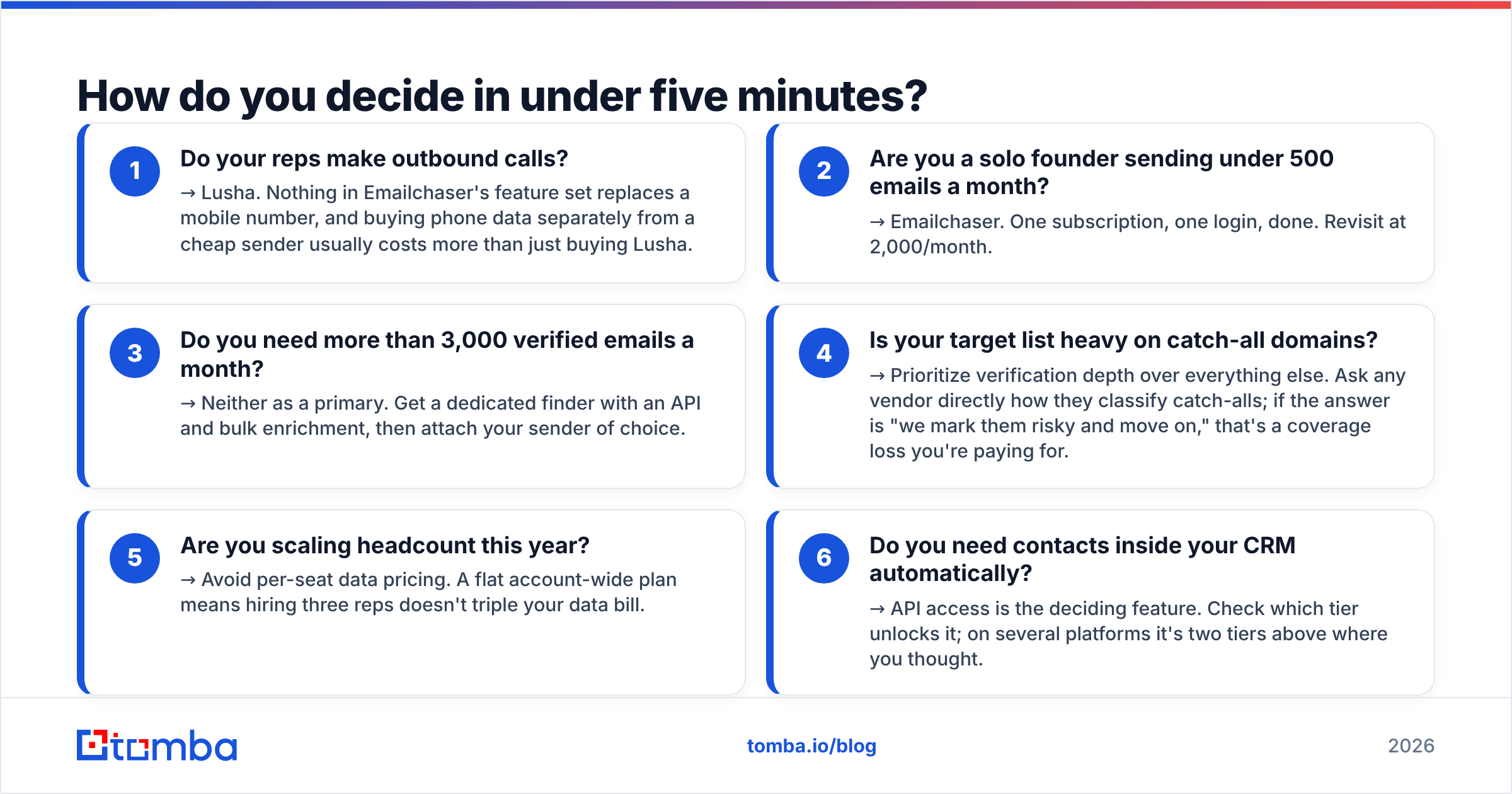
How do you decide in under five minutes?#
Work down this list and stop at the first yes:
- Do your reps make outbound calls? → Lusha. Nothing in Emailchaser's feature set replaces a mobile number, and buying phone data separately from a cheap sender usually costs more than just buying Lusha.
- Are you a solo founder sending under 500 emails a month? → Emailchaser. One subscription, one login, done. Revisit at 2,000/month.
- Do you need more than 3,000 verified emails a month? → Neither as a primary. Get a dedicated finder with an API and bulk enrichment, then attach your sender of choice.
- Is your target list heavy on catch-all domains? → Prioritize verification depth over everything else. Ask any vendor directly how they classify catch-alls; if the answer is "we mark them risky and move on," that's a coverage loss you're paying for.
- Are you scaling headcount this year? → Avoid per-seat data pricing. A flat account-wide plan means hiring three reps doesn't triple your data bill.
- Do you need contacts inside your CRM automatically? → API access is the deciding feature. Check which tier unlocks it; on several platforms it's two tiers above where you thought.
Frequently asked questions#
Is Emailchaser cheaper than Lusha? On sticker price, usually yes — a flat workspace fee beats multiple seats. On cost per usable contact, it depends entirely on your bounce rate. A cheap tool that returns 20% invalid addresses costs more than an expensive one at 3% once you count burned domain reputation.
Does Lusha provide email sending or sequences? No. Lusha is a data platform. You export or sync contacts into a sequencer — HubSpot, Salesloft, Instantly, or similar. Budget for that separately.
Can Emailchaser find phone numbers? No. If dialing is part of your motion you need a separate source for mobile and direct dial data.
What about catch-all domains? Both handle them weakly. Catch-all servers accept every address at the SMTP layer, so ordinary verification returns a false positive. You need a tool that runs additional signals — pattern confidence, historical engagement, domain-level heuristics — before it calls a catch-all address safe. That's a specific product capability, not a checkbox.
Which has better data for European companies? Lusha, generally, especially for phone data in the UK, Germany, and the Nordics. Verify against your own ICP with a trial before committing — coverage claims are averages, and your niche may sit far from the average.
Where to go from here#
The decision between Emailchaser and Lusha usually resolves once you separate the two jobs: finding contacts and contacting them. Buy each from a vendor that treats it as the main product, not the free extra.
If the finding half is your bottleneck — you have a sender you like, a list you can't fill, and a bounce rate you're nervous about — start with the Tomba Email Finder. The free tier gives you 25 searches a month to test coverage against your actual ICP, Starter is $49/mo with account-wide credits that don't multiply when you hire, and every result runs through verification with explicit catch-all handling before it reaches your CSV. Test it on twenty accounts you already know the answers for. That's a more honest benchmark than any comparison table, including this one.
Related guides#
Ready to find emails that actually work?
Join 150,000+ professionals who stopped guessing and started sending. Free credits on signup — no credit card required.
Get the Tomba newsletter
Practical outbound tactics and product updates — once every two weeks.
About the author