Emailchaser vs MorphyMail (2026): Which Email Tool Wins?
One is a Gmail-native cold outreach sequencer, the other a desktop bulk mailer built for volume. Here's how Emailchaser and MorphyMail actually differ in 2026 — and which one belongs in your stack.
TL;DR
- Emailchaser and MorphyMail are not really competitors — they solve different problems. Emailchaser is a cloud-based cold email sequencer that sends through your own Gmail or Outlook mailbox. MorphyMail is desktop bulk-mailing software that pushes large volumes through SMTP from your own machine.
- Pick Emailchaser if you run 1-to-1 style B2B outreach with follow-up sequences, reply detection, and a small sales team. It behaves like a real person sending real emails.
- Pick MorphyMail if you need offline, one-time-license bulk sending — newsletters, announcements, list blasts — and you're comfortable managing your own SMTP and deliverability.
- Neither tool finds or verifies your contact data. That's the gap that kills most campaigns: a 12% bounce rate torches your domain before your copy ever gets read.
- Cheapest sane setup in 2026: a verified list from a dedicated data provider + one sending tool. Roughly $49–$99/mo total for a solo founder or a two-person SDR team.
What are Emailchaser and MorphyMail?#
Emailchaser is a cold email outreach platform built around your existing mailbox. You connect Gmail or Outlook, upload a list, write a sequence of two to five steps, and it sends on a schedule with randomized delays. Replies stop the sequence automatically. It's marketed heavily at agencies, freelancers, and small sales teams who want something simpler than Outreach or Salesloft. You can see their current feature set on the Emailchaser homepage.
MorphyMail comes from an older lineage: desktop email marketing software. You install it on Windows, point it at an SMTP server (yours, your host's, or a relay), import a list, build an HTML template with merge tags, and send. It's typically sold as a one-time license rather than a monthly subscription, which is the single biggest reason people still search for it in 2026.
That difference in architecture — cloud sequencer on your mailbox vs. desktop blaster on your SMTP — drives almost every other difference between them.
How do Emailchaser and MorphyMail compare head to head?#
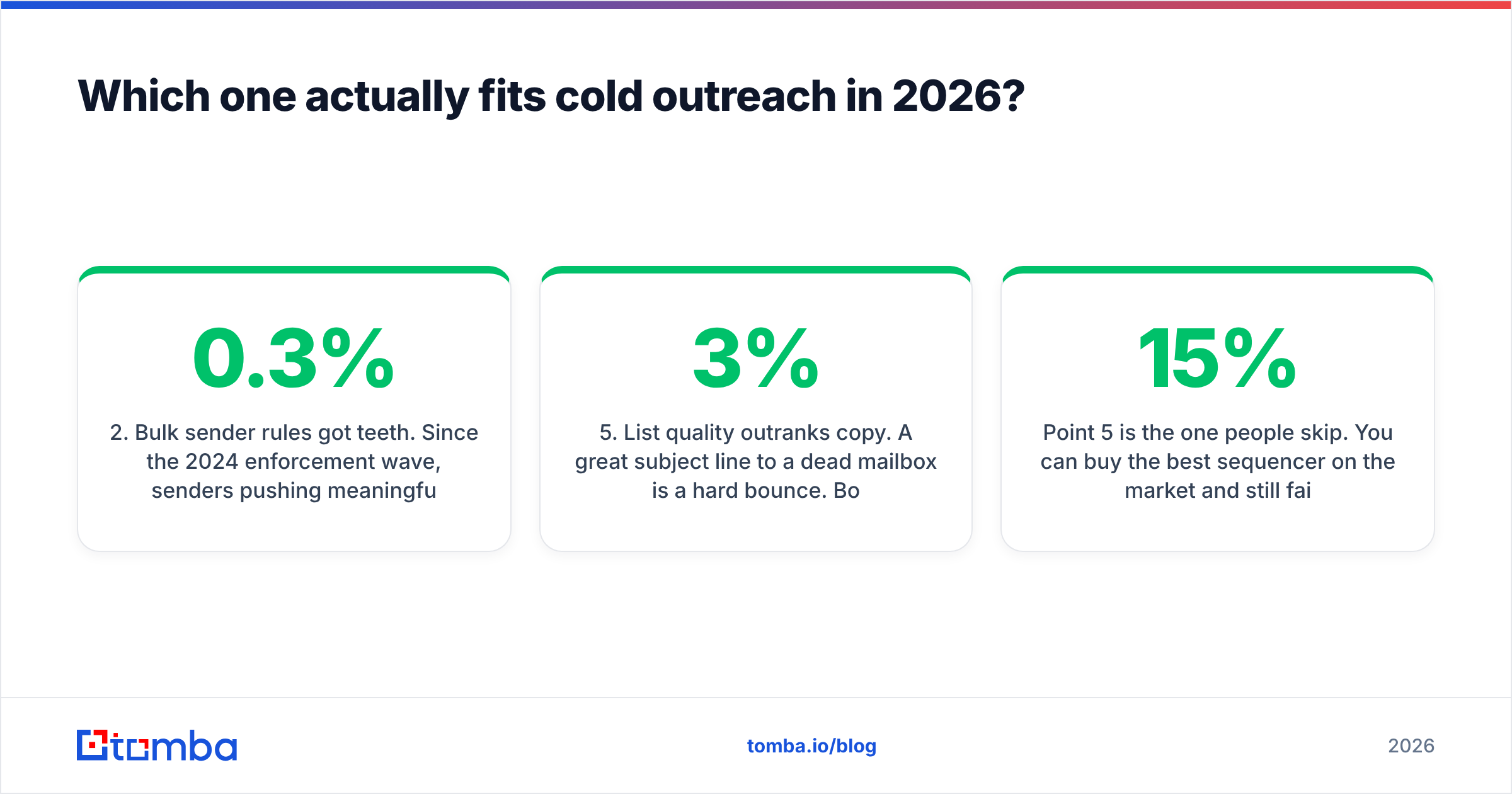
| Dimension | Emailchaser | MorphyMail |
|---|---|---|
| Deployment | Cloud (browser) | Desktop app (Windows) |
| Sending path | Your Gmail / Outlook mailbox via OAuth | Your own SMTP server or relay |
| Pricing model | Monthly subscription (entry tier typically under $50/mo) | One-time license, per-seat |
| Best for | 1-to-1 cold outreach, follow-up sequences | Bulk newsletters, announcement blasts |
| Automated follow-ups | Yes — multi-step, reply-aware | Limited; largely manual re-sends |
| Reply detection | Yes, stops sequence on reply | No native reply threading |
| Inbox rotation / multi-mailbox | Yes on higher tiers | Depends on SMTP config |
| Personalization | Merge tags + spintax-style variation | Merge tags in HTML templates |
| Built-in email finder | No | No |
| Built-in verification | No (bounce data only after the fact) | No |
| Deliverability responsibility | Shared — Google/Microsoft reputation applies | Entirely yours (IP, SPF, DKIM, DMARC) |
| Learning curve | Low | Medium — you configure the plumbing |
Read that table once more and note the two rows that are identical: neither tool finds emails, and neither verifies them. Every other row is a real trade-off. Those two rows are a shared blind spot, and they're where most campaigns die.

Which one actually fits cold outreach in 2026?#
Emailchaser, clearly — if "cold outreach" means what it means to most B2B teams: 50 to 400 highly targeted prospects a month, personalized first lines, three or four follow-ups, and a human on the other end who might reply.
Here's why the mailbox-based model matters more in 2026 than it did five years ago:
- Mailbox providers grade the sender, not the tool. Google and Microsoft evaluate your domain and mailbox reputation. Sending through your authenticated Gmail account inherits whatever reputation you've earned. A cold SMTP relay starts from zero — or worse, from a shared IP someone else already burned.
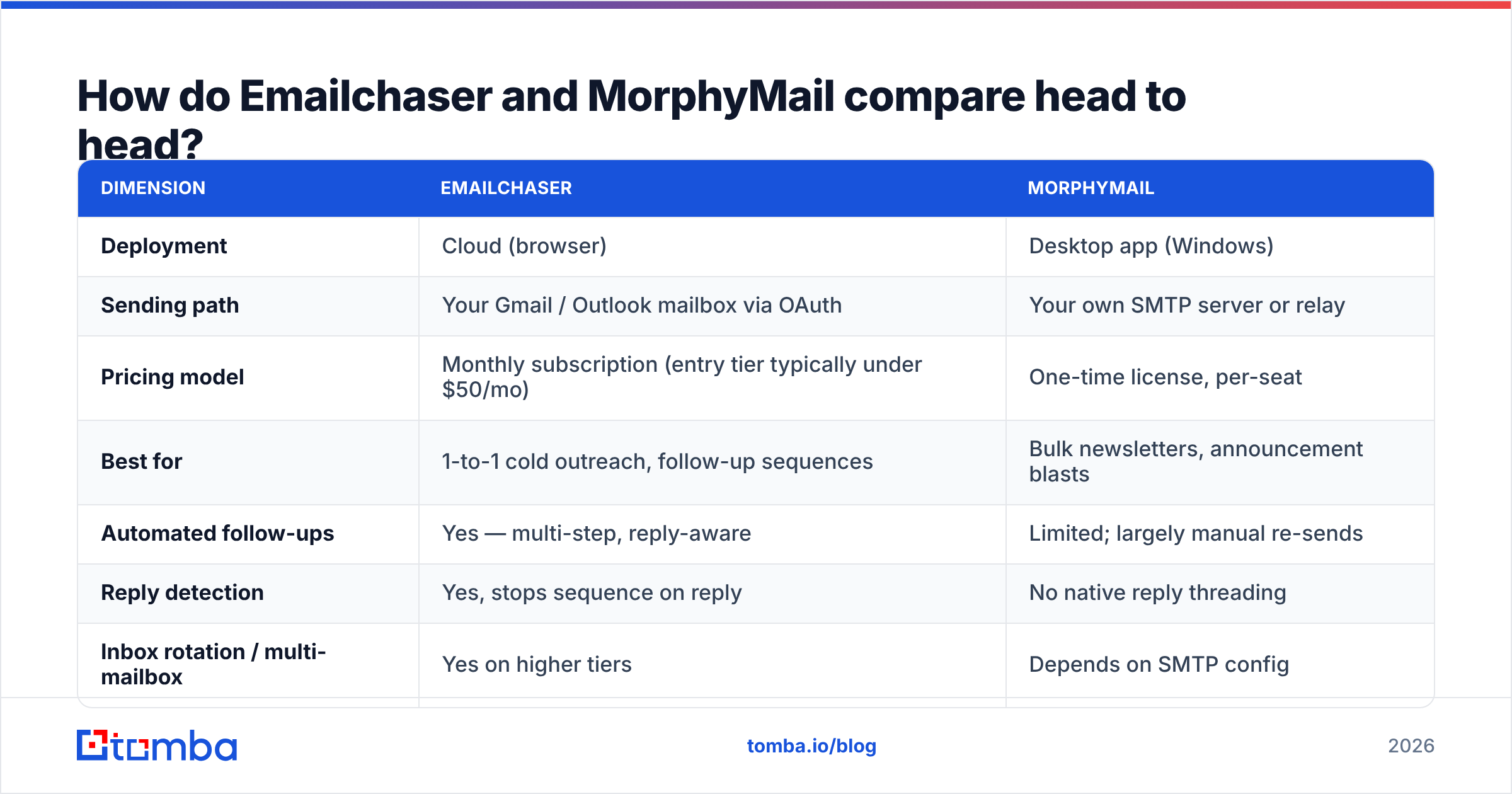
- Bulk sender rules got teeth. Since the 2024 enforcement wave, senders pushing meaningful volume need SPF, DKIM, DMARC alignment, one-click unsubscribe, and a spam-complaint rate under 0.3%. Desktop blasters put all of that on you.
- Reply-aware sequencing is table stakes. If step 3 fires after a prospect already replied, you look automated and you lose the deal. Emailchaser handles this natively. MorphyMail does not thread replies.
- Volume is no longer the lever. Sending 50,000 generic emails now produces worse absolute results than sending 500 relevant ones, because filtering has gotten dramatically better at scoring engagement. The economics inverted.
- List quality outranks copy. A great subject line to a dead mailbox is a hard bounce. Bounce rate above roughly 3% starts throttling your throughput; above 8% you're in domain-reputation trouble.
Point 5 is the one people skip. You can buy the best sequencer on the market and still fail if 15% of your addresses don't exist. Run your list through an email verifier before it ever touches a sequencer — it costs a fraction of a cent per record and prevents the single most expensive mistake in outbound.
When is MorphyMail the better choice?#
Genuinely — there are cases.
You already have an opted-in list and a working SMTP setup. If you run a 20,000-subscriber newsletter through your own mail server and just need a composer, merge tags, and a send queue, a one-time license beats paying $99/mo forever.
You want no recurring cost. Subscription fatigue is real. A perpetual desktop license with occasional upgrade fees can be the right call for a small business sending four campaigns a year.
You have data-residency or offline constraints. Some organizations can't upload a customer list to a third-party cloud. A local desktop app that never transmits your list to a vendor solves a compliance problem that no SaaS tool can.
You're sending transactional-adjacent broadcasts. Event reminders, price-change notices, membership renewals — high volume, low personalization, warm audience. That's the shape MorphyMail was designed for.
What MorphyMail is not good for: cold B2B prospecting. No reply detection, no sequence branching, no inbox rotation, and a delivery path you have to defend yourself. If your list wasn't opted in, a desktop blaster is the fastest known route to a blacklisted domain. Check your standing with a blacklist checker before and after any large send.
What does each one actually cost?#
Pricing on both products moves, so treat these as shapes rather than quotes — verify on the vendors' own pages before you buy. What matters is the structure of the cost, and how the missing pieces add up.
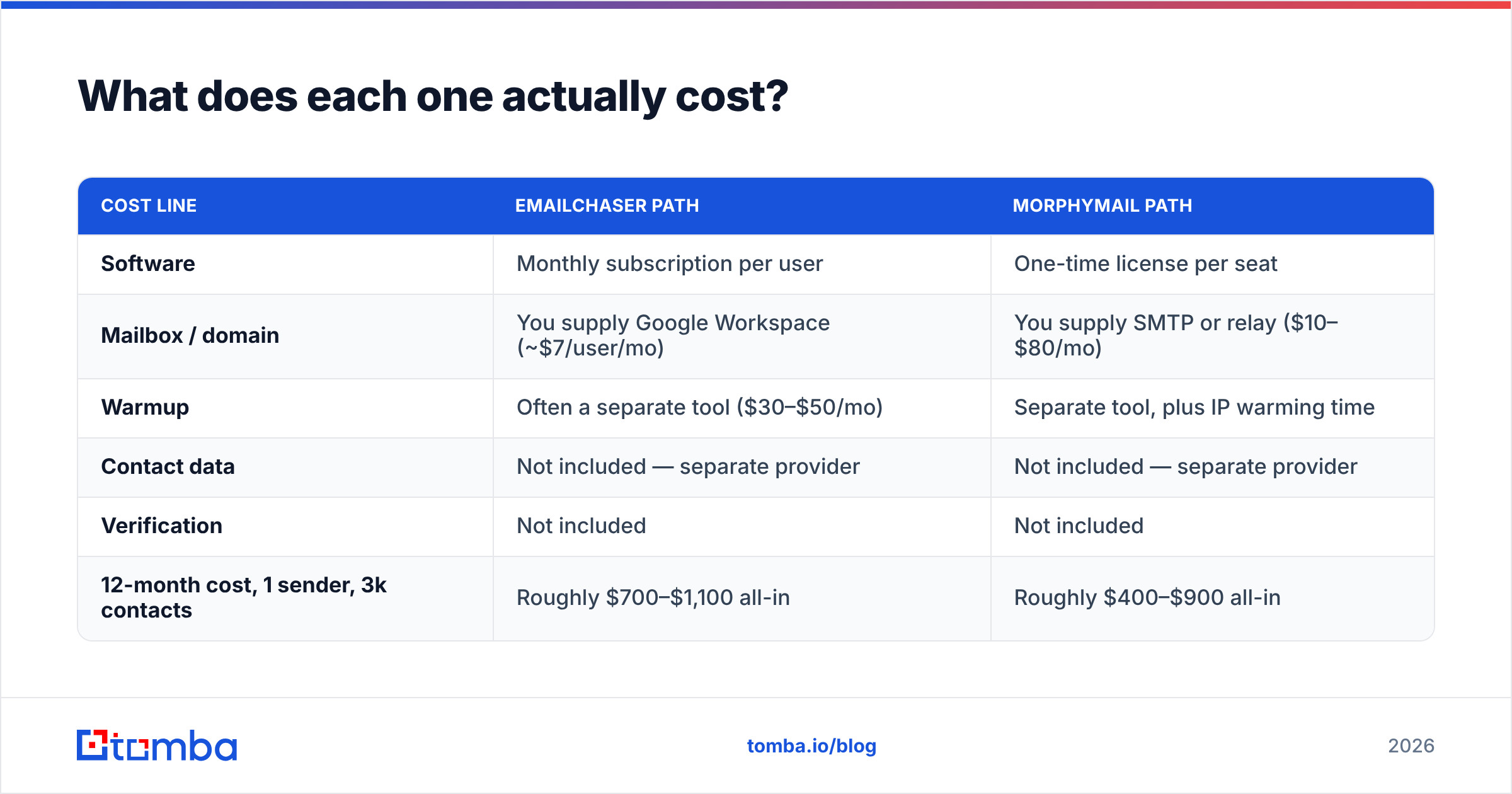
| Cost line | Emailchaser path | MorphyMail path |
|---|---|---|
| Software | Monthly subscription per user | One-time license per seat |
| Mailbox / domain | You supply Google Workspace (~$7/user/mo) | You supply SMTP or relay ($10–$80/mo) |
| Warmup | Often a separate tool ($30–$50/mo) | Separate tool, plus IP warming time |
| Contact data | Not included — separate provider | Not included — separate provider |
| Verification | Not included | Not included |
| 12-month cost, 1 sender, 3k contacts | Roughly $700–$1,100 all-in | Roughly $400–$900 all-in |
The bottom row is the honest one. MorphyMail can be cheaper on paper over a year. But that comparison assumes your SMTP just works, your IP stays clean, and your list is already good. Price in one blacklisting incident — a week of dead outbound, a domain you might have to retire — and the math flips hard.
Note what's missing from both columns: the data. Neither vendor sells you contacts. If you're budgeting an outbound stack from scratch, that line is not optional, and it's usually where the real leverage sits. Tomba's pricing starts free at 25 searches a month, with Starter at $49/mo and Growth at $99/mo — which for most one- or two-person outbound motions is the entire data budget.
How do you keep either tool out of the spam folder?#
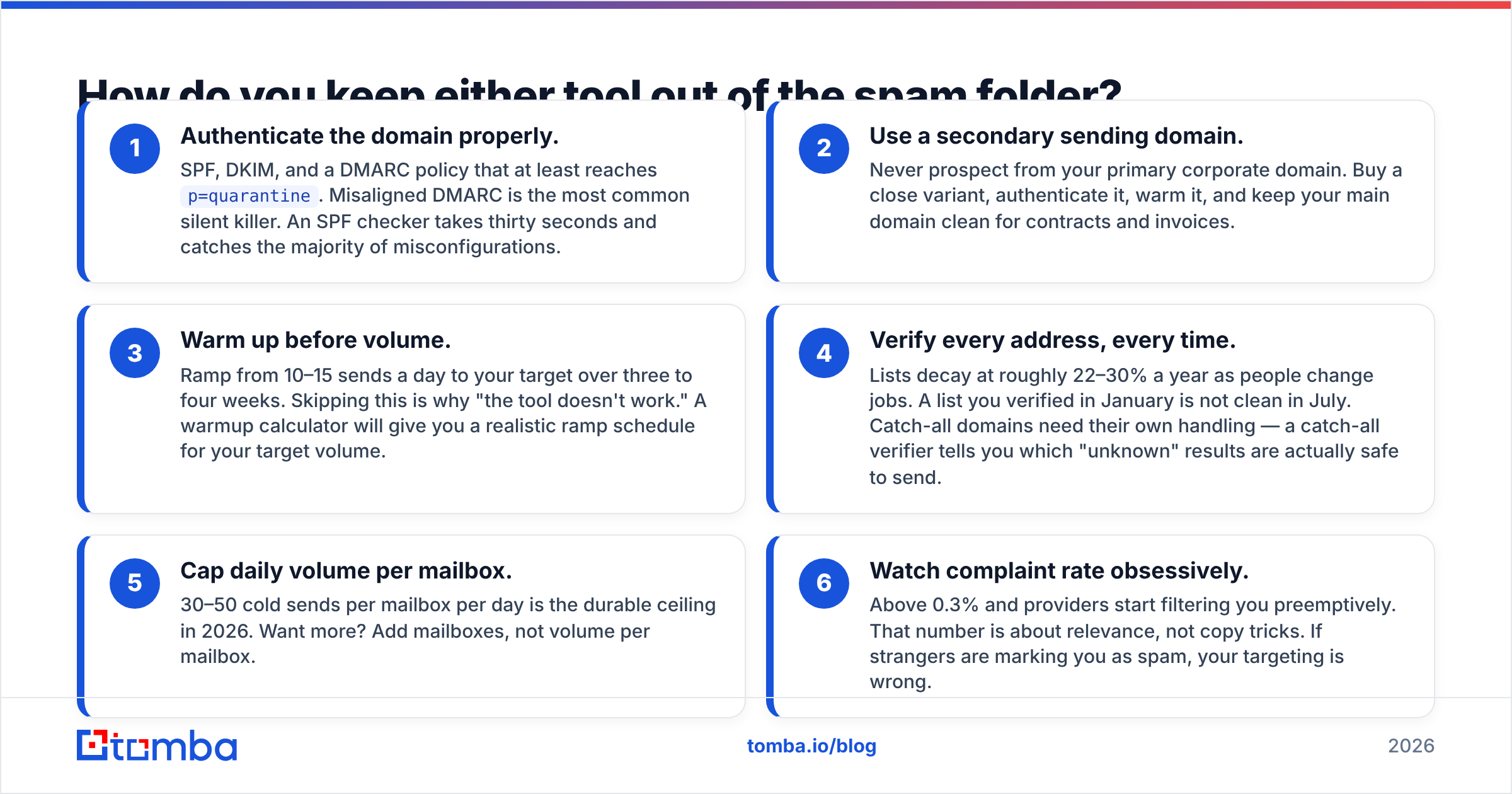
The tool matters less than the six things around it. In order of impact:
- Authenticate the domain properly. SPF, DKIM, and a DMARC policy that at least reaches
p=quarantine. Misaligned DMARC is the most common silent killer. An SPF checker takes thirty seconds and catches the majority of misconfigurations. - Use a secondary sending domain. Never prospect from your primary corporate domain. Buy a close variant, authenticate it, warm it, and keep your main domain clean for contracts and invoices.
- Warm up before volume. Ramp from 10–15 sends a day to your target over three to four weeks. Skipping this is why "the tool doesn't work." A warmup calculator will give you a realistic ramp schedule for your target volume.
- Verify every address, every time. Lists decay at roughly 22–30% a year as people change jobs. A list you verified in January is not clean in July. Catch-all domains need their own handling — a catch-all verifier tells you which "unknown" results are actually safe to send.
- Cap daily volume per mailbox. 30–50 cold sends per mailbox per day is the durable ceiling in 2026. Want more? Add mailboxes, not volume per mailbox.
- Watch complaint rate obsessively. Above 0.3% and providers start filtering you preemptively. That number is about relevance, not copy tricks. If strangers are marking you as spam, your targeting is wrong.
Neither Emailchaser nor MorphyMail does items 1, 4, or 5 for you. That's not a knock on either product — it's the shape of the category. Sending tools send. Understanding email deliverability as a system, rather than a feature you buy, is what separates campaigns that compound from campaigns that flame out in month two.

What do real users say about each?#
Neither product carries the review volume of an Apollo or an Instantly, so treat aggregate scores with appropriate skepticism — a 4.8 average across 30 reviews is a much weaker signal than 4.4 across 3,000. Still, patterns emerge on G2 and Capterra if you read the actual text rather than the stars.
Recurring Emailchaser praise: simple setup, Gmail integration "just works," pricing that doesn't punish small teams, responsive support. Recurring criticism: fewer integrations than enterprise sequencers, reporting is basic, and no native data or verification, so you're stitching tools together.
Recurring MorphyMail praise: the one-time license, full control over sending, no per-contact billing, works offline. Recurring criticism: dated interface, Windows-only, and a steep deliverability learning curve — several reviewers describe landing in spam and having no clear diagnostic path.
Notice that both criticism columns point the same direction: the tool sends, but you own the data quality and the delivery infrastructure. That's the honest verdict on this entire matchup.
So which should you pick?#
Choose Emailchaser if you're doing B2B cold outreach at human scale — targeted lists, real personalization, multi-step follow-ups, replies you want to have. The mailbox-native architecture is the correct one for 2026, and the price point is reasonable for a solo founder or a small team.
Choose MorphyMail if you're broadcasting to a warm, opted-in list, you already run your own SMTP competently, and you'd rather buy once than subscribe forever. It's a legitimate tool for a legitimate job — just not the cold-prospecting job.
Choose neither, yet, if you don't have a verified list. That's the actual bottleneck for most teams asking this question. A sequencer with bad data is an expensive way to hard-bounce, and no amount of A/B testing subject lines fixes an address that was never real.
Where does the contact data come from?#
This is the part both tools leave to you, so it's worth being concrete.
You need three things before either product is worth its price: correct email addresses for the right people, confidence that those addresses still resolve, and enough surrounding context (role, company, seniority) to write something non-generic.
The Tomba Email Finder covers the first: give it a domain plus a name, or just a domain, and it returns professional addresses with a confidence score and the sources it matched against. Free tier gets you 25 searches a month to test the accuracy on companies you already know — which is exactly how you should evaluate any data vendor. Run 20 contacts you can verify by hand, count the hits, then decide.
Pair that with verification before every send, feed the clean list into Emailchaser (or MorphyMail, if broadcasting is your use case), and you've built the stack correctly: data provider does data, sending tool does sending, and neither is pretending to do the other's job badly.
Start with the free tier, test it against a list you can validate yourself, and only pay once the accuracy holds up on your own market.
Related guides#
Ready to find emails that actually work?
Join 150,000+ professionals who stopped guessing and started sending. Free credits on signup — no credit card required.
Get the Tomba newsletter
Practical outbound tactics and product updates — once every two weeks.
About the author