Emailchaser vs Salesbot: Which Cold Email Tool Wins in 2026?
Emailchaser and Salesbot both promise simple cold email at a low price, but they solve different problems. Here's the honest breakdown of pricing, deliverability, data, and which one actually fits your team.
TL;DR
- Emailchaser is a lightweight Gmail/Outlook-based cold email sequencer aimed at solo founders and small agencies. Flat, cheap pricing. Minimal CRM. No serious lead database.
- Salesbot is a broader outbound-automation play — sequences plus AI-assisted reply handling and light CRM behaviour. More moving parts, more setup, higher ceiling.
- Neither tool is a contact-data provider. Both assume you already have verified emails, which is where most cold email programs actually fail.
- If your bounce rate is above 3%, tool choice is irrelevant — fix your list first with a real email verifier.
- Our pick: Emailchaser for under 5 seats and simple 1:1 sequences; Salesbot if you need reply routing and multi-step branching. Pair either with a dedicated data layer.
Cold email tooling has split into two camps. On one side are the thin, cheap sequencers that do one job — send from your existing mailbox, track opens, stop on reply. On the other are the sprawling platforms that want to be your CRM, your data source, and your AI SDR at once.
Emailchaser sits firmly in the first camp. Salesbot leans toward the second. Picking between them is less about feature checklists and more about how much operational complexity you're willing to own.
What is Emailchaser?#
Emailchaser is a cold email automation tool built around your existing Google Workspace or Microsoft 365 mailbox. You connect an inbox, upload a CSV or add contacts manually, write a sequence of follow-ups, and it sends them as ordinary emails from your account.
The design philosophy is deliberate minimalism. There is no drag-and-drop HTML builder, no image-heavy templates, no complicated branching logic. Emails go out as plain text, which is exactly what most experienced cold emailers want anyway — plain-text messages from a warmed domain historically land in the primary tab more often than styled marketing blasts.
Key characteristics:
- Mailbox-native sending. Emails route through your real Gmail/Outlook account via API, not a third-party SMTP relay. Your sending reputation is your own domain's reputation.
- Flat per-user pricing. No credit meters that reset mid-month. You pay for seats, not sends (within fair-use daily caps).
- Reply detection and auto-stop. Standard, and it works reliably — the sequence halts when a prospect responds.
- Basic team features. Shared templates, shared contact lists, per-user sending limits.
- Thin reporting. Opens, clicks, replies, bounces. No revenue attribution, no pipeline view.
What it does not do: find email addresses, verify them, enrich company data, or manage deals. It is a sender, not a growth stack.
What is Salesbot?#
Salesbot positions itself further up the stack. Alongside sequencing, it layers in AI-assisted drafting, reply classification (interested / not interested / out-of-office / referral), and a lightweight pipeline view so replies don't die in an inbox.
That extra surface area buys you two real things. First, reply triage at volume — when you're running 2,000 sends a week across three reps, sorting genuine interest from auto-responders manually eats hours. Second, branching sequences: send path A if they clicked the pricing link, path B if they opened twice but never clicked.
The cost is setup time. Salesbot expects you to define intents, train (or at least review) the classifier on your own reply patterns, and connect it to whatever CRM you already run. Teams that treat it as a fancy sequencer and skip the configuration typically get worse results than they'd get from a simpler tool.

Emailchaser vs Salesbot: how do they actually compare?#
Here's the head-to-head on the attributes that change your outcome, not the ones that fill a feature matrix.
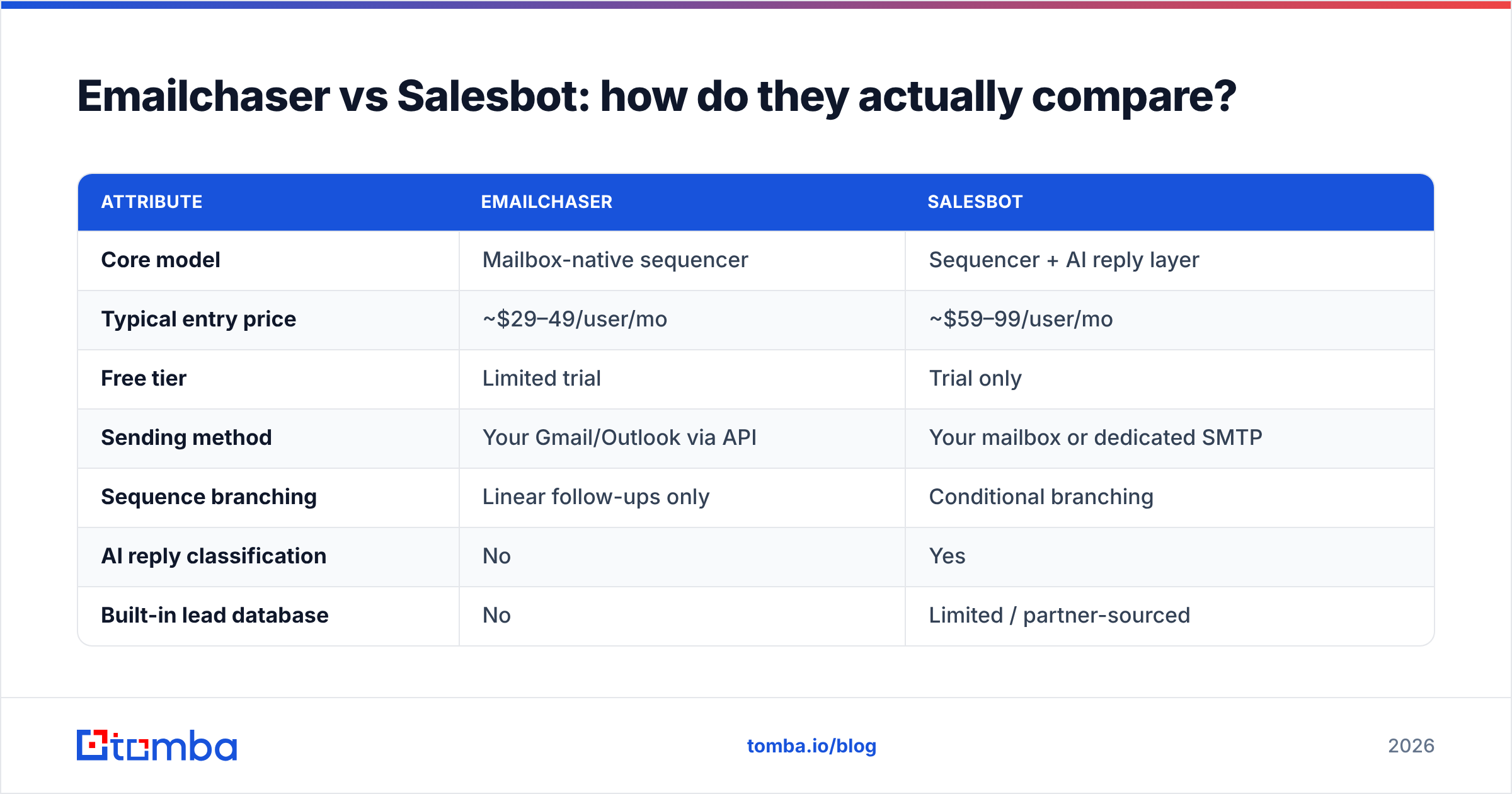
| Attribute | Emailchaser | Salesbot |
|---|---|---|
| Core model | Mailbox-native sequencer | Sequencer + AI reply layer |
| Typical entry price | ~$29–49/user/mo | ~$59–99/user/mo |
| Free tier | Limited trial | Trial only |
| Sending method | Your Gmail/Outlook via API | Your mailbox or dedicated SMTP |
| Sequence branching | Linear follow-ups only | Conditional branching |
| AI reply classification | No | Yes |
| Built-in lead database | No | Limited / partner-sourced |
| Email verification | No | Basic, often third-party |
| CRM behaviour | Minimal (lists + tags) | Light pipeline view |
| Setup time to first send | Under 30 minutes | 2–5 hours realistically |
| Best fit | 1–5 person teams, founder-led sales | 5–25 reps, structured outbound |
| Weakest link | No data layer, thin analytics | Complexity vs. payoff at low volume |
Two things jump out of that table.
One: the price gap is real but small in context. A $40/user/month difference is noise next to what you'll spend on data and domains. Do not pick on price alone.
Two: neither column has a credible data story. That's the actual decision-driver, and it's covered below.
Which one has better deliverability?#
Neither tool "has" deliverability — you do. Both send from mailboxes you control, so inbox placement comes down to domain age, authentication, list quality, and volume ramp.
That said, there are structural differences worth knowing:
- Emailchaser's mailbox-only model is the safer default. Because everything routes through the Gmail/Outlook API, you inherit whatever reputation your domain already has and there's no shared-IP risk from other customers.
- Salesbot's optional dedicated SMTP gives you more throughput but shifts the reputation burden. If you use it, you own IP warmup entirely.
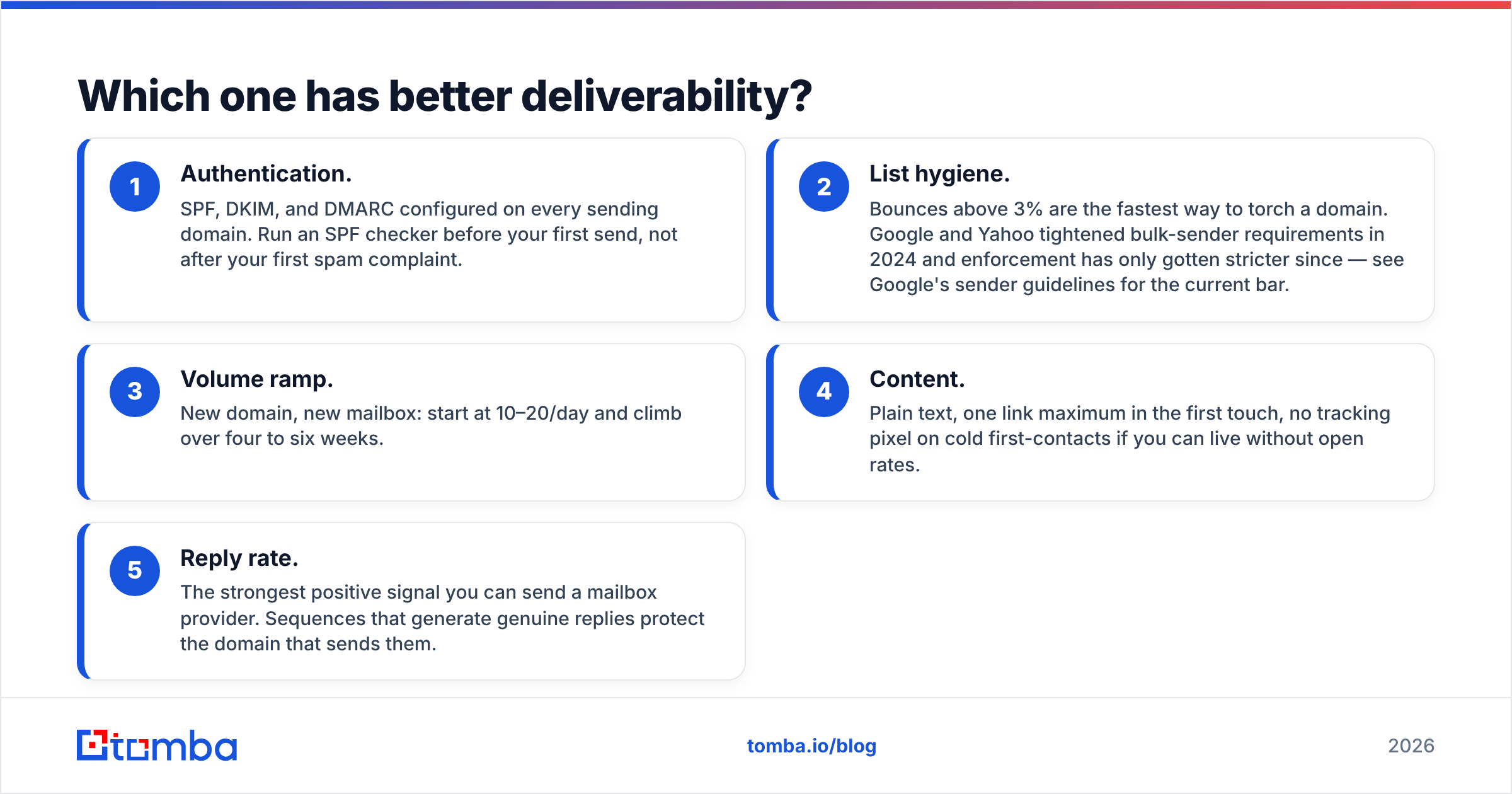
Whichever you choose, the controllable levers are the same and they matter far more than the vendor:
- Authentication. SPF, DKIM, and DMARC configured on every sending domain. Run an SPF checker before your first send, not after your first spam complaint.
- List hygiene. Bounces above 3% are the fastest way to torch a domain. Google and Yahoo tightened bulk-sender requirements in 2024 and enforcement has only gotten stricter since — see Google's sender guidelines for the current bar.
- Volume ramp. New domain, new mailbox: start at 10–20/day and climb over four to six weeks.
- Content. Plain text, one link maximum in the first touch, no tracking pixel on cold first-contacts if you can live without open rates.
- Reply rate. The strongest positive signal you can send a mailbox provider. Sequences that generate genuine replies protect the domain that sends them.
Both tools handle #3 and #5 adequately. Neither solves #2, and #2 is where most programs die.
What neither tool solves: where do the emails come from?#
This is the gap that makes the Emailchaser vs Salesbot debate secondary.
Emailchaser has no contact database at all. You bring a CSV. Salesbot offers some data, but it's typically partner-sourced and thin outside US tech — coverage in EMEA mid-market, manufacturing, and healthcare falls off sharply, and refresh cadence is rarely disclosed.
The practical consequence: you end up running one of three patterns.
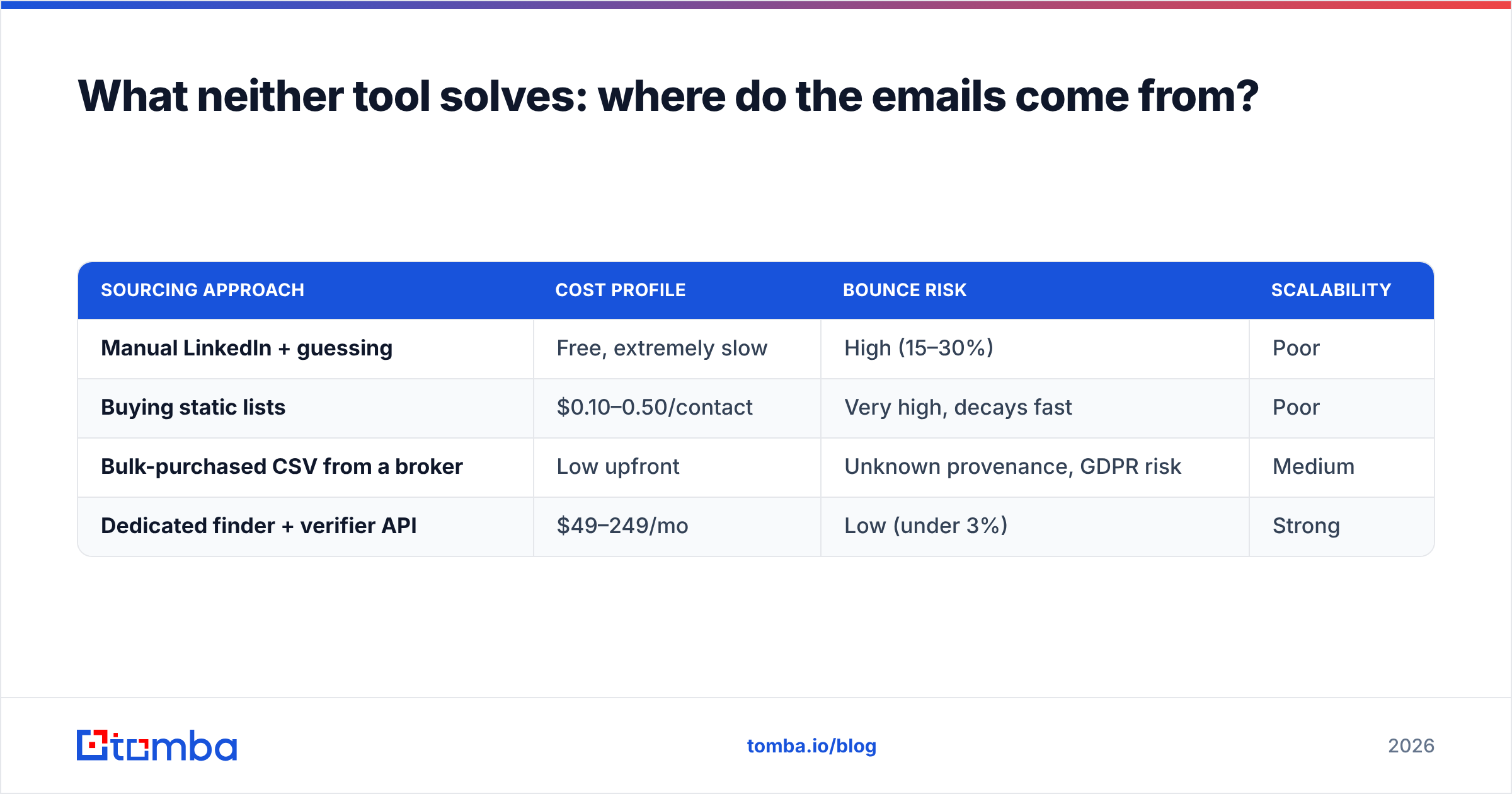
| Sourcing approach | Cost profile | Bounce risk | Scalability |
|---|---|---|---|
| Manual LinkedIn + guessing | Free, extremely slow | High (15–30%) | Poor |
| Buying static lists | $0.10–0.50/contact | Very high, decays fast | Poor |
| Bulk-purchased CSV from a broker | Low upfront | Unknown provenance, GDPR risk | Medium |
| Dedicated finder + verifier API | $49–249/mo | Low (under 3%) | Strong |
The fourth row is the only one that survives contact with a modern spam filter. A dedicated email finder resolves a name and company domain into a deliverable address, then a verification pass confirms the mailbox exists before you ever load it into a sequencer.
Tomba's approach here is straightforward: use domain search to pull every published address at a target company, run the results through verification, then export the clean set into whichever sender you picked. Pricing runs from a free tier at 25 searches/month to Starter at $49/mo, Growth at $99/mo, and Pro at $249/mo — see Tomba pricing for the full breakdown. The point isn't that you need Tomba specifically; it's that you need something in that slot, and neither Emailchaser nor Salesbot fills it.

For teams evaluating alternatives across this whole category, BookYourData is a solid option when you want a pay-as-you-go verified list rather than a search-and-verify workflow — different model, legitimate results, worth a look if your motion is list-first rather than account-first.
Is Salesbot worth the extra cost?#
Depends entirely on reply volume.
Run the math. Salesbot's AI reply classification saves roughly 15–30 seconds per inbound reply versus manual triage. At 50 replies/week per rep, that's 12–25 minutes saved weekly — maybe $20–40 of loaded rep time. The price delta over Emailchaser is $30–50/user/month.
So the break-even sits somewhere around 40–60 replies per rep per week. Below that, you're paying for software that solves a problem you don't have yet. Above it, the classification and branching genuinely compound.

There's a second consideration: sequence branching. If your outbound motion is genuinely multi-path — different follow-ups by persona, by engagement signal, by account tier — Salesbot's conditional logic is worth real money regardless of reply volume. If every prospect gets the same four-touch sequence, you're buying a capability you'll never configure.
Which should you pick?#
Use this decision path.
Pick Emailchaser if:
- You're a founder or a team under five people doing 1:1 personalised outreach
- Your sequences are linear: touch, follow-up, follow-up, break-up
- You want to be sending within an hour, not a weekend
- You already have (or are buying) verified data elsewhere
- Predictable flat pricing matters more than feature depth
Pick Salesbot if:
- You have 5+ reps and reply volume is a real operational load
- Your sequences branch by persona, engagement, or account tier
- You want reply classification feeding a pipeline view rather than an inbox
- You have someone who will actually configure it properly
- You can absorb a multi-week ramp before seeing returns
Pick neither — yet — if:
- Your bounce rate is above 3%. Fix the list first.
- You don't have a written ICP. No sequencer rescues bad targeting.
- You're sending from a domain younger than 30 days with no warmup.
That third case is more common than vendors admit. Run your existing list through a free email checker before you commit to either platform. If a meaningful slice comes back invalid or catch-all, your tool budget is better spent on data than on sending.
How do you build the stack around either tool?#
The pattern that works looks like this, in order:
- Define the ICP — firmographics, tech signals, trigger events. Written down, not implied.
- Source contacts — domain search or LinkedIn-based lookup against target accounts.
- Verify — every address, every time. Catch-all domains get flagged, not guessed at.
- Enrich — role, seniority, company size, tech stack. This is what makes personalisation possible at volume.
- Sequence — Emailchaser or Salesbot, whichever you picked above.
- Route replies — into your CRM, with a defined SLA on response time.
Steps 2 through 4 sit entirely outside both tools. That's the recurring point of this comparison. You can automate that layer with the Tomba API or handle it in a spreadsheet with the Google Sheets add-on if your volume is low — but you cannot skip it and expect either sequencer to perform.
For a sanity check on how established vendors frame the same stack, HubSpot's sales enablement resources and peer reviews on G2's sales engagement category are useful counterweights to any single vendor's marketing.
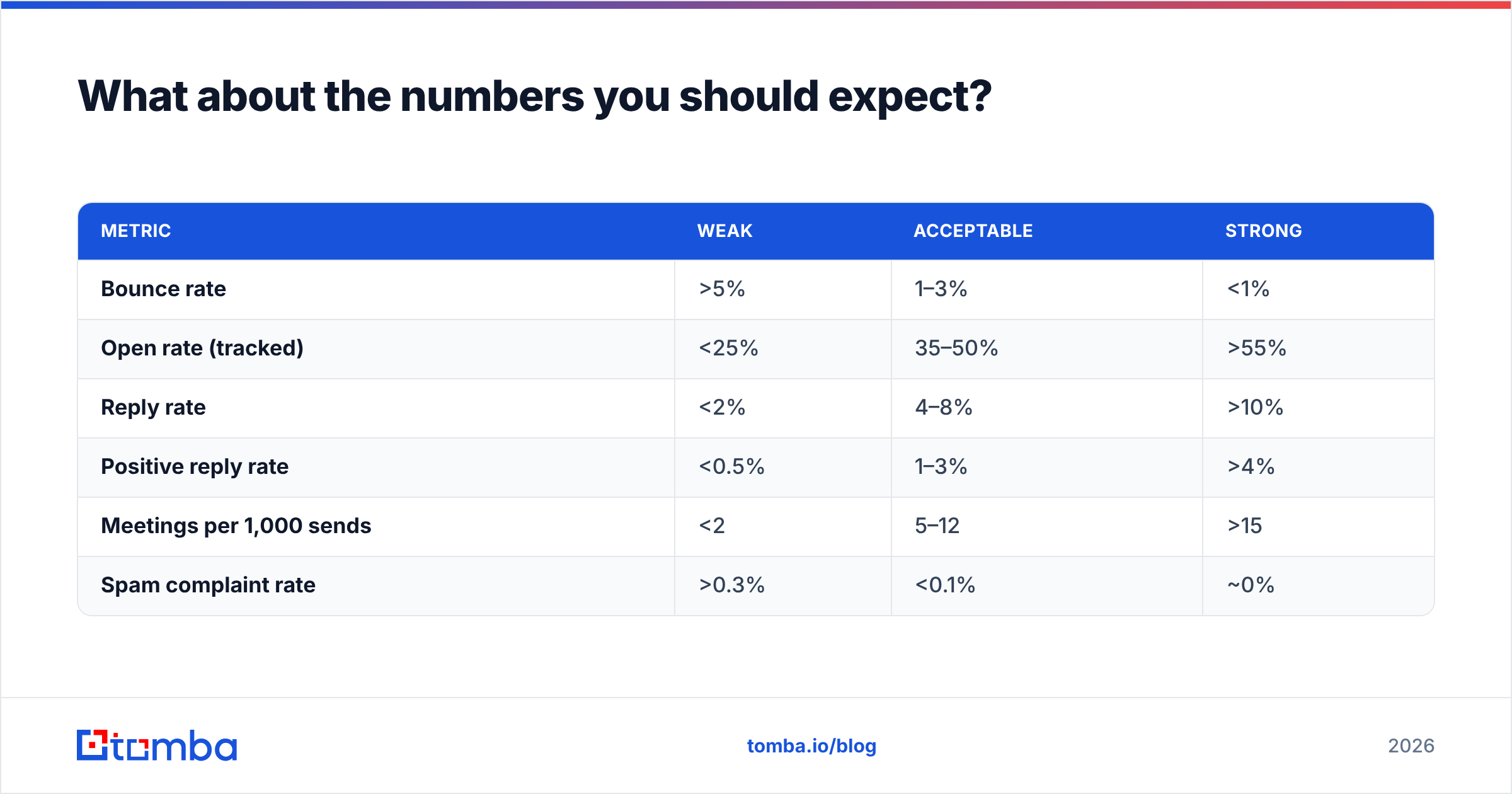
What about the numbers you should expect?#
Benchmarks vary wildly by industry, but for cold outbound to a verified, well-targeted list in 2026, these ranges are realistic:
| Metric | Weak | Acceptable | Strong |
|---|---|---|---|
| Bounce rate | >5% | 1–3% | <1% |
| Open rate (tracked) | <25% | 35–50% | >55% |
| Reply rate | <2% | 4–8% | >10% |
| Positive reply rate | <0.5% | 1–3% | >4% |
| Meetings per 1,000 sends | <2 | 5–12 | >15 |
| Spam complaint rate | >0.3% | <0.1% | ~0% |
Neither Emailchaser nor Salesbot moves the bounce row — your data provider does. Both can influence the reply row through sequencing and timing. Salesbot's branching can nudge positive reply rate if configured well. The response rate you actually achieve is determined more by targeting and message relevance than by which of these two you pay.
The verdict#
Emailchaser wins on simplicity and cost for small teams. It does one thing, does it without drama, and gets out of the way. If you're under five seats running linear sequences, the extra spend on Salesbot buys capability you won't use.
Salesbot wins for structured teams at volume. Once reply triage becomes a real time sink and your sequences genuinely need to branch, the AI layer earns its price. Below that threshold, it's overhead.
Both lose on data, and that's the decision that actually determines whether your outbound works. A perfectly configured sequencer firing at a 20%-invalid list will underperform a basic one firing at a clean one, every single time.
Start where the leverage is. Build a verified, enriched contact list against a tight ICP, then pick the sender that matches your team size. The Tomba Email Finder handles the first half — name and domain in, deliverable address out, verified before it ever reaches your sequencer. Free tier gives you 25 searches a month to test the accuracy against your own target accounts before you spend anything. Get the data layer right, and the Emailchaser vs Salesbot question becomes what it should be: a small, reversible preference.
Related guides#
Ready to find emails that actually work?
Join 150,000+ professionals who stopped guessing and started sending. Free credits on signup — no credit card required.
Get the Tomba newsletter
Practical outbound tactics and product updates — once every two weeks.
About the author