Emailchaser vs Smartlead: Which Cold Email Tool Wins in 2026?
Emailchaser keeps cold email simple and cheap. Smartlead scales to hundreds of inboxes. We compare pricing, deliverability, and sending limits to show which one actually fits your team.
TL;DR
- Emailchaser is a lightweight, Gmail-first cold email tool built for solo founders and small teams who want to send sequences without learning a platform. Flat, cheap pricing; very few moving parts.
- Smartlead is an infrastructure-heavy sending platform built for agencies and outbound teams running unlimited mailboxes, inbox rotation, a unified master inbox, and sub-account white-labelling.
- If you send from 1-3 inboxes and want setup done in an afternoon, Emailchaser wins on time-to-first-send. If you run 20+ inboxes across multiple clients, Smartlead wins on architecture and it isn't close.
- Neither tool finds or verifies contacts. Both assume you arrive with a clean list — which is where most cold email programs actually fail.
- Budget reality: Emailchaser starts around $29/mo; Smartlead starts around $39/mo but real agency usage lands in the $94-$174/mo range once you add sub-accounts and lead credits.
What are Emailchaser and Smartlead?#
They solve two different halves of the same problem, and the pricing pages hide that.
Emailchaser is a cold email sequencer. You connect a Gmail or Outlook mailbox, upload a CSV, write a few follow-up steps, and it sends on a schedule with automatic reply detection. The product philosophy is deliberate restraint: fewer settings, fewer places to misconfigure something, no separate onboarding call. It's the tool you pick when the bottleneck is "I haven't started sending yet," not "my sending infrastructure is falling over."
Smartlead is closer to sending infrastructure with a sequencer bolted on top. Unlimited mailbox connections on every plan, automatic inbox rotation so no single mailbox burns out, a built-in warmup network, a master inbox that aggregates replies across every mailbox, sub-accounts with white-label domains for agencies, and a webhook/API layer for routing replies into a CRM. It's the tool you pick when you're already sending 10,000+ emails a month and the failure mode is deliverability, not effort.
The mistake teams make is comparing them on features. Compare them on failure mode instead. Emailchaser fails when you outgrow three inboxes. Smartlead fails when nobody on the team has the time or expertise to run the infrastructure it gives you.
How do Emailchaser and Smartlead compare on features and price?#
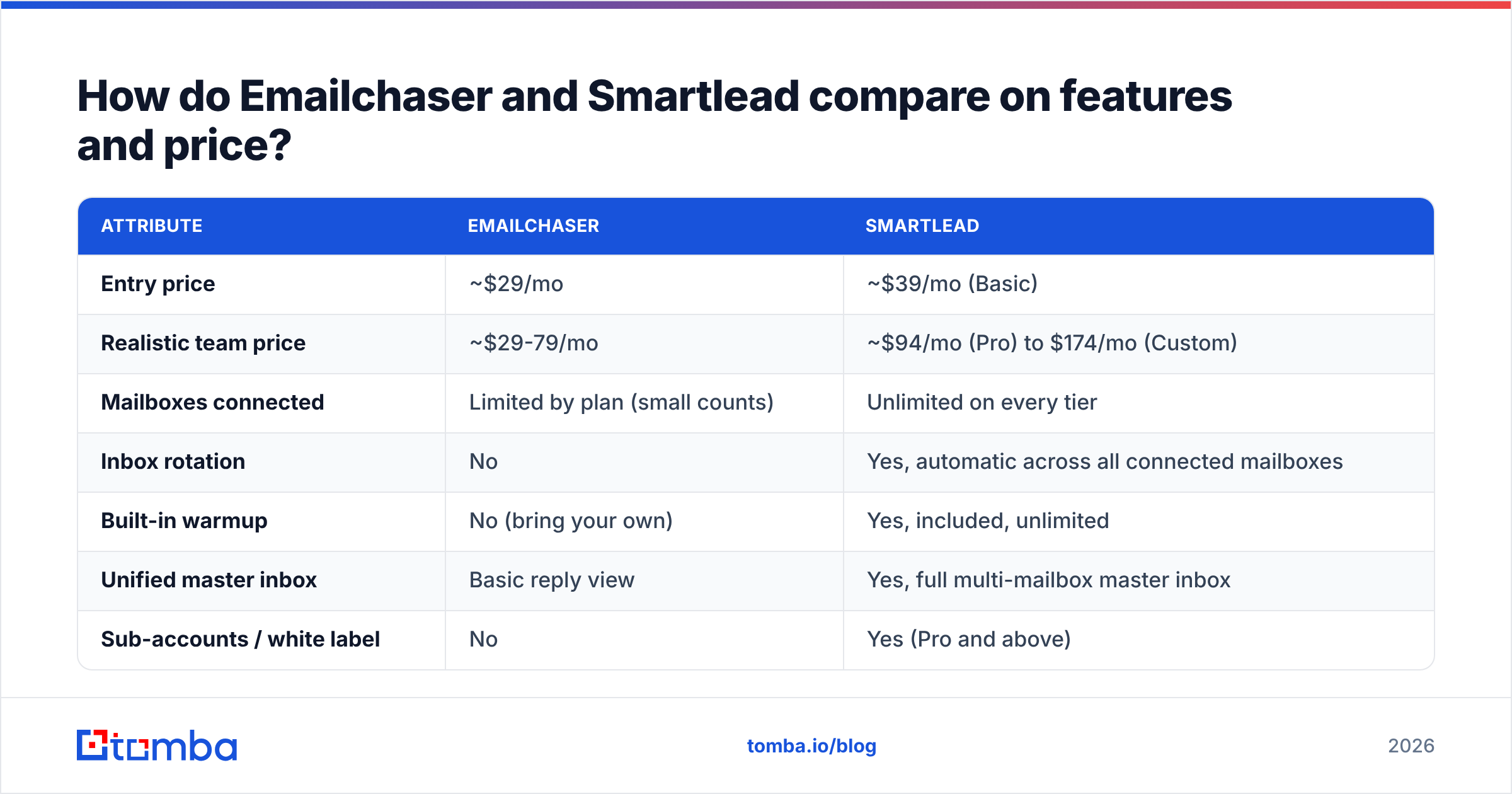
Here's the head-to-head on the attributes that actually change your decision. Pricing reflects publicly listed entry tiers as of early 2026 — always confirm on the vendor page before you commit.
| Attribute | Emailchaser | Smartlead |
|---|---|---|
| Entry price | ~$29/mo | ~$39/mo (Basic) |
| Realistic team price | ~$29-79/mo | ~$94/mo (Pro) to $174/mo (Custom) |
| Mailboxes connected | Limited by plan (small counts) | Unlimited on every tier |
| Inbox rotation | No | Yes, automatic across all connected mailboxes |
| Built-in warmup | No (bring your own) | Yes, included, unlimited |
| Unified master inbox | Basic reply view | Yes, full multi-mailbox master inbox |
| Sub-accounts / white label | No | Yes (Pro and above) |
| API + webhooks | Limited | Full API, webhooks, Zapier/Make |
| Email finder included | No | No (lead credits on higher tiers, resold data) |
| Email verification | No | Basic, not a replacement for a verifier |
| Learning curve | Under an hour | A few days to configure properly |
| Best for | Solo founders, consultants, small B2B teams | Agencies, outbound teams, high-volume SDR orgs |
Two rows deserve a second look.
Unlimited mailboxes is Smartlead's single biggest structural advantage, and it compounds. Google and Microsoft both throttle per-mailbox sending, so the only safe way to send 500 emails a day is to spread them across 15-20 mailboxes at 20-30 each. A tool that caps mailbox connections caps your volume by definition, regardless of what its sending limit says.
No email finder in either tool is the row most buyers skip past. Both platforms are sending layers. Neither one builds your list, and neither one meaningfully protects you from a list full of guessed addresses.
Which one has better deliverability?#
Smartlead, structurally — but deliverability is mostly not a tool property.
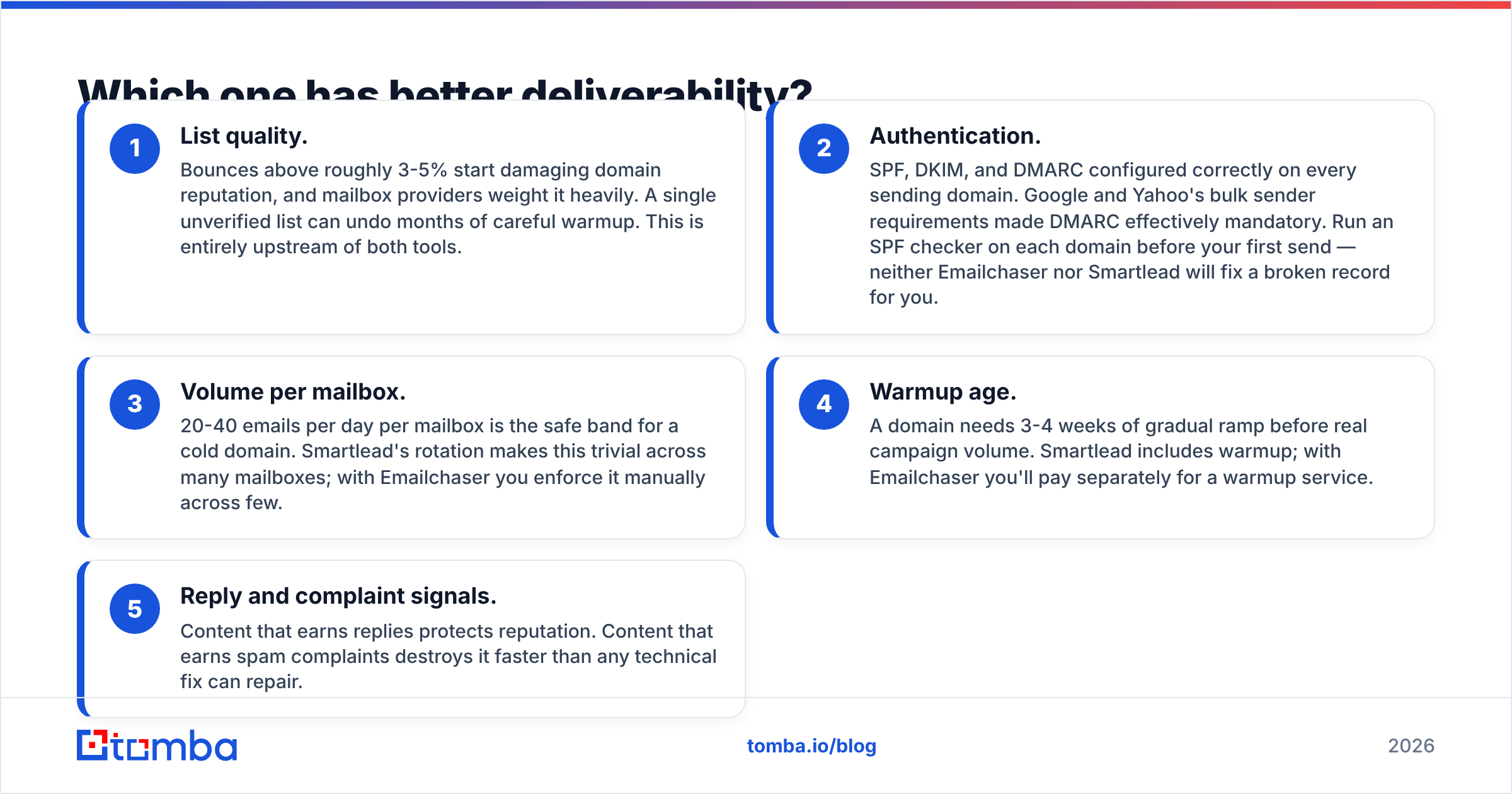
Here's the honest breakdown of what actually drives inbox placement, ranked by impact:
- List quality. Bounces above roughly 3-5% start damaging domain reputation, and mailbox providers weight it heavily. A single unverified list can undo months of careful warmup. This is entirely upstream of both tools.
- Authentication. SPF, DKIM, and DMARC configured correctly on every sending domain. Google and Yahoo's bulk sender requirements made DMARC effectively mandatory. Run an SPF checker on each domain before your first send — neither Emailchaser nor Smartlead will fix a broken record for you.
- Volume per mailbox. 20-40 emails per day per mailbox is the safe band for a cold domain. Smartlead's rotation makes this trivial across many mailboxes; with Emailchaser you enforce it manually across few.
- Warmup age. A domain needs 3-4 weeks of gradual ramp before real campaign volume. Smartlead includes warmup; with Emailchaser you'll pay separately for a warmup service.
- Reply and complaint signals. Content that earns replies protects reputation. Content that earns spam complaints destroys it faster than any technical fix can repair.
Smartlead wins items 3 and 4 outright because of rotation and included warmup. It does nothing for item 1 — and item 1 is where most programs die. Google's own Postmaster Tools documentation is blunt on this point: sending to invalid or unengaged addresses is a primary reputation signal, independent of which platform you send from.
If you want the mechanics behind why bounce rates cascade into placement problems, our primer on email deliverability covers the reputation loop in detail.
Who should choose Emailchaser?#
Pick Emailchaser when your constraint is time and attention, not volume.
- Solo founders and consultants. You're sending 50-200 emails a week from one or two mailboxes. Smartlead's architecture is dead weight — you'd pay for rotation across mailboxes you don't have.
- Teams testing whether cold email works at all. Get a sequence live this week, measure replies, then decide whether to invest in infrastructure. Buying Smartlead before you have a validated message is a classic sequencing error.
- Anyone who has abandoned a tool during onboarding. Emailchaser's restraint is the feature. Fewer settings means fewer ways to silently misconfigure sending.
- Low-volume, high-value outbound. If your ICP is 300 companies total, you don't need 20 mailboxes. You need good research and a tight message.
The ceiling is real, though. The moment you need a fourth or fifth mailbox, want replies from multiple domains in one place, or start running campaigns for clients, you'll be shopping again. Factor that migration cost in.
Who should choose Smartlead?#
Pick Smartlead when your constraint is infrastructure, or when other people's revenue depends on your sending.
- Agencies. Sub-accounts, white-label domains, and per-client reporting are non-negotiable once you have three clients. Emailchaser has no answer here.
- Outbound teams above 5,000 emails/month. Rotation across unlimited mailboxes is the only sane way to hit that volume without cooking a domain.
- Anyone routing replies into a CRM. The webhook and API layer means positive replies can create deals in HubSpot or your CRM automatically instead of dying in someone's personal inbox.
- Multi-domain senders. If you run three or four lookalike domains for reputation isolation, the master inbox stops reply management from becoming a full-time job.
The honest downside: Smartlead gives you a control panel with a lot of switches. Teams that buy it and then send 40 emails a day from two mailboxes are paying for capacity they never use, and the extra configuration surface introduces its own failure modes.
What do both tools leave you to solve yourself?#
Contact data — and this is the part that determines your results more than the sequencer does.
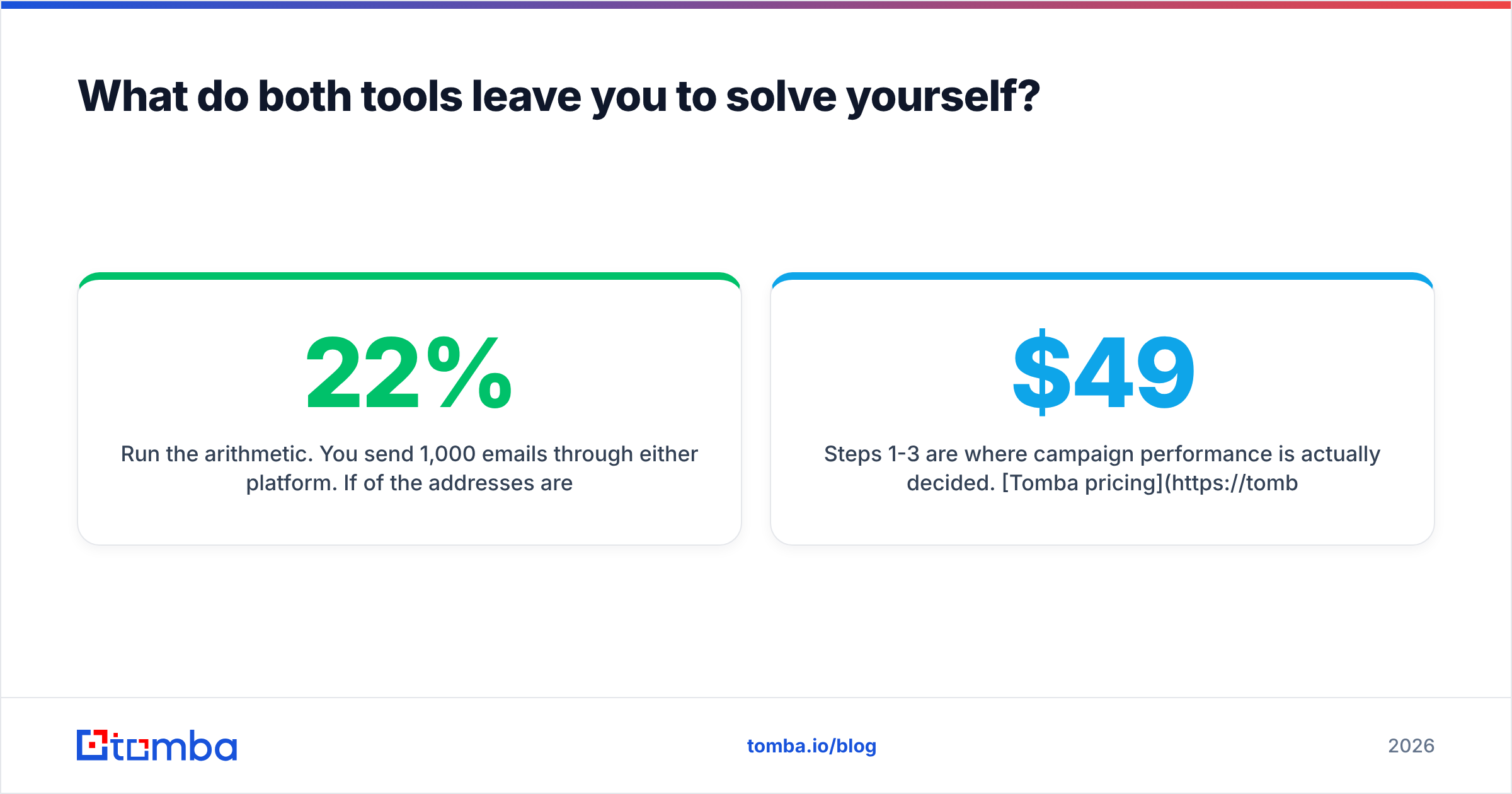
Run the arithmetic. You send 1,000 emails through either platform. If 22% of the addresses are wrong (a normal outcome for guessed or scraped lists), 220 bounce. Your bounce rate torches domain reputation, and the 780 that did deliver land in spam at a much higher rate because your sender score already dropped. The exact same 1,000-email campaign against a verified list bounces under 2%, keeps reputation intact, and every subsequent campaign performs better. Same tool, same copy, opposite outcome.
Smartlead sells lead credits on its higher tiers, resold from third-party databases. It's convenient, and it's also the same commodity data your competitors are emailing from. Emailchaser doesn't pretend to offer data at all.
This is why the practical stack for both tools is the same shape:
- Source contacts — find verified addresses at your target accounts with an email finder or map an entire company with domain search.
- Verify before import — run every address through an email verifier, including a catch-all check on domains that accept everything.
- Enrich for personalization — job title, company size, and tech stack turn a generic template into a relevant one. Data enrichment fills those fields in bulk.
- Send — Emailchaser or Smartlead, whichever matched your profile above.
- Route replies — into a CRM, with an owner and an SLA.
Steps 1-3 are where campaign performance is actually decided. Tomba pricing starts with a free tier at 25 searches/month, then Starter at $49/mo and Growth at $99/mo — so a clean, verified list costs less than the difference between Smartlead's Basic and Pro tiers.
What about the alternatives?#
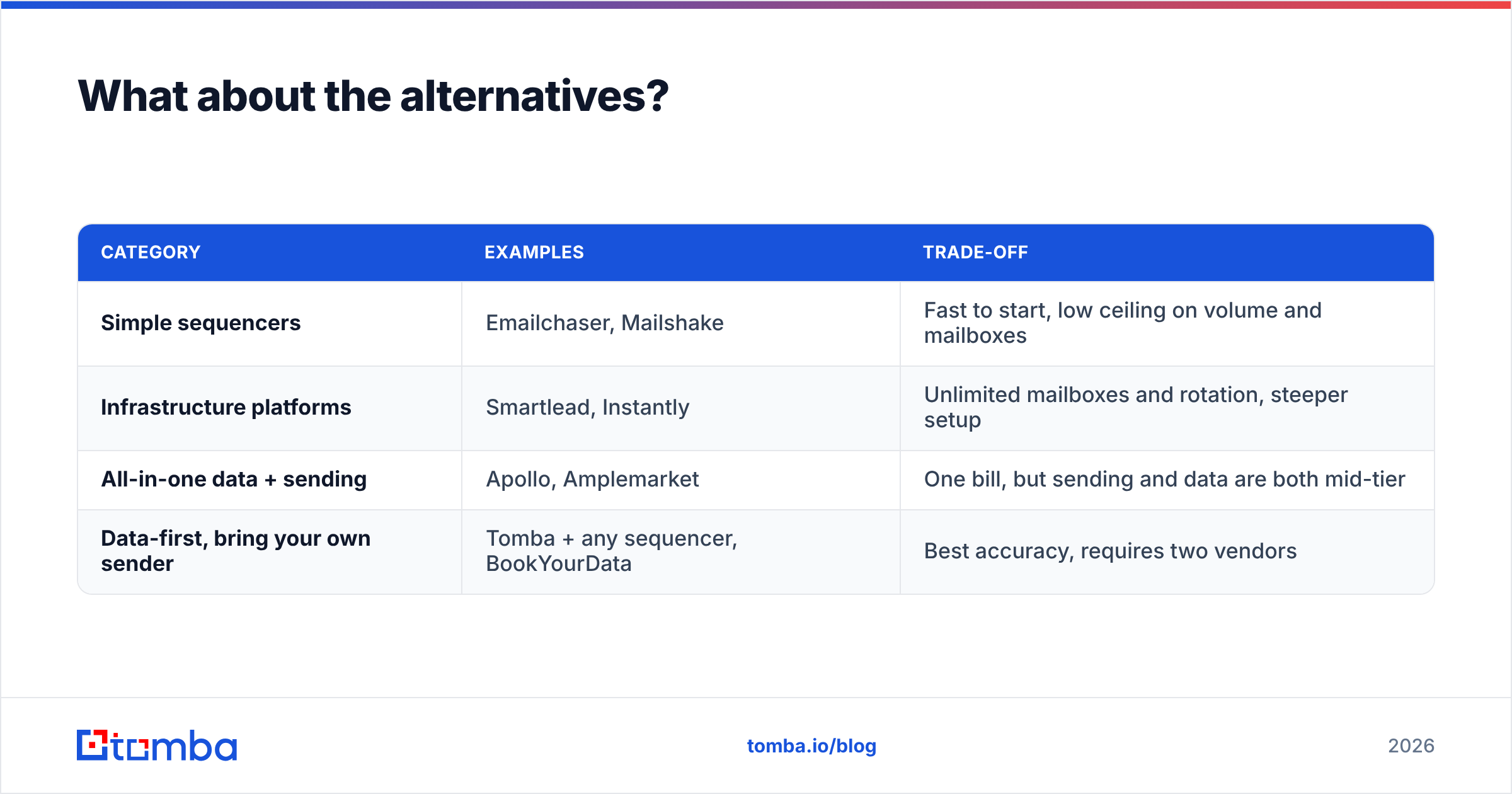
Neither tool is the only option, and the field has consolidated into three rough categories.
| Category | Examples | Trade-off |
|---|---|---|
| Simple sequencers | Emailchaser, Mailshake | Fast to start, low ceiling on volume and mailboxes |
| Infrastructure platforms | Smartlead, Instantly | Unlimited mailboxes and rotation, steeper setup |
| All-in-one data + sending | Apollo, Amplemarket | One bill, but sending and data are both mid-tier |
| Data-first, bring your own sender | Tomba + any sequencer, BookYourData | Best accuracy, requires two vendors |
The all-in-one category is tempting and usually disappointing: the platforms that bundle data with sending tend to be excellent at one and adequate at the other. If you're weighing that path, our breakdown of Apollo alternatives and Instantly alternatives covers where the bundles break down. BookYourData is a solid choice if you specifically want a purchased, pre-verified list rather than on-demand lookup — different buying model, genuinely good data.
Independent review data on G2 is worth ten minutes before you buy either tool. Filter reviews by company size — Smartlead's ratings from 1-10 person companies read very differently from its agency reviews, which is exactly the split this comparison predicts.
How should you actually decide?#
Answer three questions in order.
1. How many mailboxes will you send from in 90 days? Under four, Emailchaser. Over eight, Smartlead. In between, decide on question 2.
2. Are you sending for anyone other than yourself? If yes — clients, multiple business units, separate brands — Smartlead's sub-accounts pay for themselves in the first month of not doing manual reporting.
3. Who owns list quality? If nobody on the team owns it, fix that before you buy either tool. A perfect sequencer with a 20% bounce list produces worse results than a mediocre sequencer with a verified one.
Most teams get question 3 wrong, spend two months blaming their sending platform, then switch tools and get the same numbers. The platform is a distribution channel. The list is the product.
Get the data layer right first#
Whichever sender you pick, the campaign is only as good as the addresses in it. Use the Tomba Email Finder to source verified professional emails by name, company, or domain before your first send — free tier included, 25 searches a month, no card. Then push a clean list into Emailchaser or Smartlead and let the sequencer do the one job it's actually good at.
Related guides#
Ready to find emails that actually work?
Join 150,000+ professionals who stopped guessing and started sending. Free credits on signup — no credit card required.
Get the Tomba newsletter
Practical outbound tactics and product updates — once every two weeks.
About the author