EmailListValidation Pricing 2026: Reviews, Pros and Cons
EmailListValidation pricing starts around $12 for 5,000 credits, and those credits never expire. But a cheap per-email rate hides real trade-offs. Here is the honest 2026 breakdown.

TL;DR
- EmailListValidation pricing is pay-as-you-go. Credits start around $12 for 5,000 emails, and unlike most rivals, they never expire.
- The per-email price is among the cheapest in the category. That is about $0.0024 at entry volume, and under $0.0005 at million-scale.
- The catch is scope. It checks lists you already have. It does not find emails, enrich contacts, or search domains, so most teams pay for a second tool anyway.
- Catch-all (accept-all) domains are where every verifier gets graded. Reviews split hardest here. Expect "unknown" results that you still have to judge yourself.
- Need finding and verification on one bill? Tomba bundles both at $49/mo. If you only ever clean purchased lists, EmailListValidation is hard to beat on raw cost.
What is EmailListValidation and who is it for?#
EmailListValidation is a bulk email verification service. You upload a CSV. It runs each address through syntax checks, MX record lookups, SMTP handshakes, disposable-domain detection, role-account flagging, and spam-trap rules. Then it hands back a sorted file: valid, invalid, catch-all/unknown, disposable, role.
That is the whole product. It cleans data. It does not source it. The typical buyer already has a list — scraped, bought, inherited from an old CRM, or collected through a signup form with no double opt-in. They need to know how much of it will bounce before they hit send.
If that is you, the pitch is simple. You pay pennies to protect a sender reputation worth far more. Mailbox providers read hard bounces above roughly 2% as a sign of poor list hygiene. Recovery from a throttled domain takes weeks.
Say your problem is different. You need to reach 500 marketing directors at mid-market SaaS companies, and you have no list at all. EmailListValidation solves none of that. That gap drives most of the bad reviews you will read: people bought a verifier and expected a prospecting tool.
EmailListValidation pricing in 2026: how much does it cost?#
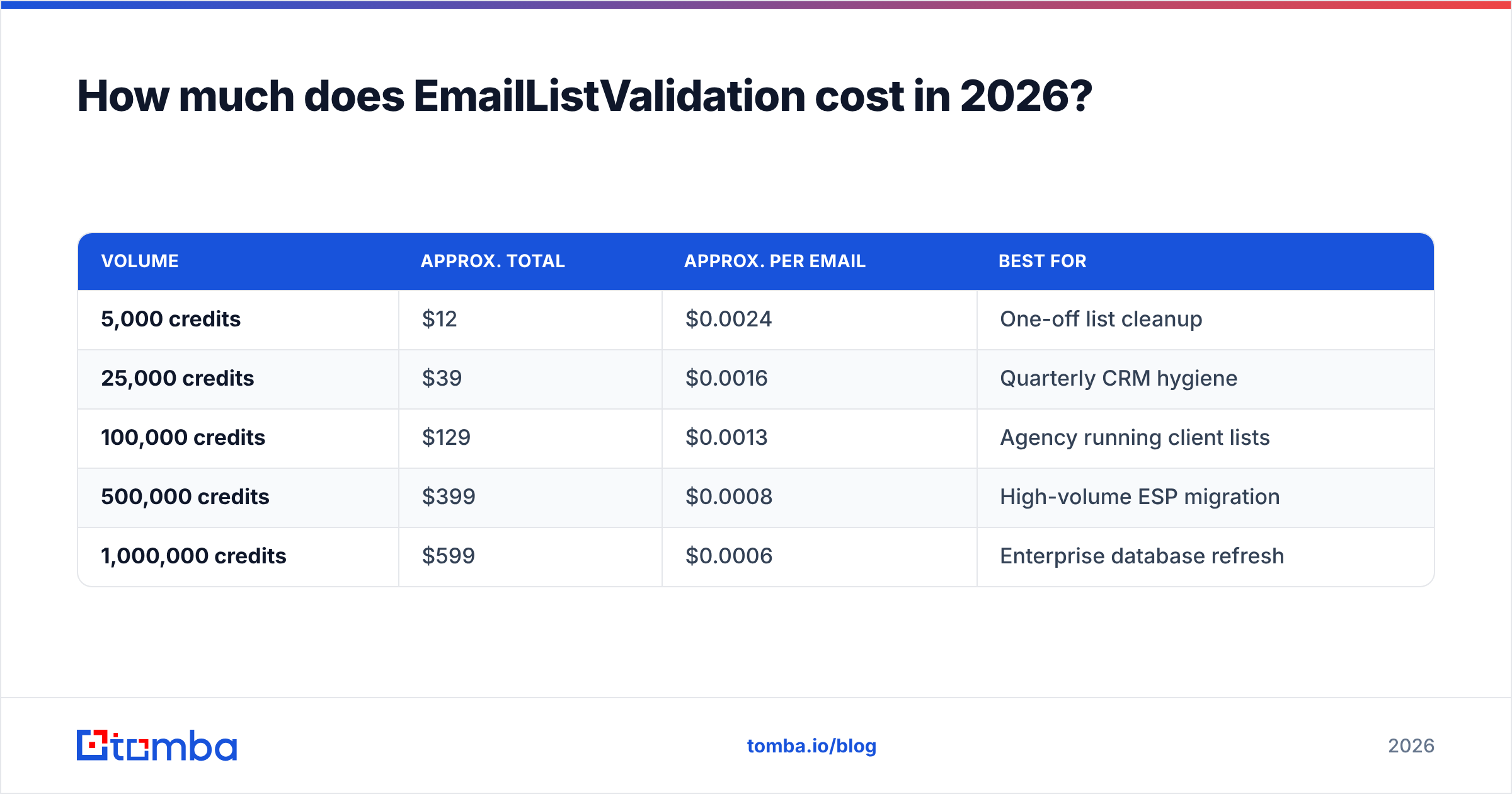
EmailListValidation pricing is credit-based and prepaid. One credit equals one email verified. There is no monthly subscription to sign, and credits carry over forever. That last point is the most-praised feature in user reviews.
Published tiers sit roughly here. Check the official EmailListValidation site before you budget, since vendors move prices.
| Volume | Approx. total | Approx. per email | Best for |
|---|---|---|---|
| 5,000 credits | $12 | $0.0024 | One-off list cleanup |
| 25,000 credits | $39 | $0.0016 | Quarterly CRM hygiene |
| 100,000 credits | $129 | $0.0013 | Agency running client lists |
| 500,000 credits | $399 | $0.0008 | High-volume ESP migration |
| 1,000,000 credits | $599 | $0.0006 | Enterprise database refresh |
A free trial of about 100 credits lets you sanity-check accuracy before you pay. That is enough to spot-check a sample, but not enough to benchmark properly. Plan on buying the smallest tier for a real test.
Two things about this model matter more than the headline number:
- Non-expiring credits change the math. Subscription verifiers reset every month. If you clean lists twice a year, a $99/mo plan costs $1,188 a year for maybe 40,000 verifications you actually use. Prepaid credits at $0.0016 cost $64 for the same work.
- Duplicates burn credits. Most tools charge for every row you submit, repeats included. Deduplicate first. A free remove duplicates pass on a 100,000-row export often strips 8–15% and pays for itself right away.

How accurate is EmailListValidation really?#
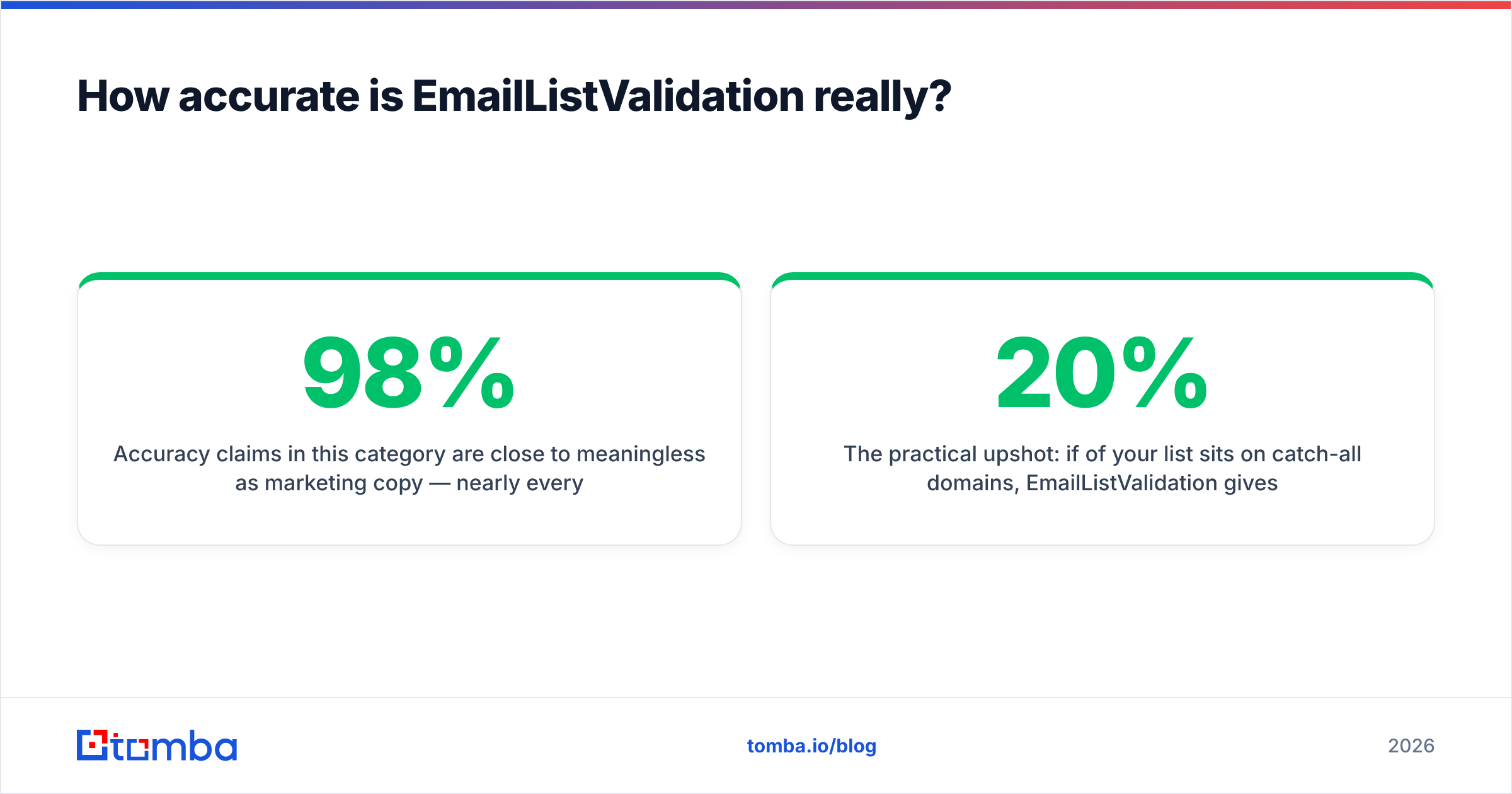
Accuracy claims in this category mean little as marketing copy. Nearly every vendor advertises "98%+" and none publish the method. What really varies is how a tool handles hard cases.
Here is the honest breakdown of where verifiers split:
- Standard mailboxes (Gmail, Outlook, self-hosted with open SMTP). Every credible tool gets these right, EmailListValidation included. This is table stakes, not a differentiator.
- Catch-all domains. Some servers accept mail for any address at the domain. That makes SMTP probing useless. EmailListValidation returns these as "unknown"/"accept-all" and leaves the call to you. Some rivals add pattern and history checks to push a slice of them into a confident verdict. This is the biggest gap in user reviews.
- Greylisting and rate-limited servers. Corporate mail servers often defer a first-contact connection. If the verifier does not retry, you get false "invalid" results. Reported behaviour here is inconsistent across users.
- Disposable and role detection. Solid. It flags
info@,sales@,support@and known throwaway domains reliably. - Spam traps. No verifier can promise trap detection. Pristine traps are, by definition, addresses that never opted in anywhere. Treat any vendor claiming full trap removal with doubt.
The practical upshot is easy to picture. Say 20% of your list sits on catch-all domains. EmailListValidation hands that 20% back as a shrug. You either send anyway and accept the bounce risk, or you run those addresses through a dedicated catch-all verifier that scores them by pattern. Budget for that step instead of being surprised by it.

Suggested visual: side-by-side screenshot of an EmailListValidation results CSV showing the "unknown" column volume on a real 10k list.
What are the pros and cons of EmailListValidation?#
Pros
- Genuinely low cost per email. At every tier it undercuts most subscription-first competitors.
- Credits never expire. Buy once, use across two years of sporadic cleanups. Rare in this market.
- No forced subscription. No cancellation friction, no unused-quota guilt.
- Straightforward API. A real-time single-address endpoint plus bulk file submission. The docs are good enough to wire up in an afternoon.
- ESP integrations. Direct connections to Mailchimp, HubSpot, and similar platforms cut the CSV shuffle.
- Fast bulk processing. Large files usually come back within hours, not days.
Cons
- Verification only. No email finding, no domain search, no enrichment, no phone data. You will run a second tool.
- Catch-all handling is passive. "Unknown" is an honest answer, but not a useful one when it covers a fifth of your list.
- Support is email-based and slow. Several reviews on G2 mention long first-response times next to vendors with live chat.
- Dated dashboard. Functional, not modern. Reporting is thin. You get counts, not deliverability trends over time.
- Prepaid means forecasting. Underbuy and you stall mid-campaign. Overbuy and cash sits on the shelf, though at least it does not evaporate.
- No sender-reputation tooling. Verification is one input to email deliverability. Authentication, warmup, and content all sit outside this product.
How does EmailListValidation compare with the alternatives?#
The honest comparison depends on one thing: do you need one job done, or the whole pipeline?
| Attribute | EmailListValidation | ZeroBounce | BookYourData | Tomba |
|---|---|---|---|---|
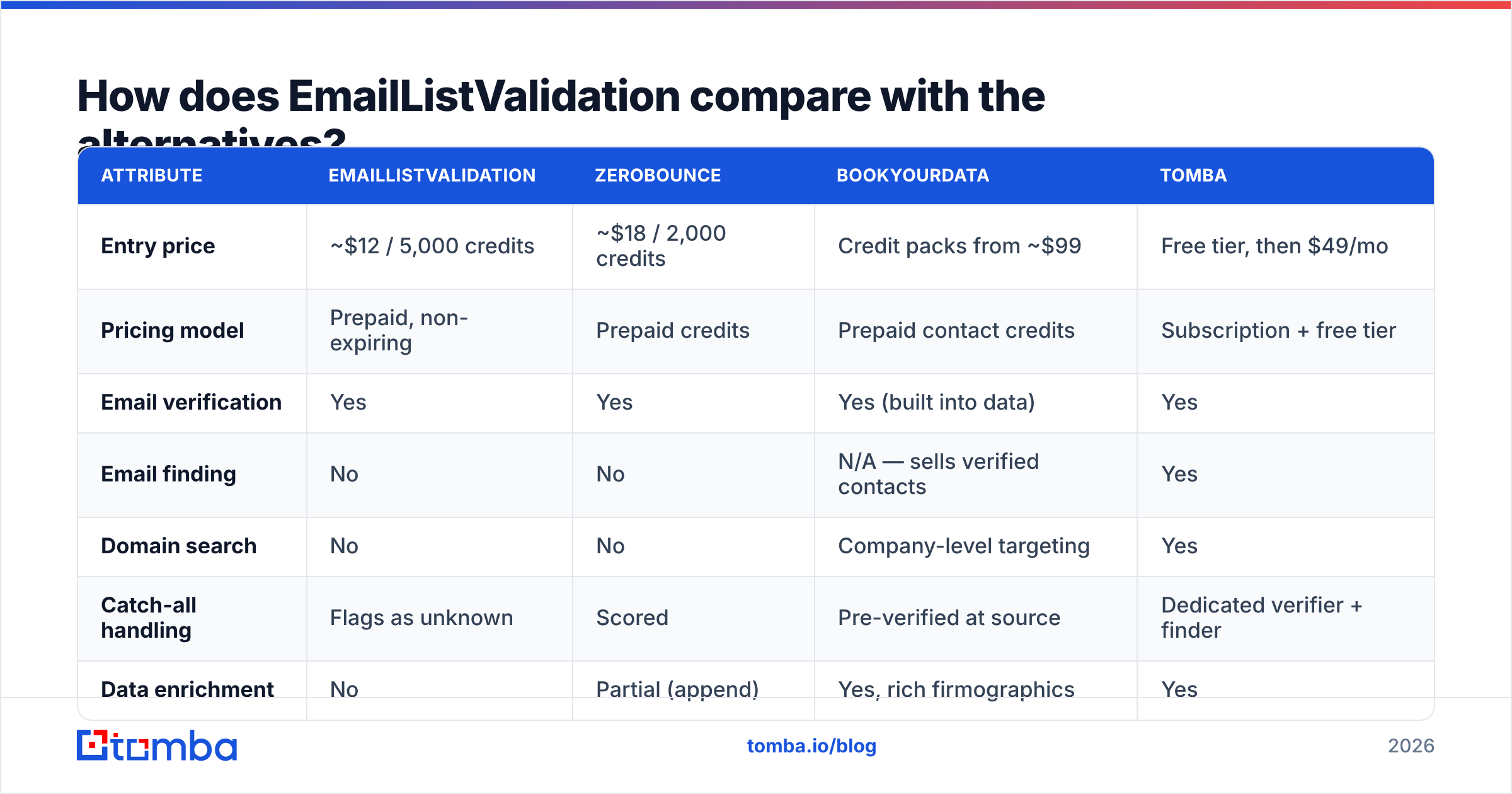
| Entry price | ~$12 / 5,000 credits | ~$18 / 2,000 credits | Credit packs from ~$99 | Free tier, then $49/mo |
| Pricing model | Prepaid, non-expiring | Prepaid credits | Prepaid contact credits | Subscription + free tier |
| Email verification | Yes | Yes | Yes (built into data) | Yes |
| Email finding | No | No | N/A — sells verified contacts | Yes |
| Domain search | No | No | Company-level targeting | Yes |
| Catch-all handling | Flags as unknown | Scored | Pre-verified at source | Dedicated verifier + finder |
| Data enrichment | No | Partial (append) | Yes, rich firmographics | Yes |
| Phone data | No | Yes (append, extra cost) | Yes | Yes |
| API access | Yes | Yes | Yes | Yes, all plans |
| Free tier | ~100 credits trial | 100/mo | Sample available | 25 searches/mo |
| Best for | Cheapest bulk cleaning | Deliverability suite | Buying ready-made B2B lists | Find + verify in one bill |

Three genuinely different jobs sit in that table. BookYourData suits buyers who would rather purchase a pre-verified, targeted list than build one. It skips the find-then-verify loop entirely, and its data ships with accuracy guarantees.
ZeroBounce leans into the wider deliverability suite, with inbox placement testing and blacklist monitoring. EmailListValidation competes on price alone, and it wins that fight.
Tomba's angle is consolidation. The email finder and email verifier run on the same credits. You are not reconciling two invoices and two data formats.

When should you pick EmailListValidation over an all-in-one tool?#
Pick EmailListValidation when all of these are true:
- You already have the addresses. Your bottleneck is trust in the list, not getting one.
- Your volume is lumpy. You clean 200,000 rows in March and nothing until November. Non-expiring credits are built for exactly this.
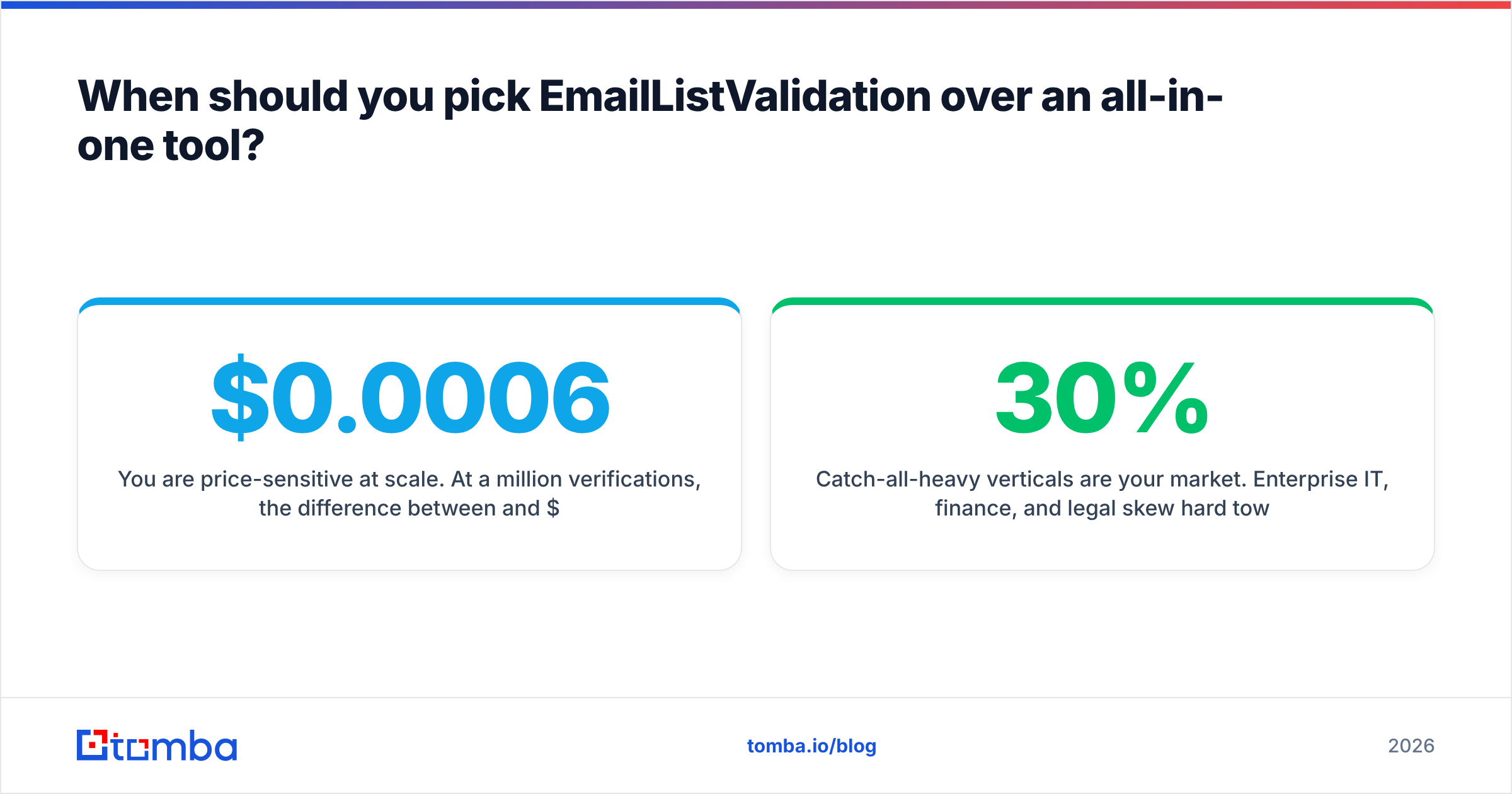
- You are price-sensitive at scale. At a million verifications, the gap between $0.0006 and $0.002 per email is $1,400.
- You have a developer. The API is where this tool shines. Real-time validation on a signup form stops bad addresses at the door, which beats any batch cleanup.
Skip it when:
- You are building lists from scratch. A verifier cannot tell you that Priya Raman runs engineering at a company you want to reach, or what her address is. That is what a domain search does.
- Catch-all-heavy verticals are your market. Enterprise IT, finance, and legal skew hard toward accept-all setups. A tool that returns "unknown" on 30% of your file has solved 70% of your problem.
- You want one vendor. Two tools means two contracts, two APIs, two support queues, and manual CSV handoffs between them.
How should you actually run a verification workflow?#
Verification is one step in a chain. Run it in isolation and you waste money. Here is the sequence that holds up:
- Deduplicate before you upload. You are charged per row, so duplicates are pure waste. Strip them locally or with a free tool first.
- Segment by domain type. Split free-provider addresses (Gmail, Yahoo) from corporate domains. They fail differently and deserve different treatment.
- Verify the corporate segment. This is where SMTP probing earns its keep.
- Route catch-alls to a specialist step. Do not delete them, and do not blindly mail them. Check them against the company's known email format and score them.
- Suppress role accounts for cold outreach.
info@andsales@addresses pad your list and drag down your response rate. Keep them for newsletters if you must. Drop them for one-to-one prospecting. - Re-verify on a schedule. B2B data decays at roughly 22–30% a year as people change jobs. A list verified in January is stale by October. HubSpot's own research on database decay made this the standard planning assumption.
Step 4 is where teams lose the most money. They either bin half a million dollars of pipeline, or they torch a domain's reputation on addresses that never existed.
What do real users say about EmailListValidation?#
Aggregated sentiment across review platforms lands in a consistent place:
What users consistently praise: price, credits that never expire, bulk processing speed, and no subscription pressure. Small agencies and freelancers are the happiest group. The economics fit irregular workloads well.
What users consistently criticise: support response times, an interface that feels a decade old, and the pile of "unknown" results. One theme repeats in negative reviews: someone bought credits expecting a lead-generation tool, then found it only cleans what you bring. That is a positioning problem more than a product defect, but it drags the ratings down.
What is contested: accuracy. Some users report near-perfect results against known-good control lists. Others report false positives on corporate servers with aggressive greylisting. Both can be true, because outcomes depend on the domain mix in your file.
So run your own control test. Take 500 addresses whose status you already know, check them, and compare. Do that before you commit to a large purchase. Check current standings on Capterra alongside G2, since the reviewer profiles differ.
Is EmailListValidation pricing worth it in 2026?#
Yes, if you scope it correctly. It is a cheap, competent, no-nonsense list cleaner with the best credit terms in the category. Nobody buying it for that job is making a mistake.
It stops being the right answer the moment your workflow includes finding contacts, not just checking them. Then you are managing two vendors to do what one can. The $12 you saved on verification gets eaten by the friction of stitching tools together, plus whatever you pay the finder.
Run the numbers on your own pattern. Two cleanups a year on modest lists? Prepaid credits win outright. Continuous outbound where every new prospect needs an address found and validated? Consolidation wins, and EmailListValidation pricing stops being the metric that matters.
Ready to stop paying two vendors for one job? Tomba Email Finder finds verified professional addresses by name, domain, or company. Verification, catch-all checking, and enrichment run on the same credits. Start free with 25 searches a month, no card required, and scale to $49/mo when the pipeline demands it.
Related guides#
Ready to find emails that actually work?
Join 150,000+ professionals who stopped guessing and started sending. Free credits on signup — no credit card required.
Get the Tomba newsletter
Practical outbound tactics and product updates — once every two weeks.
About the author