EmailListValidation vs FinalScout: Which Tool Wins in 2026?
One cleans lists you already have. The other scrapes LinkedIn for new ones. Here's the honest head-to-head on accuracy, pricing, and which tool actually belongs in your 2026 outbound stack.
TL;DR
- EmailListValidation and FinalScout are not really competitors. EmailListValidation is a bulk verifier — it tells you whether an address you already have will bounce. FinalScout is a LinkedIn-first finder — it pulls contacts off profiles and writes outreach for you.
- If you already own a list (webinar signups, a CRM export, a purchased file), EmailListValidation is the cheaper and more focused choice.
- If you live inside LinkedIn Sales Navigator and want emails plus AI-written sequences in one place, FinalScout is the closer fit.
- Neither tool covers the whole job. Running both means two logins, two credit pools, and two invoices for what should be one workflow.
- A combined finder-plus-verifier platform (Tomba, Hunter, Findymail) usually costs less than stacking a scraper and a verification vendor, and it keeps one source of truth for data quality.
What is EmailListValidation and what does it actually do?#
EmailListValidation is a list-hygiene tool. You upload a CSV of addresses — or hit its API — and it returns a status for each one: valid, invalid, disposable, role-based, catch-all, or unknown. That's the entire product surface, and the narrow focus is the point.
Under the hood it runs the standard verification chain:
- Syntax check — malformed addresses die instantly at zero cost.
- Domain and MX lookup — does the domain exist, and does it accept mail at all?
- Disposable and role detection — flags Mailinator-style burner domains and
info@,sales@,support@inboxes that skew your reply metrics. - SMTP handshake — opens a connection to the receiving server and asks whether the mailbox exists, without sending anything.
- Catch-all classification — marks domains that accept every address, which is where most verifiers quietly give up.
What it does not do: find anyone. EmailListValidation has no prospecting database, no domain search, no browser extension that pulls a contact off a company page. It assumes you arrived with a list in hand. If you don't have one, the tool has nothing to work with.
That constraint is worth stating plainly, because it defines the whole comparison. Verification is a cost center — it protects email deliverability and sender reputation. Finding is a growth activity. Buying one when you needed the other is the most common mistake in this category.
What is FinalScout and who is it built for?#
FinalScout attacks the opposite half of the problem. It's a Chrome extension plus web app that extracts email addresses from LinkedIn profiles, Sales Navigator searches, group members, event attendees, and post engagers. You browse, it collects, and it claims a high deliverability rate on what it returns.
Its differentiator is the AI layer. FinalScout will draft a personalized cold email using the scraped profile — job title, company, recent activity — so the extract-and-write loop happens in one tab. For a solo founder or a one-person SDR function, that's a genuine time saver.
The trade-offs are structural, not cosmetic:
- LinkedIn dependency. Your reach is capped by what you can see and scroll through. Sales Navigator's own view limits become your data limits, and Chrome-extension scraping carries account-safety risk that LinkedIn actively works to increase.
- Verification is a black box. FinalScout asserts a deliverability rate. It does not hand you the per-address evidence — MX status, SMTP result, catch-all flag — that a dedicated verifier produces.
- No list cleaning. You can't upload the 40,000-row file your marketing team inherited and ask FinalScout to sort it. That's not what it's for.
EmailListValidation vs FinalScout: how do they compare head-to-head?#
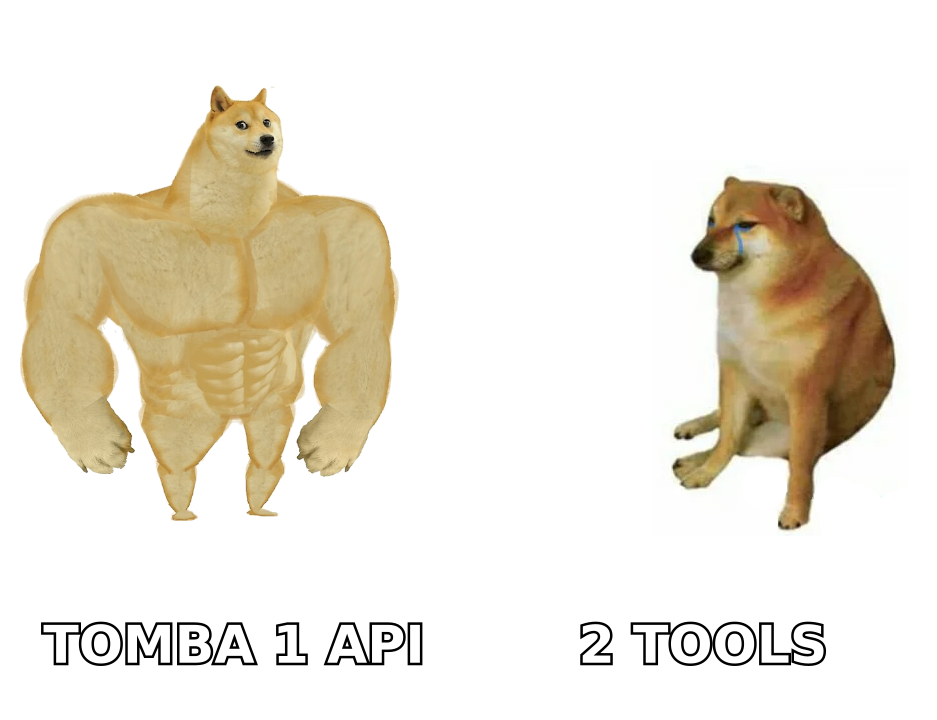
Here is the honest side-by-side. Pricing shifts, so treat the numbers as a shape rather than a quote — check each vendor's page before you buy.
| Attribute | EmailListValidation | FinalScout |
|---|---|---|
| Primary job | Verify existing lists | Find emails on LinkedIn |
| Data source | Your upload / API input | LinkedIn profiles + own database |
| Finds new contacts | No | Yes |
| Bulk CSV verification | Yes, core feature | No |
| Catch-all handling | Explicit status returned | Not surfaced per-contact |
| AI email writing | No | Yes |
| Chrome extension | No | Yes, required for scraping |
| API access | Yes, real-time + bulk | Limited |
| Pricing model | Pay-as-you-go credits | Monthly subscription tiers |
| Free tier | Small trial credit grant | Limited monthly credits |
| Best for | Marketers cleaning old lists | Solo SDRs prospecting on LinkedIn |
The row that matters most is the second one. Data source determines everything downstream — accuracy, coverage, cost per usable contact, and whether the tool scales past one person clicking through profiles.
Which one is more accurate — and how would you even know?#
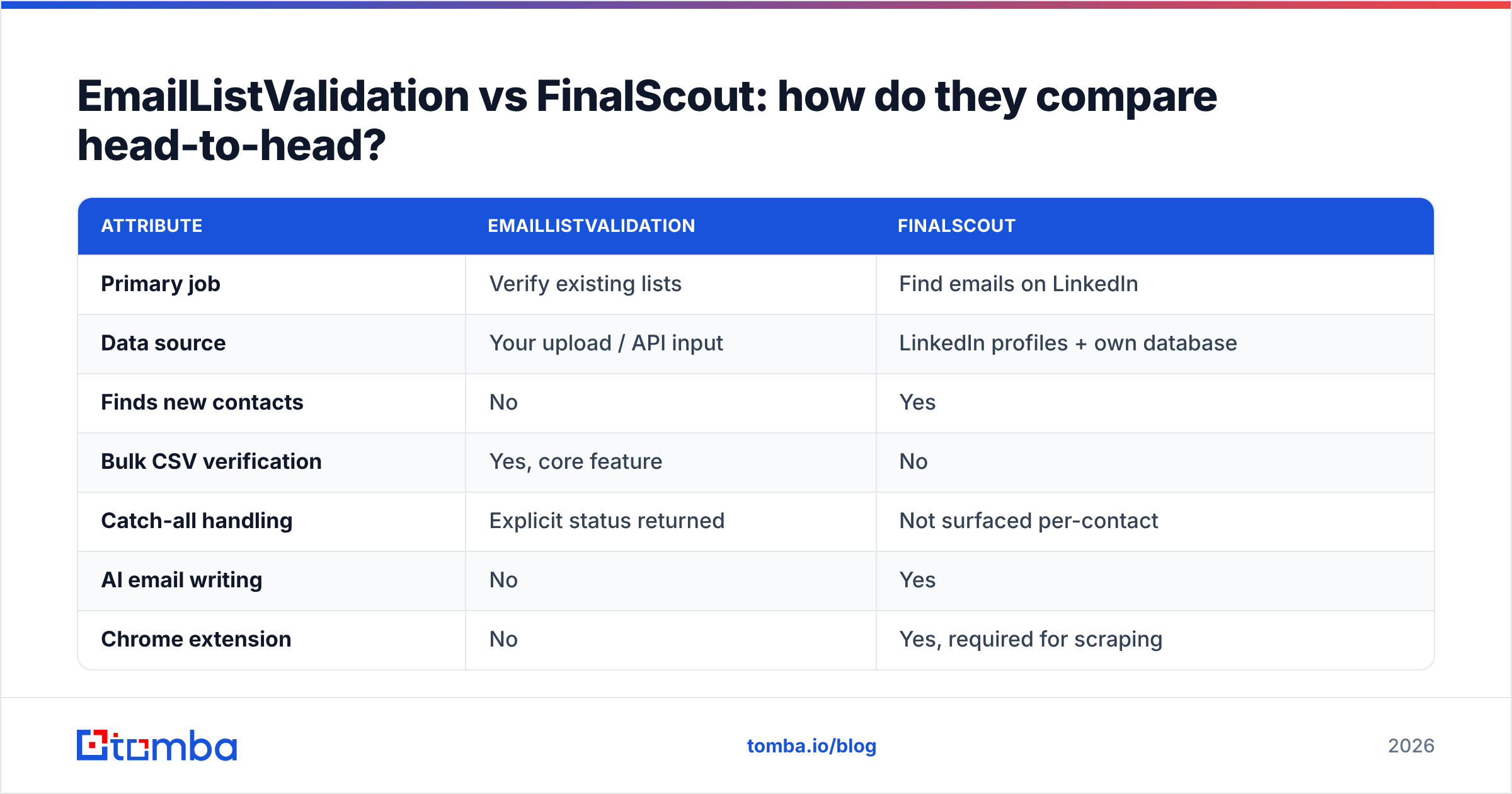
Accuracy means two different things here, which is exactly why "which is more accurate" gets answered badly in most comparison posts.
For EmailListValidation, accuracy means classification precision: of the addresses it marked valid, how many actually delivered? Good verifiers land in the 96–99% range on ordinary corporate domains. Where they separate is the hard cases — catch-all domains, greylisting servers, and providers like Microsoft 365 that deliberately accept-then-bounce to defeat SMTP probing. Any vendor claiming 99%+ across catch-alls is rounding generously.
For FinalScout, accuracy means match rate and correctness: of the profiles you scraped, how many produced an email, and how many of those were the right person's real work address? Pattern-guessing tools inflate this by returning firstname.lastname@company.com whether or not it exists. If the tool doesn't verify before returning, a 90% "found" rate can hide a 20% bounce rate.

Three things to test before you commit spend to either:
- Seed a known list. Take 100 addresses you're certain about — 80 live, 20 dead — and run them through the verifier. Count the false positives, not the accuracy percentage.
- Check the catch-all bucket. Feed in 20 domains you know are catch-all. A tool that returns "unknown" for all of them is charging you for a shrug. Tools with a dedicated catch-all verifier will resolve a meaningful share of them.
- Send to a small batch. Fifty emails through your real sending infrastructure tells you more than any vendor benchmark. Watch bounces at 24 and 72 hours.
Verified data is the cheapest deliverability insurance you can buy. A 5% bounce rate is enough to get a sending domain throttled, and mailbox providers do not care that a third-party tool told you the address was fine.
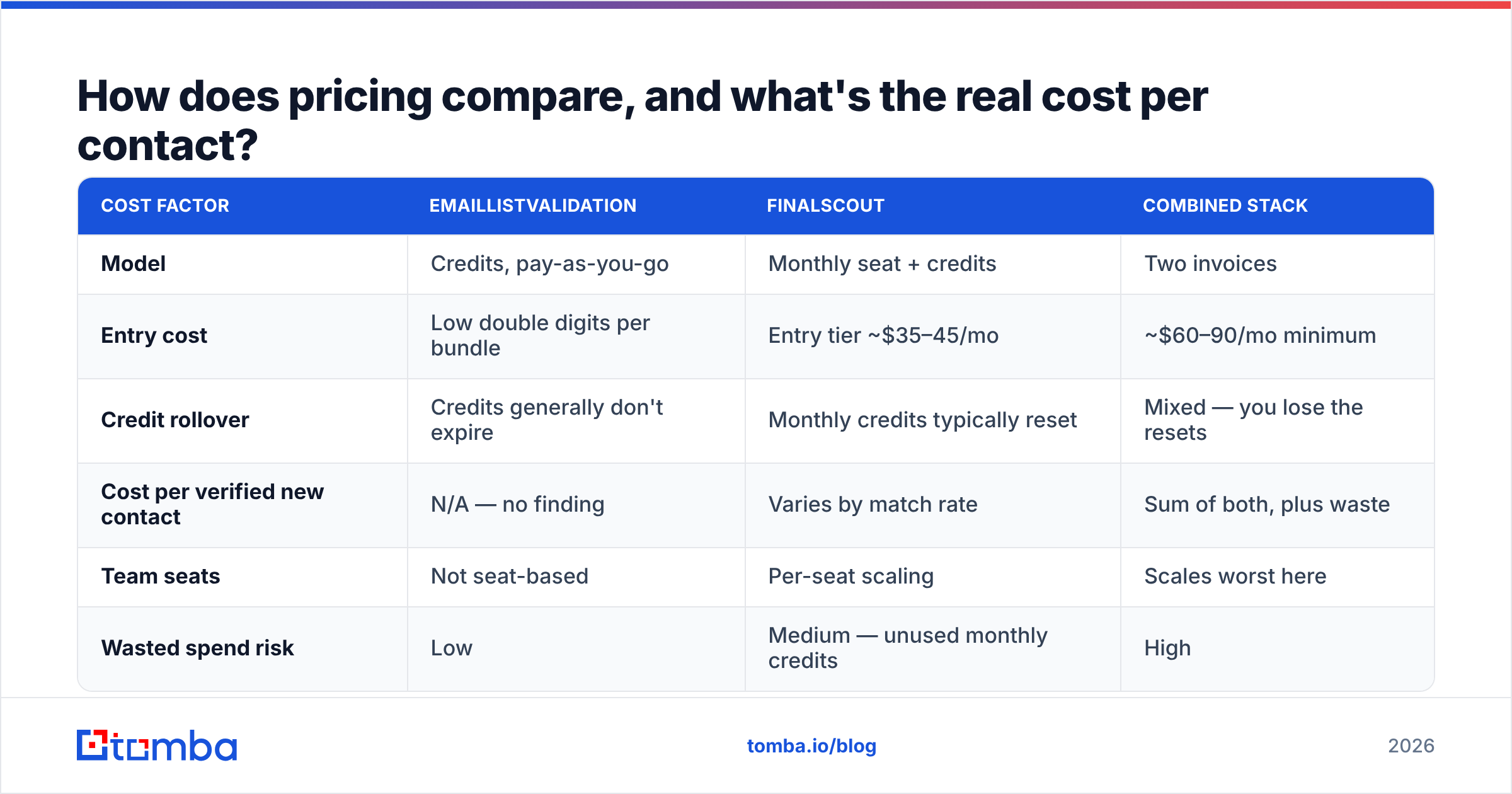
How does pricing compare, and what's the real cost per contact?#
Both tools price honestly for what they are — the problem appears when you need both.
| Cost factor | EmailListValidation | FinalScout | Combined stack |
|---|---|---|---|
| Model | Credits, pay-as-you-go | Monthly seat + credits | Two invoices |
| Entry cost | Low double digits per bundle | Entry tier ~$35–45/mo | ~$60–90/mo minimum |
| Credit rollover | Credits generally don't expire | Monthly credits typically reset | Mixed — you lose the resets |
| Cost per verified new contact | N/A — no finding | Varies by match rate | Sum of both, plus waste |
| Team seats | Not seat-based | Per-seat scaling | Scales worst here |
| Wasted spend risk | Low | Medium — unused monthly credits | High |
The hidden line item is workflow tax. Scrape in FinalScout, export CSV, upload to EmailListValidation, wait, download, re-merge, then import to your sequencer. That's four manual steps per campaign and four chances to lose a column. At two campaigns a week, it's a meaningful slice of somebody's job.

For comparison, an integrated platform prices the whole loop together. Tomba pricing starts with a free tier at 25 searches per month, Starter at $49/mo, Growth at $99/mo, and Pro at $249/mo — with finding, verification, and enrichment drawing from one credit pool instead of two. Hunter, Findymail, and Dropcontact follow similar structures. The point isn't that any one vendor is cheapest; it's that paying two vendors for two halves of one job rarely wins on total cost.
Who should choose EmailListValidation?#
Pick EmailListValidation when list hygiene is the actual problem:
- You inherited a database. A 50,000-row CRM export from 2023 needs cleaning before anyone touches it. Pay-as-you-go credits are perfect for a one-time project you may never repeat.
- You're a marketer, not an SDR. Newsletter lists, event registrations, and gated-content downloads decay at roughly 22–25% per year. Quarterly cleaning is a maintenance task, not a prospecting one.
- You need API verification at signup. Real-time checks on form submissions stop typos and burner addresses from entering the database at all — the cheapest possible place to fix the problem.
- You already have a finder you like. Bolting a verifier onto an existing prospecting stack is a legitimate, common architecture.
Who should choose FinalScout?#
Pick FinalScout when LinkedIn is genuinely your entire prospecting motion:
- You're a solo founder or first sales hire. One person, one workflow, no ops overhead. The AI writing layer removes a real bottleneck.
- Your ICP lives on LinkedIn and nowhere else. Recruiters, agency owners, and creator-economy sellers often find LinkedIn's data richer than any B2B database.
- You prospect in bursts. Scrape a Sales Navigator search on Monday, send all week. Monthly credit tiers fit that rhythm.
- You want personalization without a separate AI tool. Profile-to-draft in one click is the product's strongest argument.
Where it breaks down is scale and repeatability. Once you have three SDRs, or need contacts for companies whose decision-makers aren't active on LinkedIn, the ceiling arrives fast. That's when teams start looking at an Apollo alternative or a domain-first approach instead.
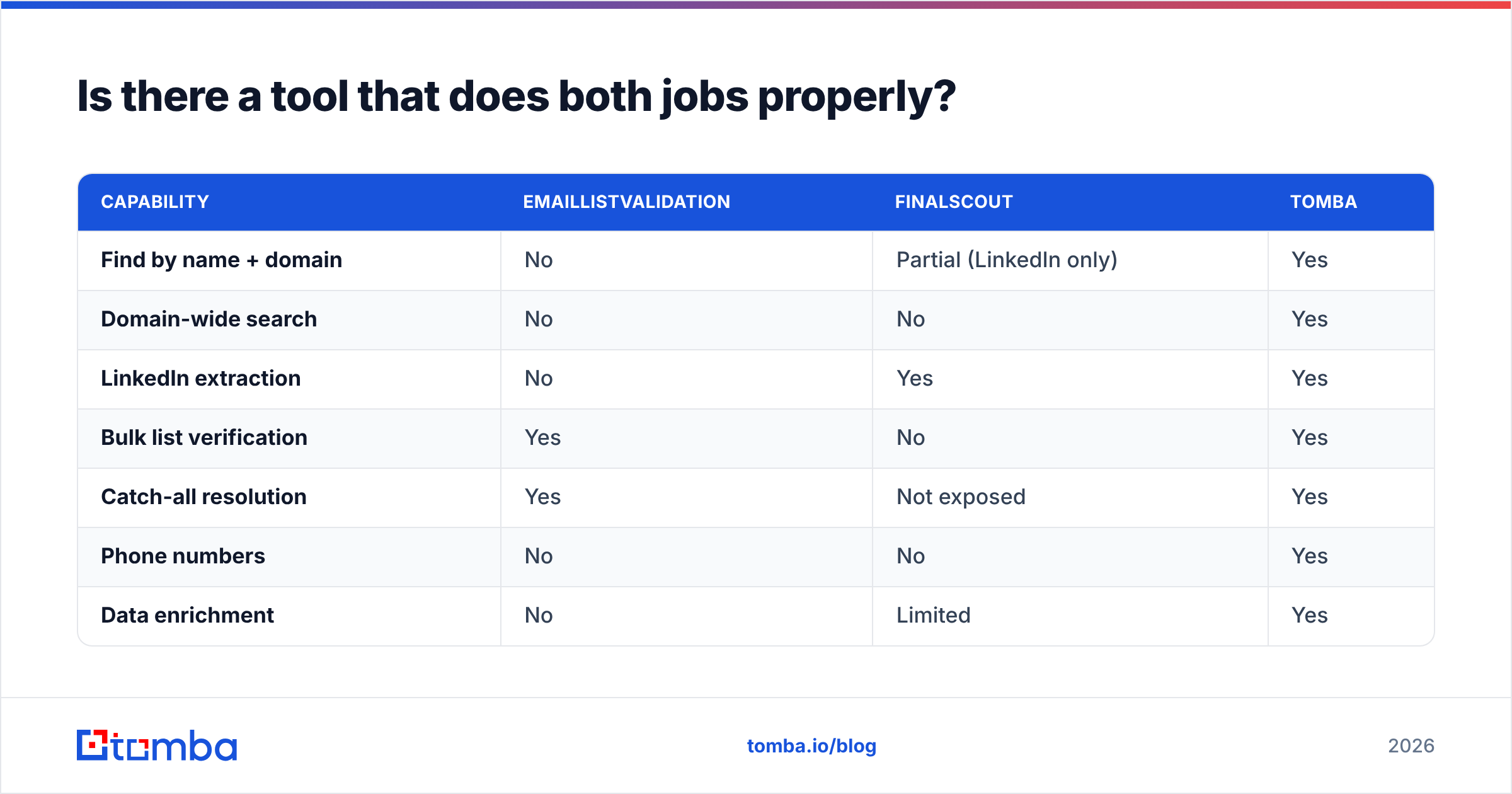
Is there a tool that does both jobs properly?#
Yes — and this is where the two-tool comparison stops being the right frame. Modern email-finding platforms bundle discovery and verification because splitting them creates the workflow tax described above.
| Capability | EmailListValidation | FinalScout | Tomba |
|---|---|---|---|
| Find by name + domain | No | Partial (LinkedIn only) | Yes |
| Domain-wide search | No | No | Yes |
| LinkedIn extraction | No | Yes | Yes |
| Bulk list verification | Yes | No | Yes |
| Catch-all resolution | Yes | Not exposed | Yes |
| Phone numbers | No | No | Yes |
| Data enrichment | No | Limited | Yes |
| Native API | Yes | Limited | Yes |
| Free tier | Trial credits | Limited monthly | 25 searches/mo |
| Entry paid price | PAYG bundles | ~$35–45/mo | $49/mo |
The practical difference: with an integrated platform you run domain search to map every contact at a target company, pull the LinkedIn profiles you actually want with a LinkedIn finder, and have every address verified before it leaves the tool — no CSV round trip. Then bulk verify the legacy list your marketing team has been avoiding, in the same account.

How should you actually test these tools before buying?#
Run the same evaluation on any candidate, including the incumbent:
- Define one target list. Pick 100 real prospects at 25 real companies. Every tool gets the identical input.
- Measure match rate honestly. Found ÷ attempted. Exclude anything the tool returns without verification — those are guesses, not data.
- Measure bounce rate for real. Send to the results through your actual infrastructure. Anything above 3% is a problem; above 5% is a deliverability incident.
- Time the workflow. Stopwatch the full loop from "I want contacts at these 25 companies" to "the list is in my sequencer." Two-tool stacks lose here consistently.
- Price the annual total. Include both vendors, unused monthly credits, and the hours spent on CSV shuffling. Compare that against a single integrated plan.
- Read recent reviews, not the homepage. Filter G2 to the last six months. Data vendors change fast, and a 2023 review describes a product that no longer exists.
Most teams that run this test discover the same thing: the finder-versus-verifier debate is a false choice, and the real decision is whether to buy the halves separately or the whole thing once.
The bottom line#
EmailListValidation wins if your problem is a dirty list. It's focused, credit-based, and doesn't charge you for capabilities you won't use. FinalScout wins if your problem is LinkedIn prospecting as a solo operator. The AI drafting is a real advantage and the workflow is genuinely fast.
Neither wins if your problem is "build and maintain an accurate outbound list at team scale," because that job needs finding, verification, catch-all handling, and enrichment operating as one system rather than three purchases.
If that's your situation, start with the Tomba Email Finder — find contacts by name, company, or full domain, get every address verified before it enters your sequencer, and clean your existing lists from the same credit pool. The free tier gives you 25 searches a month to run the 100-prospect test above before you spend anything, and Starter is $49/mo when you're ready to scale. Test it against whatever you're using now with the same input list, and let the bounce rate decide.
Related guides#
Ready to find emails that actually work?
Join 150,000+ professionals who stopped guessing and started sending. Free credits on signup — no credit card required.
Get the Tomba newsletter
Practical outbound tactics and product updates — once every two weeks.
About the author