EmailOversight vs FinalScout: Honest 2026 Comparison
EmailOversight verifies and appends. FinalScout scrapes LinkedIn and writes the email for you. They solve opposite halves of the same problem — here is which one you actually need in 2026, and where both fall short.
EmailOversight vs FinalScout is not a fair fight — and that is the point. One tool cleans lists you already own. The other builds new ones from LinkedIn. Here is how the two differ, what each costs, and which one your team actually needs in 2026.
TL;DR
- These two tools are not really competitors. EmailOversight is a verification and append platform — it cleans and enriches lists you already have. FinalScout is a LinkedIn-first prospecting tool — it produces new contacts from profiles and drafts the outreach.
- If your problem is "my bounce rate is 7% and Google is throttling me," EmailOversight's multi-method verification is the closer fit.
- If your problem is "I have 400 LinkedIn profiles and no email addresses," FinalScout is the closer fit — but you should still verify its output before sending.
- Neither one covers the full loop cheaply. Buying both stacks two subscriptions and two credit pools for what is one job.
- A combined finder-plus-verifier (Tomba, Hunter, Findymail-class tools) usually costs less than running a scraper and a hygiene vendor side by side.
What is EmailOversight, and what problem does it actually solve?#
EmailOversight is a data-hygiene platform. Its core product is email verification. The differentiator is that it runs several validation methods against the same address instead of a single SMTP handshake: syntax, domain and MX checks, known-complainer and spam-trap lists, disposable-domain detection, role-account flags, and activity signals that estimate whether a mailbox is still in use.
That last piece matters more than most buyers realise. A mailbox can be technically valid and still be abandoned. A verifier that only asks "does the SMTP server accept this recipient?" returns "valid" for an inbox nobody has opened since 2021. EmailOversight leans on engagement and complaint data to grade those addresses down. That is why it tends to be sold to email service providers and high-volume senders rather than to two-person SDR teams.
It also sells email append — you hand over a name plus a company, or a postal record, and it returns a matched address. That is finder-adjacent, but it is a batch, file-based workflow, not a live prospecting UI.
What it is not: a prospecting tool. There is no LinkedIn extension, no sequence builder, no persona search. You bring the list.
What is FinalScout, and who is it built for?#
FinalScout sits at the opposite end. It is a Chrome-extension-driven tool that pulls contacts out of LinkedIn — individual profiles, search results, group members, event attendees, post engagers. For as many of them as it can match, it returns a business email. It layers AI email drafting on top, so you can go from profile to first-touch copy without leaving the tool.
Its marketing leans hard on a deliverability claim (a figure in the high nineties is quoted on the site). Treat vendor-published accuracy numbers from any vendor — including this one — as a ceiling measured on their easiest cohort, not a guarantee on yours. More on that below.
FinalScout's real appeal is workflow compression. If your entire prospecting motion lives inside LinkedIn Sales Navigator, a tool that turns a saved search into a CSV of emails removes three steps. That convenience is what you are paying for.

EmailOversight vs FinalScout: how do they compare head-to-head?#
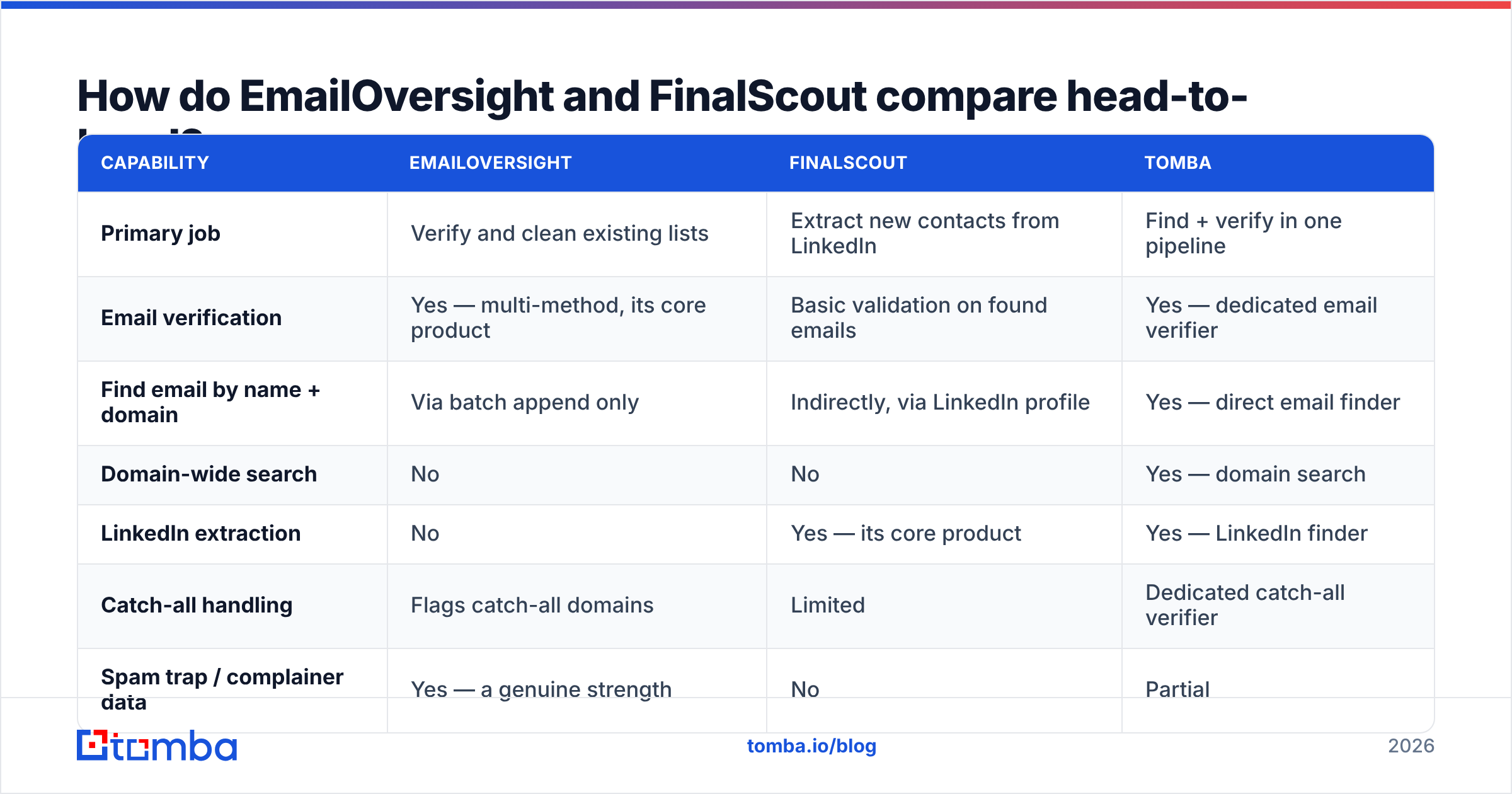
Here is the honest side-by-side. Note how few rows have a genuine overlap — that is the actual finding.
| Capability | EmailOversight | FinalScout | Tomba |
|---|---|---|---|
| Primary job | Verify and clean existing lists | Extract new contacts from LinkedIn | Find + verify in one pipeline |
| Email verification | Yes — multi-method, its core product | Basic validation on found emails | Yes — dedicated email verifier |
| Find email by name + domain | Via batch append only | Indirectly, via LinkedIn profile | Yes — direct email finder |
| Domain-wide search | No | No | Yes — domain search |
| LinkedIn extraction | No | Yes — its core product | Yes — LinkedIn finder |
| Catch-all handling | Flags catch-all domains | Limited | Dedicated catch-all verifier |
| Spam trap / complainer data | Yes — a genuine strength | No | Partial |
| AI email writing | No | Yes | No (separate free tools) |
| Public API | Yes, real-time | Limited | Yes — Tomba API, CLI, MCP |
| Free tier | Trial credits only | ~20 emails/month | 25 searches/month |
| Best for | ESPs, list owners, deliverability teams | LinkedIn-native SDRs | Mixed-source outbound teams |
The table makes the structural point: choosing between them is not choosing between two versions of the same tool. It is choosing which half of the problem you are solving this quarter.
Which one produces more valid emails?#
Wrong question, and it is worth explaining why before you spend money on the answer.
EmailOversight does not produce emails in the prospecting sense. It grades them. So the only fair accuracy comparison is: of the addresses FinalScout returns, how many survive an independent verification pass? In practice, LinkedIn-sourced emails from any vendor — FinalScout, Wiza, ContactOut, Lusha — cluster in a similar band. They all pattern-guess against the same public profile data and the same corporate mail servers. The same upstream signal produces broadly similar hit rates.

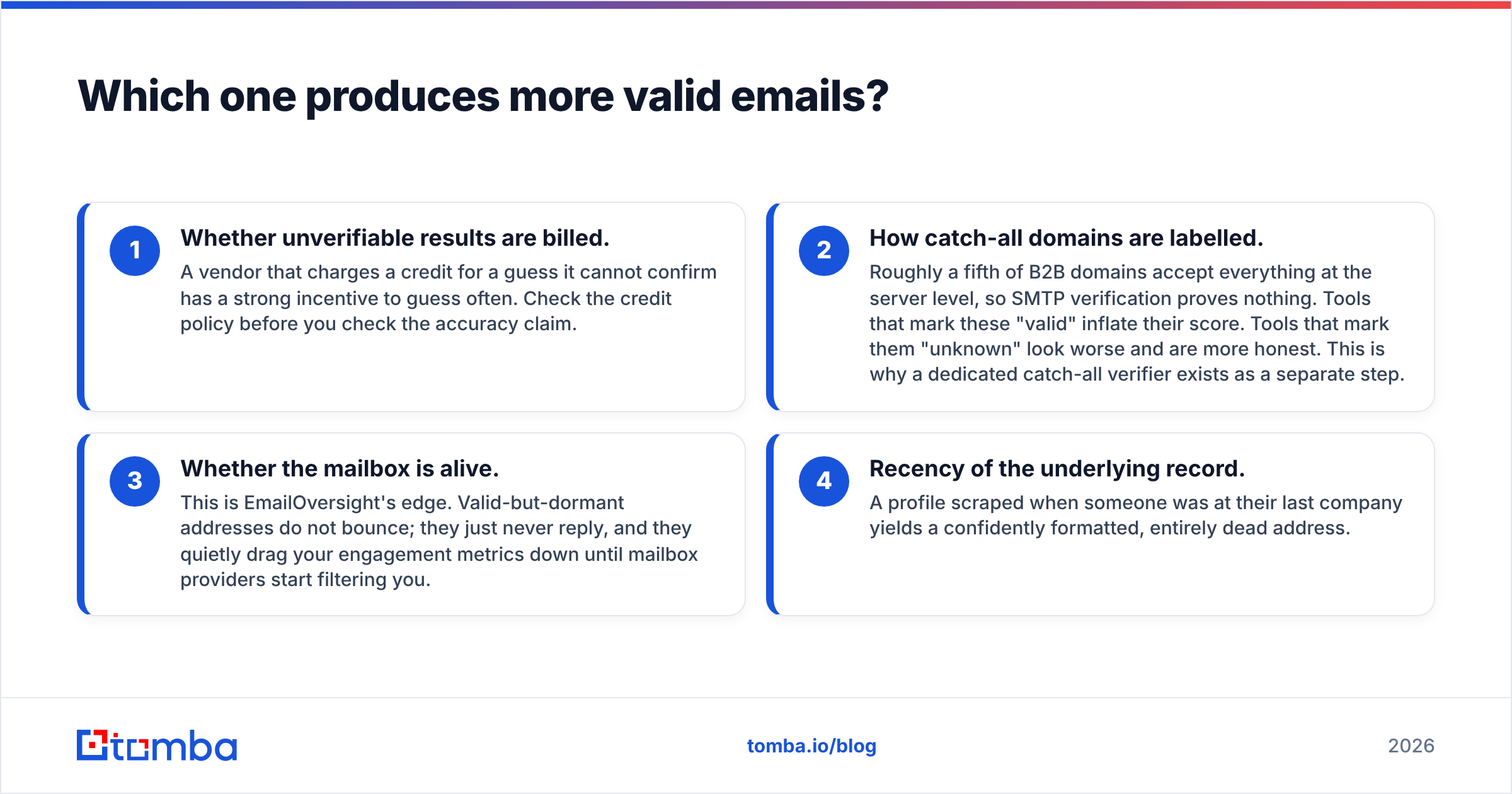
What separates tools in real testing is not the headline number but four things underneath it:
- Whether unverifiable results are billed. A vendor that charges a credit for a guess it cannot confirm has a strong incentive to guess often. Check the credit policy before you check the accuracy claim.
- How catch-all domains are labelled. Roughly a fifth of B2B domains accept everything at the server level, so SMTP verification proves nothing. Tools that mark these "valid" inflate their score. Tools that mark them "unknown" look worse and are more honest. This is why a dedicated catch-all verifier exists as a separate step.
- Whether the mailbox is alive. This is EmailOversight's edge. Valid-but-dormant addresses do not bounce. They just never reply, and they quietly drag your engagement metrics down until mailbox providers start filtering you.
- Recency of the underlying record. A profile scraped when someone was at their last company yields a confidently formatted, entirely dead address.
Point three is the reason a two-tool stack is defensible. FinalScout can find; EmailOversight can tell you whether what it found is worth sending to. The question is whether you want to pay two vendors for that.
What does each one actually cost?#
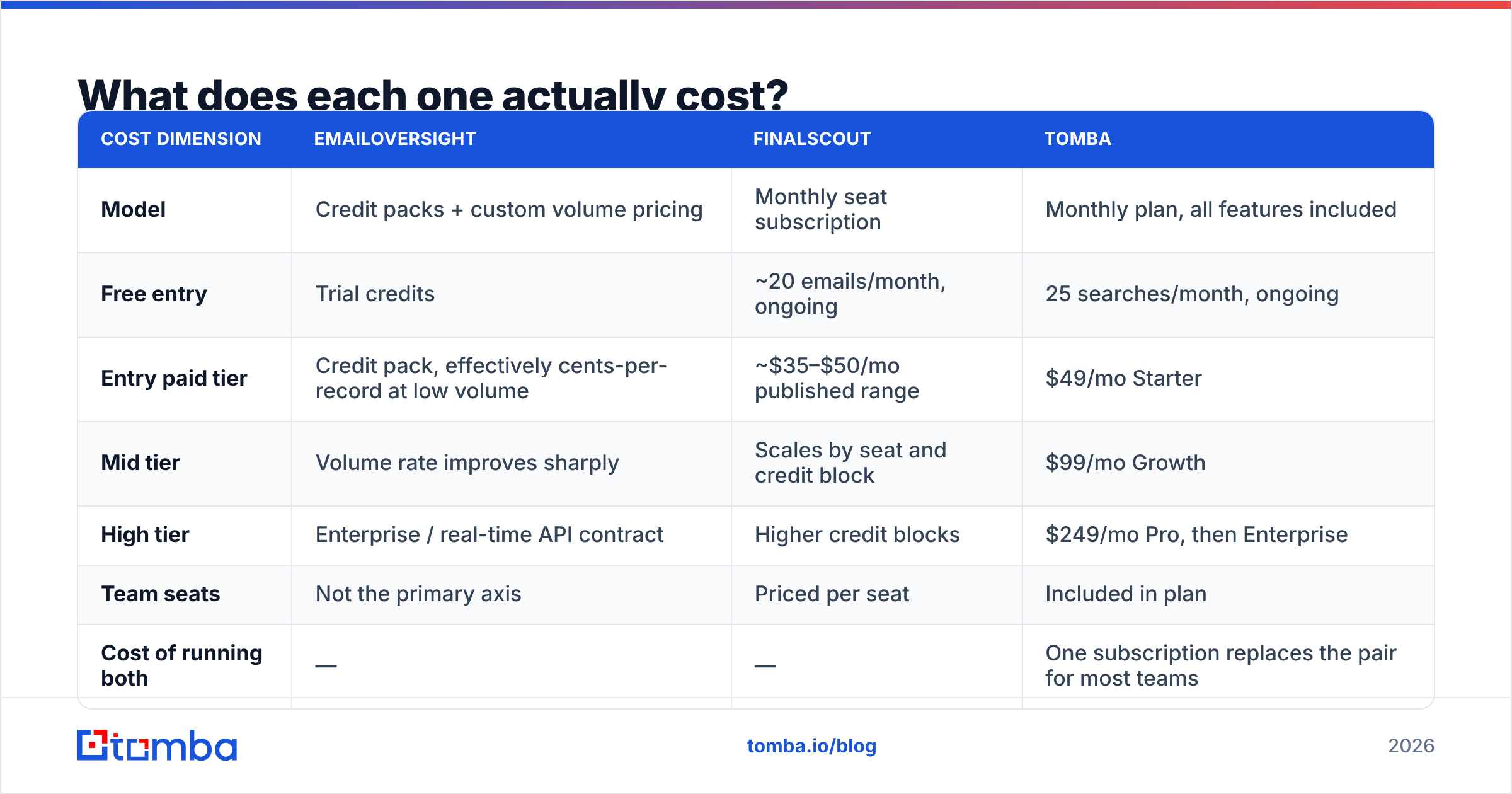
Pricing on both platforms moves. EmailOversight in particular quotes volume-dependent rates rather than a public grid, so treat everything below as a shape rather than a quote. Check both vendor pages before committing.
| Cost dimension | EmailOversight | FinalScout | Tomba |
|---|---|---|---|
| Model | Credit packs + custom volume pricing | Monthly seat subscription | Monthly plan, all features included |
| Free entry | Trial credits | ~20 emails/month, ongoing | 25 searches/month, ongoing |
| Entry paid tier | Credit pack, effectively cents-per-record at low volume | ~$35–$50/mo published range | $49/mo Starter |
| Mid tier | Volume rate improves sharply | Scales by seat and credit block | $99/mo Growth |
| High tier | Enterprise / real-time API contract | Higher credit blocks | $249/mo Pro, then Enterprise |
| Team seats | Not the primary axis | Priced per seat | Included in plan |
| Cost of running both | — | — | One subscription replaces the pair for most teams |
Two cost traps worth naming:
- Seat-based pricing punishes small teams unevenly. A four-person SDR pod on a per-seat LinkedIn tool pays four times for a shared credit need. Plan-based pricing like Tomba's does not scale that way.
- Credit-pack pricing punishes irregular usage. If you verify 200,000 records in March and 3,000 in April, you either overbuy or pay the worst per-unit rate. Ask any credit vendor about rollover before you sign.
Where does each tool break down?#
Every tool in this category has a failure mode. Here are the ones you should budget for.
EmailOversight's limits:
- No prospecting layer. It is genuinely useless if you do not already have a list. Buying it as your first data tool is a sequencing mistake.
- Opaque entry pricing. Volume-negotiated deals favour large senders and make small-team budgeting awkward.
- Overkill for low volume. If you send 2,000 cold emails a month, spam-trap and complainer intelligence is a level of rigour you will not feel.
FinalScout's limits:
- LinkedIn dependency. Platform rate limits, account restrictions, and layout changes all sit upstream of your pipeline. Anything that leans on scraping a platform inherits that platform's risk.
- Thin verification. Found emails need an independent verification pass before they touch a warm sending domain. Skipping it is how a healthy sender reputation turns into a spam-folder problem in three weeks.
- AI copy is a convenience, not an advantage. The generated drafts are template-grade. They will not out-perform a human-written sequence, and every competitor's prospects are receiving structurally identical AI drafts.
- Narrow coverage outside LinkedIn. No LinkedIn profile means no contact — which excludes a lot of SMB, trades, manufacturing, and non-US markets.
EmailOversight vs FinalScout: which should you choose in 2026?#
Match the tool to the bottleneck, not to the review score.
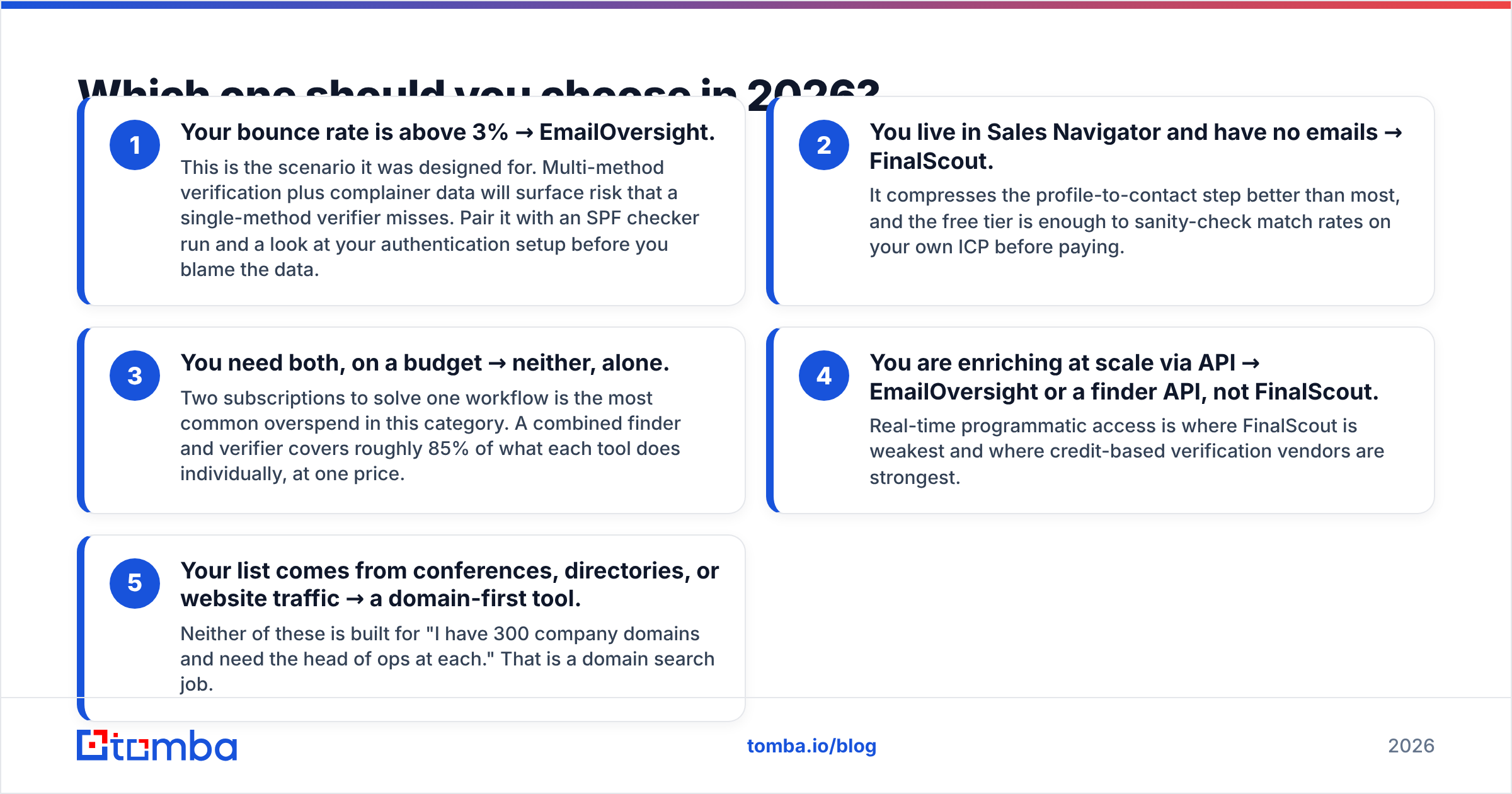
- Your bounce rate is above 3% → EmailOversight. This is the case it was built for. Multi-method checks plus complainer data catch risk a single-method verifier misses.
- You live in Sales Navigator and have no emails → FinalScout. It compresses the profile-to-contact step well. The free tier is enough to test match rates on your own ICP.
- You need both, on a budget → neither, alone. Two subscriptions for one workflow is the most common overspend here. A combined finder and verifier covers most of the job at one price.
- You are enriching at scale via API → EmailOversight or a finder API. Real-time programmatic access is where FinalScout is weakest.
- Your list comes from conferences or directories → a domain-first tool. Neither tool is built for "300 company domains, find the head of ops at each." That is a domain search job.
Before you blame the data, run an SPF checker pass on your sending domain. Bad authentication looks a lot like bad data.
An honest note on adjacent options: if what you actually want is a pre-built list rather than a scrape, a database vendor like BookYourData solves that more directly than either tool here. A purchased, verified list and a scraping subscription are different purchases with different risk profiles. It is worth being clear about which one your quarter needs.

How does a combined finder-plus-verifier change the math?#
The reason the EmailOversight vs FinalScout question keeps resolving to "you need parts of both" is that the market split into finders and verifiers for historical reasons, not technical ones. Modern platforms run both stages in a single call: find the address, verify it, return a confidence grade, and refuse to bill for a result they cannot stand behind.
That collapses the stack in three ways:
- One credit pool. No stranded verification credits in a month when you sourced less than you expected.
- One integration. A single API key instead of a scraper export feeding a hygiene vendor feeding your CRM. Fewer CSV round-trips, fewer places for a list to go stale.
- Verification before billing. When the verifier runs inside the finder, unverifiable guesses can be filtered out rather than sold to you as results.
You give something up. You will not get EmailOversight's spam-trap and complainer intelligence at that price point, and if you send tens of millions of emails a month, that specialist data is worth a specialist contract. Below roughly a million sends a year, it rarely is.
Frequently asked questions#
Is FinalScout's 98% deliverability claim real? It is a vendor-reported figure, likely measured on verified-only results from well-covered domains. Your own match rate on your own ICP is the only number that matters. Run 200 records through the free tier and count.
Can EmailOversight find emails from a name and company? Through its append service, yes — as a batch process. It is not an interactive lookup, and it is not priced or designed as a prospecting tool.
Do I still need a verifier if my finder verifies? Not usually, if the finder verifies at find time and grades catch-alls honestly. You do need a re-verification pass on any list older than about 90 days — B2B contact data decays fast enough that a quarterly bulk verify is cheap insurance.
Which is safer from a compliance standpoint? Both put the obligation on you. Scraped LinkedIn data carries platform-terms exposure that a hygiene vendor does not, so if legal review is a factor, that difference is worth raising early.
Getting the finding and the verification in one step#
If this EmailOversight vs FinalScout comparison left you planning to buy both — pause and price the alternative first. Tomba's Email Finder finds addresses by domain, name, or company and verifies each result before it counts against your quota, with domain search, catch-all handling, bulk processing, and a full API on the same plan. The free tier gives you 25 searches a month to test match rates against your own list. Starter is $49/mo and Growth is $99/mo — usually less than one scraping seat plus one verification pack.
Run your next 100 prospects through it, compare the valid-address count to whatever you are paying for today, and let the numbers pick the stack.
Related guides#
Ready to find emails that actually work?
Join 150,000+ professionals who stopped guessing and started sending. Free credits on signup — no credit card required.
Get the Tomba newsletter
Practical outbound tactics and product updates — once every two weeks.
About the author