How to Write Emails That Get Responses in 2026 (Templates)
Reply rates are down across every outbound channel, but the emails that still get answers share a short list of traits. Here is the anatomy, the data, and four templates you can steal today.
TL;DR
- Emails that get responses are short (50–125 words), single-ask, and written about the recipient's situation — not your product's feature list.
- Deliverability is upstream of copy. A brilliant email in the spam folder has a 0% reply rate, so verify addresses and authenticate your domain before you touch the subject line.
- The highest-leverage line is not the subject — it's the first sentence, because that's what shows in the preview pane next to it.
- Personalization only pays when it's relevant, not when it's merely accurate. "Saw you're VP Sales at Acme" earns nothing.
- Follow-ups produce roughly half of all replies in most sequences. Two to four spaced-out touches beat one perfect email.
What actually makes an email get a response?#
A reply happens when the reader concludes, in under eight seconds, that answering you is cheaper than ignoring you. That's the whole mechanic. Everything below is a way of lowering the cost of a reply or raising the cost of silence.
Break it into four gates. An email has to clear all four in order, and most cold emails die at gate one or two:
- Delivery — does it land in the inbox at all? Invalid addresses, missing SPF/DKIM/DMARC records, and cold domains sending at volume all route you to spam. Google and Yahoo's bulk sender requirements made this non-negotiable, not a nice-to-have.
- The open decision — the reader scans sender name, subject, and preview text as one unit. Three signals, about two seconds.
- The read decision — the first two lines either sound like a person who did homework, or like a template. Template detection is now near-instant for anyone in a buying role.
- The reply decision — is the ask small, specific, and answerable in one line? "Worth a 30-min discovery call?" is a bigger ask than it looks. "Are you the right person for this, or should I ask someone else?" is a one-word reply.
Most teams obsess over gate two and neglect gates one and four. That's backwards. You can double reply rate faster by cleaning your list and shrinking your ask than by A/B testing subject lines for a month.
Why do most cold emails get ignored?#
Because they're indistinguishable from the other 40 that arrived that week. Here are the failure patterns that show up in almost every underperforming sequence:
- The résumé opener. "We're a leading platform trusted by 3,000+ companies…" Nobody replies to your credentials. They reply to their own problem.
- The fake personalization token.
{{first_name}}, I loved your post about {{topic}}reads as automation the moment the topic is generic. If your merge field could apply to 500 prospects, it isn't personalization. - The multi-ask. A demo request, a calendar link, a PDF download, and a "let me know your thoughts" in the same 200 words. Every additional ask splits attention and lowers response.
- The wrong recipient. A perfectly written email to someone who does not own the problem gets forwarded at best, deleted at worst.
- The unverified address. Hard bounces above roughly 2–3% damage sender reputation for every subsequent send, including the good ones.
That last point deserves emphasis. Bounce damage is cumulative and invisible — you don't see the emails that silently went to spam because of last month's dirty list. Running your list through an email verifier before a campaign is the least glamorous and highest-ROI step in the entire process.
What does a reply-worthy email look like, line by line?#
Six components, in order. Each one has a job, and if a line isn't doing one of these jobs, cut it.
- Subject line (3–5 words, lowercase-ish, no hype). "question about your SDR ramp" outperforms "Unlock 3x Pipeline Growth 🚀" in almost every test we've seen reported. Aim for something that could plausibly be from a colleague. If you want a sanity check before sending, run candidates through a subject line tester rather than guessing.
- Opening line (one sentence, about them). This is your real subject line because it appears in the preview. Reference a trigger event: a job posting, a funding round, a product launch, a tech-stack change, a conference talk. The test is whether the sentence would be false if you sent it to a different company.
- Relevance bridge (one or two sentences). Connect the trigger to a problem that people in their role actually have. Not "we help companies like yours" — name the specific friction. "Teams hiring four AEs at once usually hit a territory-mapping mess by month two" is a bridge. "We optimize sales efficiency" is not.
- Proof (one line, quantified, comparable). A single specific number from a similar-sized company in a similar segment. One line. Not a case-study paragraph, not a customer logo wall.
- The ask (one sentence, low-friction). The best cold asks are questions that can be answered with a word or a name. Interest-based asks ("worth a look?") outperform time-based asks ("do you have 15 minutes Thursday at 2?") at the first touch, because the second one asks for a commitment before you've earned it.
- Signature (plain, human, no banner images). Image-heavy signatures raise spam risk and add nothing. If you need one, generate a clean text-first block with an email signature generator and skip the tracking pixels on cold sends.
Total: 50–125 words. If you're over 150, you're writing a brochure.
Which email style actually performs best?#
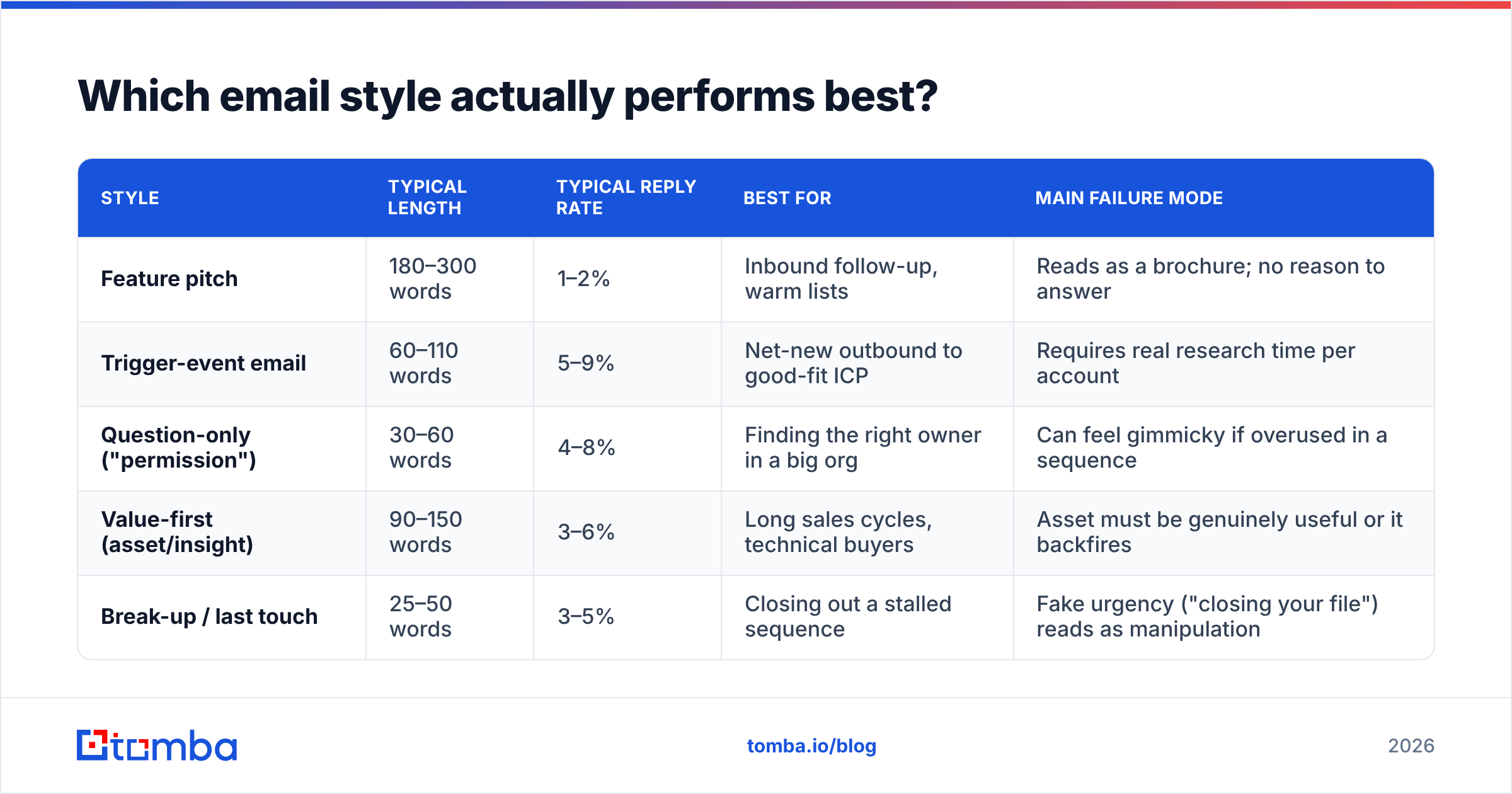
The four dominant cold-email archetypes, compared on the dimensions that matter. Reply-rate figures are directional ranges from published outbound benchmarks and vendor-reported aggregates — treat them as relative rankings, not guarantees for your market.
| Style | Typical length | Typical reply rate | Best for | Main failure mode |
|---|---|---|---|---|
| Feature pitch | 180–300 words | 1–2% | Inbound follow-up, warm lists | Reads as a brochure; no reason to answer |
| Trigger-event email | 60–110 words | 5–9% | Net-new outbound to good-fit ICP | Requires real research time per account |
| Question-only ("permission") | 30–60 words | 4–8% | Finding the right owner in a big org | Can feel gimmicky if overused in a sequence |
| Value-first (asset/insight) | 90–150 words | 3–6% | Long sales cycles, technical buyers | Asset must be genuinely useful or it backfires |
| Break-up / last touch | 25–50 words | 3–5% | Closing out a stalled sequence | Fake urgency ("closing your file") reads as manipulation |
Two things stand out. First, shorter styles win — every high-performing archetype is under 150 words. Second, the trigger-event email's advantage comes entirely from research, which is exactly the part teams cut when they scale. That's the central tension of outbound: the thing that makes emails work is the thing that doesn't scale cleanly.
The resolution is not "personalize everything" or "automate everything." It's tiering. Reserve deep research for your top 50 accounts, use segment-level relevance (same industry, same role, same trigger type) for the next 500, and don't send at all to the tail.
Does personalization still work in 2026?#
Yes — but the bar moved. Surface-level tokens are now a negative signal, because buyers have learned that name-and-company merge fields are free. What still works is relevance, which is a different thing.
Test any personalized line against this question: could I have written this sentence without knowing anything specific about this company? If yes, delete it.
Three tiers, in ascending order of effectiveness:
- Tier 1 — Identity personalization. Name, company, title. Costs nothing, earns nothing. Assume it's table stakes and invisible.
- Tier 2 — Segment personalization. Role-specific problems, industry-specific language, stage-specific pain ("Series A to B is where most RevOps stacks break"). Scales reasonably. This is where most teams should live.
- Tier 3 — Account personalization. A specific observed trigger with a specific implication. Job post for three enterprise AEs, new VP of Marketing, a pricing page change, a migration announced in an engineering blog post. Doesn't scale, converts best.
Research from HubSpot's sales team and revenue-intelligence platforms like Gong has repeatedly pointed the same direction: specificity in the opening beats flattery, and questions beat statements at the close.
Should you use AI to write cold emails?#
Use it for the parts that are mechanical, not for the parts that are judgment.
AI is genuinely good at: rewriting a 200-word email to 90 words, generating 10 subject-line variants, adapting one proven template across five industries, catching passive voice and hedging language, and drafting follow-ups from a thread. It is bad at: knowing what your buyer actually cares about, judging whether a trigger event is meaningful, and resisting the pull toward generic enthusiasm.
The practical rule: AI drafts, humans decide the angle. If a model writes the opening line — the one carrying the relevance — you've automated the only part that had a chance of earning a reply.
There's also a volume trap. AI makes it cheap to send more, and sending more is precisely what wrecks deliverability. If your reply rate is 2%, the answer is not to triple volume. Tripling a broken sequence gets you a burnt domain and the same number of meetings.
How many follow-ups should you send?#
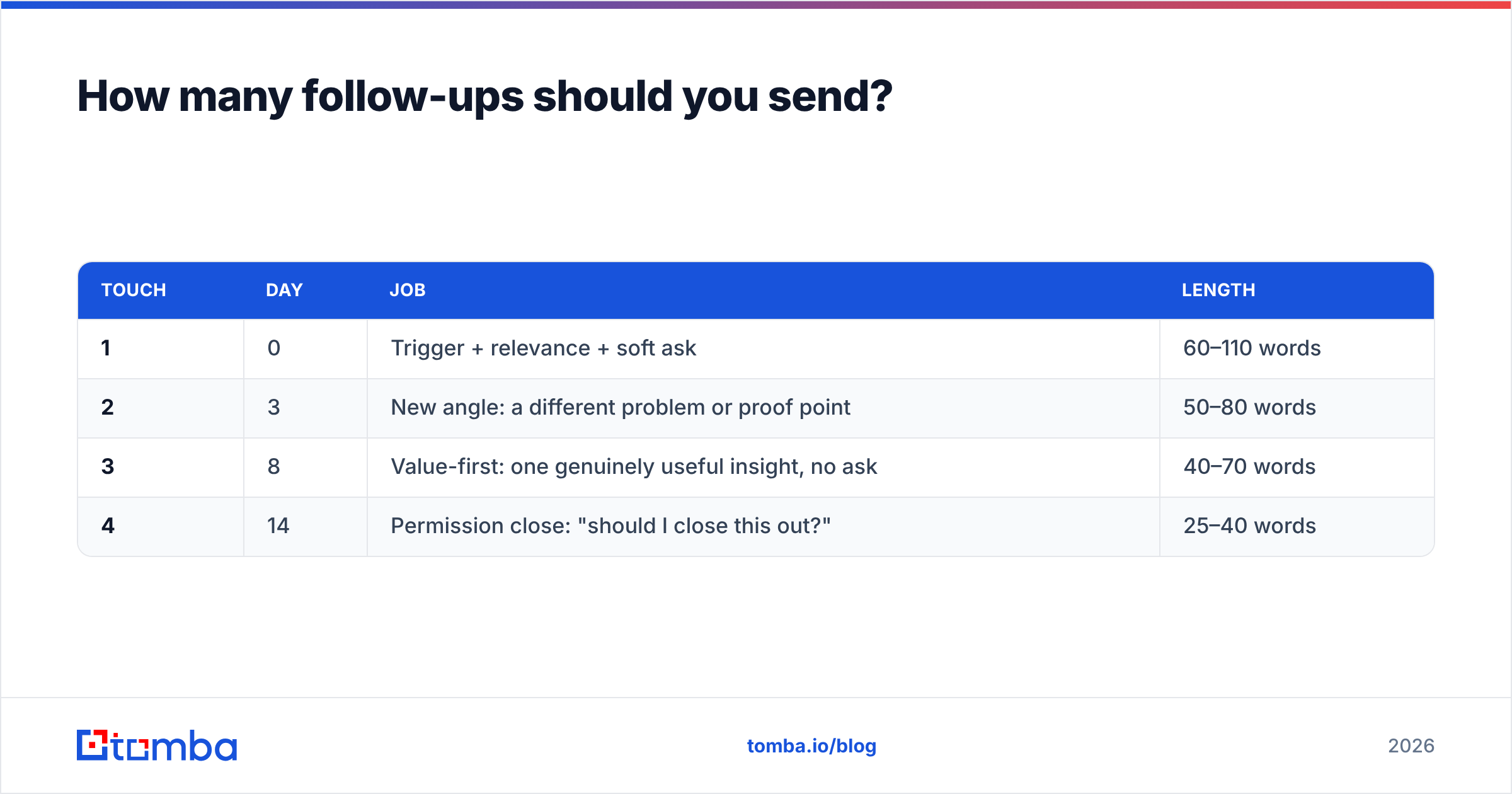
Three to four total touches, spaced 3–4 business days apart, then stop. In most published sequence data, the first email produces well under half the total replies — the rest come from touches two through four.
But follow-ups only work if each one adds something. A sequence of "just bumping this up," "checking in," and "circling back" is three chances to annoy someone. Give each touch a distinct job:
| Touch | Day | Job | Length |
|---|---|---|---|
| 1 | 0 | Trigger + relevance + soft ask | 60–110 words |
| 2 | 3 | New angle: a different problem or proof point | 50–80 words |
| 3 | 8 | Value-first: one genuinely useful insight, no ask | 40–70 words |
| 4 | 14 | Permission close: "should I close this out?" | 25–40 words |
The fourth touch performs surprisingly well because it flips the cost calculation. Silence now means losing the option, and people reply to preserve optionality.
What are the templates?#
Template 1 — Trigger event (best all-round performer)
Subject: your 3 enterprise AE roles
Hi Dana — saw the three enterprise AE postings on the Acme careers page this week.
When teams add that much capacity at once, territory data usually falls behind by month two. One RevOps lead at a similar-stage company told us they lost about six weeks of ramp to bad account records before fixing the source.
Is territory data something your team owns, or is that with ops?
— Ben
Template 2 — Permission / right-person
Subject: quick routing question
Hi Sam — are you the right person at Northwind for outbound data quality, or should I be talking to someone in RevOps?
Happy to send one paragraph on what we do if it's you; happy to go away if it isn't.
— Ben
Template 3 — Value-first (touch 3)
Subject: re: your 3 enterprise AE roles
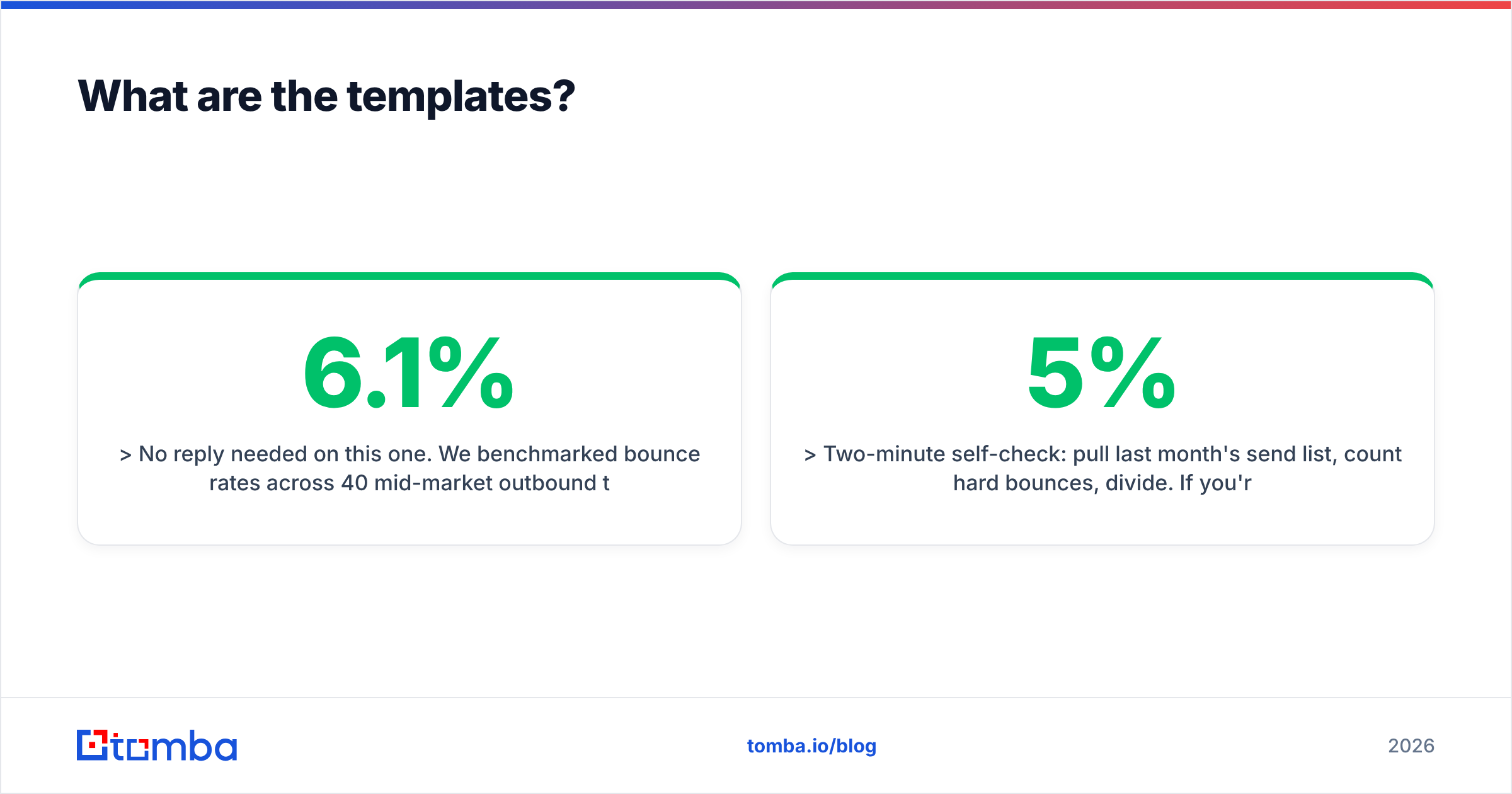
No reply needed on this one. We benchmarked bounce rates across 40 mid-market outbound teams last quarter — median was 6.1%, and everyone above 8% saw open rates drop the following month.
Two-minute self-check: pull last month's send list, count hard bounces, divide. If you're over 5%, list hygiene is costing you more than copy is.
— Ben
Template 4 — Permission close (touch 4)
Subject: closing this out?
Hi Dana — I've sent a few notes about territory data and haven't heard back, which usually means it's not a priority this quarter. Totally fine.
Want me to close this out, or check back in Q4?
— Ben
Notice what's absent from all four: no calendar links, no attachments, no "hope this finds you well," no bold claims, no more than one question per email.
How do you know it's working?#
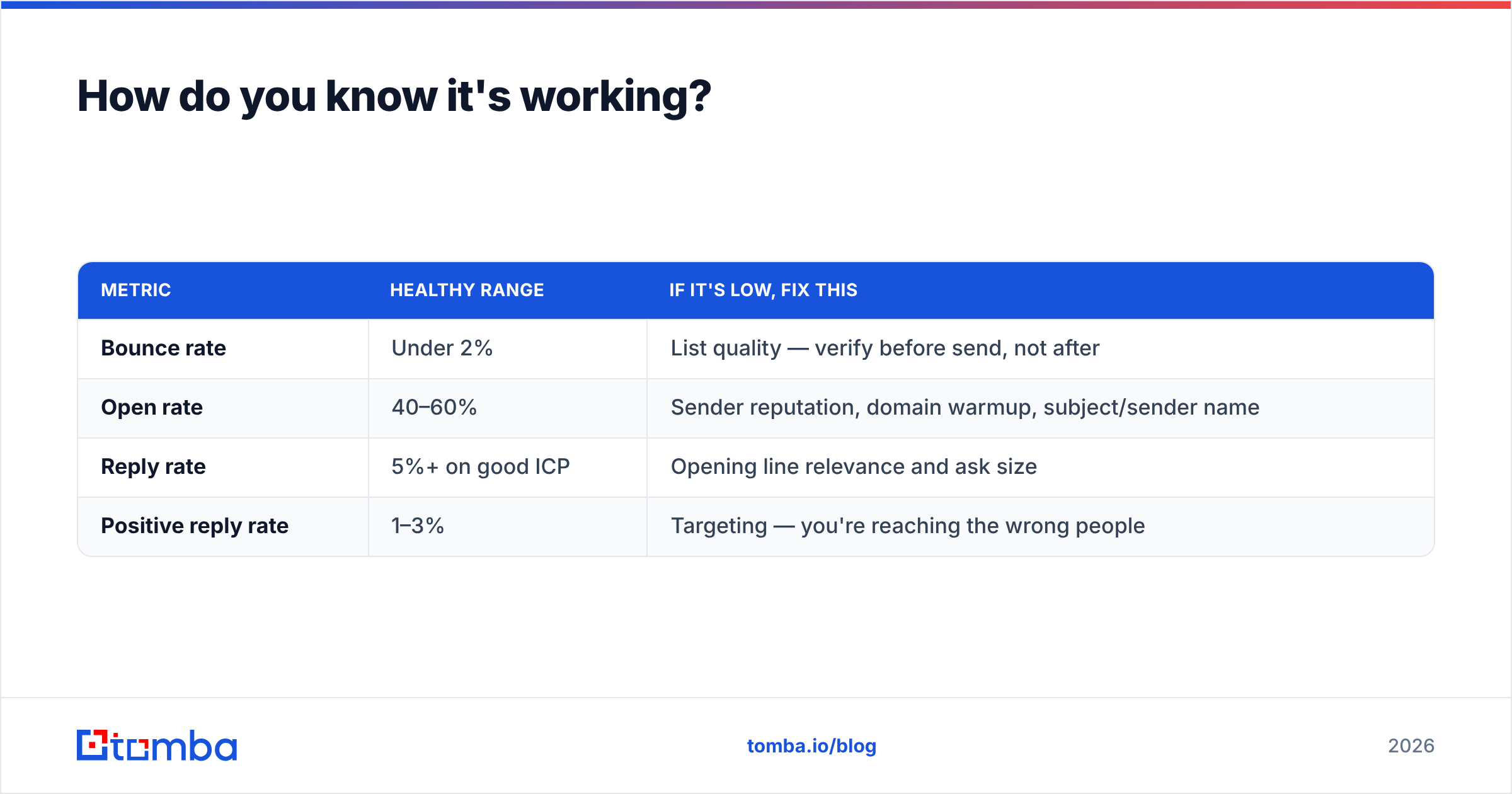
Track four numbers, in this order. Fixing them out of order wastes time.
| Metric | Healthy range | If it's low, fix this |
|---|---|---|
| Bounce rate | Under 2% | List quality — verify before send, not after |
| Open rate | 40–60% | Sender reputation, domain warmup, subject/sender name |
| Reply rate | 5%+ on good ICP | Opening line relevance and ask size |
| Positive reply rate | 1–3% | Targeting — you're reaching the wrong people |
A 60% open rate with a 1% reply rate is a copy problem. A 20% open rate with an 8% reply-among-openers is a deliverability problem. Diagnose before you rewrite. For definitions and benchmarks on the middle metric, see the breakdown of response rate in the glossary.
One caution on open tracking: pixel-based open rates have been unreliable since Apple Mail Privacy Protection, and they inflate further with corporate security scanners. Treat opens as a weak directional signal and let replies be the scoreboard.
Where should you start?#
If you only change three things this quarter: cut every email under 125 words, replace your opening line with a company-specific observation, and verify your list before every send. Those three moves reliably move reply rate more than any subject-line experiment.
The last one is where most teams have the fastest win available. You can't write emails that get responses if a chunk of your list never receives them. Tomba's Email Finder resolves verified business addresses from a name and domain, flags catch-all domains before they burn your reputation, and connects to the CRM and sequencer you already run — so the copy you worked on actually reaches a human. Start on the free tier (25 searches/month), or check Tomba pricing — Starter is $49/mo — when you're ready to run real volume.
Related guides#
Ready to find emails that actually work?
Join 150,000+ professionals who stopped guessing and started sending. Free credits on signup — no credit card required.
Get the Tomba newsletter
Practical outbound tactics and product updates — once every two weeks.
About the author