Engage Pricing Reviews Pros and Cons: B2B Buyer Guide 2026
A neutral breakdown of Engage pricing, what reviewers actually complain about, and where the real costs hide — plus how it stacks up against email-first stacks in 2026.
Every roundup of engage pricing reviews pros and cons hits the same wall: there is no single price. Seat minimums, annual terms, and data sold on the side decide what you actually pay. This guide covers list prices, the add-ons that surface later, and the point where a leaner stack wins.
TL;DR
- "Engage" pricing is rarely one number. Sales engagement platforms (Salesloft Engage, Outreach Engage, Reply.io, Apollo's engagement tier) charge per seat, per month. Annual terms and seat minimums set your real cost, not the sticker price.
- Expect $75–$165 per seat per month at list for mid-tier platforms. Enterprise tiers pass $200 once dialer, conversation intelligence, and API access are bundled.
- The top complaint is not the price. It's the mismatch: teams buy 20 seats, use 9, and pay for the other 11 all year.
- Data is a separate line item. These tools send email well. They rarely find and verify it well. A dedicated email finder at $49/mo does more per dollar than another engagement seat.
- Best fit: teams of 8+ SDRs running multi-touch sequences with a manager who needs reporting. Worst fit: 1–3 person teams who need contact data more than cadence software.
What does "Engage" actually mean in pricing terms?#
Start here, because the word is overloaded. "Engage" is a product name at Salesloft, a tier at Outreach, and a module inside Apollo. It is also a generic category label ("sales engagement") that analysts like Gartner use for the whole segment.
All of them sell the same core: a sequencing engine that fires email, calls, LinkedIn steps, and tasks on a schedule, tracks replies, and reports on it. Think of it as an air traffic control tower for outbound. It doesn't build the planes (your data) or write the flight plan (your messaging). It just makes sure nothing collides and everything departs on time.
That distinction matters for pricing. Engagement platforms charge for seats. Data platforms charge for records. Confusing the two is the single most expensive mistake in this category.
How is Engage priced in 2026?#
Engagement vendors have converged on a similar structure:
- Per-seat, per-month, billed annually. Monthly billing, when offered at all, carries a 15–25% premium.
- Seat minimums. Most enterprise-tier contracts start at 5–10 seats. Some start at 20.
- Tier gating on the features you actually wanted. Dialer, conversation intelligence, advanced reporting, and API access sit in the top tier far more often than not.
- Add-on modules. Call recording minutes, AI writing credits, and CRM sync depth are frequently separate SKUs.
- Data sold separately. Contact records, verified emails, and phone numbers are usually not included. When they are, the bundled quantity runs out in week two.
- Annual uplift clauses. A 5–10% renewal increase written into the original order form is standard. First-time buyers rarely negotiate it.
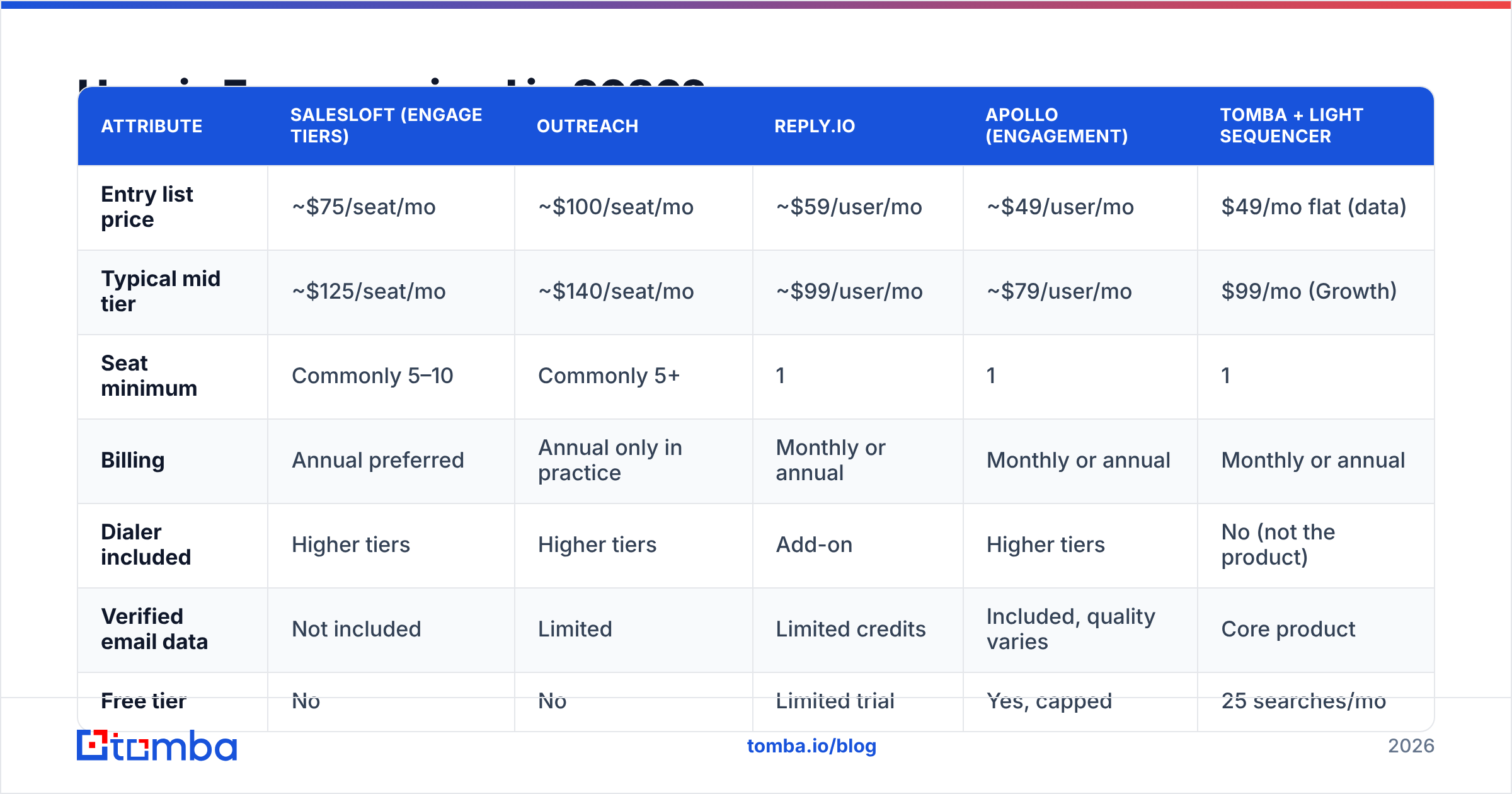
Here's how the tiers typically compare across the platforms buyers shortlist against each other:
| Attribute | Salesloft (Engage tiers) | Outreach | Reply.io | Apollo (engagement) | Tomba + light sequencer |
|---|---|---|---|---|---|
| Entry list price | ~$75/seat/mo | ~$100/seat/mo | ~$59/user/mo | ~$49/user/mo | $49/mo flat (data) |
| Typical mid tier | ~$125/seat/mo | ~$140/seat/mo | ~$99/user/mo | ~$79/user/mo | $99/mo (Growth) |
| Seat minimum | Commonly 5–10 | Commonly 5+ | 1 | 1 | 1 |
| Billing | Annual preferred | Annual only in practice | Monthly or annual | Monthly or annual | Monthly or annual |
| Dialer included | Higher tiers | Higher tiers | Add-on | Higher tiers | No (not the product) |
| Verified email data | Not included | Limited | Limited credits | Included, quality varies | Core product |
| Free tier | No | No | Limited trial | Yes, capped | 25 searches/mo |
| Best for | 15+ seat teams | Enterprise RevOps | SMB sequencing | All-in-one starters | Data layer for any stack |
Prices move. Treat the table as the shape of the market, not a quote. Every vendor here negotiates, and most will discount 10–30% at quarter end if you hold a competing quote.

Engage pricing reviews pros and cons: what buyers praise#
Pull the review corpus on G2 and Capterra and the positive themes are consistent:
Sequence reliability. Multi-step cadences fire when they're supposed to. For a team sending 200+ touches a day, that is not trivial. Homegrown scripts and Zapier chains break silently. Engagement platforms mostly don't.
Manager visibility. Rep-level activity, step-level reply rates, and cadence A/B comparisons sit in one dashboard. Sales leaders rate this the highest-value feature, above anything the reps themselves use.
CRM write-back. Two-way sync with Salesforce and HubSpot logs every touch against the right record. Teams that have rebuilt outbound activity from email logs will pay real money to never do it again.
Task orchestration. Reps stop deciding what to do next. The platform serves a queue. Ramp time for new SDRs drops measurably, and several reviewers cite going from six weeks to three.
Deliverability guardrails. Sending limits, warmup integration, and inbox rotation are now built in rather than bolted on. That matters more since the 2024 Google and Yahoo bulk-sender rules tightened enforcement. If you still manage this by hand, run your domain through an SPF checker before you blame the platform.
What do reviewers complain about?#
The negatives are just as consistent, and they cluster around money.
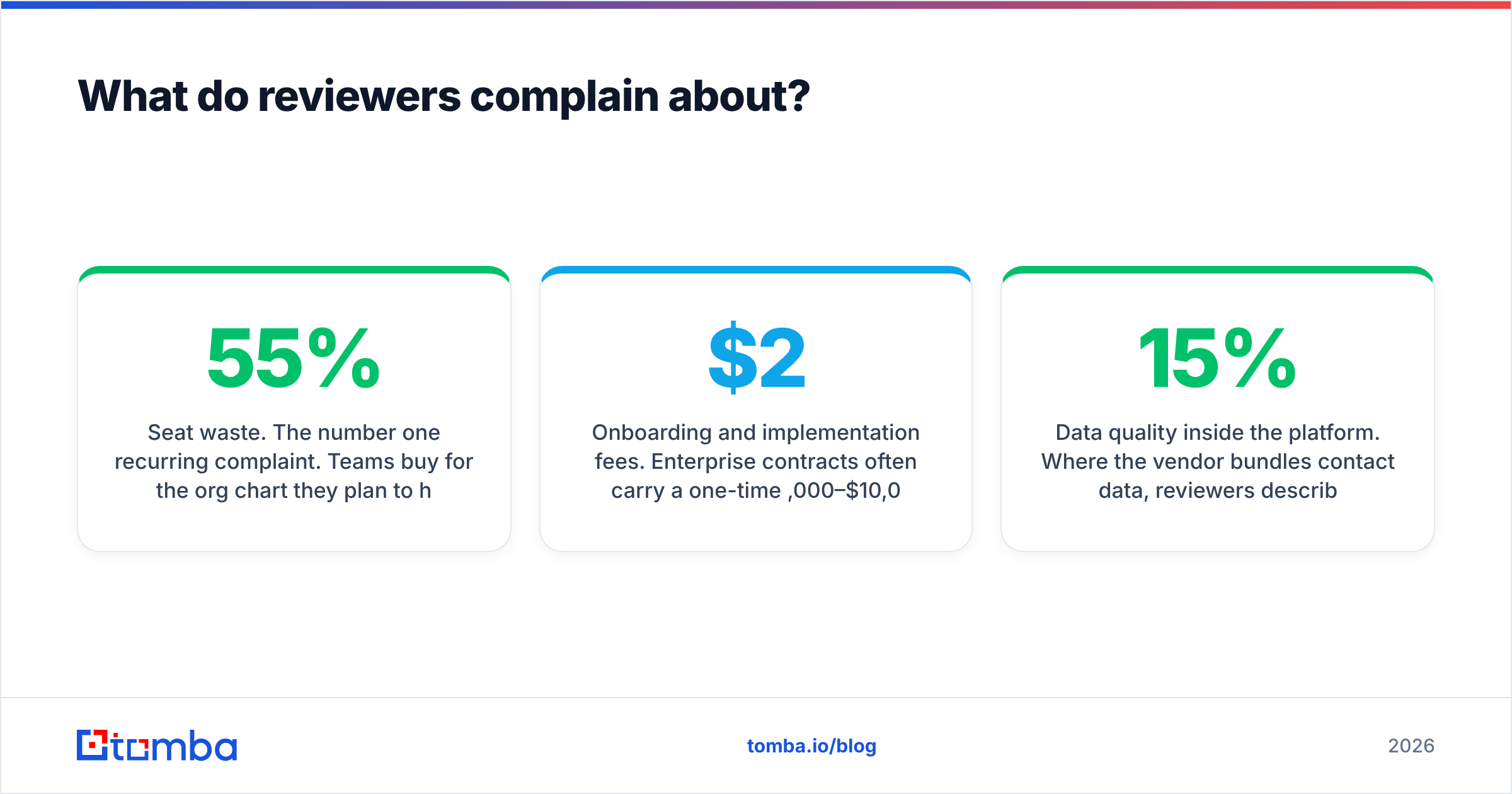
Seat waste. This is the number one complaint. Teams buy for the org chart they plan to have, not the one they have. Reviewers describe paying for 20 seats while 9 are active. That 55% waste rate turns a $125/seat platform into an effective $278 per active user.
Annual lock-in with no downgrade path. Mid-term seat reduction is almost never permitted. If you cut headcount in month four, you pay through month twelve anyway.
Tier-gated basics. Buyers repeatedly report that API access, custom reporting fields, or the dialer they demoed live in a tier above the one they signed. This is the most cited source of "hidden cost" in review text.
Onboarding and implementation fees. Enterprise contracts often carry a one-time $2,000–$10,000 implementation line. It's negotiable. It's rarely negotiated.
Data quality inside the platform. Where the vendor bundles contact data, reviewers report bounce rates of 8–15% on unverified records. That's the trap: you bought a sending tool and inherited a data problem. An email verifier run before import fixes this for a fraction of what an upgraded data tier costs.
Support tiers. Below enterprise, support is email-only with multi-day response times at several vendors. Reviewers who escalate deliverability incidents find this especially painful.
What are the real hidden costs?#
Budget the line items that never appear in the pricing page hero:
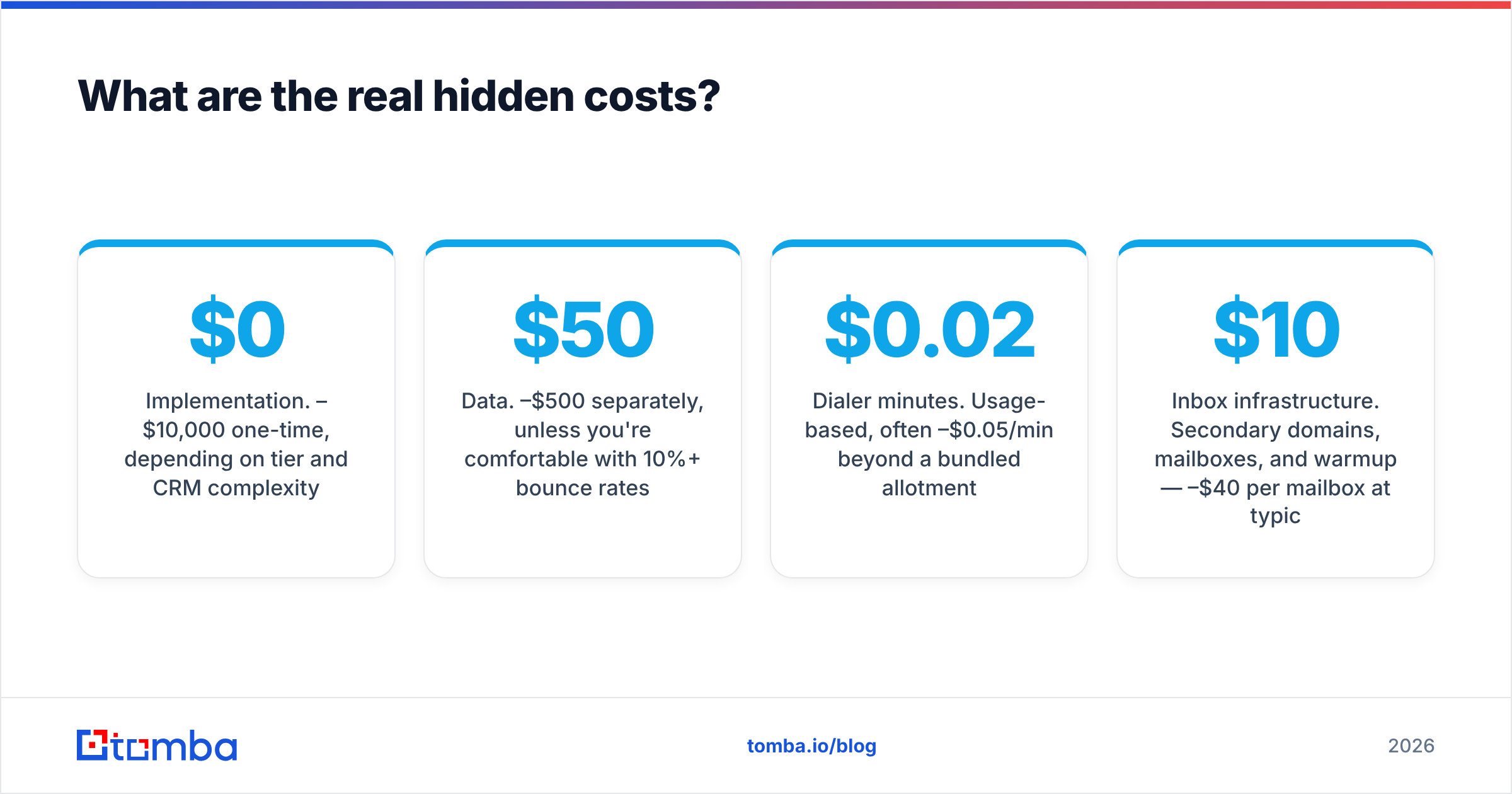
- Implementation. $0–$10,000 one-time, depending on tier and CRM complexity.
- Data. $50–$500/mo separately, unless you're comfortable with 10%+ bounce rates.
- Dialer minutes. Usage-based, often $0.02–$0.05/min beyond a bundled allotment.
- Inbox infrastructure. Secondary domains, mailboxes, and warmup — $10–$40/mo per mailbox at typical providers.
- Admin time. Someone owns sequence hygiene, CRM field mapping, and reporting. That's 5–10 hours a week at scale, which is real payroll.
- Renewal uplift. 5–10% annually, compounding.
Run the math on a 10-seat team at $125/seat. License is $15,000/year. Add roughly $3,000 in data, $1,200 in inbox infra, and a $4,000 implementation in year one. Your $15k platform is a $23k program. That's not an argument against buying it. It's an argument against budgeting only the sticker price.
Is Engage worth it compared to a leaner stack?#
It depends on team size and where your bottleneck actually is.
Buy the engagement platform when: you have 8+ reps, a sales manager who reports on activity, a CRM that must stay authoritative, and cadences complex enough that a spreadsheet genuinely fails. Above roughly 10 seats, the coordination value exceeds the cost.
Skip it when: you have 1–4 people, your bottleneck is "we don't have enough good contacts," and your sequences are three emails long. At that size, a light sender plus a strong data layer beats a full engagement seat on every dollar-per-meeting measure.
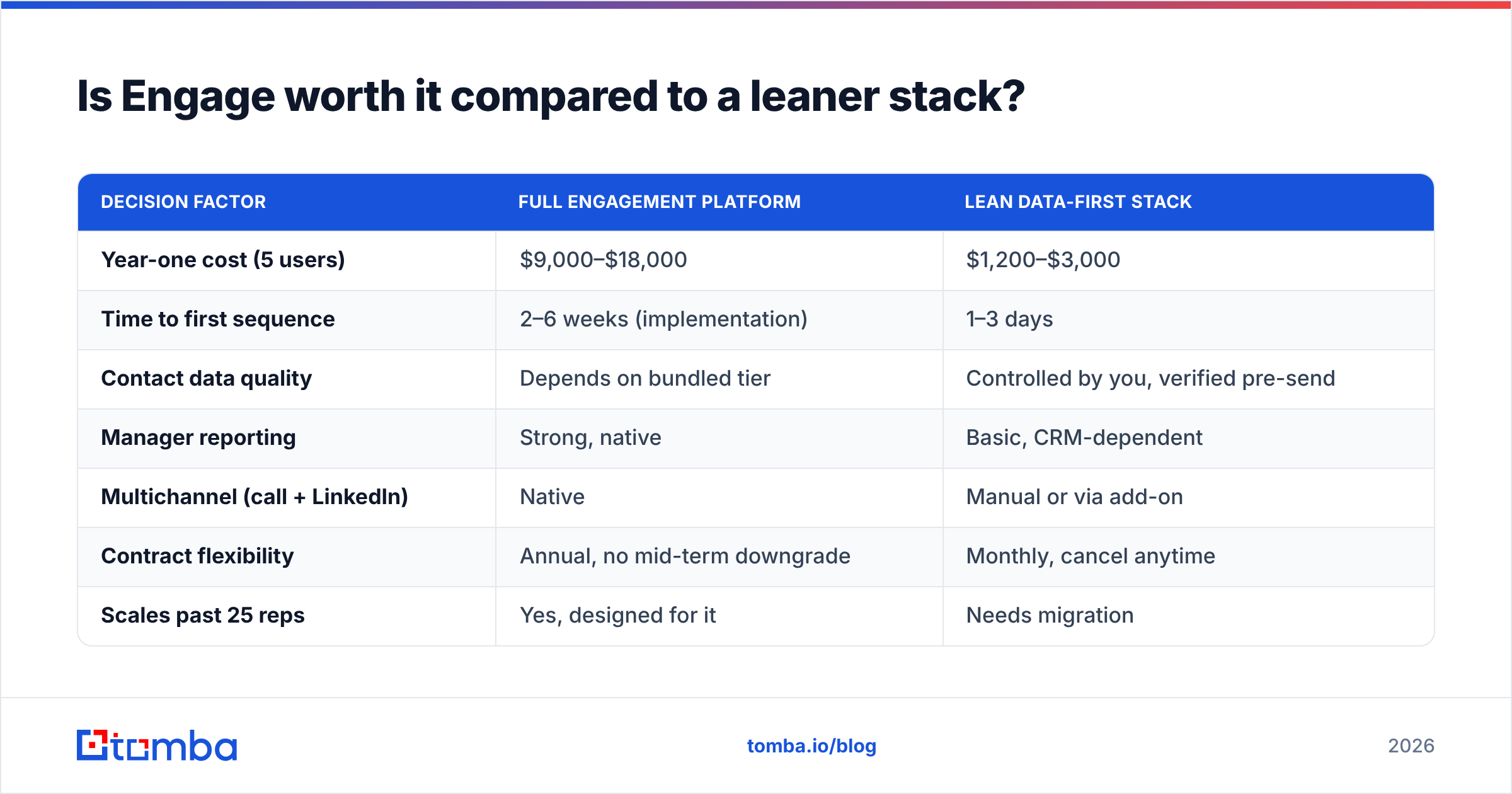
Here's the honest comparison of the two approaches:
| Decision factor | Full engagement platform | Lean data-first stack |
|---|---|---|
| Year-one cost (5 users) | $9,000–$18,000 | $1,200–$3,000 |
| Time to first sequence | 2–6 weeks (implementation) | 1–3 days |
| Contact data quality | Depends on bundled tier | Controlled by you, verified pre-send |
| Manager reporting | Strong, native | Basic, CRM-dependent |
| Multichannel (call + LinkedIn) | Native | Manual or via add-on |
| Contract flexibility | Annual, no mid-term downgrade | Monthly, cancel anytime |
| Scales past 25 reps | Yes, designed for it | Needs migration |
If you're weighing specific vendors, read the neutral breakdowns of a Salesloft alternative, an Outreach.io alternative, and a Reply.io alternative side by side first. The demo will not tell you what tier the feature lives in.
How do you negotiate a better Engage price?#
Four moves that reliably work, in rough order of leverage:
- Time it. Sign in the last two weeks of a quarter, ideally Q4. Discounts of 15–30% are routine when a rep needs the number.
- Buy fewer seats than you plan to use. Start at your current active headcount. Negotiate a pre-agreed expansion rate in writing instead of pre-buying growth you haven't hired yet.
- Get the uplift capped. Ask for renewal increases capped at 3–5%, or a flat two-year rate. Vendors concede this more readily than a headline discount, because it doesn't hit this year's number.
- Unbundle the data. Decline the contact-data tier and source it yourself. You get better accuracy, monthly flexibility, and a smaller platform invoice. Peer vendors like BookYourData have built solid businesses on exactly this premise. Buyers increasingly want data and sending decoupled, and both sides of that split are healthier for it.
Also check whether your team needs the seat at all. Managers, marketers, and part-time contributors often need read-only reporting, not a full license. Ask for viewer seats. Several vendors have them and none advertise them.
What should you check before signing?#
Run this checklist against any engagement quote:
- Seat minimum and mid-term reduction rights — get downgrade language in writing or accept that you can't.
- Which tier holds the API — if you plan any automation, confirm before signing, not after.
- Bounce guarantee on bundled data — if the vendor won't state a number, assume 10%+.
- Deliverability defaults — sending caps, inbox rotation, and whether the platform enforces them or just suggests them.
- Data export on exit — can you take your sequences, replies, and activity history with you?
- Sandbox or pilot — a 30-day paid pilot on 3 seats beats a 12-month guess.
And run a sample list through verification before your first send. Nothing torches sender reputation faster than a fresh domain sending to a list you never checked.
The verdict#
Across engage pricing reviews pros and cons threads, the same pattern shows up. These platforms are priced fairly for what they do, which is coordinate a team's outbound at scale. They are mispriced for what buyers hope they do, which is fix a pipeline problem. Most of the time, that problem is a data problem. The reviews bear this out. Complaints skew toward seats bought and never used, tiers that gated the feature that closed the demo, and bundled contact data that bounced.
If you have the team size to justify the coordination layer, buy it, cap the uplift, and start at active headcount. If you don't, build the cheaper stack first and revisit in two quarters.
Either way, fix the data layer before you scale the sending layer. Tomba's Email Finder starts free at 25 searches a month, with Starter at $49/mo and Growth at $99/mo. Full Tomba pricing is public, monthly, and cancellable, with no seat minimums and no implementation fee. Find and verify the contacts first. Then decide how much sequencing software you actually need.
Related guides#
Ready to find emails that actually work?
Join 150,000+ professionals who stopped guessing and started sending. Free credits on signup — no credit card required.
Get the Tomba newsletter
Practical outbound tactics and product updates — once every two weeks.
About the author