Enrow vs Leadsforge: Which B2B Email Tool Wins in 2026?
Enrow verifies emails others mark risky. Leadsforge finds leads through a chat interface. They solve different halves of the same problem — here's which one your pipeline actually needs, and what it costs.
Enrow vs Leadsforge comes up in every cold email stack thread. Here is the short answer: they are not rivals. Enrow cleans lists. Leadsforge builds them. Pick the one that fixes the half of your pipeline that hurts.
TL;DR
- Enrow is an email verification specialist. Its pitch is catch-all resolution — the ~30% of B2B domains that generic verifiers return as "unknown" or "risky."
- Leadsforge is an AI-chat lead generation tool. You describe your ICP in plain words and it builds a list. Verification is a bundled step, not the product.
- These two are not direct substitutes. Enrow sits at the end of your data pipeline. Leadsforge sits at the start.
- Have lists and a bounce problem? Enrow. Have neither lists nor a sourcing motion? Leadsforge. Need both plus an API? One platform beats stitching two vendors together.
- Budget reality: Enrow plus a separate finder usually costs $80–$200 a month at mid volume. Consolidated tools like Tomba start at $49/mo for finding and verification together.
Enrow vs Leadsforge: what does each tool actually do?#
Both show up in "cold email stack" listicles. But they fill different slots.
Enrow (enrow.io) is a French email verification service. Its edge is catch-all handling. A catch-all domain accepts mail at any address. Most verifiers hit one, shrug, and return "unknown." Enrow claims to turn a large share of those into clear valid or invalid calls. It reads behavioral signals instead of leaning on the SMTP handshake alone. It sells a finder too, but verification is the story.
Leadsforge (leadsforge.ai) starts at the other end. There is no filter-heavy search UI. You type "marketing directors at Series B SaaS companies in the Nordics with 50–200 employees" into a chat box. It hands back a list. The AI-first interface is the product. Data comes from an aggregated pool, and verification runs before export.
So the honest framing of Enrow vs Leadsforge is not "which is better." It is "which layer of your data problem hurts more right now?"

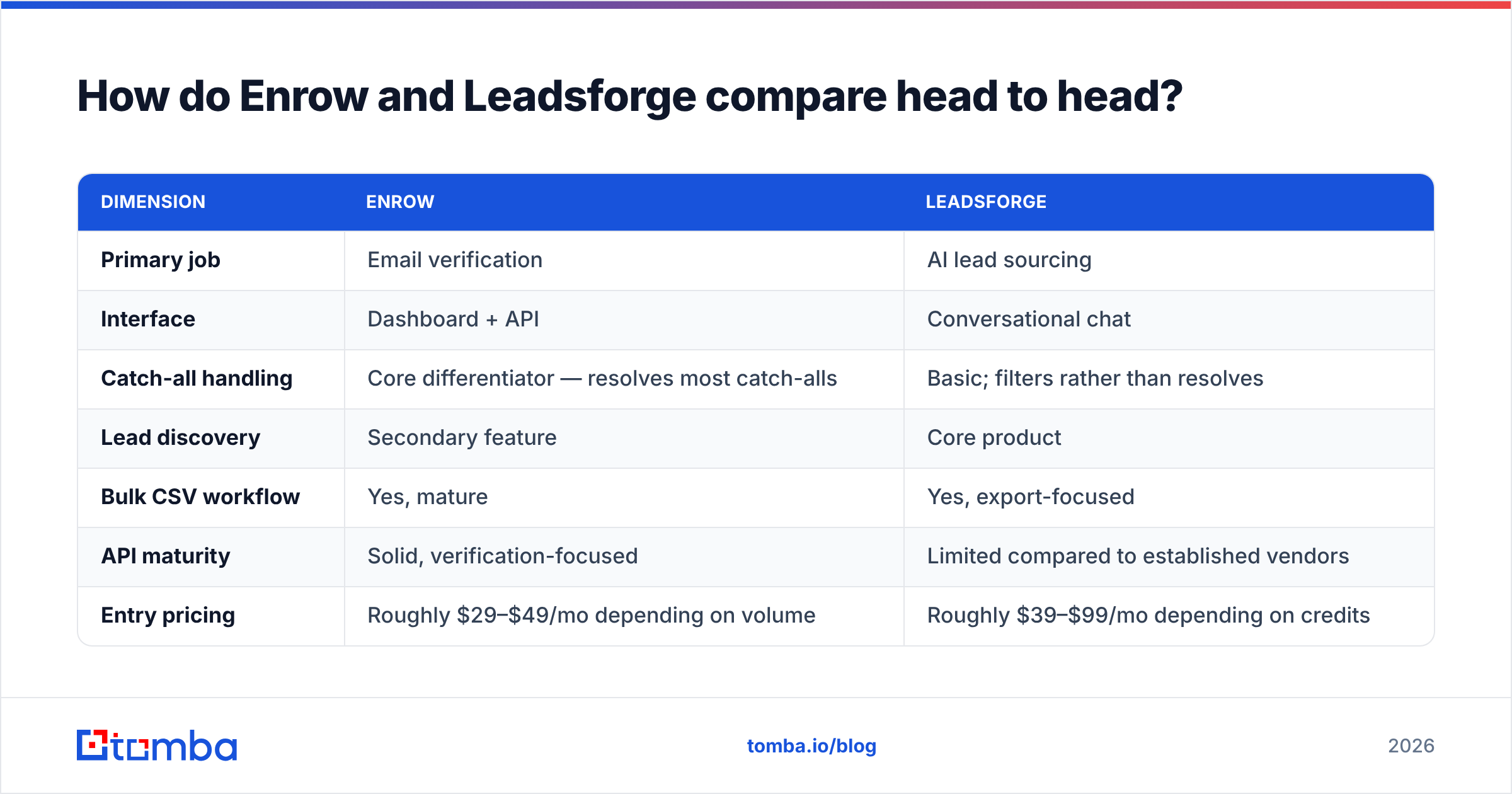
Enrow vs Leadsforge: how do they compare head to head?#
| Dimension | Enrow | Leadsforge |
|---|---|---|
| Primary job | Email verification | AI lead sourcing |
| Interface | Dashboard + API | Conversational chat |
| Catch-all handling | Core strength — resolves most catch-alls | Basic; filters rather than resolves |
| Lead discovery | Secondary feature | Core product |
| Bulk CSV workflow | Yes, mature | Yes, export-focused |
| API maturity | Solid, verification-focused | Limited compared to established vendors |
| Entry pricing | Roughly $29–$49/mo depending on volume | Roughly $39–$99/mo depending on credits |
| Free trial | Credit-based trial | Credit-based trial |
| Best for | Teams with existing lists and bounce pain | Teams with no list-building motion |
| Weakness | Not a sourcing tool | Verification depth is shallower |
A note on pricing: both vendors change tiers often, and both bill by credits rather than seats. Treat the numbers above as ranges. Check their live pricing pages before you commit. That holds for every tool in this category, Tomba included.
Why does catch-all handling matter so much?#
Because that is where most lists die quietly.
Picture a catch-all domain as an apartment block with no mailroom staff. Every package gets accepted, even for people who never lived there. The scan says delivered. Nothing was really delivered. A standard SMTP check gets a "250 OK" from that server. It cannot tell whether sarah.chen@company.com is a real mailbox or a black hole.
Depending on the dataset, 20–35% of B2B domains work this way. The share skews toward large firms on Microsoft 365 with default settings. If your ICP is mid-market and up, catch-alls are not an edge case. They are a third of your list.
Vendors handle them in three ways:
- Mark as risky and move on. Cheapest and most common. You either send blind or delete a third of your list.
- Pattern-confidence scoring. Check the address format against known-good addresses at the same domain. This cuts uncertainty. It does not remove it.
- Behavioral resolution. Mix engagement signals, past send data, and multi-source checks into a clear call. It is slower and costs more per check. It is also the only result you can act on.
Enrow sits squarely in bucket three. Leadsforge sits closer to bucket one. Its verification keeps exported lists tidy. It does not try to rescue ambiguous domains.
If catch-alls are your bottleneck, a dedicated catch-all verifier — from Enrow, Tomba, or anyone else in bucket three — will move your bounce rate more than any finder swap.
Which one gives you better data quality?#
On data quality, Enrow vs Leadsforge splits into two separate questions. Let us take them one at a time.
Verification accuracy: Enrow wins clearly. It is the whole product. On catch-all-heavy lists, a specialist verifier beats a bundled step every time. Leadsforge is not careless here. Resolving catch-alls simply costs real compute per address, and that only pays off when you charge for it directly.
Coverage and freshness of sourced contacts: Leadsforge is the relevant tool. Its quality rests on the data pool, not the chat layer. Chat is genuinely faster for open-ended searches. "Find me companies like X" is hard to express in filter dropdowns. But chat does not improve the data underneath it. If the pool holds no Nordic Series B SaaS contacts, no phrasing will conjure them.
The trap: teams buy Leadsforge, export a list, see the "verified" label, and skip their own check. Three weeks later their email deliverability has tanked. Any vendor grading its own sourced data has a conflict of interest. Run an independent email verifier over every list before a cold campaign, whatever finder produced it.
What do the pricing models really cost you?#
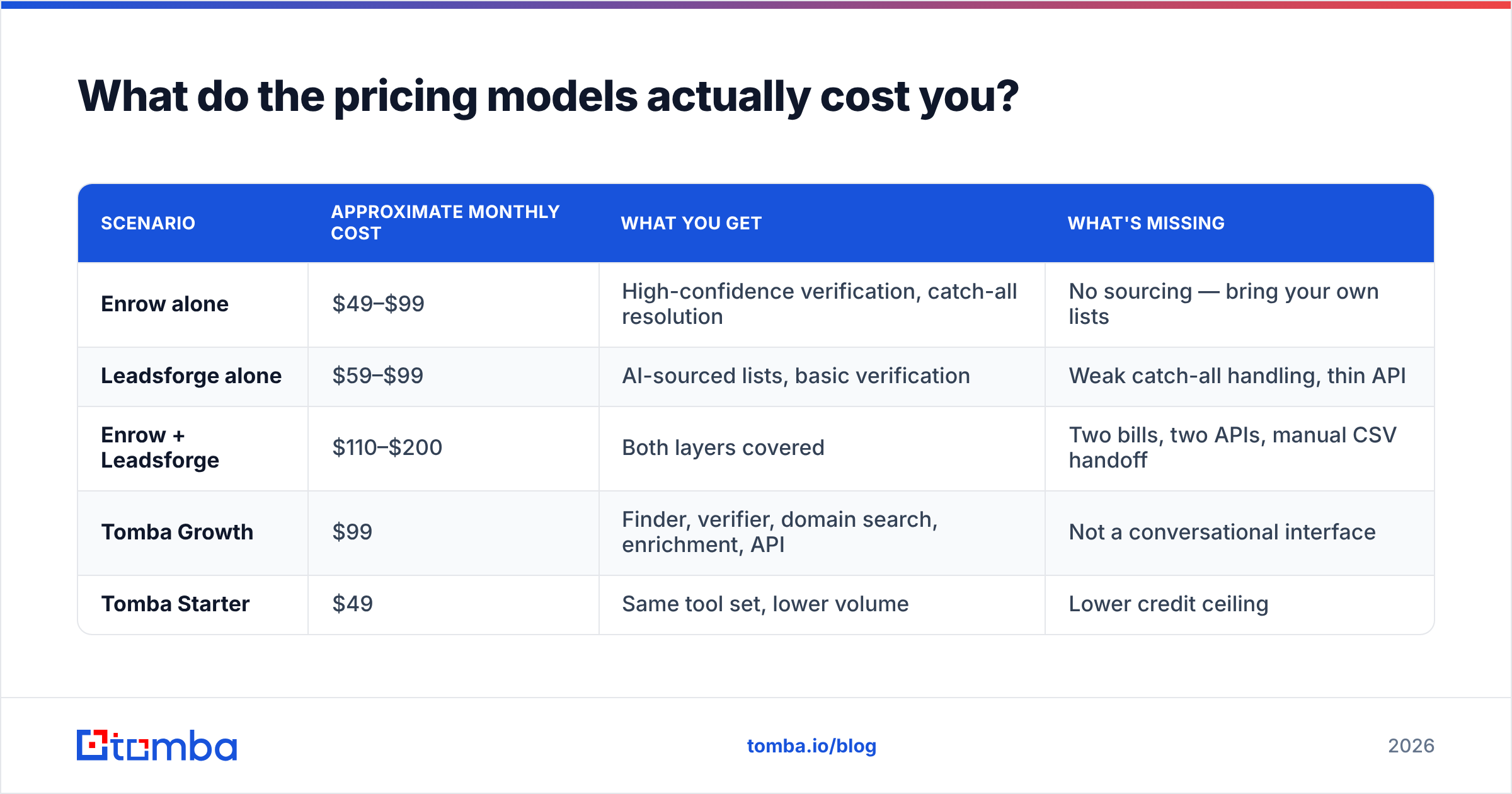
The Enrow vs Leadsforge pricing question is really a credits question. Both use credit pools, so a like-for-like comparison is hard. Here is a normalized view at a realistic mid-market volume: 5,000 contacts sourced and 10,000 verifications a month.
| Scenario | Approximate monthly cost | What you get | What's missing |
|---|---|---|---|
| Enrow alone | $49–$99 | High-confidence verification, catch-all resolution | No sourcing — bring your own lists |
| Leadsforge alone | $59–$99 | AI-sourced lists, basic verification | Weak catch-all handling, thin API |
| Enrow + Leadsforge | $110–$200 | Both layers covered | Two bills, two APIs, manual CSV handoff |
| Tomba Growth | $99 | Finder, verifier, domain search, enrichment, API | Not a conversational interface |
| Tomba Starter | $49 | Same tool set, lower volume | Lower credit ceiling |
Most teams reach the stacked row by accident. They buy the sourcing tool, hit the bounce problem, then buy a verifier. It works. But now you maintain a CSV handoff between two vendors and pay two bills for what mature platforms bundle. Check current Tomba pricing against your real volume. The math flips at different points, depending on whether verification or sourcing dominates your usage.
One cost nobody prices in: engineering time. Want either tool inside your own workflow — enrichment when a CRM record is created, verification before a sequence fires? Then API quality matters more than the dashboard. Enrow's API is competent for verification. Leadsforge's is thinner. A full email finder API that covers finding, verifying, and enrichment on one authenticated surface removes a whole integration project from your roadmap.

When should you pick Enrow?#
Pick Enrow when these are true:
- You already source leads through LinkedIn Sales Navigator, scraping, events, or an existing database. Sourcing is not the broken part.
- Your bounce rate is above 3% and you have cleaned the obvious junk. That is a hard signal. Google and Yahoo bulk sender rules make it costly to ignore.
- Your ICP skews enterprise, where almost every domain is set up as a catch-all.
- You keep deleting big chunks of lists because a verifier said "unknown" and you do not want the risk.
- Verification is a running cost, not a one-time cleanup, so specialist pricing pays back.
Worried about domain reputation rather than list hygiene? That is a separate problem. Start with your SPF, DKIM, and DMARC records and a sender reputation check before you spend on verification credits.
When should you pick Leadsforge?#
Pick Leadsforge when:
- You have no list-building process at all and need contacts today, not after a two-week tool review.
- Your team is non-technical. Chat really is easier than a 20-filter search builder. Founders and solo marketers get value fast.
- Your searches are exploratory. "Companies similar to our best three customers" is awkward in structured filters and natural in a chat prompt.
- Volume is modest. At a few hundred contacts a month, bundled verification is probably fine, and the two-vendor math does not pay yet.
Where Leadsforge struggles: repeatability. Chat is convenient, but it is not predictable. The same prompt, worded a little differently, can return a different list. If you need auditable list-building for a RevOps process, structured search with explicit filters is the safer base. A domain search returns every findable address at a company, with patterns and confidence scores. You can rerun it next quarter and get consistent results.
What are the real alternatives to both?#
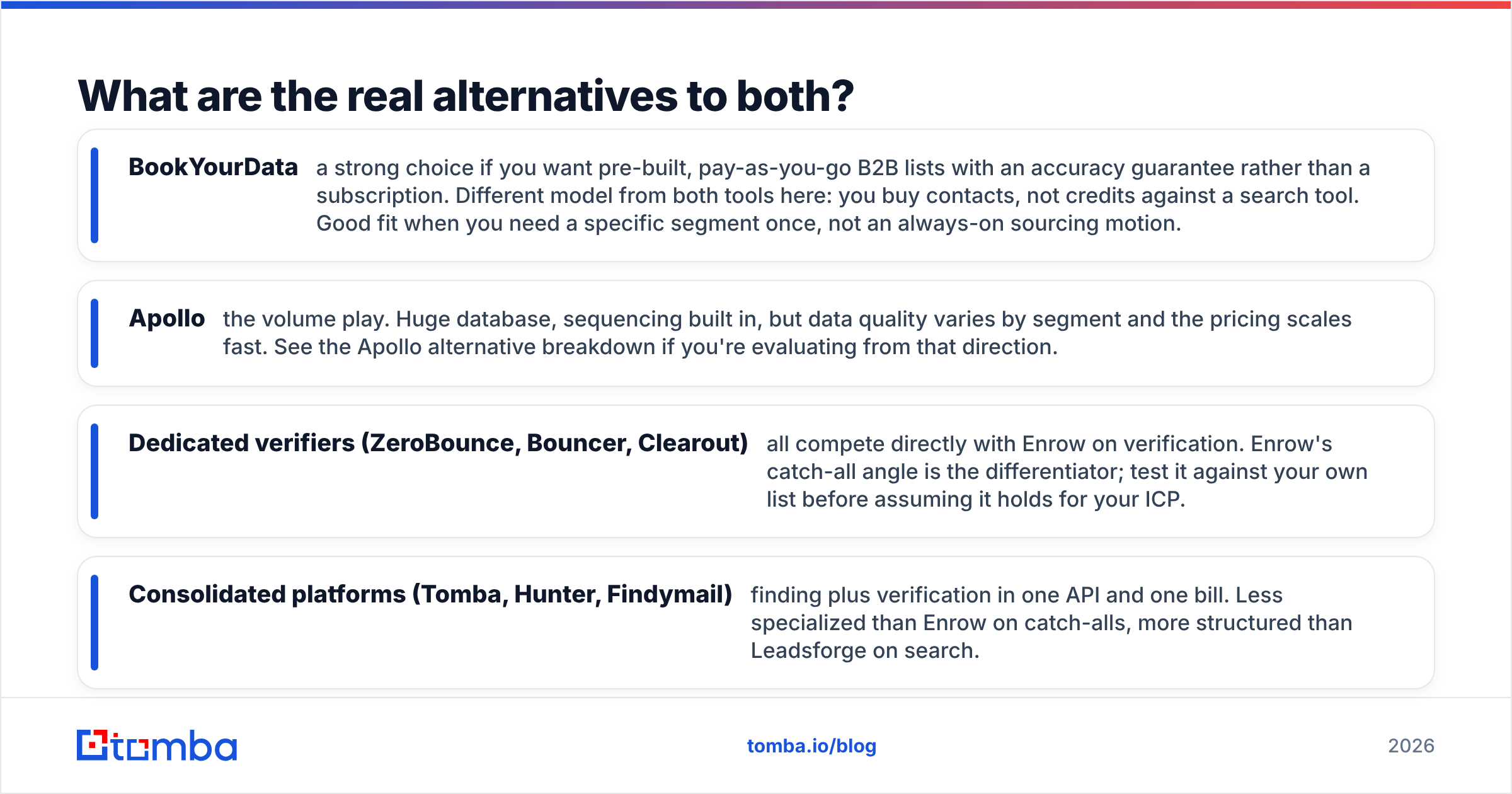
Neither tool is your only option, and the category is crowded. A few honest comparisons:
- BookYourData — good if you want pre-built, pay-as-you-go B2B lists with an accuracy guarantee instead of a subscription. It is a different model: you buy contacts, not credits. Best when you need one specific segment, not an always-on sourcing motion.
- Apollo — the volume play. Huge database and built-in sequencing. Data quality varies by segment, and the pricing scales fast. See the Apollo alternative breakdown if you are coming from that direction.
- Dedicated verifiers (ZeroBounce, Bouncer, Clearout) — all compete with Enrow head-on. Catch-all resolution is Enrow's angle. Test it on your own list before you assume it holds for your ICP.
- Consolidated platforms (Tomba, Hunter, Findymail) — finding plus verification on one API and one bill. Less specialized than Enrow on catch-alls. More structured than Leadsforge on search.
Here is the useful test, and it takes an afternoon. Take 200 contacts you know are valid — closed-won records from your CRM, spread across company sizes. Run them through each tool's free tier. Count how many it finds, how many it verifies correctly, and how many it flags as risky when you know they are fine. Vendor accuracy numbers are marketing. Your own sample is evidence. G2's email verification category helps you surface candidates, but reviews will not tell you how a tool performs on your ICP.
How should you build the stack instead?#
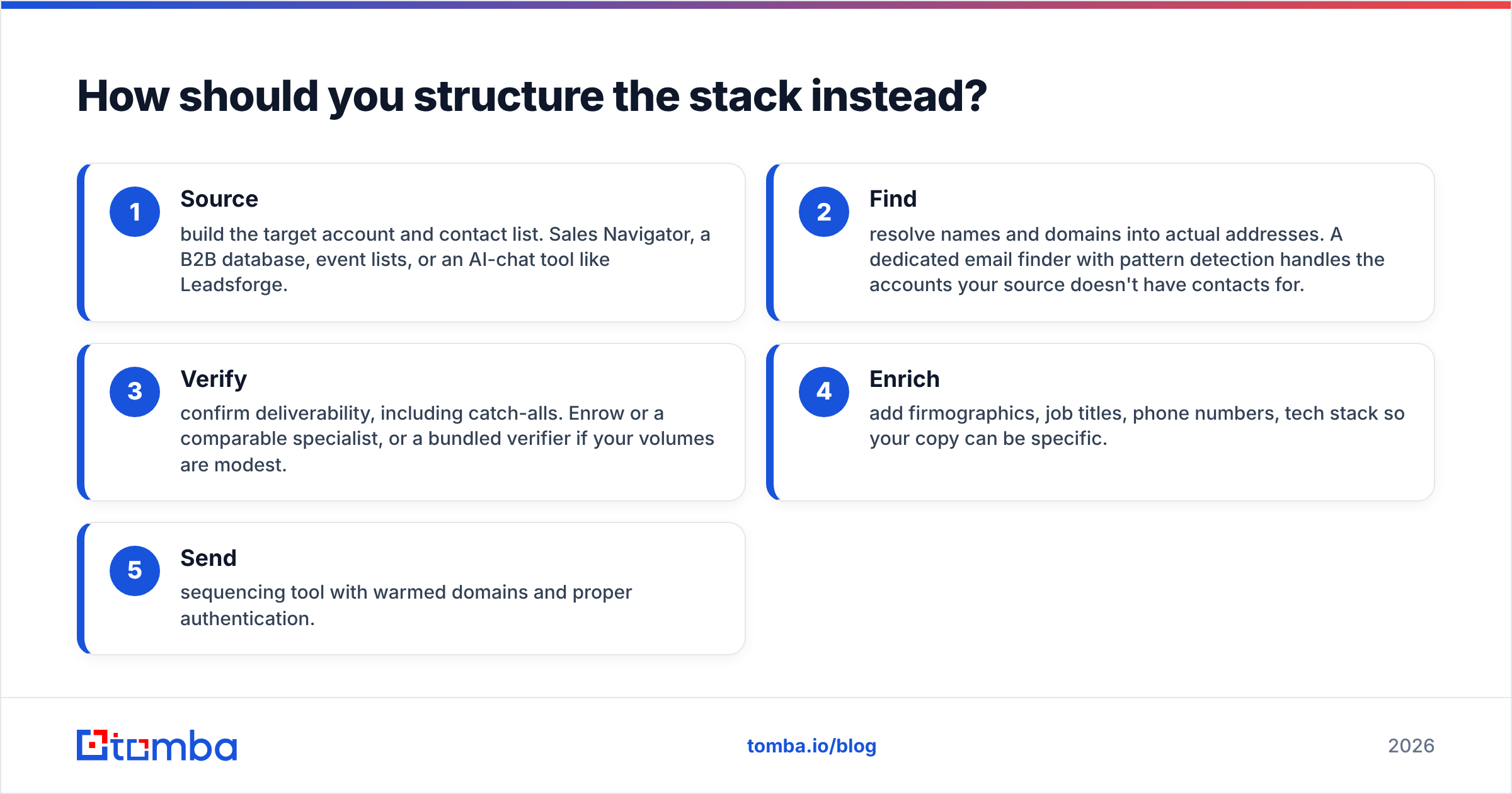
Stop treating this as tool selection. Treat it as pipeline stages:
- Source — build the target account and contact list. Sales Navigator, a B2B database, event lists, or an AI-chat tool like Leadsforge.
- Find — turn names and domains into real addresses. A dedicated email finder with pattern detection covers the accounts your source has no contacts for.
- Verify — confirm deliverability, catch-alls included. Enrow or a similar specialist, or a bundled verifier if your volumes are modest.
- Enrich — add firmographics, job titles, phone numbers, and tech stack so your copy can be specific.
- Send — a sequencing tool with warmed domains and proper authentication.
Enrow covers stage 3 well. Leadsforge covers stage 1 and part of stage 2. Neither covers the whole chain. That is why Enrow vs Leadsforge is a slightly malformed question. For most teams the answer is "one of them, plus something else."
The case for consolidation is simple. Every handoff between stages is a CSV export, a column-mapping chore, and a place where records go missing. Fewer vendors means fewer handoffs. That is not an argument for the cheapest tool. It is an argument for counting integration cost as part of the price.
The verdict on Enrow vs Leadsforge#
If you must pick one: Enrow, for most B2B teams with an outbound motion already running. Bad data in your sequencer costs more than slow list-building does. Bounces damage the sending domain you spent months warming, and that damage compounds across every later campaign. Leadsforge is the better pick for teams starting from zero, with no sourcing process and no technical help, where speed to a first list is what matters.
If you can pick a stack: do not stitch two single-purpose vendors together by default. Price out a consolidated platform first. Add a specialist verifier only if your catch-all rate is severe and is measurably costing you deliverability.
Run the 200-contact test. It settles arguments that vendor comparison pages never will.
Want finding and verification without the two-vendor handoff? Tomba Email Finder resolves professional email addresses by domain, name, or company. Verification, catch-all checking, and enrichment run on the same API and the same bill. The free tier gives you 25 searches a month, so you can run your own accuracy test. No card, no sales call. Paid plans start at $49/mo when you are ready to scale.
Related guides#
Ready to find emails that actually work?
Join 150,000+ professionals who stopped guessing and started sending. Free credits on signup — no credit card required.
Get the Tomba newsletter
Practical outbound tactics and product updates — once every two weeks.
About the author