Enterprise Cold Email Outreach: The 2026 Playbook That Works
Enterprise cold email is a different sport than SMB outbound. Here's the multithreading, data hygiene, and compliance playbook that actually books meetings at 5,000-employee accounts.
TL;DR
- Enterprise cold email outreach fails when you copy SMB tactics: 500 sends a day into a 12-person buying committee is noise, not coverage.
- The unit of work is the account, not the contact. Plan 8-14 named people per target account, sequenced over 6-10 weeks, not 200 randoms blasted in a day.
- Data quality decides everything. A 6% bounce rate at 40 sends/day is survivable; at enterprise volumes with a shared domain, it torches your sender reputation across the whole revenue org.
- Compliance is not optional upmarket. GDPR, CAN-SPAM, and increasingly aggressive procurement security reviews mean your outreach data provenance gets audited.
- Budget realistically: verified enterprise contact data runs $49-$500/mo per seat depending on volume, and it is the cheapest line item in the stack relative to what a blown domain costs.
Enterprise cold email outreach is not "cold email with bigger logos." The buying committee is larger, the sales cycle runs 6-18 months, the legal exposure is real, and a single deliverability mistake propagates across every rep on your domain. If you are moving a team upmarket — from 50-person SaaS targets to 5,000-employee enterprises — nearly every assumption from your SMB playbook needs re-derivation.
This guide covers what changes, what breaks, and what to build instead.
What Makes Enterprise Cold Email Outreach Different?#
Three structural differences drive everything else.
1. The buying committee is 6-12 people. Gartner's widely cited B2B buying research puts the average enterprise buying group at 6 to 10 stakeholders, each bringing four or five independently gathered pieces of information to the table. You are not emailing a decision-maker. You are emailing one node in a committee that will debate you without you in the room.
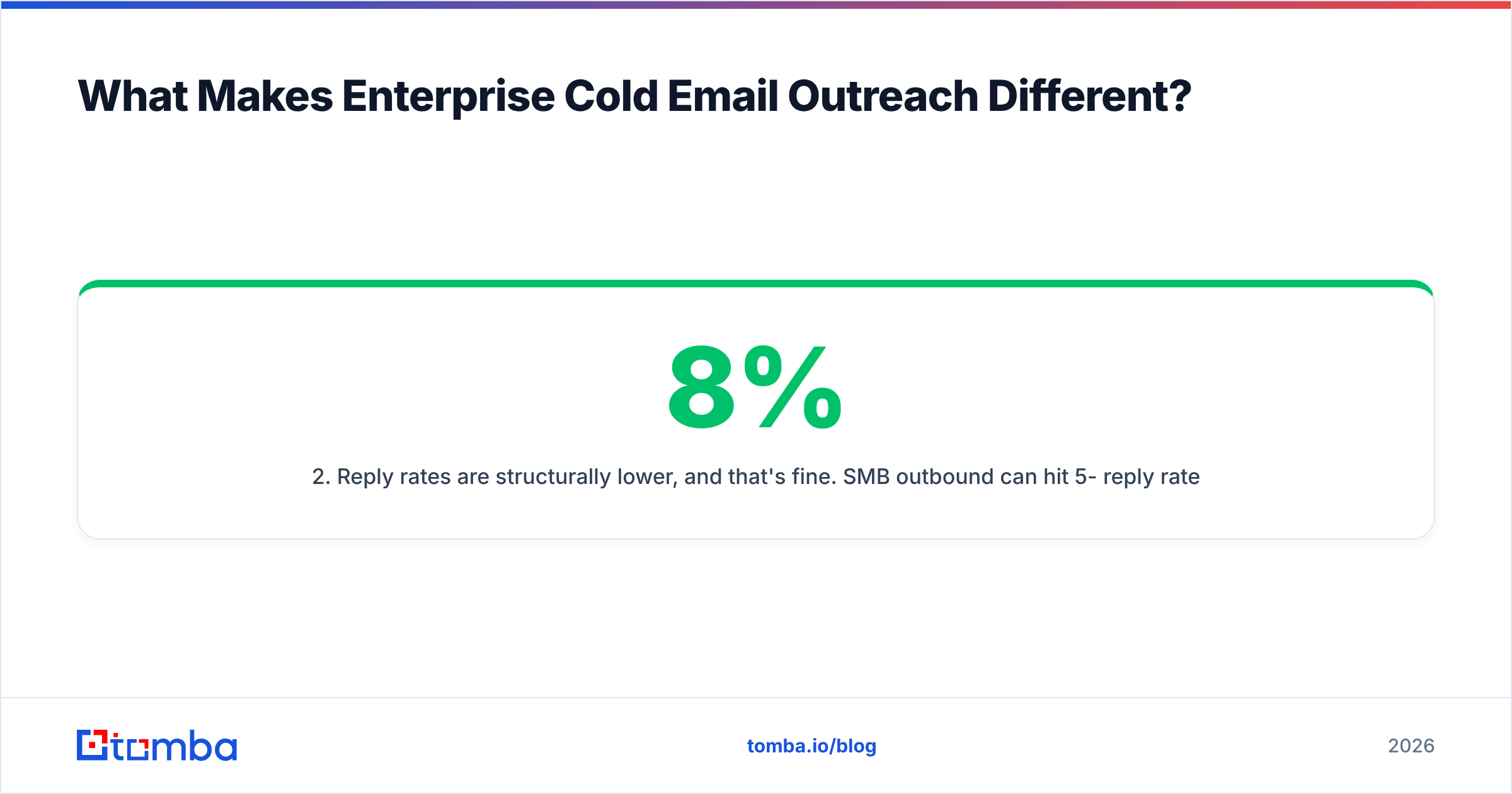
2. Reply rates are structurally lower, and that's fine. SMB outbound can hit 5-8% reply rates on a good day. Enterprise outbound at 1.5-3% is healthy — because one reply is worth 30-100x more. Optimizing enterprise sequences for reply rate is the classic mistake; optimize for account penetration (how many named stakeholders at a target account have engaged at all) instead.
3. Your domain is a shared asset. At 5 reps, one bad list burns one rep. At 50 reps across a shared root domain, one bad list burns the company. This is why enterprise outbound orgs run subdomain isolation and mandatory pre-send verification while SMB teams get away with neither.

Why Do SMB Cold Email Tactics Fail Upmarket?#
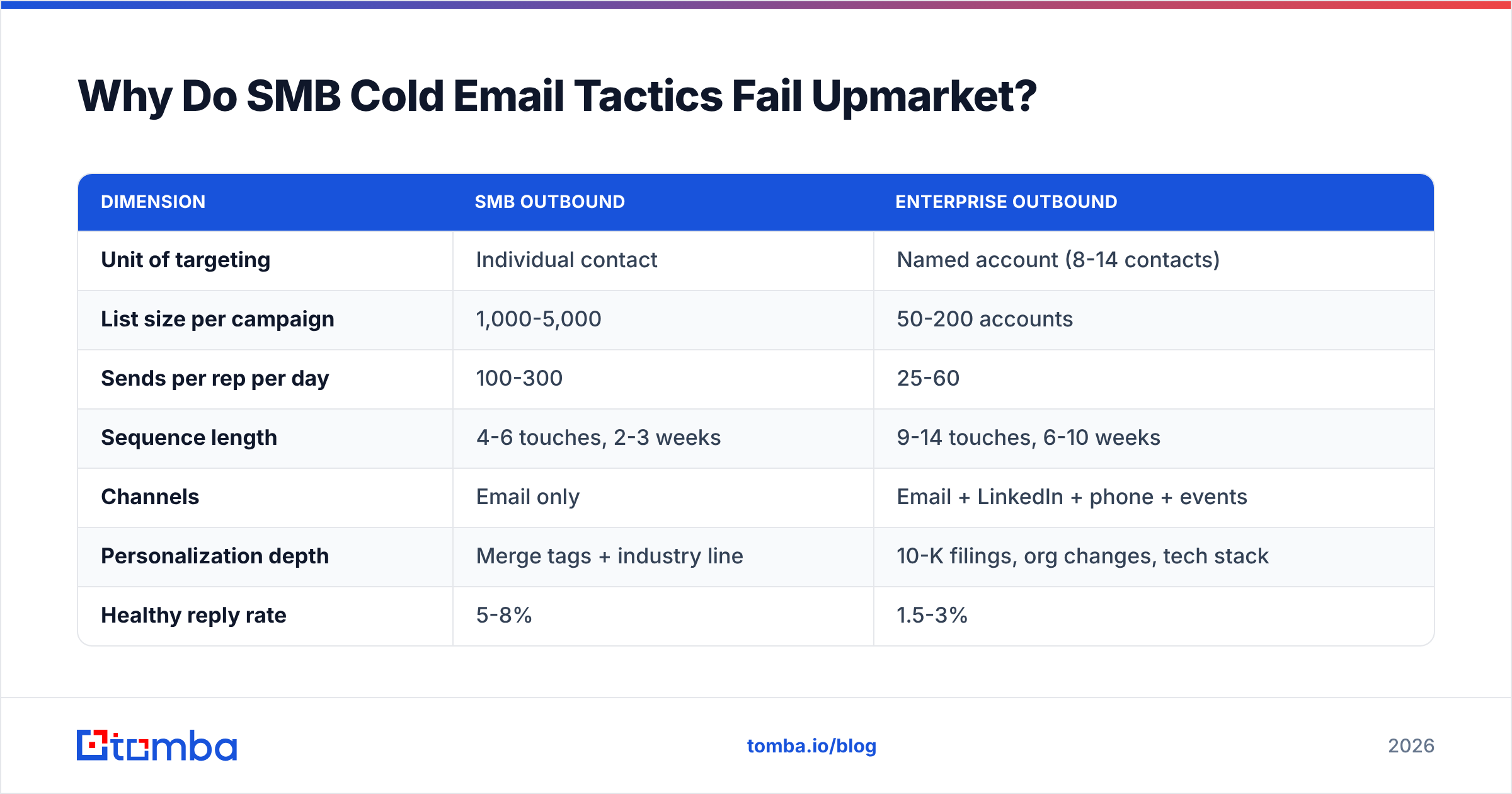
| Dimension | SMB outbound | Enterprise outbound |
|---|---|---|
| Unit of targeting | Individual contact | Named account (8-14 contacts) |
| List size per campaign | 1,000-5,000 | 50-200 accounts |
| Sends per rep per day | 100-300 | 25-60 |
| Sequence length | 4-6 touches, 2-3 weeks | 9-14 touches, 6-10 weeks |
| Channels | Email only | Email + LinkedIn + phone + events |
| Personalization depth | Merge tags + industry line | 10-K filings, org changes, tech stack |
| Healthy reply rate | 5-8% | 1.5-3% |
| Acceptable bounce rate | Under 3% | Under 1% |
| Data cost tolerance | $49-99/mo | $99-500+/mo per seat |
| Legal review | Rare | Standard (GDPR, DPA, procurement) |
The row that surprises most teams is sends per rep per day. Cutting volume by 80% feels like sabotage until you notice that enterprise account lists are 50-200 accounts deep, not 5,000 contacts wide. You do not need volume. You need to hit the same 150 accounts from six angles for two months without getting filtered.
How Do You Build an Enterprise Target Account List?#
The list build is where 70% of the outcome is determined, and it is the part most teams rush. Work in this order:
Define the account, not the persona. Start from firmographic fit: employee count band, revenue band, industry code, tech stack signals, geography. A 400-account TAM slice you can name is worth more than a 40,000-row export nobody will ever touch.
Map the committee per account. For each target, list the roles you need: economic buyer, technical evaluator, end-user champion, procurement gatekeeper, and one executive sponsor. That's your 8-14 contacts. Write the role map before you look up a single email.
Source contacts by role, then find the email. Identify people from LinkedIn, company leadership pages, conference speaker lists, and press releases. Then resolve the email — a domain search against the company's root domain will surface the pattern and the existing directory in one step, which beats guessing formats contact by contact.
Verify before it touches a sequencer. Every address goes through an email verifier pass. At enterprise domains you will hit a lot of catch-all configurations — those need a dedicated catch-all verifier rather than a binary valid/invalid call, or you will either discard good contacts or send into black holes.
Enrich for sequencing context. Title, seniority, tenure at company, department, and direct phone. Tenure matters enormously: someone 60-120 days into a VP role is measurably more responsive to change-oriented outreach than someone eight years in.
Re-verify on a 90-day cycle. Enterprise contact data decays 25-30% annually, concentrated in high-churn functions like marketing and sales ops. A quarterly re-verification pass on your active account list is cheap insurance.
Which Data Provider Should You Use for Enterprise Lists?#
There is no universally correct answer — it depends on whether you need breadth (a full prebuilt database) or precision (verified emails for a list you already own).
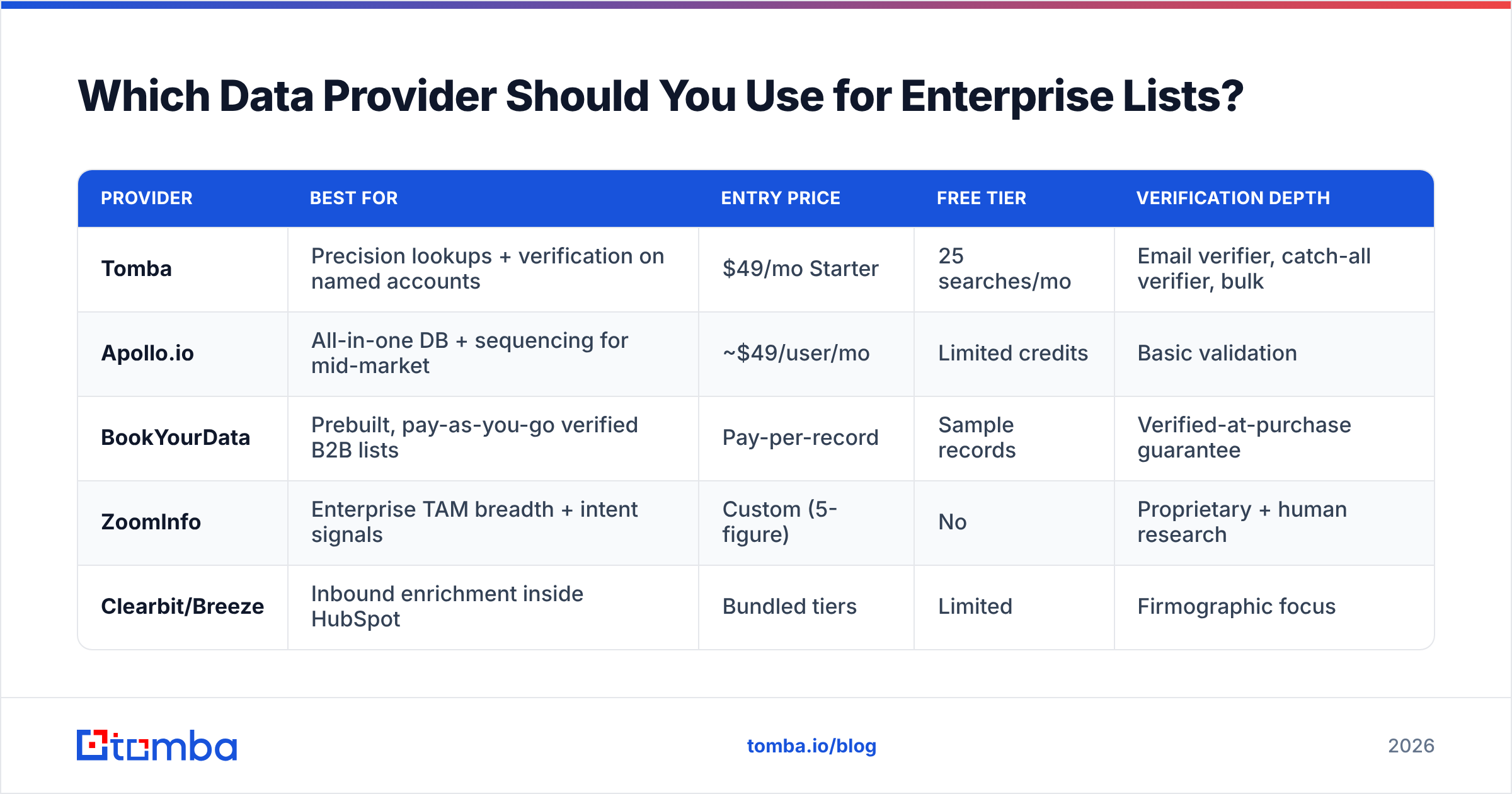
| Provider | Best for | Entry price | Free tier | Verification depth |
|---|---|---|---|---|
| Tomba | Precision lookups + verification on named accounts | $49/mo Starter | 25 searches/mo | Email verifier, catch-all verifier, bulk |
| Apollo.io | All-in-one DB + sequencing for mid-market | ~$49/user/mo | Limited credits | Basic validation |
| BookYourData | Prebuilt, pay-as-you-go verified B2B lists | Pay-per-record | Sample records | Verified-at-purchase guarantee |
| ZoomInfo | Enterprise TAM breadth + intent signals | Custom (5-figure) | No | Proprietary + human research |
| Clearbit/Breeze | Inbound enrichment inside HubSpot | Bundled tiers | Limited | Firmographic focus |
A common enterprise stack pairs a broad database for account discovery with a precision finder for the specific committee members the database missed — which is most of them, because senior enterprise roles are exactly where prebuilt databases go stale fastest. Tomba's Tomba pricing runs Free (25 searches/mo), Starter $49/mo, Growth $99/mo, Pro $249/mo, and Enterprise custom, and the Tomba API matters more than the UI once you are resolving contacts programmatically inside a CRM workflow.
If you buy prebuilt lists, buy them from vendors who state their sourcing and re-verification cadence in writing. BookYourData and similar pay-as-you-go providers work well when you need a defined slice fast and do not want a seat subscription. Whatever you buy, verify it yourself anyway — vendor "verified" and your ESP's tolerance are not the same standard.

How Should You Sequence an Enterprise Account?#
Sequence the account, not the person. The mechanics:
Weeks 1-2 — Champion entry. Start with the end-user or manager-level person closest to the pain. They are more responsive, and their reply gives you internal language to use upward. Two emails, one LinkedIn touch.
Weeks 3-4 — Lateral expansion. Email two to three peers in adjacent functions. Reference the problem, never "I reached out to your colleague" (that reads as pressure and travels badly internally).
Weeks 5-7 — Executive layer. Now go up. By this point you have specific language, maybe a reply, possibly a call. Executive emails should be four sentences, one number, one ask.
Weeks 8-10 — Trigger-based re-entry. Funding round, exec hire, product launch, competitor switch, earnings call comment. Re-enter on the event, not the calendar.
Across the whole run, cap each individual at 5-7 emails total. The account gets 30-50 touches; no single person gets carpet-bombed. That distinction is what separates persistent from annoying.
For the LinkedIn layer, resolving profile-to-email at scale matters — a LinkedIn finder pulls the work address off a profile you have already qualified, so your email and social touches hit the same verified human rather than two different records.
What Copy Actually Works at Enterprise Accounts?#
Short answer: fewer claims, more specificity, and a lower-friction ask.
The four-sentence structure that survives executive inboxes:
- Observed trigger — something specific and recent about their company. Not "I saw you're in fintech."
- Consequence — the operational cost that trigger usually creates.
- Proof — one comparable company, one number, no adjectives.
- Ask — a question they can answer in one line, not a 30-minute calendar link.
What kills enterprise emails:
- Merge-tag theater.
{{first_name}}, I noticed {{company}} is growingreads as automation to anyone who has received 200 of them. - Feature lists. Enterprise buyers evaluate on risk and integration, not features.
- Calendar links in email one. It signals you want their time before you have earned it.
- Attachments. They trip secure email gateways at large orgs constantly.
- Image-heavy HTML. Enterprise mail filters are more aggressive than Gmail's consumer stack.
Before a sequence goes live, run the copy through a spam checker — enterprise gateways (Proofpoint, Mimecast, Microsoft Defender) score more harshly than the consumer providers most cold email advice is calibrated against.
How Do You Protect Deliverability at Enterprise Scale?#
This is where teams moving upmarket most often self-destruct. The failure mode is predictable: bigger list, same infrastructure, sudden volume ramp, domain reputation collapse, and now your AEs' reply emails to live opportunities are landing in spam too.
The controls that matter, in order of impact:
- Sending domain isolation. Never run cold outreach from your corporate root domain. Use dedicated lookalike domains (
get-yourbrand.com,yourbrand-hq.com) with their own authentication. - Full authentication stack. SPF, DKIM, and DMARC on every sending domain. Google and Yahoo's bulk sender requirements made this non-negotiable in 2024; enterprise recipient gateways were already stricter. Verify with an SPF checker before the first send.
- Sub-1% bounce discipline. Verification is not a nice-to-have at this volume. It is the single highest-leverage control you have over email deliverability.
- Ramp schedules. New domains warm over 4-6 weeks. New mailboxes start at 10-15 sends/day. There is no shortcut that survives contact with Microsoft 365's filters.
- Mailbox distribution. Spread volume across many mailboxes at low per-mailbox volume rather than concentrating it. Twenty mailboxes at 30/day beats five at 120/day every time.
- Reply-rate monitoring as a health signal. A sudden reply-rate drop with stable send volume usually means you are being filtered, not that your copy got worse overnight.
For teams running this at scale, Google's Postmaster Tools is the ground-truth reputation dashboard — check it weekly, not after something breaks.
Is Enterprise Cold Email Even Legal?#
Mostly yes, with real constraints that vary by jurisdiction.
United States (CAN-SPAM): B2B cold email is legal. You need accurate headers and sender identity, a physical postal address, a functioning opt-out, and honored unsubscribes within 10 business days. No prior consent required.
EU/UK (GDPR + PECR): More restrictive but not prohibitive. B2B outreach to corporate addresses can run under legitimate interest, but you need a documented Legitimate Interest Assessment, clear data provenance, and immediate opt-out handling. Individual-format addresses (firstname.lastname@) at small companies get treated more like personal data than role addresses (sales@).
Canada (CASL): Genuinely strict. Implied consent from an existing business relationship or a conspicuously published business address, with conditions. Penalties are severe. Many teams simply exclude Canada from cold sequences.
The enterprise-specific wrinkle: procurement will ask. When your deal reaches security review at a large organization, "where did you get my contact data" is a standard question in vendor assessment. Vendors who publish their data sources make that conversation short. Vendors who scraped an unattributed dataset make it long.
None of this is legal advice — get counsel for your specific jurisdictions before running EU sequences at volume.
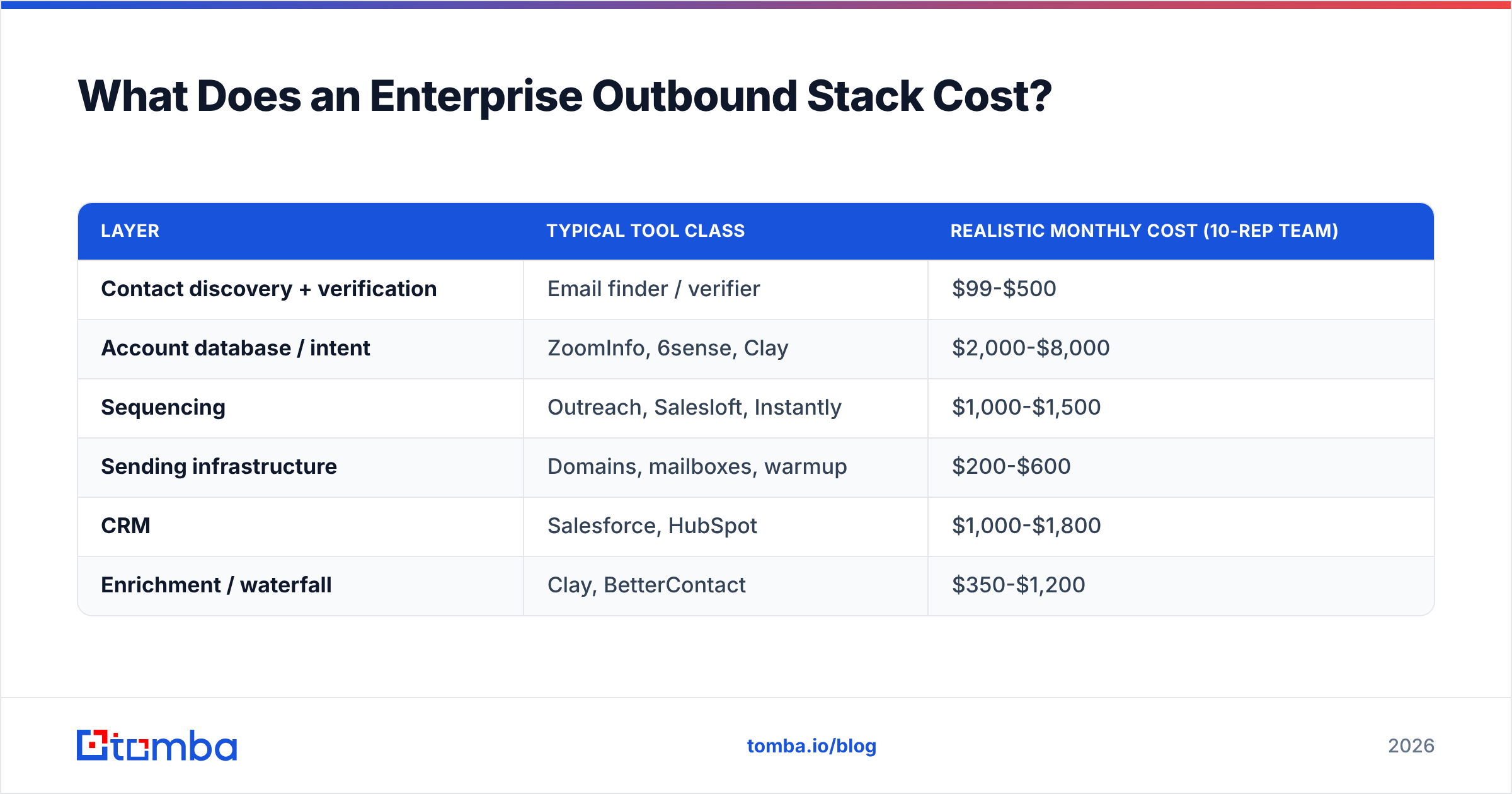
What Does an Enterprise Outbound Stack Cost?#
| Layer | Typical tool class | Realistic monthly cost (10-rep team) |
|---|---|---|
| Contact discovery + verification | Email finder / verifier | $99-$500 |
| Account database / intent | ZoomInfo, 6sense, Clay | $2,000-$8,000 |
| Sequencing | Outreach, Salesloft, Instantly | $1,000-$1,500 |
| Sending infrastructure | Domains, mailboxes, warmup | $200-$600 |
| CRM | Salesforce, HubSpot | $1,000-$1,800 |
| Enrichment / waterfall | Clay, BetterContact | $350-$1,200 |
The discovery-and-verification layer is consistently the cheapest line and the one with the largest downstream blast radius. Cutting $200/mo there to save budget, and then bouncing 6% of a 4,000-send month, costs more in domain recovery time than the annual contract you avoided.
For teams already running Salesforce or HubSpot as the system of record, resolving contacts inside the CRM workflow — via the HubSpot integration or Salesforce integration — removes the CSV round-trip where most data quality actually degrades.
How Do You Measure Enterprise Outbound?#
Stop reporting on reply rate as the headline. Track these instead:
- Account penetration rate — % of target accounts with at least 2 engaged contacts. Target: 25-40% within 10 weeks.
- Committee coverage — average number of named, verified contacts per target account. Target: 8+.
- Meetings per 100 accounts — the honest enterprise efficiency metric. 8-15 is strong.
- Bounce rate — under 1%, checked weekly, treated as a defect not a statistic.
- Pipeline per rep per quarter — the only number leadership actually funds.
- Time-to-first-touch on new triggers — how fast a funding announcement becomes a sequenced email. Under 72 hours separates good teams from average ones.
Cohort your reporting by account tier, not by campaign. Campaign-level reporting hides the fact that your Tier 1 accounts are working and your Tier 3 accounts are dragging the average into uselessness.
Where Should You Start?#
If you are moving a team upmarket this quarter, sequence the work like this: build a 150-account named list first, map committees to 8+ verified contacts each, isolate your sending domains and warm them while the list is being built, then launch a 10-week multithreaded sequence against 50 accounts as a pilot before scaling to the full list. Measure account penetration, not replies, and re-verify quarterly.
The part you cannot skip is the data. Every downstream metric — deliverability, penetration, meetings, pipeline — is bounded by whether the addresses you loaded are real and current.
Start with the Tomba Email Finder. Resolve committee members by name and company domain, verify before anything reaches your sequencer, and keep bounce rates under 1% while you scale sends across a growing rep team. The free tier gives you 25 searches a month to pressure-test the accuracy on your own target accounts before committing to a plan — which is exactly how you should evaluate any data vendor going into an enterprise motion.
Related guides#
Ready to find emails that actually work?
Join 150,000+ professionals who stopped guessing and started sending. Free credits on signup — no credit card required.
Get the Tomba newsletter
Practical outbound tactics and product updates — once every two weeks.
About the author