ESP Matching in 2026: What It Is and When It Actually Works
ESP matching routes Google-hosted leads to Google inboxes and Microsoft-hosted leads to Microsoft inboxes. Here is what it actually fixes, what it doesn't, and how to set it up without buying another tool.

TL;DR
- ESP matching means sending to a prospect from a mailbox hosted on the same email provider they use — Google Workspace inbox to Google Workspace recipient, Microsoft 365 inbox to Microsoft 365 recipient.
- It works because Outlook's filtering stack (Exchange Online Protection) is far more aggressive toward unknown external senders than Gmail's, so Microsoft-hosted prospects punish sloppy senders harder.
- Realistic lift is single-digit percentage points on inbox placement, not the 2x some vendors imply. It is a tiebreaker, not a fix for bad lists or bad copy.
- Detection is free: read the recipient domain's MX record.
google.comin the MX means Google;outlook.com/mail.protection.outlook.commeans Microsoft. - ESP matching only pays off after list hygiene. If 12% of your contacts bounce, matching the provider just gets your bounces delivered faster to the same reputation penalty.
What is ESP matching in cold email?#
ESP matching is the practice of pairing your sending mailbox's email service provider with the recipient's email service provider. If a prospect's company runs on Google Workspace, you send from a Google Workspace mailbox. If they run on Microsoft 365, you send from a Microsoft 365 mailbox.
The theory is simple: mail that travels inside a single provider's infrastructure — Google to Google — never crosses a hostile gateway. Google already knows the sending domain's history from its own telemetry, the hop count drops, and the message avoids the third-party filtering layer that Microsoft applies to inbound external mail.
In practice, "ESP" here is being used loosely. Your Instantly or Smartlead account is not an ESP in the marketing-automation sense — it is a sending orchestrator sitting on top of mailboxes. The ESP that matters is the mailbox host: Google Workspace, Microsoft 365, Zoho, Fastmail, Proton, or a self-hosted server. ESP matching is really mailbox-host matching.
The tactic became mainstream around 2023 when Smartlead and Instantly shipped provider-aware routing, and it hardened in 2024 after Google and Yahoo enforced bulk-sender authentication requirements. Since then, most serious outbound teams keep two mailbox pools instead of one.
Why does Microsoft treat outside senders differently?#
Because the filtering models are built on different assumptions.
Gmail leans heavily on engagement signals. Opens, replies, moves-out-of-spam, and prior conversation history drive placement. A cold sender with clean authentication and no complaints gets a reasonable shot at the primary tab, and Gmail is comparatively forgiving of low volume from a new domain.
Microsoft's Exchange Online Protection leans on IP and domain reputation plus content heuristics, and it applies a bulk complaint level (BCL) score to inbound commercial mail. A domain with no sending history gets a cold reception by default. That is why the same campaign frequently shows 80%+ placement on Gmail recipients and 40-50% on Microsoft recipients from the same sequence.

The asymmetry is the whole reason ESP matching exists. Nobody worries much about Google-to-Microsoft because Google is strict — they worry because Microsoft is. And there is a second, less-discussed effect: many corporate Microsoft tenants run additional gateways (Mimecast, Proofpoint, Barracuda) in front of EOP, which adds another layer that has never seen your domain before.
How do you detect a prospect's ESP?#
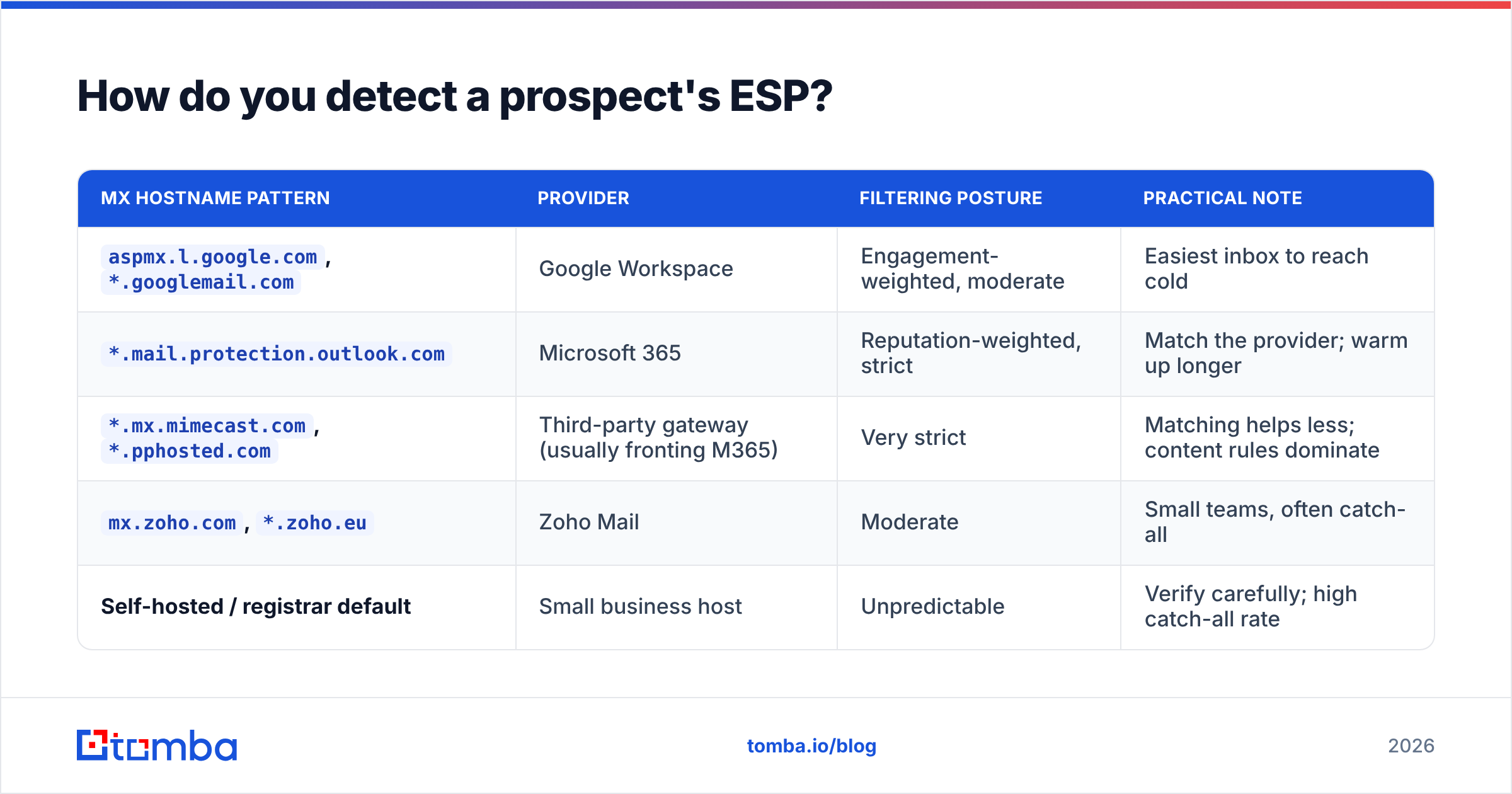
You read the MX record for their domain. It is public DNS data, it costs nothing, and it is accurate at the moment of lookup.
| MX hostname pattern | Provider | Filtering posture | Practical note |
|---|---|---|---|
aspmx.l.google.com, *.googlemail.com |
Google Workspace | Engagement-weighted, moderate | Easiest inbox to reach cold |
*.mail.protection.outlook.com |
Microsoft 365 | Reputation-weighted, strict | Match the provider; warm up longer |
*.mx.mimecast.com, *.pphosted.com |
Third-party gateway (usually fronting M365) | Very strict | Matching helps less; content rules dominate |
mx.zoho.com, *.zoho.eu |
Zoho Mail | Moderate | Small teams, often catch-all |
| Self-hosted / registrar default | Small business host | Unpredictable | Verify carefully; high catch-all rate |
A few practical rules when you run this at scale:
- Resolve at enrichment time, not send time. MX lookups are cheap, but 50,000 live DNS queries during a send window will get you rate-limited and will slow the campaign.
- Cache with a 30-day TTL. Companies migrate providers, but not weekly. Re-resolve monthly, or whenever a domain's bounce rate spikes.
- Treat gateways as Microsoft. If the MX points at Mimecast or Proofpoint, the tenant behind it is Microsoft roughly 8 times out of 10. Route it to the Microsoft pool.
- Flag catch-all domains separately. Provider detection tells you nothing about whether the specific mailbox exists. A catch-all verifier does that job, and it is a different check entirely.
- Store the provider as a field on the contact record, not as a tag on the campaign. You will want to segment reporting by provider later, and retrofitting that data is painful.
If you are already running domain search to build a contact list, capture the MX result in the same pass. You are hitting DNS anyway to validate the domain — pulling the MX adds no meaningful cost and saves an entire enrichment step downstream.
Does ESP matching actually improve deliverability?#
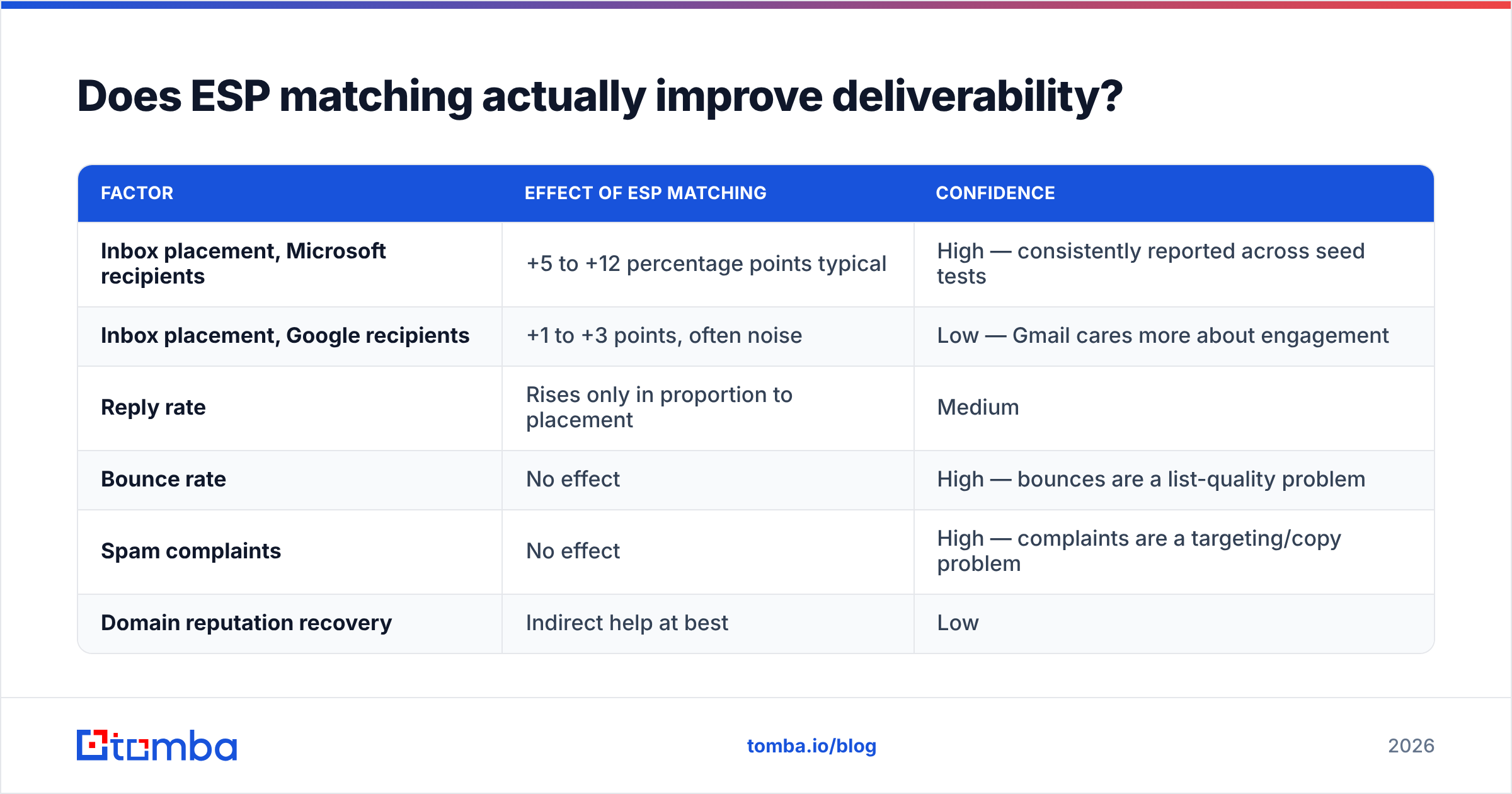
Yes, measurably — but the size of the effect is routinely overstated.
Here is an honest read on what changes and what doesn't:
| Factor | Effect of ESP matching | Confidence |
|---|---|---|
| Inbox placement, Microsoft recipients | +5 to +12 percentage points typical | High — consistently reported across seed tests |
| Inbox placement, Google recipients | +1 to +3 points, often noise | Low — Gmail cares more about engagement |
| Reply rate | Rises only in proportion to placement | Medium |
| Bounce rate | No effect | High — bounces are a list-quality problem |
| Spam complaints | No effect | High — complaints are a targeting/copy problem |
| Domain reputation recovery | Indirect help at best | Low |
Two caveats worth internalizing.
First, most published "ESP matching doubled our reply rate" numbers come from teams that changed several things at once — new domains, fresh warmup, tighter ICP, shorter copy. Isolating the provider variable requires a seed-list test where everything else is held constant, and few teams run one.
Second, the benefit scales with how bad your baseline is. If your domain reputation is already strong and your list is verified, matching adds a couple of points. If your reputation is damaged, matching does not rescue you — it just delivers the same problematic mail through a slightly friendlier door.
The one place the effect is dramatic: brand-new sending domains targeting Microsoft-heavy industries (finance, manufacturing, healthcare, government contractors). There, mismatch can be the difference between 45% and 60% placement in month one.
Which tools support ESP matching in 2026?#
Provider-aware routing is now a checkbox feature in most sending platforms. The differences are in granularity and in whether you can act on the provider field outside the sending tool.
| Capability | Instantly | Smartlead | Saleshandy | DIY (MX lookup + segmentation) |
|---|---|---|---|---|
| Auto-detect recipient provider | Yes | Yes | Partial | Yes (free DNS query) |
| Route to matching mailbox pool | Yes | Yes | Manual lists | Manual, via campaign split |
| Gateway detection (Mimecast/Proofpoint) | Limited | Limited | No | Yes, if you parse MX yourself |
| Provider field exportable to CRM | Limited | Limited | No | Yes |
| Extra cost | Included in plan | Included in plan | Plan-dependent | $0 |
| Works across multiple sending tools | No | No | No | Yes |
The honest conclusion: if you already pay for a sending platform with provider routing, use it. If you are choosing a platform because of ESP matching, don't — the underlying detection is a DNS lookup you can run yourself in about four lines of code, and owning the provider field in your own data layer is strictly more useful than renting it inside one vendor's campaign builder. Teams evaluating options often start with an Instantly alternative comparison for exactly this reason: the routing feature is table stakes, and the real differences sit elsewhere.

How do you set up ESP matching step by step?#
- Build two mailbox pools. Buy secondary domains and provision half on Google Workspace, half on Microsoft 365. Three to five mailboxes per domain, two domains minimum per pool. Never send from your primary corporate domain.
- Authenticate both pools identically. SPF, DKIM, and DMARC on every sending domain. Run an SPF checker on each one before a single send — a broken SPF record undoes any routing advantage instantly.
- Warm each pool separately. Warmup pools should include recipients on both providers so each mailbox builds reputation with Microsoft and Google. Two to three weeks minimum, ramping to your target daily volume gradually.
- Enrich contacts with MX data. Resolve the MX for every domain in the list and write
provider: google | microsoft | gateway | otheronto the contact. - Verify before you route. Provider detection and mailbox validity are unrelated checks. Run the list through an email verifier first and drop anything unknown — a matched send to a dead mailbox is still a bounce.
- Split the campaign by provider and assign each segment to its pool. Keep the copy identical between segments for the first two weeks so you can actually read the placement difference.
- Measure by segment. Track placement, reply rate, and bounce rate per provider. If the Microsoft segment does not improve after four weeks, the bottleneck is not routing.
Google's own Postmaster Tools gives you domain reputation and spam-rate data for the Google half at no cost. There is no equivalent public dashboard for Microsoft beyond SNDS for IP-based senders, which is why the Microsoft side of your reporting has to come from seed testing.
When is ESP matching a waste of time?#
Skip it, or deprioritize it, when any of the following is true:
- Your bounce rate is above 3%. Fix list quality first. Every hard bounce is a direct hit to sender reputation, and no amount of routing offsets that.
- Your list is under a few thousand contacts. Maintaining two pools costs money and setup time. At low volume, one well-warmed pool with clean authentication outperforms two half-warmed ones.
- Your prospects are mostly on Google. Startups, agencies, e-commerce, and most SMB software companies skew heavily Google Workspace. If 85% of your list resolves to Google, the Microsoft pool is idle infrastructure.
- You are sending high-volume newsletters, not 1:1 outbound. Bulk marketing mail is judged on complaint rate and list hygiene. Provider matching does not change that calculus.
- Your copy trips content filters. Link-heavy HTML, tracking pixels on every send, spam-trigger phrasing, and eight-paragraph pitches get filtered regardless of routing. Run a spam checker on the template before you blame the infrastructure.
What matters more than ESP matching?#
Ranked by impact on actual replies, based on what consistently moves the needle across outbound programs:
- List accuracy. A verified list with sub-2% bounce rate beats every infrastructure trick. This is the single highest-leverage variable and it is also the cheapest to fix.
- Authentication and DMARC alignment. SPF, DKIM, DMARC at
p=noneminimum, aligned domains. Non-negotiable since the 2024 bulk-sender rules. - Volume discipline. 20-40 sends per mailbox per day, ramped. Blasting 200 from a two-week-old mailbox undoes everything else.
- Targeting relevance. Complaint rate is a function of whether the message makes sense to the recipient. No routing strategy survives a badly targeted list.
- Plain-text-style copy. Short, no images, one link maximum, no tracking pixel on the first touch.
- ESP matching. Real, worth doing, but sixth on the list — a tiebreaker once the five above are handled.
The pattern here is that infrastructure tactics get disproportionate attention because they feel controllable, while data quality gets ignored because it is unglamorous. Teams that reverse those priorities see better numbers, and email deliverability stops being a monthly firefight.
How do you audit whether it worked?#
Run a seed test, not a vibes check.
Create ten seed accounts — five Google Workspace, five Microsoft 365, on domains you control but that have no prior relationship with your sending domains. Seed them into the campaign at the same position in the sequence. Record placement (primary, promotions, spam, missing) for each, for both matched and mismatched routing.
Repeat weekly for four weeks. You need the repetition because single-day placement is noisy — a filter update on Microsoft's side can swing results by 20 points overnight and recover two days later.
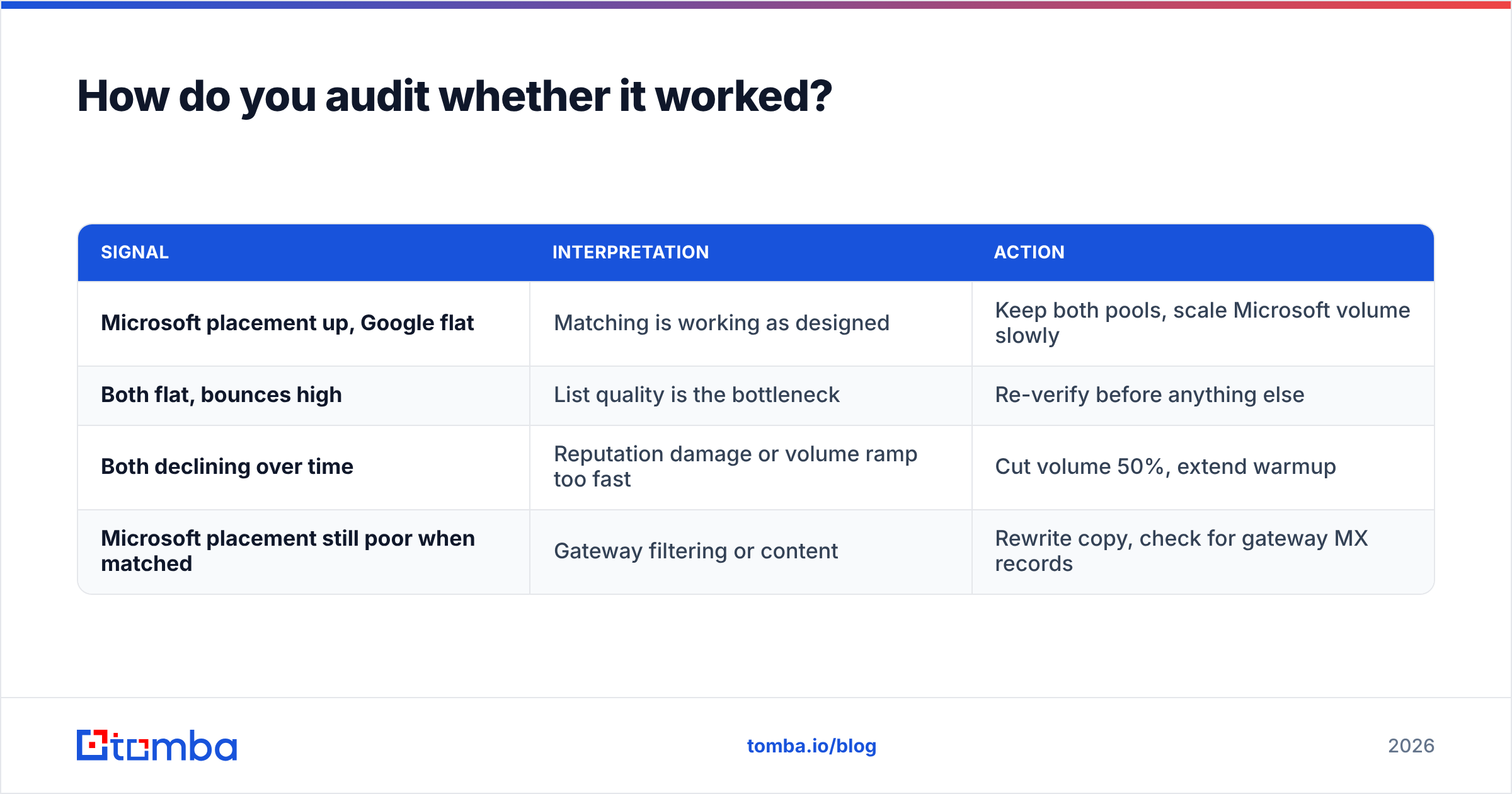
What to look for:
| Signal | Interpretation | Action |
|---|---|---|
| Microsoft placement up, Google flat | Matching is working as designed | Keep both pools, scale Microsoft volume slowly |
| Both flat, bounces high | List quality is the bottleneck | Re-verify before anything else |
| Both declining over time | Reputation damage or volume ramp too fast | Cut volume 50%, extend warmup |
| Microsoft placement still poor when matched | Gateway filtering or content | Rewrite copy, check for gateway MX records |
Independent reviews on G2 are useful for spotting which sending platforms handle multi-pool routing without breaking reporting, but treat feature claims about "AI-powered ESP matching" as marketing until a seed test confirms them. Under the hood, every implementation reads the same public MX record.
The bottom line#
ESP matching is legitimate, cheap to implement, and worth doing — for Microsoft-heavy lists, once your fundamentals are solid. It is not a growth hack, and it will not rescue a campaign built on scraped, unverified contacts. The teams that get the most out of it are the ones who already had clean data and were looking for the last few points of placement.
Get the data layer right first. Build the list with a source that resolves real, deliverable addresses instead of permutated guesses, capture the recipient's provider at enrichment time, and verify before you route. The Tomba Email Finder handles the first two — domain-level discovery with verification built into the same call, so the contact record you route on is one you can trust. The free tier gives you 25 searches a month to test the accuracy on your own target accounts, and paid plans start at $49/month; full Tomba pricing is public if you want to size it against your list volume before committing.
Related guides#
Ready to find emails that actually work?
Join 150,000+ professionals who stopped guessing and started sending. Free credits on signup — no credit card required.
Get the Tomba newsletter
Practical outbound tactics and product updates — once every two weeks.
About the author