Evawarm Pricing Reviews Pros and Cons: The 2026 Verdict
A neutral breakdown of Evawarm pricing, real user reviews, and the pros and cons that matter before you pay for another warmup seat — plus what warmup can't fix.
Evawarm pricing reviews pros and cons — here is the short answer first. Evawarm is a cheap per-inbox warmup tool. It helps a new domain look active. It does not fix a bad list. This guide covers what a seat costs, what real users report, and when the money is better spent elsewhere.
TL;DR
- Evawarm is an email warmup and deliverability tool. It sends automated peer-to-peer conversations between inboxes to build sender reputation before you run cold campaigns. Pricing is per inbox, so the bill climbs fast once you connect more than a handful of mailboxes.
- The pros are real: a low entry price per seat, simple setup, unlimited-warmup positioning, and a spam-placement dashboard that flags a mailbox in trouble.
- The cons are real too. Warmup traffic is synthetic, Google and Microsoft have gotten better at ignoring it, and no warmup tool fixes a list full of dead or catch-all addresses.
- Budget math matters more than feature lists. Ten inboxes on a $6–$15 tool cost less than one bad month of bounced sends killing a domain.
- The best split for most teams is simple: a modest warmup budget plus a real verification and email finder layer, so you never send to addresses that should not exist.
What is Evawarm and who actually uses it?#
Evawarm is an inbox warmup service. You connect a mailbox — Google Workspace, Microsoft 365, or plain SMTP/IMAP. The tool then trades messages with other inboxes in its network. Those messages get opened, replied to, marked "not spam," and pulled out of the promotions tab. Over two to six weeks, that pattern is meant to show mailbox providers that your address belongs to a real person.
Think of it like a credit score for your sending domain. A brand-new domain has no history, so providers play it safe and filter hard. Warmup builds a payment history for you: small, steady, positive signals. Then, when you apply for the big loan — a 500-email-a-day cold campaign — you are not turned down on sight.
The typical Evawarm user is one of three profiles:
- Agency operators running 10–100 sending mailboxes across client domains, where the cost per inbox adds up fast.
- Solo founders and small sales teams with two to five mailboxes. They just bought secondary domains and need to not burn them.
- Cold email teams already paying for a sequencer (Instantly, Smartlead, Saleshandy). They want warmup kept separate, so switching sequencers does not reset reputation.
If you are in group three, the honest question is not "is Evawarm good?" It is "am I paying twice for warmup my sequencer already gives me?" Many sequencers include warmup at no extra charge per inbox. That single fact changes the whole price math, and most Evawarm reviews skip it.
How does Evawarm pricing actually work in 2026?#
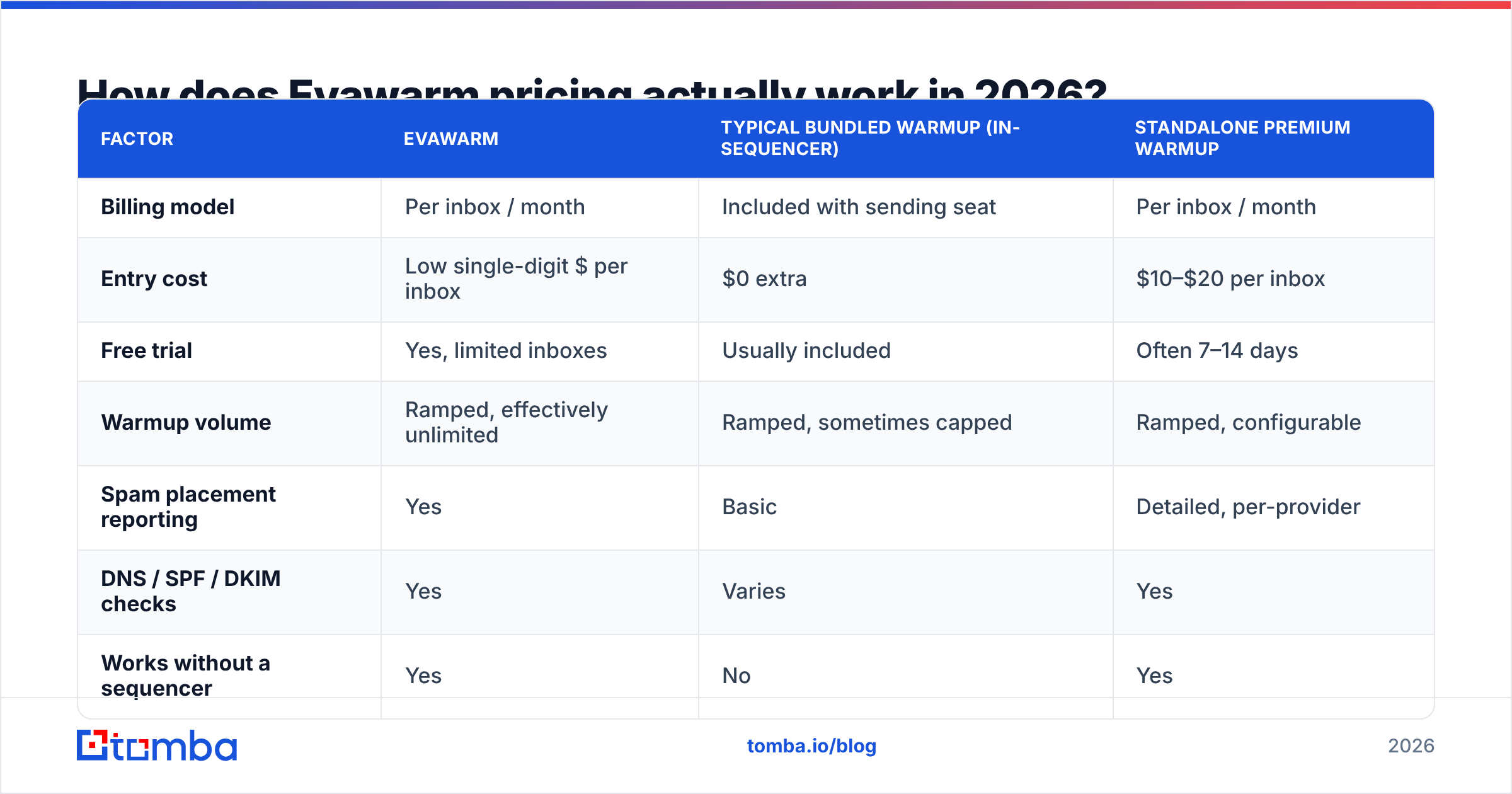
Evawarm charges per connected inbox, per month. Volume discounts kick in as you add mailboxes. A free trial lets you test one or two mailboxes first. Nearly every warmup vendor works this way now. What differs is the rate per inbox, whether daily send volume is capped, and what you get on top of raw warmup — spam-placement testing, DNS checks, reporting.
Here is how the category stacks up. Treat published rates as a starting point. Warmup vendors change prices often, and almost all of them discount annual plans.
| Factor | Evawarm | Typical bundled warmup (in-sequencer) | Standalone premium warmup |
|---|---|---|---|
| Billing model | Per inbox / month | Included with sending seat | Per inbox / month |
| Entry cost | Low single-digit $ per inbox | $0 extra | $10–$20 per inbox |
| Free trial | Yes, limited inboxes | Usually included | Often 7–14 days |
| Warmup volume | Ramped, effectively unlimited | Ramped, sometimes capped | Ramped, configurable |
| Spam placement reporting | Yes | Basic | Detailed, per-provider |
| DNS / SPF / DKIM checks | Yes | Varies | Yes |
| Works without a sequencer | Yes | No | Yes |
| Best for | Multi-mailbox agencies | Teams already on one sequencer | Enterprise deliverability teams |
The pattern is clear. Standalone warmup wins on flexibility and loses on overlap. If you already pay for a sending platform that bundles warmup, Evawarm is a duplicate line item. The exception: you need its reporting, or you rotate sequencers often.

The math that decides this is simple. Take your monthly warmup cost and divide it by inboxes. Then compare that to the revenue from one closed deal. At 20 inboxes and $8 each, you spend $160 a month. If your average contract is worth $3,000, warmup pays for itself the first time it saves a domain from a blacklist. That is usually an easy yes. The trap is scaling to 80 inboxes because a tool made it cheap. At that point you run a mailbox farm, not a sales process.
What do Evawarm reviews actually say?#
Pull the user reviews together from G2 and similar directories, and the same picture shows up. Warmup tools in this price band draw praise for the same things and complaints about the same things.
What reviewers consistently like:
- Setup speed. OAuth for Google and Microsoft, SMTP/IMAP for everything else. Most users are live in under ten minutes per mailbox.
- Price per inbox. For an agency running dozens of mailboxes, the gap between $6 and $15 per inbox is thousands of dollars a year.
- The spam-placement view. Knowing that mailbox #14 lands in spam on Outlook but is fine on Gmail is useful. It tells you which domains to pause.
- Set and forget. Once it is configured, warmup runs without daily babysitting.
What reviewers consistently complain about:
- Support latency. Cheap per-seat tools tend to run lean support. Reviewers across the category report slow tickets during incidents.
- Shallow reporting. You get placement percentages. You do not always get the "why" behind them.
- Reconnect churn. Google and Microsoft token expiries knock mailboxes offline. Reviewers want louder alerts when a mailbox quietly stops warming.
- Diminishing returns. After eight weeks the graph flattens, and users cannot tell whether the tool still does anything.
That last one is the most important critique in the whole category. It deserves its own section.
Does email warmup still work in 2026?#
Partly. Less than it did in 2022. Here is the honest version.
Warmup networks work by making engagement signals. Mailbox providers weigh engagement heavily, so on paper the logic holds. But Google and Microsoft have spent years learning to tell real conversation from network traffic. Four signals get discounted: the same address pairs always replying to each other, identical timing, thin message variety, and clusters of accounts that only ever talk among themselves.
So warmup is now table stakes, not an edge. It does one thing well. It shows that a brand-new domain and mailbox are not dormant. It will not rescue a domain that already draws spam complaints.
What actually moves email deliverability in 2026, ranked by impact:
- Authentication done right. An SPF record, DKIM, and a DMARC policy that is not
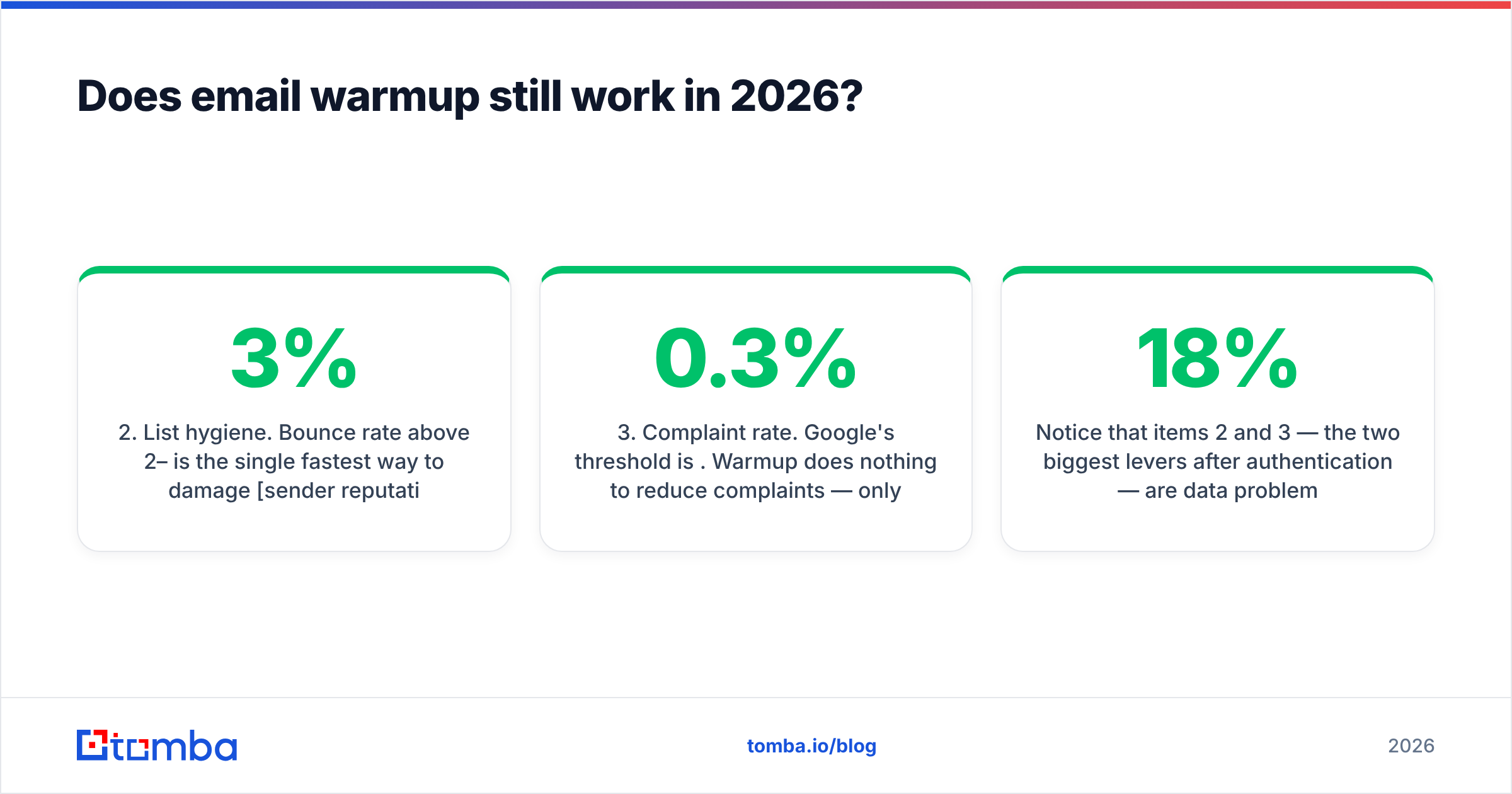
p=noneforever. Since the 2024 bulk-sender rules from Google and Yahoo, this is non-negotiable. The current rules live in Google's Postmaster guidelines. - List hygiene. A bounce rate above 2–3% is the fastest way to hurt sender reputation. Every invalid address you mail is a direct penalty.
- Complaint rate. Google's threshold is 0.3%. Warmup does nothing here. Only relevance and targeting cut complaints.
- Volume ramping. Slow, steady increases beat spiky sends. This is where warmup genuinely helps.
- Content and link hygiene. Tracking domains, link shorteners, and image-heavy HTML all carry risk.
- Warmup traffic. Real, but the smallest lever on this list.
Notice that items 2 and 3 are data problems, not warmup problems. They are also the two biggest levers after authentication. You can run the best warmup network alive and still burn a domain in a week by mailing a scraped list with 18% bad addresses.

Evawarm pricing reviews pros and cons, side by side#
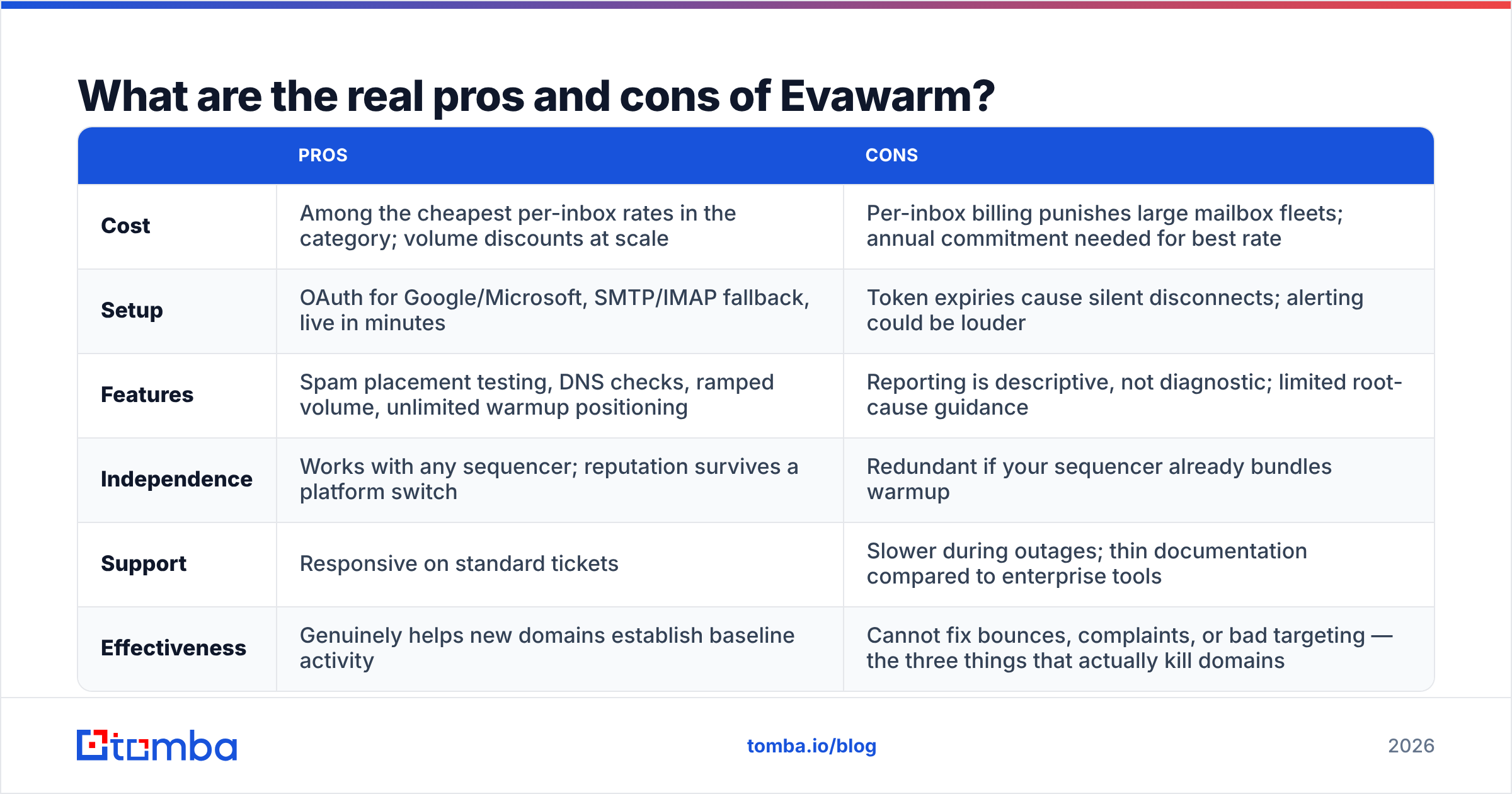
Laid out plainly, without the vendor gloss:
| Pros | Cons | |
|---|---|---|
| Cost | Among the cheapest rates per inbox in the category; volume discounts at scale | Per-inbox billing punishes large mailbox fleets; you need an annual plan for the best rate |
| Setup | OAuth for Google/Microsoft, SMTP/IMAP fallback, live in minutes | Token expiries cause silent disconnects; alerting could be louder |
| Features | Spam placement testing, DNS checks, ramped volume, unlimited warmup | Reports show what happened, not why; little root-cause help |
| Independence | Works with any sequencer; reputation survives a platform switch | Redundant if your sequencer already bundles warmup |
| Support | Responsive on standard tickets | Slower during outages; thin docs next to enterprise tools |
| Effectiveness | Genuinely helps new domains build a baseline | Cannot fix bounces, complaints, or bad targeting — the three things that kill domains |
The verdict: Evawarm is fair value for what it is. And what it is happens to be the fourth or fifth most important item on your deliverability checklist. Buy it if you have new domains and no bundled option. Do not buy it and expect it to make up for weak data.
What should you buy instead of, or alongside, warmup?#
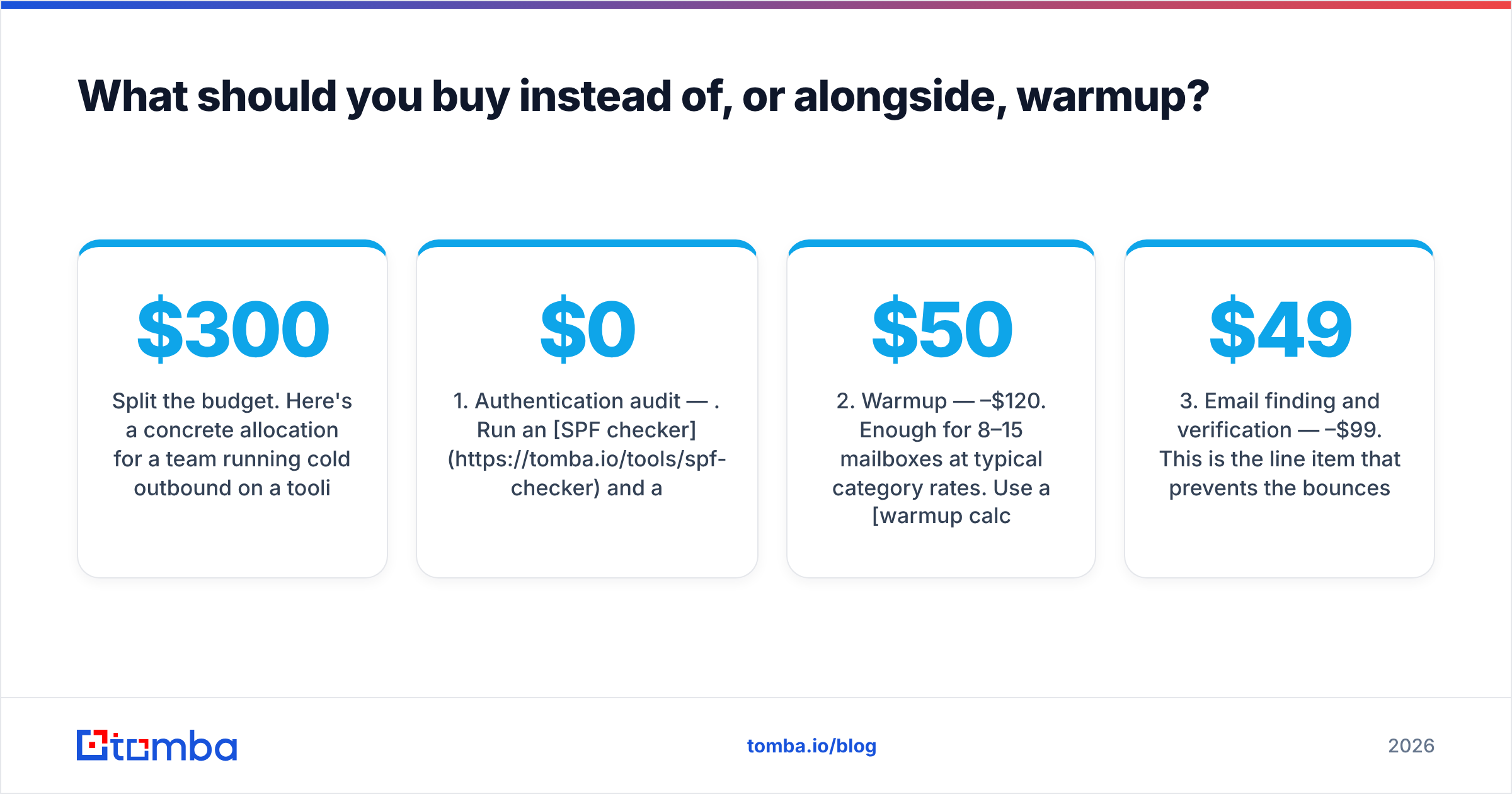
Split the budget. Here is a concrete plan for a team running cold outbound on a $300 monthly tooling budget:
- Authentication audit — $0. Run an SPF checker and a blacklist checker on every sending domain first. Bad DNS is free to find and expensive to ignore.
- Warmup — $50–$120. Enough for 8–15 mailboxes at typical rates. Use a warmup calculator to set a realistic ramp instead of guessing.
- Email finding and verification — $49–$99. This is the line item that stops the bounces warmup cannot fix. Tomba's Starter plan is $49/mo and Growth is $99/mo. Both cover email finder and email verifier use for most SMB outbound programs. A free tier gives you 25 searches a month if you want to test accuracy first.
Two more line items round it out, and both are cheap:
- Catch-all handling — included. Catch-all domains accept everything and confirm nothing. That is how "verified" lists still bounce. A catch-all verifier settles the question so you do not have to guess.
- Spam-content check — $0. Run your real copy through a spam checker before launch. It takes 60 seconds and catches the obvious trigger phrases.
If you are also weighing data vendors, BookYourData takes a different and legitimate route: pay-as-you-go verified B2B contacts with a bounce guarantee. That suits teams who want a one-off list instead of an ongoing search plan. Different model, same goal. Do not send to addresses that do not exist.

Accuracy gaps between finders look small on a spec sheet and huge in a bounce report. Compare a finder at 95% accuracy with one at 82%. On a 5,000-contact campaign, that is roughly 650 extra invalid sends. It is well past the point where providers start to throttle you. No amount of warmup traffic offsets that.
How do you evaluate any warmup tool before you pay?#
Use this checklist on Evawarm or any rival. It takes about an hour and saves months of guessing.
- Run the free trial on a real mailbox. Warmup on a dormant test account tells you nothing.
- Check whether your sequencer already includes it. If it does, the standalone tool has to earn its keep on reporting alone.
- Ask about network size and quality. A network of 200 accounts is a fingerprint waiting to be spotted. Bigger, more varied networks age better.
- Verify that placement testing is per provider. An overall "94% inbox" is useless if all your prospects sit on Outlook.
- Test the disconnect alerting. Revoke OAuth on one mailbox and see how long it takes to hear about it.
- Confirm the exit path. Can you export your reputation history? Does cancelling mid-cycle prorate?
- Cross-check reviews on a second directory. Capterra and G2 draw different users and surface different gripes.
If a vendor fails three or more of these, the low price per inbox is not a deal. It is a discount on a tool you will replace in six months.
Is Evawarm worth it? The honest verdict#
Buy it if you run new or recently bought sending domains, your sequencer has no warmup built in, you manage more than three mailboxes, and you want reputation that survives a platform switch. At this price it is an easy line item to defend.
Skip it if your sequencer already warms your inboxes, or if you send from a mature domain with years of real history. Skip it too — and this is the common case — if your real problem is a bounce rate above 3% caused by unverified contact data. There, warmup treats a symptom while the cause keeps growing.
Strip away the noise and the Evawarm pricing reviews pros and cons all land in the same place. The tools work about as well as each other. They cost about the same. The one variable that separates a 4% reply rate from a 0.4% reply rate is list quality, not mailbox warmth.
Fix the data layer first. Use the Tomba Email Finder to source verified professional addresses by domain, name, or company. Run everything through verification before a single message leaves your warmed-up inbox. Start on the free tier at 25 searches a month, see what your real bounce rate looks like on clean data, and then decide how much warmup you need to buy.
Related guides#
Ready to find emails that actually work?
Join 150,000+ professionals who stopped guessing and started sending. Free credits on signup — no credit card required.
Get the Tomba newsletter
Practical outbound tactics and product updates — once every two weeks.
About the author