Event Lead Conversion: How to Turn Badge Scans Into Pipeline
Most booth scans never become pipeline. Here's the 72-hour follow-up system, the benchmarks that actually matter, and the data stack that keeps event leads from bouncing.
TL;DR
- Event lead conversion is not a follow-up problem, it's a latency and data-quality problem. Leads scanned Tuesday and emailed the following Monday convert at a fraction of leads emailed within 48 hours.
- Badge-scan data is dirty by default: typo'd emails, personal Gmail addresses, and generic
info@catch-alls routinely put 20–35% of an event list into bounce territory. - Segment before you send. Booth scans, demo-meeting attendees, and session-only attendees deserve three different sequences, not one blast.
- The realistic benchmark for a well-run B2B event is 12–20% of raw scans reaching a sales conversation, and 2–5% reaching opportunity stage within 90 days.
- Measure cost per opportunity, not cost per scan. Scan counts are the vanity metric that keeps bad booths funded.
What is event lead conversion, exactly?#
Event lead conversion is the percentage of contacts collected at an event — badge scans, business cards, booked meetings, webinar registrants — that progress into a defined sales stage within a set window (usually 90 days).
The definition matters because most teams quietly measure the wrong thing. "We got 640 leads at SaaStr" is a collection metric. It tells you how many people walked within QR-code range of your booth, not how many of them had a budget, a problem, or a pulse.
A useful working definition has three parts:
- Numerator — contacts that reached a qualified sales conversation (a real discovery call, not an auto-booked no-show).
- Denominator — total unique, deduplicated, human contacts collected. Not raw scans. One person scanned three times is one lead.
- Window — a fixed period, typically 90 days, so events with long deal cycles are compared fairly against each other.
Run those three numbers on your last event and the result is usually humbling. That's the point: you can't fix what you're flattering.
Why do most event leads die before the first follow-up?#
Four failure points account for almost all of the loss, and only one of them is about your email copy.
1. Latency. The average B2B team sends its first post-event email 5–9 days after the show closes. By then the attendee has been to two more conferences' worth of inbox noise, forgotten your booth, and — if they were genuinely shopping — already replied to a competitor who was faster. Speed compounds: the same email sent on day 2 versus day 9 is a completely different message, because on day 2 you're a memory and on day 9 you're a stranger.
2. Data quality. Badge scanners capture whatever the attendee typed into a registration form six weeks earlier, often on a phone, often in a hurry. You get jsmith@acme with a missing TLD, personal addresses that never route to a work inbox, and role accounts that go to a shared queue nobody reads. Send to that list unfiltered and your bounce rate spikes, which damages sender reputation for every other campaign you run that quarter.
3. Missing context. A scan gives you a name, a company, and maybe a title. It does not tell you whether that person watched your demo for 20 minutes or grabbed a stress ball on the way to the bathroom. Without booth-side context capture, every lead gets the same generic "great meeting you!" email — including the people you never actually met.
4. No routing rules. Leads land in a spreadsheet, marketing "nurtures" them for three weeks, and sales sees them cold in month two. The handoff needs to be defined before the event, with named owners and SLAs, or the list rots in transit.
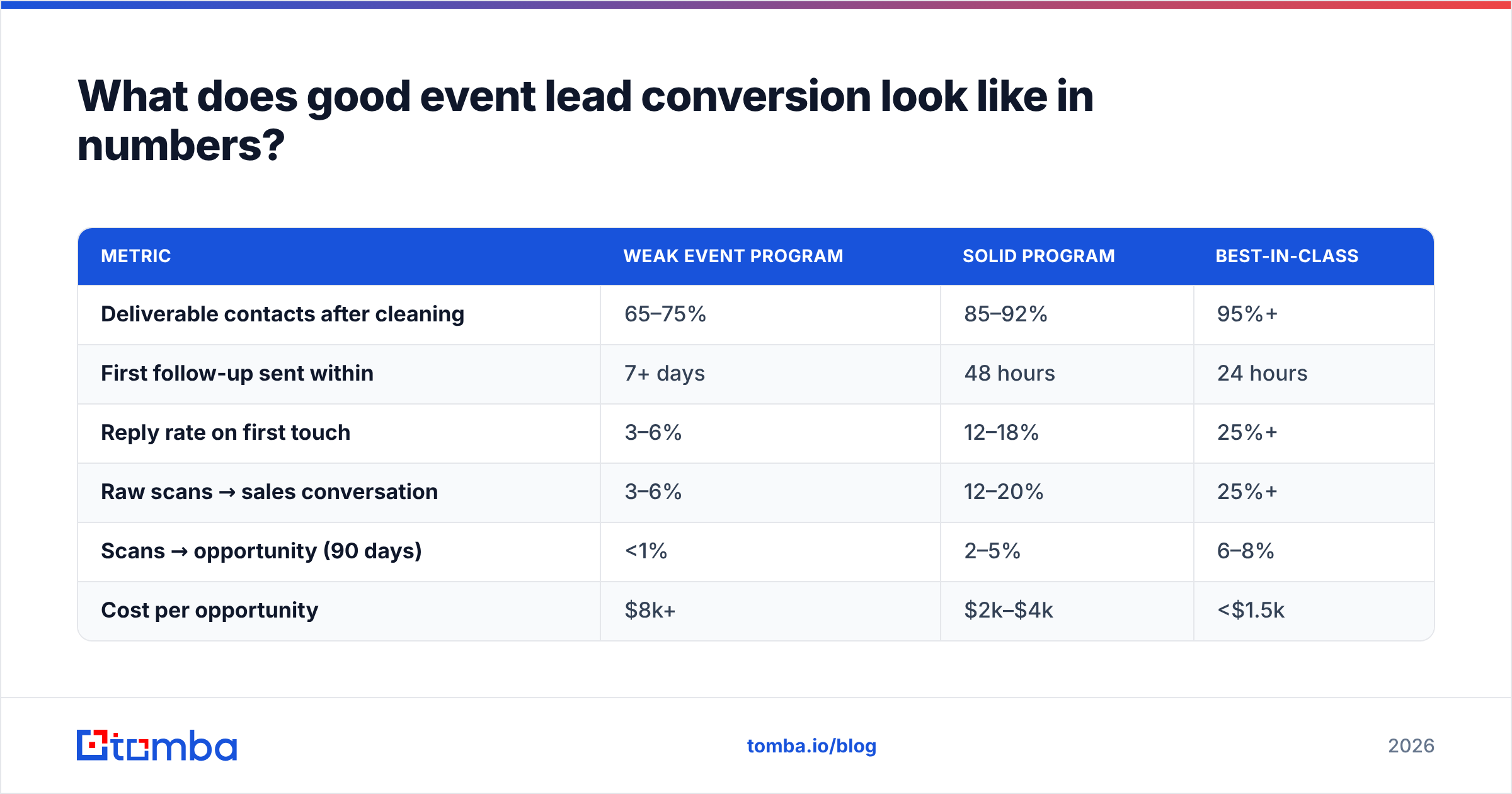
What does good event lead conversion look like in numbers?#
Benchmarks vary wildly by event type, ticket size, and how aggressive your scanning policy is. These ranges reflect what disciplined B2B teams report for mid-market ACVs ($15k–$60k) — treat them as a sanity check, not a law.
| Metric | Weak event program | Solid program | Best-in-class |
|---|---|---|---|
| Deliverable contacts after cleaning | 65–75% | 85–92% | 95%+ |
| First follow-up sent within | 7+ days | 48 hours | 24 hours |
| Reply rate on first touch | 3–6% | 12–18% | 25%+ |
| Raw scans → sales conversation | 3–6% | 12–20% | 25%+ |
| Scans → opportunity (90 days) | <1% | 2–5% | 6–8% |
| Cost per opportunity | $8k+ | $2k–$4k | <$1.5k |
The two rows that move everything else are deliverable contacts and time to first touch. Fix those and the downstream numbers improve without touching your messaging at all. Most teams do the opposite: they rewrite the follow-up email six times while shipping it to a list that's a third undeliverable.
How do you build a 72-hour post-event follow-up system?#
The system is boring, which is why it works. Build it once, reuse it for every event.
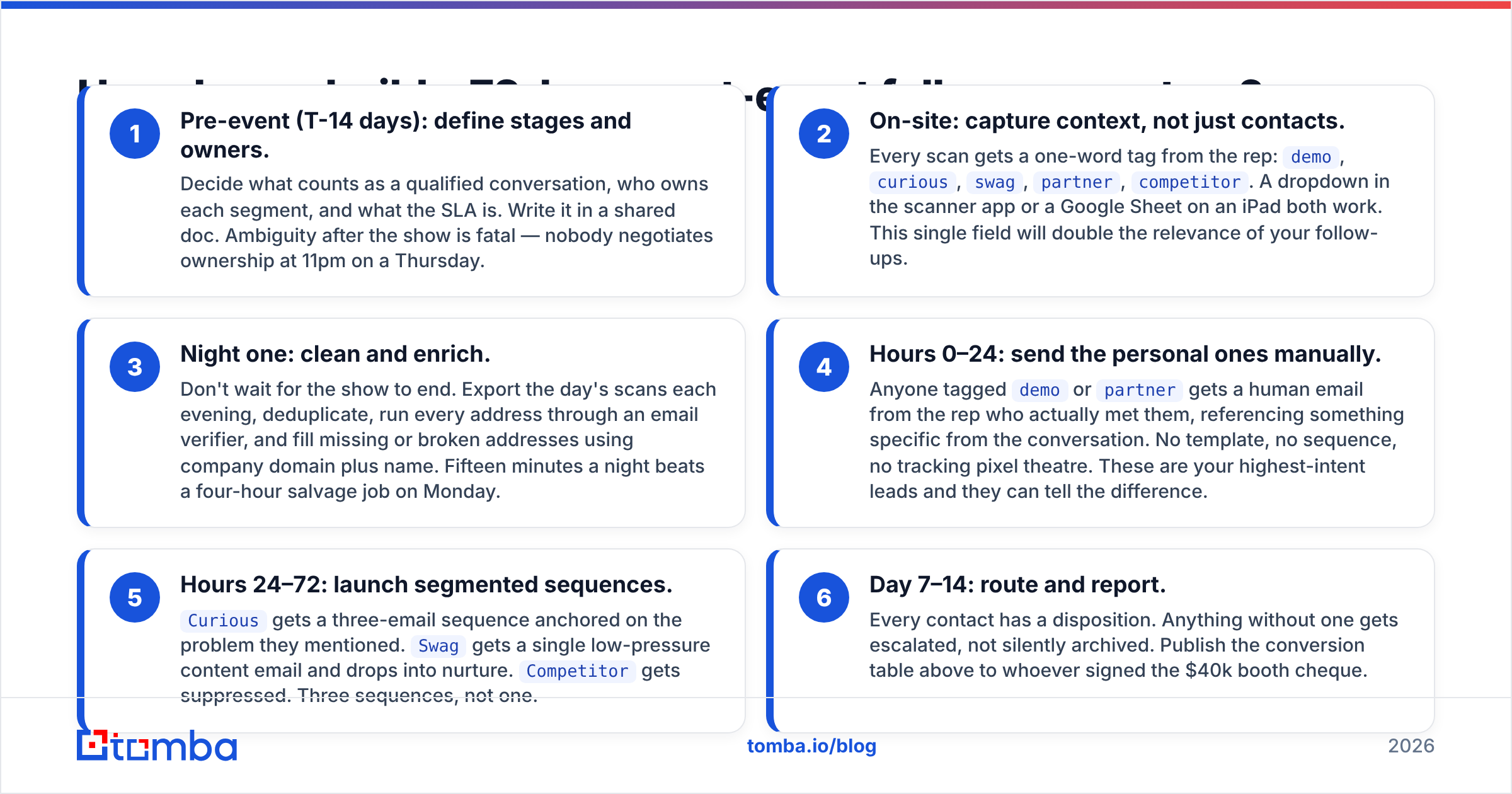
Pre-event (T-14 days): define stages and owners. Decide what counts as a qualified conversation, who owns each segment, and what the SLA is. Write it in a shared doc. Ambiguity after the show is fatal — nobody negotiates ownership at 11pm on a Thursday.
On-site: capture context, not just contacts. Every scan gets a one-word tag from the rep:
demo,curious,swag,partner,competitor. A dropdown in the scanner app or a Google Sheet on an iPad both work. This single field will double the relevance of your follow-ups.Night one: clean and enrich. Don't wait for the show to end. Export the day's scans each evening, deduplicate, run every address through an email verifier, and fill missing or broken addresses using company domain plus name. Fifteen minutes a night beats a four-hour salvage job on Monday.
Hours 0–24: send the personal ones manually. Anyone tagged
demoorpartnergets a human email from the rep who actually met them, referencing something specific from the conversation. No template, no sequence, no tracking pixel theatre. These are your highest-intent leads and they can tell the difference.Hours 24–72: launch segmented sequences.
Curiousgets a three-email sequence anchored on the problem they mentioned.Swaggets a single low-pressure content email and drops into nurture.Competitorgets suppressed. Three sequences, not one.Day 7–14: route and report. Every contact has a disposition. Anything without one gets escalated, not silently archived. Publish the conversion table above to whoever signed the $40k booth cheque.
Step 3 is where most programs quietly fail, so it's worth being concrete about it.
How do you clean and enrich badge-scan data before you send?#
Treat the export as raw material, not a list. A defensible cleaning pass has five stages:
- Deduplicate across scans, business cards, and meeting bookings. The same VP will appear in all three. Merge on email first, then company plus last name. A duplicate remover handles the mechanical pass in seconds.
- Repair obvious breakage. Missing TLDs, doubled domains (
acme.comcom), OCR errors from card scans. Roughly 3–8% of any badge export has a mechanical defect that a regex pass fixes for free. - Replace personal addresses. A
@gmail.comaddress on a badge is usually a registration shortcut, not a preference. Take the name plus the company domain and find the corporate address with an email finder — replies to a work inbox outperform replies to a personal one by a wide margin in B2B. - Verify what's left. SMTP-level verification catches the addresses that look fine and bounce anyway. Catch-all domains are the tricky case: they accept everything, so you need a catch-all verifier to score them rather than guessing.
- Enrich for segmentation. Title, seniority, company size, and tech stack turn a flat list into three sequences. Data enrichment at this stage is what makes step 5 above possible.
That last stage is also your suppression filter. Anyone already in an open opportunity should be routed to their existing AE, not blasted with a "nice to meet you" from an SDR who's never spoken to them. Nothing torches a live deal faster.
Which tools actually move event lead conversion?#
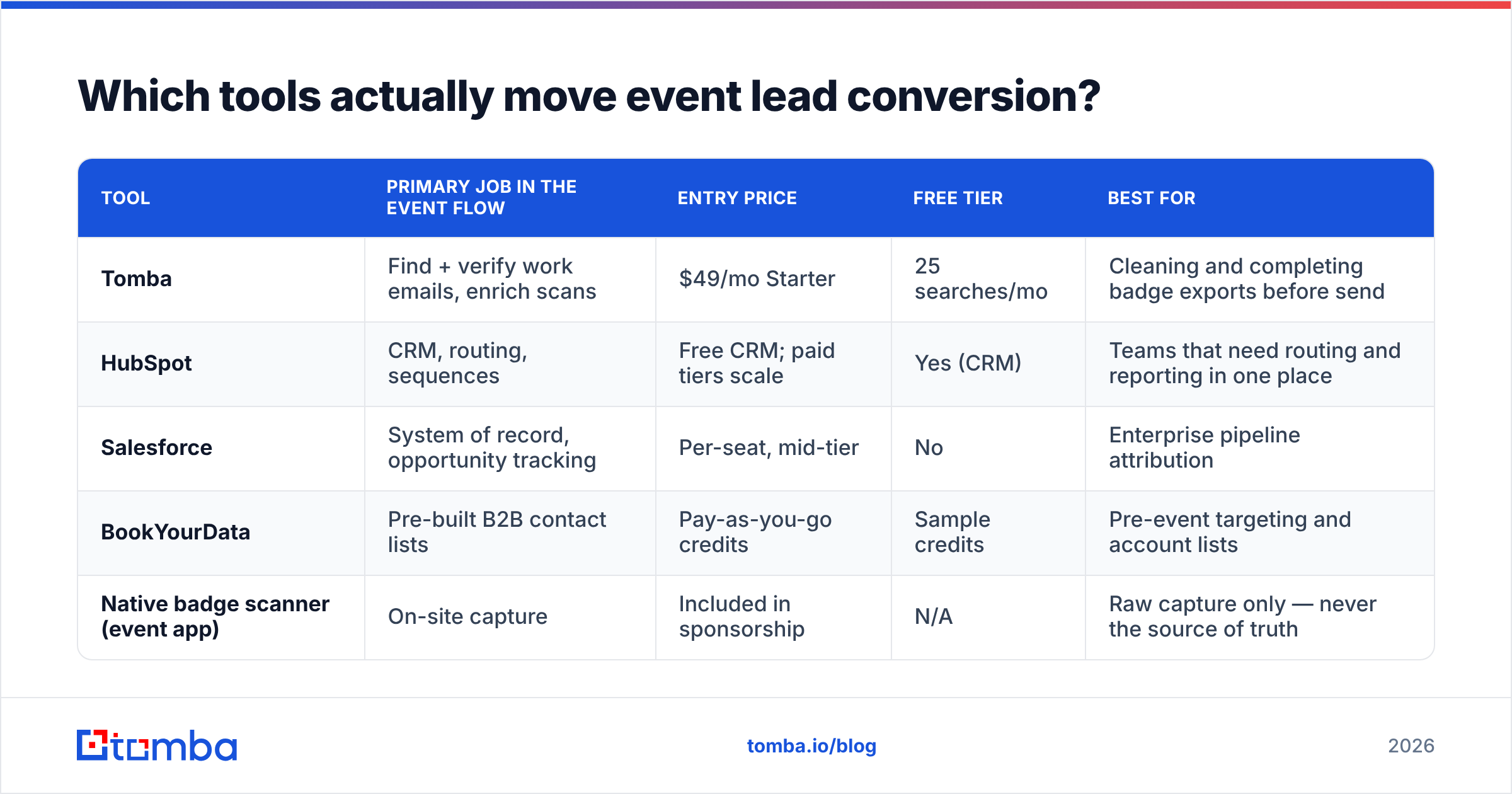
You don't need a new platform. You need three functions covered: capture, clean, and sequence. Here's how common options map onto them.
| Tool | Primary job in the event flow | Entry price | Free tier | Best for |
|---|---|---|---|---|
| Tomba | Find + verify work emails, enrich scans | $49/mo Starter | 25 searches/mo | Cleaning and completing badge exports before send |
| HubSpot | CRM, routing, sequences | Free CRM; paid tiers scale | Yes (CRM) | Teams that need routing and reporting in one place |
| Salesforce | System of record, opportunity tracking | Per-seat, mid-tier | No | Enterprise pipeline attribution |
| BookYourData | Pre-built B2B contact lists | Pay-as-you-go credits | Sample credits | Pre-event targeting and account lists |
| Native badge scanner (event app) | On-site capture | Included in sponsorship | N/A | Raw capture only — never the source of truth |
The pattern that works: capture in the event app, clean and complete in a data layer, store in the CRM, sequence from wherever your reps already live. Tomba's bulk email finder exists specifically for the "I have a 600-row CSV and 90 minutes" moment, and the Tomba API covers it if you'd rather wire cleaning directly into your event-app export. Full Tomba pricing runs Free (25 searches/mo), Starter $49/mo, Growth $99/mo, Pro $249/mo, and Enterprise custom.
For CRM-side routing and lifecycle reporting, HubSpot and Salesforce both publish solid documentation on event lead lifecycle stages. If you're comparing categories rather than specific vendors, G2 is the least-worst source for verified user counts.
How should you segment booth scans versus meetings versus session attendees?#
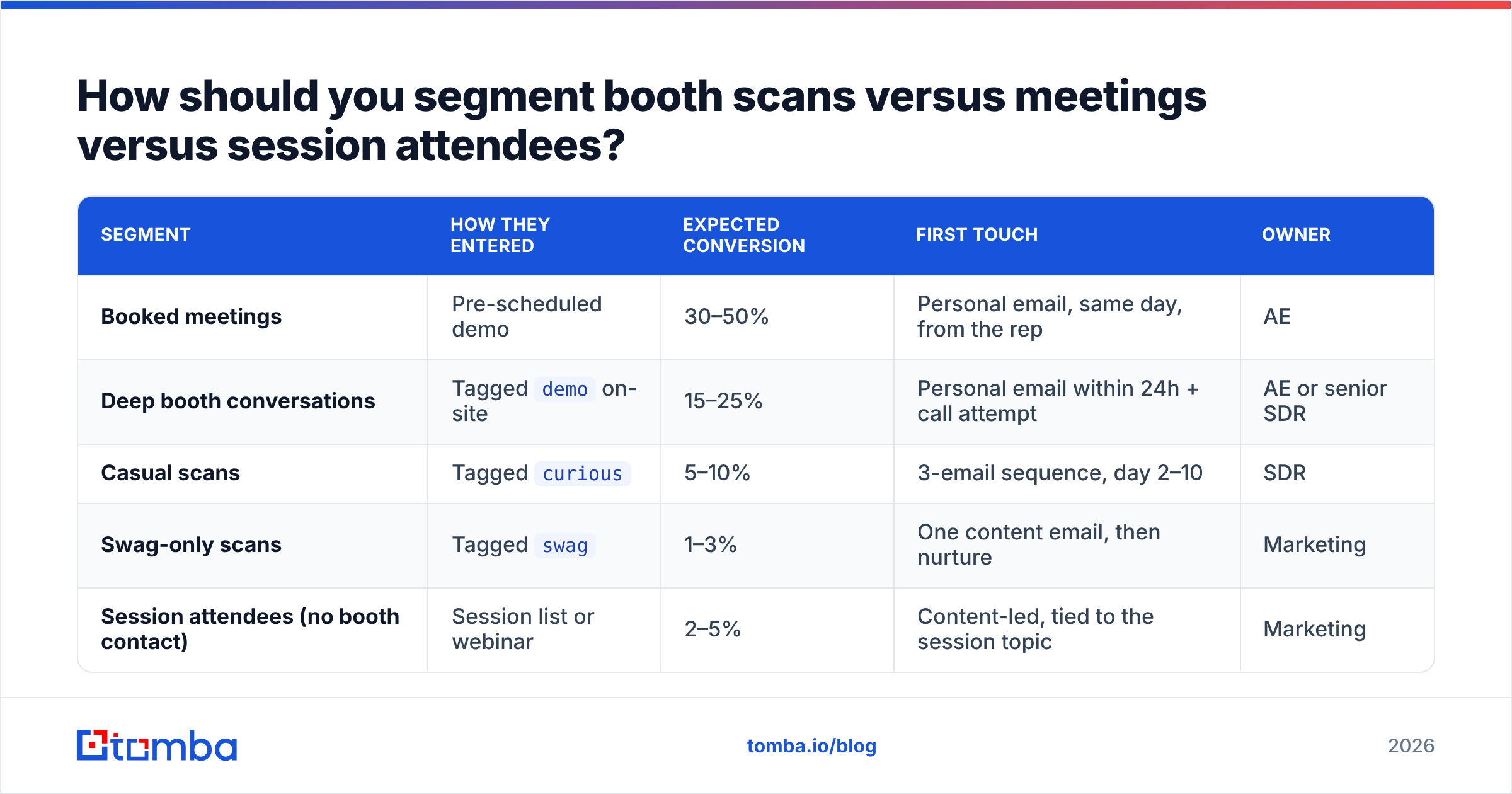
Not all event contacts are the same species. Sending them the same email is the single most common conversion killer.
| Segment | How they entered | Expected conversion | First touch | Owner |
|---|---|---|---|---|
| Booked meetings | Pre-scheduled demo | 30–50% | Personal email, same day, from the rep | AE |
| Deep booth conversations | Tagged demo on-site |
15–25% | Personal email within 24h + call attempt | AE or senior SDR |
| Casual scans | Tagged curious |
5–10% | 3-email sequence, day 2–10 | SDR |
| Swag-only scans | Tagged swag |
1–3% | One content email, then nurture | Marketing |
| Session attendees (no booth contact) | Session list or webinar | 2–5% | Content-led, tied to the session topic | Marketing |
Note what happens to your headline number when you segment: a "640-lead" event might be 12 meetings, 60 real conversations, 300 casual scans, and 268 swag grabs. The 12 and the 60 deserve nearly all of your energy in the first 48 hours. The rest can wait for the sequence.
What should the first follow-up email actually say?#
Three rules, and they're all about proof of memory.
Reference a specific detail. "You mentioned your team is stitching together three data sources for account research" beats "great to connect at Booth 412." If you can't reference a detail, you didn't have a conversation — send the sequence, not the personal note.
Keep it under 90 words. Post-event inboxes are triage zones. The job of email one is to earn a reply, not to explain your product.
Ask one question with a low answer cost. "Worth a 15-minute look next week?" converts better than a calendar link dropped cold, because it lets a busy person say yes without opening their calendar. If you want a starting point, Tomba's cold email templates include post-event variants you can strip down.
And on send hygiene: after an event you're mailing a list of people who have never received email from you before, often at volume, often from a domain that mostly sends one-to-one. Warm the sending domain in advance, cap daily volume, and check your list against a spam checker before you launch. Good email deliverability is a prerequisite for event lead conversion, not a nice-to-have.
How do you measure event ROI beyond MQLs?#
Track four numbers per event and nothing else at the executive level:
- Deliverable contact count (not scan count)
- Sales conversations booked within 30 days
- Opportunities created within 90 days
- Cost per opportunity = total event cost ÷ opportunities created
Total event cost means everything: booth, travel, swag, staff time, the sponsorship upsell you regretted. When you compute cost per opportunity honestly, most event portfolios reveal that two or three shows carry the whole program and the rest are habit. That's the decision the data exists to inform.
Set attribution to first-touch and multi-touch, then look at both. Events rarely close deals on their own — they accelerate deals that were going to happen and surface accounts that weren't on your radar. A first-touch-only model undercounts the first effect; a multi-touch-only model undercounts the second.
Fix the data layer first#
If you only change one thing before your next event, change what happens between the badge scan and the first send. Deduplicate, repair, replace personal addresses with work ones, verify, enrich, segment. That pass is worth more than a new booth design and a rewritten pitch deck combined, because everything downstream is multiplied by it.
Tomba's Email Finder is built for exactly this step: give it a name and a company domain from your badge export and it returns the verified work address, with a confidence score and the sources behind it. Start on the free tier (25 searches/mo) to clean a sample of your last event list, see what percentage was actually deliverable, and decide from there whether Starter at $49/mo pays for itself — for most teams, one recovered opportunity covers a year.
Related guides#
Ready to find emails that actually work?
Join 150,000+ professionals who stopped guessing and started sending. Free credits on signup — no credit card required.
Get the Tomba newsletter
Practical outbound tactics and product updates — once every two weeks.
About the author