ExactVerify vs Findymail: Which Email Tool Wins in 2026?
ExactVerify verifies, Findymail finds. Most teams buy the wrong one first. Here is the honest breakdown of coverage, bounce rates, pricing models and where a single-vendor stack beats both.
TL;DR
- ExactVerify and Findymail are not really competitors — one cleans lists, the other builds them. Buying the wrong category is the most common mistake in this comparison.
- Findymail's edge is sourcing: it pulls emails from LinkedIn and Sales Navigator exports and claims a bounce-rate guarantee on what it returns.
- ExactVerify's edge is validation throughput: SMTP checks, syntax and MX validation, catch-all handling, and bulk list cleaning at a per-credit price.
- If you need both jobs — and almost every outbound team does — running two vendors means two logins, two credit pools, and two failure points.
- The cheapest path for most teams is one platform that finds and verifies. That is where a consolidated tool like Tomba changes the math at $49/mo.
Search "ExactVerify vs Findymail" and you get a false binary. These tools sit at different points in the same pipeline: Findymail answers "what is this person's email?" and ExactVerify answers "will this email bounce?" Picking between them without understanding that distinction is how teams end up paying twice and still hitting a 9% bounce rate.
This post breaks down what each tool actually does, how the pricing models differ in practice, where each one breaks, and how to decide — including the honest case for skipping the two-vendor setup entirely.
What is ExactVerify and what problem does it solve?#
ExactVerify is an email verification service. You hand it a list — a CSV export, a form-capture dump, a decade-old newsletter database — and it returns a status for each address: valid, invalid, risky, catch-all, disposable, role-based.
The mechanics are standard across the verification category, and worth understanding because vendors describe them differently:
- Syntax and format check — catches typos, malformed addresses, and obvious junk before any network call is made.
- Domain and MX record lookup — confirms the domain resolves and actually accepts mail. Dead domains die here.
- SMTP handshake — opens a connection to the receiving mail server and asks whether the mailbox exists, without sending anything.
- Catch-all detection — flags domains that accept every address, which is where most verification tools quietly give up and return "unknown."
- Risk classification — disposable domains, role accounts (info@, sales@), and spam traps get separated from your clean segment.
The fifth step is the one that matters most for email deliverability. A verifier that hands you a big "valid" bucket without separating role accounts and catch-alls is transferring risk to your sending domain.
ExactVerify positions itself on speed and price-per-credit for bulk cleaning. It is a good fit if you already have lists and your problem is bounce rate, not sourcing.

What is Findymail and how is it different?#
Findymail is an email finder built for outbound teams who live inside LinkedIn. Its core workflow: export a Sales Navigator list, run it through Findymail, get back work emails. It also does domain-based lookups and single searches, plus a Chrome extension for on-page enrichment.
Findymail's public pitch is a bounce guarantee — it verifies what it finds and does not charge you for addresses it cannot confirm. That is a meaningful design choice. Many finders bill you for a guess; Findymail bills you for a result.
Where it gets constrained: Findymail is a finder first. Its verification is applied to its own output, not offered as a general-purpose list-cleaning engine. If you have a 200,000-row CSV from a trade show three years ago, Findymail is not the tool for that job. That is exactly ExactVerify's job.
So the real question is not "which is better." It is "which job am I trying to do, and am I about to buy two subscriptions for it?"
How do ExactVerify and Findymail compare head-to-head?#
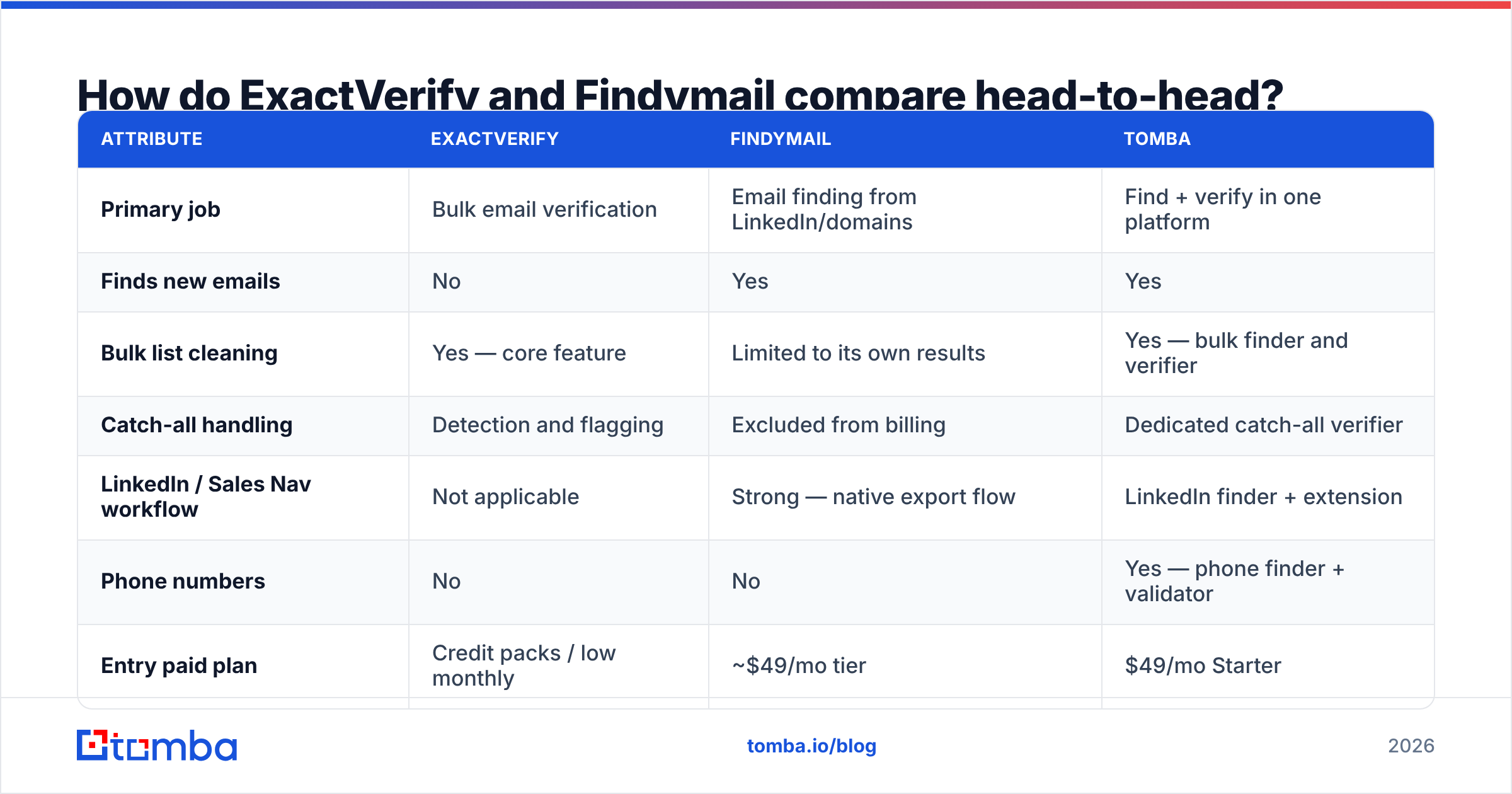
Here is the practical comparison. Pricing and limits shift — always confirm on the vendor's own page before you commit budget.
| Attribute | ExactVerify | Findymail | Tomba |
|---|---|---|---|
| Primary job | Bulk email verification | Email finding from LinkedIn/domains | Find + verify in one platform |
| Finds new emails | No | Yes | Yes |
| Bulk list cleaning | Yes — core feature | Limited to its own results | Yes — bulk finder and verifier |
| Catch-all handling | Detection and flagging | Excluded from billing | Dedicated catch-all verifier |
| LinkedIn / Sales Nav workflow | Not applicable | Strong — native export flow | LinkedIn finder + extension |
| Phone numbers | No | No | Yes — phone finder + validator |
| Entry paid plan | Credit packs / low monthly | ~$49/mo tier | $49/mo Starter |
| Free tier | Trial credits | Limited free credits | 25 searches/mo, no card |
| API access | Yes | Yes | Yes — REST, CLI, MCP, Sheets, Excel |
| Best for | Cleaning lists you already own | Sourcing from LinkedIn lists | Teams who need both jobs on one bill |
The row that decides most purchases is "finds new emails." If your pipeline starts with a name and a company and ends with a sequence, a verifier alone cannot get you there. If your pipeline starts with an inherited CRM export, a finder alone cannot get you there either.

Which tool gives you a lower bounce rate?#
Wrong framing — but it is the question everyone asks, so here is the honest answer.
A verifier cannot improve the quality of emails that were never discovered. A finder cannot clean addresses it did not source. Your bounce rate is a function of the weakest step in your chain, not the best one.
Concretely, three failure patterns show up repeatedly:
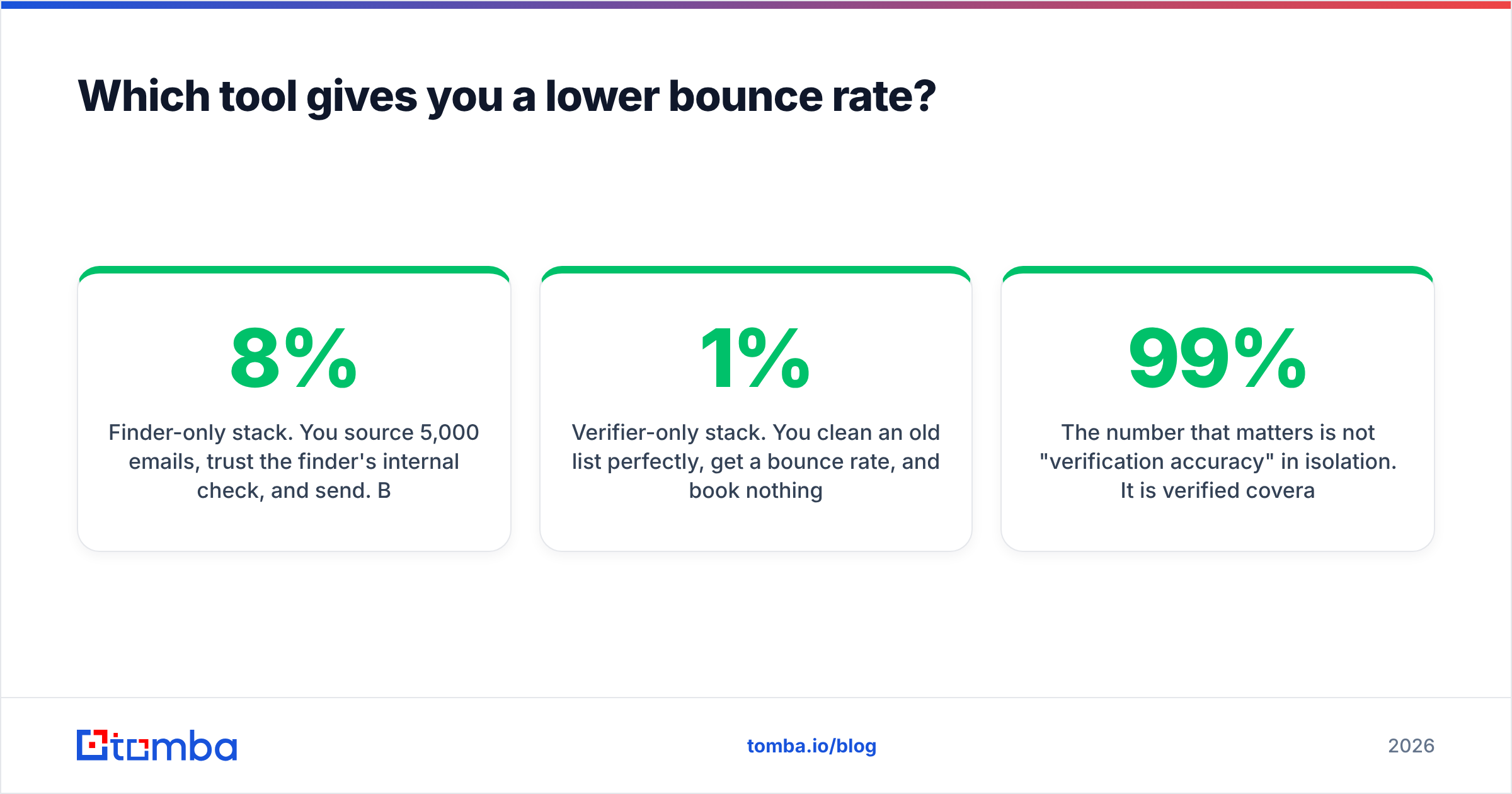
- Finder-only stack. You source 5,000 emails, trust the finder's internal check, and send. Bounce rate lands at 4–8% because catch-all domains were counted as valid. Mailbox providers notice.
- Verifier-only stack. You clean an old list perfectly, get a 1% bounce rate, and book nothing — because the list was stale and the contacts changed jobs 18 months ago. Clean is not the same as current.
- Two-vendor stack with no reconciliation. The finder returns 3,000 addresses, the verifier rejects 700, and nobody updates the source records. Next quarter you re-find and re-verify the same 700 dead contacts and pay for both again.

The number that matters is not "verification accuracy" in isolation. It is verified coverage: out of 1,000 target contacts, how many usable, deliverable addresses do you end up with? A tool that returns 400 addresses at 99% accuracy loses to a tool that returns 700 at 96% — and you need to run that test on your ICP, not a vendor benchmark.
Before you sign anything, take 200 contacts from your actual target segment and run them through every candidate. Then send to a small slice and measure real bounces. If a vendor will not give you enough free credits to run that test, that itself is data. You can sanity-check your list hygiene first with a free email checker and confirm your sending setup with an SPF checker.
How does the pricing actually work?#
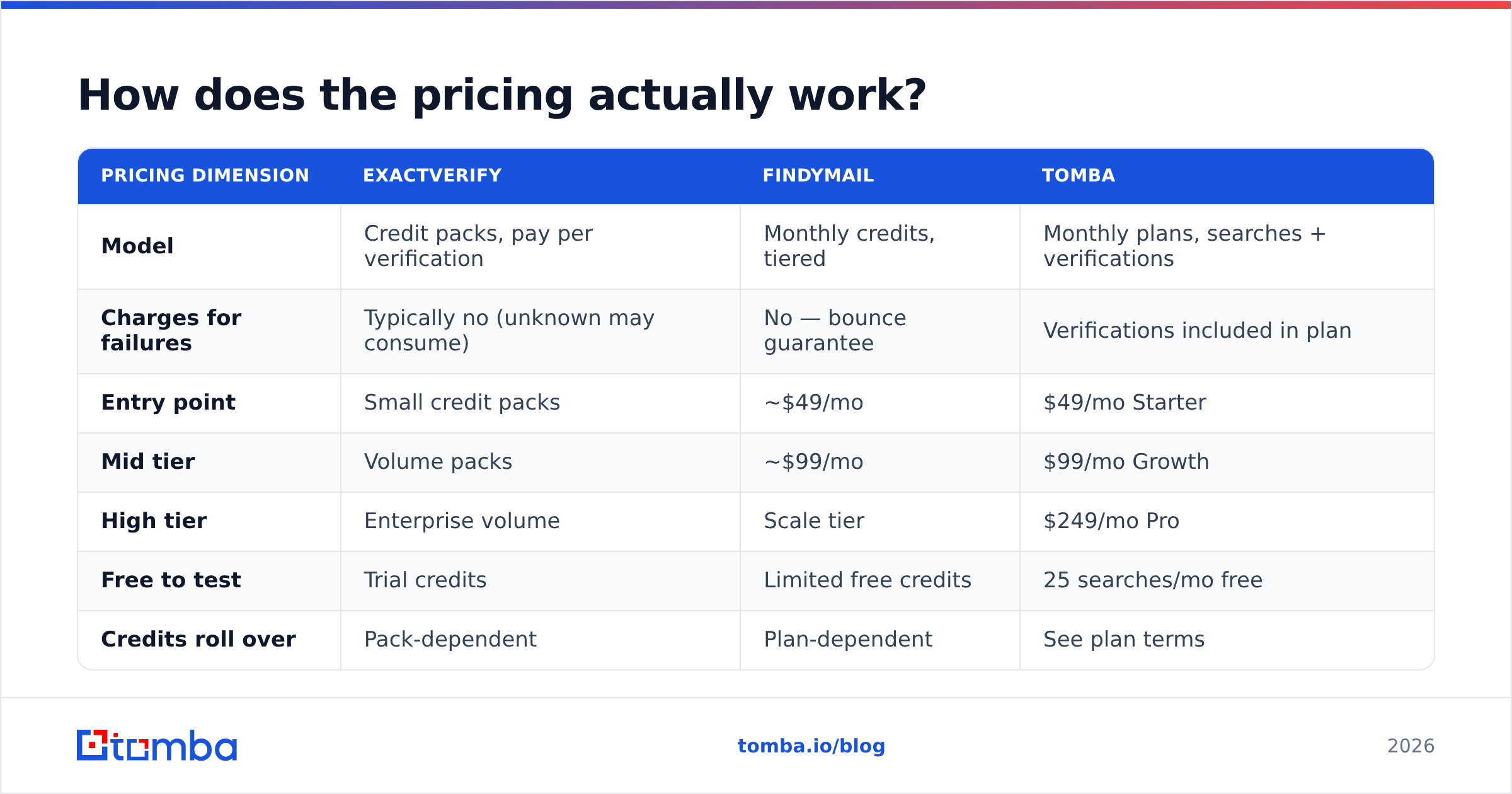
The pricing models differ in kind, not just amount — and that is where budgets leak.
| Pricing dimension | ExactVerify | Findymail | Tomba |
|---|---|---|---|
| Model | Credit packs, pay per verification | Monthly credits, tiered | Monthly plans, searches + verifications |
| Charges for failures | Typically no (unknown may consume) | No — bounce guarantee | Verifications included in plan |
| Entry point | Small credit packs | ~$49/mo | $49/mo Starter |
| Mid tier | Volume packs | ~$99/mo | $99/mo Growth |
| High tier | Enterprise volume | Scale tier | $249/mo Pro |
| Free to test | Trial credits | Limited free credits | 25 searches/mo free |
| Credits roll over | Pack-dependent | Plan-dependent | See plan terms |
Run the two-vendor math honestly. A finder at $49/mo plus a verifier credit pack is roughly $70–90/mo at modest volume — before you account for the engineering time to keep two credit balances, two API keys, and two rate limits from breaking your enrichment job at 2am.
Compare that against a single stack. Tomba pricing starts at $49/mo for Starter, $99/mo for Growth, and $249/mo for Pro, with a free tier at 25 searches/mo — and finding, verifying, catch-all checking, and enrichment all draw from the same account. Enterprise is custom. That consolidation is not a marketing point; it is the difference between one integration to maintain and three.

Who should choose ExactVerify?#
Pick a dedicated verifier like ExactVerify when:
- You own the data already. Your CRM has 80,000 contacts of unknown quality and you need a hygiene pass before migrating or sending.
- Verification is a recurring batch job, not a per-lead action. Quarterly database cleaning, list hygiene before a big campaign, or pre-import validation.
- You need per-credit economics at volume. Pay-as-you-go credit packs beat monthly subscriptions when your usage is spiky.
- You are an ESP or agency validating client lists. You never source; you only clean.
What you should not expect from it: new contacts, phone numbers, firmographic enrichment, or a LinkedIn workflow. It is a validation engine, and it should be judged as one.
Who should choose Findymail?#
Pick Findymail when:
- Your prospecting starts on LinkedIn. Sales Navigator export → enriched CSV is the workflow it was built around, and it handles it cleanly.
- You want billing tied to results. Not being charged for unfound or unverifiable addresses removes a real category of waste.
- Volume is moderate and predictable. A few thousand contacts a month fits the tiered model well.
- You do not need phone numbers. If your motion is email-only, the missing phone layer costs you nothing.
Where it gets tight: bulk cleaning of external lists, non-LinkedIn sourcing paths (author bylines, company domains at scale, reverse lookups), and any workflow where you need waterfall enrichment across multiple data sources.
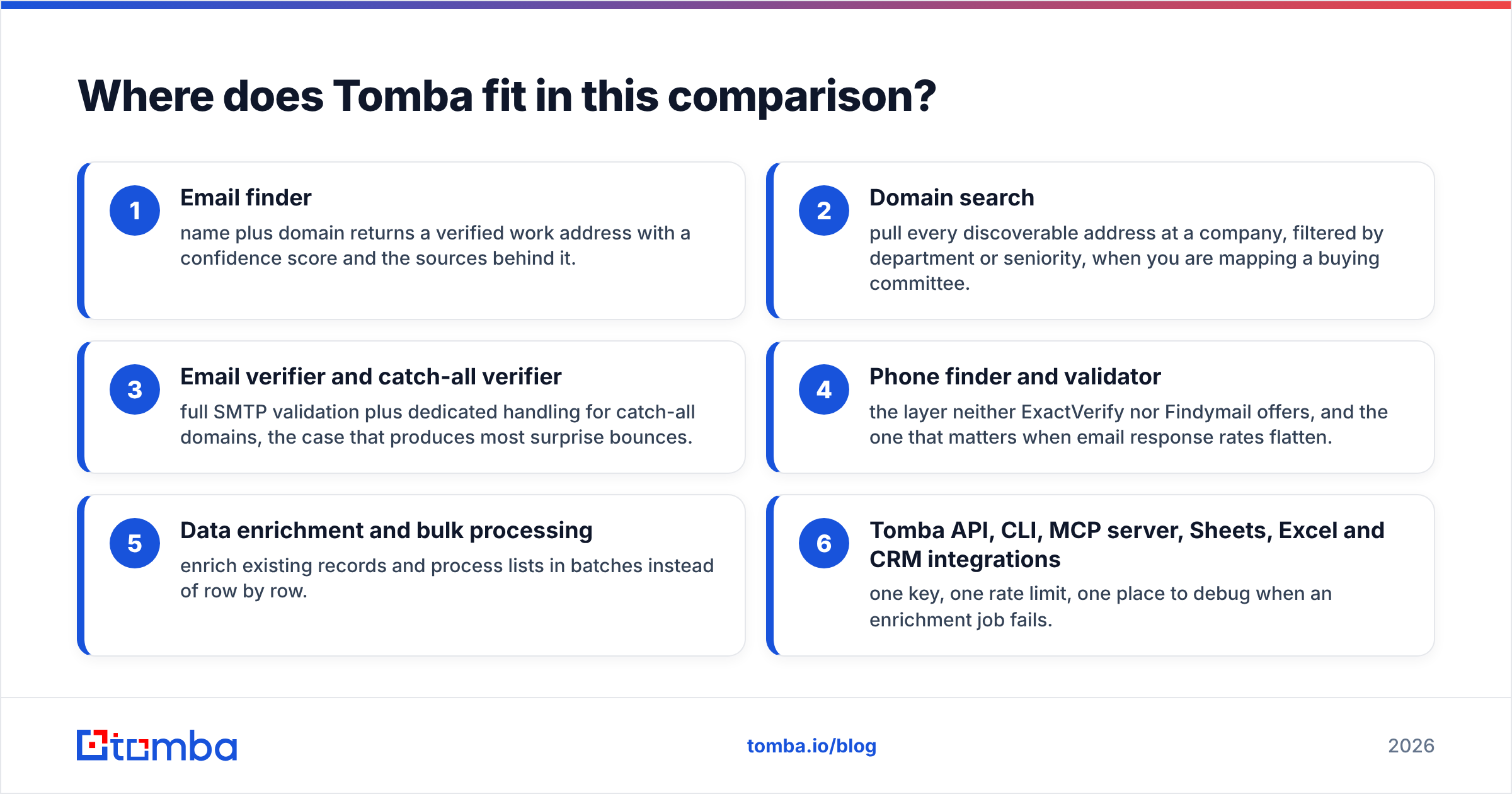
Where does Tomba fit in this comparison?#
Tomba's argument is not "better verification than a verifier" or "better LinkedIn scraping than a LinkedIn tool." It is that the split between the two categories is an artifact of vendor packaging, not of how outbound teams actually work.
On one account you get:
- Email finder — name plus domain returns a verified work address with a confidence score and the sources behind it.
- Domain search — pull every discoverable address at a company, filtered by department or seniority, when you are mapping a buying committee.
- Email verifier and catch-all verifier — full SMTP validation plus dedicated handling for catch-all domains, the case that produces most surprise bounces.
- Phone finder and validator — the layer neither ExactVerify nor Findymail offers, and the one that matters when email response rates flatten.
- Data enrichment and bulk processing — enrich existing records and process lists in batches instead of row by row.
- Tomba API, CLI, MCP server, Sheets, Excel and CRM integrations — one key, one rate limit, one place to debug when an enrichment job fails.
Is Tomba always the right answer? No. If you exclusively clean lists and never source, a pure verifier with per-credit pricing may be cheaper. If your entire motion is Sales Navigator exports and nothing else, a specialist finder built around that one flow will feel more native. Both are legitimate reasons to skip a consolidated platform.
But if you are reading a comparison of a verifier against a finder because you are not sure which one you need — the honest answer is that you need both, and paying two vendors for it is a choice, not a requirement.
What should you test before committing to either tool?#
Do not buy on a feature grid, including this one. Run a controlled bake-off:
- Build one 200-contact test set from your real ICP — same industries, same company sizes, same seniority. Vendor benchmarks are run on data that flatters the vendor.
- Measure verified coverage, not raw hit rate. Count only addresses that pass an independent verification check. A finder that returns more addresses but fewer deliverable ones is a worse tool.
- Force the catch-all case. Include 20–30 contacts at domains you know are catch-all. How each tool labels them predicts your future bounce rate better than any other single test.
- Send a real 50-contact batch. Bounce data from an actual send beats every claimed accuracy percentage. Track hard bounces separately from soft.
- Time the API under load. Latency and rate limits determine whether you can enrich inbound leads in real time or only in overnight batches.
- Price your actual monthly volume, including the credits you burn on failures and re-runs — not the headline tier price.
Six steps, roughly two hours of work, and it will save you a year of paying for the wrong stack. Compare your findings against public review data on G2 rather than vendor case studies, and read up on sender reputation before you scale sending volume on any new list.
Ready to stop paying two vendors for one pipeline?#
If your team is currently comparing ExactVerify against Findymail, you are really deciding whether to build a two-tool pipeline or consolidate. Try the consolidated version first — it is the cheaper test. The Tomba Email Finder gives you 25 free searches a month with no card, every result verified before it reaches you, and catch-all, phone, and enrichment data on the same account. Run your 200-contact bake-off against it, compare verified coverage side by side, and let the bounce data pick the winner.
Related guides#
Ready to find emails that actually work?
Join 150,000+ professionals who stopped guessing and started sending. Free credits on signup — no credit card required.
Get the Tomba newsletter
Practical outbound tactics and product updates — once every two weeks.
About the author