How to Extract Emails From Websites Free (2026 Methods)
Free email extraction works — until it doesn't. Here's an honest breakdown of every free method to pull emails from websites in 2026, what each one actually returns, and the point where free costs you more than paid.
TL;DR
- You can extract emails from websites free using browser extensions, regex scripts, Google search operators, or a free-tier extractor tool — all four work, all four have hard ceilings.
- Free methods find published emails only:
info@,support@,press@. They almost never surface the named decision-maker you actually want to reach. - Roughly 20-35% of scraped addresses are dead, role-based, or spam traps. Sending to an unverified scrape is how new domains get burned in week one.
- The honest breakeven: free is fine under ~100 contacts a month. Past that, a paid finder with pattern matching plus verification costs less than the deliverability damage.
- Best free starting point: a browser-based email extractor for one-off pages, then verification before anything gets sent.
What does "extract emails from websites free" actually mean?#
It means three different jobs that get lumped together, and confusing them is why most people end up with a junk list.
Job one — page scraping. You point something at a URL and it pulls every string matching an email pattern out of the rendered HTML. Simple, fast, and completely limited to what the site chose to publish.
Job two — domain discovery. You give a company domain and get back the addresses associated with it, whether or not they appear on any public page. This requires an index built from crawling, not from the single page in front of you.
Job three — pattern inference. You know the company uses first.last@domain.com and you know a person's name, so the address is generated and then validated. Nothing was scraped at all.
Free tools do job one well. They do job two badly or not at all. They cannot do job three without a verification layer, because guessing without validating is just noise generation.
Think of it like finding someone's phone number. Scraping a website is reading the number posted on the shop door — accurate, but it's the front desk. Domain discovery is having the company directory. Pattern inference is knowing the extension format and confirming the line rings. Different jobs, different tools, wildly different hit rates.
Which free methods actually work in 2026?#
Five approaches survive contact with modern sites. Here they are ranked by effort-to-value:
- Browser extractor tools — Paste a URL or page text into a web-based extractor and get a deduplicated list back in seconds. Zero setup, works on any public page, no install. Ceiling: one page at a time, and JavaScript-rendered contact pages sometimes come back empty.
- Google search operators —
site:company.com "@company.com"orsite:company.com intext:"email"surfaces addresses buried in PDFs, press releases, and old team pages that no scraper crawls. Slow, manual, but it finds things nothing else does. - Chrome extensions with a free tier — Run on the page you're viewing, show emails inline. Convenient for LinkedIn-to-website workflows. Free tiers usually cap at 25-50 lookups per month, and several now require a work email to sign up.
- A regex script — Twelve lines of Python with
requestsandrewill pull every address off a static page. Free forever, infinitely scalable in theory. In practice you'll spend a weekend on rate limits, Cloudflare challenges, and JS-rendered pages, then rebuild it as a headless-browser job. - Free tiers of paid finders — The most underrated option. You get real infrastructure — crawled index, pattern matching, SMTP verification — just metered. Tomba's free tier is 25 searches a month, which is enough to evaluate quality honestly before paying anything.
Method five is the one people skip, and it's the one that answers the real question: are these addresses any good?
How do free methods compare on what they actually return?#
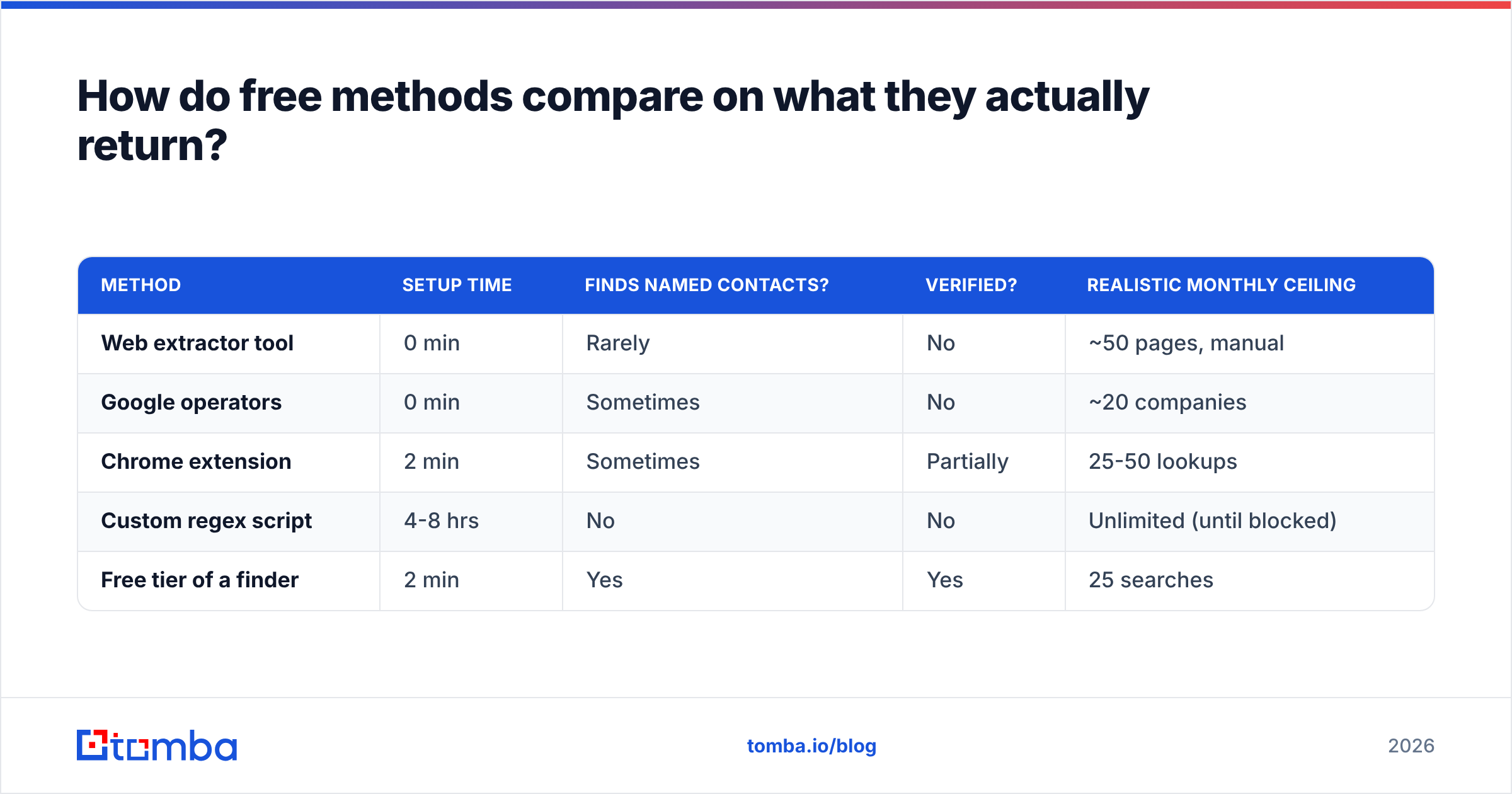
| Method | Setup time | Finds named contacts? | Verified? | Realistic monthly ceiling |
|---|---|---|---|---|
| Web extractor tool | 0 min | Rarely | No | ~50 pages, manual |
| Google operators | 0 min | Sometimes | No | ~20 companies |
| Chrome extension | 2 min | Sometimes | Partially | 25-50 lookups |
| Custom regex script | 4-8 hrs | No | No | Unlimited (until blocked) |
| Free tier of a finder | 2 min | Yes | Yes | 25 searches |
The column that matters is "finds named contacts." Everything except the last row is optimized for harvesting whatever a site published — which, for most B2B companies in 2026, is one generic inbox routed to a shared queue.

How accurate are free email extractors?#
Accuracy splits into two questions people conflate: is the address real, and is it useful?
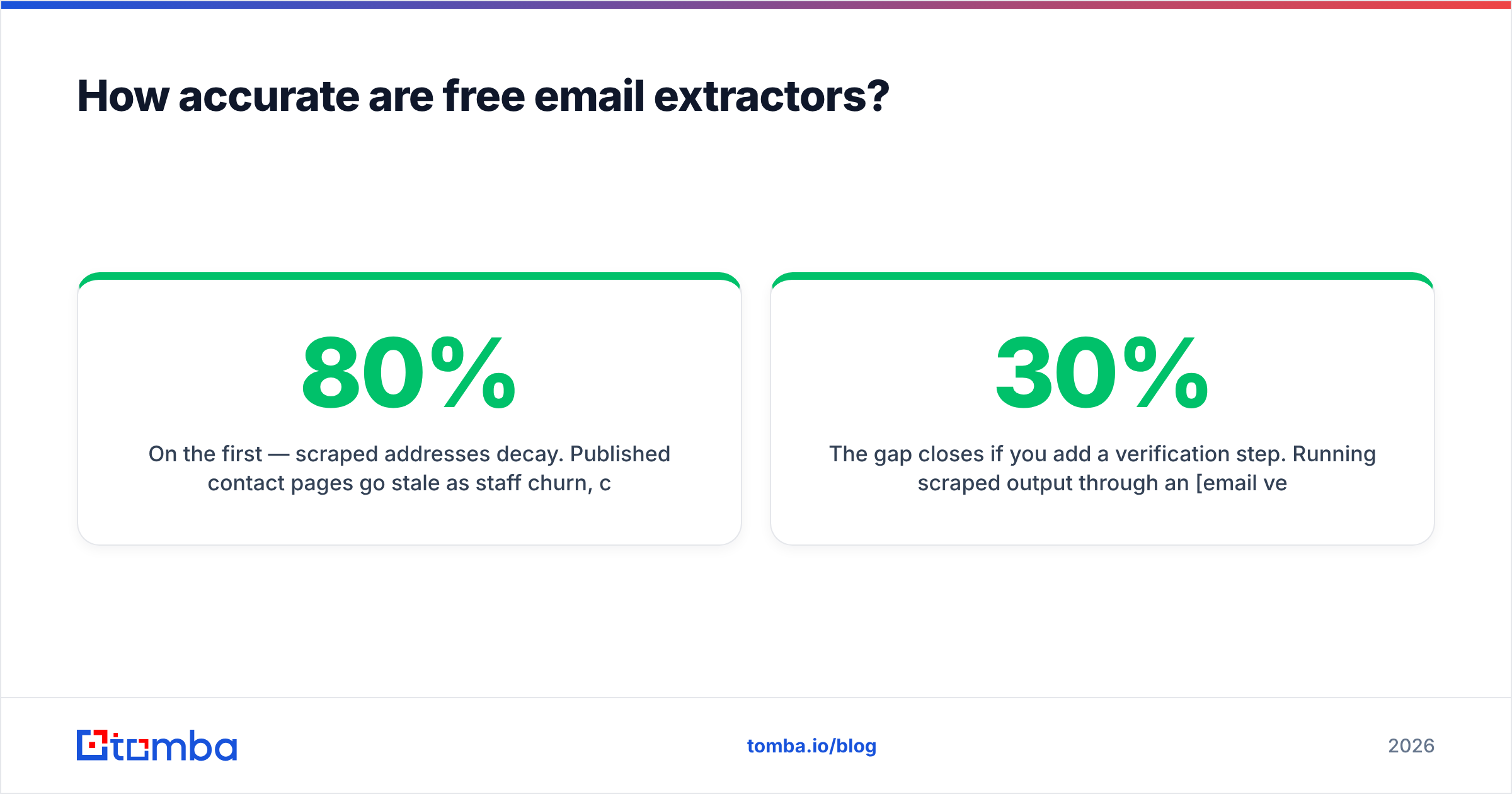
On the first — scraped addresses decay. Published contact pages go stale as staff churn, companies migrate domains, and old WordPress footers keep serving an address that stopped resolving three years ago. Independent testing across email-sourcing tools consistently shows unverified scrapes landing in the 65-80% deliverable range. That's a 20-35% bounce rate on a raw list, and mailbox providers start throttling well before you hit 5%.
On the second — usefulness is worse than accuracy. A perfectly valid info@ address at a 400-person company routes to a support queue where cold outreach is deleted by policy. It's a real email and a wasted send.

The gap closes if you add a verification step. Running scraped output through an email verifier before import typically strips 15-30% of a raw list — the dead boxes, the syntax errors, the disposable domains, and the catch-all addresses that will silently swallow your sends. That single step is the difference between a scrape you can use and a scrape that damages your sender reputation.
A practical rule: never send to an address that has been scraped but not verified. Free extraction plus free verification is a legitimate workflow. Free extraction alone is not.
Is scraping emails from websites legal?#
Short answer: extracting publicly published addresses is generally legal; what you do next is where the rules bite.
Three things to keep straight:
- Public data ≠ unrestricted use. In the US, scraping publicly accessible pages has repeatedly survived legal challenge, and the general practice of web scraping is well established. That doesn't grant you permission to ignore a site's terms of service or hammer its servers.
- GDPR treats a business email as personal data. If you're contacting anyone in the EU or UK, you need a lawful basis — legitimate interest is the usual one for B2B — plus a clear opt-out in every message and a real answer if someone asks how you got their address. The official GDPR resource is worth ten minutes of your time before you build a list.
- Respect
robots.txtand rate limits. The robots exclusion standard isn't law, but ignoring it while running an aggressive crawler is how you get IP-banned and, occasionally, how you end up in a demand letter. Crawl slowly, identify your agent, and don't touch anything behind a login.
CAN-SPAM in the US, incidentally, explicitly prohibits "harvesting" addresses via automated scraping when it's paired with commercial email — the penalty stacks on top of standard violations. This is the single strongest argument for using a compliant data provider rather than a homemade scraper once you scale past experimentation.
How do you extract emails from a website step by step?#
Here's the workflow that produces a list you can actually send to, using free tooling where free tooling is good enough.
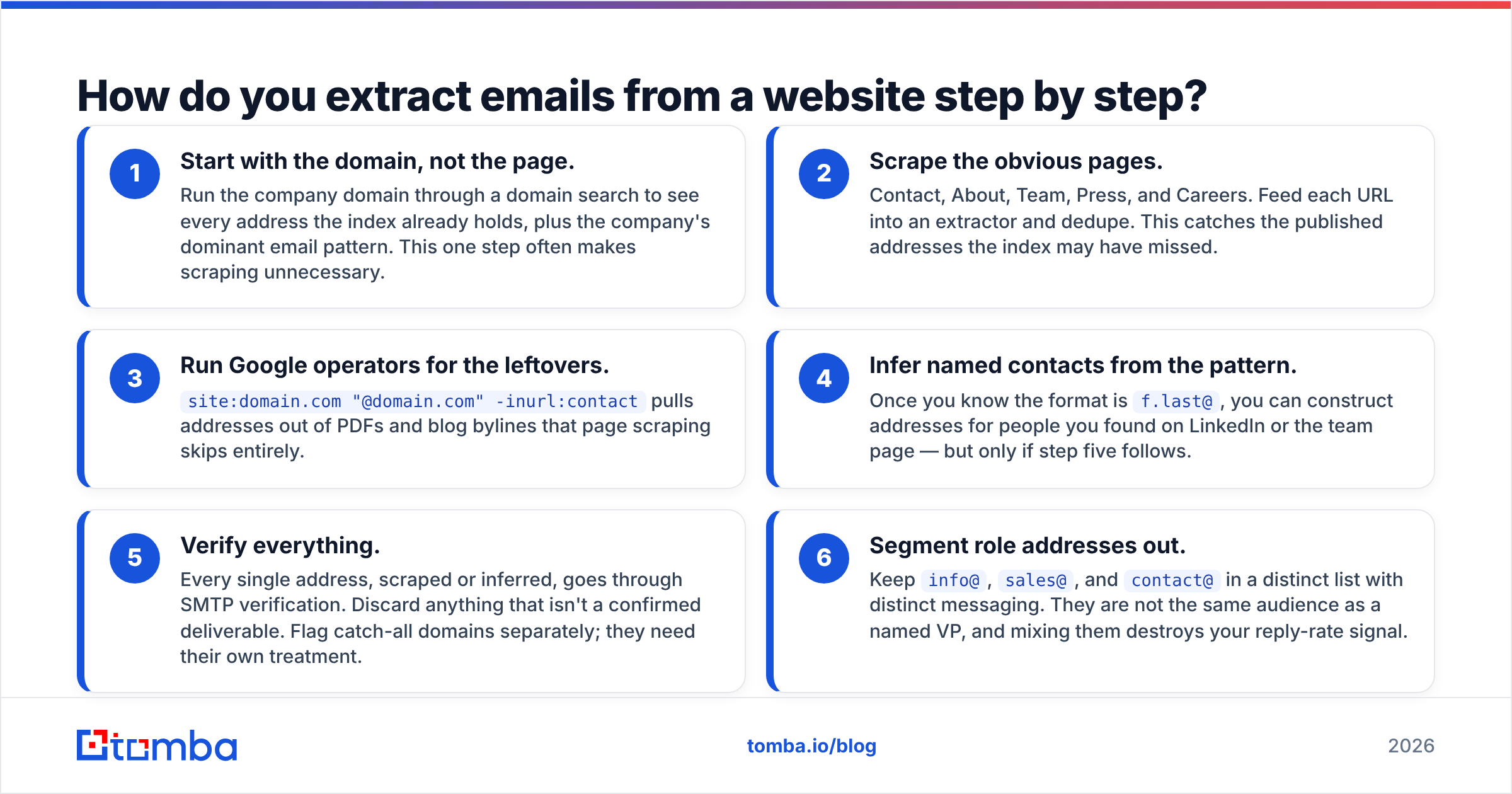
- Start with the domain, not the page. Run the company domain through a domain search to see every address the index already holds, plus the company's dominant email pattern. This one step often makes scraping unnecessary.
- Scrape the obvious pages. Contact, About, Team, Press, and Careers. Feed each URL into an extractor and dedupe. This catches the published addresses the index may have missed.
- Run Google operators for the leftovers.
site:domain.com "@domain.com" -inurl:contactpulls addresses out of PDFs and blog bylines that page scraping skips entirely. - Infer named contacts from the pattern. Once you know the format is
f.last@, you can construct addresses for people you found on LinkedIn or the team page — but only if step five follows. - Verify everything. Every single address, scraped or inferred, goes through SMTP verification. Discard anything that isn't a confirmed deliverable. Flag catch-all domains separately; they need their own treatment.
- Segment role addresses out. Keep
info@,sales@, andcontact@in a distinct list with distinct messaging. They are not the same audience as a named VP, and mixing them destroys your reply-rate signal.
If you're processing more than a handful of domains, steps one through five compress into a single bulk email finder run — upload the domain list, get back verified contacts with confidence scores.
What do free tools cost compared with paid finders?#
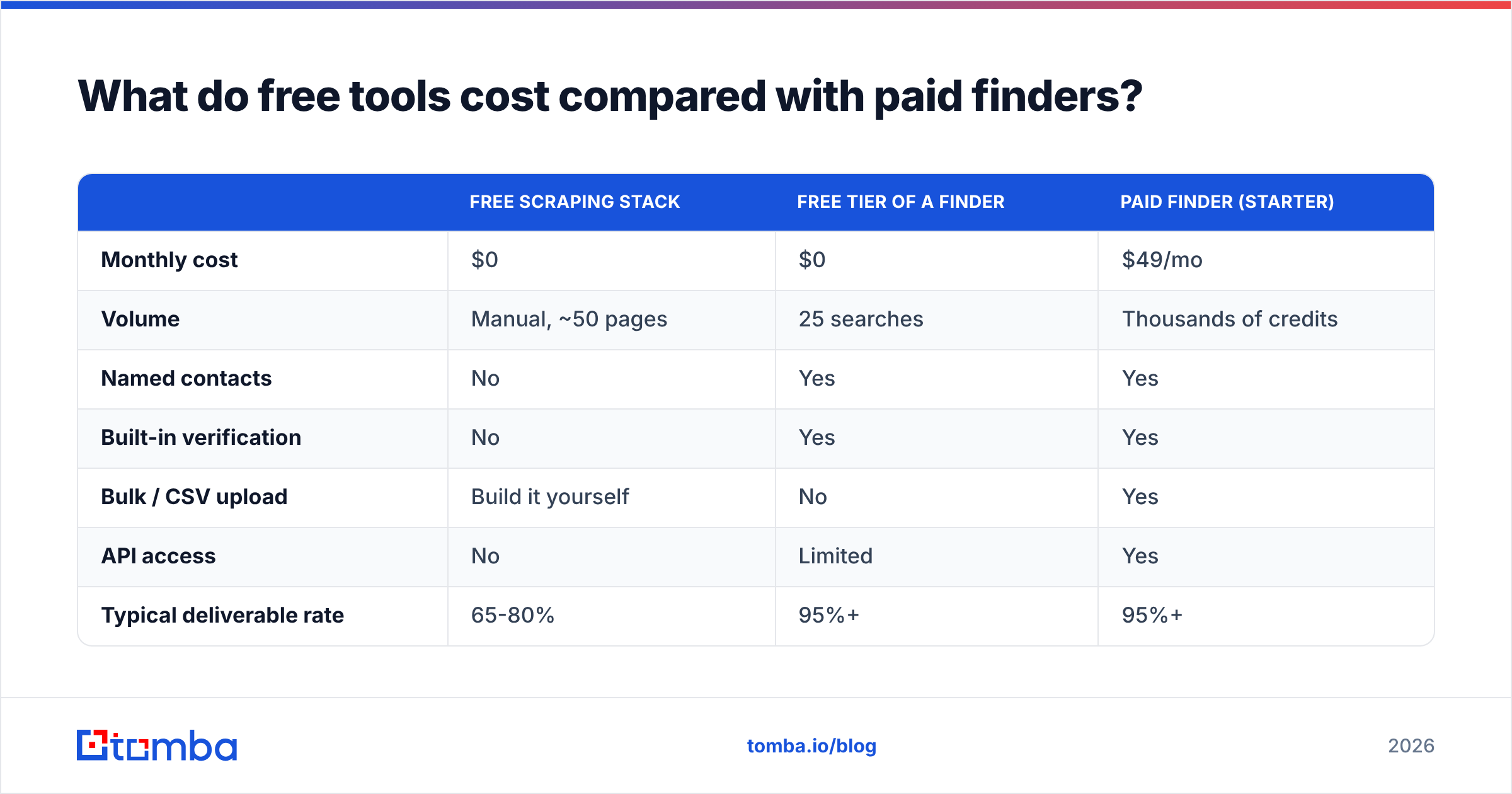
The comparison people run is "$0 vs $49/mo," which is the wrong frame. The right frame is cost per usable, verified contact.
| Free scraping stack | Free tier of a finder | Paid finder (Starter) | |
|---|---|---|---|
| Monthly cost | $0 | $0 | $49/mo |
| Volume | Manual, ~50 pages | 25 searches | Thousands of credits |
| Named contacts | No | Yes | Yes |
| Built-in verification | No | Yes | Yes |
| Bulk / CSV upload | Build it yourself | No | Yes |
| API access | No | Limited | Yes |
| Typical deliverable rate | 65-80% | 95%+ | 95%+ |
| Your time per 100 contacts | 3-5 hrs | 1 hr | 10 min |

Put a number on your own hour and the math resolves quickly. Four hours of manual scraping to produce 100 addresses, 25 of which bounce, is not free — it cost you half a workday and a dent in your domain reputation. The Tomba pricing ladder runs Free (25 searches/mo), Starter at $49/mo, Growth at $99/mo, and Pro at $249/mo, so the crossover point where paid wins is somewhere around 100-150 contacts a month for most teams.
Worth noting: this isn't unique to any one vendor. Browse the lead intelligence category on G2 and you'll see the same structural pattern across the whole market — free tiers exist to prove data quality, not to serve production volume. Choose based on accuracy in your specific vertical, not on who gives away the most credits.
When should you stop using free extraction?#
Four signals, any one of which means it's time:
- Your bounce rate crossed 3%. You're now actively harming deliverability. Stop, verify the existing list, and fix the source.
- You're scraping the same domain twice. That's a workflow problem an index solves instantly.
- You need contacts by role, not by page. No scraper can answer "who runs marketing here" — that requires an enriched dataset.
- You've written more than 50 lines of scraper maintenance code. Congratulations, you're now maintaining infrastructure instead of selling.
Free extraction has a genuinely good use case: validating that a segment is worth pursuing before you spend anything. Pull 20 domains manually, check the emails resolve, send a tiny test batch, read the replies. If the segment responds, graduate to tooling. If it doesn't, you learned it for $0 — which is exactly what free tools are for.
Ready to stop scraping and start finding?#
Free extraction gets you published addresses. Finding the person who can actually say yes takes an index, a pattern engine, and SMTP verification working together.
The Tomba Email Finder does all three: search by domain, by name plus company, or in bulk, with every result verified and confidence-scored before it reaches you. Start on the free tier — 25 searches a month, no card — and compare the output side by side against whatever your scraper returned. If the quality gap isn't obvious in the first ten lookups, keep scraping. It usually is.
Related guides#
Ready to find emails that actually work?
Join 150,000+ professionals who stopped guessing and started sending. Free credits on signup — no credit card required.
Get the Tomba newsletter
Practical outbound tactics and product updates — once every two weeks.
About the author