Finalscout vs Kickbox 2026: Which Email Tool Wins?
Finalscout finds LinkedIn emails. Kickbox verifies lists and protects deliverability. They solve different halves of the same problem — here is which one your team actually needs, and what it costs.
TL;DR
- Finalscout and Kickbox are not competitors. Finalscout is a LinkedIn-first email finder with AI message drafting. Kickbox is a pure email verification and deliverability service. Comparing them head-to-head only makes sense because both sit in the same "stop my emails bouncing" budget line.
- If you need contacts you do not have yet, Finalscout (or a broader finder) is the tool. If you already have a list and need it cleaned before sending, Kickbox is the tool.
- Kickbox is the stronger standalone product in its lane — real-time API, deliverability consulting, and a bounce-rate guarantee that agencies trust.
- Finalscout's weakness is source concentration: it leans heavily on LinkedIn profiles, so coverage drops for contacts who are not active there.
- Most teams end up buying both categories. A combined finder-plus-verifier stack like Tomba at $49/mo often replaces two separate subscriptions that together cost more.
What are Finalscout and Kickbox, exactly?#
Start with the honest answer: these two tools do different jobs, and half the people searching "finalscout vs kickbox" are really asking "which one do I buy first?"
Finalscout is a Chrome-extension-driven email finder built around LinkedIn. You browse a profile, a search result page, or a Sales Navigator list, and Finalscout attempts to resolve professional email addresses for those people. It layers on AI-generated outreach copy, which is its main differentiator against plain finders.
Kickbox is an email verification platform. You upload a list, or call its API in real time at signup, and it tells you whether each address is deliverable, undeliverable, risky, or unknown. It also sells deliverability services — inbox placement testing, sending consultation, and a Sendex quality score per address.
The mental model: Finalscout is the fishing rod, Kickbox is the scale that tells you which fish are worth keeping. You do not choose between them on merit. You choose based on which end of your pipeline is currently broken.

How do their core capabilities compare?#
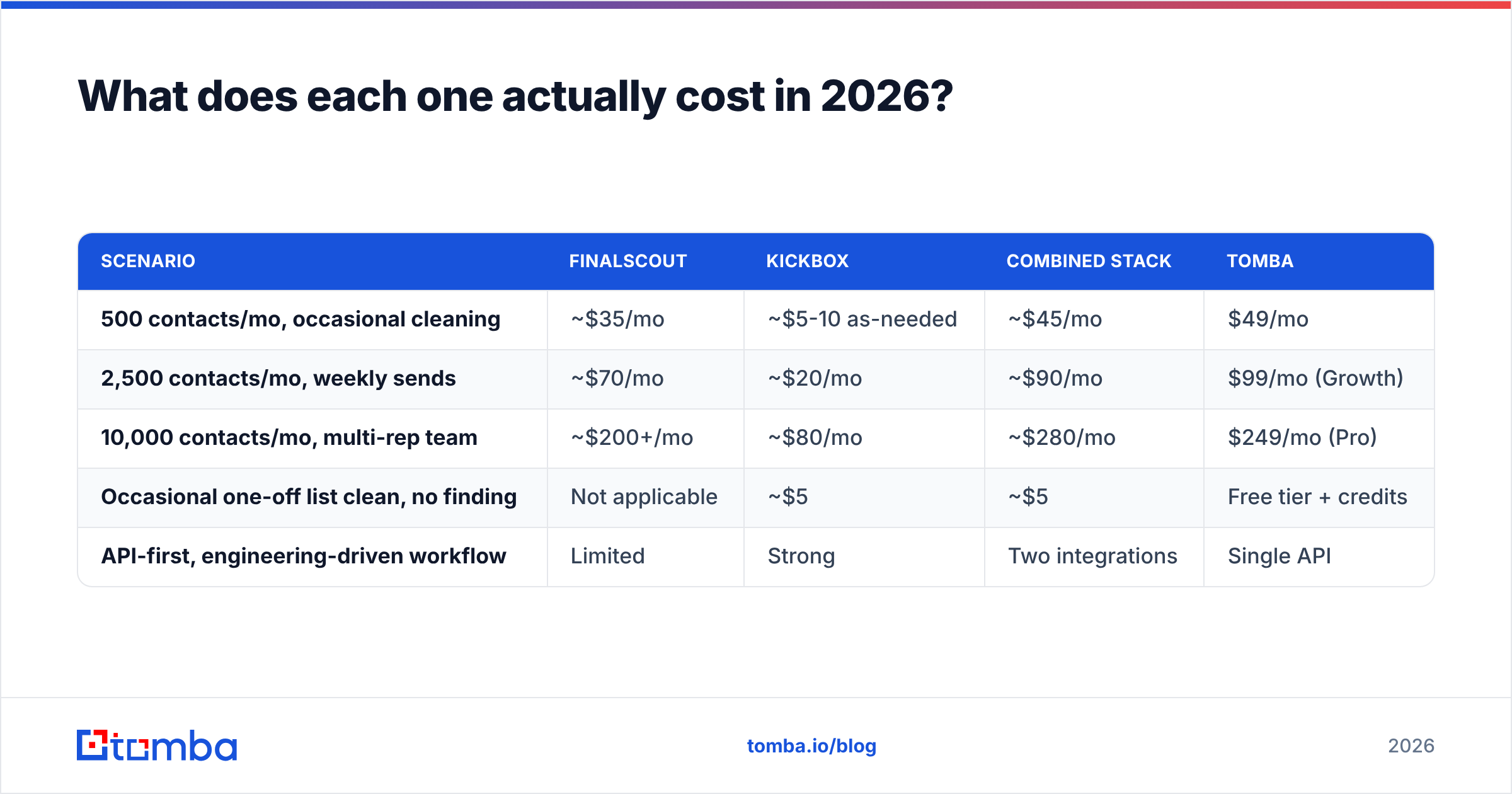
Here is the split by job-to-be-done, which is more useful than a raw feature checklist:
| Capability | Finalscout | Kickbox | Tomba |
|---|---|---|---|
| Find new email addresses | Yes (LinkedIn-first) | No | Yes (domain, name, LinkedIn, author) |
| Verify existing addresses | Basic validation | Yes — core product | Yes — dedicated verifier |
| Catch-all handling | Limited | Flagged as "risky" | Dedicated catch-all verifier |
| Real-time API | Limited | Yes, sub-second | Yes, full REST API |
| Bulk list processing | Yes | Yes | Yes |
| Phone numbers | No | No | Yes |
| AI outreach copy | Yes | No | Via free tools |
| Free tier | Limited credits | 100 free verifications | 25 searches/mo |
| Entry paid price | ~$35/mo | Pay-as-you-go from $5 | $49/mo (finder + verifier) |
Two things jump out of that table.
First, Kickbox's pay-as-you-go model is genuinely friendly for occasional cleaning. If you clean a 20,000-record list twice a year, you do not want a monthly subscription — you want to buy credits and walk away. Kickbox lets you do that.
Second, Finalscout's price looks low until you count what it does not include. There is no verification depth, no phone data, and no coverage outside its LinkedIn-shaped world. You will end up paying for a second tool, which is exactly how a $35/mo line item becomes a $110/mo stack.
Is Finalscout accurate enough for cold outreach?#
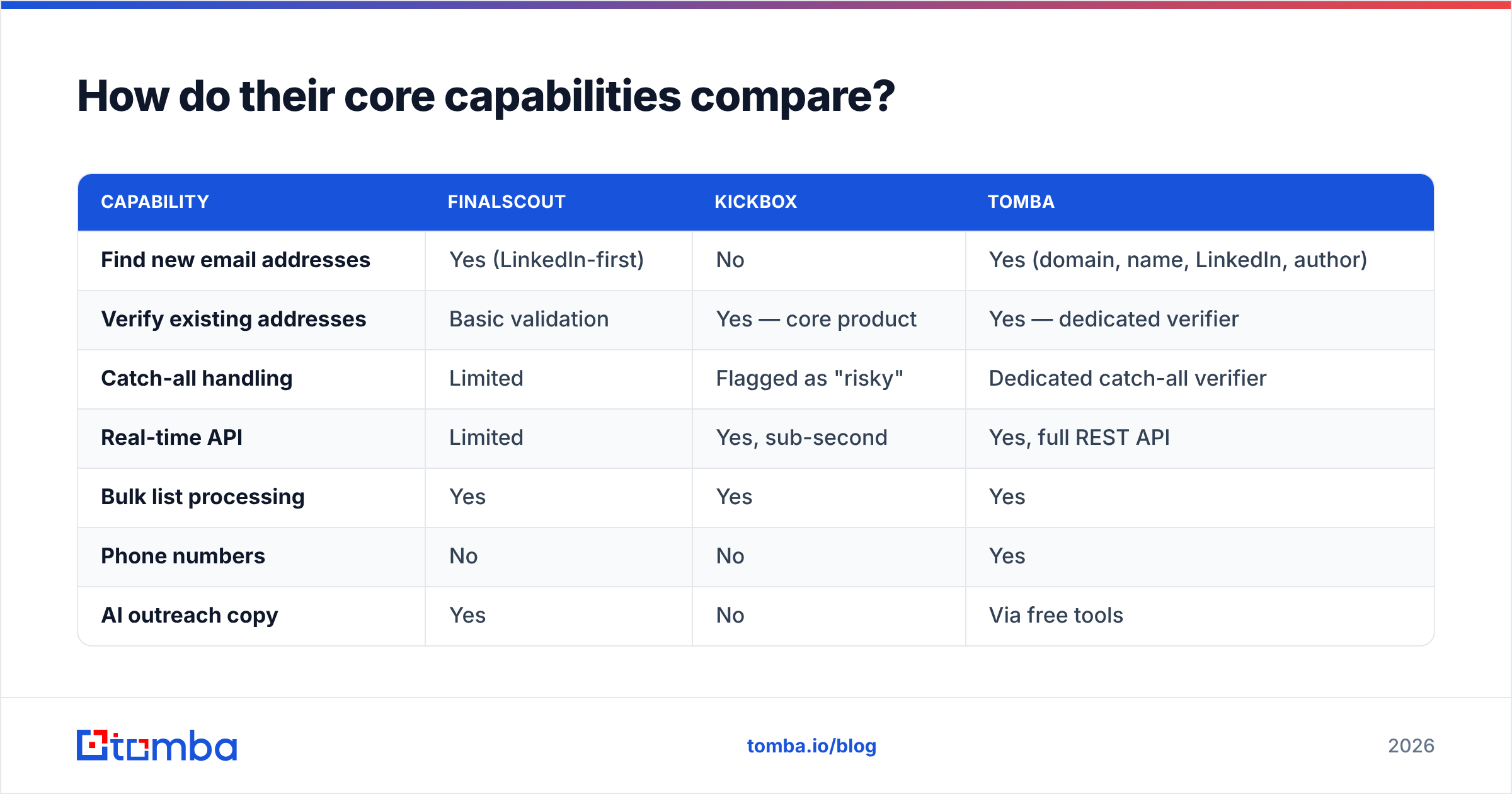
Accuracy in email finding is not one number — it is two, and vendors love to conflate them.
- Hit rate — of the contacts you searched, what percentage returned any email at all? A tool can post a 95% hit rate by guessing patterns aggressively.
- Bounce rate — of the emails it returned, what percentage actually deliver? This is the number that costs you your domain reputation.
- Catch-all handling — does the tool mark catch-all domains honestly, or silently pass them as valid? Roughly 15-20% of B2B domains are catch-all, so this single behavior swings your apparent accuracy by double digits.
- Source freshness — how recently was the record confirmed? A 2023-era email for someone who changed jobs in 2025 is a bounce waiting to happen.
Finalscout does reasonably on hit rate for LinkedIn-active contacts in tech, SaaS, and marketing. It does noticeably worse in industries where decision-makers are not maintaining LinkedIn profiles — manufacturing, local services, healthcare admin, public sector. If your ICP is a plant manager in the Midwest, a LinkedIn-first finder is the wrong instrument.
Kickbox does not have a hit-rate problem because it never finds anything. Its accuracy question is different: does it correctly classify what you feed it? Independent user reviews on G2 consistently rate its verification precision highly, and its "unknown" bucket is honest rather than optimistically padded — which is a good sign, not a weakness. A verifier that never says "I don't know" is lying to you.
If you want to sanity-check any tool's output before committing budget, run a sample through a free email checker and compare classifications. Ten minutes of that beats any vendor benchmark page.
What does each one actually cost in 2026?#
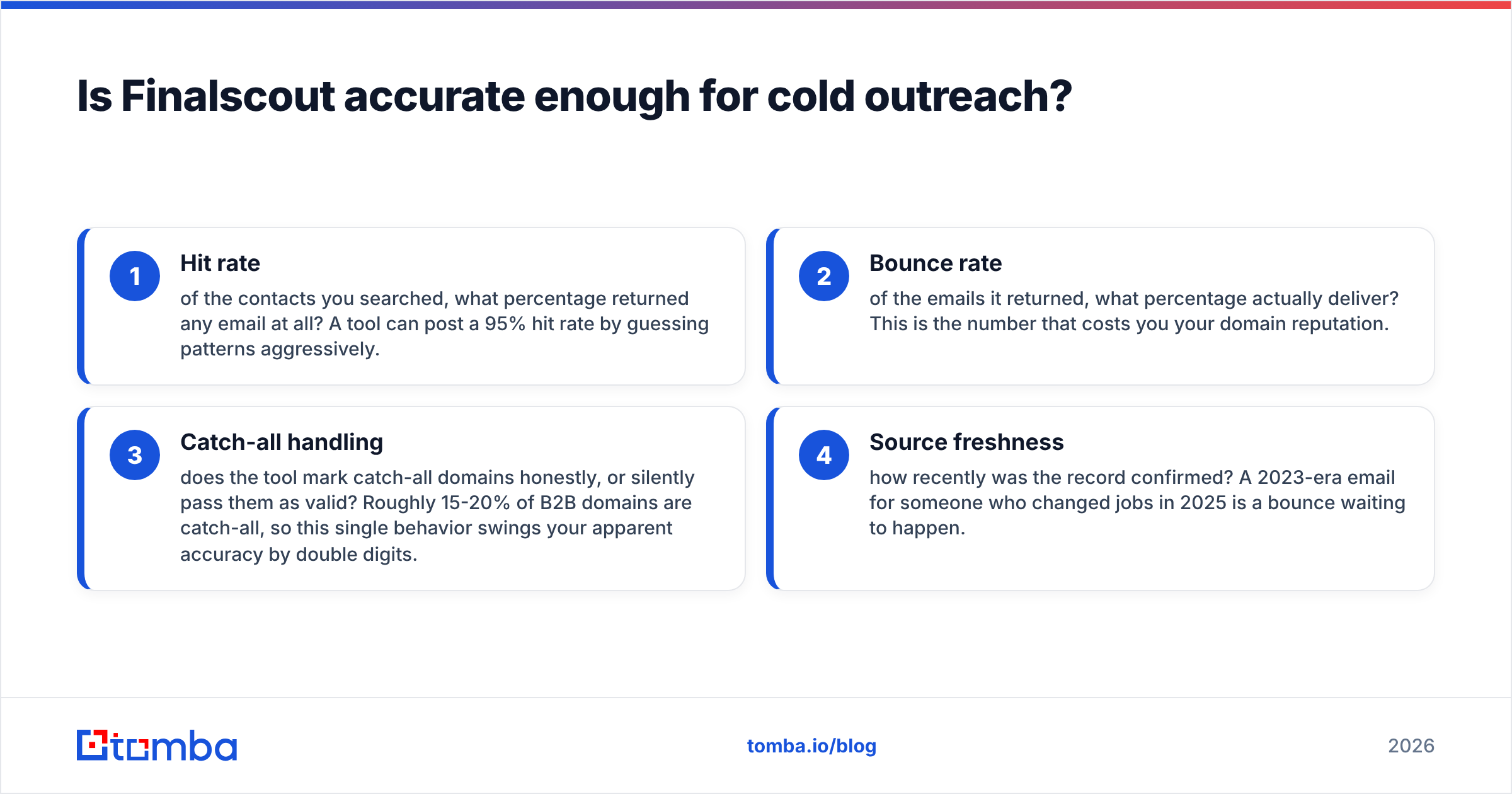
Pricing shape matters more than headline price. Finalscout sells subscription credits. Kickbox sells consumable verification credits with volume discounts. Those two models fail in different ways.
| Scenario | Finalscout | Kickbox | Combined stack | Tomba |
|---|---|---|---|---|
| 500 contacts/mo, occasional cleaning | ~$35/mo | ~$5-10 as-needed | ~$45/mo | $49/mo |
| 2,500 contacts/mo, weekly sends | ~$70/mo | ~$20/mo | ~$90/mo | $99/mo (Growth) |
| 10,000 contacts/mo, multi-rep team | ~$200+/mo | ~$80/mo | ~$280/mo | $249/mo (Pro) |
| Occasional one-off list clean, no finding | Not applicable | ~$5 | ~$5 | Free tier + credits |
| API-first, engineering-driven workflow | Limited | Strong | Two integrations | Single API |
The pattern: for pure verification of a list you already own, Kickbox's pay-as-you-go is hard to beat and you should just buy it. For everything else, the combined-stack column is where the real comparison lives — because that is what most teams actually end up paying.
Full Tomba pricing runs Free (25 searches/mo), Starter $49/mo, Growth $99/mo, Pro $249/mo, and Enterprise custom. The reason it competes with the combined column rather than either tool alone is that finding and verifying draw from the same account, so you are not forecasting two credit pools that run dry at different times.
Which one should you buy for your use case?#
Match the tool to the failure you are experiencing right now.
- "My bounce rate is over 5% and Google is throttling me." Buy Kickbox, or any dedicated verifier. This is a hygiene problem, not a sourcing problem. Clean the list, fix your sender reputation, and only then think about volume. Adding a finder here makes things worse.
- "I have 200 target accounts and no contact emails." You need a finder. Finalscout works if those accounts are LinkedIn-heavy. If they are not, use a domain search approach that starts from the company website rather than a social profile — coverage holds up better in unglamorous industries.
- "I'm scraping LinkedIn lists and want AI-written first drafts." Finalscout's bundled copy generation is a genuine convenience, though the output needs editing before it earns a reply.
- "Engineering owns this and wants it in the product signup flow." Kickbox's real-time API is purpose-built for that. Tomba's email verification API covers the same job if you also need enrichment on the same call.
- "I need both, on one invoice, without watching two credit balances." That is the case for a consolidated platform.
- "I need phone numbers too." Neither tool does this. You will need a separate phone finder regardless.

What are the real weaknesses of each tool?#
Neutral reviews are worth nothing if they will not name the trade-offs.
Finalscout's weak points. Source concentration is the big one — LinkedIn-derived data ages fast and skews toward white-collar tech roles. The extension-driven workflow is manual by design, so it does not scale cleanly past a few hundred lookups without a rep clicking through. Verification depth is thin, meaning you should treat its output as a candidate list, not a send-ready list. And catch-all domains, which are a large slice of enterprise targets, are where extension finders tend to quietly over-promise.
Kickbox's weak points. It cannot find anything, which is not a flaw but is a limit people discover after purchase. Its "unknown" classification, while honest, still leaves you deciding whether to send — a catch-all verifier with SMTP-level probing resolves more of that grey zone. Pay-as-you-go credits also mean cost is unpredictable if your list volume swings month to month, and the deliverability consulting is priced for companies with a real budget for it.
The shared weakness. Neither tool closes the loop. You find in one place, verify in another, export CSVs between them, and reconcile duplicates by hand. That handoff is where lists get stale and where reps waste an afternoon a week. Deduplicating with a remove duplicates utility helps, but it is patching a workflow gap rather than removing it.
How do you build a stack that avoids both problems?#
Run this order, whatever tools you pick:
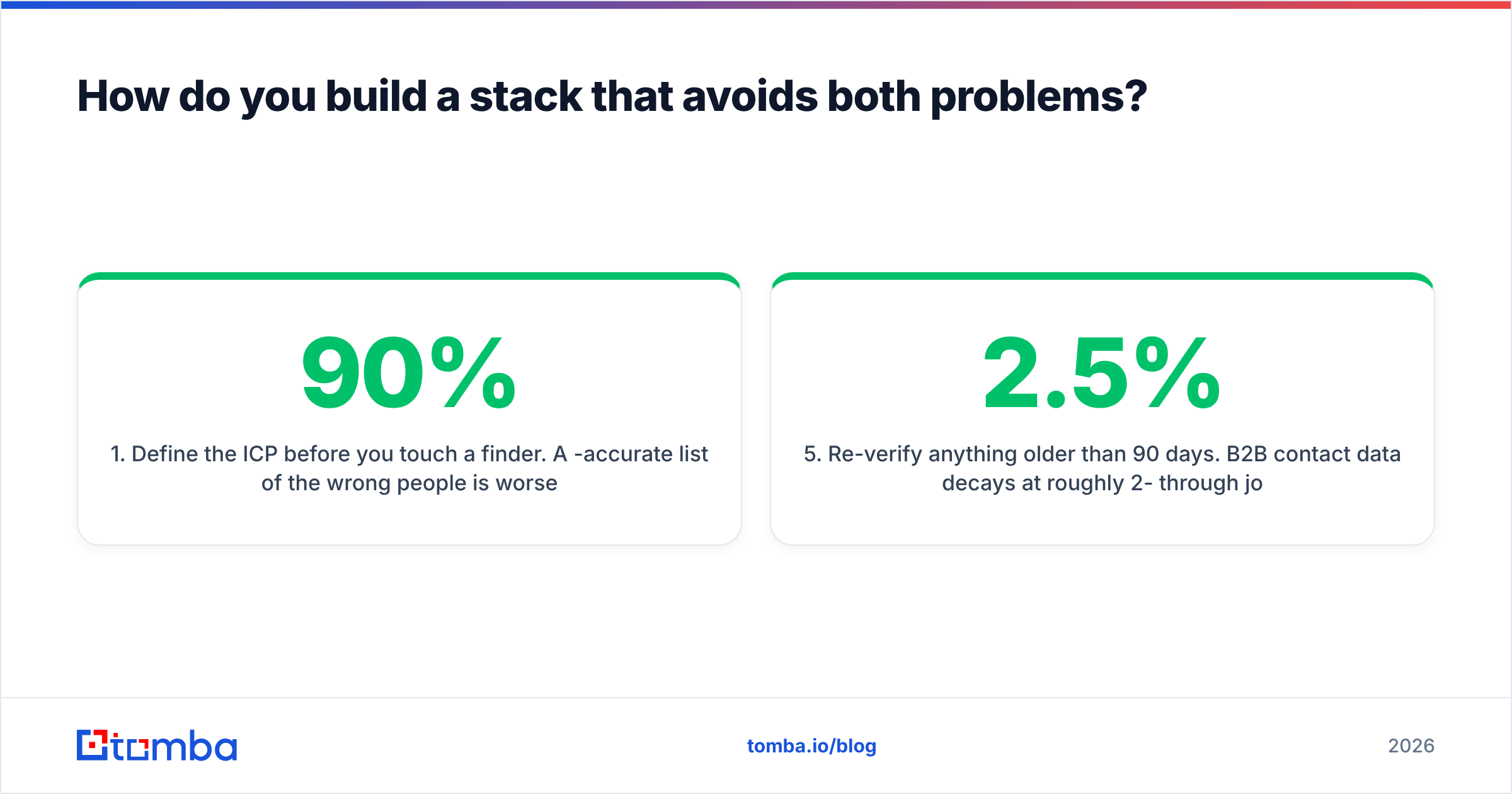
- Define the ICP before you touch a finder. A 90%-accurate list of the wrong people is worse than a 60%-accurate list of the right ones. Firmographic filters first, contact resolution second.
- Find contacts from company domains, not just social profiles. Domain-first sourcing gives you the whole org chart, including the people who never post. Social-first sourcing gives you the people who post.
- Verify everything before it enters your sequencer. Not sampled — everything. Verification costs cents; a burned sending domain costs months.
- Segment by confidence tier. Send valid addresses from your primary domain. Send catch-all and risky addresses from a secondary domain, at lower volume, and watch the response.
- Re-verify anything older than 90 days. B2B contact data decays at roughly 2-2.5% per month through job changes alone. A six-month-old list is meaningfully worse than a fresh one.
- Track bounces by source. If one tool's records bounce at triple the rate of another's, you now have your own benchmark — which beats every vendor comparison chart, including this one.
Teams that follow that sequence tend to care less about which specific vendor they picked, because the process absorbs a lot of tool variance. Teams that skip step three ask why their email deliverability collapsed six weeks in.
Which tool wins the comparison?#
Neither, cleanly — and any post that declares a single winner between a finder and a verifier is not being straight with you.
Buy Kickbox if verification is your entire problem, you want pay-as-you-go economics, and you value deliverability consulting alongside the API. It is a focused, well-built product in a lane it has occupied for years.
Buy Finalscout if your prospecting genuinely lives inside LinkedIn, your reps work profile-by-profile, and the bundled AI copy saves them real time. Accept that you will still need verification on top.
Buy a consolidated platform if you recognize your own workflow in the combined-stack column of the pricing table — which, in practice, is most outbound teams. Consolidation is not automatically better, but paying two vendors to hand CSVs between them rarely is either.
The honest test: open your last invoice for prospecting tools, add the lines together, and compare that to what a single platform charges at the same volume. If the numbers are close, stay where you are. If the gap is 40% or more, the switch pays for itself in a quarter.
Ready to stop running a finder and a verifier as separate line items? The Tomba Email Finder resolves contacts from a domain, name, or LinkedIn profile and pushes them through built-in verification before they reach your sequencer — one account, one credit pool, one API. Start on the free tier with 25 searches a month, and upgrade to Starter at $49/mo when the pipeline justifies it.
Related guides#
Ready to find emails that actually work?
Join 150,000+ professionals who stopped guessing and started sending. Free credits on signup — no credit card required.
Get the Tomba newsletter
Practical outbound tactics and product updates — once every two weeks.
About the author