FinalScout vs PursueApp: Which B2B Email Tool Wins in 2026
FinalScout finds emails on LinkedIn. PursueApp sends the cold sequences. They are not really rivals — and picking the wrong one is why half the outbound stacks I audit leak money. Here is the honest breakdown.
FinalScout vs PursueApp is a fight that never really happens. FinalScout finds emails on LinkedIn. PursueApp sends the cold sequences. One builds the list. The other mails it. Here is what each does, what each costs, and which gap you need to close first.
TL;DR
- FinalScout vs PursueApp is not a fair match. FinalScout is a LinkedIn email finder with an AI writing layer. PursueApp is a cold email sender with drip logic.
- Need contact data? FinalScout competes with other email finders.
- Need to send at volume with SMTP rotation and follow-ups? PursueApp competes with Instantly, Saleshandy, and Smartlead.
- FinalScout only finds what you scroll past. An API-first finder pulls from a wider pool, with no browser in the loop.
- PursueApp lifetime deals look cheap. You still bring your own inboxes, warmup, and clean list. Bad data burns those inboxes anyway.
- The 2026 stack most teams want: a data source, a verifier, then a sender. Skip two of the three and cold email stalls.
What are FinalScout and PursueApp?#
FinalScout is a Chrome extension that finds email on LinkedIn. You open a profile, a search page, a group, or a Sales Navigator list. It pulls contact details for the people on screen. It also drafts emails with AI. So you go from "found them" to "wrote to them" in one tab. The pitch on finalscout.com leans on safe lookups and a LinkedIn-first flow.
PursueApp is a cold email sender. You connect your own SMTP inboxes. You upload a list. You build a multi-step drip with rules. It handles timing, throttling, reply spotting, and reports. Its pricing has leaned on launch deals and lifetime licences, not monthly SaaS. Solo operators and agencies like that. See pursueapp.com for the current framing.
So one tool answers "who do I email, and what is their address?" The other answers "how do I send 400 emails this week without torching my domain?" You can run both. You cannot buy one and expect it to cover the other.

FinalScout vs PursueApp: how do they compare head-to-head?#
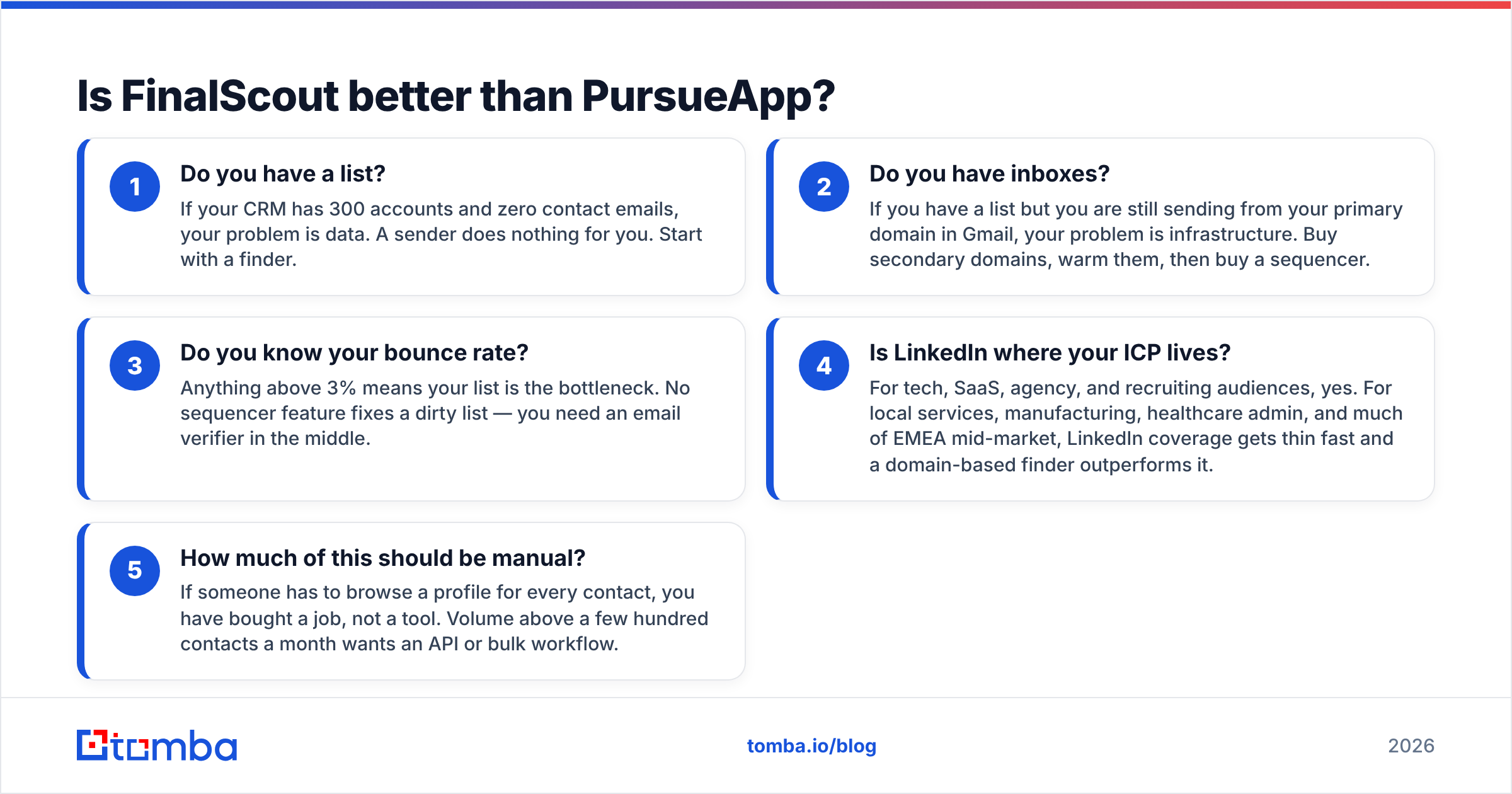
Here is the honest side-by-side. The third column is the API-first route most data-led teams now take.
| Dimension | FinalScout | PursueApp | API-first finder (e.g. Tomba) |
|---|---|---|---|
| Primary job | Find emails from LinkedIn profiles | Send and automate cold sequences | Find + verify contact data at scale |
| Core interface | Chrome extension + web app | Web app + your own SMTP | Web app, API, CLI, spreadsheet add-ins |
| Data sourcing | LinkedIn pages you actively browse | None — you supply the list | Domain crawl, pattern inference, public sources |
| Verification | Basic validity signalling | Not a verification tool | Dedicated verifier + catch-all handling |
| Sending capability | Limited / AI drafting only | Full sequencer, throttling, reply detection | None — pairs with any sequencer |
| Bulk workflow | Batch extraction from list pages | CSV upload into campaigns | Bulk CSV, API batch, Sheets/Excel |
| Pricing model | Monthly credit tiers | Lifetime / one-time style tiers | Free tier + monthly plans from $49 |
| Best for | LinkedIn-first SDRs and recruiters | Agencies sending on owned inboxes | Data teams, RevOps, dev-led workflows |
Read that table again. Notice how few rows overlap. The only real contest is "who owns the contact record". Even there, FinalScout wins only if all your prospecting lives on LinkedIn.
Is FinalScout better than PursueApp?#
Wrong question. But here is the answer people want: the one that fills the gap in your stack.
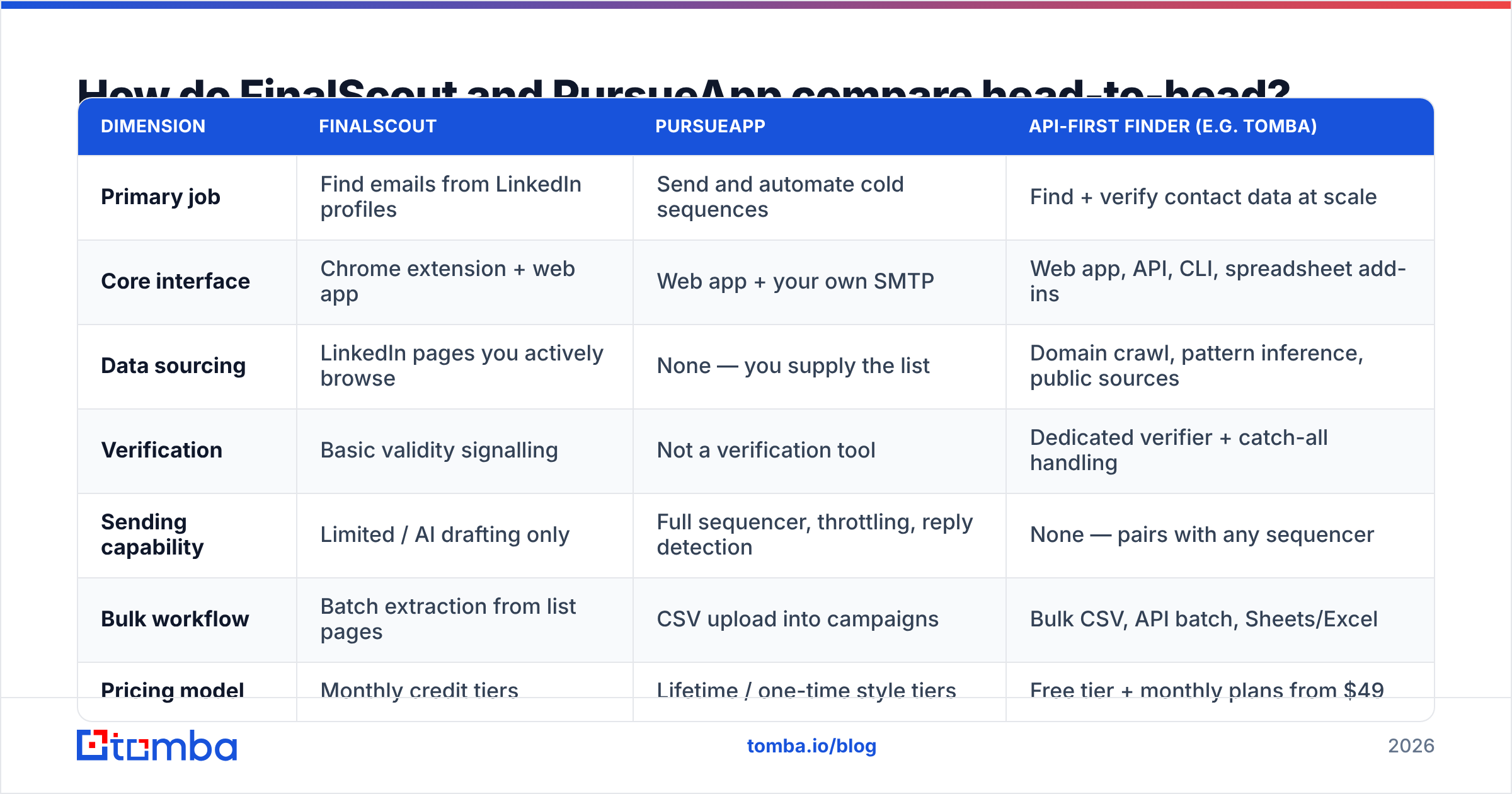
Run this five-point check before you spend a cent.
- Do you have a list? 300 accounts and no emails? Your problem is data. Start with a finder.
- Do you have inboxes? Still sending from your main Gmail domain? Buy spare domains, warm them, then buy a sender.
- Do you know your bounce rate? Above 3% means the list is the bottleneck. You need an email verifier in the middle.
- Does your ICP live on LinkedIn? True for tech, SaaS, and recruiting. Thin for local trades, factories, and much of EMEA. A domain finder wins there.
- How much should stay manual? One profile per contact is a job, not a tool. Past a few hundred a month, you want an API.
Most teams that ask "FinalScout vs PursueApp" fail step 1 or step 3. So neither product is the buy that moves the number.
What does FinalScout do well?#
FinalScout's strength is timing. You are on the profile. You already know the person fits. The email shows up with no tab switch. For recruiters and founder-led sales, that loop is fast. The AI drafting helps if you write every email from scratch.
The ceiling is structural. It is not a knock on the product.
- Coverage equals browsing. You only enrich pages you load. A 2,000-contact list means about 2,000 page loads. You hit LinkedIn's rate limits long before you hit your target.
- Platform risk. Any extension living inside LinkedIn's page is one UI change away from a bad week. That is a real dependency.
- One shape of data. Records are person-level and LinkedIn-anchored. Need every inbox at a target domain? Think support@, the head of ops who never posts, the second buyer. A domain search gets them in one query.
- Valid is not verified. A guess from a name pattern is not an SMTP check with catch-all handling. Those are two different jobs.
Is your work LinkedIn-shaped and your volume small? Then FinalScout is a fair pick. Want the same LinkedIn coverage plus whole-domain reach plus an API? The LinkedIn finder route gives you both. Use the extension when you want it, the endpoint when you need scale.
Where does PursueApp fit?#
PursueApp fits after the data problem is solved. Its value is the sending layer. You get sequence logic, per-inbox throttling, reply-based branches, and campaign reports. It all runs on SMTP logins you own. Because the inboxes are yours, cost per email drops near zero once the licence is paid. That is why agencies like it.
Be clear-eyed about three things.
- You own deliverability. Your SMTP means your warmup, your DNS, your blacklist checks, and your clean-up work. Check SPF and DKIM before the first send, not after the first spam-folder run. An SPF checker takes thirty seconds.
- Lifetime pricing moves risk. It does not remove cost. A one-time licence is great while the product ships updates. It is dead weight when it stops. Read recent release notes and support reviews on G2 first.
- It will send to a bad list. No sender refuses junk input. Every dead address is a hard bounce against a domain score you spent weeks building.
That last point is where most "the tool did not work" reviews land.

How do the costs compare?#
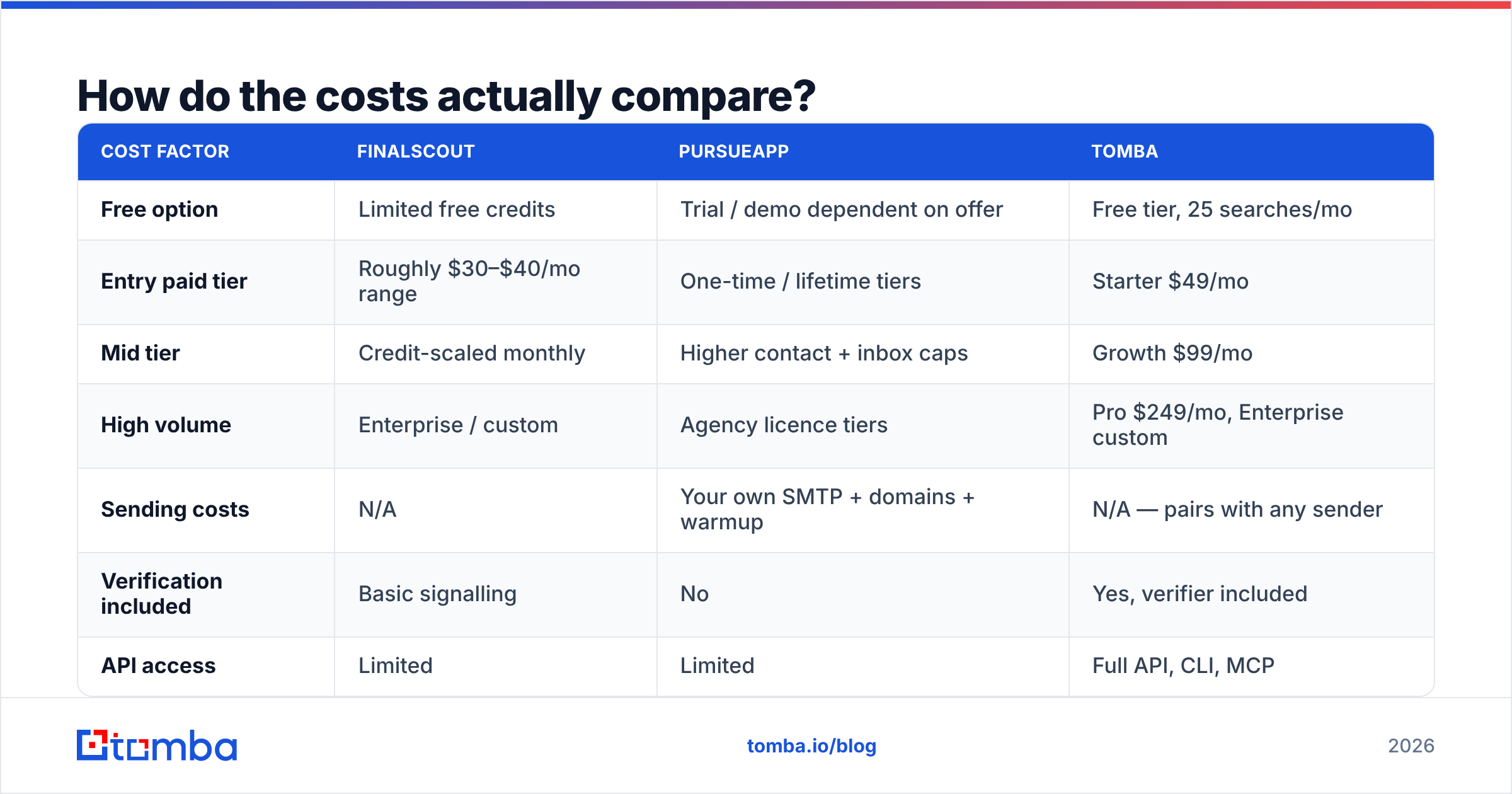
FinalScout vs PursueApp on price is not apples to apples. Both vendors move their plans, and lifetime offers come and go. Treat this as the shape of the cost. Confirm on each vendor page before you buy.
| Cost factor | FinalScout | PursueApp | Tomba |
|---|---|---|---|
| Free option | Limited free credits | Trial / demo dependent on offer | Free tier, 25 searches/mo |
| Entry paid tier | Roughly $30–$40/mo range | One-time / lifetime tiers | Starter $49/mo |
| Mid tier | Credit-scaled monthly | Higher contact + inbox caps | Growth $99/mo |
| High volume | Enterprise / custom | Agency licence tiers | Pro $249/mo, Enterprise custom |
| Sending costs | N/A | Your own SMTP + domains + warmup | N/A — pairs with any sender |
| Verification included | Basic signalling | No | Yes, verifier included |
| API access | Limited | Limited | Full API, CLI, MCP |
The line nobody budgets for is re-work. A 15% bounce rate on 3,000 contacts is 450 wasted sends. Add a hit to your sender score and a week of warmup to fix it. That costs more than any plan above. Compare Tomba pricing against the credits you burn, not the credits on the label.
Which one gives you better data?#
Two things drive accuracy. Where the data comes from. And what happens to it before it reaches your sender.
FinalScout reads LinkedIn profiles and guesses patterns. That works well for people with full, current profiles. It works badly for recent job changers, odd email formats, and catch-all domains. Catch-all domains are the quiet killer. The server accepts every address, so a naive check marks junk as valid. You want a catch-all verifier that scores confidence instead of shrugging.
PursueApp does not source or check data at all. That is not a flaw. It is a category line. But it means a PursueApp campaign is only as good as the list you feed it.
Hold any stack to this bar:
- Under 3% hard bounce on a fresh list of 1,000+
- Catch-all flagged out loud, never a silent "valid"
- A confidence score per record, so you can cut the tail
- Re-check before every send, since B2B data rots 2–3% a month
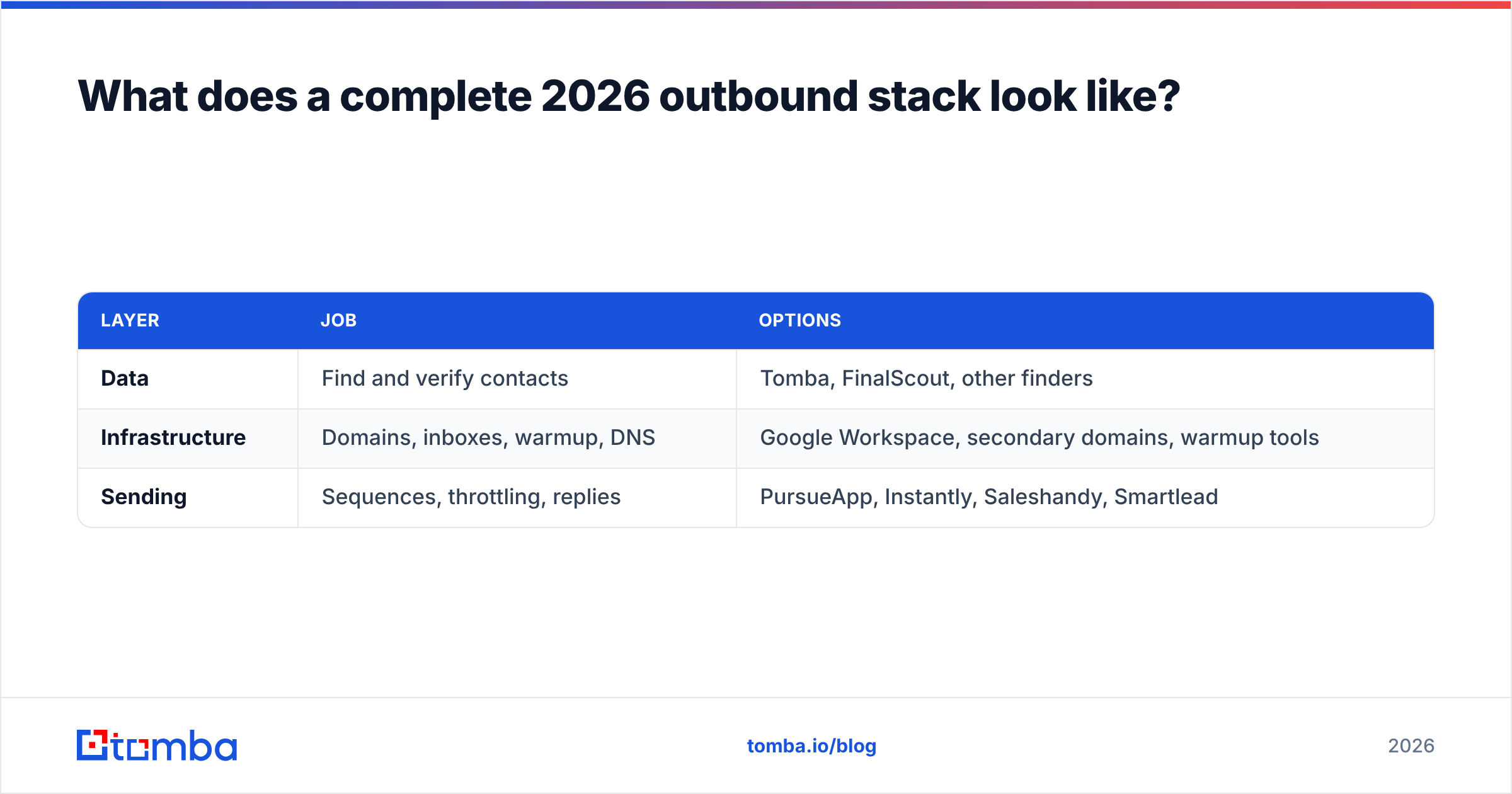
What does a full 2026 outbound stack look like?#
Three layers. Keep them apart. Swap any one without rebuilding the rest.
| Layer | Job | Options |
|---|---|---|
| Data | Find and verify contacts | Tomba, FinalScout, other finders |
| Infrastructure | Domains, inboxes, warmup, DNS | Google Workspace, secondary domains, warmup tools |
| Sending | Sequences, throttling, replies | PursueApp, Instantly, Saleshandy, Smartlead |
Bundles that claim all three tend to be strong in one layer and thin in two. Keep them separate and you can drop the weak link. It also means your data layer should ship an email finder API. Then enrichment runs inside your CRM, not in a browser tab someone leaves open.
A weekly loop that works: pull target accounts, run a domain search for every contact, verify the output, cut anything under your score line, push the clean list to your sender, and re-check anything older than 60 days. Nothing fancy. Just no skipped step.
So which should you choose?#
The FinalScout vs PursueApp answer comes down to the gap you have today.
Choose FinalScout if LinkedIn is your hunting ground, you need a few hundred contacts a month, and you want to find and draft in one place.
Choose PursueApp if your data is already clean, you own or will build sending setup, and you prefer a one-time licence to a monthly bill. It suits agencies running many client campaigns.
Choose neither, yet if you cannot state your bounce rate. That number names the broken layer. It is rarely the layer people plan to pay for.
Run a finder next to PursueApp for the honest best of both. You get a data layer that covers domains as well as profiles, checks built into the same account, and an API for scale.
That last setup is where Tomba's Email Finder earns its keep. Find email by domain, name, or company. Verify and handle catch-alls in the same account. Run bulk and API jobs when volume grows. The free tier gives 25 searches a month, so you can test coverage on your own ICP first. Run your 50 hardest prospects through it. Compare the hit rate to your current tool. Let the bounce rate decide.
Related guides#
Ready to find emails that actually work?
Join 150,000+ professionals who stopped guessing and started sending. Free credits on signup — no credit card required.
Get the Tomba newsletter
Practical outbound tactics and product updates — once every two weeks.
About the author