FinalScout vs SalesBlink 2026: LinkedIn Email Finder or Cold Outreach?
FinalScout finds LinkedIn emails. SalesBlink sends and automates sequences. They solve different halves of outbound — here's which one you actually need, what each really costs, and where a dedicated email finder beats both.
FinalScout vs SalesBlink comes down to one thing: the two tools do different jobs. FinalScout finds emails on LinkedIn. SalesBlink sends them. Here is what each one does, what each costs, and which one fills your gap.
TL;DR
- FinalScout is a LinkedIn-first email finder with an AI writer attached. SalesBlink is a cold email sender with a small built-in contact database. They sit in different product categories.
- If all your prospecting runs through LinkedIn Sales Navigator, FinalScout fits better. If you need multi-channel sequences, inbox rotation, and delivery tooling, SalesBlink wins outright.
- Neither is a strong data provider on its own. FinalScout's coverage drops off outside LinkedIn profiles. SalesBlink's database is thin next to dedicated finders.
- The setup most teams run in 2026: a dedicated email finder plus a verifier for data, and a separate sender for delivery. Splitting the two jobs costs less. It also breaks less often.
- Budget reality: FinalScout's usable tier lands around $44–$81/mo depending on credits. SalesBlink starts near $25/mo, but the price climbs fast as contacts and inboxes add up.
What are FinalScout and SalesBlink, actually?#
Think of outbound as a restaurant. One person sources ingredients. Another cooks and plates them. FinalScout sources. SalesBlink is the kitchen. Most FinalScout vs SalesBlink comparisons go sideways right here, because people treat the two as swaps when they work different stations.
FinalScout is a Chrome extension and web app. It pulls email addresses from LinkedIn profiles, Sales Navigator lists, and LinkedIn group members. The pitch is a claimed 98% deliverability rate on found emails, plus an AI writer that drafts a message from the profile. You install the extension, run a Sales Navigator search, and export a list with emails attached.
SalesBlink is a cold outreach platform. It runs sequences (email, LinkedIn touches, calls as tasks) and rotates sending across several inboxes. It also warms those inboxes up, spins message variants, detects replies, and books meetings. BlinkGPT writes sequences for you. There is a lead-finding module too, but it is a side dish, not the main course.
That split drives every choice below. You do not pick between these two the way you pick between two email verifiers. You pick based on which half of your stack is broken.
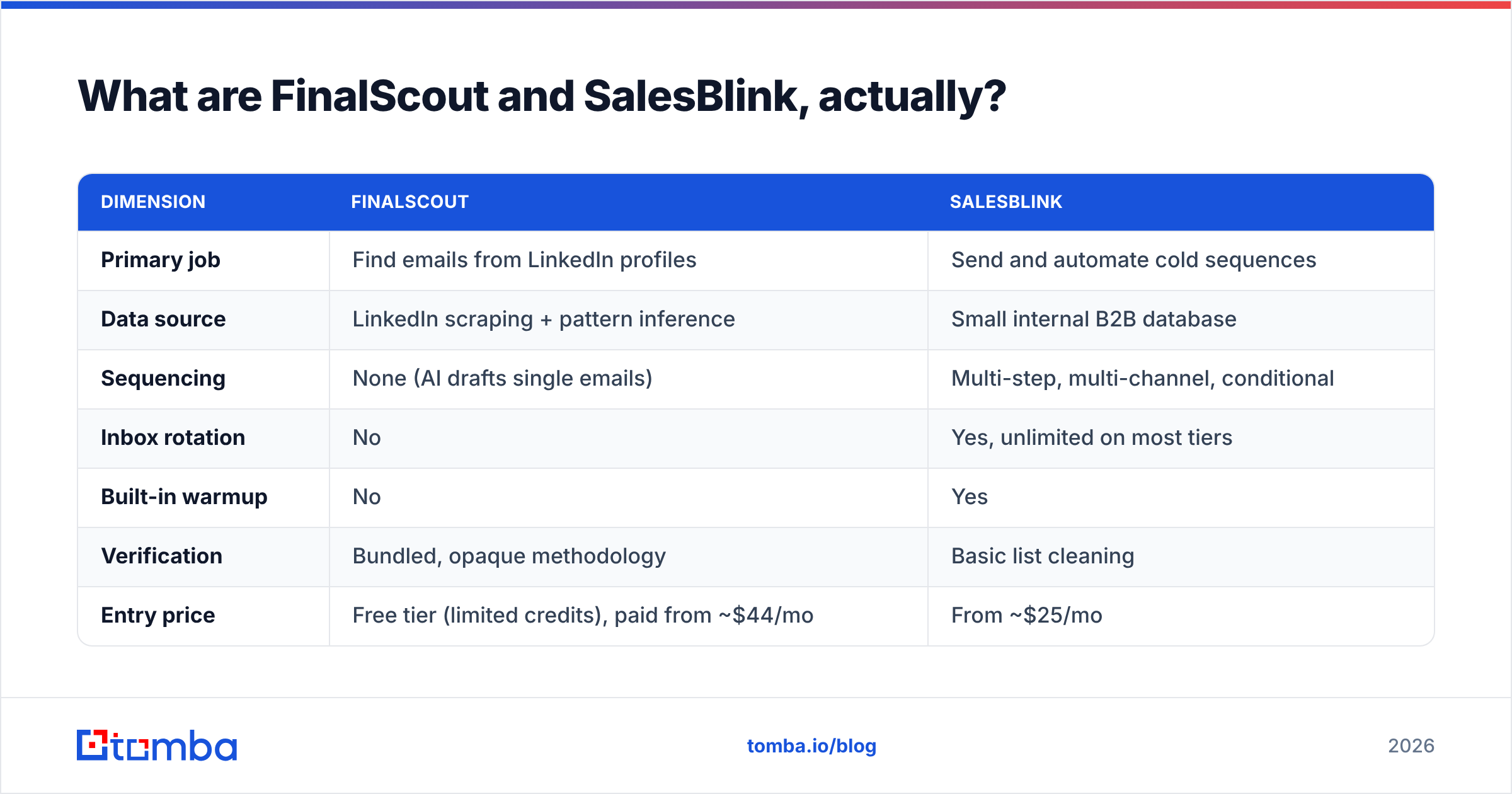
| Dimension | FinalScout | SalesBlink |
|---|---|---|
| Primary job | Find emails from LinkedIn profiles | Send and automate cold sequences |
| Data source | LinkedIn scraping + pattern inference | Small internal B2B database |
| Sequencing | None (AI drafts single emails) | Multi-step, multi-channel, conditional |
| Inbox rotation | No | Yes, unlimited on most tiers |
| Built-in warmup | No | Yes |
| Verification | Bundled, opaque methodology | Basic list cleaning |
| Entry price | Free tier (limited credits), paid from ~$44/mo | From ~$25/mo |
| API access | Limited | Available on higher tiers |
| Best for | LinkedIn-native SDRs and recruiters | Agencies running multi-inbox campaigns |
Which one finds better emails?#
FinalScout, but only inside its own lane. And the lane is narrow.
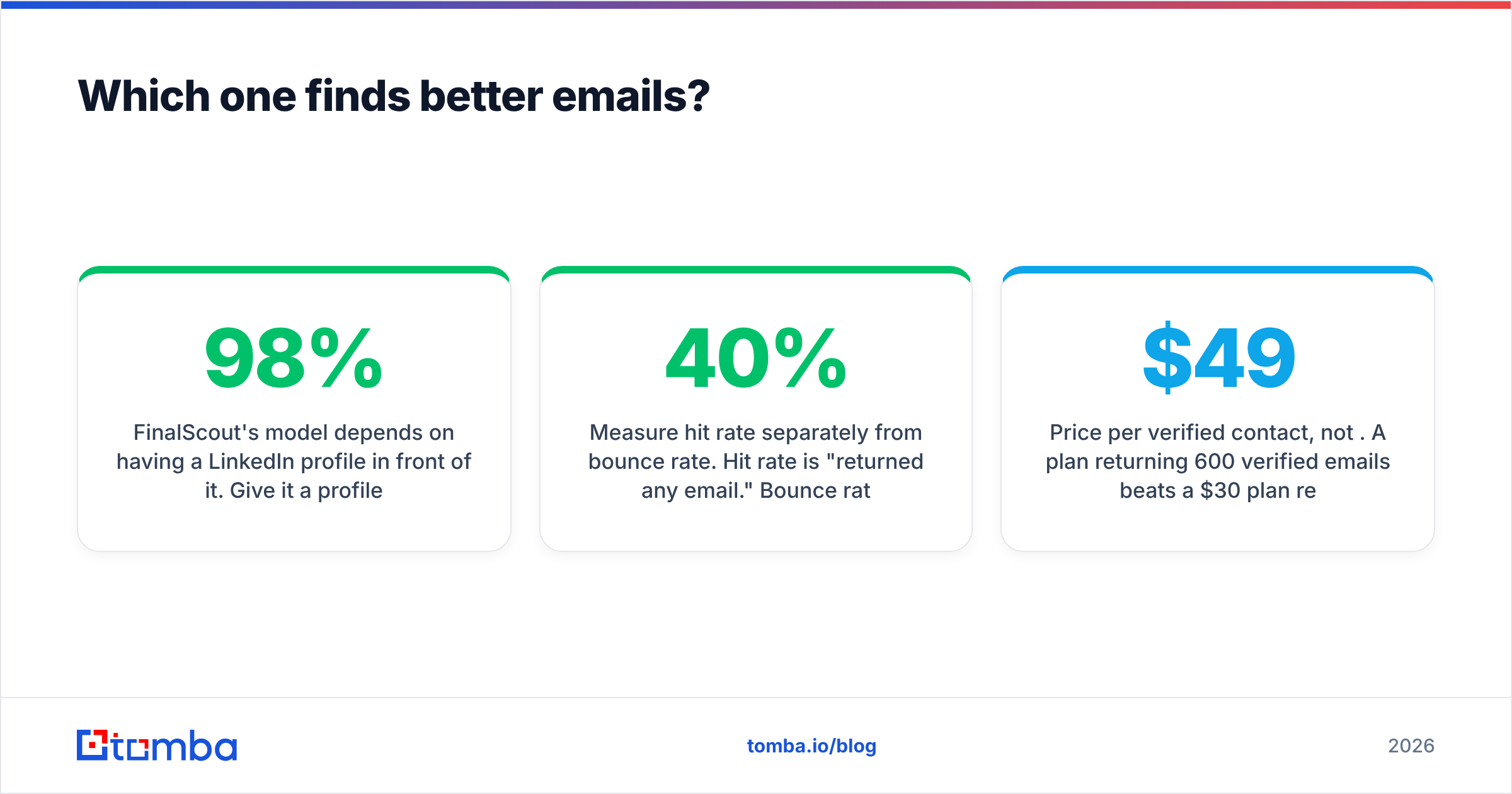
FinalScout needs a LinkedIn profile in front of it. Give it a profile URL and it does well. Name, company, and role are structured data, so pattern guessing plus verification returns a solid hit rate. The 98% claim describes verified output only. It does not tell you how many profiles return an email at all. Those are two different numbers, and vendors rarely publish the second one.
Where it falls apart:
- No domain-first workflow. You cannot hand it a company domain and get back a full contact map. That is the most common motion in larger teams, and FinalScout does not serve it.
- LinkedIn dependency is a real risk. Scraping tools live at the mercy of LinkedIn's rules. Account limits and blocks are a known cost of running them.
- Catch-all domains are a coin flip. Any tool that guesses patterns will hand you addresses that look fine on catch-all servers. Without a catch-all check, those inflate your found count and your bounce rate at the same time.
SalesBlink's finder is weaker still. The database works for basic firm-level pulls. It cannot match providers whose whole business is data. If you are judging SalesBlink on lead finding, you are judging it on the wrong thing.
This is why most teams at volume pair either tool with a dedicated finder. A proper email finder works from a domain, a name, a LinkedIn URL, or a bulk list. It also returns a confidence score you can filter on, instead of one blended accuracy claim. Tomba's domain search covers the motion FinalScout cannot: give it stripe.com, get back the contact map and the main email pattern.
How should you evaluate accuracy claims?#
Ignore the headline number. Run your own test instead.
- Build a 100-row control list from companies where you already have verified contacts. Mix company sizes. A 20-person startup behaves nothing like a 5,000-person firm.
- Measure hit rate apart from bounce rate. Hit rate means "returned an email." Bounce rate means "the email was wrong." A tool with a 40% hit rate and 2% bounce often beats one with 80% hit and 15% bounce.
- Segment by domain type. Track catch-all domains on their own. That is where tools differ most.
- Send a real test batch. SMTP checks and real delivery do not always agree. A 50-email live send tells you more than any vendor chart.
- Price per verified contact, not per credit. A $49 plan that returns 600 verified emails beats a $30 plan that returns 250.
Run that test before you sign an annual deal. It takes an afternoon, and it often flips the decision.
Which one is better for sending cold email?#
SalesBlink, and it is not close. On sending, FinalScout vs SalesBlink is barely a contest, because FinalScout does not compete here at all.
SalesBlink covers what outbound needs in 2026. Most tiers allow unlimited connected inboxes. It rotates sends across them, so no single mailbox carries the full load. You also get warmup, spintax for message variety, and reply detection that pulls people out of a sequence. Branching rules react to opens and replies. A built-in scheduler books meetings, so you skip a separate Calendly seat.
FinalScout's AI writer drafts one email at a time. There is no follow-up, no sending setup, no warmup, no delivery monitoring. You copy the draft into whatever you send from.
If you are comparing the two because you need sequences, the answer is already clear. The real question becomes SalesBlink versus Instantly, Smartlead, or Lemlist. Our take on the Instantly alternative landscape is worth a read if sending is your gap.
One caveat: SalesBlink's delivery tools are solid but not best in class. You still handle authentication yourself. Run an SPF checker on every sending domain. Get DMARC to at least p=none with reporting on. Then follow Google's bulk sender rules — the Gmail sender guidelines are the standard, and Google enforces them harder each year. No platform saves a broken domain setup.
How do FinalScout and SalesBlink pricing compare?#
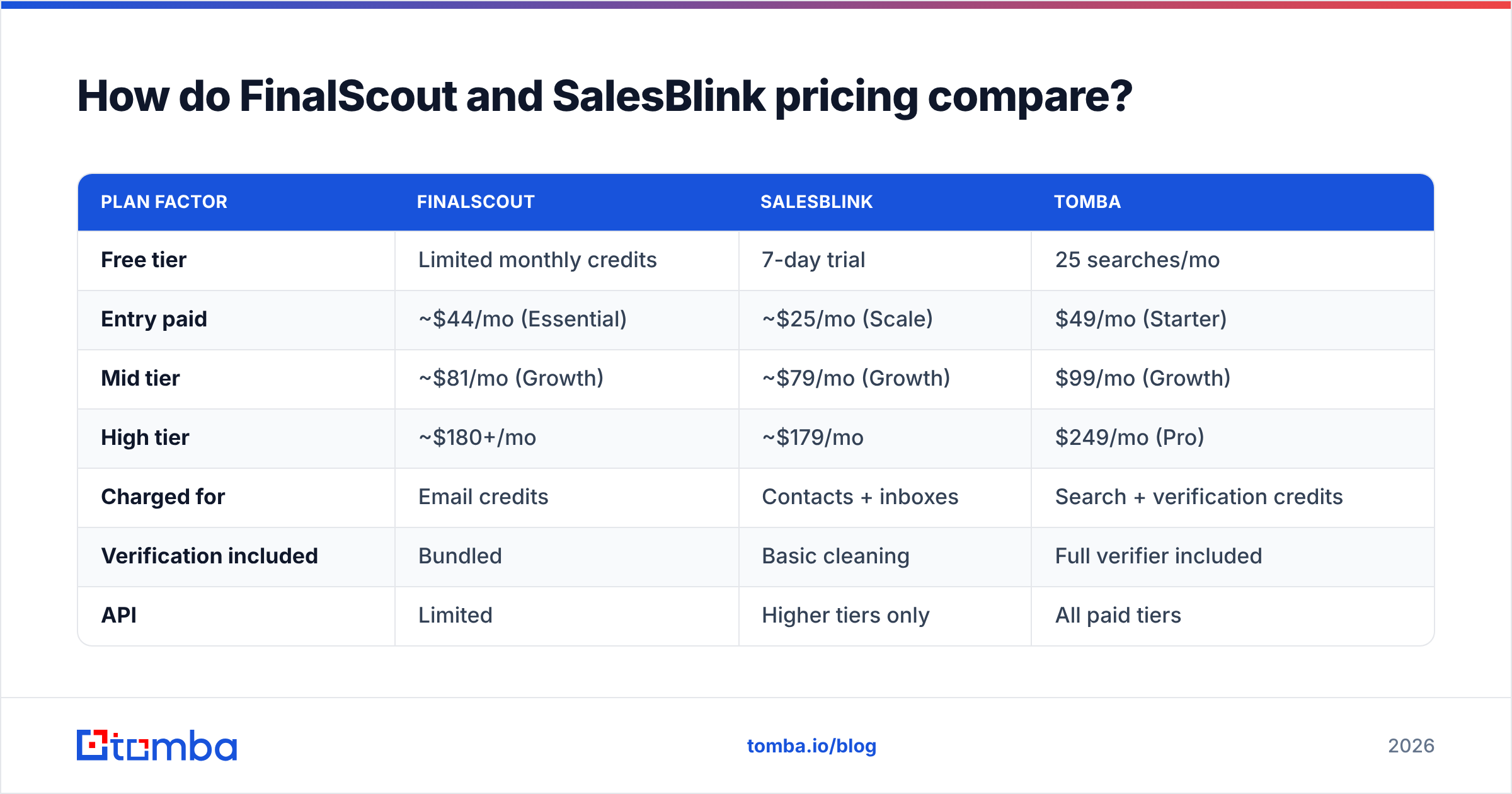
FinalScout vs SalesBlink pricing follows the same shape. Both use credits and seats. Both look cheap at the entry tier and get costly at working volume.
| Plan factor | FinalScout | SalesBlink | Tomba |
|---|---|---|---|
| Free tier | Limited monthly credits | 7-day trial | 25 searches/mo |
| Entry paid | ~$44/mo (Essential) | ~$25/mo (Scale) | $49/mo (Starter) |
| Mid tier | ~$81/mo (Growth) | ~$79/mo (Growth) | $99/mo (Growth) |
| High tier | ~$180+/mo | ~$179/mo | $249/mo (Pro) |
| Charged for | Email credits | Contacts + inboxes | Search + verification credits |
| Verification included | Bundled | Basic cleaning | Full verifier included |
| API | Limited | Higher tiers only | All paid tiers |
| Bulk processing | CSV export | CSV import | Native bulk + Sheets/Excel |
Prices shift, so check each vendor's page before you budget. The structure holds either way.
Both models share one trap: you pay twice for the same contact. FinalScout charges a credit to find the email. Your sending platform then charges per contact to email it. If you care about bounce rate, you pay a verifier too. Three line items, one prospect.
So the number that matters is cost per sent-and-landed email, not cost per credit. Fold finding and verifying into one tool and a line item disappears. Tomba's pricing puts both in a single credit pool. Starter is $49/mo with both included, and the API comes with every paid tier instead of sitting behind an upgrade.

Is there a third option that beats both?#
Yes. For most teams the FinalScout vs SalesBlink question has a third answer: unbundle.
Modern outbound has three jobs. Tools that try to do all three do at least one of them badly.
- Data — finding accurate, current contacts at the volume you need. This rewards vendors whose whole business is fresh, broad data.
- Verification — confirming the address exists before you send. Bundled checks are often just syntax and MX lookups dressed up as validation. Catch-all domains expose that fast.
- Delivery and sequencing — warmup, rotation, follow-ups, reply handling. That is an infrastructure job, and it needs its own tool.
FinalScout does job 1 narrowly and job 2 opaquely. SalesBlink does job 3 well and job 1 poorly. Neither covers the full chain.
The pairing that works: a finder plus a verifier for jobs 1 and 2, then a sender for job 3. In practice, run domain search or bulk finding to build the list. Push it through an email verifier that handles catch-all domains. Then load the clean list into SalesBlink, Instantly, or whichever sender you prefer.
For LinkedIn-heavy work, this replaces FinalScout's core use case without the scraping risk. A LinkedIn finder turns profile URLs into verified work emails. It runs on an API, not a browser extension driving your logged-in session, so your LinkedIn account stays out of harm's way.
Other options are worth a look on G2 before you decide. BookYourData suits teams that want pay-as-you-go verified contacts with no subscription — handy when list building is irregular. Apollo bundles data and sequencing in one platform if you prefer a single vendor and can live with uneven data quality.
Which should you choose for your team?#
Match the tool to the gap you actually have.
- You are a recruiter or SDR living in LinkedIn Sales Navigator, sending under 200 emails a month. FinalScout's workflow fits and the price is fair. Add a standalone verifier before you send.
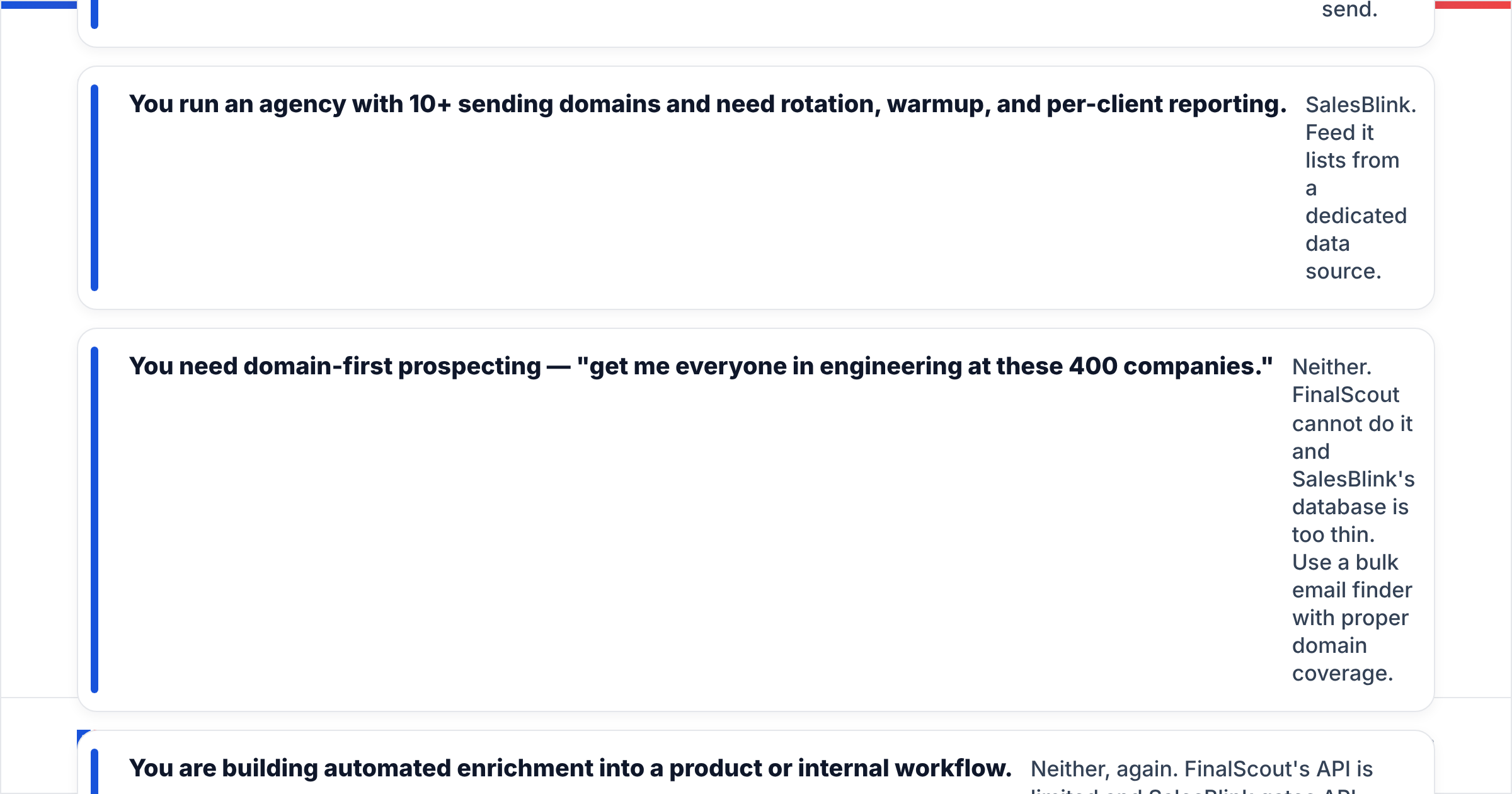
- You run an agency with 10+ sending domains and need rotation, warmup, and per-client reporting. SalesBlink. Feed it lists from a dedicated data source.
- You need domain-first prospecting — "get me everyone in engineering at these 400 companies." Neither one works. FinalScout cannot do it, and SalesBlink's database is too thin. Use a bulk email finder with real domain coverage.
- You are building enrichment into a product or internal workflow. Neither, again. FinalScout's API is limited, and SalesBlink gates API access behind higher tiers. Pick a provider where the email finder API is a first-class product with documented rate limits.
- You are a two-person team that wants the fewest tools. Pick a finder with verification bundled, plus one sender. Two tools total. A third one rarely improves output.
One more point people underweight: data compliance. If you prospect into the EU or UK, scraped data carries different obligations than data from documented, consent-aware pipelines. Check any vendor's data sources page before you build a GDPR-exposed motion on top of it. HubSpot's GDPR guidance for sales teams is a fair starting point on what legitimate interest really requires.
What is the verdict on FinalScout vs SalesBlink?#
The FinalScout vs SalesBlink verdict: they complement each other, and both leave a gap on the data side.
FinalScout wins when your prospecting is LinkedIn-native and your volume is modest. SalesBlink wins when your problem is sending at scale across many inboxes. Buy one hoping it covers the whole funnel, and you will buy the other within a quarter.
The lasting fix is simple. Stop asking one tool to source, verify, and send. Get data from a vendor whose only job is data. Verify it before it touches a sending domain. Let a purpose-built sender handle delivery. That stack survives a LinkedIn policy change, a Gmail rule change, and a price hike, because no single failure takes down the chain.
Start with the data layer, because everything downstream inherits its quality. The Tomba Email Finder covers the motions both tools miss: domain-first search, LinkedIn URL lookup, bulk processing, and verification in one credit pool. The free tier gives you 25 searches a month. That is enough to run the control-list test above and compare hit rates against your current tool before you spend anything. If the numbers hold up, Starter is $49/mo with full API access on day one.
Related guides#
Ready to find emails that actually work?
Join 150,000+ professionals who stopped guessing and started sending. Free credits on signup — no credit card required.
Get the Tomba newsletter
Practical outbound tactics and product updates — once every two weeks.
About the author