How to Find Business Email Addresses Online: 2026 Guide
Nine repeatable methods for finding business email addresses online — from free manual tricks to bulk API lookups — with accuracy benchmarks, costs, and the legal lines you should not cross.
TL;DR
- The fastest reliable path is pattern inference plus SMTP verification — everything else is a variation on that theme.
- Free manual methods (Google operators, site footers, WHOIS, GitHub commits) work fine at 5-20 contacts, and collapse past that.
- Paid finders differ less on coverage and more on how honestly they report confidence. A tool that returns a guess labeled "valid" costs you more than one that returns nothing.
- Budget roughly $0.01–$0.05 per verified business email at mid-volume. Anything charging materially more is selling a database, not a lookup.
- Verify before you send, always. A 3% bounce rate is the line between "inbox" and "spam folder" for most mailbox providers.
You need someone's work email. You have a name, a company, maybe a LinkedIn profile. What you do next determines whether you end up with a deliverable address, a bounce, or a spam complaint.
This guide walks through nine ways to find business email addresses online, ranked by how well they actually hold up — with real costs, accuracy expectations, and the point at which each method stops scaling.
What counts as a "business email address"?#
A business email address is a mailbox hosted on a company-controlled domain — sarah.chen@stripe.com, not sarahchen91@gmail.com. Three properties matter for outreach:
- It follows a domain-wide pattern. Over 80% of companies use one of five formats:
first.last@,first@,flast@,firstl@, orfirst_last@. Find the pattern once and you can construct addresses for the whole org. - It resolves through a mail exchanger. The domain's MX records tell you where mail goes — Google Workspace, Microsoft 365, or a self-hosted server. This changes how verifiable the address is.
- It may be a role account.
info@,sales@,support@are shared inboxes. Easy to find, terrible reply rates, and often monitored by people with no authority to buy. - It may sit behind a catch-all. Some domains accept mail for every possible local part, which makes standard verification return "valid" for addresses that don't exist. This is the single biggest source of inflated accuracy claims in this category.
That fourth point deserves emphasis. If a vendor advertises 99% accuracy and doesn't publish a separate catch-all figure, treat the number as marketing.

What are the free ways to find business email addresses online?#
These cost nothing but your time. They're genuinely good at low volume.
1. Google search operators. Search site:company.com "@company.com" to surface addresses published on the site. Add filetype:pdf to catch press kits and investor decks, which leak executive emails constantly. Try "firstname lastname" email site:company.com for a specific person.
2. Company footers, press pages, and job listings. Press contacts, careers pages, and legal/privacy pages almost always expose a real mailbox and often reveal the domain pattern. One confirmed address gives you the format for everyone else.
3. GitHub commit history. If the company ships code, git log on a public repo shows author emails. Engineers commit with work addresses more often than you'd expect. Add .patch to any GitHub commit URL to see the raw email.
4. WHOIS records. Increasingly redacted under GDPR, but smaller companies and older domains still expose an admin contact. Worth 30 seconds.
5. Twitter/X, personal sites, and conference bios. Speakers list contact info. Newsletter authors publish reply-to addresses. Podcast guests get introduced with their company and role, which is half the puzzle.
6. Email permutation + manual verification. Generate the likely formats with an email permutator, then check each with a free email checker. This is the manual version of what paid tools automate.
The ceiling on free methods is real. At 5-20 prospects, they're efficient. At 200, you'll spend a full workday and still miss a third of your list.
How do paid email finders actually work?#
Every commercial finder runs the same three-stage pipeline. The differences are in the data behind stage one and the honesty of stage three.
Stage 1 — Pattern resolution. The tool looks up the domain in an index of previously-confirmed addresses and derives the dominant format. A domain search does this in a single call and returns every known mailbox at that company.
Stage 2 — Candidate construction. Given a name and the confirmed pattern, the tool builds the most likely address. Some tools stop here and ship you a guess.
Stage 3 — Verification. The tool checks syntax, MX records, and then opens an SMTP conversation with the receiving server to ask whether the mailbox exists — without sending mail. This is where a good email verifier separates itself: it reports catch-all, accept-all, greylisted, and role statuses instead of collapsing everything into "valid."
The honest tools return a confidence score and let you filter. The dishonest ones round everything up.

Which method should you use at your volume?#
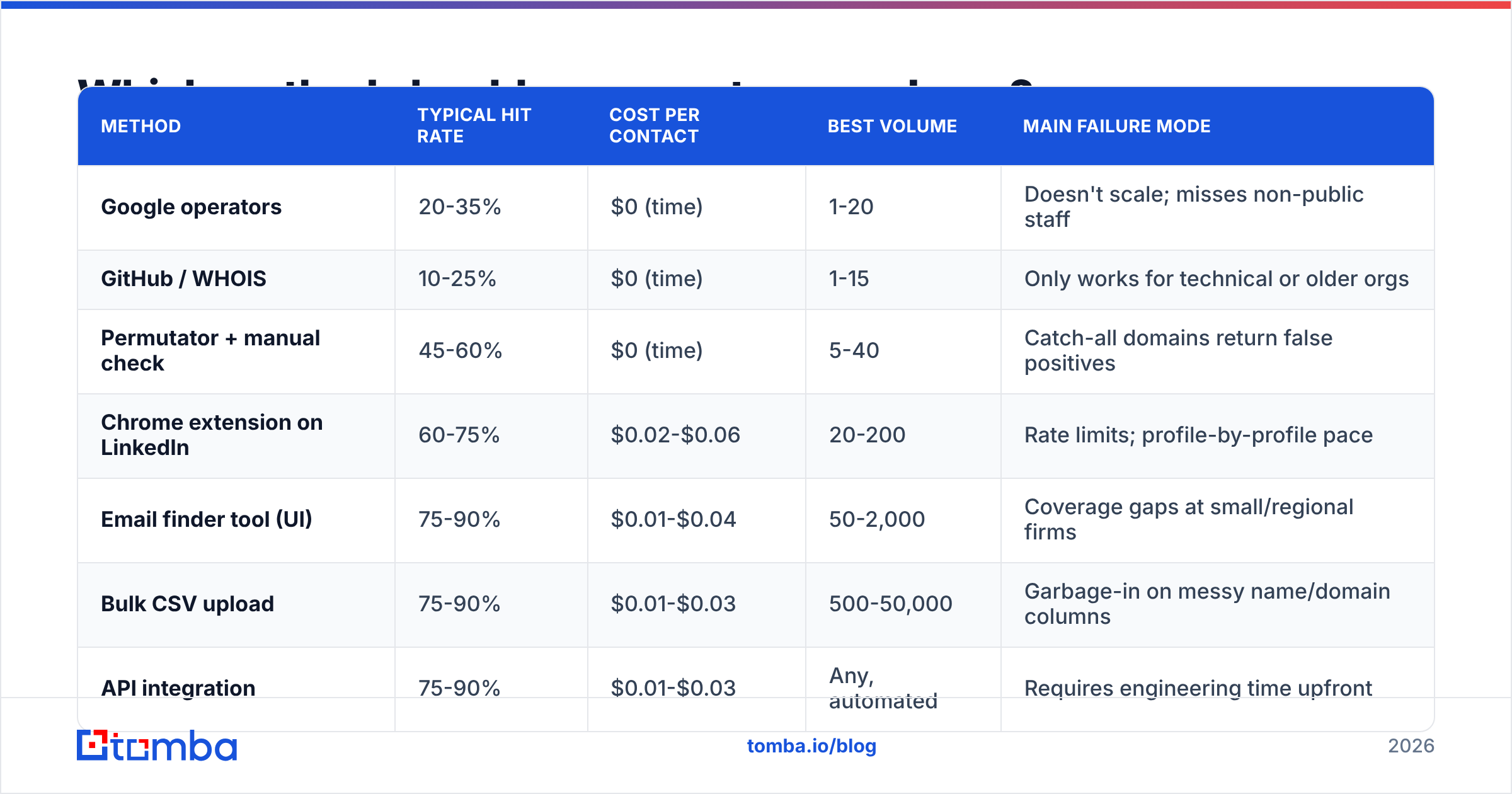
Volume is the deciding variable. Here's how the methods compare on the dimensions that matter.
| Method | Typical hit rate | Cost per contact | Best volume | Main failure mode |
|---|---|---|---|---|
| Google operators | 20-35% | $0 (time) | 1-20 | Doesn't scale; misses non-public staff |
| GitHub / WHOIS | 10-25% | $0 (time) | 1-15 | Only works for technical or older orgs |
| Permutator + manual check | 45-60% | $0 (time) | 5-40 | Catch-all domains return false positives |
| Chrome extension on LinkedIn | 60-75% | $0.02-$0.06 | 20-200 | Rate limits; profile-by-profile pace |
| Email finder tool (UI) | 75-90% | $0.01-$0.04 | 50-2,000 | Coverage gaps at small/regional firms |
| Bulk CSV upload | 75-90% | $0.01-$0.03 | 500-50,000 | Garbage-in on messy name/domain columns |
| API integration | 75-90% | $0.01-$0.03 | Any, automated | Requires engineering time upfront |
| Prepaid B2B list | Varies widely | $0.05-$0.30 | 1,000+ | Data age; you pay for records you skip |
| Manual outreach for the address | 90%+ | High (your time) | 1-5 | Only worth it for named accounts |
Read that table as a staircase. Under 20 contacts, free methods win. Between 20 and 200, a browser extension is the sweet spot. Past 200, you want bulk or API — and past 2,000, you want the API plus a verification pass, because a stale list is the fastest way to torch a sending domain.
How do the main email finder tools compare in 2026?#
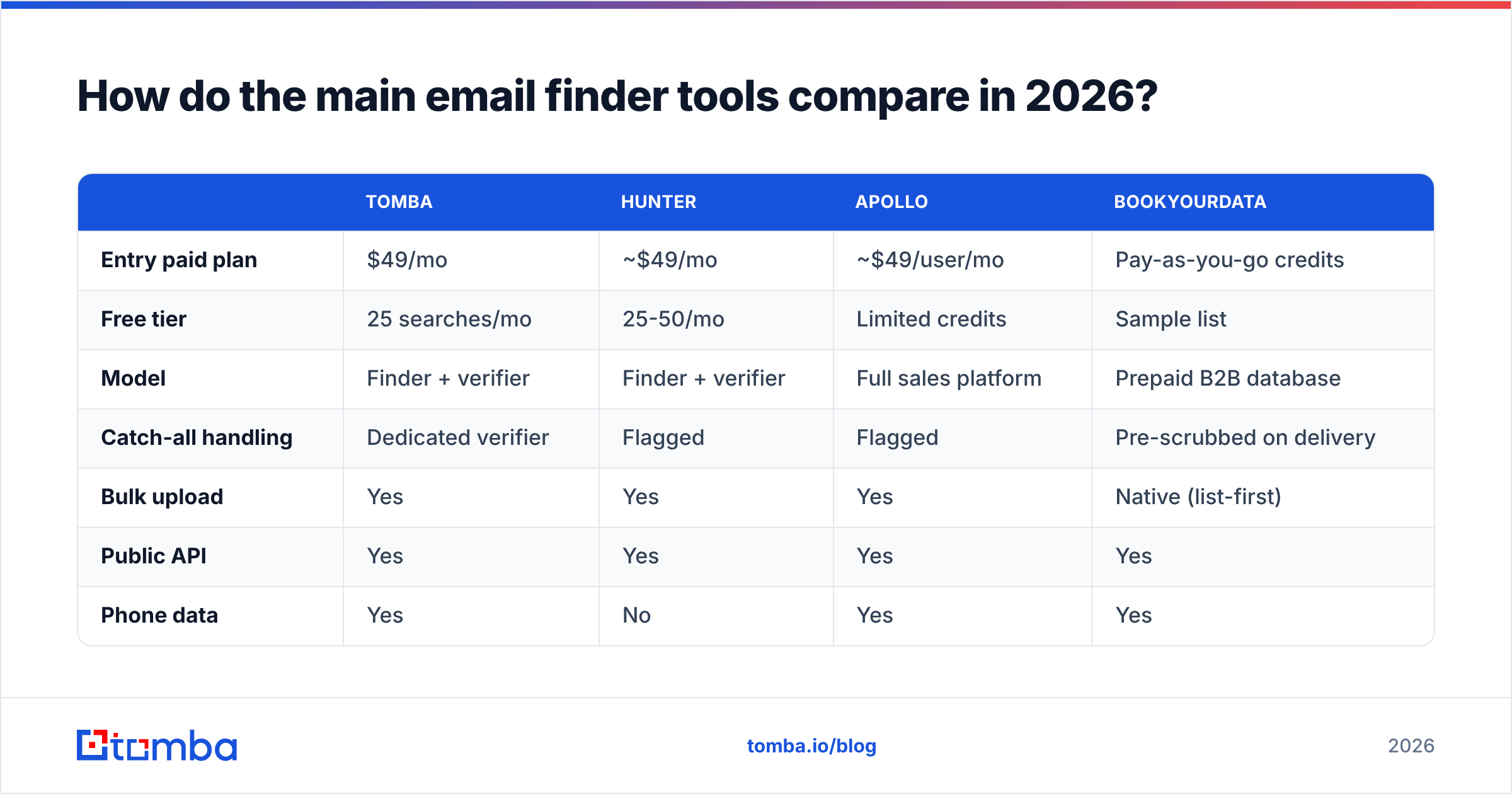
The market has consolidated into three shapes: pure finders, all-in-one sales platforms, and prepaid database vendors. They price on completely different logic, which makes headline comparisons misleading.

| Tomba | Hunter | Apollo | BookYourData | |
|---|---|---|---|---|
| Entry paid plan | $49/mo | ~$49/mo | ~$49/user/mo | Pay-as-you-go credits |
| Free tier | 25 searches/mo | 25-50/mo | Limited credits | Sample list |
| Model | Finder + verifier | Finder + verifier | Full sales platform | Prepaid B2B database |
| Catch-all handling | Dedicated verifier | Flagged | Flagged | Pre-scrubbed on delivery |
| Bulk upload | Yes | Yes | Yes | Native (list-first) |
| Public API | Yes | Yes | Yes | Yes |
| Phone data | Yes | No | Yes | Yes |
| Best for | Finding + verifying at volume | Simple domain lookups | Teams wanting sequences too | Buying a defined list outright |
Pricing shown is list price at the time of writing; check each vendor for current figures. Full Tomba pricing runs Free (25 searches), Starter $49/mo, Growth $99/mo, Pro $249/mo, and custom Enterprise.
A few honest calls on fit:
- Apollo makes sense if you want sequencing, dialer, and data in one seat and don't mind per-seat pricing. If you already run Instantly or Smartlead, you're paying twice.
- Hunter is the simplest thing that works for domain-level lookups. Thinner on phone data and enrichment.
- BookYourData is a genuinely different purchase — you buy a defined, pre-verified list rather than metering lookups. If your ICP is stable and you know exactly who you want, buying the list outright can be cheaper per usable contact than paying for searches that return nothing.
- Tomba sits where you need both find and verify in the same workflow, especially with a catch-all verifier for domains that defeat standard SMTP checks.
Cross-check any of these against current user reviews on G2 before committing — the category moves fast and coverage claims age badly.

How do you find email addresses from LinkedIn?#
LinkedIn is where most B2B prospecting starts, and it's also where most people get the workflow wrong.
The platform does not expose member emails unless the member has published them or you're a first-degree connection. Scraping profiles at scale violates the LinkedIn User Agreement and gets accounts restricted. Treat any tool that promises unlimited profile scraping as a liability.
The compliant workflow looks like this:
- Extract identity, not contact data. Take the name, company, and title from the profile — facts you'd get from a business card.
- Resolve the company domain. Sales Navigator lists it, or use a company website finder.
- Run name + domain through a finder. A LinkedIn finder does steps 2 and 3 in one call.
- Verify before it enters your sequence. Non-negotiable.
- Log the source. Under GDPR you need a lawful basis and a record of where the data came from. "Publicly listed business contact, sourced [date]" is a defensible entry.
That last step gets skipped constantly and is the one that costs money when someone files a subject access request.
What accuracy should you actually expect?#
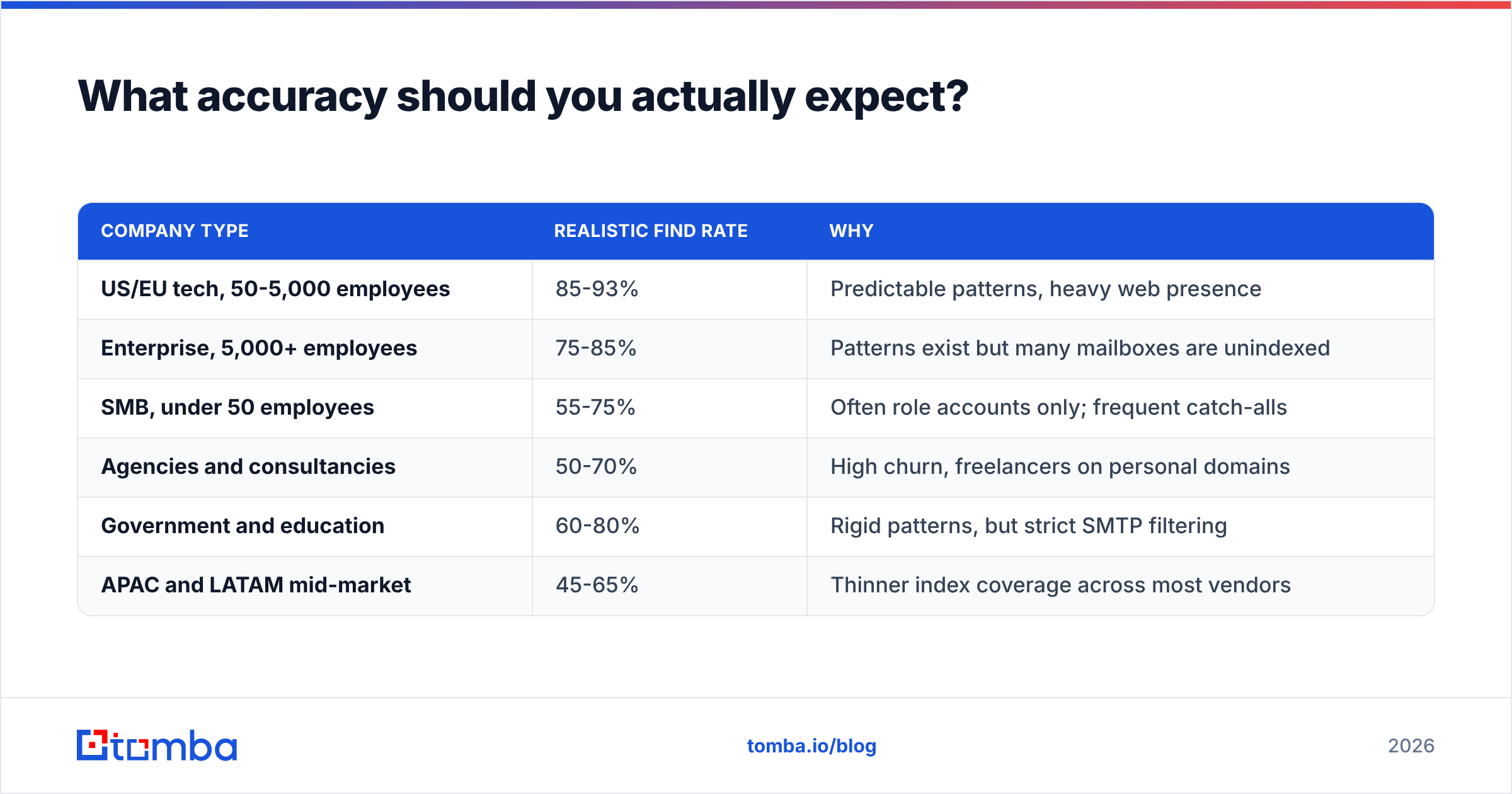
Set expectations by segment, because aggregate numbers hide enormous variance.
| Company type | Realistic find rate | Why |
|---|---|---|
| US/EU tech, 50-5,000 employees | 85-93% | Predictable patterns, heavy web presence |
| Enterprise, 5,000+ employees | 75-85% | Patterns exist but many mailboxes are unindexed |
| SMB, under 50 employees | 55-75% | Often role accounts only; frequent catch-alls |
| Agencies and consultancies | 50-70% | High churn, freelancers on personal domains |
| Government and education | 60-80% | Rigid patterns, but strict SMTP filtering |
| APAC and LATAM mid-market | 45-65% | Thinner index coverage across most vendors |
If a vendor quotes you one number with no segmentation, they're quoting their best segment. Run a 100-row test on your ICP before you sign an annual contract — every serious vendor will let you.
And separate two metrics that get conflated constantly: find rate (did the tool return an address?) and accuracy (was the returned address real?). A tool with a 95% find rate and 70% accuracy is worse than one with a 70% find rate and 97% accuracy, because bounces damage your sender reputation and unfound contacts don't.
How do you scale this without wrecking deliverability?#
Finding is the easy half. Sending into inboxes is the half that fails.
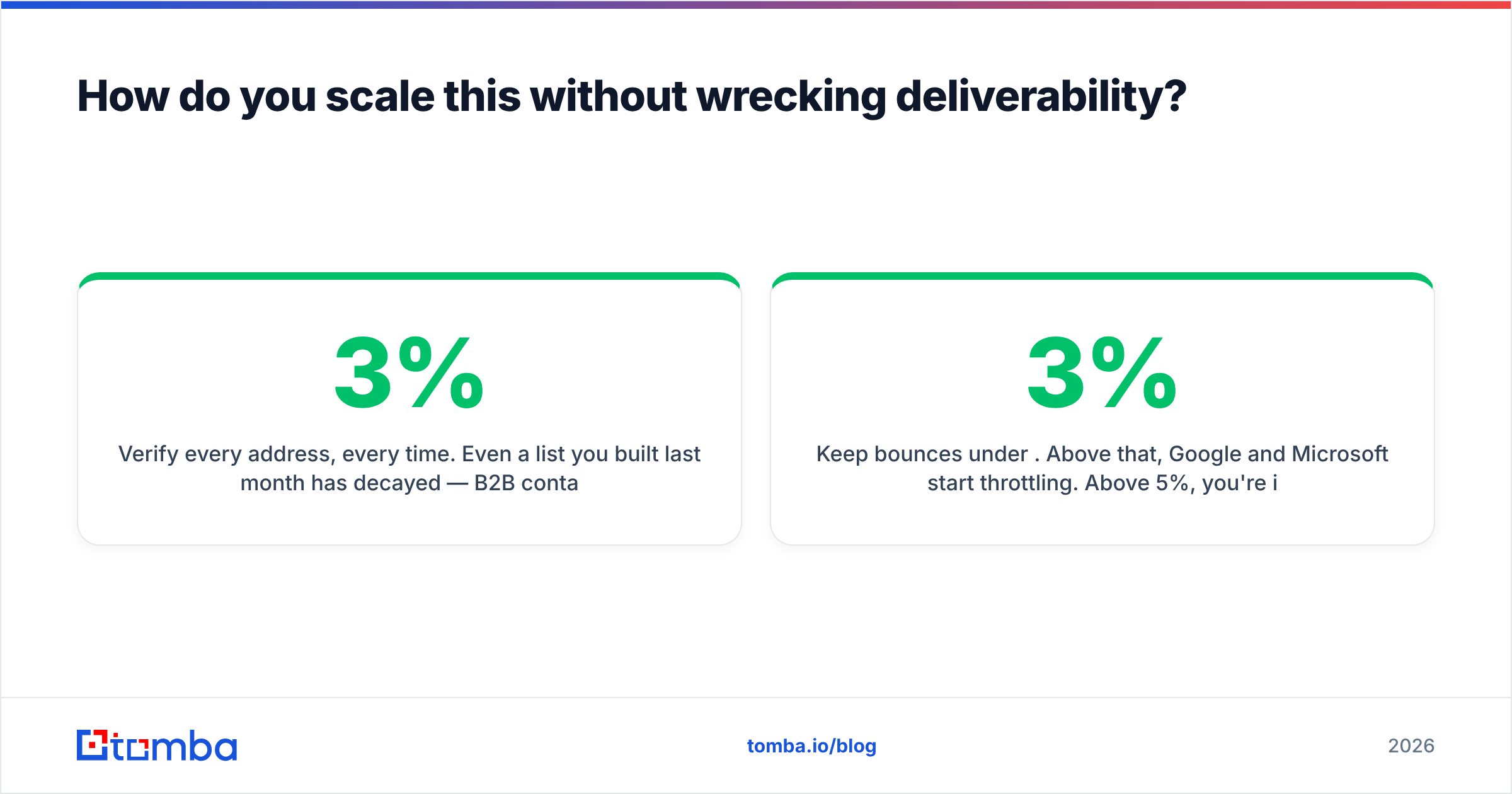
- Verify every address, every time. Even a list you built last month has decayed — B2B contact data churns at roughly 2-3% per month as people change jobs.
- Keep bounces under 3%. Above that, Google and Microsoft start throttling. Above 5%, you're in filtering territory that takes weeks to recover from.
- Segment catch-all domains into their own campaign. They can't be verified conclusively, so isolate the risk instead of spreading it across your main sending domain.
- Drop role accounts from cold sequences.
info@andsales@inflate your list size and depress your response rate. Keep them for account-based follow-up only. - Deduplicate before import. The same person appears under three name spellings across sources. Run remove duplicates before anything hits your sequencer.
- Automate the whole chain. Push find → verify → enrich → CRM through the Tomba API or a HubSpot integration so no one is hand-copying rows at 4pm on a Friday.
Is it legal to find business email addresses online?#
Short answer: yes, with conditions that differ by jurisdiction.
In the EU/UK (GDPR), business email addresses are personal data. Legitimate interest can be a lawful basis for B2B outreach, but you need a documented balancing test, a clear opt-out in every message, and a record of your source. Some member states apply stricter rules to individually-named addresses than to role accounts.
In the US (CAN-SPAM), cold B2B email is legal. You must not use deceptive headers or subject lines, must disclose the message is a solicitation, must include a physical postal address, and must honor opt-outs within 10 business days.
In Canada (CASL), the bar is higher — you generally need express or implied consent before the first message. Implied consent exists when the address is conspicuously published without a "no unsolicited email" notice and your message relates to the person's role.
Practical rule: only contact people about things genuinely relevant to their job, make unsubscribing trivial, and keep provenance records. The compliance failures that draw enforcement are almost always volume-blasting irrelevant offers, not the act of finding an address.
What does a working weekly workflow look like?#
Here's a workflow that holds up at 200-500 new contacts per week without a dedicated ops hire:
- Define the ICP in filters, not adjectives. Industry, headcount band, geography, tech stack. Vague ICPs produce lists nobody wants to call.
- Build the company list first. Domains before people. A B2B database query or a Sales Navigator account search gets you there.
- Map the org. Run domain search per company to see who's already indexed and what the email pattern is.
- Fill the gaps by name. For decision-makers not in the index, run name + domain through the email finder.
- Verify the merged list in bulk. One bulk verify pass over everything before it leaves the spreadsheet.
- Enrich and route. Add title, seniority, and company size via data enrichment, then push to your CRM with the source and date stamped on every record.
Total hands-on time once it's set up: about 90 minutes a week. The first build takes a day.
Where should you start?#
If you're finding fewer than 20 addresses a month, use Google operators and a free checker. You don't need a tool.
If you're building lists weekly, start with a finder that verifies in the same workflow — the round trip between two vendors is where accuracy quietly leaks. The Tomba Email Finder covers name-and-domain lookups, domain-wide org mapping, and catch-all handling in one place, with 25 free searches a month to test against your own ICP before you pay anything. Run 100 of your real target accounts through it, measure the find rate and the bounce rate yourself, and let those two numbers make the decision.
Related guides#
Ready to find emails that actually work?
Join 150,000+ professionals who stopped guessing and started sending. Free credits on signup — no credit card required.
Get the Tomba newsletter
Practical outbound tactics and product updates — once every two weeks.
About the author