How to Find an Email Address in 2026: 9 Methods Ranked
Nine ways to find an email address — from manual pattern guessing to bulk API lookups — ranked by real hit rate, cost, and how often each one quietly hands you a bounce.
TL;DR
- There is no single best way to find an email address. There is a decision tree: how many contacts you need, how fast, and how much bounce risk you can absorb.
- Manual methods (pattern guessing, Google operators, site footers) are free and fine for 1–10 contacts. They collapse past that.
- Email finder tools trade cost for hit rate. Expect 70–95% coverage on B2B domains, far lower on tiny companies and generic mailboxes.
- Finding is only half the job. Verification is what keeps your bounce rate under 2% and your sender reputation intact.
- Catch-all domains are the silent killer: they accept every address at SMTP, so "valid" means nothing until you run a dedicated catch-all check.
What does it actually mean to find an email address?#
Finding an email address is really two separate jobs stapled together, and most people only do the first one.
Job one is discovery: figuring out that sarah.chen@acme.com probably exists. Job two is validation: proving that a message sent to it will land in a real inbox instead of bouncing back.
Think of it like finding a house. Discovery is looking up the street number from public records. Validation is knocking on the door to check somebody actually lives there. Skip the knock and you'll mail a hundred envelopes to a demolished block — and the postal service will start treating everything you send as junk.
Technically, discovery works because email addresses follow a small set of company-wide patterns. A company picks one format at setup — first.last@, flast@, first@, firstl@ — and applies it to nearly everyone. Once you know the pattern plus a person's name, you can construct the address. That's why domain-level intelligence beats person-level guessing: solve the domain once, and every contact at that company becomes cheap.
Validation works differently. It queries the receiving mail server directly — MX record lookup, then an SMTP handshake that asks "would you accept mail for this address?" without ever sending one. Most servers answer honestly. Some don't, which is where catch-all domains come in later.

Which methods actually work in 2026?#
Here are the nine methods worth knowing, ordered roughly from "free but slow" to "fast but paid."
Pattern guessing plus verification — Find one known email at the company (a press release, a support address, a GitHub commit), infer the format, apply it to your target, then verify. Costs nothing, works surprisingly often, and an email permutator generates all likely combinations in one click.
Google search operators —
site:acme.com "@acme.com"or"john smith" "@acme.com"surfaces addresses published in PDFs, conference programmes, and old press kits. Slow, but it finds addresses no database has indexed.Company website scraping — Team pages, press pages, and privacy policies leak addresses constantly. The
/about,/team,/contact, and/legalpaths are the highest-yield spots.Domain search — Instead of hunting one person, pull every public address associated with a company at once. A domain search returns the roster plus the dominant email pattern, which lets you construct addresses for people who aren't listed.
LinkedIn-based lookup — You have the name, the title, and the employer, but not the address. A LinkedIn finder resolves the profile to a work email. Highest-intent method for outbound because you already qualified the person.
Email finder APIs — Feed in
first name + last name + domain, get back an address plus a confidence score. This is what you use when finding emails is a step inside a workflow rather than a task a human does. See the email finder API docs for the request shape.Bulk CSV enrichment — Upload 5,000 rows of names and companies, download them with emails attached. The workhorse method for list building.
Author lookup — For content, PR, and link-building outreach, you need the writer, not the company. An author finder resolves an article URL directly to the byline's email.
Ask a mutual connection or just ask them — Underrated. A five-word LinkedIn DM ("what's the best email for you?") outperforms every tool on the list for a shortlist of 20 high-value targets.
How accurate is each method, really?#
Accuracy is where the marketing claims and the spreadsheet reality diverge. Vendors quote hit rates on their easiest test sets — large US tech companies with predictable formats. Your list of 300 regional manufacturers will not perform the same.

Two numbers matter and they are not the same thing:
- Hit rate (coverage): of 100 contacts you submit, how many come back with any address at all. Typical range: 45–85%.
- Accuracy (deliverability): of the addresses returned, how many actually deliver. Typical range: 85–98%.
A tool with 85% coverage and 88% accuracy gives you 75 usable emails per 100. A tool with 65% coverage and 97% accuracy gives you 63 — fewer contacts, but almost no bounces. For cold outreach, the second is usually the better trade, because bounces cost you more than missing contacts do.
| Method | Typical hit rate | Cost per 1,000 | Time for 500 contacts | Best for |
|---|---|---|---|---|
| Manual pattern guessing | 50–65% | $0 | 12+ hours | 1–10 named targets |
| Google operators | 20–35% | $0 | 20+ hours | Hard-to-find individuals |
| Website scraping | 30–45% | $0 | 8+ hours | Small local businesses |
| Domain search | 70–85% | $10–30 | 30 minutes | Account-based lists |
| Email finder tool | 75–92% | $10–50 | 15 minutes | Standard B2B prospecting |
| Bulk API enrichment | 75–92% | $10–40 | 5 minutes | CRM and workflow automation |
| Direct ask (DM/referral) | 60–80% | $0 | 6+ hours | Top 20 enterprise accounts |
The honest read: manual methods aren't bad, they're just expensive in the only currency that matters at volume, which is your time. Below ~25 contacts, do it by hand. Above that, the tool pays for itself in the first afternoon.
How do the main email finder tools compare?#
The market splits into three groups. Pure finders do one job well and price per credit. All-in-one sales platforms bundle finding with sequencing, dialers, and a CRM. Verification specialists don't find anything but clean what you already have.

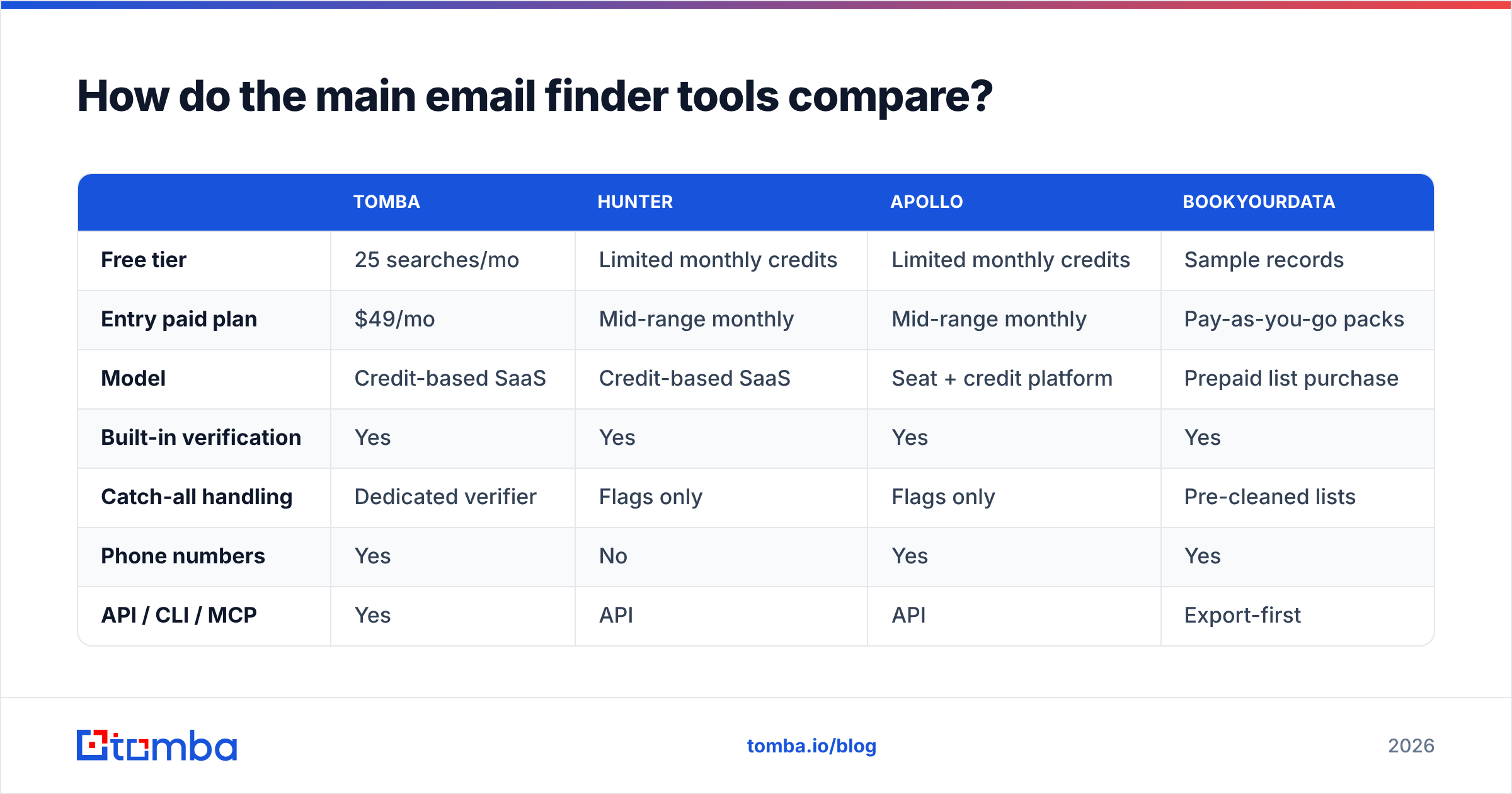
| Tomba | Hunter | Apollo | BookYourData | |
|---|---|---|---|---|
| Free tier | 25 searches/mo | Limited monthly credits | Limited monthly credits | Sample records |
| Entry paid plan | $49/mo | Mid-range monthly | Mid-range monthly | Pay-as-you-go packs |
| Model | Credit-based SaaS | Credit-based SaaS | Seat + credit platform | Prepaid list purchase |
| Built-in verification | Yes | Yes | Yes | Yes |
| Catch-all handling | Dedicated verifier | Flags only | Flags only | Pre-cleaned lists |
| Phone numbers | Yes | No | Yes | Yes |
| API / CLI / MCP | Yes | API | API | Export-first |
| Best for | Teams that want finding + verification in one credit pool | Simple domain lookups | Teams wanting an all-in-one outbound stack | Buyers who prefer owning a static list outright |
Read that table as a fit question, not a leaderboard. If you want a large static list you own outright with no monthly commitment, a purchased database like BookYourData is a legitimately clean way to get there — you pay once and the records are yours. If your list needs to be built continuously from live signals (new hires, new accounts, inbound traffic), a credit-based finder fits better because you're paying for freshness, not volume. And if you already run Outreach or Salesloft for sequencing, adding a second all-in-one platform on top is duplicated spend — buy the data layer only.
Tomba sits in the first group with the verification stack folded in: find email addresses, verify them, and check catch-all domains from the same credit pool, with full Tomba pricing starting at a $49/mo Starter tier and a free 25-search tier for testing accuracy on your own domains before you commit. That last part matters more than any published benchmark — run 50 of your target accounts through a free tier and compare, because vertical and geography swing hit rates by 30 points.
Independent user reviews on G2 are the other sanity check. Filter for reviewers in your company size band; enterprise reviews of a tool tell you nothing about how it performs for a two-person agency.
Why do verified emails still bounce?#
Because "verified" is doing a lot of quiet work in that sentence. Four failure modes account for almost every surprise bounce.
Catch-all domains. Roughly a fifth of business domains are configured to accept mail sent to any address at that domain, then sort it out internally. asdfgh@acme.com returns "valid" from a standard SMTP check. So does your real prospect. Standard verification cannot tell them apart — you need a catch-all verifier that uses secondary signals rather than the handshake alone.
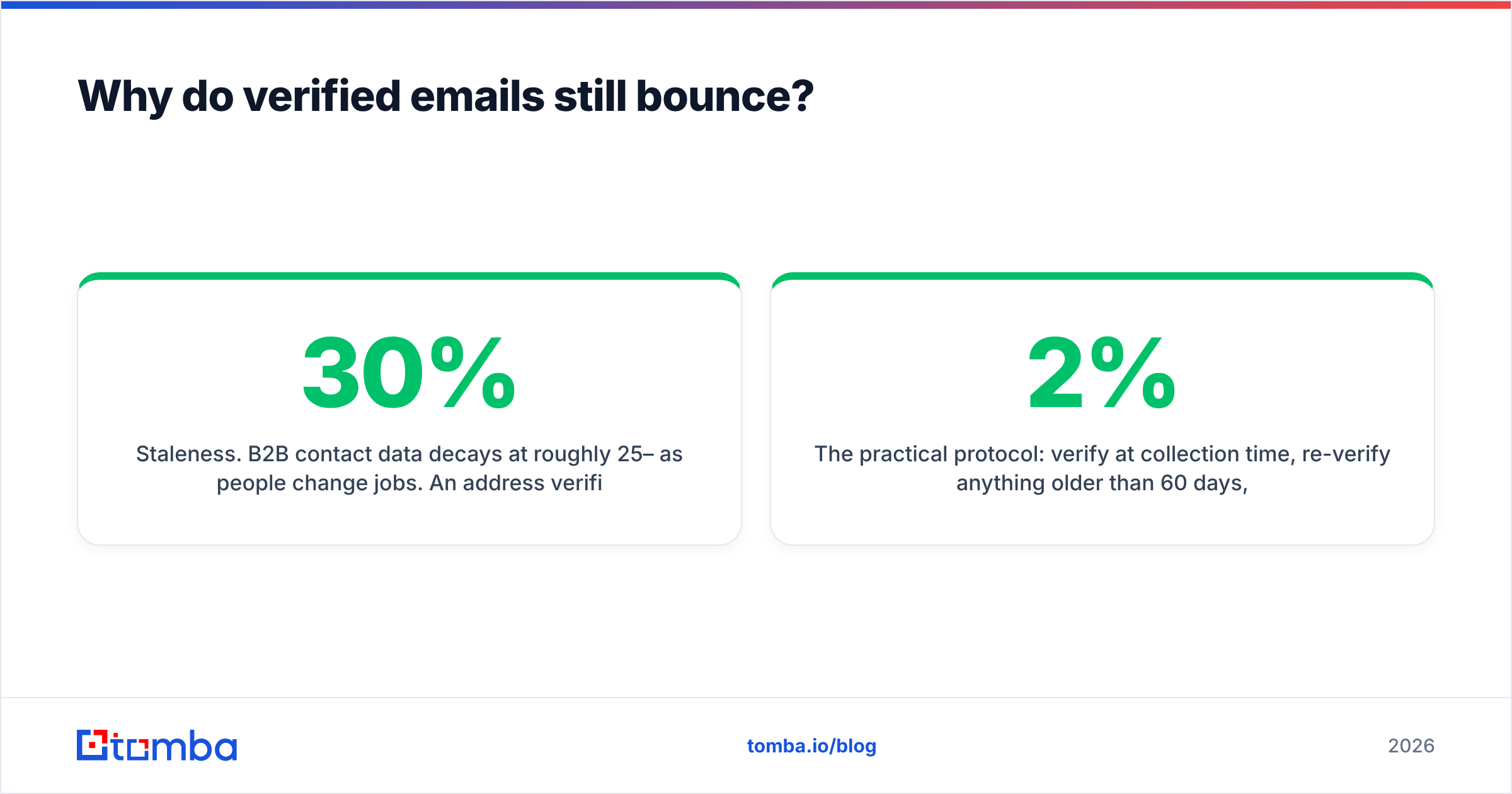
Staleness. B2B contact data decays at roughly 25–30% per year as people change jobs. An address verified in March can be dead by September. If your list sat in a spreadsheet for two quarters, re-verify before sending — this is the single most common cause of a campaign that bounced at 12% "for no reason."
Role accounts. info@, sales@, support@, hello@ are technically valid and technically deliverable. They also get routed to shared queues, marked as spam by whoever's on rota, and drag your complaint rate up. Strip them.
Greylisting and rate limits. Some servers temporarily reject unfamiliar senders. A verifier reading that as a hard fail will discard good addresses; a verifier retrying properly will not. This is why two tools can score the same list differently.
The practical protocol: verify at collection time, re-verify anything older than 60 days, run catch-alls through a separate check, and keep your bounce rate under 2%. Google and Yahoo's bulk sender requirements make that number a hard operational threshold, not a best practice — HubSpot's breakdown of the sender rules covers the authentication side that pairs with it.

What's the fastest manual method when you have no budget?#
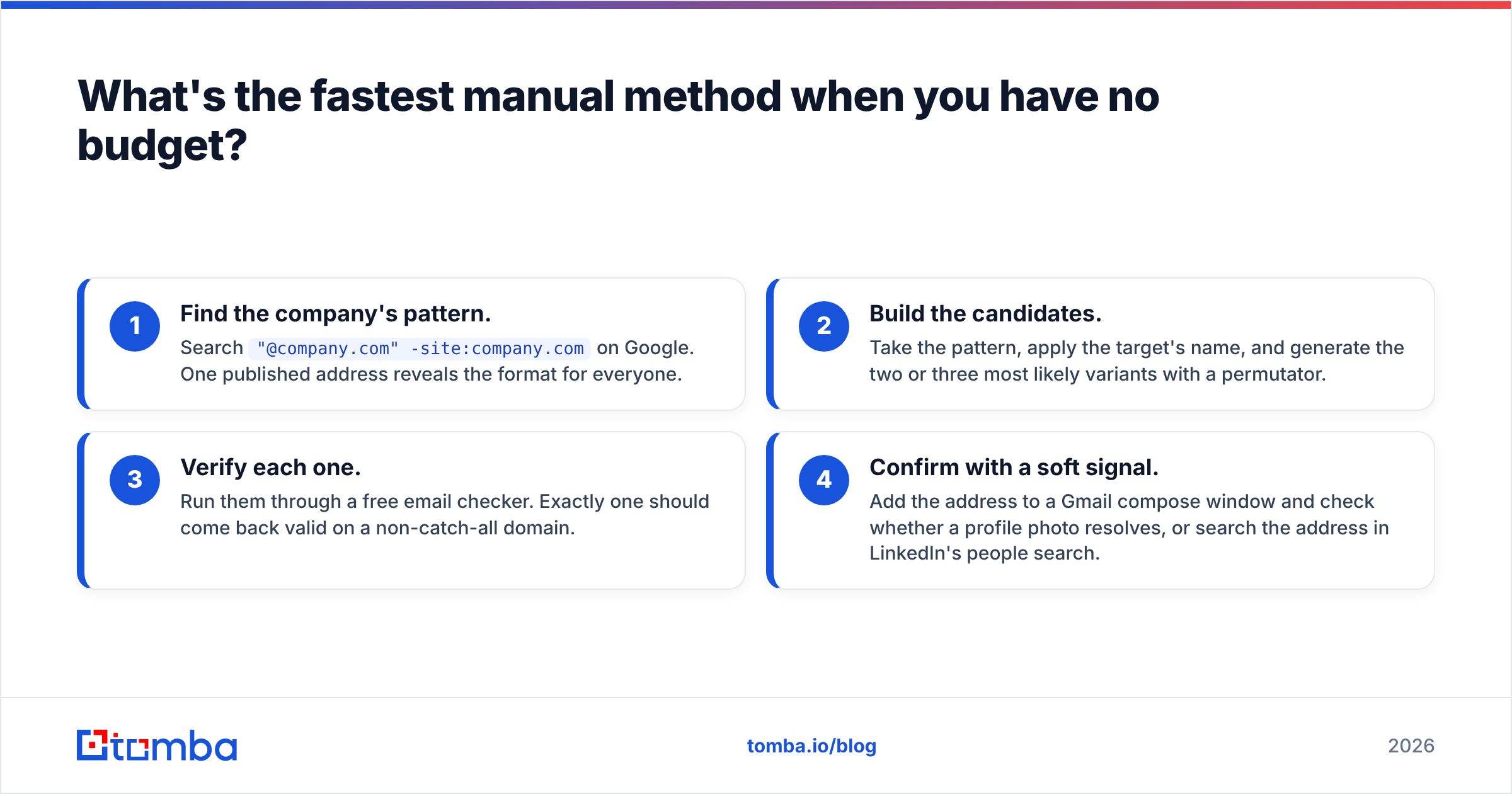
Four steps, about three minutes per contact once you have the rhythm.
- Find the company's pattern. Search
"@company.com" -site:company.comon Google. One published address reveals the format for everyone. - Build the candidates. Take the pattern, apply the target's name, and generate the two or three most likely variants with a permutator.
- Verify each one. Run them through a free email checker. Exactly one should come back valid on a non-catch-all domain.
- Confirm with a soft signal. Add the address to a Gmail compose window and check whether a profile photo resolves, or search the address in LinkedIn's people search.
This works well for a handful of contacts. It does not scale, and the failure mode is nasty: at 100 contacts, tired manual verification produces exactly the kind of sloppy list that torches sender reputation before you notice.
How do you find emails at scale without wrecking deliverability?#
Volume changes the constraint. At 10 contacts, the bottleneck is finding them. At 10,000, the bottleneck is sending to them safely.
Three rules hold at scale:
- Segment by confidence score, not by list. Most finders return a confidence rating. Send to 95%+ addresses first, on your best-warmed domain. Park the 70–85% band for a secondary domain. Never mix them in one send.
- Cap volume per sending domain. Even a perfectly clean list will get throttled if you jump from 50 to 2,000 sends overnight. Ramp gradually.
- Deduplicate before you enrich, not after. You pay credits per lookup. Removing duplicates first is free money — run the list through a remove duplicates pass before spending anything.
For real volume, do the work through an API or bulk upload rather than a browser tab. A bulk email finder processes a CSV in minutes and hands back confidence scores per row, which is what makes rule one possible in the first place.
Is it legal to find someone's email address?#
Short answer: finding a business email address is legal in most jurisdictions; how you use it is the regulated part.
In the US, CAN-SPAM permits unsolicited commercial email to business addresses provided you identify yourself honestly, include a physical address, and honour opt-outs promptly. In the EU and UK, GDPR treats a work email as personal data — you need a lawful basis, and "legitimate interest" for B2B outreach requires the message to be genuinely relevant to that person's professional role, plus a clear way to object.
Practical compliance for outbound:
- Only target business addresses, never personal ones.
- Keep a record of where each address came from.
- Honour unsubscribes on the first request, permanently.
- Don't email people whose role has nothing to do with what you sell — that's the fastest way to lose the legitimate-interest argument.
Check where Tomba gets its data or the equivalent page from any vendor you're evaluating. If a provider won't explain its sourcing, that's your answer.
Which method should you pick?#
Match the method to the job, not to the marketing:
- 1–10 contacts, no budget → pattern guessing plus a free checker.
- A specific hard-to-find person → Google operators, then LinkedIn lookup.
- Every contact at 50 target accounts → domain search.
- A 5,000-row prospect list → bulk enrichment with confidence scoring.
- Emails inside an automated workflow → API, with verification in the same call.
- A list you already own that's gone stale → skip finding entirely, just verify.
Start with the Tomba Email Finder on the free tier — 25 searches a month is enough to run your own accuracy test against a domain you already have verified contacts for. Compare the hit rate you actually get to the one you were promised, then decide whether the $49/mo Starter plan or a bigger tier makes sense for your volume. Test on your own data before you trust anyone's benchmark, including this one.
Related guides#
Ready to find emails that actually work?
Join 150,000+ professionals who stopped guessing and started sending. Free credits on signup — no credit card required.
Get the Tomba newsletter
Practical outbound tactics and product updates — once every two weeks.
About the author