How to Find an Email Address From a Website: 2026 Guide
Most contact pages hide the person you actually need. Here are seven ways to find an email address from a website — manual tricks, source-code digging, and tools — ranked by hit rate and time cost.
TL;DR
- The email you want is rarely on the contact page.
info@andhello@route to a shared inbox where 90% of cold outreach dies. - Seven methods work in practice: contact page scan, page source / mailto scan, WHOIS, LinkedIn cross-reference, pattern guessing, Google operators, and a domain-search tool. Only the last two scale.
- Pattern guessing gets you a plausible address; it does not get you a valid one. Guessed addresses bounce at 25-45%, and bounces above 3% start damaging your sending domain.
- The reliable sequence is find → verify → send. Skipping verification is what turns a good list into a spam-folder problem.
- For one-off lookups, manual methods are fine. For anything over ~20 domains a month, a domain search that returns every public address plus a confidence score costs less than the hour you'd burn doing it by hand.
You landed on a company site. You need to reach a specific human there — the head of partnerships, the person who wrote that blog post, the ops lead who owns the tool you integrate with. The site gives you a contact form and info@company.com.
That's the problem this post solves. Below are the seven methods that actually return a working address, what each one costs in time, and the hit rate you should expect from each.
Why is finding an email address from a website so hard?#
Because companies deliberately made it hard. Two forces pushed real addresses off public pages:
1. Scrapers. Plain-text addresses on a webpage get harvested within days. Most CMS templates now render addresses as images, JavaScript-obfuscated strings, or replace them with a form entirely.
2. Privacy regulation. GDPR and similar frameworks made companies cautious about publishing individual staff contacts. A team page that listed sarah.chen@company.com in 2018 now lists "Sarah Chen, VP Marketing" and nothing else.
The result: the information still exists, it's just distributed. The name is on the team page. The email pattern is inferable from a press release. The domain is obvious. Your job is assembly, not discovery.

What are the 7 ways to find an email address from a website?#
Here's the full set, ordered roughly by how fast you should try them.
1. Contact, About, and Team pages. Obvious, still worth 30 seconds. Check /contact, /about, /team, /press, and /careers. Press pages are underrated — media contacts are usually real named humans, not aliases, because PR wants to be reachable.
2. Page source and mailto scan. Right-click, View Source, then Ctrl+F for mailto: and @. Addresses hidden behind a JavaScript-rendered button are often sitting in plain text in the HTML or in a JSON config blob. Also check the footer of the site's RSS feed and any humans.txt file.
3. WHOIS lookup. Query the domain registration record. Most registrars now use privacy proxies, so hit rate is low — but small businesses, older domains, and self-hosted sites frequently expose a real administrative address. Free to try, takes 20 seconds.
4. LinkedIn cross-reference. The site tells you the role exists; LinkedIn tells you the person's name. Search the company page, filter by title, get a full name, then combine with the domain in step 6. This is the single most reliable way to go from "I need the VP of Sales" to "I need Marcus Webb."
5. Google search operators. Run site:company.com "@company.com" to surface any page on the domain containing a visible address. Then widen: "@company.com" "marketing" without the site restriction picks up conference speaker bios, PDF slide decks, GitHub commits, and job board listings that leaked the format.
6. Pattern inference. Once you know one address at the company, you know the format. If jane.doe@company.com exists, marcus.webb@company.com almost certainly does too. Use an email permutator to generate every plausible variant, then verify — never send to an unverified permutation.
7. Domain search tools. Enter the domain, get back every publicly indexed address on it with names, roles, sources, and a confidence score. This is method 1-6 automated and cross-referenced. It's the only approach that holds up past a handful of lookups.
Which method has the best hit rate?#
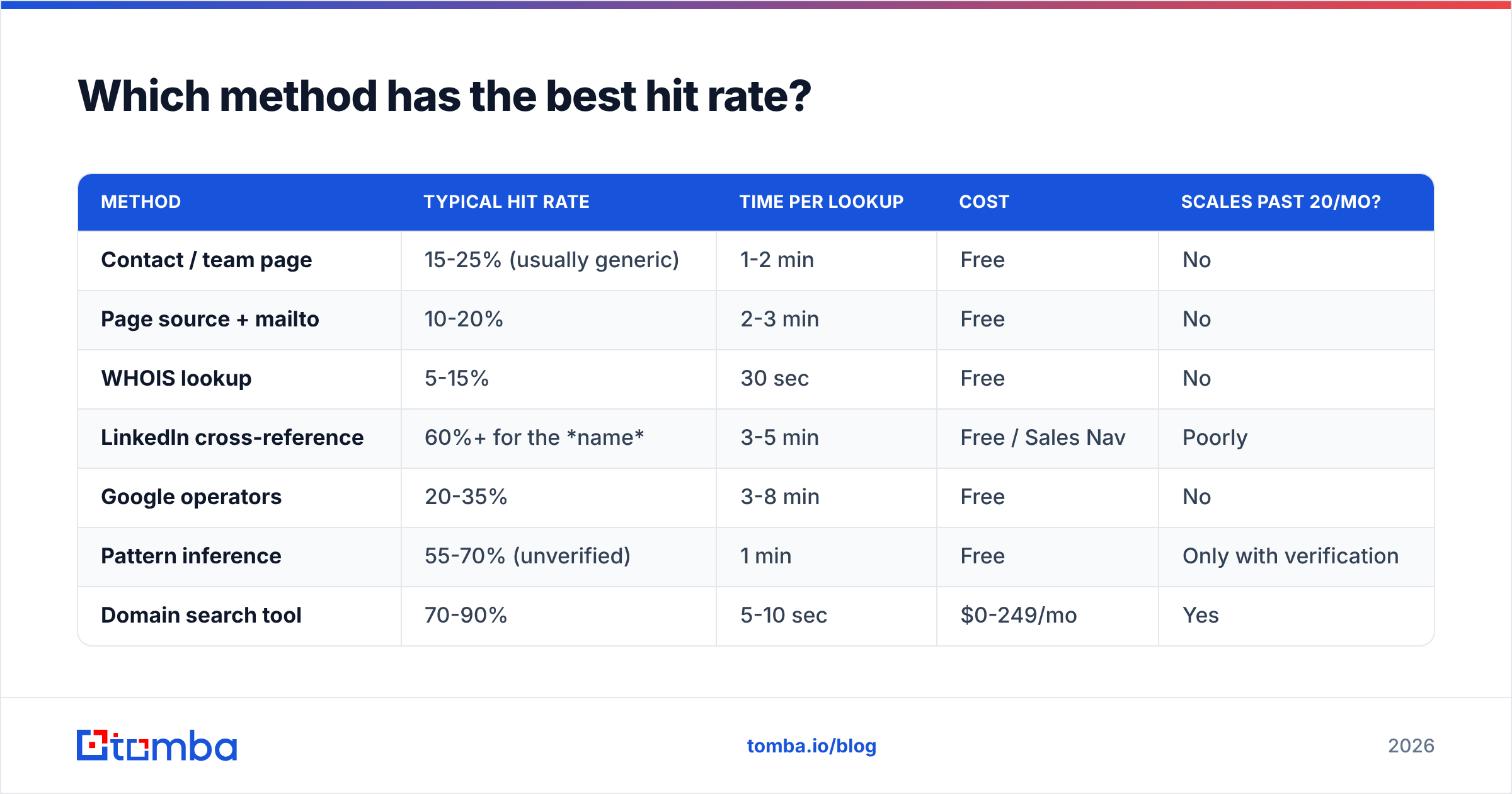
Depends on what you're optimising for. Here's the honest comparison:
| Method | Typical hit rate | Time per lookup | Cost | Scales past 20/mo? |
|---|---|---|---|---|
| Contact / team page | 15-25% (usually generic) | 1-2 min | Free | No |
| Page source + mailto | 10-20% | 2-3 min | Free | No |
| WHOIS lookup | 5-15% | 30 sec | Free | No |
| LinkedIn cross-reference | 60%+ for the name | 3-5 min | Free / Sales Nav | Poorly |
| Google operators | 20-35% | 3-8 min | Free | No |
| Pattern inference | 55-70% (unverified) | 1 min | Free | Only with verification |
| Domain search tool | 70-90% | 5-10 sec | $0-249/mo | Yes |
Two things stand out. First, no free method clears 40% on its own — you're always stacking them. Second, pattern inference looks strong until you notice the "unverified" caveat, which is where most cold outreach quietly falls apart.

Why does verification matter more than finding?#
Because a found address that bounces is worse than no address at all.
Think of your sending domain like a credit score. Every bounce is a missed payment. Mailbox providers — Gmail, Outlook, Yahoo — track your bounce rate as a proxy for "does this sender know who they're emailing?" Cross roughly 3% and your messages start landing in spam, including the ones to addresses that are perfectly valid. Google's own bulk sender guidelines spell out the spam-rate thresholds, and they got stricter, not looser, over the last two years.
Pattern inference is exactly the behaviour that trips this wire. You generate eight permutations of marcus.webb, send to all eight hoping one lands, and seven bounce. Do that across 200 prospects and you've torched a domain you spent months warming.
The fix is boring and non-negotiable: run every address through an email verifier before it enters a sequence. A verifier performs an SMTP-level check against the receiving server without sending a message, returning valid, invalid, or unknown. Handle "unknown" — usually a catch-all domain — with a catch-all verifier rather than gambling on it.
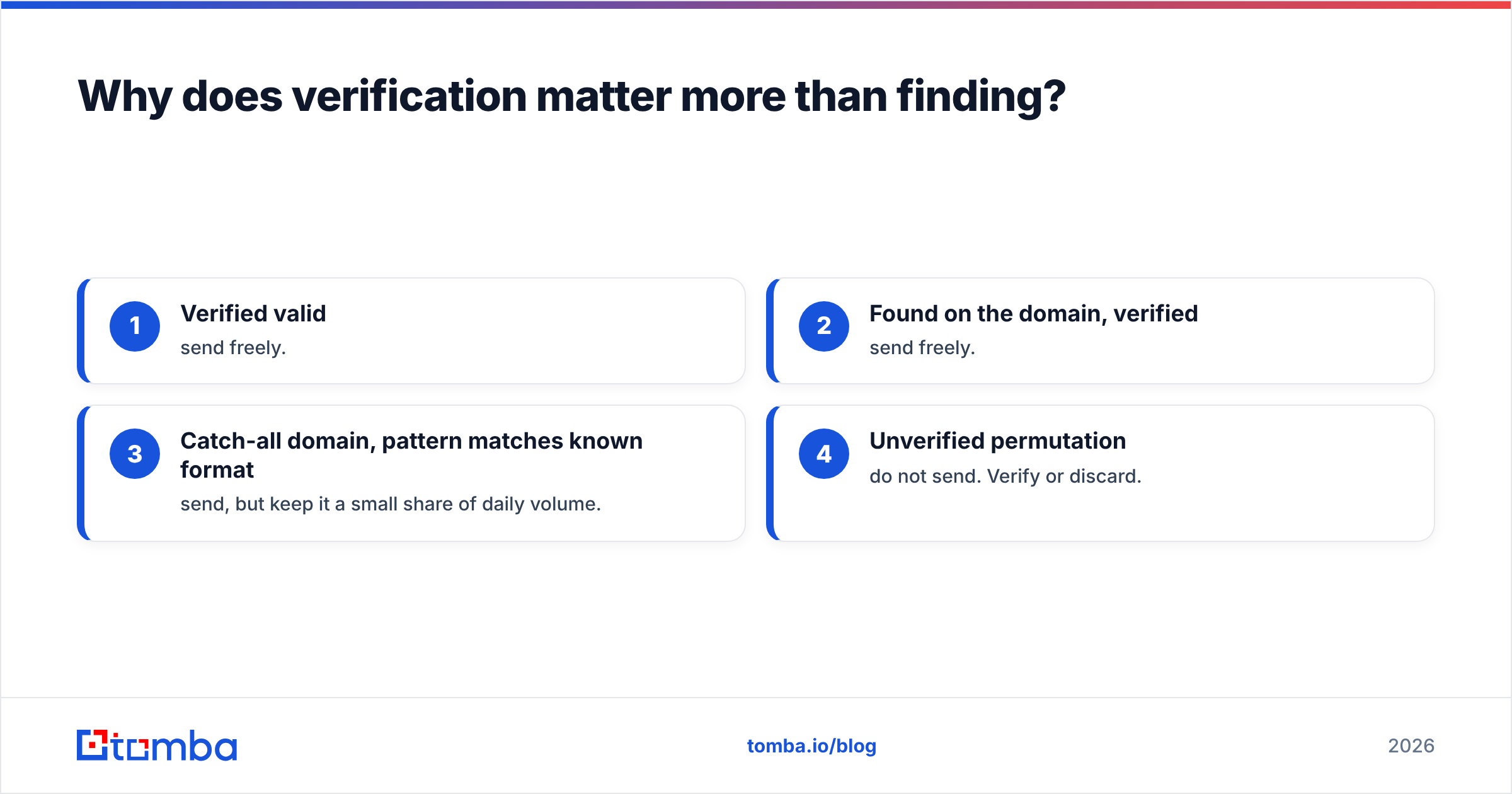
Rough ordering of what to trust:
- Verified valid — send freely.
- Found on the domain, verified — send freely.
- Catch-all domain, pattern matches known format — send, but keep it a small share of daily volume.
- Unverified permutation — do not send. Verify or discard.

How do domain search tools actually work?#
They're not magic and they're not scraping your target site live. A domain search tool maintains a continuously refreshed index built from public web crawls, published documents, code repositories, press releases, and similar open sources. When you enter company.com, it returns every address it has seen on that domain, plus metadata.
The useful part is the metadata. A good result gives you:
- The address itself, formatted per the company's actual convention
- A name and role, so you know whether you're looking at the right person
- Sources — the URLs where that address was observed, so you can sanity-check it
- A confidence score, reflecting how many independent sources agree
- Last-seen date, which is how you spot addresses that went stale after someone left
Sources matter more than most buyers realise. A tool that hands you an address with no provenance is asking you to trust a black box. Tomba publishes its data sources for this reason, and every domain search result links back to where the address was observed.
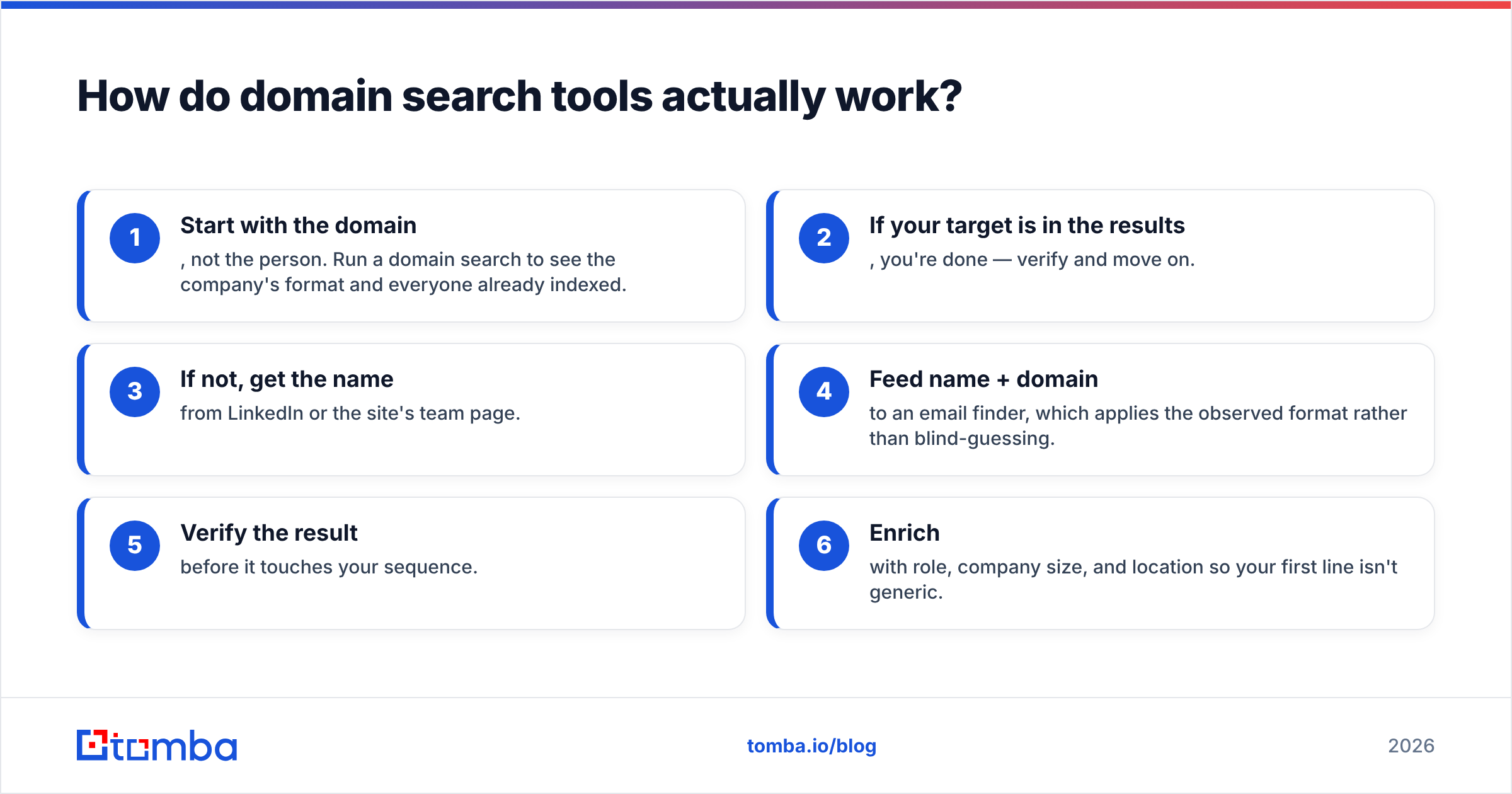
The workflow that works in practice, end to end:
- Start with the domain, not the person. Run a domain search to see the company's format and everyone already indexed.
- If your target is in the results, you're done — verify and move on.
- If not, get the name from LinkedIn or the site's team page.
- Feed name + domain to an email finder, which applies the observed format rather than blind-guessing.
- Verify the result before it touches your sequence.
- Enrich with role, company size, and location so your first line isn't generic.
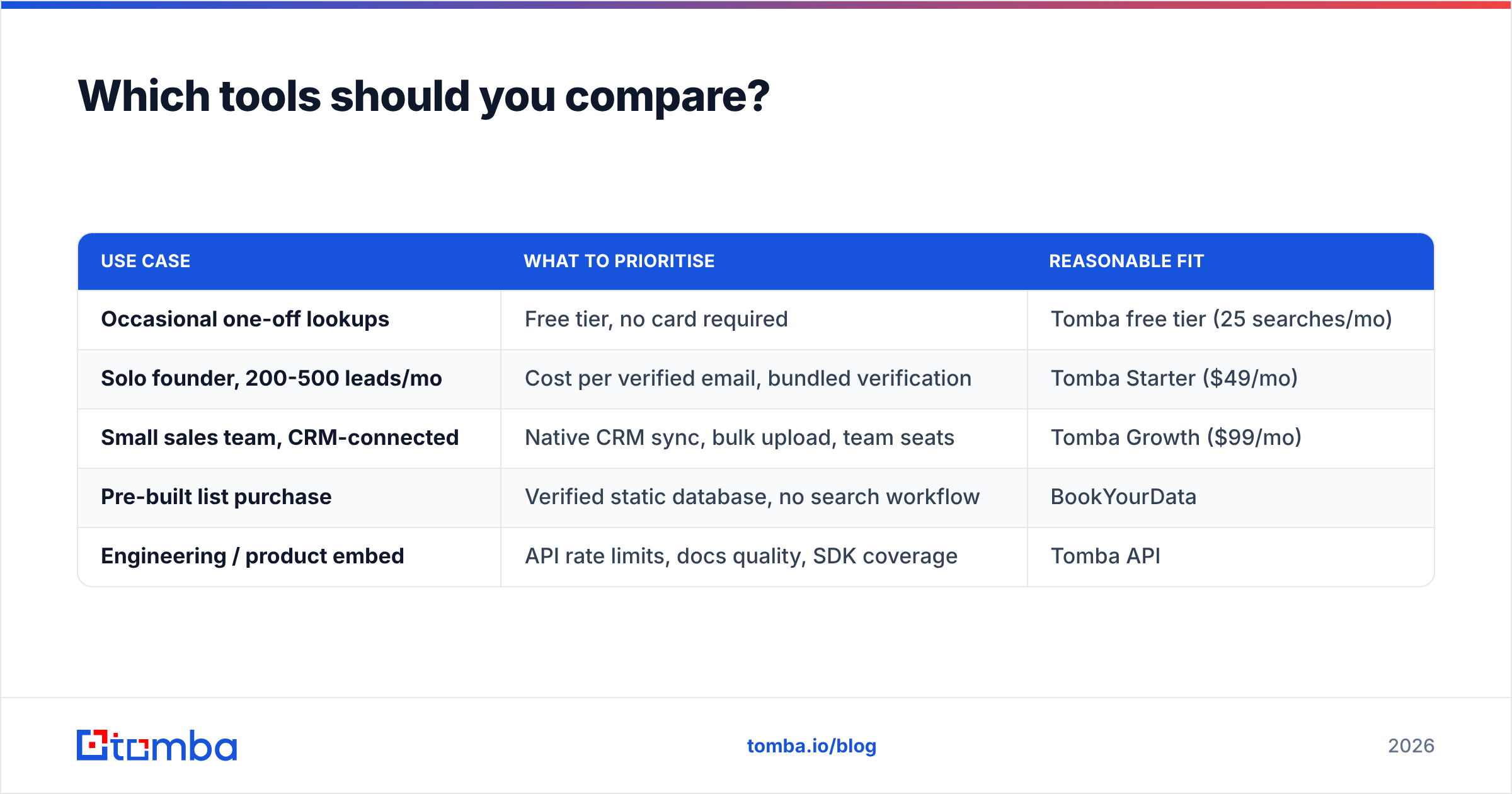
Which tools should you compare?#
The email-finder market is crowded and pricing structures differ enough to make headline numbers misleading. Some charge per search regardless of result; others only bill on a successful find. Some bundle verification credits, others sell them separately.

A practical shortlist by use case:
| Use case | What to prioritise | Reasonable fit |
|---|---|---|
| Occasional one-off lookups | Free tier, no card required | Tomba free tier (25 searches/mo) |
| Solo founder, 200-500 leads/mo | Cost per verified email, bundled verification | Tomba Starter ($49/mo) |
| Small sales team, CRM-connected | Native CRM sync, bulk upload, team seats | Tomba Growth ($99/mo) |
| Pre-built list purchase | Verified static database, no search workflow | BookYourData |
| Engineering / product embed | API rate limits, docs quality, SDK coverage | Tomba API |
If you'd rather buy a validated list than build one, BookYourData is a solid option in that lane — it sells pre-verified B2B contacts rather than search credits, which suits teams who want volume up front instead of per-domain lookups. The two models complement each other more than they compete: list purchase for breadth, domain search for the specific accounts you're actively working.
Full Tomba pricing runs Free (25 searches/mo), Starter $49/mo, Growth $99/mo, Pro $249/mo, and custom Enterprise. Compare on cost-per-verified-email, not cost-per-credit — a cheap plan that returns unusable addresses costs more once you price in the deliverability damage.
Before committing to any vendor, check independent reviews on G2 and run the same 20 test domains through each free tier. Vendors' own accuracy claims are marketing; your 20 domains are data.
What about scraping the site yourself?#
You can, and for some jobs it's the right call. If you need every address across 500 pages of a single large site, a crawler beats manual work.
Practical constraints:
- Respect robots.txt and rate limits. Hammering a site gets your IP blocked and can create legal exposure depending on jurisdiction and terms of service.
- Obfuscation defeats naive scrapers. Addresses rendered as images, split across DOM nodes, or assembled in JavaScript won't appear in raw HTML.
- You still need verification. Scraped addresses go stale exactly as fast as any other kind.
- Maintenance is the real cost. Site redesigns break selectors. A scraper you wrote in March needs fixing in June.
For text you already have — a copied page, a PDF, a document dump — an email extractor does the parsing without any crawling infrastructure. That covers most of the cases people think need a scraper.
How do you keep found emails from going stale?#
Roughly a quarter of B2B contact data decays annually as people change jobs, companies rebrand, and domains migrate. An address you found and verified in January can be dead by August.
Three habits prevent the rot:
Re-verify before every campaign, not once per list. Verification is cheap; a 12% bounce rate on a six-month-old list is not.
Store the source and date alongside the address. When something bounces, provenance tells you whether the address was ever right or whether the person simply left.
Watch for domain migrations. If a company gets acquired, the entire address format may change overnight. A fresh domain search on the acquiring company's domain usually surfaces the new pattern faster than guessing.
For larger lists, run everything through bulk verify on a schedule rather than address-by-address. Monthly is reasonable for active outbound; quarterly is the floor.
Start with the domain, not the guess#
The mistake almost everyone makes is starting from a person's name and guessing the format. Reverse it. Start from the domain, learn the company's actual convention from addresses that already exist, then apply that convention to the person you want. You skip the guesswork entirely and your bounce rate reflects it.
Run your first domain through Tomba Email Finder — the free tier gives you 25 searches a month with no card, which is enough to test it against domains where you already know the answer. Check the confidence scores and cited sources against what you find manually. If it matches, you've just replaced a 20-minute process with a five-second one.
Related guides#
Ready to find emails that actually work?
Join 150,000+ professionals who stopped guessing and started sending. Free credits on signup — no credit card required.
Get the Tomba newsletter
Practical outbound tactics and product updates — once every two weeks.
About the author