How to Find Executive Contact Information in 2026: A Practical Guide
Executive email addresses are guarded, gated, and rarely published. Here is the exact stack, waterfall, and verification workflow that gets you a C-level inbox without burning your domain.

TL;DR
- Executive contact data fails at verification, not discovery. Anyone can guess
first.last@company.com; the hard part is knowing whether it routes to a real inbox before you send. - A single-source workflow tops out around 55-70% coverage on C-level titles. A waterfall (pattern detection → database lookup → SMTP/catch-all verification) reliably pushes you past 85%.
- Executives sit behind catch-all domains far more often than ICs, which is why "valid" from a cheap checker means almost nothing at the VP+ level.
- Budget realistically: $49-$99/mo gets a two-person team enough credits for 1,000-3,000 verified executive contacts a month. Seat-based platforms start near $500/mo for the same output.
- Compliance is not optional. GDPR legitimate interest, CAN-SPAM identification requirements, and CCPA deletion requests all apply to the CEO's inbox exactly as they apply to anyone else's.
Finding a director's email is easy. Finding a CRO's email that actually delivers, on a domain that silently accepts everything, without torching your sender reputation in the process — that's the job. This guide covers the workflow, the tools, the accuracy math, and the legal guardrails.
What does "executive contact information" actually include?#
It is not just an email address. A usable executive record has four layers, and most tools only give you one or two.
- Verified work email — the deliverable address, confirmed against the mail server, not inferred from a pattern.
- Direct dial or mobile — the number that skips the switchboard. Gatekeepers filter main lines; direct dials bypass them entirely.
- Identity anchors — LinkedIn URL, current title, tenure start date, and reporting line. Without these you cannot confirm the person still holds the role.
- Company context — headcount band, funding stage, tech stack, and recent trigger events. This is what turns a contact into a reason to reach out.
Skip layer three and you will email a CMO who left eight months ago. Executive churn runs high — roughly a fifth to a quarter of senior go-to-market leaders change companies each year — which means an executive list decays roughly twice as fast as an IC list. Any record older than 90 days should be treated as a hypothesis, not a fact.

How do you find executive contact information step by step?#
Here is the sequence that actually holds up at volume. Each step feeds the next.
Step 1 — Fix the company list first. Resolve every target to a canonical root domain. acme.com and acmecorp.io and acme-group.co.uk may all be the same buyer, or three different subsidiaries with three different mail servers. Getting this wrong poisons everything downstream. A website to company lookup handles the normalization in bulk.
Step 2 — Detect the email pattern per domain. Before you guess anything, learn how the company actually formats addresses. Run a domain search to pull known addresses at that domain and infer the dominant pattern — f.last@, first@, firstl@, and so on. Large enterprises frequently run two patterns simultaneously (legacy employees on one, post-merger hires on another), so check the distribution, not just the top result.
Step 3 — Resolve the named executive. Now that you know the pattern, resolve the specific person. Feed the first name, last name, and domain into an email finder. If you are working from a LinkedIn list instead of a name list, a LinkedIn finder maps profile URLs to work emails directly.
Step 4 — Verify, then verify catch-alls separately. This is the step everyone truncates. Standard email verification does syntax, DNS, MX, and SMTP handshake checks. But on a catch-all domain the server accepts every address, so SMTP tells you nothing. Executives disproportionately sit on catch-all domains — enterprise mail configurations, security appliances, and shared-inbox routing all cause it. A dedicated catch-all verifier uses secondary signals to rule those addresses in or out.
Step 5 — Layer in phone as a fallback channel. Email-only sequences to executives underperform. A phone finder attached to the same record gives you a second touchpoint, and a multi-channel sequence typically doubles the connect rate of an email-only one.
Step 6 — Enrich and route. Push the finished record into your CRM with firmographics attached via data enrichment, so routing rules and scoring have something to work with on arrival.
Why do executive emails fail verification more often than everyone else's?#
Three structural reasons, and understanding them changes how you interpret tool output.
Catch-all prevalence. Roughly a third of enterprise domains accept mail to any address. That number climbs on domains where the executive team sits, because large orgs are likelier to run gateway appliances that accept-then-filter. Your verifier returns "accept_all" and you are back to guessing unless you have catch-all-specific logic.
Alias routing. Many executives never publish a personal-format address at all. Mail to ceo@ or exec@ routes to a chief of staff. The address is real, the human on the other end is not the person you researched, and your reply rate craters while your bounce rate looks perfect.
Deliberate obscurity. Senior leaders scrub themselves from data brokers. GDPR and CCPA deletion requests are used most aggressively by exactly the people with the most to lose from unsolicited outreach — which is a real, honest limit on any provider's coverage of C-level records.

The practical consequence: treat any tool's headline accuracy number as an IC-level figure. Executive-tier accuracy generally runs 8-15 points lower across every vendor. Nobody advertises that split, but you will find it the moment you segment your own bounce data by seniority.
Which tools actually find executive contact information?#
Different tools optimize for different failure modes. The honest framing is that no single provider wins on all axes — you pick based on whether your bottleneck is coverage, verification depth, or budget.
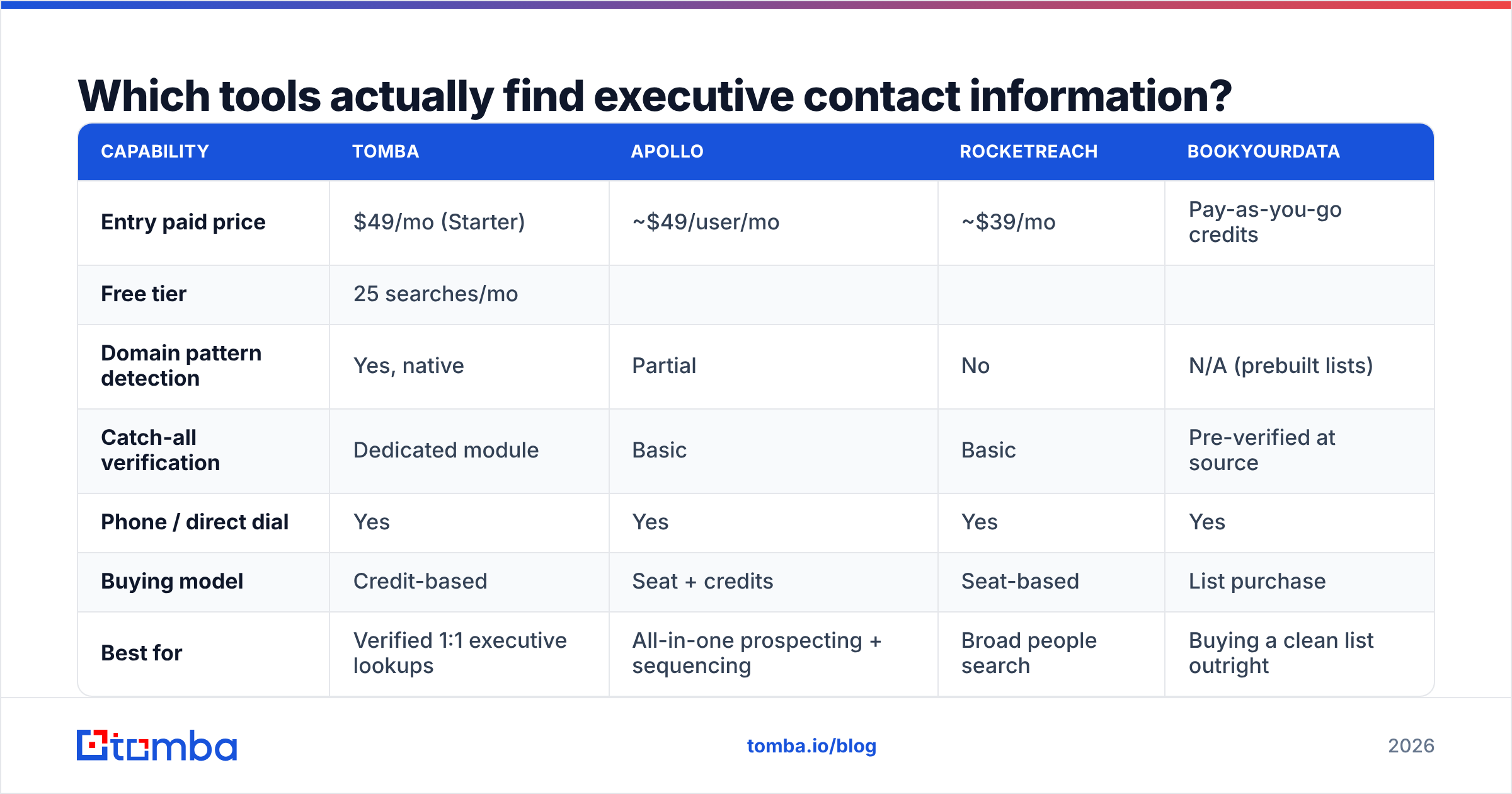
| Capability | Tomba | Apollo | RocketReach | BookYourData |
|---|---|---|---|---|
| Entry paid price | $49/mo (Starter) | ~$49/user/mo | ~$39/mo | Pay-as-you-go credits |
| Free tier | 25 searches/mo | |||
| Limited credits | Limited lookups | Sample list | ||
| Domain pattern detection | Yes, native | Partial | No | N/A (prebuilt lists) |
| --- | --- | --- | --- | --- |
| Catch-all verification | Dedicated module | Basic | Basic | Pre-verified at source |
| Phone / direct dial | Yes | Yes | Yes | Yes |
| Buying model | Credit-based | Seat + credits | Seat-based | List purchase |
| Best for | Verified 1:1 executive lookups | All-in-one prospecting + sequencing | Broad people search | Buying a clean list outright |
| API access | All paid plans | Higher tiers | Higher tiers | Export-based |
A few honest notes on that table. Apollo is the strongest choice if you want database, sequencing, and dialer under one login and are willing to pay per seat — the tradeoff is that its data quality varies sharply by region and its seat model gets expensive fast for a small team. RocketReach casts the widest net on people search but leans on shallower verification, so plan on a second verification pass. BookYourData solves a genuinely different problem: if you want a pre-verified list delivered rather than a lookup engine you operate yourself, buying the list is often faster and cheaper than building it, and their pay-as-you-go model means no subscription overhead. Tomba is the pick when your bottleneck is verification depth and per-contact cost — credit-based Tomba pricing means you pay for lookups, not for chairs.

If you are currently on a seat-based platform and the math has stopped working, the Apollo alternative and RocketReach alternative breakdowns cover the migration specifics.
Is a waterfall approach worth the extra cost?#
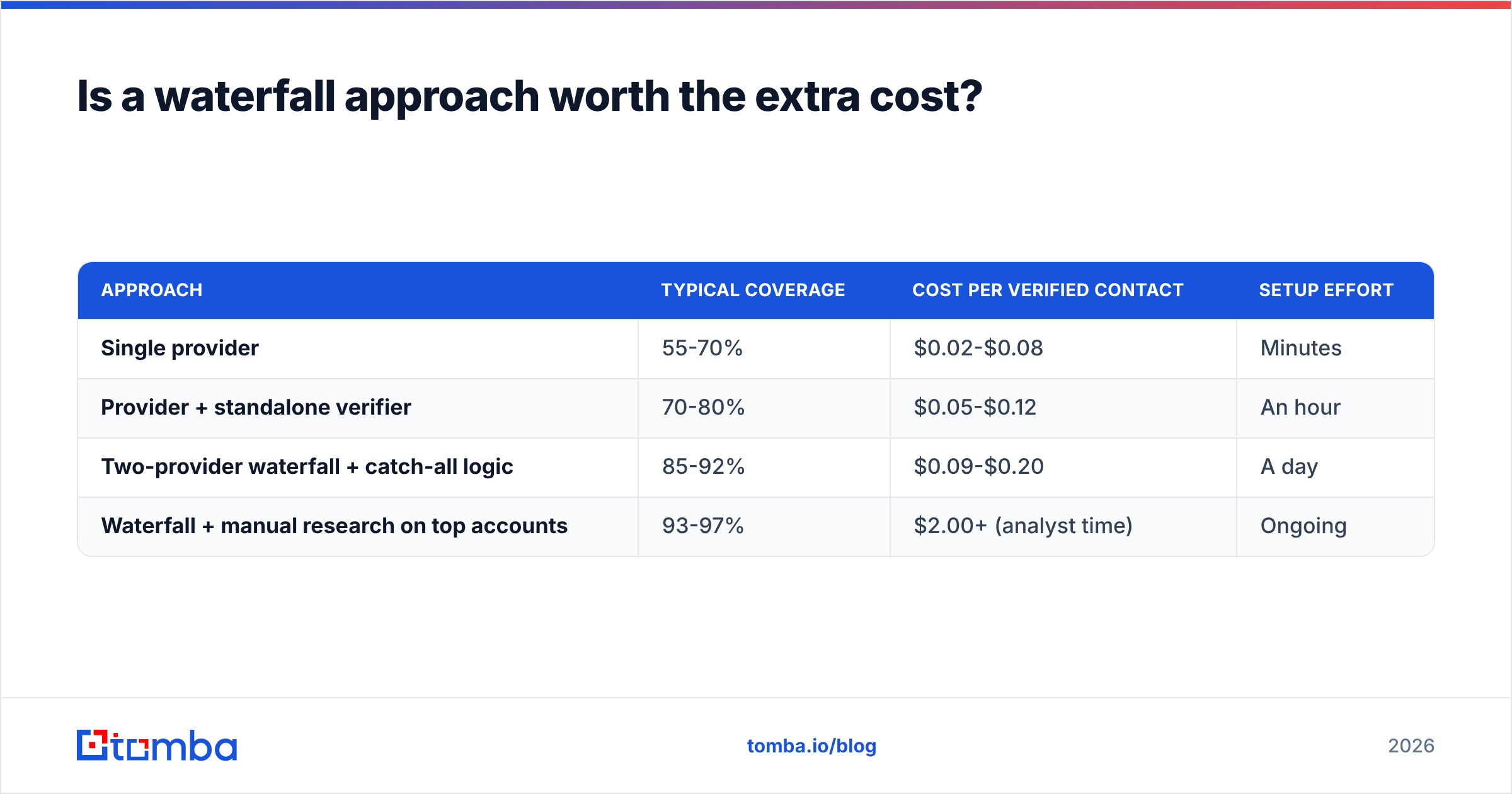
Yes, above roughly 500 contacts a month. Below that, the operational overhead outweighs the coverage gain.
A waterfall means you query source A, and only if it returns nothing (or returns an unverifiable result) do you spend a credit on source B. The economics work because you pay full price only on the hard records.
| Approach | Typical coverage | Cost per verified contact | Setup effort |
|---|---|---|---|
| Single provider | 55-70% | $0.02-$0.08 | Minutes |
| Provider + standalone verifier | 70-80% | $0.05-$0.12 | An hour |
| Two-provider waterfall + catch-all logic | 85-92% | $0.09-$0.20 | A day |
| Waterfall + manual research on top accounts | 93-97% | $2.00+ (analyst time) | Ongoing |
That last row is only defensible for named accounts where a single meeting is worth five figures. For everything else, the three-tier waterfall is the efficiency frontier. You can build it with the Tomba API as the verification layer behind whichever discovery source you already pay for, or run it in batch through bulk email finder jobs if you prefer not to write code.

What are the legal limits on contacting executives?#
Short answer: the same rules apply to a CEO as to anyone else, and enforcement has tightened.
GDPR (EU/UK). B2B outreach can rest on legitimate interest, but you must document the balancing test, identify yourself, name your data source on request, and honor erasure within a month. Corporate role addresses get slightly softer treatment than personal ones in several member states, but "slightly softer" is not "exempt." The ICO's direct marketing guidance is the clearest official read.
CAN-SPAM (US). No opt-in required, but you must include a valid physical postal address, an honest subject line and header, and a working opt-out honored within 10 business days. The FTC's compliance guide is short and worth reading in full.
CASL (Canada). Materially stricter — express or implied consent is required before the first message. Implied consent from a conspicuously published business address exists but is narrow and time-limited.
Two practical rules that keep you out of trouble regardless of jurisdiction: keep a permanent suppression list that survives tool migrations, and log the provenance of every record so you can answer "where did you get this?" without improvising.
How do you keep executive data from going stale?#
Build decay into the process instead of pretending it doesn't happen.
- Re-verify quarterly, not annually. At roughly 2-2.5% monthly decay on senior titles, a 12-month-old list is a quarter dead. Run the whole executive segment back through bulk verify every 90 days.
- Watch for title triggers. A new CRO, a funding round, or an acquisition invalidates old records and creates a legitimate reason to reach out. Both signals arrive together.
- Suppress hard bounces permanently. One hard bounce means that address is gone. Retrying it later is the fastest way to damage sender reputation.
- Cap unverified sends at zero. If a record comes back "risky" or "accept_all" with no supporting signal, route it to a LinkedIn or phone touch instead of an email. Protecting email deliverability is worth more than one extra send.
- Keep the CRM as the source of truth. Enrichment that writes into a spreadsheet nobody reads is wasted spend. Sync through the HubSpot integration or your equivalent so decay is visible where reps work.
What does a realistic executive prospecting stack cost?#
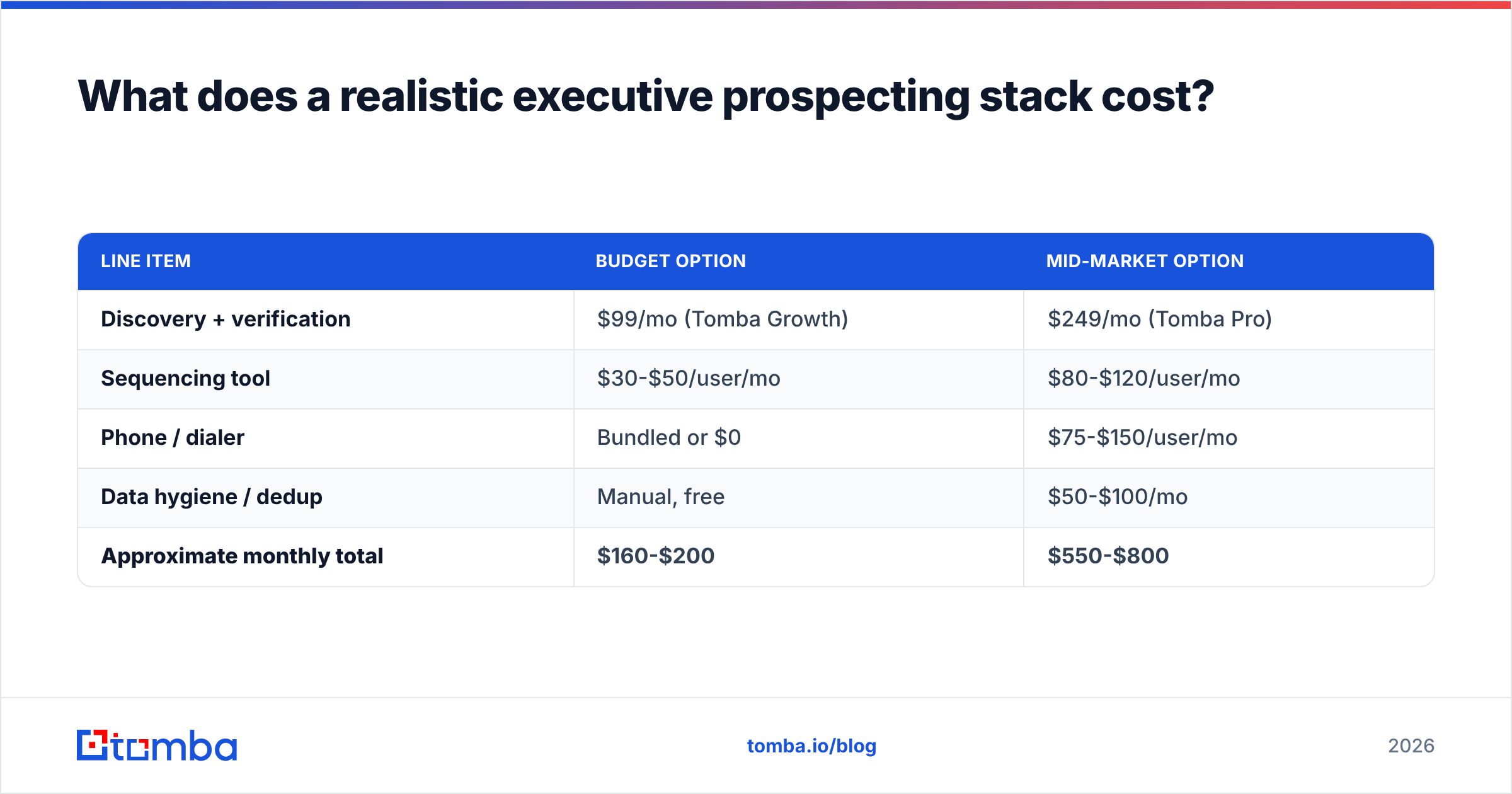
For a two-rep team targeting ~1,500 verified executive contacts per month:
| Line item | Budget option | Mid-market option |
|---|---|---|
| Discovery + verification | $99/mo (Tomba Growth) | $249/mo (Tomba Pro) |
| Sequencing tool | $30-$50/user/mo | $80-$120/user/mo |
| Phone / dialer | Bundled or $0 | $75-$150/user/mo |
| Data hygiene / dedup | Manual, free | $50-$100/mo |
| Approximate monthly total | $160-$200 | $550-$800 |
The line most teams over-buy is discovery and under-buy is verification. Doubling your contact volume while your bounce rate sits at 6% just gets you blocked twice as fast. Fix the verification layer first, then scale volume against it.
Where should you start?#
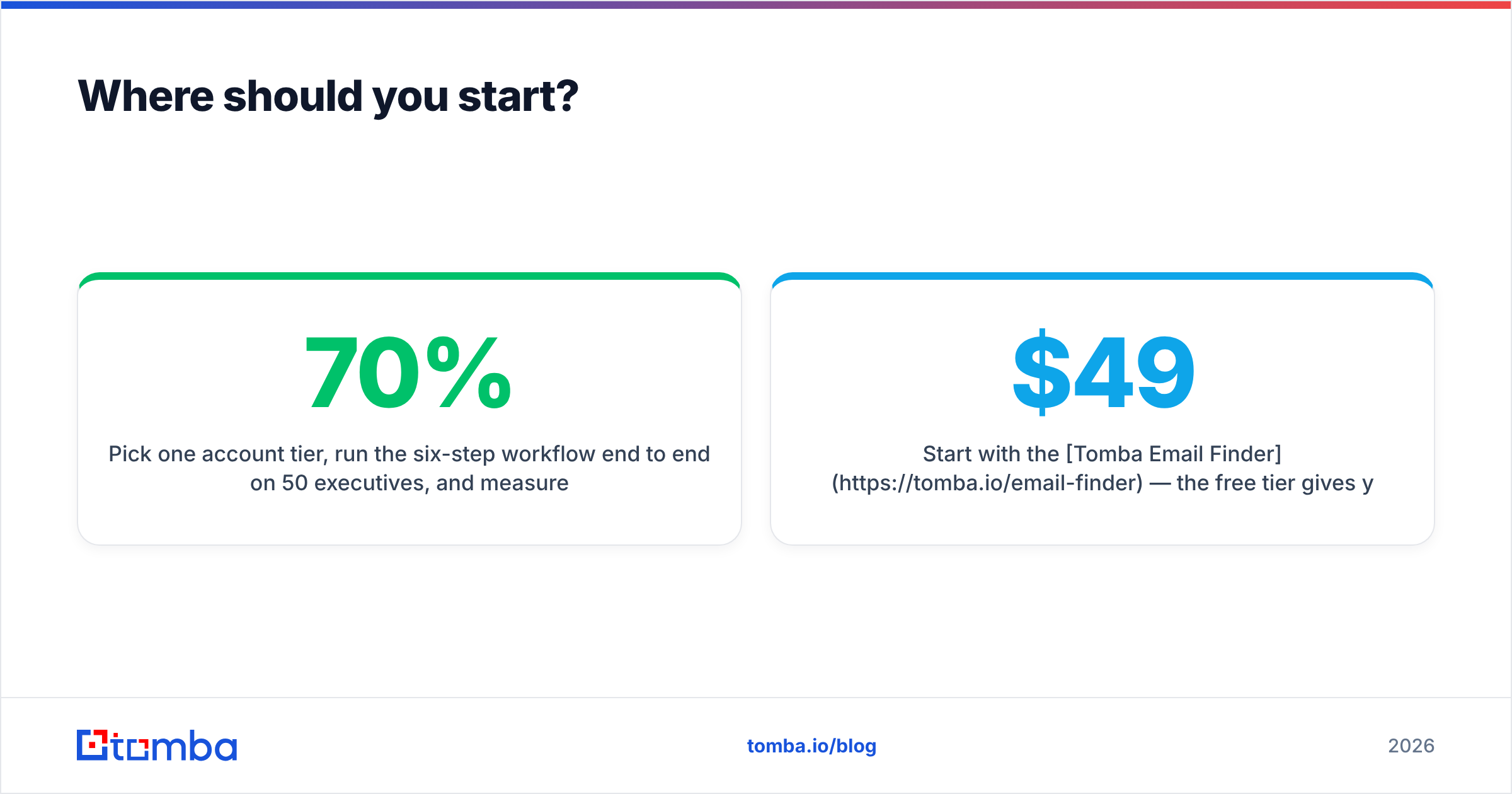
Pick one account tier, run the six-step workflow end to end on 50 executives, and measure two numbers: percentage resolved to a verified address, and bounce rate on the first send. If resolution is under 70% your discovery layer is weak. If bounce rate is over 3% your verification layer is weak. Fix whichever is worse before you scale anything.
Start with the Tomba Email Finder — the free tier gives you 25 searches a month, which is enough to run that 50-contact test across two sessions and see your own numbers rather than someone's marketing claim. If the resolution rate holds up on your accounts, the $49/mo Starter plan covers a typical rep's monthly volume, and the catch-all verifier is where you'll see the difference on senior titles.
Sources: FTC CAN-SPAM Compliance Guide, ICO Direct Marketing Guidance, G2 Lead Intelligence Category
Related guides#
Ready to find emails that actually work?
Join 150,000+ professionals who stopped guessing and started sending. Free credits on signup — no credit card required.
Get the Tomba newsletter
Practical outbound tactics and product updates — once every two weeks.
About the author