How to Find Out If an Email Address Is Valid in 2026
Syntax checks, MX lookups, SMTP pings, catch-all traps — here is exactly how each validation layer works, what it costs, and which combination actually protects your sender reputation.
TL;DR
- You cannot prove an email address is valid from the outside with 100% certainty. You can stack five or six checks that get you to roughly 95-98% confidence without sending a single message.
- The layers, cheapest to most expensive: syntax → domain/MX → disposable and role detection → SMTP handshake → catch-all handling → engagement signal.
- Free syntax checkers only catch typos. They tell you nothing about whether a mailbox exists.
- Catch-all domains (about 15-20% of B2B domains) accept everything at the SMTP layer, so they need pattern confidence scoring, not a yes/no ping.
- Keep bounce rate under 2%. Above 5%, Google and Microsoft start throttling your whole sending domain, not just the bad address.
Why does it matter whether an email address is valid?#
Because mailbox providers grade you on the addresses you attempt, not just the ones you reach.
Think of it like a postal carrier who keeps getting handed letters to addresses that do not exist. After a while, they stop trusting your mail entirely — even the letters going to real houses. That is exactly how Gmail and Outlook filtering works. Every hard bounce is a signal that you bought a list, scraped badly, or never cleaned your data.
The numbers that matter:
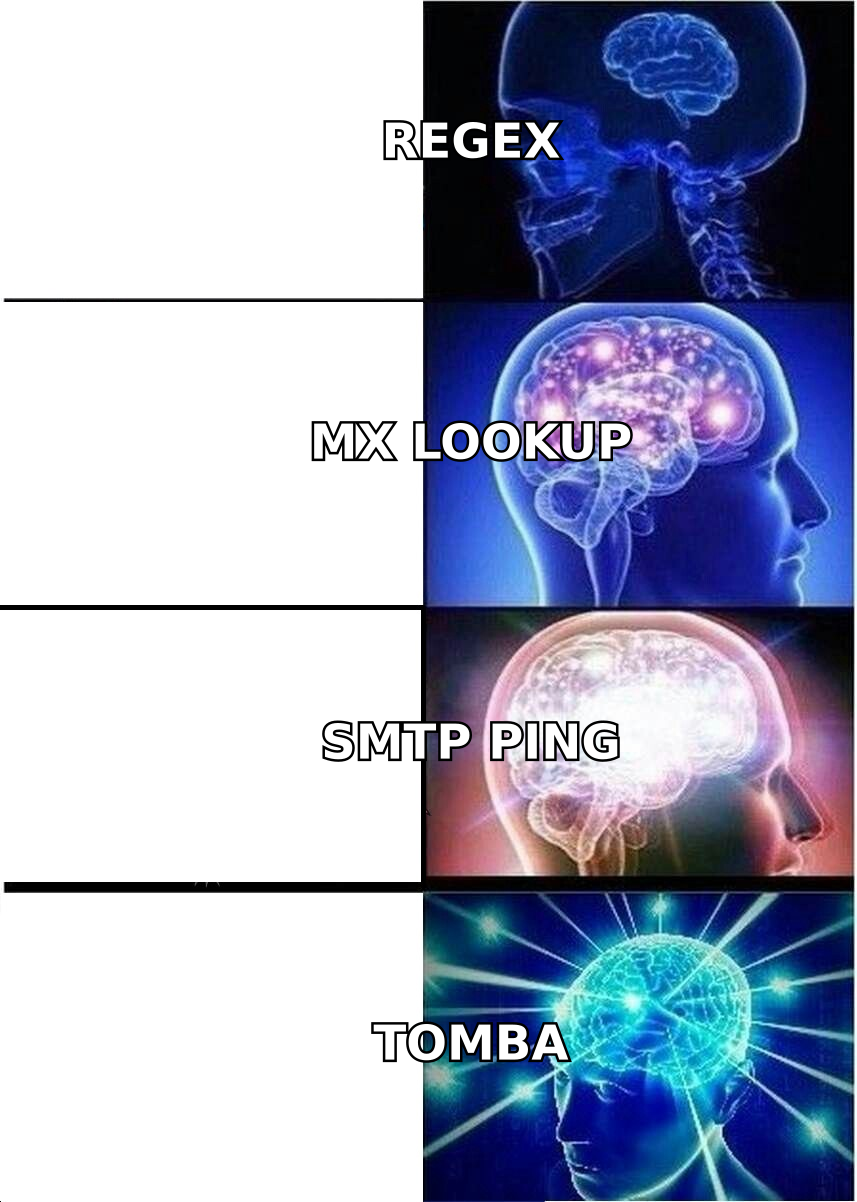
- Under 2% bounce rate — safe territory. Providers see normal list decay.
- 2-5% bounce rate — warning zone. Expect inbox placement to slip.
- Above 5% — throttling and spam-folder placement across your sending domain.
- Above 10% — many ESPs will suspend your account outright.
B2B data decays fast. People change jobs, companies get acquired, domains get consolidated. A list you exported eight months ago is meaningfully worse than one you built last week — the commonly cited figure is 22-30% annual decay for B2B contact data. So "is this address valid?" is not a one-time question. It is a recurring maintenance task.
What are the layers used to find out if an email address is valid?#
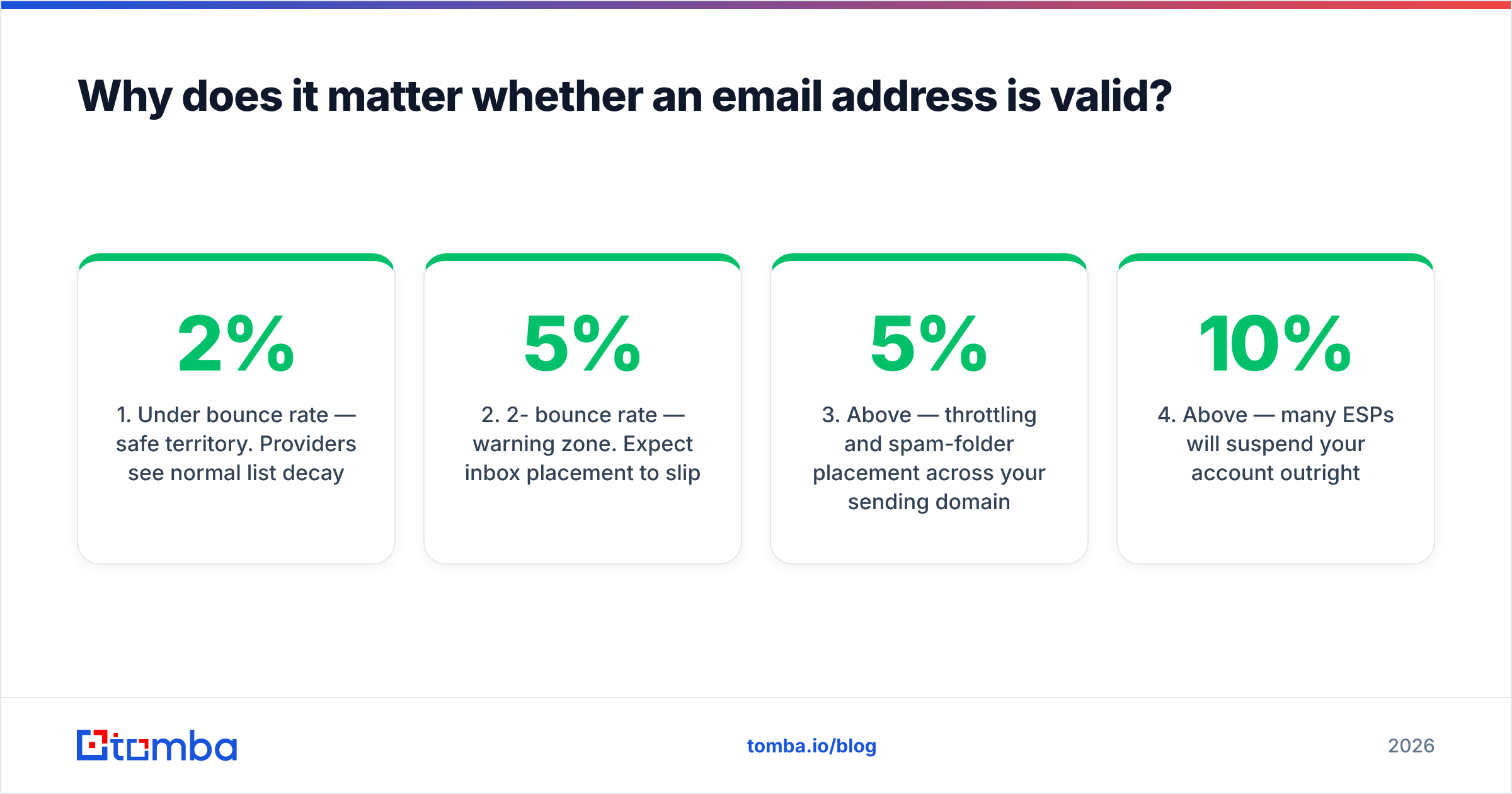
Six of them, and each one answers a different question. Running only the cheap ones is why so many "verified" lists still bounce.
| Layer | Question it answers | Cost | Catches |
|---|---|---|---|
| Syntax / RFC 5322 | Is the string a legal address? | Free, instant | Typos, missing @, illegal chars |
| Domain + MX record | Can this domain receive mail at all? | Free, ~50ms | Dead domains, parked domains, no mail server |
| Disposable / role check | Is it a burner or a shared inbox? | Cheap lookup | mailinator.com, info@, support@ |
| SMTP handshake | Does the mailbox exist on that server? | Slow, rate-limited | Departed employees, fake mailboxes |
| Catch-all resolution | Does the server accept everything? | Requires pattern data | Silent acceptors that bounce later |
| Engagement history | Has anyone ever replied here? | Requires your own data | Abandoned but technically live boxes |
Layer 1: syntax#
john.doe@@acme.com is invalid. john doe@acme.com is invalid. jöhn@acme.com may or may not be, depending on whether the receiving server supports internationalized addresses. A strict RFC 5322 regex is genuinely hairy — the fully compliant version runs several hundred characters — which is why most implementations use a pragmatic subset.
This layer catches maybe 3-5% of a typical hand-typed list and 0.5% of a scraped one. It is table stakes, not a strategy. Any free email checker does this in the browser.
Layer 2: domain and MX records#
Now you ask DNS a real question: does acme.com publish MX records? No MX record means no mail server means guaranteed bounce. This also catches the long tail of domains that expired, got parked, or redirect to a holding page.
While you are in DNS, an SPF checker tells you whether the domain has its sending policy configured — useful context if you are evaluating a partner or prospect's email maturity, though not a validity signal on its own.
Layer 3: disposable and role-based detection#
Two different problems wearing similar hats.
Disposable addresses come from services like Mailinator, Guerrilla Mail, and thousands of rotating throwaway domains. They are technically valid and will accept your mail. They are also worthless — nobody reads them. If these are entering your funnel, you have a form-quality problem, not a verification problem.
Role-based addresses — info@, sales@, hello@, support@, admin@ — are valid, monitored, and terrible for cold outreach. They typically go to a shared queue, get filtered aggressively, and generate spam complaints at several times the rate of a named mailbox. Most verification tools flag them separately rather than marking them invalid, which is correct: they are valid, just strategically poor.
Layer 4: the SMTP handshake#
This is the layer that actually confirms a mailbox exists. The verifier opens a connection to the receiving mail server and walks through the conversation without ever sending the message:
> HELO verifier.example.com
< 250 mx.acme.com
> MAIL FROM: <probe@verifier.example.com>
< 250 2.1.0 Ok
> RCPT TO: <john.doe@acme.com>
< 250 2.1.5 Ok          <-- mailbox exists
> QUIT
If the server answers 550 5.1.1 User unknown at the RCPT TO step, the mailbox does not exist. The verifier drops the connection before DATA, so nothing lands in anyone's inbox.
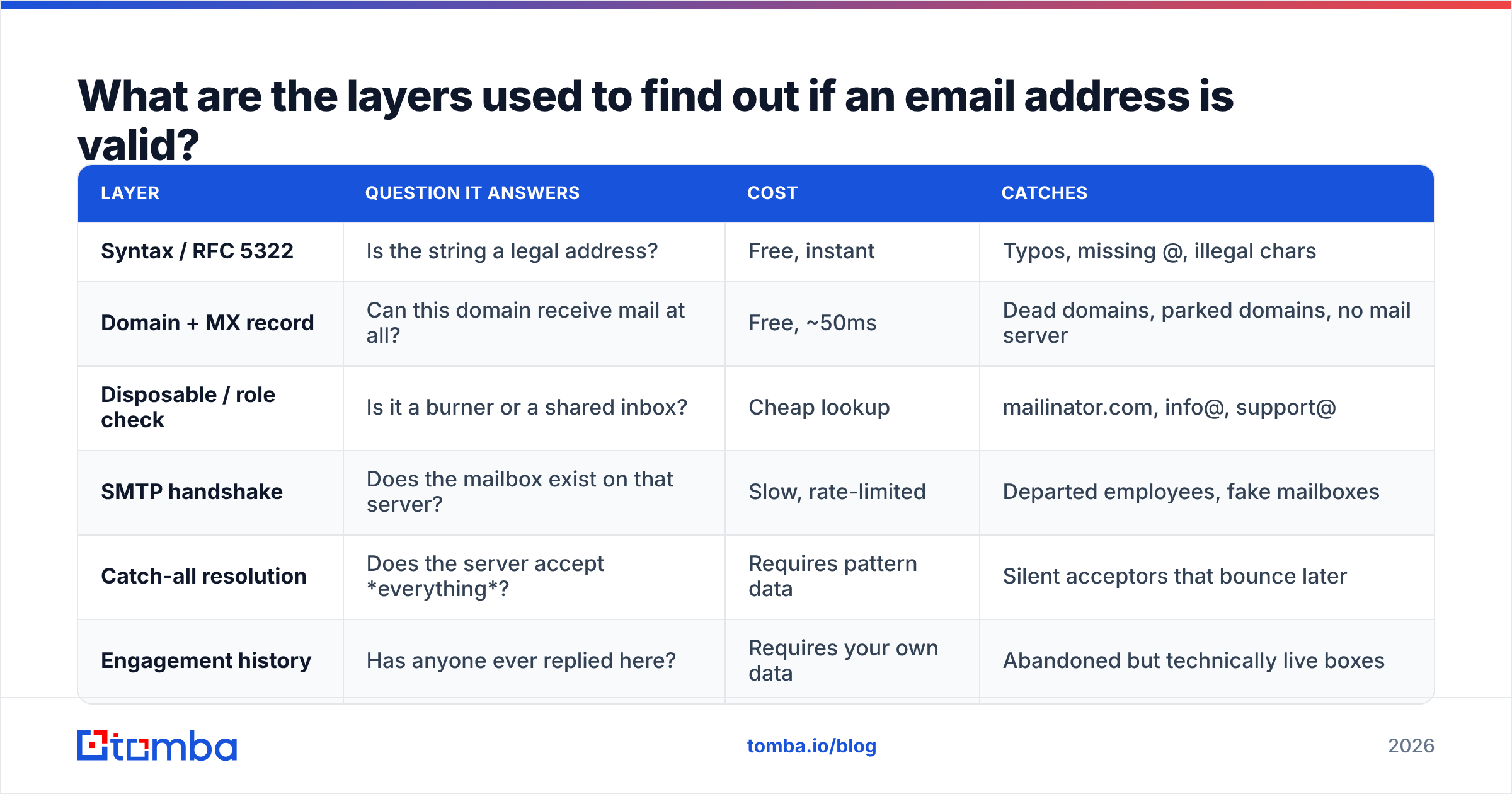
Three things break this in practice. First, greylisting: many servers return a temporary 4xx on the first attempt from an unknown IP and require a retry minutes later. Second, rate limiting: hammer a large provider from one IP and you get blocked, which is why serious verifiers rotate large IP pools. Third — and most importantly — catch-all configurations.
How do you handle catch-all domains?#
You stop asking the server and start scoring the pattern, because a catch-all server will say yes to literally anything.
A catch-all (or "accept-all") domain is configured to accept mail for every address at that domain and sort it out internally. ceo@acme.com, nonexistent-person-9843@acme.com, and asdfgh@acme.com all get a 250 OK. The SMTP layer has nothing left to tell you. Roughly 15-20% of B2B domains run this way, and the rate is higher among enterprises using Microsoft 365 with certain routing rules.
Bad tools report these as "valid" and let you bounce later. Honest tools report them as "accept-all" or "risky" and pass the problem to you. Good tools apply a second method: pattern confidence.
Pattern confidence works like this. If you already know that sarah.chen@acme.com and marcus.webb@acme.com are real and confirmed, then acme.com uses first.last@. When you generate priya.natarajan@acme.com from that pattern, you are not guessing — you are applying a rule with a known success rate for that specific domain. A catch-all verifier combines the pattern rule, the number of confirmed sources for that address, and how recently each source was seen.
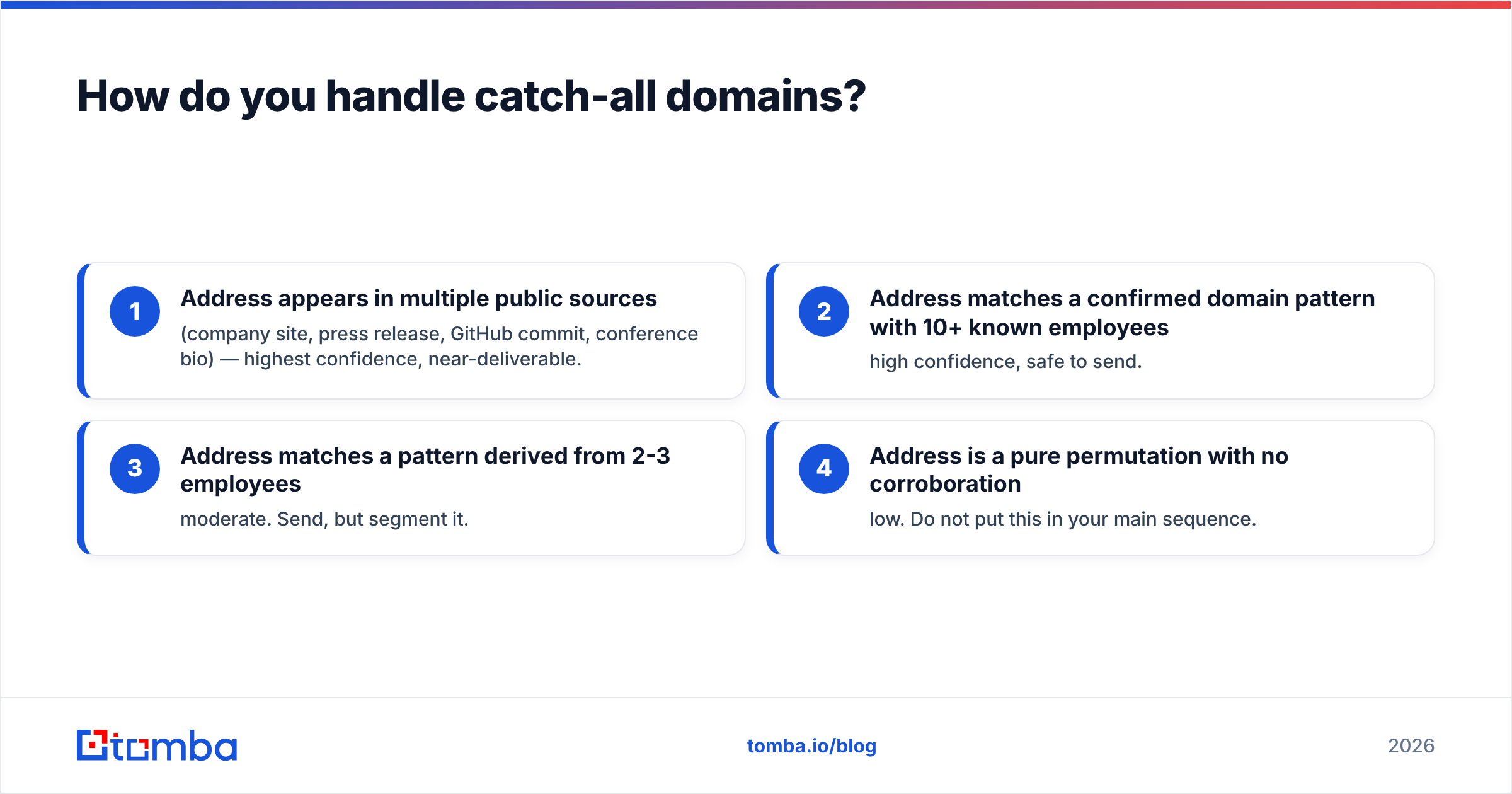
Here is the honest hierarchy of confidence on a catch-all domain:
- Address appears in multiple public sources (company site, press release, GitHub commit, conference bio) — highest confidence, near-deliverable.
- Address matches a confirmed domain pattern with 10+ known employees — high confidence, safe to send.
- Address matches a pattern derived from 2-3 employees — moderate. Send, but segment it.
- Address is a pure permutation with no corroboration — low. Do not put this in your main sequence.
That last case is what an email permutator produces on its own. Permutation is a starting point, not an answer.

What do the verification tools actually cost?#
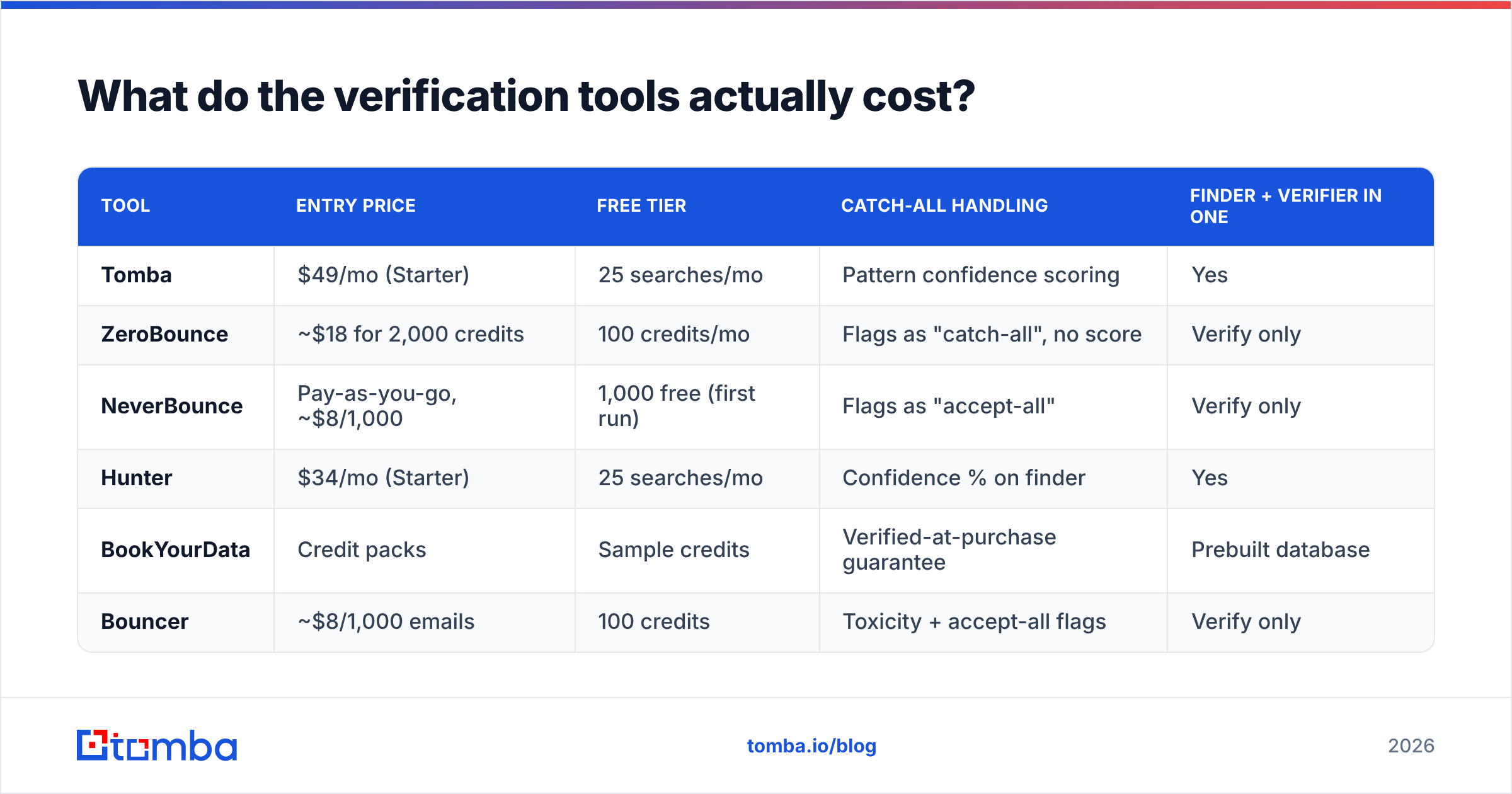
Prices cluster tightly, so the real differentiators are catch-all handling, whether finding and verifying live in one place, and what the free tier lets you test.
| Tool | Entry price | Free tier | Catch-all handling | Finder + verifier in one |
|---|---|---|---|---|
| Tomba | $49/mo (Starter) | 25 searches/mo | Pattern confidence scoring | Yes |
| ZeroBounce | ~$18 for 2,000 credits | 100 credits/mo | Flags as "catch-all", no score | Verify only |
| NeverBounce | Pay-as-you-go, ~$8/1,000 | 1,000 free (first run) | Flags as "accept-all" | Verify only |
| Hunter | $34/mo (Starter) | 25 searches/mo | Confidence % on finder | Yes |
| BookYourData | Credit packs | Sample credits | Verified-at-purchase guarantee | Prebuilt database |
| Bouncer | ~$8/1,000 emails | 100 credits | Toxicity + accept-all flags | Verify only |
A note on comparing these fairly: per-email pricing looks cheaper than a subscription until you need finding and verifying. If you are verifying a 5,000-row list once a quarter, a pay-as-you-go verifier is the cheaper tool. If you are building lists continuously and verifying as you go, a combined platform wins on both cost and workflow friction. Tomba pricing runs Free (25 searches/mo), Starter $49/mo, Growth $99/mo, Pro $249/mo, and Enterprise custom, with finding and verification drawing from the same credit pool.
BookYourData takes a different shape from the rest — it sells prebuilt, pre-verified contact records rather than a verification API, which suits teams who want a list handed to them rather than built. If you already have contacts and need to check them, a verifier is the right category; if you have no list at all, a database is.

Third-party review sites are useful for spotting recent quality shifts — G2's email verification category aggregates enough reviews that sustained accuracy complaints surface quickly.
Can you find out if an email address is valid for free?#
Partly. You can get to about 70% confidence for free and the last 25 points cost money.
What free gets you:
- Syntax validation — any browser-based checker, instant.
- MX record lookup —
dig MX acme.comfrom a terminal, or any DNS lookup site. - Disposable domain check — open-source blocklists cover most known throwaway providers.
- Manual SMTP telnet — technically possible, practically useless. Most residential and cloud IPs are blocked or greylisted by major providers, so your results will be misleading rather than absent, which is worse.
- Free tier credits — most vendors give 25-100 verifications monthly. Enough to spot-check, not enough to clean a list.
What free does not get you: reliable SMTP results at volume, catch-all pattern scoring, or the IP reputation required to talk to Google and Microsoft mail servers without being throttled.
There is also a "free" method that costs more than it saves: sending a test message and watching for a bounce. This works, in the sense that a bounce is definitive. It also means the invalid address is now permanently recorded against your sending reputation. Never validate by sending.
What is the practical workflow?#
Front-load the cheap checks, batch the expensive ones, and re-verify on a schedule.
Step 1 — Validate at the point of capture. Run syntax plus MX on every form submission in real time. This catches gmial.com before it enters your CRM, which is where fixing it costs the least.
Step 2 — Verify in bulk before any campaign. Upload the segment, run it through a bulk verify pass, and split the output into three buckets: deliverable, catch-all/risky, and invalid. Delete invalid. Do not "try them anyway."
Step 3 — Segment the risky bucket. Send catch-all addresses in a separate, smaller batch from a secondary sending domain. If that batch bounces above 5%, your pattern confidence for those domains is wrong and you learn it without burning your primary domain.
Step 4 — Verify at the API layer for anything automated. If leads flow in from enrichment, scraping, or partner feeds, put verification in the pipeline rather than as a manual pre-send step. An email verification API call at ingest is cheaper than a cleanup project six months later.
Step 5 — Re-verify on a cadence. Every 90 days for actively-mailed lists, every 30 days for high-volume senders. Data decay is continuous; your hygiene should be too.
Step 6 — Watch bounce rate as your feedback loop. If a verified list bounces above 2%, your vendor's accuracy claim does not match your reality. Test a second vendor on the same 1,000 rows and compare — that is the only benchmark that reflects your actual data.

How does verification connect to deliverability?#
Verification is necessary but not sufficient. It protects the reputation you build elsewhere.
A perfectly clean list still lands in spam if your authentication is broken. Google and Yahoo's bulk-sender requirements — in force since 2024 and tightened since — mandate SPF, DKIM, and DMARC for anyone sending meaningful volume, plus a spam complaint rate under 0.3%. Google's own sender guidelines are the primary source here and worth reading in full rather than through a blog's summary.
So the stack is: authenticated domain, warmed sending infrastructure, verified recipient list, relevant message. Verification handles one of those four. Skipping it makes the other three harder; doing it perfectly does not excuse the others.
One diagnostic worth running before you blame your list: put a draft through a spam checker to separate content-triggered filtering from reputation-triggered filtering. They have completely different fixes, and teams routinely spend weeks cleaning data when the actual problem was three trigger words and a link shortener.
What should you actually do next?#
If you have a list already, verify it before your next send — the check costs less than a single throttling incident. If you are building the list, find and verify in the same step so you never accumulate a cleanup backlog.
Tomba's Email Finder does both: it locates professional addresses by domain, name, or company, and runs each result through syntax, MX, SMTP, and catch-all pattern scoring before it hands you an address. Every result comes back with a confidence score and the sources behind it, so you know which addresses are corroborated and which are pattern-derived guesses worth segmenting. The free tier gives you 25 searches a month to test the accuracy against a domain you already know the answers for — which is exactly how you should evaluate any vendor in this category.
Related guides#
Ready to find emails that actually work?
Join 150,000+ professionals who stopped guessing and started sending. Free credits on signup — no credit card required.
Get the Tomba newsletter
Practical outbound tactics and product updates — once every two weeks.
About the author