How to Find Someone's Email Address in 2026: 9 Methods
Nine tested ways to find someone's email address in 2026 — from free manual tricks to paid lookup tools — plus which ones still work and which quietly waste your time.
TL;DR
- The fastest reliable path is a domain + name lookup tool — you give a full name and a company domain, it returns a verified address in seconds. Everything else is a fallback.
- Free manual methods still work (Google operators, GitHub commits, WHOIS, newsletter footers), but hit rates hover around 20–40% and cost you 5–15 minutes per contact.
- Pattern guessing without verification is the #1 cause of bounces. Always run the candidate address through an SMTP-level check before you send.
- Catch-all domains break most tools. Roughly 15–20% of B2B domains accept everything, so a plain "valid" result means nothing without dedicated catch-all handling.
- Budget path: free tiers stack surprisingly well. Tomba's free tier gives 25 searches/month; paid starts at $49/mo.
Why is it so hard to find someone's email address?#
Because email addresses were never designed to be discoverable. Phone numbers had directories. Postal addresses had the census. Email has nothing — no registry, no public index, no lookup authority. Every address you find is reconstructed from breadcrumbs someone left in public.
That reconstruction usually works one of three ways:
- Pattern inference — you know the company uses
first.last@domain.com, so you build the address from a name. Fast, free, wrong maybe 30% of the time. - Public disclosure — the person published the address somewhere: a conference bio, a git commit, a WHOIS record, a press release, an academic paper.
- Aggregated databases — a vendor crawled millions of those disclosures, deduped them, and sells lookups against the index.
Everything in this guide is one of those three, dressed differently. Understanding which one a method uses tells you immediately how much to trust the result.

What are the 9 methods that actually work?#
Ranked roughly by hit rate, from most to least reliable.
1. Email finder tools (domain + name) You enter "Sarah Chen" and "stripe.com" and get back a verified address with a confidence score. This is the highest-yield method because good tools combine all three approaches — pattern inference, scraped disclosures, and a live verification ping. Expect 70–90% coverage on mid-to-large companies, much lower on tiny local businesses with no web footprint. A Tomba Email Finder query takes under two seconds.
2. Domain search (find everyone at a company) When you don't know who you need — just that you need someone in engineering at a given company — domain search returns every known address on a domain with job titles attached. This is how most prospecting actually starts. You filter by department after, not before.
3. LinkedIn profile → email lookup LinkedIn hides emails from non-connections, but the profile URL is a stable identifier that lookup tools resolve against their index. A LinkedIn finder turns a profile link into a work address. Note that this returns the work email, not the personal one they signed up to LinkedIn with — that's usually the one you want anyway.
4. Google search operators Free and underrated. Try these in order:
"firstname lastname" + "@company.com"site:company.com "email"orsite:company.com "contact""firstname lastname" "@gmail.com" OR "@company.com"intext:"firstname" intext:"@company.com" filetype:pdf— conference programs and annual reports leak addresses constantly
5. GitHub commit history
For anyone technical, this is close to a cheat code. Open their GitHub profile, find any repo they've pushed to, then append .patch to a commit URL — the raw patch header contains the author's commit email. Many developers commit with their work address. Roughly half now use GitHub's noreply masking, so treat this as a coin flip.
6. Twitter/X, personal sites, and newsletter footers People who publish put their address where they want to be reachable. Check the "About" page, the RSS feed's author field, and — the one everybody forgets — the footer of any newsletter they send. CAN-SPAM requires a reachable contact in commercial email, so newsletters are a legally mandated leak.
7. WHOIS lookup If the person owns a domain, WHOIS may list their registrant email. GDPR redaction killed most of this for EU registrants after 2018, but non-EU and older registrations still expose plenty. Free, takes 20 seconds, works maybe 15% of the time.
8. Email permutation + verification
Generate every plausible combination (j.smith@, jsmith@, john.smith@, john@) with an email permutator, then verify each one to find the live address. This is method 1 done manually. It works, it's free, and it's slow. Never send to permutations you haven't verified.
9. Just ask Send a LinkedIn connection note, a Twitter DM, or a contact-form message asking for the best email. Low volume, high hit rate, zero deliverability risk. Sales teams dismiss this because it doesn't scale — but for a shortlist of 10 high-value targets, it beats everything above.
Which email finder tool should you use?#
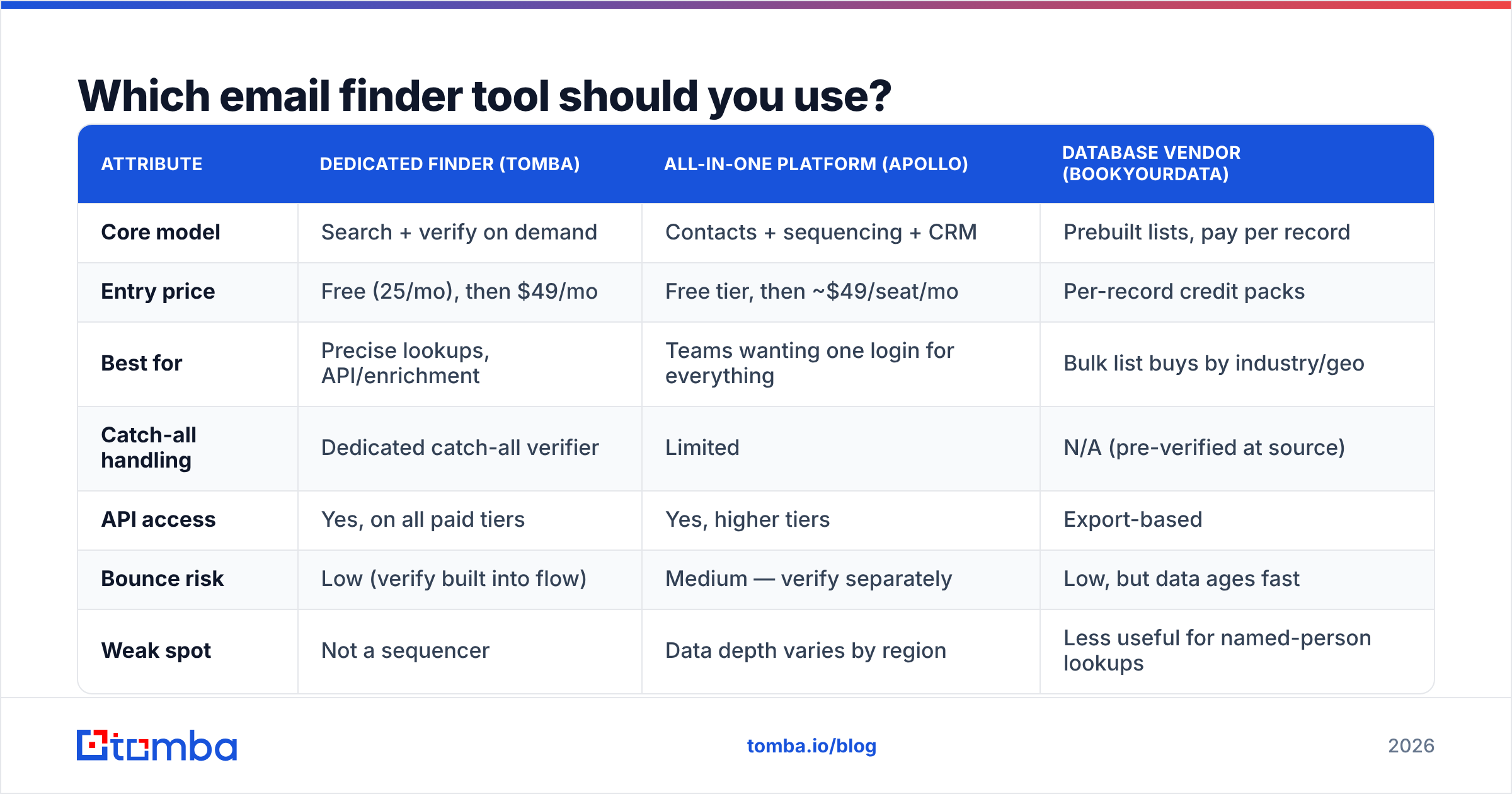
The tools cluster into three groups: dedicated finders, all-in-one sales platforms, and prebuilt database vendors. They solve different problems and get compared as if they were interchangeable, which is why so many teams buy the wrong one.
| Attribute | Dedicated finder (Tomba) | All-in-one platform (Apollo) | Database vendor (BookYourData) |
|---|---|---|---|
| Core model | Search + verify on demand | Contacts + sequencing + CRM | Prebuilt lists, pay per record |
| Entry price | Free (25/mo), then $49/mo | Free tier, then ~$49/seat/mo | Per-record credit packs |
| Best for | Precise lookups, API/enrichment | Teams wanting one login for everything | Bulk list buys by industry/geo |
| Catch-all handling | Dedicated catch-all verifier | Limited | N/A (pre-verified at source) |
| API access | Yes, on all paid tiers | Yes, higher tiers | Export-based |
| Bounce risk | Low (verify built into flow) | Medium — verify separately | Low, but data ages fast |
| Weak spot | Not a sequencer | Data depth varies by region | Less useful for named-person lookups |
The honest read: if you know who you want to reach and need the address, a dedicated finder wins on cost and accuracy. If you want a list of 5,000 CFOs in manufacturing and don't care about names yet, a database vendor like BookYourData gets you there faster. If you want one tool for finding and sending, an all-in-one platform saves you an integration — at the cost of shallower data. Compare the specifics on Tomba pricing and against Apollo alternatives before committing to seats.

How accurate are these methods, really?#
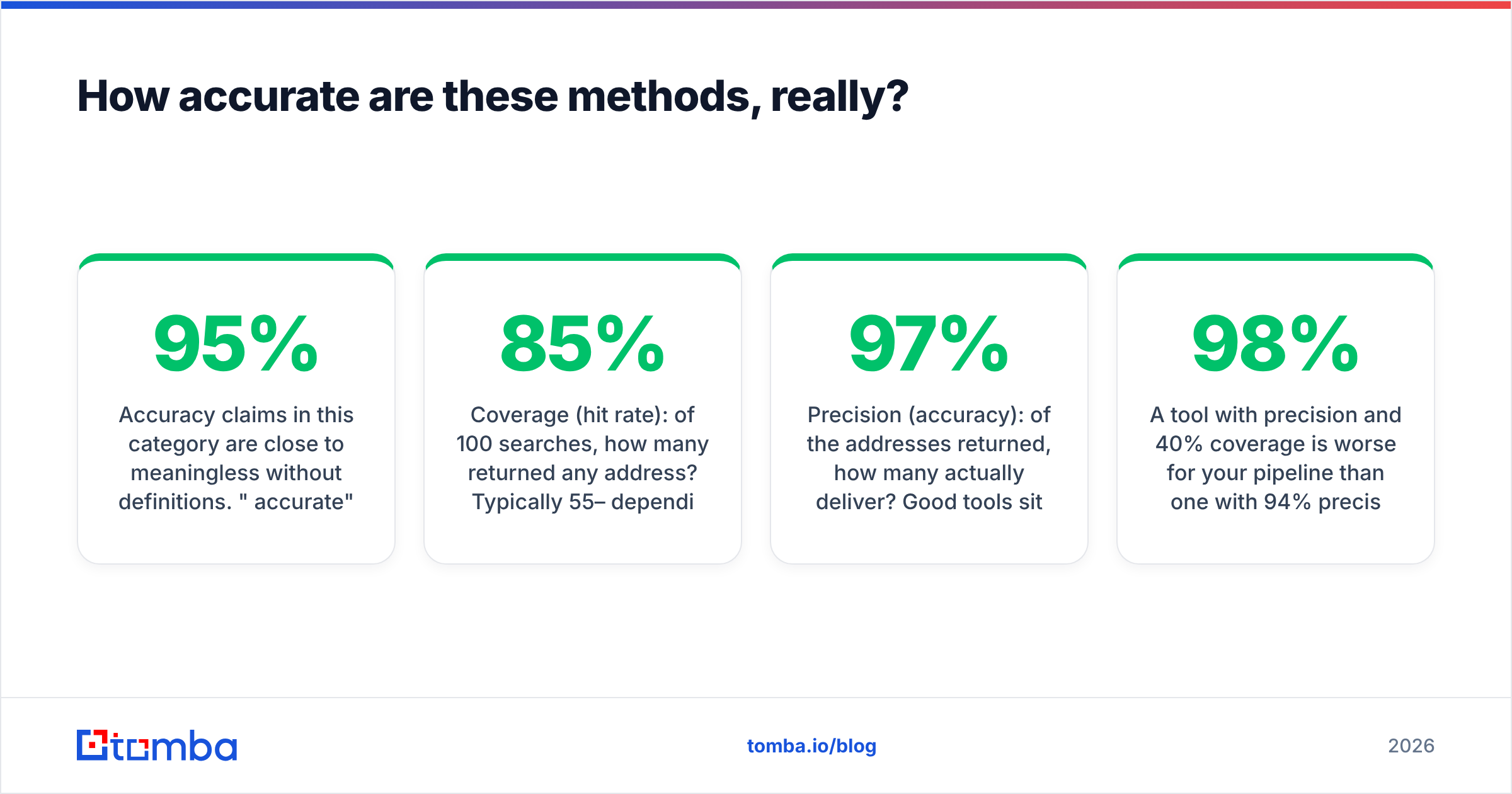
Accuracy claims in this category are close to meaningless without definitions. "95% accurate" from a vendor usually means "95% of addresses we returned were deliverable" — which says nothing about how many searches returned nothing at all. Two numbers matter, and vendors report one:
- Coverage (hit rate): of 100 searches, how many returned any address? Typically 55–85% depending on company size and region.
- Precision (accuracy): of the addresses returned, how many actually deliver? Good tools sit at 92–97%.
A tool with 98% precision and 40% coverage is worse for your pipeline than one with 94% precision and 80% coverage — you just never see the misses. Ask vendors for both, and run your own test set of 100 known-good contacts before you sign anything. G2 review threads are useful here because users report real-world hit rates; the G2 category listings are a reasonable starting point for cross-checking claims.
Regional variance is the other thing nobody publishes. US and Western European SaaS companies are heavily indexed. Japanese, Korean, and Latin American mid-market companies are not. If your ICP sits outside the anglophone tech bubble, test before you buy.
Why does verification matter more than finding?#
Because a wrong address costs more than a missing one. A missing address means you move on. A wrong address means a hard bounce, and hard bounces compound.
Mailbox providers treat bounce rate as a direct trust signal. Google and Yahoo's 2024 bulk-sender requirements formalized what was already informal practice: keep spam complaints under 0.3% and keep your lists clean, or your delivery degrades. The Google Postmaster documentation spells out the expectations. Once your domain's sender reputation drops, every email you send — including to perfectly valid addresses — starts landing in spam.
So the operating rule is simple: find, then verify, then send. Never skip the middle step. Run candidates through an email verifier that does real SMTP-level checks, not just syntax and MX-record validation. Syntax checking catches typos. It does not catch an address that was valid two years ago and has since been deactivated.

What about catch-all domains?#
This is where most verification pipelines quietly fail. A catch-all (or "accept-all") domain is configured to accept mail to any address at that domain — definitely-not-real@company.com gets a 250 OK just like the CEO's address does. About 15–20% of B2B domains are configured this way, and the number is rising as companies front their mail with security gateways.
The consequence: a standard verifier returns "valid" for every address at a catch-all domain, including the ones you invented. Your list looks clean and bounces anyway.
Handling this properly requires a separate signal — cross-referencing the address against known-good sources, checking pattern consistency across the domain, and scoring confidence rather than returning a binary. That's what a catch-all verifier is for. If your current tool doesn't distinguish accept-all from confirmed-valid, assume a meaningful share of your "verified" list is fiction.
What's the fastest workflow for finding emails at scale?#
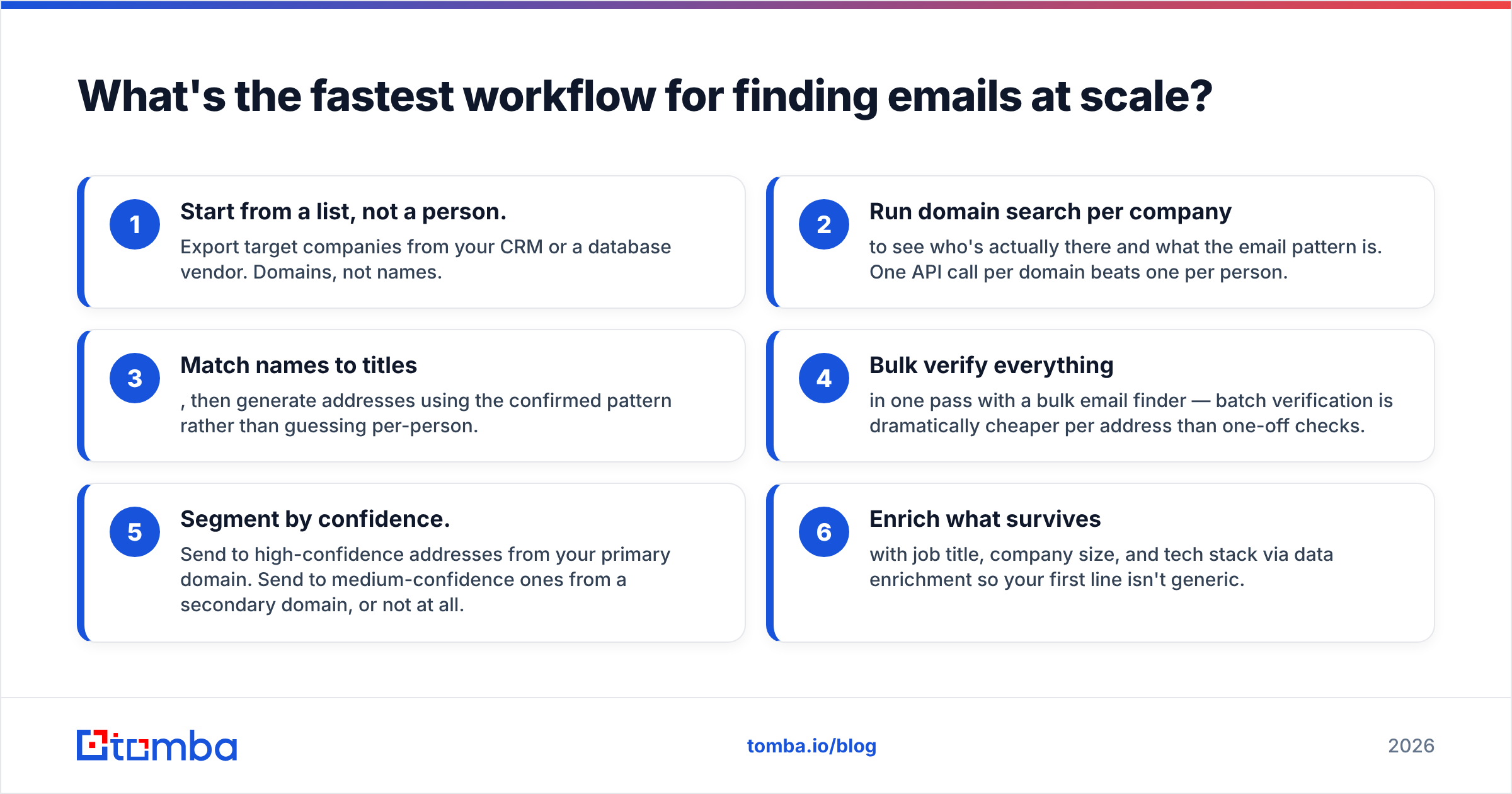
Manual methods break down past about 20 contacts. Here's the workflow that holds up at volume:
- Start from a list, not a person. Export target companies from your CRM or a database vendor. Domains, not names.
- Run domain search per company to see who's actually there and what the email pattern is. One API call per domain beats one per person.
- Match names to titles, then generate addresses using the confirmed pattern rather than guessing per-person.
- Bulk verify everything in one pass with a bulk email finder — batch verification is dramatically cheaper per address than one-off checks.
- Segment by confidence. Send to high-confidence addresses from your primary domain. Send to medium-confidence ones from a secondary domain, or not at all.
- Enrich what survives with job title, company size, and tech stack via data enrichment so your first line isn't generic.
If you're doing this repeatedly, skip the UI entirely. The Tomba API handles finder, verifier, and enrichment in one integration, and there are native paths into HubSpot, Google Sheets, and Zapier if you'd rather not write code. The teams that get good at this treat email discovery as a data pipeline, not a research task.
Is it legal to find someone's email address?#
Generally yes for business addresses, with real conditions attached — and this is not legal advice.
In the US, CAN-SPAM permits unsolicited commercial email to business addresses provided you identify yourself honestly, don't use deceptive subject lines, include a physical postal address, and honor opt-outs promptly. Finding the address isn't the regulated act; how you use it is.
In the EU and UK, GDPR treats a work email tied to a named person as personal data. B2B outreach is usually defensible under "legitimate interest," but you need to document that assessment, disclose where you got the data on first contact, and honor deletion requests. The ICO's guidance on direct marketing is the clearest official read.
In Canada, CASL is stricter — it requires consent (express or implied) before the first message, with narrow exemptions for published business addresses where the message relates to the recipient's role.
Practical guardrails that keep you clean in every jurisdiction: only target business addresses, only for a business reason relevant to that person's actual job, always include a one-click opt-out, always name your company, and honor removals within 24 hours. Check where Tomba gets data if you need to document provenance for a DPA.
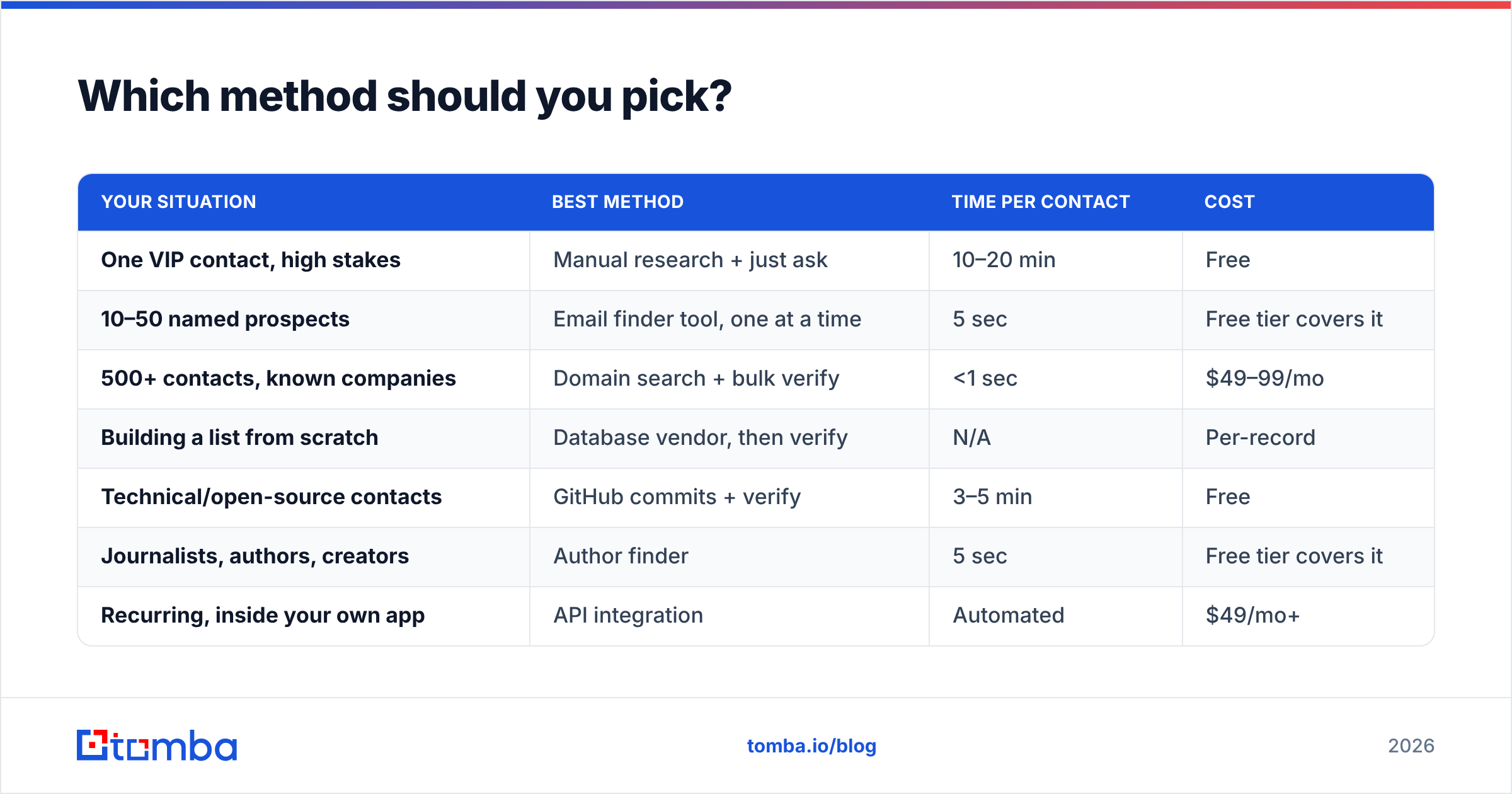
Which method should you pick?#
| Your situation | Best method | Time per contact | Cost |
|---|---|---|---|
| One VIP contact, high stakes | Manual research + just ask | 10–20 min | Free |
| 10–50 named prospects | Email finder tool, one at a time | 5 sec | Free tier covers it |
| 500+ contacts, known companies | Domain search + bulk verify | <1 sec | $49–99/mo |
| Building a list from scratch | Database vendor, then verify | N/A | Per-record |
| Technical/open-source contacts | GitHub commits + verify | 3–5 min | Free |
| Journalists, authors, creators | Author finder | 5 sec | Free tier covers it |
| Recurring, inside your own app | API integration | Automated | $49/mo+ |
The mistake most teams make is picking one method and forcing everything through it. Manual research on 500 contacts burns a week. A paid tool for three lookups a month is waste. Match the method to the volume.
Ready to stop guessing?#
If you're currently building addresses by hand and hoping they land, start with the free tier — 25 searches a month is enough to test hit rate on your own target list before spending anything. Give the Tomba Email Finder a name and a domain, check the confidence score, run the result through verification, and compare it against whatever you're doing now. If the hit rate beats your manual process, the $49/mo Starter plan pays for itself in the first week of saved research time. If it doesn't, you've lost nothing but ten minutes.
Related guides#
Ready to find emails that actually work?
Join 150,000+ professionals who stopped guessing and started sending. Free credits on signup — no credit card required.
Get the Tomba newsletter
Practical outbound tactics and product updates — once every two weeks.
About the author