How to Find Anyone's Work Email in 2026: 9 Proven Methods
Nine tested ways to find a work email address — from free guessing tricks to paid finders — plus which ones actually survive a verification check in 2026.
TL;DR
- The fastest reliable path to a work email is pattern detection plus SMTP verification — not guessing, and not scraping.
- Free methods (Google operators, GitHub commits, press pages, WHOIS) still work, but hit rates sit around 20-40% and cost you 5-15 minutes per contact.
- Paid finders land 60-85% on most B2B domains; the spread between vendors is mostly about catch-all handling, not raw database size.
- Never send to an unverified address. A single 5% bounce rate on a cold campaign can drag your domain reputation down for weeks.
- Best default stack in 2026: a finder with verification built in (Tomba, Hunter, Findymail, BookYourData for pre-built lists), plus a manual fallback for the 15% nobody has.
What does "find work email" actually mean in 2026?#
It means resolving a person plus a company into a deliverable mailbox at that company's domain — and proving the mailbox exists before you send.
Two halves, and most people only do the first. Finding a plausible string like jane.doe@acme.com is trivial. Proving that string routes to a real inbox is the part that decides whether your campaign lands in a primary tab or a spam folder.
The reason this got harder: Google and Yahoo tightened bulk-sender requirements in 2024, and Microsoft followed for Outlook-hosted domains in 2025. Bounce thresholds that used to be tolerated at 5-8% now trigger throttling closer to 2-3%. So the cost of a wrong guess went up while the difficulty of guessing stayed flat.
The practical upshot: any method that gives you an address without a verification signal is half a method.
How do work email formats actually work?#
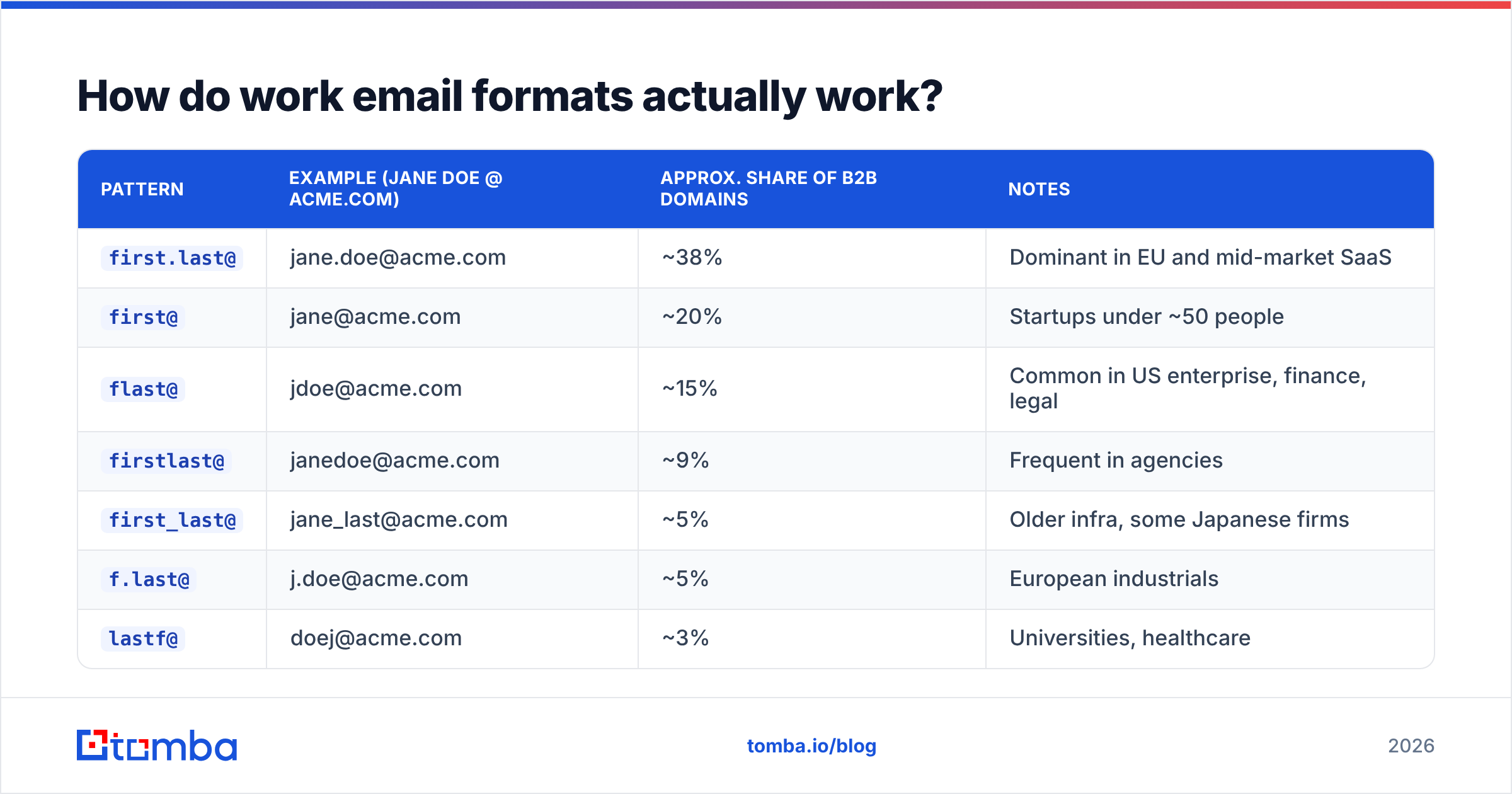
Roughly 90% of companies use one of eight patterns. Learn them and you can reverse-engineer most domains from a single known employee.
| Pattern | Example (Jane Doe @ acme.com) | Approx. share of B2B domains | Notes |
|---|---|---|---|
first.last@ |
jane.doe@acme.com | ~38% | Dominant in EU and mid-market SaaS |
first@ |
jane@acme.com | ~20% | Startups under ~50 people |
flast@ |
jdoe@acme.com | ~15% | Common in US enterprise, finance, legal |
firstlast@ |
janedoe@acme.com | ~9% | Frequent in agencies |
first_last@ |
jane_last@acme.com | ~5% | Older infra, some Japanese firms |
f.last@ |
j.doe@acme.com | ~5% | European industrials |
lastf@ |
doej@acme.com | ~3% | Universities, healthcare |
| Non-derivable | jd7291@acme.com | ~5% | Employee IDs, security-conscious orgs |
Two things follow from that table. First, if you know one employee's address you can usually predict everyone else's — that's why a single LinkedIn post signature or a press release contact is so valuable. Second, that last row is why guess-only workflows cap out: about one in twenty domains gives you nothing to pattern-match against.
You can test a domain's pattern in seconds with a company email pattern checker, or generate every permutation for a name with an email permutator and verify them in a batch.

What are the 9 methods, ranked?#
Here they are ordered by hit rate per minute spent, which is the only metric that matters when you have 200 prospects and a Tuesday.
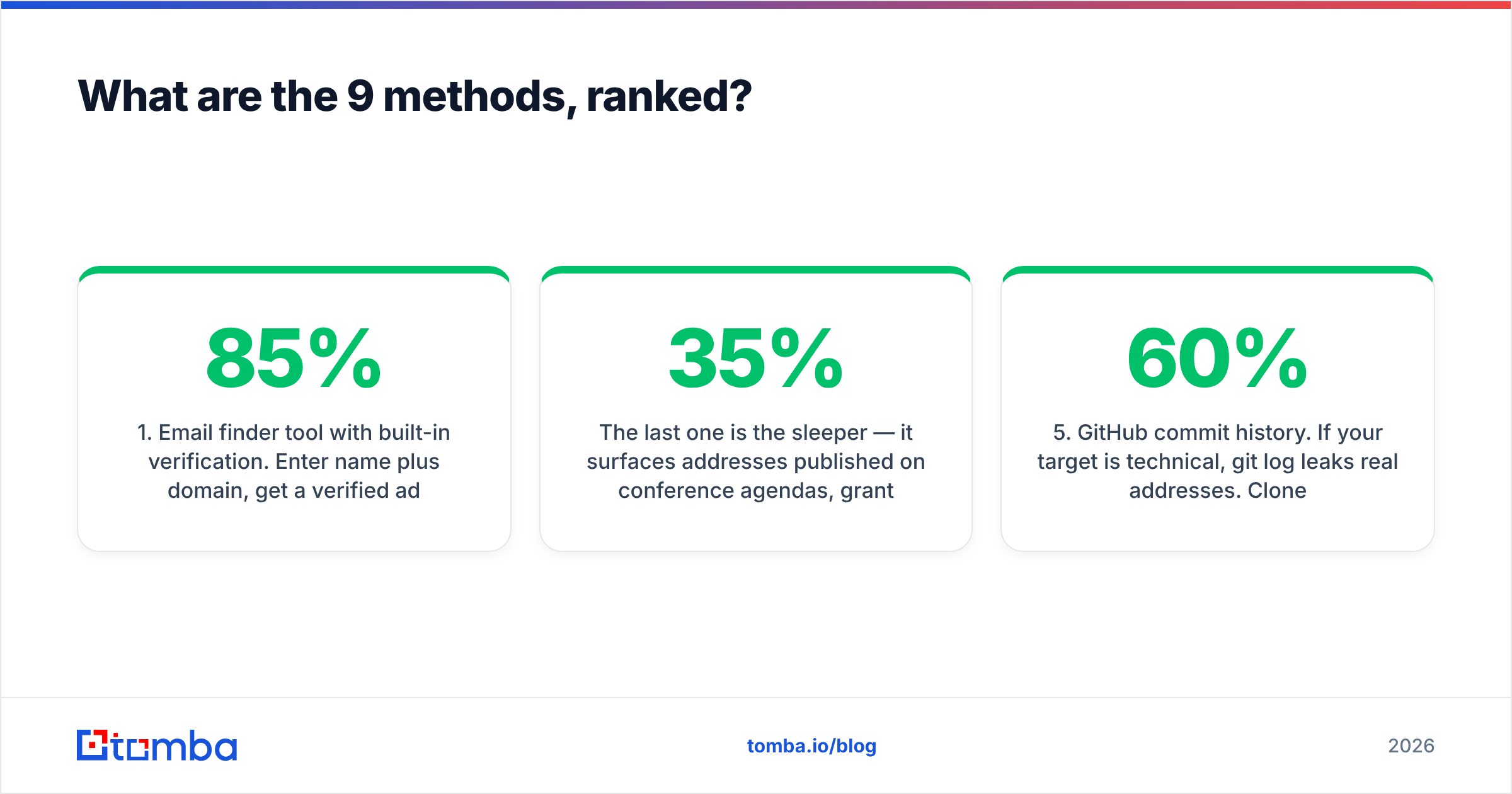
1. Email finder tool with built-in verification. Enter name plus domain, get a verified address with a confidence score. Hit rate 60-85% on standard B2B domains, sub-second. This is the default for any volume above ~20 contacts. Tools in this class include Tomba's email finder, Hunter, Findymail, and Apollo's enrichment layer.
2. Domain search / bulk pull. Instead of one person at a time, pull every discoverable address at a domain and filter to the roles you want. Useful when you know the company but not the person. A domain search on a 200-person company typically returns 30-80 addresses with department and seniority labels.
3. LinkedIn-to-email resolution. Start from a Sales Navigator list, resolve profiles to work emails. Highest intent-match, because you've already filtered by title and company. A LinkedIn finder handles this without asking you to scrape profile pages manually.
4. Google search operators. Free, and still underrated:
site:acme.com "@acme.com"
"jane doe" "@acme.com"
site:acme.com filetype:pdf "email"
"@acme.com" -site:acme.com
The last one is the sleeper — it surfaces addresses published on conference agendas, grant filings, and partner sites. Hit rate roughly 25-35%, but it takes 3-8 minutes per person.
5. GitHub commit history. If your target is technical, git log leaks real addresses. Clone any repo they've contributed to and run git log --format='%ae' | sort -u. Or append .patch to a GitHub commit URL and read the From: header. Works for maybe 60% of engineers, 5% of everyone else.
6. Company press and investor pages. Press releases carry a media contact. SEC filings and EU company registers carry an IR contact. These are almost always real and monitored, though usually not the person you actually want.
7. Twitter/X bio and personal sites. Founders and consultants publish addresses openly. Check the bio, the pinned post, the personal domain's /about or /contact.
8. Newsletter reply-to. Subscribe to the company newsletter, then check the reply-to header — it frequently resolves to a real marketing mailbox rather than a no-reply. Slow, but it reveals the domain pattern.
9. Just ask. Message them on LinkedIn: "What's the best email for you?" Response rate is low, but a positive response is a warm lead, not a cold one.
Which method wins for your situation?#
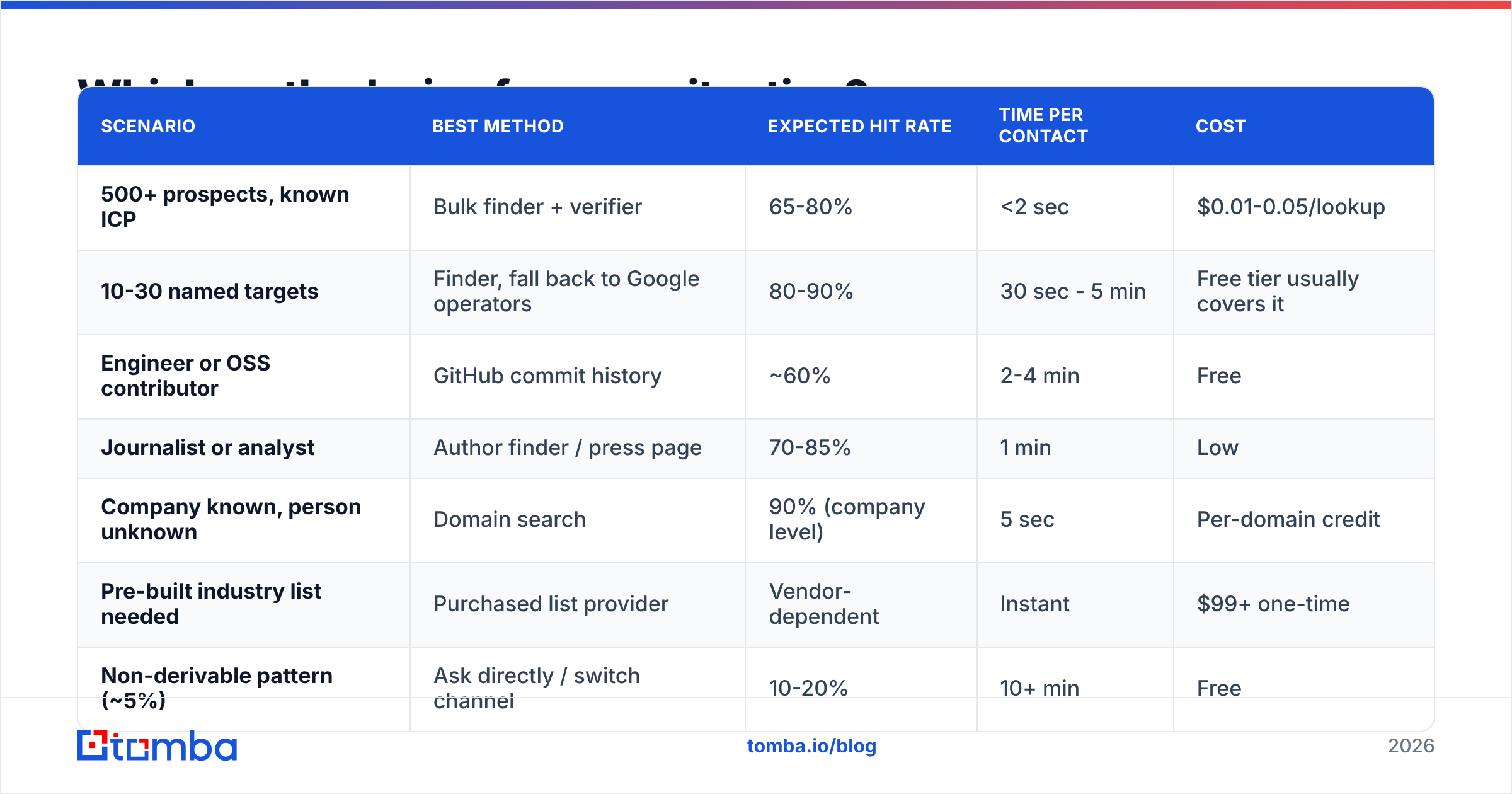
| Scenario | Best method | Expected hit rate | Time per contact | Cost |
|---|---|---|---|---|
| 500+ prospects, known ICP | Bulk finder + verifier | 65-80% | <2 sec | $0.01-0.05/lookup |
| 10-30 named targets | Finder, fall back to Google operators | 80-90% | 30 sec - 5 min | Free tier usually covers it |
| Engineer or OSS contributor | GitHub commit history | ~60% | 2-4 min | Free |
| Journalist or analyst | Author finder / press page | 70-85% | 1 min | Low |
| Company known, person unknown | Domain search | 90% (company level) | 5 sec | Per-domain credit |
| Pre-built industry list needed | Purchased list provider | Vendor-dependent | Instant | $99+ one-time |
| Non-derivable pattern (~5%) | Ask directly / switch channel | 10-20% | 10+ min | Free |
A note on that "pre-built list" row: buying a list and finding an email are different jobs. Providers like BookYourData sell verified, filterable B2B contact lists you download in one shot — sensible when you need coverage of an entire vertical fast and don't have named targets yet. A finder is the better tool when you already know who you want to reach. Plenty of teams use both.
Why does verification matter more than finding?#
Because deliverability compounds, and bounces are the fastest way to destroy it.
Here's the mechanic. Mailbox providers score your sending domain on complaint rate, bounce rate, engagement, and authentication. Push bounce rate above roughly 3% and you get throttled — not blocked, just slowed and shunted to spam, which looks identical to "my copy isn't working" from the inside. Recovery takes two to six weeks of clean sending.
So the sequence is always: find → verify → send. Never find → send.
A proper email verifier runs syntax checks, MX record lookup, disposable-domain detection, role-account flagging (info@, sales@, support@), and an SMTP handshake that asks the receiving server whether the mailbox exists without delivering anything.
The catch: catch-all domains. Perhaps 20-25% of B2B domains accept mail to any address at the domain, which makes the SMTP handshake useless — every guess comes back "valid." This is where finder vendors genuinely differ. Weak tools mark catch-alls "valid" and let you bounce. Better tools flag them separately and apply pattern confidence and secondary signals. If you work in enterprise, a dedicated catch-all verifier is worth more than 10,000 extra database records.
Before a big send, it's also worth checking your own side: run an SPF checker and a blacklist checker on your sending domain. Finding perfect addresses doesn't help if your authentication is broken. Google's own bulk sender guidelines spell out the current thresholds.


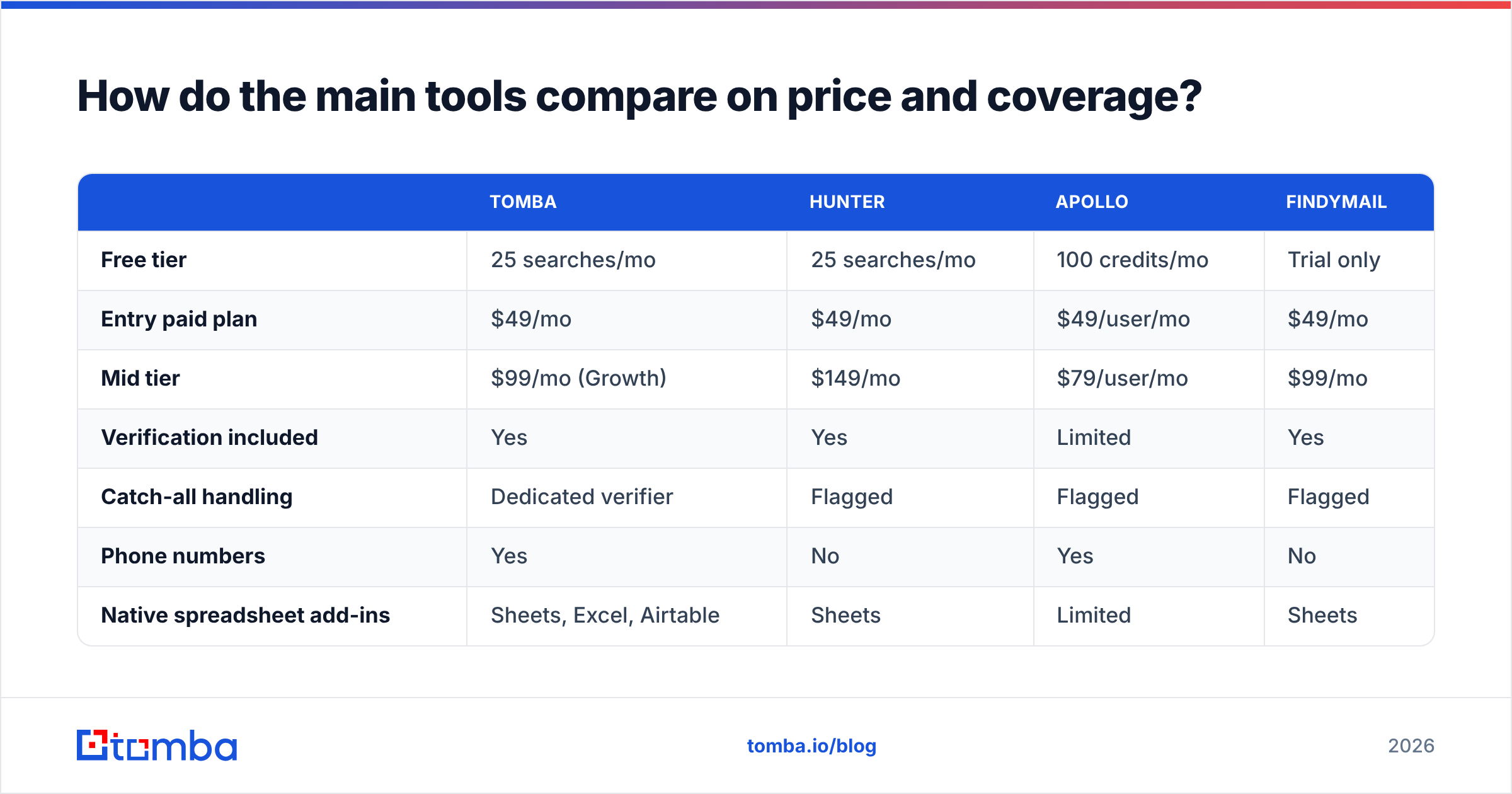
How do the main tools compare on price and coverage?#
Pricing below is list price as of early 2026; check vendor pages before you commit, since credit definitions shift.
| Tomba | Hunter | Apollo | Findymail | |
|---|---|---|---|---|
| Free tier | 25 searches/mo | 25 searches/mo | 100 credits/mo | Trial only |
| Entry paid plan | $49/mo | $49/mo | $49/user/mo | $49/mo |
| Mid tier | $99/mo (Growth) | $149/mo | $79/user/mo | $99/mo |
| Verification included | Yes | Yes | Limited | Yes |
| Catch-all handling | Dedicated verifier | Flagged | Flagged | Flagged |
| Phone numbers | Yes | No | Yes | No |
| Native spreadsheet add-ins | Sheets, Excel, Airtable | Sheets | Limited | Sheets |
| API + CLI | Yes (REST, CLI, MCP) | REST | REST | REST |
| Best fit | Finder + verifier in one stack | Simple domain lookups | All-in-one sales platform | Deliverability-first lists |

The honest read: at the entry tier, these tools are close enough that price shouldn't decide it. What should decide it is the shape of your workflow. If you live in a spreadsheet, pick the one with a real Google Sheets add-on. If you're piping leads through code, compare API rate limits and whether verification is a separate billable call — Tomba's email finder API returns the verification status in the same response, which halves your credit burn versus find-then-verify architectures. Full Tomba pricing runs Free → Starter $49 → Growth $99 → Pro $249 → Enterprise.
Independent reviews on G2 are useful for sanity-checking vendor claims, though remember review volume correlates with marketing spend more than product quality.
What's the fastest repeatable workflow?#
Six steps, roughly 90 seconds per contact at the start and near-zero once it's automated.
- Confirm the company domain. Not the marketing site — the mail domain.
acme.comandgetacme.comare frequently different. A quick MX lookup or a website-to-company check settles it. - Detect the pattern. Find one known address at the domain (press page, a domain search, an existing customer record). That single data point predicts the rest.
- Generate the candidate. Apply the pattern to your target's first and last name. Handle the messy cases: hyphenated surnames, accented characters stripped to ASCII, nicknames (
Bob→robert.), and married-name changes. - Verify before anything else. Run the SMTP check. Accept
valid. Discardinvalid. Routecatch-allandunknownto a separate, lower-priority segment — don't mix them into your main sequence. - Enrich for context. Title, seniority, company size, and tech stack turn a valid address into a personalized email. Data enrichment at this stage costs less than writing a generic message that gets ignored.
- Log the source. Record where each address came from. Six months later, when a segment underperforms, source attribution tells you whether the problem was the data or the copy.
For anything over 50 contacts, skip steps 1-4 manually and use a bulk email finder — upload a CSV of names and domains, get back verified addresses with confidence scores and catch-all flags.
Is finding work emails legal?#
Short answer: in most jurisdictions, yes for B2B, with conditions — but this is not legal advice and the conditions matter.
Under GDPR, a work email tied to an identifiable person is personal data. Processing it for B2B outreach generally rests on legitimate interest (Article 6(1)(f)), which requires a documented balancing test, a clear privacy notice at first contact, and a working opt-out. Some member states layer on stricter ePrivacy rules — Germany and Italy are notably tighter than Ireland or the Netherlands.
Under CAN-SPAM in the US, cold B2B email is legal provided you use accurate headers and subject lines, disclose your physical mailing address, and honor unsubscribes within 10 business days. There's no opt-in requirement.
Canada's CASL is the strict one: consent-first, with narrow implied-consent exceptions for conspicuously published business addresses relevant to the recipient's role.
Practical guardrails that keep you clean across all three: source addresses from published or legitimately licensed data rather than credential-gated scraping, keep a suppression list that actually works, include a one-click opt-out, and don't email people whose role has nothing to do with what you sell. That last one is a compliance safeguard and a conversion safeguard at the same time. The ICO's guidance on direct marketing is the clearest free reference for the UK/EU side.
What mistakes cost people the most?#
- Sending to role accounts.
info@,hello@, andsales@inflate your list and depress reply rates. Filter them out unless the role account genuinely is your buyer. - Treating catch-all as valid. The single largest source of surprise bounces. Segment them.
- Reusing lists past 90 days. B2B contact data decays at roughly 22-30% per year. A list you built last spring is meaningfully wrong by now. Re-verify before every major campaign.
- Scaling before proving the pattern. Verify 10 addresses at a new domain before you generate 400. If the sample bounces, the pattern's wrong and you've saved yourself a reputation hit.
- Ignoring the personal-email temptation. A Gmail address for a business contact converts worse and creates a compliance headache. Stay on the work domain.
- Skipping the warmup. New sending domain, 500 emails on day one — that's a spam flag regardless of data quality. Ramp with an email warmup calculator to set a sane schedule.
Where should you start?#
If you're doing this occasionally — a handful of targets a month — the free tiers plus Google operators will carry you. Start with a search operator, fall back to a free finder, and verify before you send.
If this is a repeated part of your job, buy the tool. Ten minutes of manual searching per contact at 100 contacts a month is over 16 hours; a $49/mo plan pays for itself several times over on time alone, before you count the bounces you avoid.
Start with Tomba's Email Finder — 25 free searches a month, no card, verification and confidence scoring returned in the same call so you're not paying twice for one contact. Test it on ten prospects you already have addresses for. If it matches what you know, it'll work on the ones you don't.
Related guides#
Ready to find emails that actually work?
Join 150,000+ professionals who stopped guessing and started sending. Free credits on signup — no credit card required.
Get the Tomba newsletter
Practical outbound tactics and product updates — once every two weeks.
About the author