Finder.io Reviews 2026: Features, Pricing, Accuracy & Limits
Finder.io bundles an email finder into a 50-app subscription. We dug into the accuracy claims, the credit math, and the support reality to work out who it actually fits in 2026.

Finder.io reviews mostly repeat the vendor's own blurb. This one does not. Here is what the tool does, what it costs, and where it breaks.
TL;DR
- Finder.io is the email-finding app inside the 500apps bundle. You do not buy it as a standalone product in the usual sense — you buy access to a large suite and Finder.io is one tile in it.
- The bundle price is the headline attraction. If you genuinely use several of the other apps, the per-tool cost is hard to beat. If you only want emails, you are paying for shelfware.
- Match rates and verification depth are the weak spot. Bundled finders rarely maintain the crawl infrastructure and SMTP logic that dedicated tools do, and user reviews reflect that.
- Support and roadmap velocity are the most common complaints in third-party reviews — not the finder itself.
- Best fit: small teams that want one invoice for many tools. Poor fit: outbound teams whose deliverability depends on high match rate and clean catch-all handling.
Most Finder.io reviews online are affiliate roundups. The writers never opened the product. This one is written from the buyer's chair: what the tool does well, where it breaks, what it costs, and which alternatives fit how you prospect.
What is Finder.io?#
Finder.io is an email finder and verification tool distributed as part of the 500apps software suite. The pitch is simple: instead of buying a prospecting tool, a CRM, a help desk, and a form builder separately, you buy one subscription and get all of them.
Inside that suite, Finder.io covers the standard email-finder feature set:
- Single email lookup — enter a first name, last name, and company domain, get a best-guess address with a confidence indicator.
- Domain search — pull the known addresses associated with a company domain, usually with role and department labels where available.
- Bulk upload — drop in a CSV of names and domains and process them as a batch rather than one at a time.
- Email verification — syntax, MX record, and mailbox-level checks to filter out addresses that will bounce.
- Chrome extension — surface contact data while you are on a company site or a LinkedIn profile.
- API access — programmatic lookups so you can wire the finder into your own enrichment jobs.
Most Finder.io reviews stop at that feature list. On paper it is nearly identical to every other tool in the category, including the Tomba Email Finder. The differences are not in the checklist. They are in match rate, verification honesty, data freshness, and what happens when something goes wrong. That is where a review should actually focus.
You can see the current product page on the official Finder.io site — features and packaging change, so treat any pricing or limit figure you read in a blog post (including this one) as a starting point to verify, not gospel.

How does Finder.io actually find email addresses?#
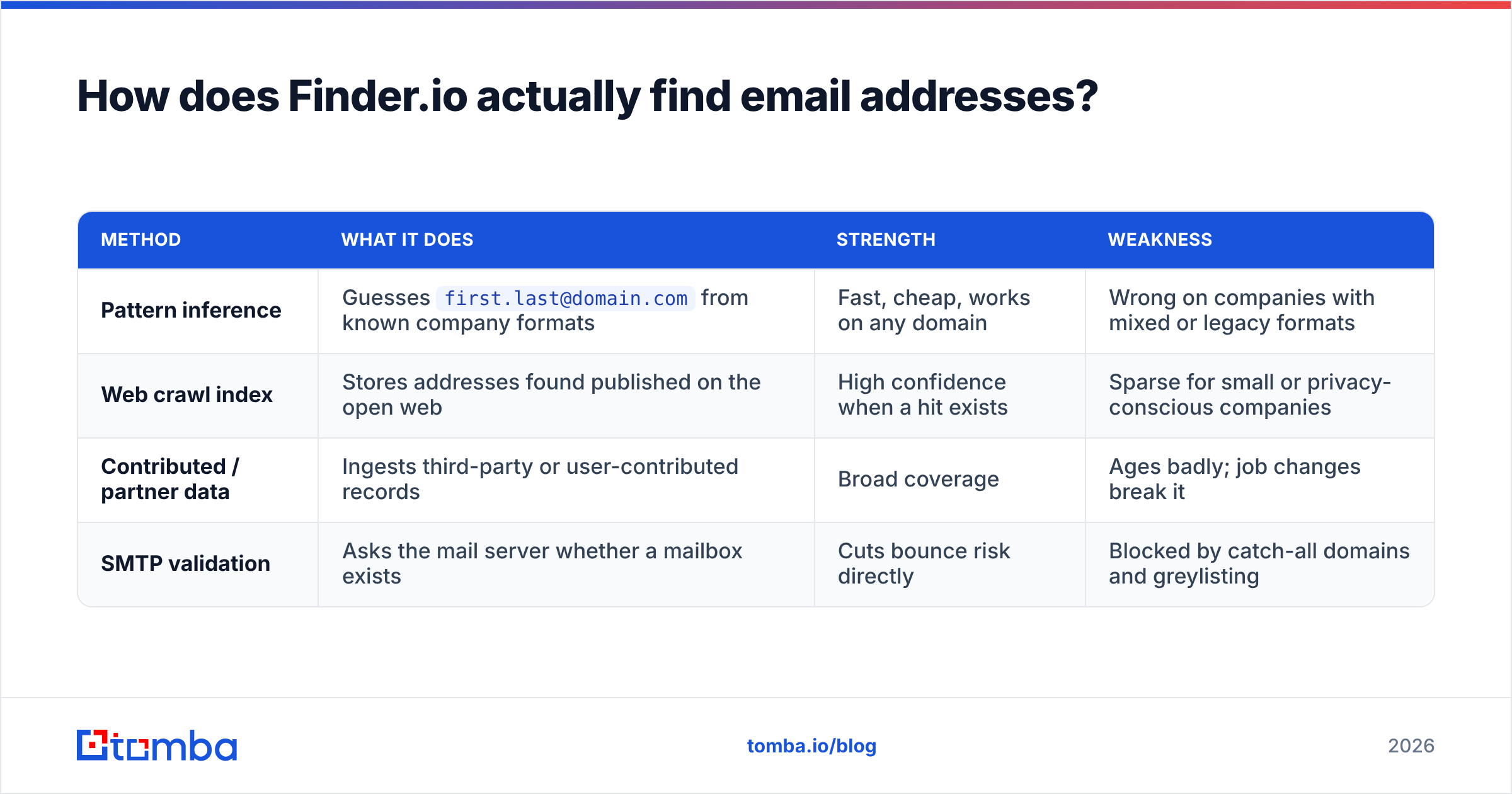
Every email finder does some blend of four things, and understanding the blend tells you more than any feature list.
| Method | What it does | Strength | Weakness |
|---|---|---|---|
| Pattern inference | Guesses first.last@domain.com from known company formats |
Fast, cheap, works on any domain | Wrong on companies with mixed or legacy formats |
| Web crawl index | Stores addresses found published on the open web | High confidence when a hit exists | Sparse for small or privacy-conscious companies |
| Contributed / partner data | Ingests third-party or user-contributed records | Broad coverage | Ages badly; job changes break it |
| SMTP validation | Asks the mail server whether a mailbox exists | Cuts bounce risk directly | Blocked by catch-all domains and greylisting |
Finder.io leans heavily on pattern inference plus verification. That combination is cheap to run. It works fine on mid-size companies with a predictable format. It struggles in the two places that matter most to outbound teams: startups with odd formats, and enterprises on catch-all domains, where SMTP checks return "accepted" for every address you throw at them.
If you are prospecting into catch-all-heavy segments — agencies, enterprise IT, a lot of European mid-market — you need a tool that treats catch-all as a distinct problem rather than marking everything "valid". Tools with a dedicated catch-all verifier apply extra signals before they let an address through. A bundled finder generally does not.
How accurate is Finder.io in practice?#
Finder.io reviews should lead with this question. Almost none do.
There is no independent audited accuracy figure for Finder.io. What exists is vendor-stated confidence scoring and scattered user reports. That gap is itself a signal. Dedicated email-finder vendors publish match rates and bounce guarantees, because their whole business depends on them. Suite vendors rarely do. The finder is one of fifty products, and nobody's renewal hinges on it.

This is where Finder.io reviews disagree most, so run your own test before you commit budget. Build the list yourself:
- Take 100 real prospects from your ICP, not a sample list the vendor provides.
- Include at least 20 small companies (under 50 employees). This is where pattern-guessing tools quietly collapse.
- Include at least 20 catch-all domains. Check first with a free email checker so you know which ones they are.
- Measure three numbers separately: match rate (how many addresses returned), verified rate (how many the tool calls valid), and actual bounce rate after you send.
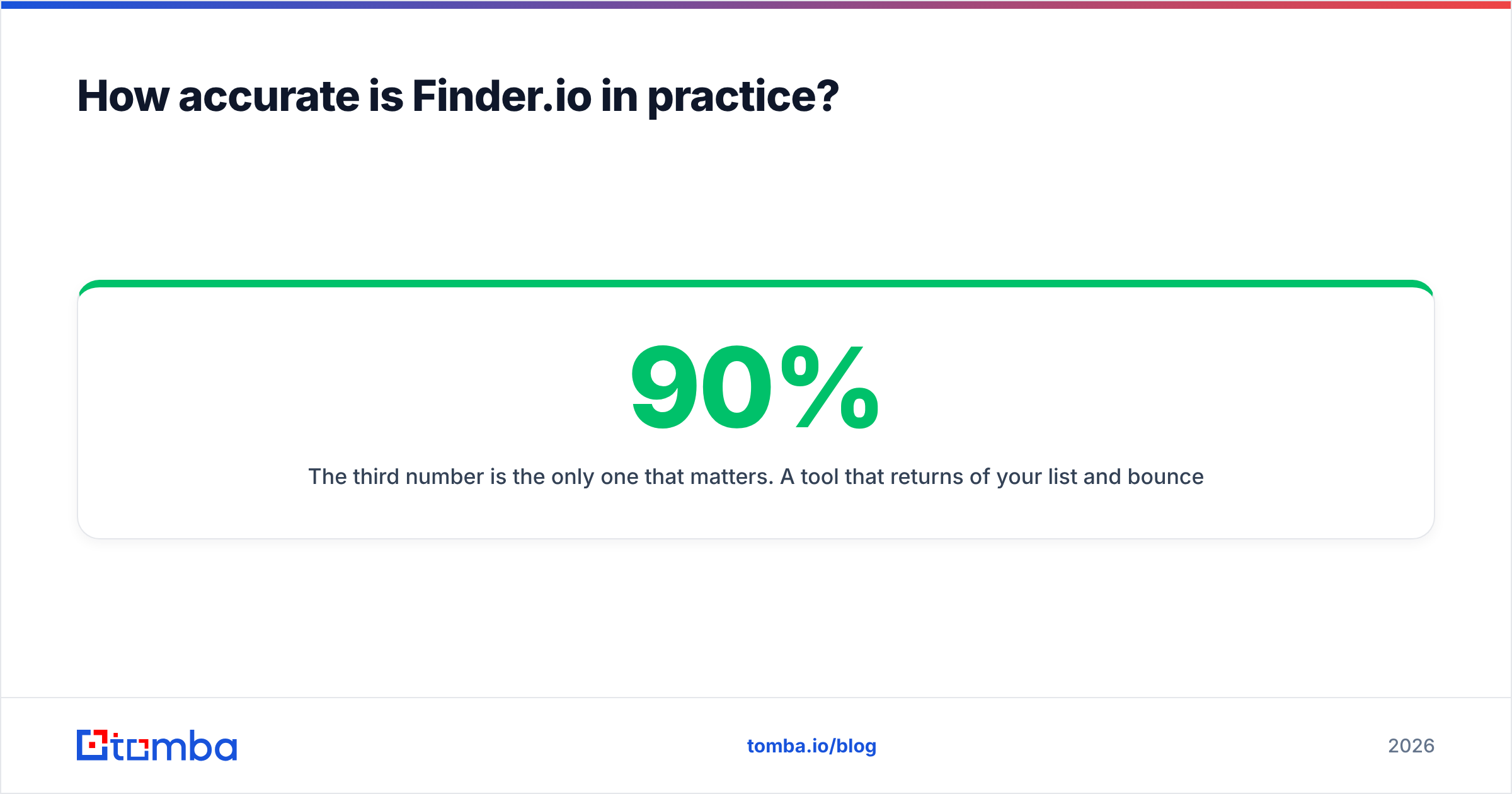
The third number is the only one that matters. A tool that returns 90% of your list and bounces 12% of it is worse than one that returns 70% and bounces 1%. Bounces damage your sender reputation, and that damage follows you across every later campaign.
In community reports, the common Finder.io pattern is decent coverage on well-known domains and thinner results on long-tail companies. That is the expected profile for a pattern-first finder. It is not a scandal — it is a design tradeoff you should price in.
What does Finder.io cost in 2026?#
Finder.io's pricing is inseparable from 500apps' pricing. The suite has historically sold on a flat per-user, per-month basis that unlocks the entire catalogue rather than metering each app individually, with credit allocations applied per tool. Verify the live number on their site before you buy — suite pricing has moved more than once.
Finder.io reviews rarely do the credit math, and the sticker price is not the point. The shape of the deal is:
- You pay per seat, not per credit. Great if you have one researcher doing a lot of lookups. Bad if you have eight reps who each need occasional access.
- Credits are allocated per app. Heavy email-finding use can exhaust the finder's allocation while your unused help-desk seats sit idle.
- Value depends on adoption. The bundle only beats point solutions if your team actually adopts three or more of the apps. In practice, most teams adopt one and forget the rest.
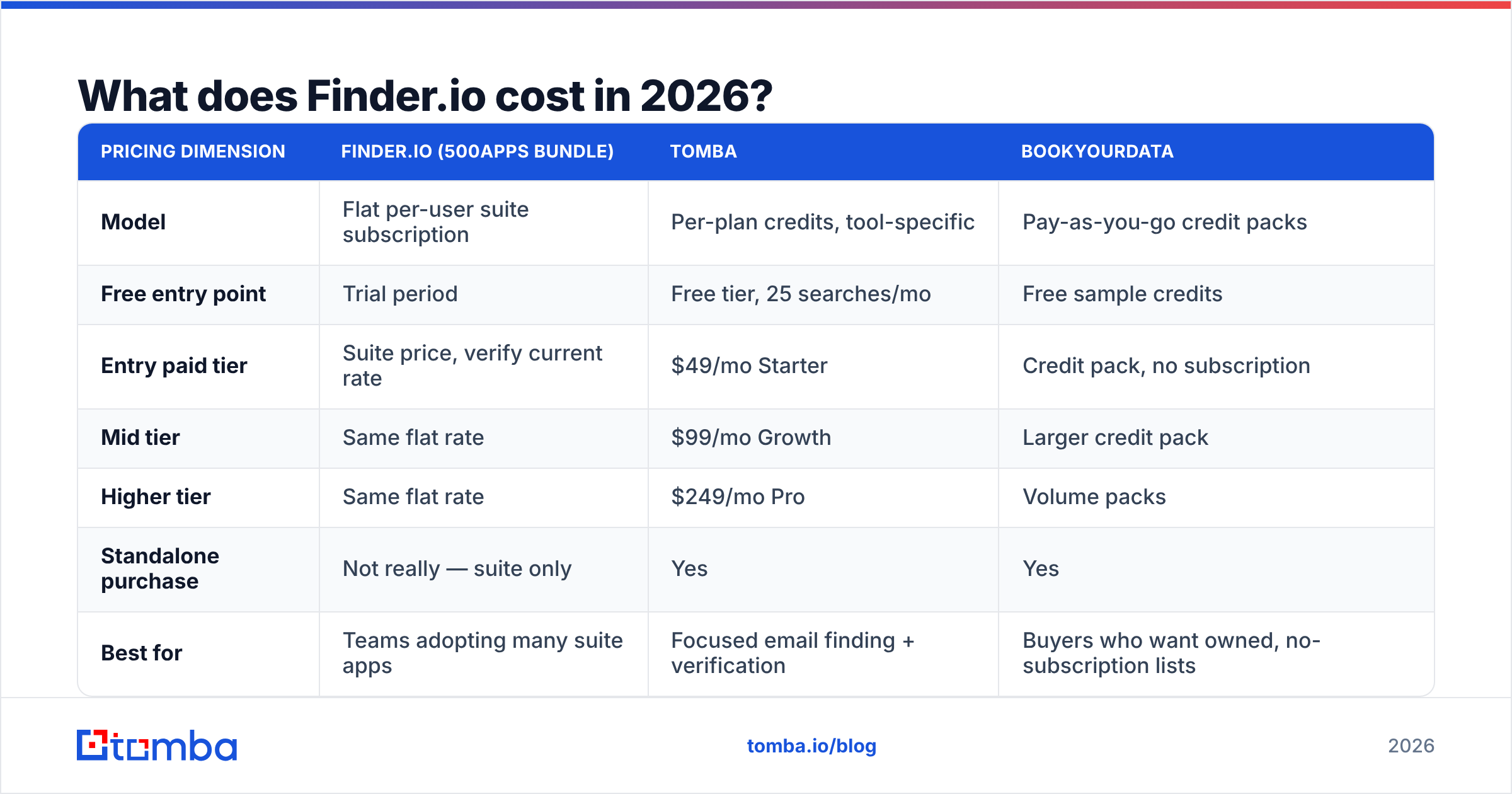
| Pricing dimension | Finder.io (500apps bundle) | Tomba | BookYourData |
|---|---|---|---|
| Model | Flat per-user suite subscription | Per-plan credits, tool-specific | Pay-as-you-go credit packs |
| Free entry point | Trial period | Free tier, 25 searches/mo | Free sample credits |
| Entry paid tier | Suite price, verify current rate | $49/mo Starter | Credit pack, no subscription |
| Mid tier | Same flat rate | $99/mo Growth | Larger credit pack |
| Higher tier | Same flat rate | $249/mo Pro | Volume packs |
| Standalone purchase | Not really — suite only | Yes | Yes |
| Best for | Teams adopting many suite apps | Focused email finding + verification | Buyers who want owned, no-subscription lists |
BookYourData deserves a fair mention here. Its pay-as-you-go model solves a different problem: you want a list, you buy it, you own it, and there is no monthly commitment to justify. That is a legitimately different buying motion from a credit subscription, and a good fit for one-off campaigns.
Full Tomba pricing is published per plan, including the free tier, so you can size it against your actual monthly lookup volume rather than a per-seat guess.
How does Finder.io compare to dedicated email finders?#

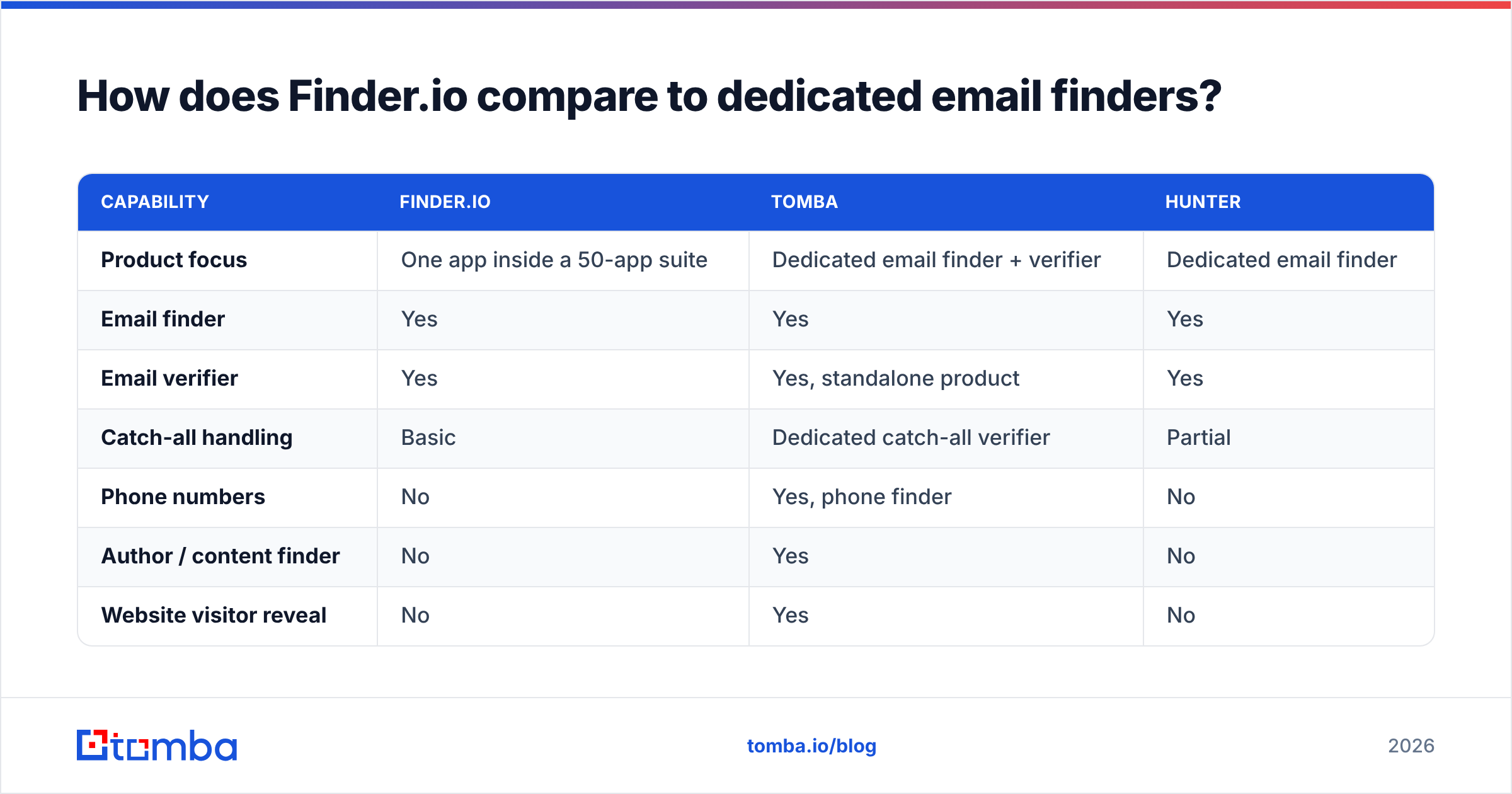
| Capability | Finder.io | Tomba | Hunter |
|---|---|---|---|
| Product focus | One app inside a 50-app suite | Dedicated email finder + verifier | Dedicated email finder |
| Email finder | Yes | Yes | Yes |
| Email verifier | Yes | Yes, standalone product | Yes |
| Catch-all handling | Basic | Dedicated catch-all verifier | Partial |
| Phone numbers | No | Yes, phone finder | No |
| Author / content finder | No | Yes | No |
| Website visitor reveal | No | Yes | No |
| Native spreadsheet add-ins | Limited | Excel + Google Sheets | Sheets |
| API | Yes | Yes, documented REST API | Yes |
| MCP / AI agent access | No | Yes | No |
| Free tier | Trial only | 25 searches/mo, ongoing | 25-50 searches/mo |
Most Finder.io reviews stop at the feature grid. The honest read is simpler: Finder.io is not trying to beat Hunter or Tomba on email finding. It is trying to make the email finder a reason to buy a suite. Judge it on that basis and it does its job. Judge it as a prospecting tool your revenue depends on and it comes up short on the specialised pieces — catch-all logic, phone data, enrichment depth, and the surrounding tooling like bulk email finder jobs and a proper email verifier you can point at lists from any source.

What do real users say in Finder.io reviews?#
Third-party review sites are where suite products get tested hardest, because the reviewer is rating the whole vendor relationship, not one feature.
Search Finder.io and 500apps on G2 and Capterra and you will see a recurring pattern in the low-star reviews, and it is rarely about the finder's UI:
- Support responsiveness. The most common complaint across suite vendors. When one team supports fifty products, ticket depth suffers.
- Feature depth per app. Reviewers describe individual apps as "80% there" — usable, but missing the last mile that a specialist covers.
- Billing and cancellation friction. Suite subscriptions are stickier to exit than a month-to-month credit plan. Read the terms.
- Data freshness. Reviewers report addresses for people who have changed roles, which is the standard decay problem for any database that is not continuously re-crawled.
The positive reviews are consistent too, and they are worth taking seriously. Buyers who genuinely use five or six of the apps describe the bundle as excellent value, and they are right. That is the whole thesis of the product.
The Finder.io reviews that matter are the recent ones. Sort by "most recent" rather than "most helpful". Suite products change fast, and a glowing 2023 review tells you very little about the 2026 product.
Who should use Finder.io — and who should not?#
Finder.io is a good fit if:
- You are a small business or solo operator who needs several categories of software at once and one predictable invoice.
- Your email volume is modest — a few hundred lookups a month, not tens of thousands.
- Your prospects are mid-size companies with predictable email formats.
- You value consolidation over best-in-class in any single category.
Look elsewhere if:
- Outbound is a primary revenue channel and bounce rate directly affects your numbers.
- You prospect into small companies, startups, or catch-all-heavy domains.
- You need phone numbers, enrichment, or LinkedIn-sourced contacts alongside emails.
- You want the finder embedded in engineering workflows — an API, a CLI, spreadsheet add-ins, or an MCP server your AI agents can call.
- Your team is large enough that per-seat suite pricing multiplies faster than credit pricing.
That last point catches a lot of buyers. Per-seat bundles look cheap at two users and get expensive at fifteen, especially when only three of those people ever open the email finder.
What are the best Finder.io alternatives in 2026?#
Many Finder.io reviews end with an affiliate list. These are the categories actually worth evaluating if the bundle logic does not apply to you:
- Dedicated finder + verifier (Tomba, Hunter). Best match rates, deepest verification, published free tiers so you can test before paying. Pick this if outbound accuracy drives revenue.
- Pay-as-you-go list vendors (BookYourData). No subscription, you buy and own the records. Strong choice for one-off campaigns or agencies billing per project.
- Full sales-engagement platforms (Apollo, Outreach). Data plus sequencing plus dialer in one. Heavier and pricier, but you stop stitching tools together. See the Apollo alternative breakdown if you are weighing that path.
- API-first enrichment. If you have engineers, an email finder API plus your own orchestration beats any UI, because you control the waterfall and the caching.
Whichever route you take, run the same 100-prospect test across two or three finalists before you sign anything annual. Vendors' published match rates are measured on their own sample sets. Yours is the only sample that matters.
Finder.io reviews: what is the final verdict?#
Finder.io is a competent, unremarkable email finder attached to an interesting pricing model. If the suite fits how you buy software, the finder is a reasonable bonus and the bundle will pay off. If you came for the email finder alone, you are buying a side feature from a vendor whose attention is spread across dozens of products. Expect side-feature depth on match rate, catch-all handling, and support.
Test it against a specialist on your own list. If the match and bounce numbers come out close, take the bundle and enjoy the savings. If they do not — and on long-tail domains they usually will not — the cheaper tool turns out to be the expensive one, because every bounce costs you domain reputation you cannot buy back.
Ready to benchmark it properly? Run your next 25 prospects through the Tomba Email Finder on the free tier, compare match rate and bounce rate against whatever you are using now, and let the numbers decide. No seat commitment, no fifty apps you will never open — just the addresses, verified, with a clear upgrade path at $49/mo when your volume justifies it.
Related guides#
Ready to find emails that actually work?
Join 150,000+ professionals who stopped guessing and started sending. Free credits on signup — no credit card required.
Get the Tomba newsletter
Practical outbound tactics and product updates — once every two weeks.
About the author