FindThatLead vs FindEmails.com (Toofr): 2026 Comparison
Two of the oldest email finders still standing, priced very differently. We compare FindThatLead and FindEmails.com (formerly Toofr) on hit rate, credits, verification depth, and who each one actually suits in 2026.
FindThatLead vs FindEmails.com comes down to one choice: a full prospecting suite, or a cheap, no-frills email finder. Below we compare both on hit rate, credits, verification depth, and real cost per contact in 2026.
TL;DR
- FindThatLead is a prospecting suite: email finder, domain scraper, lead search, and a built-in cold email sender. You pay for the whole bundle even if you never send from it.
- FindEmails.com (the tool once known as Toofr) is the opposite. It is a narrow, cheap, credit-based finder with a spreadsheet-first workflow and little else around it.
- Want one seat to prospect and send? FindThatLead is the more complete package. Just need addresses added to a list you already have? FindEmails.com costs less per credit.
- Neither vendor publishes an audited accuracy number. Both charge credits for results that come back guessed or unverifiable, and that is where most of the real cost hides.
- If verification depth, catch-all handling, and API access matter more than a bundled sender, a dedicated finder like Tomba Email Finder does the same job with clearer verification states.
FindThatLead vs FindEmails.com: what are they?#
Two tools from the same era of B2B data, built on opposite philosophies.
FindThatLead launched in Barcelona and grew into a prospecting suite. It bundles an email finder, a domain search that returns every address it knows at a company, a "Prospector" that filters by role and geography, a Chrome extension, a lead scraper, and Sender, a cold email sequencer that sends from your own mailbox. The pitch is simple: a solo founder or a two-person SDR team can run the whole top of funnel in one login. You can see the current feature set on the FindThatLead site.
FindEmails.com started life as Toofr, one of the first email-finding APIs on the market, and later moved to the plainer domain. It does one thing. You give it a name and a company, or a CSV of them, and it returns a best-guess address with a confidence score. There is no sequencer, no CRM, no intent data, no visitor tracking. The FindEmails.com product page is short because the product is short. That is the appeal, and the ceiling.
The real question is not "which is better." It is which failure mode you can live with: paying for suite features you never touch, or paying less and stitching the rest of your stack together yourself.
FindThatLead vs FindEmails.com: feature comparison#
Here is the side-by-side on what each tool actually ships. Feature sets change, so check both vendor pages before you buy on the strength of a table you read on a blog.
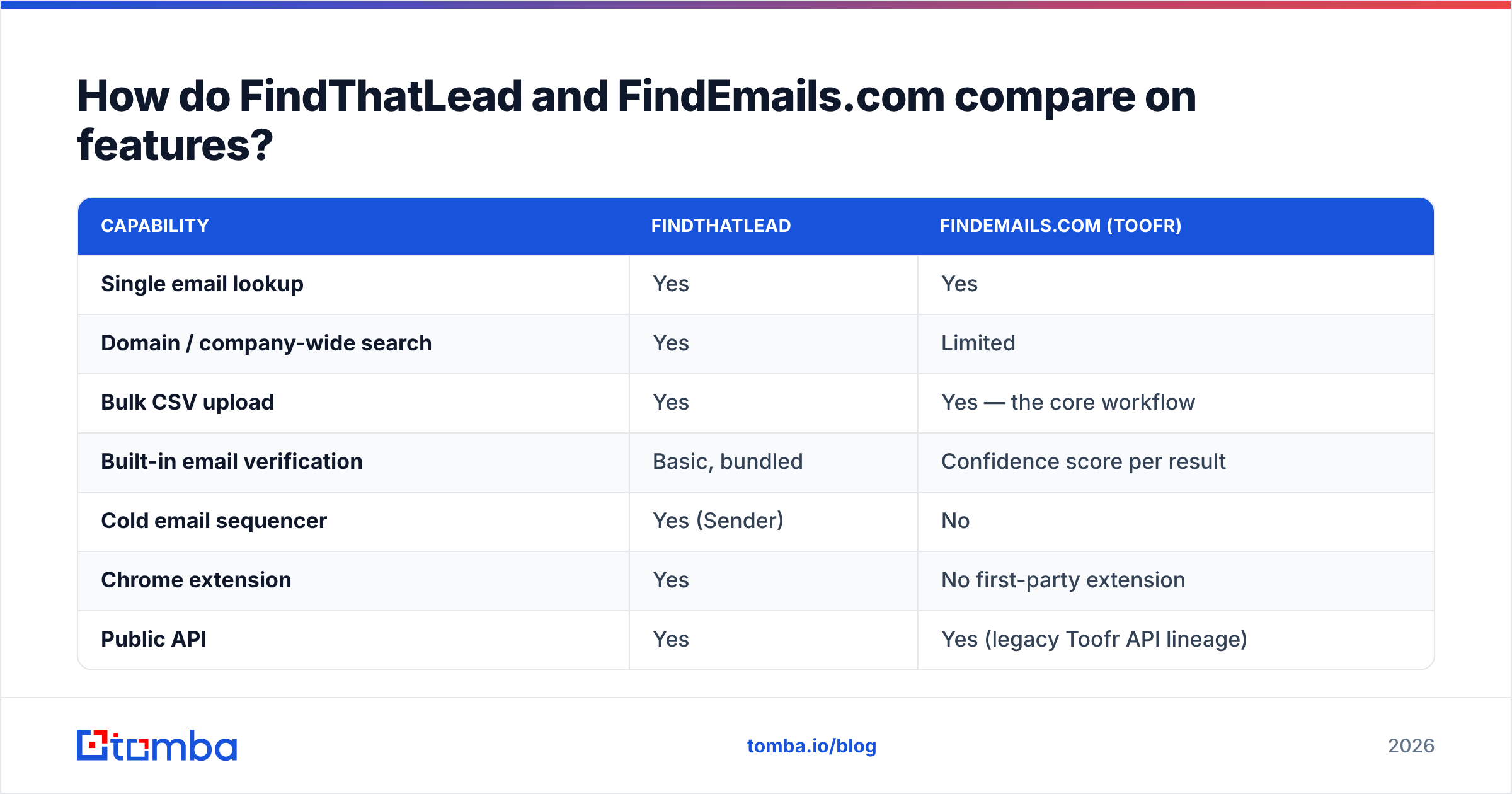
| Capability | FindThatLead | FindEmails.com (Toofr) |
|---|---|---|
| Single email lookup | Yes | Yes |
| Domain / company-wide search | Yes | Limited |
| Bulk CSV upload | Yes | Yes — the core workflow |
| Built-in email verification | Basic, bundled | Confidence score per result |
| Cold email sequencer | Yes (Sender) | No |
| Chrome extension | Yes | No first-party extension |
| Public API | Yes | Yes (legacy Toofr API lineage) |
| Lead search by role/geo | Yes (Prospector) | No |
| Phone numbers | No | No |
| Free trial credits | Yes, limited | Yes, limited |
The spread shows the positioning right away. FindThatLead is a workflow product with a data layer attached. FindEmails.com is a data layer with a CSV button attached.
That matters for your budget. A suite charges you for breadth. If you already run Instantly, Smartlead, or a Salesloft-class sequencer, FindThatLead's Sender is dead weight on your invoice. Buy FindEmails.com because it is cheap and you still need a verifier, an enrichment step, and a sender bolted on. The cheap total stops being cheap around the third subscription.
Which one finds more valid emails?#
Neither vendor publishes an audited hit rate. Treat every marketing percentage on either site as a claim, not a measurement. What you can control is how you test.

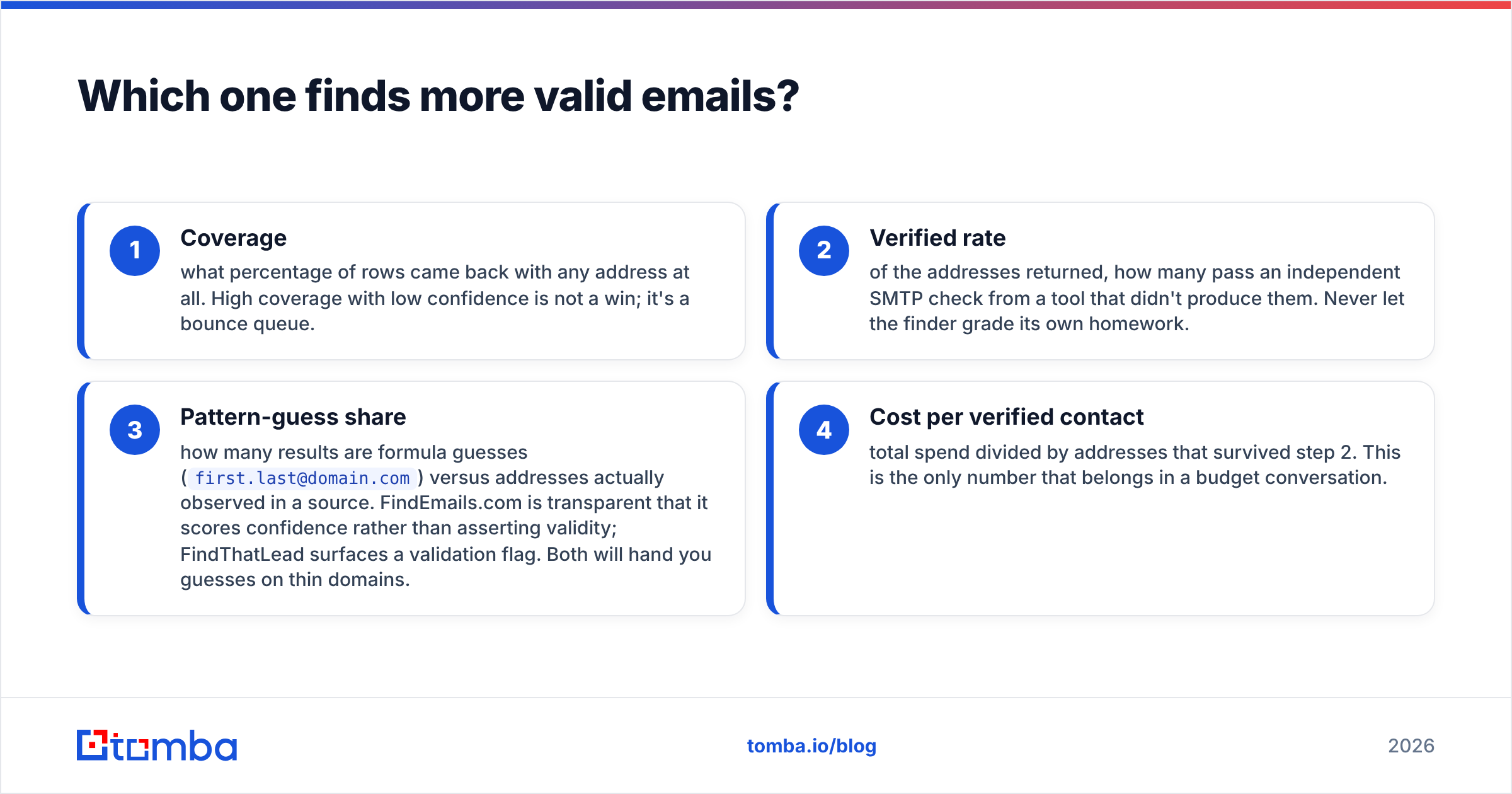
Run the same 200-contact sample through both tools and score four things:
- Coverage — what share of rows came back with any address at all. High coverage with low confidence is not a win; it is a bounce queue.
- Verified rate — of the addresses returned, how many pass an independent SMTP check from a tool that did not produce them. Never let the finder grade its own homework.
- Pattern-guess share — how many results are formula guesses (
first.last@domain.com) rather than addresses observed in a real source. FindEmails.com is upfront that it scores confidence instead of asserting validity. FindThatLead surfaces a validation flag. Both will hand you guesses on thin domains. - Cost per verified contact — total spend divided by addresses that survived step 2. This is the only number that belongs in a budget conversation.
In community testing across B2B tool categories on G2, one pattern repeats. Suite tools tend to win on coverage of well-known mid-market domains. Narrow finders hold up better on obscure or small-business domains, where scraped sources are thin. Your own vertical decides which matters. If you sell to 5,000-person enterprises, coverage is easy and verification is the differentiator. If you sell to 12-person agencies, coverage collapses first.
One structural caveat applies to both tools: neither has a strong story on catch-all domains. When a mail server accepts every address at a domain, SMTP verification returns "accepted" for a nonsense mailbox too.
Around a fifth of B2B domains behave this way in most lists we have seen. A finder that reports them as valid is quietly padding its own accuracy number. A dedicated catch-all verifier is the only way to separate a real mailbox from a permissive server.
FindThatLead vs FindEmails.com pricing in 2026#
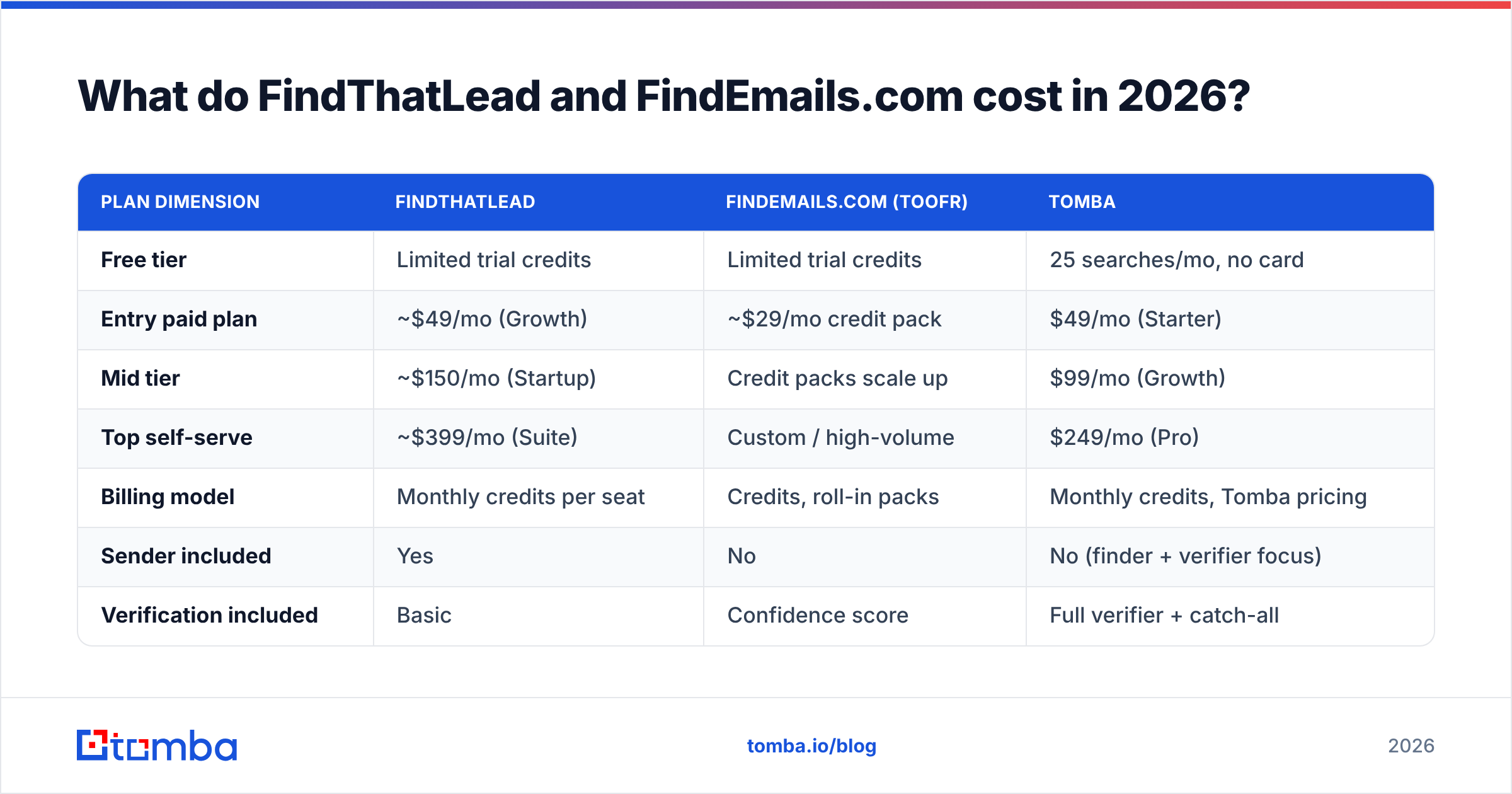
Both vendors have repriced more than once, and both keep promo and lifetime-deal alumni on legacy plans. The shape below reflects publicly listed pricing at the time of writing. Confirm on the vendor pages before you commit.
| Plan dimension | FindThatLead | FindEmails.com (Toofr) | Tomba |
|---|---|---|---|
| Free tier | Limited trial credits | Limited trial credits | 25 searches/mo, no card |
| Entry paid plan | ~$49/mo (Growth) | ~$29/mo credit pack | $49/mo (Starter) |
| Mid tier | ~$150/mo (Startup) | Credit packs scale up | $99/mo (Growth) |
| Top self-serve | ~$399/mo (Suite) | Custom / high-volume | $249/mo (Pro) |
| Billing model | Monthly credits per seat | Credits, roll-in packs | Monthly credits, Tomba pricing |
| Sender included | Yes | No | No (finder + verifier focus) |
| Verification included | Basic | Confidence score | Full verifier + catch-all |
Read that table with two questions in mind.
First: are you paying for the sender twice? FindThatLead's mid and top tiers price in a sequencer. If your team already pays for one, you are funding a duplicate.
Second: what does a credit actually buy? This is where credit-based finders diverge most. Some charge only when an address is returned. Some charge on every attempt. Some charge separately for the find and the verify.
A $29 plan that bills failed lookups can cost more per usable contact than a $49 plan that does not. Ask support to put the answer in writing before you upgrade. It is a one-sentence question that has saved teams four figures a year.
How do they handle verification and catch-all domains?#
Finding is the easy half. The expensive half is knowing whether what you found will bounce.
- FindThatLead validates during the find and shows a status on results. It is fine for a first pass, but it is not a standalone verification product. Most teams still push the export through a separate verifier before loading a sequencer.
- FindEmails.com returns a confidence score rather than a binary verdict. That is honest, since it tells you the address is a scored guess. It also pushes the decision onto you. A score of 80 means nothing until you set your own bounce tolerance.
- Neither offers real catch-all resolution. Neither exposes a verification-only API tier at a price that makes sense for cleaning a list you sourced elsewhere.
B2B contact data decays roughly 25–30% a year through job changes alone. If you maintain a list over time, verification is a recurring job, not a one-time step at purchase. Running exports through a standalone email verifier each quarter does more for email deliverability than any amount of finder shopping.

Which tool fits your workflow?#
Match the tool to how you actually work, not to the feature grid.
- Solo founder doing everything in one tab — FindThatLead. The Prospector-to-Sender loop means you never export a CSV, and for a one-person motion that saved friction is worth real money.
- Agency appending emails to client-supplied lists — FindEmails.com. You already have the names and companies. You need addresses cheaply, in bulk, with no seat sprawl. The CSV workflow is the whole job.
- SDR team with an existing sequencer — Neither, at list price. You want a finder that is strong on API and verification and cheap on everything else. Keep the sequencer your team already knows.
- RevOps enriching a CRM on a schedule — API-first only. Manual UI exports do not survive contact with a weekly sync. Look at data enrichment endpoints and rate limits before you look at UI screenshots.
- Recruiter or researcher chasing individuals, not companies — Neither is ideal. Both are tuned for company-domain patterns, and person-first search is a different index.
Where do both tools fall short?#
Three gaps show up repeatedly in reviews of both products. They are worth naming before you sign anything.
Credit transparency. Both use credits, and neither makes it obvious in-app what a failed lookup costs. Track your own cost per verified contact for a month. The dashboard number and the useful number rarely match.
Catch-all and role-address handling. info@, sales@, and contact@ are cheap to find and worthless to email. If a finder counts them toward your hit rate, that rate is inflated. Check what share of your export is role-based before you celebrate coverage.
Data provenance. Neither vendor publishes a detailed sourcing statement. If you sell into the EU or face procurement security reviews, "where did this address come from" is a question you will eventually answer in writing. Vendors that publish their data sources make that conversation shorter.

What are the best alternatives to consider?#
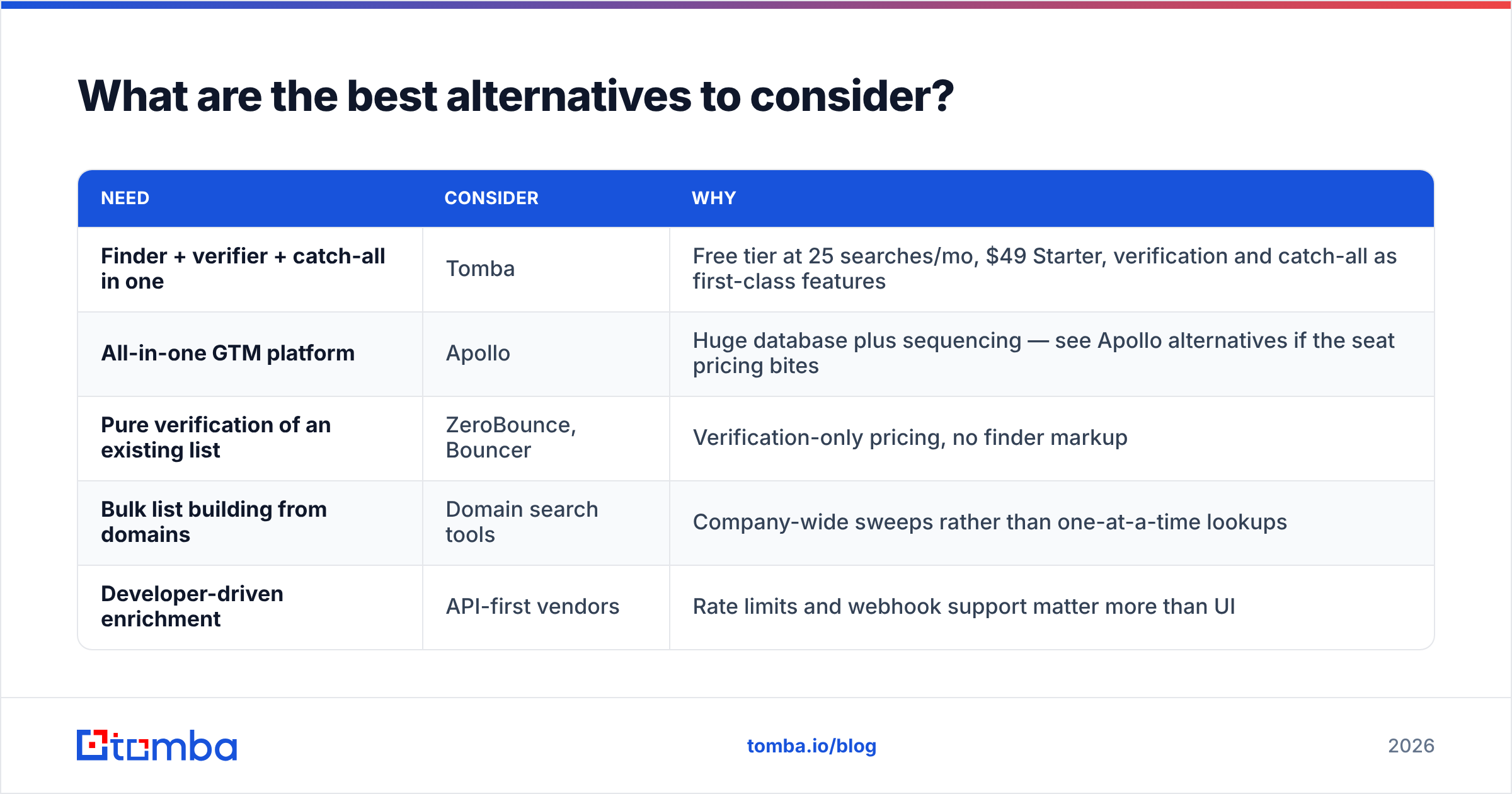
If neither shape fits, the field is wider than these two.
| Need | Consider | Why |
|---|---|---|
| Finder + verifier + catch-all in one | Tomba | Free tier at 25 searches/mo, $49 Starter, verification and catch-all as first-class features |
| All-in-one GTM platform | Apollo | Huge database plus sequencing — see Apollo alternatives if the seat pricing bites |
| Pure verification of an existing list | ZeroBounce, Bouncer | Verification-only pricing, no finder markup |
| Bulk list building from domains | Domain search tools | Company-wide sweeps rather than one-at-a-time lookups |
| Developer-driven enrichment | API-first vendors | Rate limits and webhook support matter more than UI |
The honest summary on FindThatLead vs FindEmails.com: FindThatLead wins if you want one bill and one login for prospecting plus sending, and you will genuinely use the sender. FindEmails.com wins if your job is appending addresses at the lowest per-credit cost and you already have the rest of the stack. Neither wins on verification depth, and that is the variable that decides whether your campaigns land in the inbox or the spam folder.
How should you run the test before you buy?#
Do not take anyone's word for it, including this post's. Spend an afternoon:
- Pull 200 real target contacts from your ICP, not a demo list of Fortune 500 CEOs.
- Run the same file through both free tiers.
- Verify every returned address with a third, independent tool.
- Divide spend by verified results. Compare that number, and only that number.
Four steps, one afternoon, and it settles the argument with data from your market instead of someone else's benchmark.
Ready to run that test? Start with Tomba Email Finder. The free tier gives you 25 searches a month with no card. Verification and catch-all detection are built in rather than sold separately, and paid plans start at $49/mo with a full API if you outgrow the UI. Put it in the same bake-off against FindThatLead and FindEmails.com, score cost per verified contact, and let the spreadsheet pick the winner.
Related guides#
Ready to find emails that actually work?
Join 150,000+ professionals who stopped guessing and started sending. Free credits on signup — no credit card required.
Get the Tomba newsletter
Practical outbound tactics and product updates — once every two weeks.
About the author