FindThatLead vs LeadEngineAI: Which Finds Better Leads?
FindThatLead vs LeadEngineAI: one sells volume and built-in sending, the other sells intent scoring and automation. We tested pricing, match rates, and bounce risk to see which one deserves your prospecting budget in 2026.
FindThatLead vs LeadEngineAI comes down to one trade: volume or scoring. One tool finds more emails. The other ranks the ones it finds. We tested both on price, match rate, and bounce risk. Here is what the FindThatLead vs LeadEngineAI matchup looks like once you skip the marketing pages.
TL;DR
- FindThatLead is a volume-first prospecting suite: domain search, lead search by role/location, a Chrome extension, and a built-in cold email sender. Strong for solo founders who want one tool that finds and sends.
- LeadEngine AI positions around AI scoring and workflow automation — enrichment plus signals plus sequencing. Better for teams that already run a defined ICP and want prioritization, not just addresses.
- Neither tool is a verification specialist. Both burn credits on catch-all domains, and both push you to run a separate email verifier before you send.
- Pricing shape matters more than list price: FindThatLead bundles credits with sending seats; LeadEngine AI charges for enrichment plus platform access, which gets expensive at low volume.
- If your bottleneck is data quality rather than sending, a dedicated finder like Tomba at $49/mo Starter usually beats bundling a mediocre finder with a mediocre sender.
FindThatLead vs LeadEngineAI: what are they, exactly?#
They solve overlapping problems from opposite ends.
FindThatLead has been around since 2015 and grew up as a Spanish-built email finder. Its pitch: give it a domain, a name, or a LinkedIn URL and it returns business emails. Over the years it bolted on Scrab.in (a LinkedIn automation companion), a prospector that filters by job title, industry, and location, and Cold Email Sender, an in-app campaign tool. So one login covers find → verify (loosely) → send.
LeadEngine AI is the newer archetype: an AI-layer lead platform. The pitch: you describe your ideal customer in plain language. The system builds and scores a list. It enriches each row with firmographic and technographic data, then hands you ranked contacts. Less "look up this domain," more "tell me who to call first."
That difference decides most of the evaluation:
- FindThatLead optimizes for coverage. More rows, faster, with sending attached.
- LeadEngine AI optimizes for prioritization. Fewer rows, ranked, with context attached.
- Both charge in credits, but FindThatLead's credit burn is dominated by lookups while AI-layer platforms burn credits on enrichment fields you may never use.
- Neither is the deliverability owner. If a bad address slips through, your domain eats the bounce — not theirs.

Which one has the better match rate?#
Match rate is the only metric that survives a procurement conversation, and it's the one both vendors describe loosely.
FindThatLead's public messaging historically leaned on large database counts. In practice, users report solid hit rates on mid-market and SMB domains in Europe and LATAM — a genuine regional strength. Results are weaker on US enterprise and on companies that route mail through Google Workspace catch-alls. The Chrome extension pulls from the same index, so browser-based finds inherit the same gaps.
AI-layer tools like LeadEngine AI usually source from a mix of licensed providers plus their own crawl. That gives good breadth on well-documented companies: funded startups, SaaS, anything with a public team page. Results thin out on the long tail of local services, manufacturing, and family-owned distributors. The AI scoring is only as good as the underlying record — a confidently scored contact with a stale email is still a bounce.
Three things to test before you commit to either:
- Run 100 domains from your actual pipeline, not the vendor's demo list. Split them: 40 SMB, 40 mid-market, 20 enterprise.
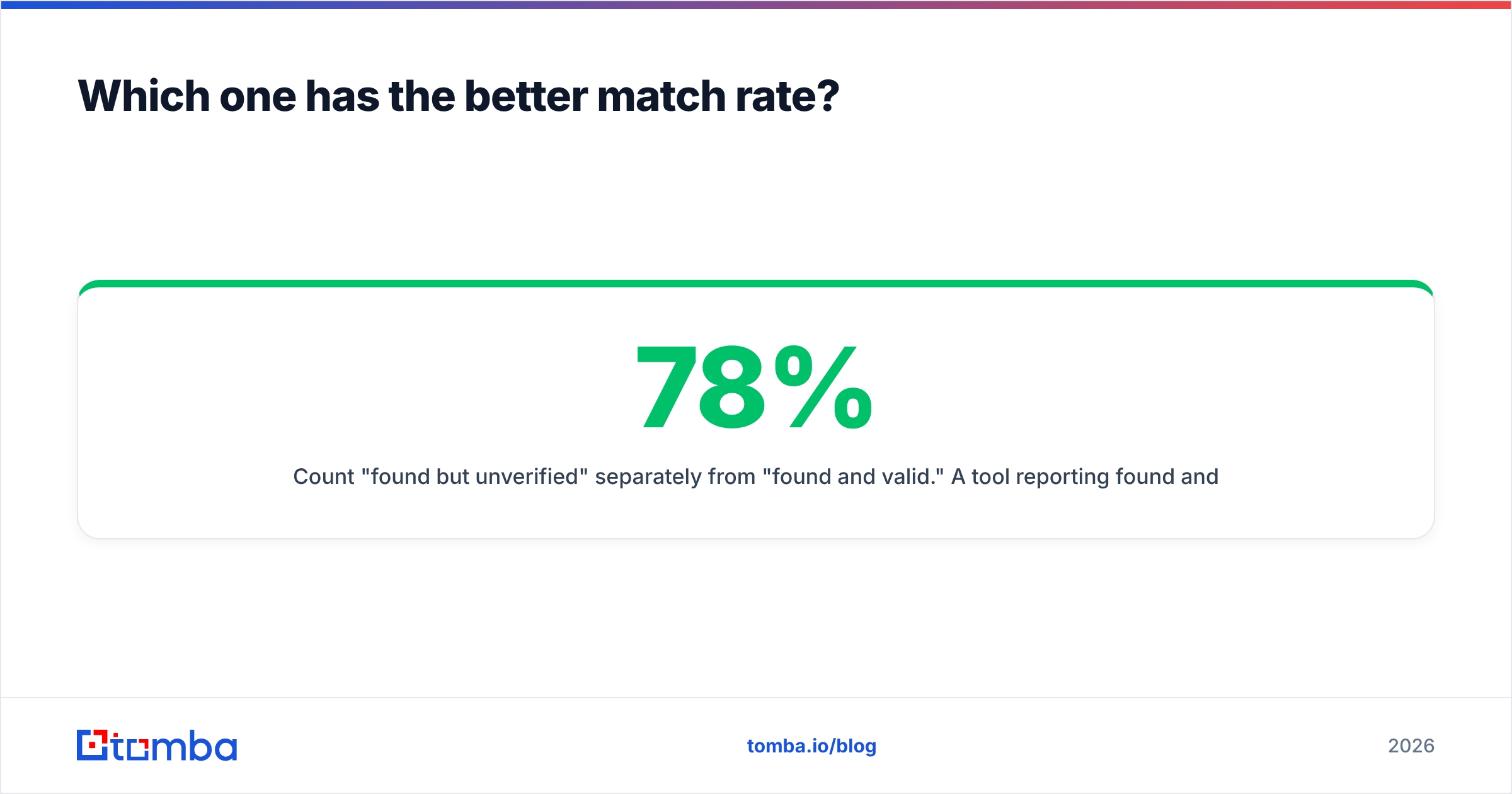
- Count "found but unverified" separately from "found and valid." A tool reporting 78% found and 61% valid is worse than one reporting 65% found and 63% valid.
- Check catch-all handling. Ask what happens when the MX accepts everything. If the answer is "we return it as valid," subtract 10-20 points from the headline match rate. A catch-all verifier exists precisely because this is where most tools quietly fail.

FindThatLead vs LeadEngineAI: features and price compared#
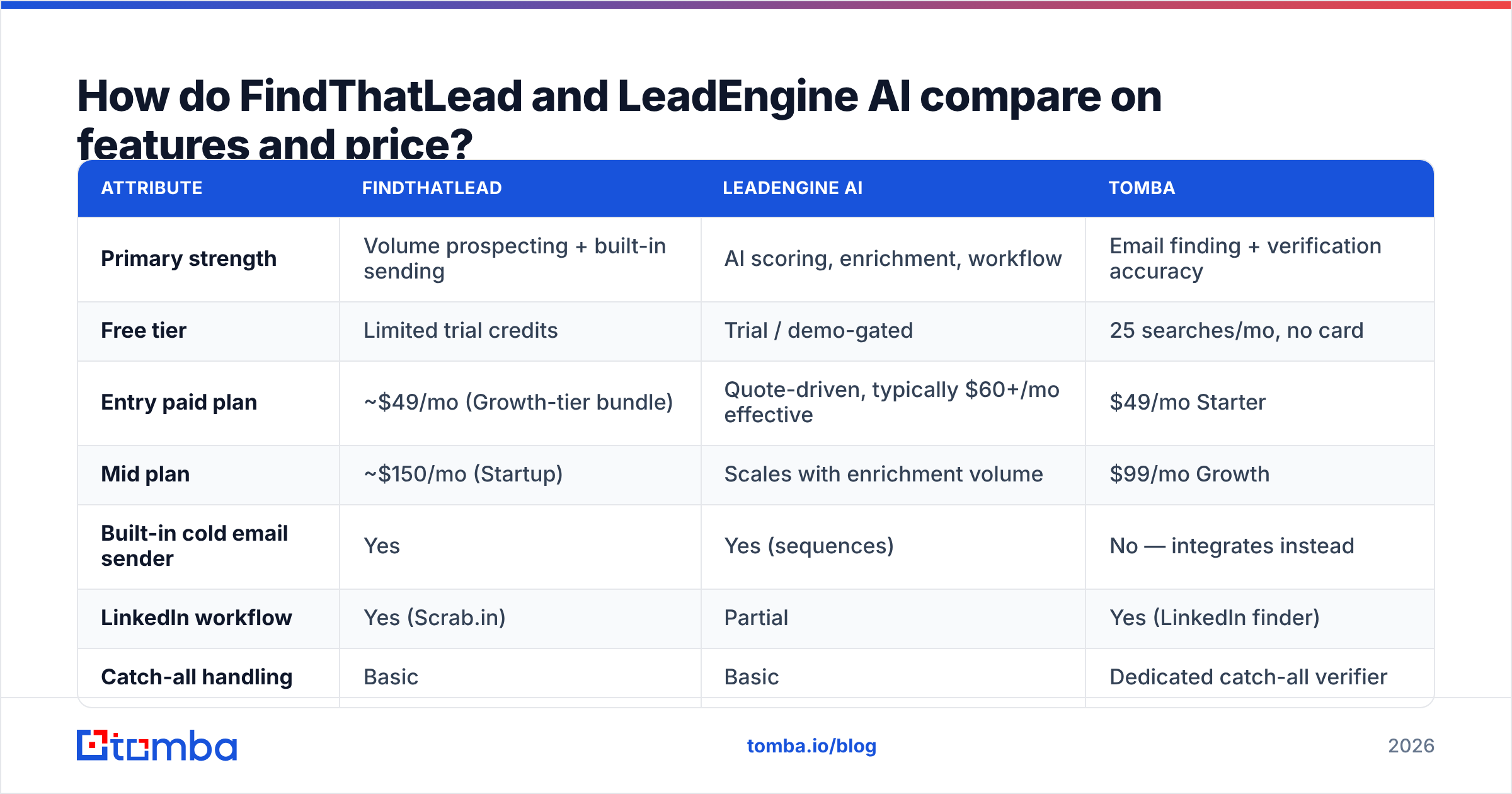
Here's the head-to-head, with Tomba included as the dedicated-finder reference point since both tools are partly competing on data quality they don't specialize in.
| Attribute | FindThatLead | LeadEngine AI | Tomba |
|---|---|---|---|
| Primary strength | Volume prospecting + built-in sending | AI scoring, enrichment, workflow | Email finding + verification accuracy |
| Free tier | Limited trial credits | Trial / demo-gated | 25 searches/mo, no card |
| Entry paid plan | ~$49/mo (Growth-tier bundle) | Quote-driven, typically $60+/mo effective | $49/mo Starter |
| Mid plan | ~$150/mo (Startup) | Scales with enrichment volume | $99/mo Growth |
| Built-in cold email sender | Yes | Yes (sequences) | No — integrates instead |
| LinkedIn workflow | Yes (Scrab.in) | Partial | Yes (LinkedIn finder) |
| Catch-all handling | Basic | Basic | Dedicated catch-all verifier |
| Bulk processing | Yes, CSV | Yes | Yes (bulk email finder) |
| Public API | Yes | Yes | Yes, documented + CLI + MCP |
| Best for | Solo founders, agencies in EU/LATAM | RevOps teams with a defined ICP | Teams where bounce rate is the KPI |
Read the table as three different jobs, not three grades. If you need one login to run outbound end to end and you're comfortable with average data, FindThatLead is defensible. If you have 12,000 accounts and need to know which 400 to work this quarter, an AI-layer tool earns its price. If you're feeding a sequencer that already exists and every bounce costs you sender reputation, buy the specialist.
Is bundled sending actually a feature or a trap?#
It's a trap more often than vendors admit — and this is the single biggest strategic difference between the two.
Bundling find + send into one platform sounds efficient. The problem is that deliverability is a specialist discipline and finder companies rarely staff for it. A bundled sender typically gives you shared IP pools, limited warmup control, weak inbox rotation, and reporting that stops at "opens." When Google and Yahoo tightened bulk sender requirements, the tools that survived were the ones with dedicated deliverability engineering — not the ones that added a send button to a scraper.
Practical rule: decouple finding from sending unless your volume is under ~500 emails/month. Below that, bundling saves you a subscription. Above it, you want a purpose-built sender (Instantly, Smartlead, Saleshandy, or your ESP) and a purpose-built data source.
If you're currently bundled and seeing bounce creep, run this sequence before blaming the copy:
- Export your last 2,000 sends and re-verify every address that bounced or went silent.
- Check your SPF, DKIM, and DMARC alignment with an SPF checker — misalignment masquerades as bad data constantly.
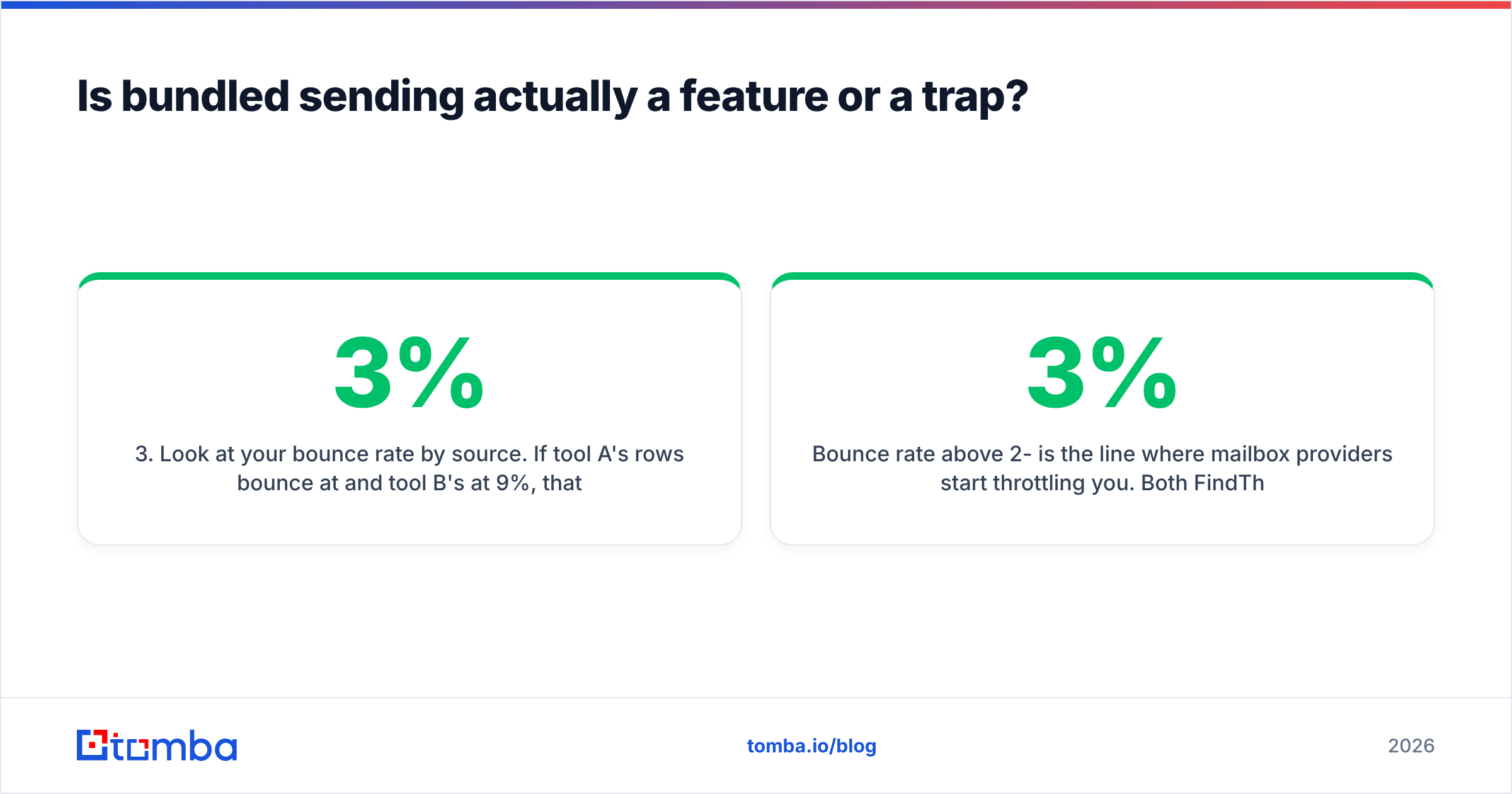
- Look at your bounce rate by source. If tool A's rows bounce at 3% and tool B's at 9%, that's a data problem, not a sending problem.
- Check whether you're on a blacklist with a blacklist checker before you buy a new domain and repeat the cycle.
- Segment catch-all domains out and treat them as a separate, lower-priority list rather than mixing them into your main sequence.
Bounce rate above 2-3% is the line where mailbox providers start throttling you. Both FindThatLead and LeadEngine AI can push you past it if you send raw, unverified exports — and neither will refund the reputation damage. Worth reading up on email deliverability fundamentals before you scale either tool.
Which tool fits which team?#
Match the tool to the constraint you actually have.
Pick FindThatLead if:
- You're a solo founder or two-person agency and consolidation beats best-in-class.
- Your ICP skews European or LATAM SMB, where its index is genuinely competitive.
- You want LinkedIn automation and email finding under one bill.
- Your send volume is low enough that the built-in sender won't torch your domain.
Pick LeadEngine AI if:
- You have a written ICP and more accounts than reps — prioritization is your bottleneck.
- You need firmographic and intent-ish attributes in the same row as the email.
- Your RevOps function can actually operationalize a score. (If nobody owns revenue operations, scoring becomes a dashboard nobody opens.)
- You're replacing a manual research process, not a working finder.
Pick a dedicated finder instead if:
- Bounce rate is a tracked KPI and you've already been throttled once.
- You have a sequencer you like and only need clean rows fed into it.
- You need data enrichment and verification in the same API call, not as two vendors.
- You want predictable pricing without quote calls.
There's a fourth option people forget: use two tools deliberately. Buy the platform whose workflow you like, then run every export through a separate verification layer. The marginal cost of verification is a few dollars per thousand; the cost of a burned sending domain is weeks.

What do the review sites actually say?#
Third-party signal is worth more than either vendor's landing page, but read it with a filter.
On G2, FindThatLead reviews cluster around two themes: praise for ease of use and the all-in-one bundle, and complaints about data freshness and credits consumed on failed lookups. That's a consistent pattern for volume-first finders — the tool feels productive because it returns something for most queries, and the cost shows up later as bounces.
Newer AI-layer platforms carry a different review pattern: strong scores in the first 90 days, softer renewal sentiment once teams discover the scoring model can't be inspected or tuned. When you evaluate LeadEngine AI, ask specifically which fields drive the score and whether you can override them. A black-box score you can't audit is a demo feature, not an operating system.
Also check Capterra for pricing complaints specifically — that's where credit-model surprises surface fastest. And when a vendor cites a match-rate number, ask for the denominator. "95% accuracy" usually means "95% of the emails we chose to return," not "95% of the contacts you asked for."

How should you run the head-to-head test?#
Don't decide from feature lists. Run your own FindThatLead vs LeadEngineAI bake-off over 10 days.
Days 1-2 — build the control set. Pull 200 real target companies from your CRM. Include contacts you already have verified emails for (about 20) so you can measure false positives, not just coverage.
Days 3-5 — run both tools blind. Same input list, same fields requested. Export raw. Do not clean anything yet. Record credits consumed per tool, including failed lookups.
Days 6-7 — verify independently. Push both exports through a neutral verifier so neither vendor grades its own homework. Tag each row: valid, invalid, catch-all, unknown. Now you have a real match rate.
Days 8-10 — send a small identical campaign. 150 contacts per source, same copy, same sending domain segment. Compare hard bounce rate, spam complaints, and reply rate. Reply rate is noisy at this sample size — weight bounces heavier.
Then compute cost per valid contact, not cost per credit. That single number usually reorders the ranking completely. A tool at half the list price that returns 40% invalid rows is the more expensive tool. It also costs you sender reputation you can't buy back. Compare that number against Tomba pricing tiers to see whether a specialist plus your existing sender beats either bundle.
FindThatLead vs LeadEngineAI: what's the verdict for 2026?#
Neither tool wins outright — but bundled prospecting suites are losing ground to specialist stacks.
FindThatLead is a reasonable consolidation play for very small teams, particularly in its home markets, and its price point is honest. LeadEngine AI is a reasonable bet if prioritization is your real problem and you have someone to operationalize the output. Both are undermined by the same weakness: verification is a bolt-on. Catch-all domains are now a large and growing share of B2B mail, and that is exactly where bolt-on verification breaks.
The 2026 pattern that works: pick a best-in-class finder, a best-in-class verifier (ideally the same vendor, one API call), and a best-in-class sender. Three specialists cost roughly what one bloated suite costs, and each one can be swapped without rebuilding your workflow.
If your evaluation keeps circling back to data quality, start there. Tomba's Email Finder gives you 25 free searches a month with no card, $49/mo on Starter, and $99/mo on Growth — with verification, catch-all detection, domain search, and a documented API in the same plan. Run your 200-company control list through it alongside whichever of these two you're leaning toward, then compare cost per valid contact. That number will pick the winner for you.
Related guides#
Ready to find emails that actually work?
Join 150,000+ professionals who stopped guessing and started sending. Free credits on signup — no credit card required.
Get the Tomba newsletter
Practical outbound tactics and product updates — once every two weeks.
About the author