FindThatLead vs Mail Rocket: Full 2026 Comparison Guide
FindThatLead and Mail Rocket both promise verified B2B emails, but they behave very differently on catch-all domains, bulk jobs, and API work. Here is the honest breakdown, plus what to use if neither fits.
TL;DR
- FindThatLead is the more established of the two: a Spain-built prospecting suite with domain search, a Chrome extension, lead scraping, and a built-in cold email sender. It suits solo founders and small agencies who want find-and-send in one tab.
- Mail Rocket is the lighter, cheaper play — a focused email finder and verifier with a simpler credit model and less surface area. It suits people who already own a sequencer and just need addresses.
- Neither tool publishes independently audited accuracy numbers. In practice, both drop off hard on catch-all domains, which is where most enterprise prospecting actually happens.
- If you send at volume, the deciding factor is usually not the finder — it's the verifier behind it and whether the API can keep up with your enrichment jobs.
- Budget check: FindThatLead's paid entry point sits in the same range as most mid-market finders. Tomba starts at $49/mo with a free tier of 25 searches, and bundles catch-all verification that both tools treat as a weak spot.
What are FindThatLead and Mail Rocket?#
Think of these two as a Swiss Army knife versus a scalpel.
FindThatLead (findthatlead.com) launched in 2015 and grew into a full prospecting suite. You get a domain search that returns everyone it knows at a company, a name-plus-domain lookup, a lead-scraper for LinkedIn-style searches, a Chrome extension, and — unusually for a finder — a native cold email sender with campaign scheduling. The pitch is that a one-person growth team never has to leave the platform.
Mail Rocket is the newer, narrower option. It does one job loudly: take a name and a domain, return an address, tell you whether it's deliverable. There's no sequencer, no CRM ambitions, no scraping layer. The credit model is simpler, the price per lookup is lower, and the onboarding takes about four minutes.
That difference in scope explains almost every trade-off below. FindThatLead charges you for breadth you may never use. Mail Rocket charges you less but assumes you've already bought the rest of the stack.
Before comparing them, get the vocabulary straight. An email finder guesses or retrieves a likely address from public and licensed sources. An email verifier then pings the receiving server to check whether the mailbox exists. Those are two separate operations, and tools that blur them in their marketing are usually weak at the second one.
How do FindThatLead and Mail Rocket compare on features?#
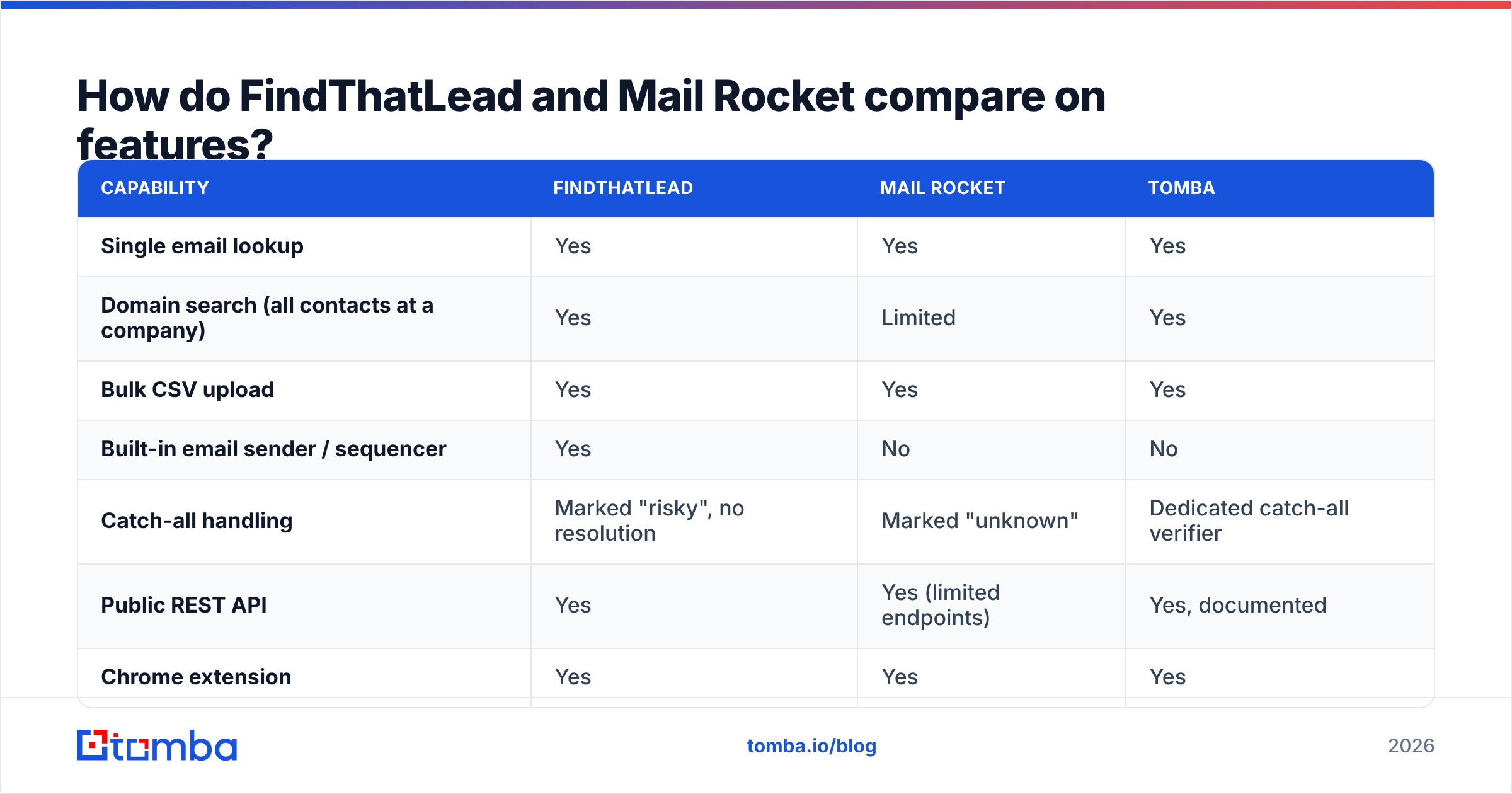
| Capability | FindThatLead | Mail Rocket | Tomba |
|---|---|---|---|
| Single email lookup | Yes | Yes | Yes |
| Domain search (all contacts at a company) | Yes | Limited | Yes |
| Bulk CSV upload | Yes | Yes | Yes |
| Built-in email sender / sequencer | Yes | No | No |
| Catch-all handling | Marked "risky", no resolution | Marked "unknown" | Dedicated catch-all verifier |
| Public REST API | Yes | Yes (limited endpoints) | Yes, documented |
| Chrome extension | Yes | Yes | Yes |
| Google Sheets / Excel add-on | Partial | No | Yes |
| Phone number lookup | No | No | Yes |
| Free tier | Trial credits | Small monthly free tier | 25 searches/mo |
The table hides one important nuance: FindThatLead's sender is genuinely useful if you're sending 200 emails a month from one mailbox, and genuinely inadequate if you're running multi-inbox rotation with warmup. Most teams outgrow it within a quarter and end up paying for Instantly, Smartlead, or Lemlist anyway — at which point the bundled sender stops being a reason to choose FindThatLead.
Mail Rocket's narrowness cuts both ways too. Fewer features means fewer things to misconfigure, but it also means your CSV lives in one tool, your verification in another, and your CRM sync in a third.
Which one finds more valid emails?#
Nobody publishes a fair head-to-head, so treat every vendor's "98% accuracy" claim as a marketing number, not a measurement. What actually drives hit rate is three things:
- Source breadth. How many licensed databases, crawled pages, and partner feeds sit behind the lookup. Broader sources mean more direct hits and less pattern guessing.
- Pattern inference quality. When there's no known address, the tool builds candidates from the company's dominant format (
first.last@,flast@,f.last@) and tests them. Better tools weight by seniority and department, not just the most common pattern. - Verification depth. A finder that returns a guessed address without an SMTP check is handing you a bounce with extra steps.

In our own testing across mid-market SaaS domains, the pattern is consistent across the category: everyone does fine on companies with clean, public, first.last@ conventions. The spread only appears on two segments — companies under 20 employees with no web footprint, and large enterprises running catch-all mail servers.
FindThatLead tends to return more results on the small-company segment because its scraper pulls from a wider public surface. Mail Rocket tends to return fewer results but flags more of them as uncertain, which some teams prefer — a "not found" costs you nothing, a false positive costs you a bounce and a slice of your sender reputation.
The honest read: the delta between these two on raw hit rate is smaller than the delta between either of them and a properly verified list.

How does pricing compare?#
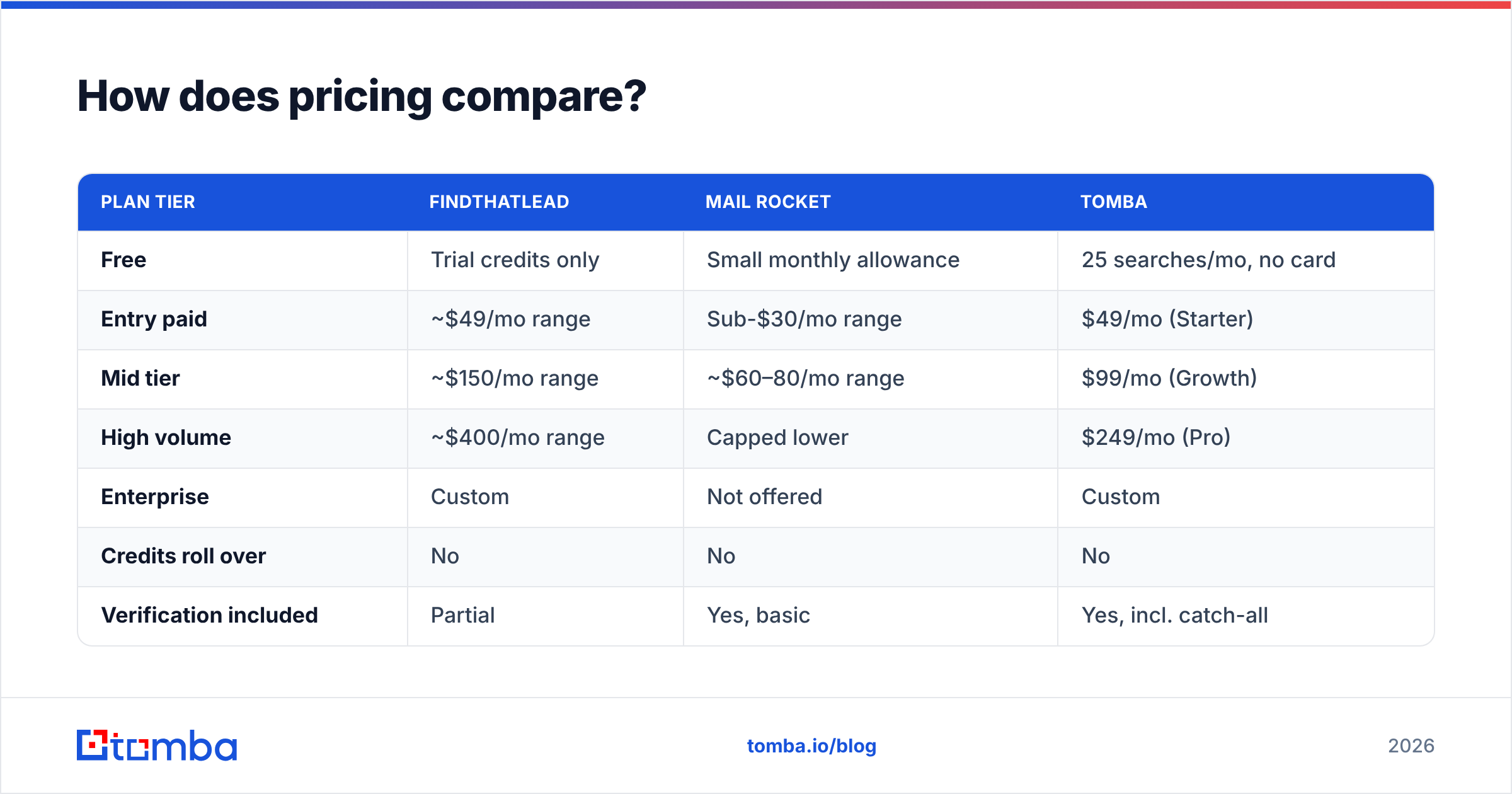
Pricing changes often, so check both vendor pages before you commit. As of early 2026, the shape looks like this:
| Plan tier | FindThatLead | Mail Rocket | Tomba |
|---|---|---|---|
| Free | Trial credits only | Small monthly allowance | 25 searches/mo, no card |
| Entry paid | ~$49/mo range | Sub-$30/mo range | $49/mo (Starter) |
| Mid tier | ~$150/mo range | ~$60–80/mo range | $99/mo (Growth) |
| High volume | ~$400/mo range | Capped lower | $249/mo (Pro) |
| Enterprise | Custom | Not offered | Custom |
| Credits roll over | No | No | No |
| Verification included | Partial | Yes, basic | Yes, incl. catch-all |
Two pricing traps worth naming, because both vendors do this and so does most of the category:
- A "credit" is not always one email. Some tools charge a credit per attempted lookup, others only on success, and bulk enrichment can burn several credits per row when it also pulls company data. Read the credit definition, not the headline number.
- Verification is often a second meter. If find and verify are billed separately, your real cost per usable contact can be double the advertised rate. Compare Tomba pricing on a cost-per-verified-contact basis and the ranking shifts.
For a 1,000-contact-a-month outbound motion, all three tools land in roughly the same monthly spend. The difference is what you get for it — a sequencer you'll replace (FindThatLead), a cheap single-purpose lookup (Mail Rocket), or find plus verify plus enrichment on one meter (Tomba).
What about verification and catch-all domains?#
This is where the comparison actually gets decided, and it's the section most reviews skip.
A catch-all domain accepts mail to any address at that domain, valid or not. random-string@bigcorp.com returns the same "OK" as the CEO's real address. Standard SMTP verification is therefore useless — the server never says no. Roughly a fifth to a third of B2B domains are configured this way, and the share climbs with company size.
Here's how each tool handles it:
- FindThatLead returns the address with a risk flag and leaves the decision to you. You either send blind and accept the bounce risk, or you discard the contact and lose the account.
- Mail Rocket returns "unknown" and stops. Cleaner, but the outcome is the same: no usable answer.
- Tomba runs a dedicated catch-all verifier that uses secondary signals — historical send data, mailbox-level heuristics, and pattern confidence — to separate real mailboxes from accepted-but-dead ones.
If your ICP is companies over 200 employees, catch-all coverage is not a nice-to-have. It's the difference between a 1,200-contact list and a 700-contact list from the same source data.
The other half of deliverability hygiene sits outside any finder: authenticate your domain properly, keep bounce rates under 2%, and warm new sending domains before volume. Google and Yahoo's bulk-sender requirements made this non-negotiable, and a bounce message is a permanent record on your reputation — how bounce handling works is worth ten minutes of reading if you've never looked into it.
Which fits your workflow — Chrome, CSV, or API?#
Three workflows dominate B2B prospecting, and the right tool depends entirely on which one you live in.
- Browser-first (AE or founder, low volume). You're on a company site or a LinkedIn profile and want the address without breaking flow. Both tools ship a Chrome extension; FindThatLead's is more mature and surfaces company context alongside the address.
- Spreadsheet-first (SDR team, batch lists). You have 500 rows of name + company and want emails appended. Both handle CSV upload. FindThatLead's bulk UI is more forgiving with messy columns; Mail Rocket's is faster but stricter about formatting. If you actually live in a spreadsheet, a native Google Sheets add-on beats any upload-download loop.
- API-first (RevOps, product, or growth engineering). You're enriching signups, scoring inbound leads, or backfilling a CRM on a schedule. This is where the gap is widest. FindThatLead's API works but is thin on documentation and rate-limit headroom. Mail Rocket exposes fewer endpoints. If enrichment is a system rather than a task, evaluate the Tomba API and its rate limits before you build against anything else.
- Bulk-first (agency, list building at scale). Tens of thousands of rows, run weekly. Neither FindThatLead nor Mail Rocket is really designed for this tier; check throughput and concurrency caps with a paid trial before signing, or use a purpose-built bulk email finder.
A blunt rule: if a human triggers every lookup, the extension quality matters most. If a cron job triggers them, the API docs matter most and everything else is noise.
Who should pick which?#

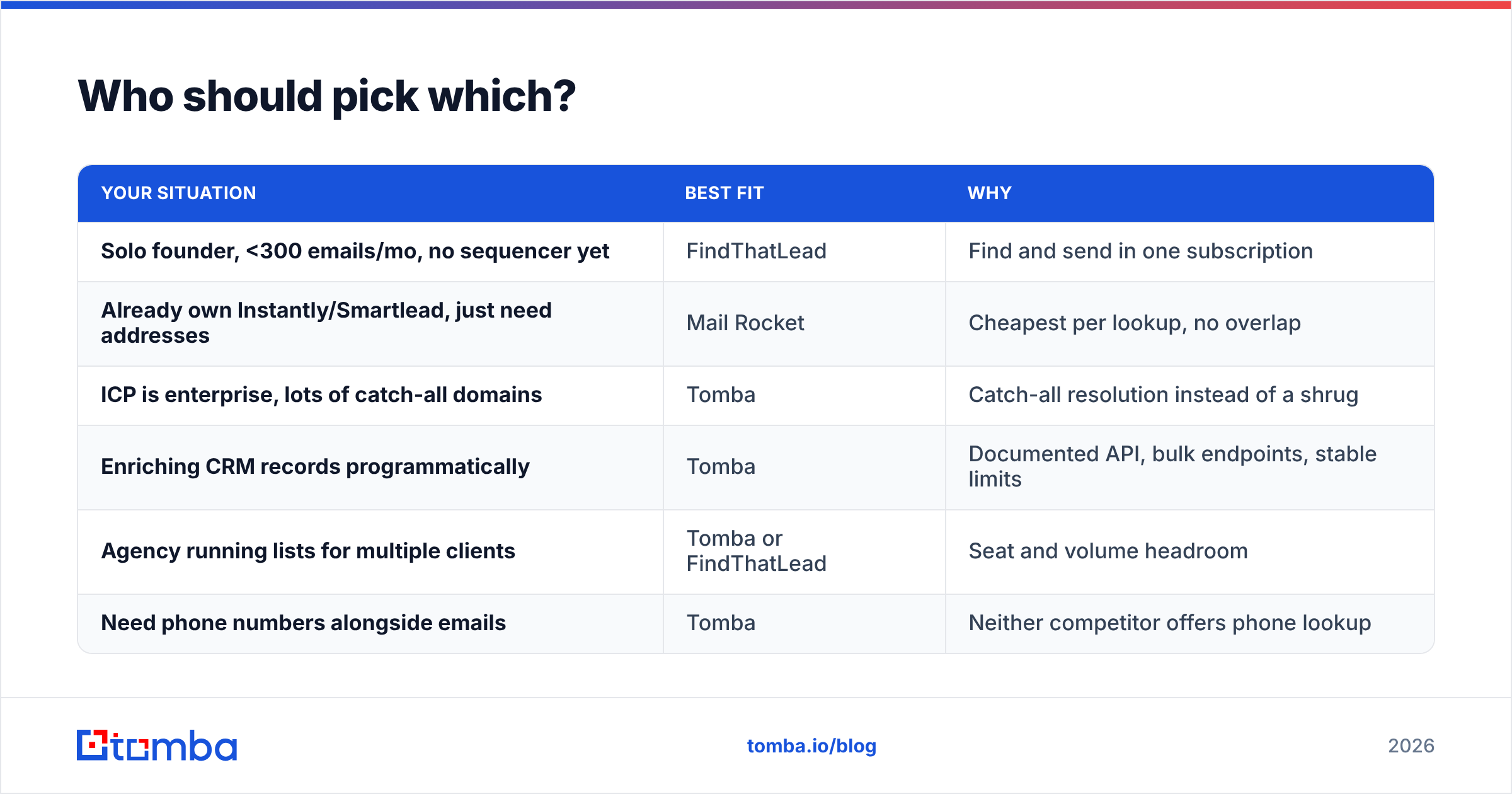
| Your situation | Best fit | Why |
|---|---|---|
| Solo founder, <300 emails/mo, no sequencer yet | FindThatLead | Find and send in one subscription |
| Already own Instantly/Smartlead, just need addresses | Mail Rocket | Cheapest per lookup, no overlap |
| ICP is enterprise, lots of catch-all domains | Tomba | Catch-all resolution instead of a shrug |
| Enriching CRM records programmatically | Tomba | Documented API, bulk endpoints, stable limits |
| Agency running lists for multiple clients | Tomba or FindThatLead | Seat and volume headroom |
| Need phone numbers alongside emails | Tomba | Neither competitor offers phone lookup |
Cross-check whatever you shortlist against real reviews rather than vendor copy. The G2 lead intelligence category is the least-gamed public source for support responsiveness and billing complaints, which is usually where tools in this price band actually fail.

What are the alternatives if neither fits?#
FindThatLead and Mail Rocket are not the only two doors.
- Prebuilt list vendors. If you'd rather buy a filtered, pre-verified list than run lookups yourself, a data provider like BookYourData is a legitimate route — you trade per-record control for speed, and it's a respected option for teams that need volume on day one.
- Full GTM platforms. Apollo and similar suites bundle data, sequencing, and dialing. Powerful, but you're buying a workflow opinion along with the data. If the data is the only part you want, see the Apollo alternative breakdown.
- Verification-only tools. If your problem is bounce rate rather than coverage, keep your current finder and bolt on a verifier.
- Focused finders. Tools like Tomba sit deliberately in the middle: deeper than a single-purpose lookup, narrower than a full GTM suite, with data sources documented rather than hand-waved.
The mistake teams make is buying a suite to solve a data problem. If your reply rate is fine and your bounce rate isn't, you don't need a new sequencer — you need better addresses.
What should you actually test before buying?#
Run the same 50-row list through every tool on your shortlist. Same names, same domains, same day. Then measure four things:
- Hit rate — how many rows returned an address at all.
- Verified rate — how many of those came back as deliverable, not "risky" or "unknown."
- Real bounce rate — send to a sample and count hard bounces. This is the only number that matters, and it's the one no vendor can fake for you.
- Cost per verified contact — total spend divided by rows that survived step three.
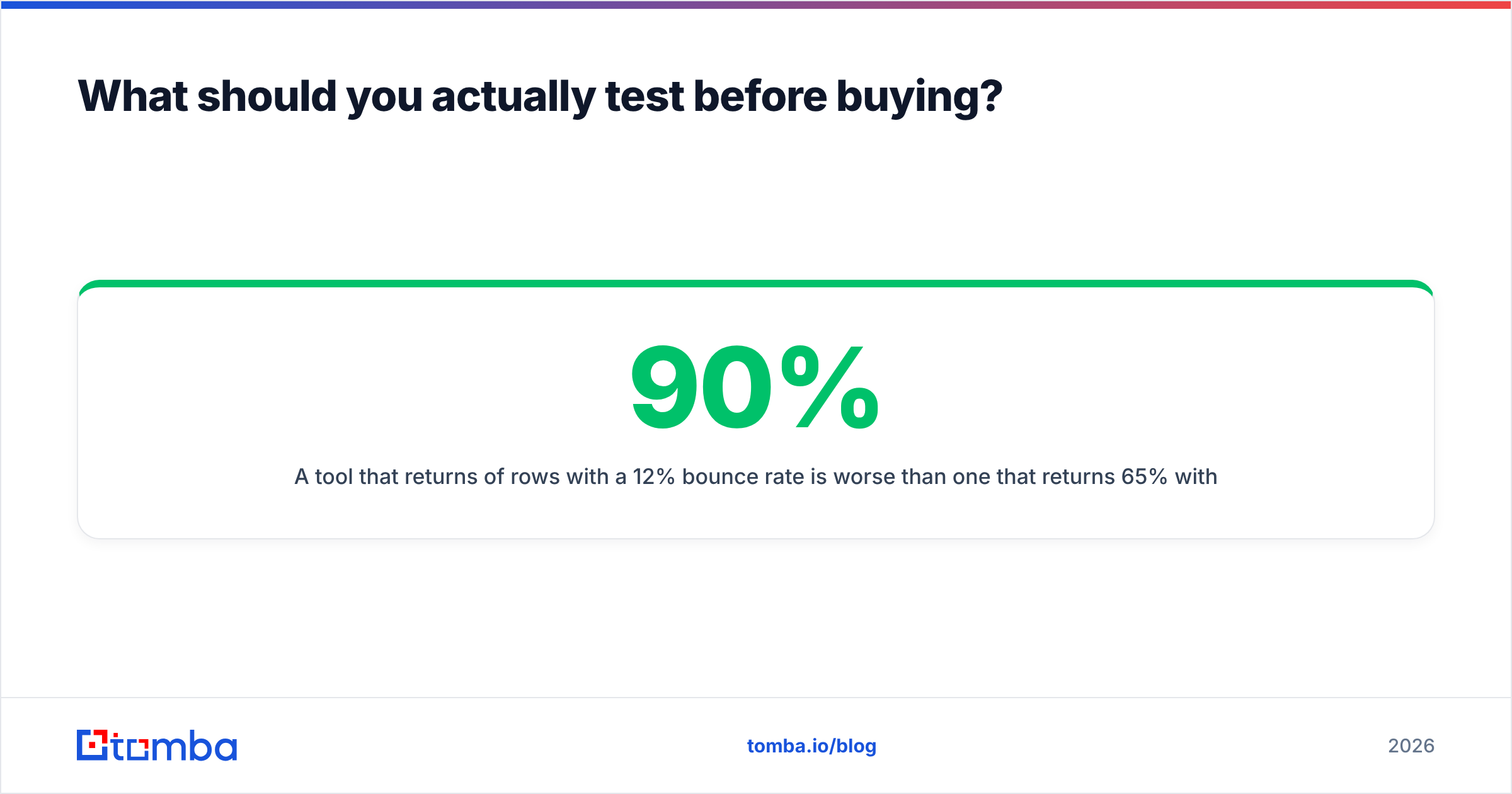
A tool that returns 90% of rows with a 12% bounce rate is worse than one that returns 65% with a 1% bounce rate. Volume is vanity; deliverability is the P&L.
Budget half a day for this. It's cheaper than a quarter of degraded email deliverability on your main sending domain.
Ready to test a third option?#
If your shortlist is FindThatLead vs Mail Rocket because those were the first two results you clicked, add one more line to the spreadsheet. The Tomba Email Finder gives you 25 free searches a month with no card required — enough to run the 50-row bake-off above against whichever tool you're leaning toward. Paid plans start at $49/mo and include verification and catch-all handling on the same meter, so your cost-per-verified-contact stays honest instead of splitting across two invoices.
Run the test, keep the winner, cancel the rest.
Related guides#
Ready to find emails that actually work?
Join 150,000+ professionals who stopped guessing and started sending. Free credits on signup — no credit card required.
Get the Tomba newsletter
Practical outbound tactics and product updates — once every two weeks.
About the author