FindThatLead vs Mailtact: Which Email Finder Wins in 2026?
FindThatLead is a veteran all-in-one prospecting suite. Mailtact is the lean, credit-cheap challenger. We break down accuracy, pricing, bulk limits and API depth so you can pick the one that actually fits your outbound motion.
TL;DR
- FindThatLead is the older, broader product: email finder, lead search, a built-in cold email sender, and a Chrome extension. You pay for the suite whether or not you use all of it.
- Mailtact is the leaner challenger: find-and-verify with credit-based pricing and a smaller surface area. Cheaper per credit, thinner on workflow features.
- Accuracy is the only metric that matters, and neither vendor publishes an independently audited hit rate. Test both on 200 of your domains before you sign anything.
- If your stack already has a sequencer (Instantly, Smartlead, Lemlist, HubSpot), FindThatLead's bundled sender is dead weight — you're paying for redundancy.
- If you need a clean API, catch-all handling and predictable per-credit pricing, a specialist email finder will usually beat both on cost-per-valid-contact.
What are FindThatLead and Mailtact?#
They solve the same job — turn a name and a company domain into a working email address — but they were built with different ambitions.
FindThatLead launched out of Barcelona and has been around since the mid-2010s. It grew into an all-in-one prospecting suite: domain-level lead search, a "Prospector" that filters by role and location, an email verifier, a Chrome extension for LinkedIn, and Scrab.in-adjacent sending features so you can push a campaign without leaving the tool. That breadth is the pitch and the problem.
Mailtact is the newer, narrower option. It positions itself as a straightforward email finder and verifier with credit-based pricing and no attempt to become your sequencer. Fewer moving parts, fewer things to learn, fewer things to pay for.
The honest framing: this is a suite-versus-specialist decision, not a feature race. One asks you to consolidate; the other asks you to plug in.

Wait — that's the wrong mental model for most teams in 2026. Here's the one that actually predicts regret:
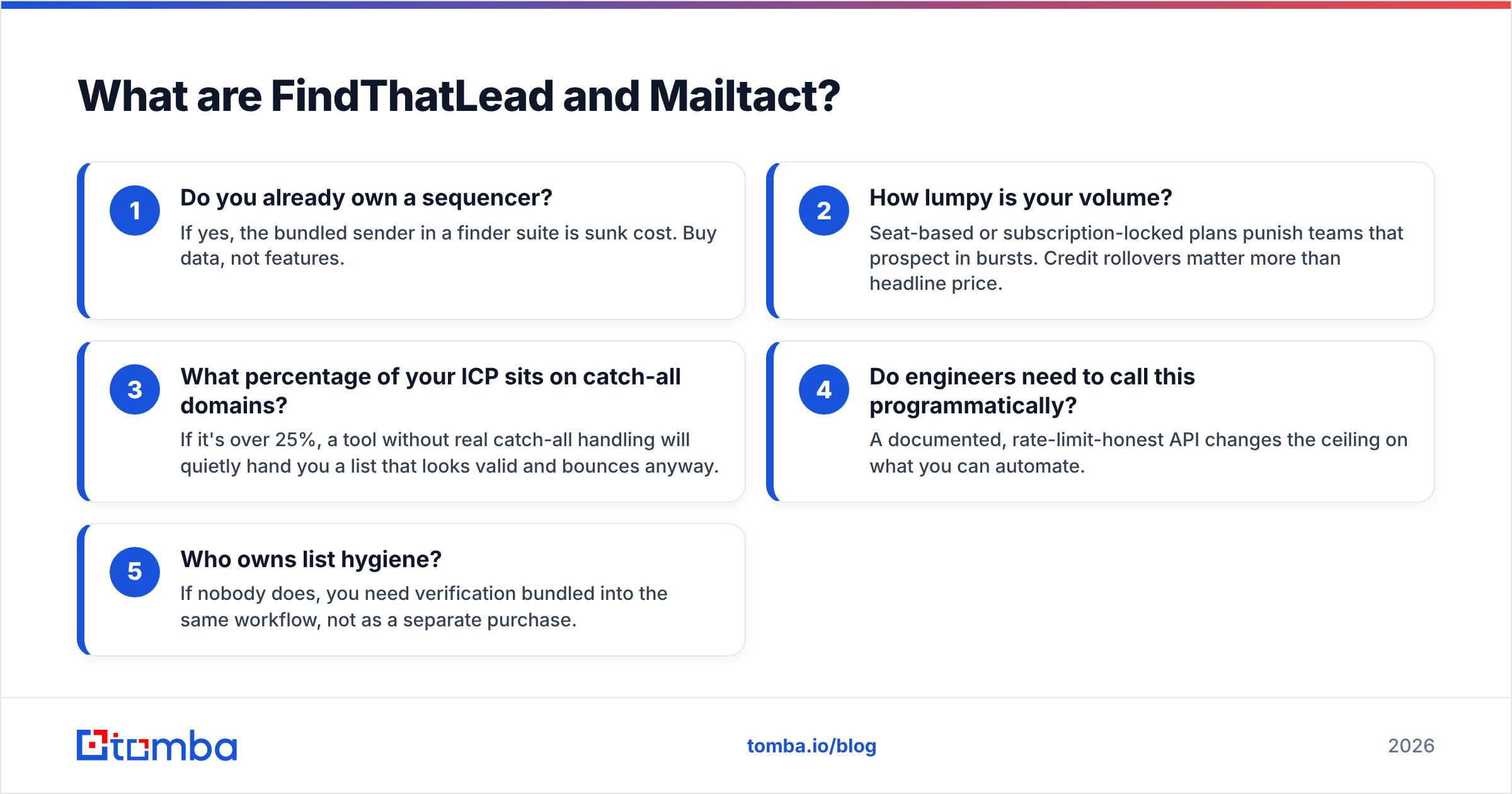
- Do you already own a sequencer? If yes, the bundled sender in a finder suite is sunk cost. Buy data, not features.
- How lumpy is your volume? Seat-based or subscription-locked plans punish teams that prospect in bursts. Credit rollovers matter more than headline price.
- What percentage of your ICP sits on catch-all domains? If it's over 25%, a tool without real catch-all handling will quietly hand you a list that looks valid and bounces anyway.
- Do engineers need to call this programmatically? A documented, rate-limit-honest API changes the ceiling on what you can automate.
- Who owns list hygiene? If nobody does, you need verification bundled into the same workflow, not as a separate purchase.
Answer those five and the comparison below mostly resolves itself.
How do FindThatLead and Mailtact compare feature by feature?#
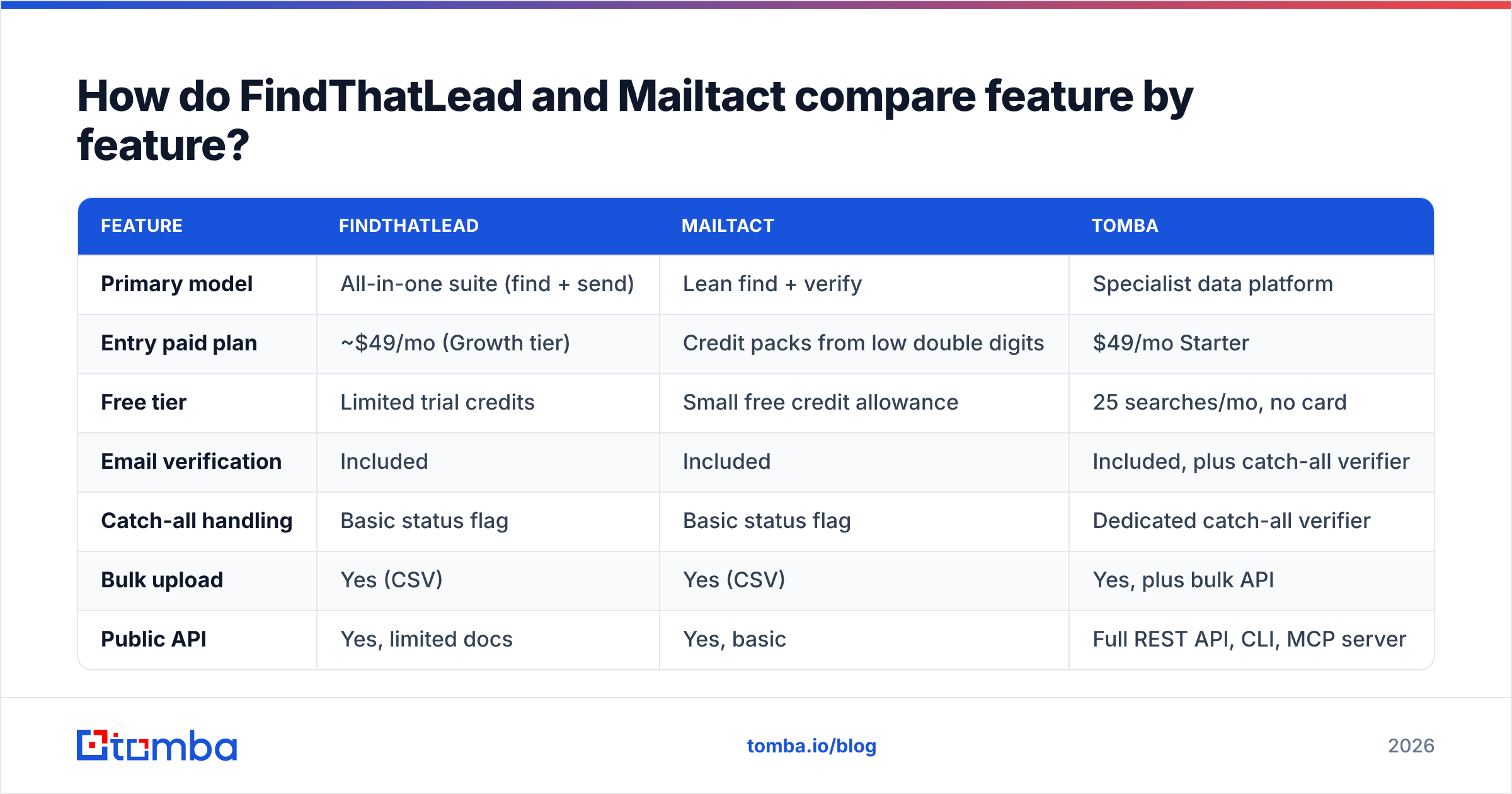
Pricing and limits move frequently on both platforms — treat the figures below as a snapshot to verify on the vendors' own pricing pages before you commit. Tomba's figures are current as of this writing.
| Feature | FindThatLead | Mailtact | Tomba |
|---|---|---|---|
| Primary model | All-in-one suite (find + send) | Lean find + verify | Specialist data platform |
| Entry paid plan | ~$49/mo (Growth tier) | Credit packs from low double digits | $49/mo Starter |
| Free tier | Limited trial credits | Small free credit allowance | 25 searches/mo, no card |
| Email verification | Included | Included | Included, plus catch-all verifier |
| Catch-all handling | Basic status flag | Basic status flag | Dedicated catch-all verifier |
| Bulk upload | Yes (CSV) | Yes (CSV) | Yes, plus bulk API |
| Public API | Yes, limited docs | Yes, basic | Full REST API, CLI, MCP server |
| Chrome extension | Yes | Yes | Yes |
| Built-in sender | Yes | No | No (integrates instead) |
| Native CRM sync | Limited | Limited | HubSpot, Salesforce, Pipedrive, Zapier |
| Best for | Solo founders wanting one login | Budget-conscious list builders | Teams that need data quality + API |
The pattern is consistent across every head-to-head in this category: the suite wins on convenience, the specialist wins on cost-per-valid-email. Which one you should optimize for depends entirely on whether your bottleneck is tooling sprawl or data quality.
Which one actually finds more valid emails?#
Nobody can answer this for you from a blog post, and you should distrust anyone who claims a universal winner.
Here's why: email finders don't have one accuracy number. They have a distribution that varies by geography, company size, and industry. A tool that nails US SaaS companies with 200+ employees can fall apart on German Mittelstand manufacturers or 8-person agencies in Southeast Asia. FindThatLead historically indexes well on European SMB data. Mailtact, being newer, has a smaller crawl footprint — which usually means better precision on the domains it covers and more misses outside them.

Three things to hold onto when you read any accuracy claim:
- Hit rate and accuracy are different numbers. Hit rate is "we returned something." Accuracy is "what we returned was real." A tool can guess
firstname.lastname@domain.comon every miss and post a gorgeous hit rate while torching your sender reputation. - Confidence scores are not standardized. A 90 on one platform is not a 90 on another. Never treat a vendor's confidence number as portable.
- Catch-all domains break naive comparisons. Roughly a third of B2B domains accept all mail at the SMTP layer, so a basic verifier marks them "unknown" or, worse, "valid." That's where most surprise bounce rates come from. A dedicated catch-all verifier is the difference between a 2% and a 12% bounce rate on the same list.
The test that settles it: pull 200 contacts you already know are real — past customers, current pipeline, people whose emails are sitting in your CRM. Strip the emails. Run the names and domains through both tools. Compare what comes back against ground truth. That takes an afternoon and beats every review site.
How does pricing actually work on each?#
This is where the two diverge hardest.
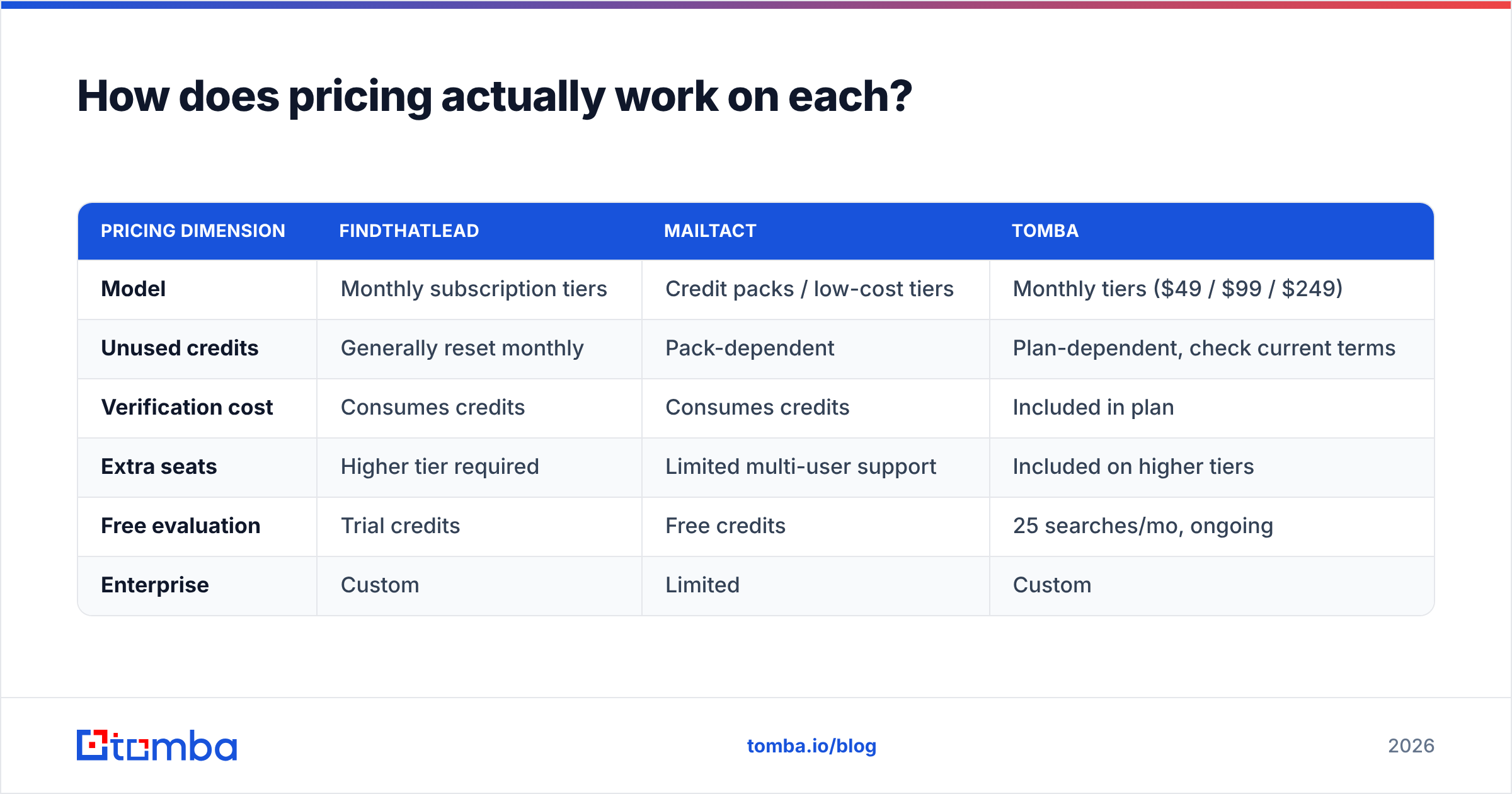
FindThatLead sells subscription tiers with monthly credit allowances. Its Growth-level plan sits around the $49/mo mark, with Startup and Suite tiers climbing into the $150–$400/mo range as credits and seats scale. Credits typically reset monthly, which means unused capacity evaporates — bad news for teams that prospect in quarterly bursts.
Mailtact leans on credit packs. Lower entry cost, more forgiving for irregular usage, but the per-credit price advantage narrows fast at volume, and you lose the workflow features you'd get from a suite.
| Pricing dimension | FindThatLead | Mailtact | Tomba |
|---|---|---|---|
| Model | Monthly subscription tiers | Credit packs / low-cost tiers | Monthly tiers ($49 / $99 / $249) |
| Unused credits | Generally reset monthly | Pack-dependent | Plan-dependent, check current terms |
| Verification cost | Consumes credits | Consumes credits | Included in plan |
| Extra seats | Higher tier required | Limited multi-user support | Included on higher tiers |
| Free evaluation | Trial credits | Free credits | 25 searches/mo, ongoing |
| Enterprise | Custom | Limited | Custom |
Full Tomba pricing is public if you want a like-for-like anchor.

The cost trap nobody prices in: a bad email doesn't cost you one credit, it costs you a bounce. Push a list with a 15% invalid rate through a fresh sending domain and you'll spend more on domain recovery, warmup time and lost pipeline than you saved by picking the cheaper finder. Run the math as cost per verified, delivered contact — not cost per search. A tool at double the credit price with half the bounce rate is the cheaper tool.
Who should pick FindThatLead?#
Choose FindThatLead if:
- You're a solo founder or a two-person team and consolidating four tools into one login has real operational value.
- Your ICP is European SMB. FindThatLead's index has historically been strongest there.
- You have no sequencer yet and don't want to buy one. The bundled sender is genuinely useful if it's your only sender.
- You prospect continuously, so monthly credit resets aren't wasteful.
Skip it if you already run Instantly, Smartlead, Lemlist or a CRM-native sequencer. You'd be paying a suite premium for a feature you'll never open. In that case, look at either a leaner finder or a dedicated data layer — the same logic that drives people toward an Apollo alternative when they only wanted the contact data.
Who should pick Mailtact?#
Choose Mailtact if:
- Budget is the binding constraint and you need contacts, not workflow.
- Your volume is spiky — a few thousand lookups in a burst, then quiet for six weeks.
- You already have a verification step elsewhere in your pipeline and just need raw finds.
- You want a small tool to do one thing without onboarding a team onto a platform.
Skip it if you need enterprise-grade API throughput, deep CRM sync, or serious catch-all resolution. A smaller vendor means a smaller index and thinner documentation, and both of those show up at scale.
It's worth noting that plenty of teams end up running two data sources in parallel — one as primary, one as fallback for misses. Providers like BookYourData, which sells pre-verified list access rather than real-time lookup, fit a different slot entirely and can complement either tool rather than replace it. Cross-referencing sources is normal practice at volume; single-vendor purity is a myth.

For broader context on how buyers actually rate these platforms, G2's email-finder category is more useful than vendor case studies — filter reviews by company size to see where each tool's satisfaction drops off.
Where does Tomba fit in this comparison?#
Tomba sits in the specialist lane, deliberately. It doesn't try to be your sequencer.
What that buys you:
- A real API surface. The Tomba API is documented, plus a CLI and an MCP server if you're wiring email lookup into AI agents or internal tooling. Neither FindThatLead nor Mailtact competes here.
- Catch-all resolution as a first-class feature, not a status flag you have to interpret yourself.
- Verification bundled with finding, so you're not paying two vendors and reconciling two confidence scales. The email verifier runs on the same data layer as the finder.
- Bulk operations that don't fall over. Bulk email finder jobs handle list-scale work without the CSV-upload babysitting.
- A free tier that's actually a tier, not a trial: 25 searches per month, ongoing, no card.
Where Tomba is not the answer: if you want one login that also sends your campaigns, FindThatLead does that and Tomba doesn't. Be honest with yourself about which problem you're solving.
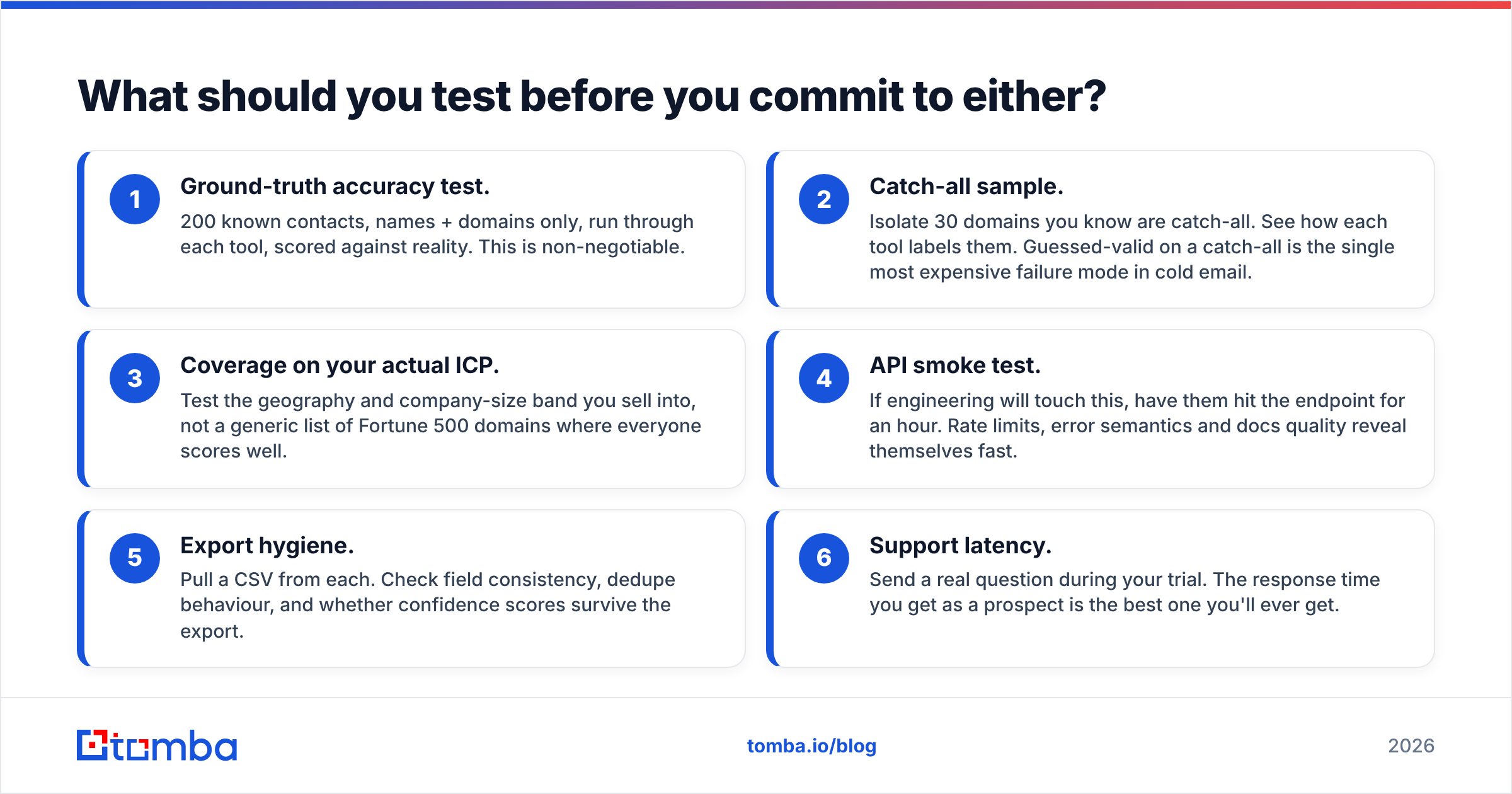
What should you test before you commit to either?#
Run this checklist before a credit card touches any of the three:
- Ground-truth accuracy test. 200 known contacts, names + domains only, run through each tool, scored against reality. This is non-negotiable.
- Catch-all sample. Isolate 30 domains you know are catch-all. See how each tool labels them. Guessed-valid on a catch-all is the single most expensive failure mode in cold email.
- Coverage on your actual ICP. Test the geography and company-size band you sell into, not a generic list of Fortune 500 domains where everyone scores well.
- API smoke test. If engineering will touch this, have them hit the endpoint for an hour. Rate limits, error semantics and docs quality reveal themselves fast.
- Export hygiene. Pull a CSV from each. Check field consistency, dedupe behaviour, and whether confidence scores survive the export.
- Support latency. Send a real question during your trial. The response time you get as a prospect is the best one you'll ever get.
Score each tool on cost per verified, delivered contact. That single number ends most of these debates.
The verdict#
FindThatLead wins if you need one tool to do everything and you don't already own a sequencer. Its breadth is real, its European SMB coverage is solid, and for a solo operator the consolidation is worth the premium.
Mailtact wins on price for spiky, low-volume list building where you already have verification and sending handled elsewhere.
Neither wins if your bottleneck is data quality at scale — that's where a specialist with proper catch-all handling, a real API and bundled verification pulls ahead on the only metric that pays: contacts that actually land in an inbox.
Start with the free tier before you pay anyone. Run Tomba's email finder on 25 of your hardest domains — the catch-alls, the odd TLDs, the 12-person companies your current tool keeps missing — and compare the results against whatever you're using now. Free plan, no card, 25 searches a month. If the hit rate on your own ICP doesn't move, you've lost twenty minutes. If it does, you've just found the cheapest line item in your outbound stack.
Related guides#
Ready to find emails that actually work?
Join 150,000+ professionals who stopped guessing and started sending. Free credits on signup — no credit card required.
Get the Tomba newsletter
Practical outbound tactics and product updates — once every two weeks.
About the author